Belkin N150 Router-Need Help in configuring!

Games Goblin

New member
Local time
1:16 PM
Messages
15
Location
India
[Solved] Set-up Belkin N150 Router with Beetel 200BX

Hi Friends,

I just bought a Belkin N150 Wireless Router. I followed the instructions on the Quick Installation guide leaflet, which i have uploaded:
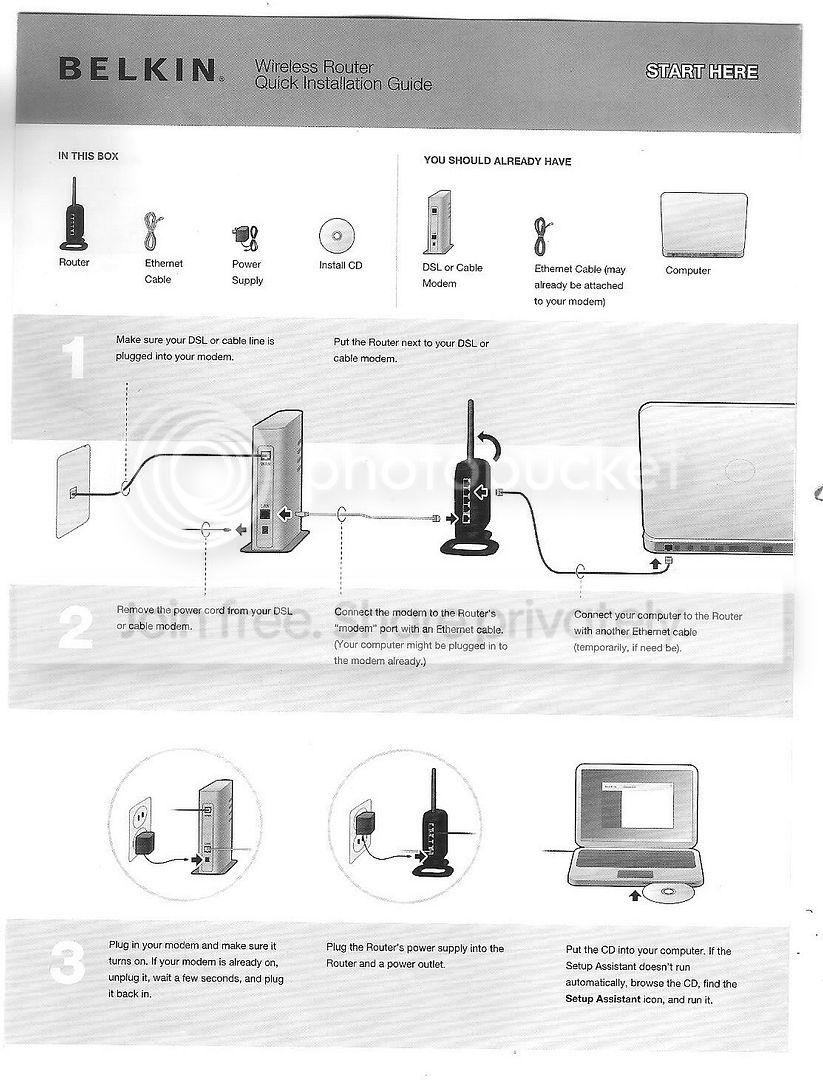
001.jpg


Then I insert the CD and run the setup assistant. It checks the connection to the router and then prompts a restart. After the restart, I am prompted to name the connection
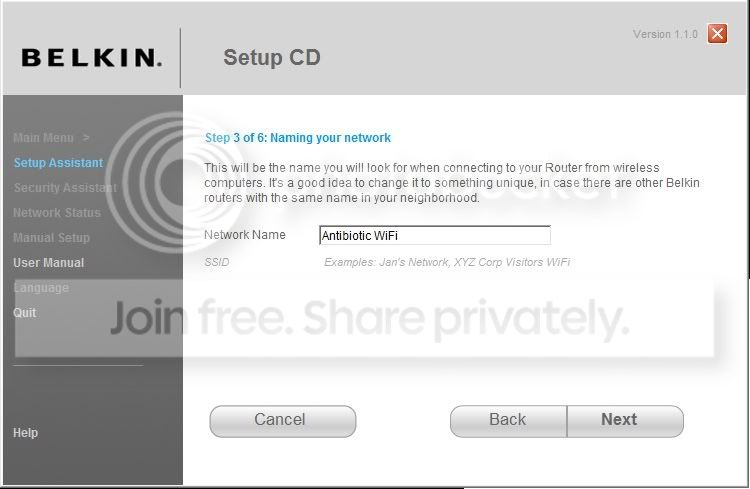
1.jpg


In the next step, I am asked what kind of connection I have. I call up AirTel (my ISP) broadband customer care and ask them about this. The customer care executive replies that it is a PPPoE connection. So i select that and click Next.
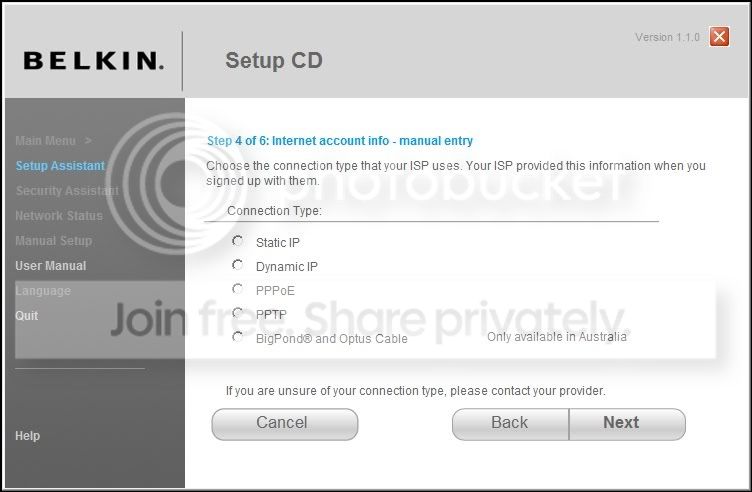
2.jpg


Now, I am asked for the login details. The customer care executive provides me with my login info. I type all this and click next.
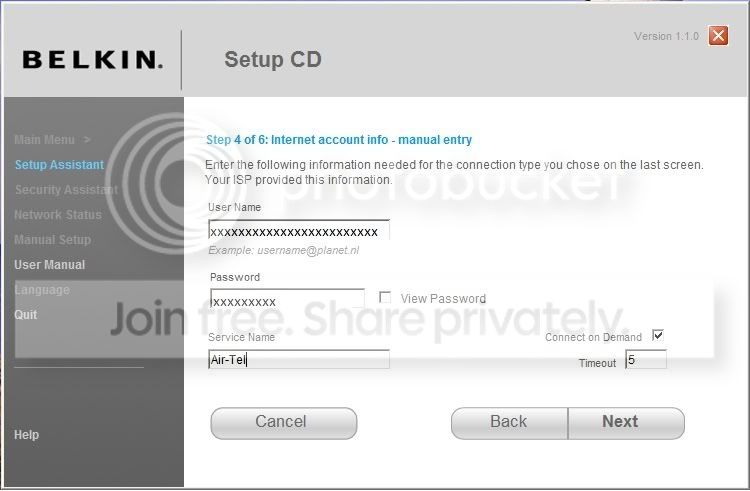
2-1.jpg


Next, the setup tries to connect to the internet and a progress bar appears.
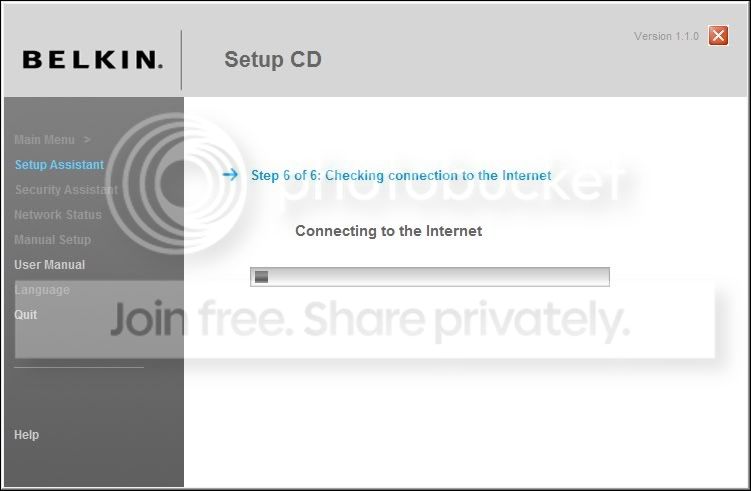
2-2.jpg


After the progress bar reaches 100%, the following screen comes up:
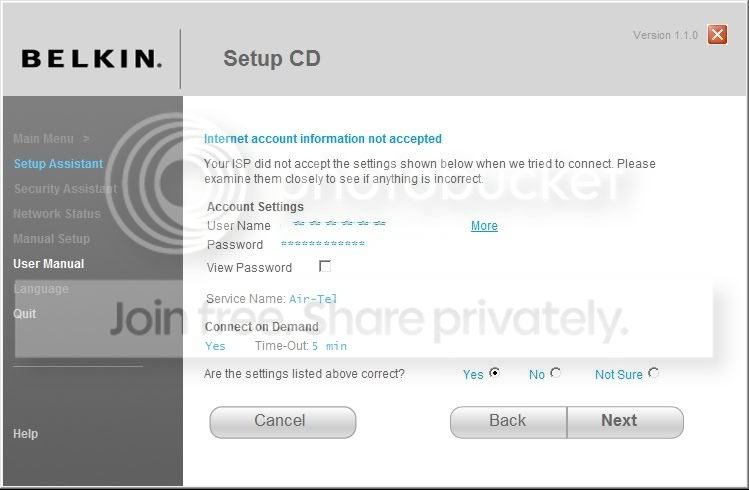
3.jpg


The 'Wired' and 'Modem' status lights on the router are green. The 'Internet' status light is orange and it blinks.

So what am I doing wrong here? The Airtel executive tells me that there may be a conflict with the LAN addresses of the Airtel Modem and the Belkin Router. I have uploaded the config pages of both the Airtel Modem and the Belkin router, as you can see both have different IP addresses

Airtel Modem Config Page
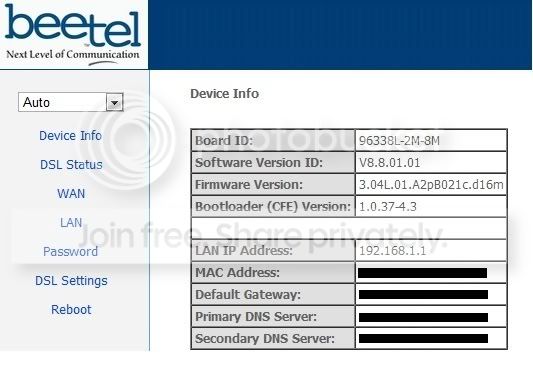
4.jpg


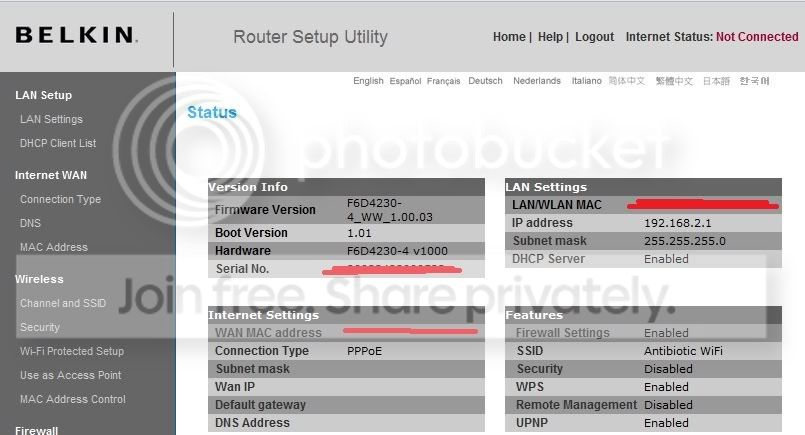
Belkin Router Config Page
belkinconfig.jpg


My system config is:

Core2 6300 @1.86Ghz
Intel(R) 82566DC Gigabit Network Connection
Windows 7 Ultimate 64-Bit
Beetel 200BX ADSL Modem

Any help is appreciated! I have spent 3 hours getting this to work, but to no avail!:-(
 
Last edited:

My Computer My Computer

At a glance

Windows 7 Ultimate x64 Version 6.1 (Build 7600)Intel Core2 6300 @ 1.86 GHz2GBSapphire ATI Radeon HD4670 512MB GDDR3
Computer Manufacturer/Model Number
Custom
OS
Windows 7 Ultimate x64 Version 6.1 (Build 7600)
CPU
Intel Core2 6300 @ 1.86 GHz
Motherboard
Intel DP965LT
Memory
2GB
Graphics Card(s)
Sapphire ATI Radeon HD4670 512MB GDDR3
Sound Card
IDT (onboard)
Monitor(s) Displays
Dell SP2208WFP
Screen Resolution
1680x1050
Hard Drives
Samsung SP2004C SATA
PSU
Odyssey 450W
Case
Zebronics Antibiotic
Cooling
Stock
Keyboard
Logitech Easy Keyboard Deluxe
Mouse
Logitech Mx510
Internet Speed
256K
Are you absolutely certain that you have to log into your modem with your router? In most situations (cable, etc) the modem logs in to the ISP and then the router just splits the connection and provides a firewall, wireless, etc.

When you connect your PC to your modem directly, what steps do you take to become connected to the internet? Do you have to input a username/password and/or do you have one stored in your network settings? If not, you should be able to simply connect the router to the modem and then set it up without "logging in".
 

My Computer My Computer

At a glance

W7 Ult. x64 | OS XIntel Mobile Core 2 Duo 2.93Ghz [T9800 Penryn]4096MB Samsung DDR3 Dual Channel [PC3-8500F 1...NVIDIA GeForce 9600M GT 512MB [G96M Rev. C1]
Computer Manufacturer/Model Number
Apple Macbook Pro (April 2009)
OS
W7 Ult. x64 | OS X
CPU
Intel Mobile Core 2 Duo 2.93Ghz [T9800 Penryn]
Motherboard
NVIDIA nForce 730i Rev. B1 [Mac-F2268EC8 (U2E1)]
Memory
4096MB Samsung DDR3 Dual Channel [PC3-8500F 1066Mhz]
Graphics Card(s)
NVIDIA GeForce 9600M GT 512MB [G96M Rev. C1]
Sound Card
SB X-Fi Surround 5.1 USB | Onboard Realtek (Disabled)
Monitor(s) Displays
Acer x223wbd 22" | Apple Anti-Glare 17" (Disabled)
Screen Resolution
{Current} 1440x900 {Acer} 1680x1050 {Apple} 1920x1200
Hard Drives
{Internal}
Seagate Momentus 320GB 2.5" 7200RPM [ST9320421AS]

{Externals}
LaCie 320GB USB 2.0 HDD [301284UR]
LaCie 750GB USB 2.0 FW400 eSATA HDD [301314U]
LaCie 1TB USB 2.0 HDD [301304UR]
PSU
Magsafe
Case
Aluminum/Unibody (MBP52)
Cooling
2 x 6000 RPM Fans
Keyboard
Logitech G-15v2 [PN 920-000379]
Mouse
Logitech G-9 [PN 910-000338]
Internet Speed
12Mbps/2.5Mbps w/ 24Mbps Speed Boost [Comcast]
Other Info
Logitech X-540 Speakers [PN 970223-0122]
Sennheiser PC-151 Headset
Are you absolutely certain that you have to log into your modem with your router? In most situations (cable, etc) the modem logs in to the ISP and then the router just splits the connection and provides a firewall, wireless, etc.

I'm not sure what you mean by logging in to the modem with the router. Can you please explain this a bit more to me?

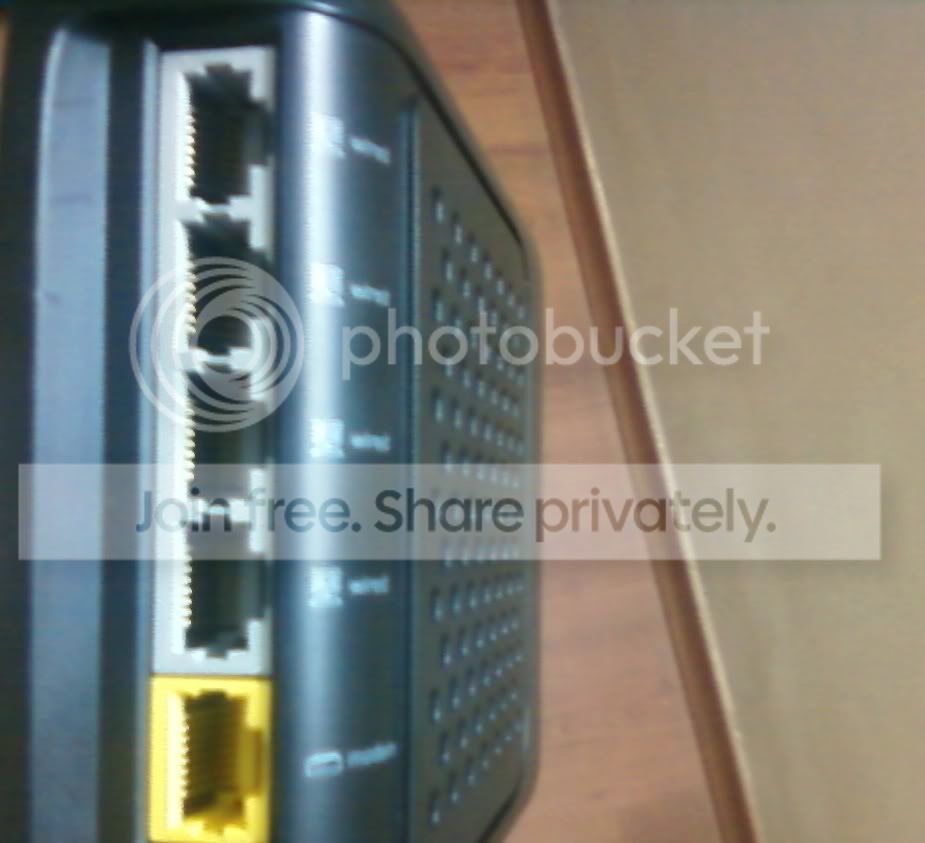
Photo-0022.jpg


I connected the Ethernet cable from the modem to the 'Modem' Port (yellow port) on the back of the router. Then, I connected another Ethernet cable from the '1 Wired' port on the rear of the router to the Ethernet port of my computer.

When you connect your PC to your modem directly, what steps do you take to become connected to the internet? Do you have to input a username/password and/or do you have one stored in your network settings? If not, you should be able to simply connect the router to the modem and then set it up without "logging in".

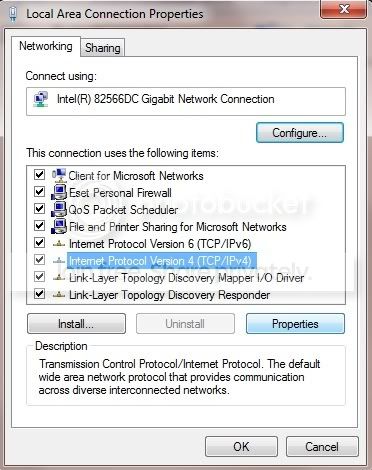
When I connect directly, I open up the network and sharing center, click on 'Change adapter settings', right click on my network card and then click properties.

config1.jpg


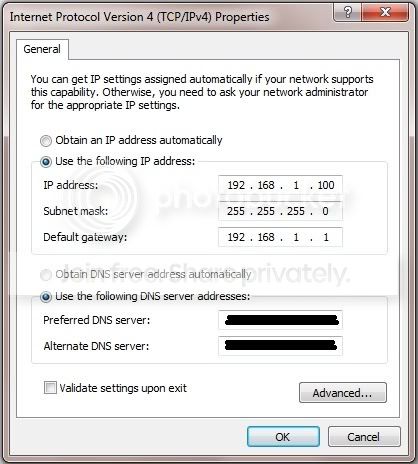
then I click on IPv4 and then click Properties

config2.jpg


then I enter the LAN Address of the modem, and then the primary and secondary DNS addresses provided by my ISP and click OK. Then I am connected to the internet.
 

My Computer My Computer

At a glance

Windows 7 Ultimate x64 Version 6.1 (Build 7600)Intel Core2 6300 @ 1.86 GHz2GBSapphire ATI Radeon HD4670 512MB GDDR3
Computer Manufacturer/Model Number
Custom
OS
Windows 7 Ultimate x64 Version 6.1 (Build 7600)
CPU
Intel Core2 6300 @ 1.86 GHz
Motherboard
Intel DP965LT
Memory
2GB
Graphics Card(s)
Sapphire ATI Radeon HD4670 512MB GDDR3
Sound Card
IDT (onboard)
Monitor(s) Displays
Dell SP2208WFP
Screen Resolution
1680x1050
Hard Drives
Samsung SP2004C SATA
PSU
Odyssey 450W
Case
Zebronics Antibiotic
Cooling
Stock
Keyboard
Logitech Easy Keyboard Deluxe
Mouse
Logitech Mx510
Internet Speed
256K
Are you absolutely certain that you have to log into your modem with your router? In most situations (cable, etc) the modem logs in to the ISP and then the router just splits the connection and provides a firewall, wireless, etc.
I have to disagree, very strongly.

Using a modem and a router, you normally have to reset the modem and leave it as it is, then configure your connection in router. For instance, I'm using Belkin N1 Vision router, which is connected to a modem and further to the net. Modem is as it was when it was delivered from factory, I'm never even looked at the setup. All work (setup) is done in router.

You should forget the setup CD completely and do this:
  • Reset the modem to the factory settings
  • Connect router and modem as told in your instructions
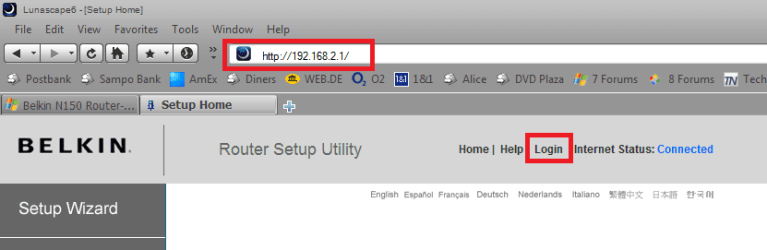
  • Open a browser and open Belkin settings interface by typing http://192.168.2.1 and hitting Enter
  • Click Login
    1.png
    .
  • Leave the password field empty and click Submit (by default Belkin has no password)
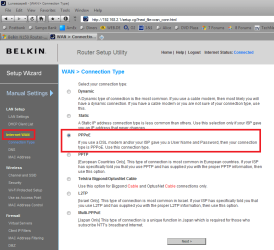
  • Click Internet WAN in left pane, choose PPPoE (in OP's case) on the right and click Next
    2.png
    .
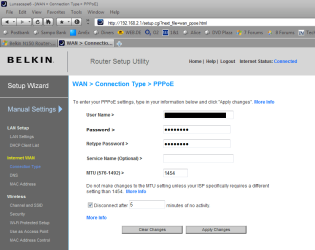
  • Enter your credentials and click Apply Changes
    3.png
You should now be connected to the Internet.

Kari
 
Last edited:

My Computer My Computer

At a glance

Windows 10 Pro x64 EN-GB1.6 GHz Intel Core i7-720QM Processor6 GBATI Mobility Radeon HD 5850 Graphics
Computer type
Laptop
Computer Manufacturer/Model Number
HP ENVY 17-1150eg
OS
Windows 10 Pro x64 EN-GB
CPU
1.6 GHz Intel Core i7-720QM Processor
Memory
6 GB
Graphics Card(s)
ATI Mobility Radeon HD 5850 Graphics
Sound Card
Beats sound system with integrated subwoofer
Monitor(s) Displays
17" laptop display, 22" LED and 32" Full HD TV through HDMI
Screen Resolution
1600*900 (1), 1920*1080 (2&3)
Hard Drives
Internal: 2 x 500 GB SATA Hard Disk Drive 7200 rpm
External: 2TB for backups, 3TB USB3 network drive for media
Cooling
As Envy runs a bit warm, I have it on a Cooler Master pad
Keyboard
Logitech diNovo Media Desktop Laser (bluetooth)
Mouse
Logitech Performance Mouse MX
Internet Speed
50/10 Mbps VDSL
Antivirus
Windows Defender 4.3.9431.0
Browser
Maxthon 3.5.2., IE11
When using separate modem and router, it is the router that needs to be configured. DSL, ADSL, VDSL and Cable, no difference.
 

My Computer My Computer

At a glance

Windows 10 Pro x64 EN-GB1.6 GHz Intel Core i7-720QM Processor6 GBATI Mobility Radeon HD 5850 Graphics
Computer type
Laptop
Computer Manufacturer/Model Number
HP ENVY 17-1150eg
OS
Windows 10 Pro x64 EN-GB
CPU
1.6 GHz Intel Core i7-720QM Processor
Memory
6 GB
Graphics Card(s)
ATI Mobility Radeon HD 5850 Graphics
Sound Card
Beats sound system with integrated subwoofer
Monitor(s) Displays
17" laptop display, 22" LED and 32" Full HD TV through HDMI
Screen Resolution
1600*900 (1), 1920*1080 (2&3)
Hard Drives
Internal: 2 x 500 GB SATA Hard Disk Drive 7200 rpm
External: 2TB for backups, 3TB USB3 network drive for media
Cooling
As Envy runs a bit warm, I have it on a Cooler Master pad
Keyboard
Logitech diNovo Media Desktop Laser (bluetooth)
Mouse
Logitech Performance Mouse MX
Internet Speed
50/10 Mbps VDSL
Antivirus
Windows Defender 4.3.9431.0
Browser
Maxthon 3.5.2., IE11
Ahh, you're in asia, and on a PPPoE connection, I skipped over that part. In most connections in the US the modem itself is setup to connect with the ISP and then anything you connect to the modem will have internet.

--- When you have a Comcast cable connection, you don't have to configure the router to connect to the modem at all, atleast not in the tradition fashion. Yes, you have to setup the wireless, but on comcast anything you connect to the router will have an internet connection automatically, no username, no password.

They may have a specialised connection, as you do have to set up your modem with the Cable company when you first get it, but once you're registered your modem with them, nothing else needs to be done.

I had the same situation when I used Fiberoptics, all I had to do was connect to my local switch, although it may have been preconfigured, it was drilled to the wall in the basement.
 

My Computer My Computer

At a glance

W7 Ult. x64 | OS XIntel Mobile Core 2 Duo 2.93Ghz [T9800 Penryn]4096MB Samsung DDR3 Dual Channel [PC3-8500F 1...NVIDIA GeForce 9600M GT 512MB [G96M Rev. C1]
Computer Manufacturer/Model Number
Apple Macbook Pro (April 2009)
OS
W7 Ult. x64 | OS X
CPU
Intel Mobile Core 2 Duo 2.93Ghz [T9800 Penryn]
Motherboard
NVIDIA nForce 730i Rev. B1 [Mac-F2268EC8 (U2E1)]
Memory
4096MB Samsung DDR3 Dual Channel [PC3-8500F 1066Mhz]
Graphics Card(s)
NVIDIA GeForce 9600M GT 512MB [G96M Rev. C1]
Sound Card
SB X-Fi Surround 5.1 USB | Onboard Realtek (Disabled)
Monitor(s) Displays
Acer x223wbd 22" | Apple Anti-Glare 17" (Disabled)
Screen Resolution
{Current} 1440x900 {Acer} 1680x1050 {Apple} 1920x1200
Hard Drives
{Internal}
Seagate Momentus 320GB 2.5" 7200RPM [ST9320421AS]

{Externals}
LaCie 320GB USB 2.0 HDD [301284UR]
LaCie 750GB USB 2.0 FW400 eSATA HDD [301314U]
LaCie 1TB USB 2.0 HDD [301304UR]
PSU
Magsafe
Case
Aluminum/Unibody (MBP52)
Cooling
2 x 6000 RPM Fans
Keyboard
Logitech G-15v2 [PN 920-000379]
Mouse
Logitech G-9 [PN 910-000338]
Internet Speed
12Mbps/2.5Mbps w/ 24Mbps Speed Boost [Comcast]
Other Info
Logitech X-540 Speakers [PN 970223-0122]
Sennheiser PC-151 Headset
It is same all around the world, when using only a modem. When using modem and router, you need to configure the router.

Kari
 

My Computer My Computer

At a glance

Windows 10 Pro x64 EN-GB1.6 GHz Intel Core i7-720QM Processor6 GBATI Mobility Radeon HD 5850 Graphics
Computer type
Laptop
Computer Manufacturer/Model Number
HP ENVY 17-1150eg
OS
Windows 10 Pro x64 EN-GB
CPU
1.6 GHz Intel Core i7-720QM Processor
Memory
6 GB
Graphics Card(s)
ATI Mobility Radeon HD 5850 Graphics
Sound Card
Beats sound system with integrated subwoofer
Monitor(s) Displays
17" laptop display, 22" LED and 32" Full HD TV through HDMI
Screen Resolution
1600*900 (1), 1920*1080 (2&3)
Hard Drives
Internal: 2 x 500 GB SATA Hard Disk Drive 7200 rpm
External: 2TB for backups, 3TB USB3 network drive for media
Cooling
As Envy runs a bit warm, I have it on a Cooler Master pad
Keyboard
Logitech diNovo Media Desktop Laser (bluetooth)
Mouse
Logitech Performance Mouse MX
Internet Speed
50/10 Mbps VDSL
Antivirus
Windows Defender 4.3.9431.0
Browser
Maxthon 3.5.2., IE11
Games Goblin is the question asker ;)

Tater is speaking of the same type of connection that I have, one where the modem does the connecting and all that you have to do is connect the ethernet cable for access.

From what I can tell though, Goblin has a PPPoE connection which requires his PC to have a username and password to connect. If that's the case, then Kari's method minus resetting the modem should work fine.
 

My Computer My Computer

At a glance

W7 Ult. x64 | OS XIntel Mobile Core 2 Duo 2.93Ghz [T9800 Penryn]4096MB Samsung DDR3 Dual Channel [PC3-8500F 1...NVIDIA GeForce 9600M GT 512MB [G96M Rev. C1]
Computer Manufacturer/Model Number
Apple Macbook Pro (April 2009)
OS
W7 Ult. x64 | OS X
CPU
Intel Mobile Core 2 Duo 2.93Ghz [T9800 Penryn]
Motherboard
NVIDIA nForce 730i Rev. B1 [Mac-F2268EC8 (U2E1)]
Memory
4096MB Samsung DDR3 Dual Channel [PC3-8500F 1066Mhz]
Graphics Card(s)
NVIDIA GeForce 9600M GT 512MB [G96M Rev. C1]
Sound Card
SB X-Fi Surround 5.1 USB | Onboard Realtek (Disabled)
Monitor(s) Displays
Acer x223wbd 22" | Apple Anti-Glare 17" (Disabled)
Screen Resolution
{Current} 1440x900 {Acer} 1680x1050 {Apple} 1920x1200
Hard Drives
{Internal}
Seagate Momentus 320GB 2.5" 7200RPM [ST9320421AS]

{Externals}
LaCie 320GB USB 2.0 HDD [301284UR]
LaCie 750GB USB 2.0 FW400 eSATA HDD [301314U]
LaCie 1TB USB 2.0 HDD [301304UR]
PSU
Magsafe
Case
Aluminum/Unibody (MBP52)
Cooling
2 x 6000 RPM Fans
Keyboard
Logitech G-15v2 [PN 920-000379]
Mouse
Logitech G-9 [PN 910-000338]
Internet Speed
12Mbps/2.5Mbps w/ 24Mbps Speed Boost [Comcast]
Other Info
Logitech X-540 Speakers [PN 970223-0122]
Sennheiser PC-151 Headset
Games Goblin is the question asker ;)

Tater is speaking of the same type of connection that I have, one where the modem does the connecting and all that you have to do is connect the ethernet cable for access.

From what I can tell though, Goblin has a PPPoE connection which requires his PC to have a username and password to connect. If that's the case, then Kari's method minus resetting the modem should work fine.

I deleted my message...
For some reason I got all turned around there...
 

My Computer My Computer

At a glance

XP Pro SP3 X86 / Win7 Pro X86Amd 64 x2 4200 (2.4ghz)Kingston DDR2 800 2gbNvidia GF-8400
Computer Manufacturer/Model Number
Homebrew
OS
XP Pro SP3 X86 / Win7 Pro X86
CPU
Amd 64 x2 4200 (2.4ghz)
Motherboard
Asus M2N-MX SE Plus
Memory
Kingston DDR2 800 2gb
Graphics Card(s)
Nvidia GF-8400
Sound Card
Realtek on Motherboard
Monitor(s) Displays
Acer x-193bw
Screen Resolution
1440 x 900
Hard Drives
Western Digital 500g
PSU
350watt In-Win
Case
In-Win
Cooling
Air
Keyboard
yes
Mouse
yes
Internet Speed
5mpbs
Other Info
Also ASRock ION 330 as HTPC (on XP).
Acer Aspire as GP netbook (on XP).
Notsograymatter, I still think he has to reset the modem. I think he has only had a modem earlier, without the router. He tells what his ISP's tech support believed to be the problem:
The Airtel executive tells me that there may be a conflict with the LAN addresses of the Airtel Modem and the Belkin Router.
If he has the ISP credentials saved in modem, he can not configure the router because of a conflict. That's why the modem needs to be reseted.

When installing modems and routers to customers, this is how I do it every time. Take a brand new modem with factory settings, or reset an older modem. Connect modem to the wall (DSL, Cable etc.) and to the router. Connect computer to router, open router's settings and enter credentials. Done.
 

My Computer My Computer

At a glance

Windows 10 Pro x64 EN-GB1.6 GHz Intel Core i7-720QM Processor6 GBATI Mobility Radeon HD 5850 Graphics
Computer type
Laptop
Computer Manufacturer/Model Number
HP ENVY 17-1150eg
OS
Windows 10 Pro x64 EN-GB
CPU
1.6 GHz Intel Core i7-720QM Processor
Memory
6 GB
Graphics Card(s)
ATI Mobility Radeon HD 5850 Graphics
Sound Card
Beats sound system with integrated subwoofer
Monitor(s) Displays
17" laptop display, 22" LED and 32" Full HD TV through HDMI
Screen Resolution
1600*900 (1), 1920*1080 (2&3)
Hard Drives
Internal: 2 x 500 GB SATA Hard Disk Drive 7200 rpm
External: 2TB for backups, 3TB USB3 network drive for media
Cooling
As Envy runs a bit warm, I have it on a Cooler Master pad
Keyboard
Logitech diNovo Media Desktop Laser (bluetooth)
Mouse
Logitech Performance Mouse MX
Internet Speed
50/10 Mbps VDSL
Antivirus
Windows Defender 4.3.9431.0
Browser
Maxthon 3.5.2., IE11
Ahh... finally found a resource.

Just as I thought, your PPPoE connection is managed through your modem.

Setting up Wireless Router with Airtel modem Beetel 200BX

Try those settings if you want.

--- To Kari

I've never seen a connection done that way. I've always connected PPPoE through the modem, that way no matter what you connect to it, it works. Either way, the above instructions should hopefully work, as they're written by a guy using the Air-Tel service. Apparently we're both right and both wrong. ;)

It might work both ways, but it seems simpler to have the modem do the log in.

Computer Asks For Internet > Router Asks for Internet & Tells Modem how to Connect > Modem Connects
OR
Computer Asks for Internet > Router Asks for Internet > Modem Connects Itself.
 

My Computer My Computer

At a glance

W7 Ult. x64 | OS XIntel Mobile Core 2 Duo 2.93Ghz [T9800 Penryn]4096MB Samsung DDR3 Dual Channel [PC3-8500F 1...NVIDIA GeForce 9600M GT 512MB [G96M Rev. C1]
Computer Manufacturer/Model Number
Apple Macbook Pro (April 2009)
OS
W7 Ult. x64 | OS X
CPU
Intel Mobile Core 2 Duo 2.93Ghz [T9800 Penryn]
Motherboard
NVIDIA nForce 730i Rev. B1 [Mac-F2268EC8 (U2E1)]
Memory
4096MB Samsung DDR3 Dual Channel [PC3-8500F 1066Mhz]
Graphics Card(s)
NVIDIA GeForce 9600M GT 512MB [G96M Rev. C1]
Sound Card
SB X-Fi Surround 5.1 USB | Onboard Realtek (Disabled)
Monitor(s) Displays
Acer x223wbd 22" | Apple Anti-Glare 17" (Disabled)
Screen Resolution
{Current} 1440x900 {Acer} 1680x1050 {Apple} 1920x1200
Hard Drives
{Internal}
Seagate Momentus 320GB 2.5" 7200RPM [ST9320421AS]

{Externals}
LaCie 320GB USB 2.0 HDD [301284UR]
LaCie 750GB USB 2.0 FW400 eSATA HDD [301314U]
LaCie 1TB USB 2.0 HDD [301304UR]
PSU
Magsafe
Case
Aluminum/Unibody (MBP52)
Cooling
2 x 6000 RPM Fans
Keyboard
Logitech G-15v2 [PN 920-000379]
Mouse
Logitech G-9 [PN 910-000338]
Internet Speed
12Mbps/2.5Mbps w/ 24Mbps Speed Boost [Comcast]
Other Info
Logitech X-540 Speakers [PN 970223-0122]
Sennheiser PC-151 Headset
When I connect directly, I open up the network and sharing center, click on 'Change adapter settings', right click on my network card and then click properties.

What I was trying to say was that you should not do that. During the intial setup phase you should leave as much of this on automatic as you can... The Router will asign DNS and IP addresses to the computers connected to it automatically.

In a manual setup...
1) The IP you set in your network setup is not arbitrary. The first three number have to match the first three of your default gateway... the 4th one you can set to what you like, just so long as you don't give the same number to more than one computer.

2) The default gateway should point to the router's IP address.

3) Since the router has built in DNS, your primary DNS server IP should be the same as the gateway IP and the second one should be blank. If you use the ISP's DNS server, you won't be able to look up other computers on your own LAN because your ISP can't see them through the router's firewall.

But...If you leave your computer's network adaptors on automatic at least until you get on the internet this will all be done for you by the router.


All you should have to set up to make first contact is the PPPOE for your ISP ....
 

My Computer My Computer

At a glance

XP Pro SP3 X86 / Win7 Pro X86Amd 64 x2 4200 (2.4ghz)Kingston DDR2 800 2gbNvidia GF-8400
Computer Manufacturer/Model Number
Homebrew
OS
XP Pro SP3 X86 / Win7 Pro X86
CPU
Amd 64 x2 4200 (2.4ghz)
Motherboard
Asus M2N-MX SE Plus
Memory
Kingston DDR2 800 2gb
Graphics Card(s)
Nvidia GF-8400
Sound Card
Realtek on Motherboard
Monitor(s) Displays
Acer x-193bw
Screen Resolution
1440 x 900
Hard Drives
Western Digital 500g
PSU
350watt In-Win
Case
In-Win
Cooling
Air
Keyboard
yes
Mouse
yes
Internet Speed
5mpbs
Other Info
Also ASRock ION 330 as HTPC (on XP).
Acer Aspire as GP netbook (on XP).
Using a modem and a router, you normally have to reset the modem and leave it as it is, then configure your connection in router. For instance, I'm using Belkin N1 Vision router, which is connected to a modem and further to the net. Modem is as it was when it was delivered from factory, I'm never even looked at the setup. All work (setup) is done in router.

Yep... Let the router to it's thing!

Most modems will reset to "Bridged" mode when you nail the reset button on the back and that's perfect for router access.


BTW... I apologize if I confused anyone with that earlier message. There was a bunch of stuff going on here at the same time and I got all turned around... my bad.
 

My Computer My Computer

At a glance

XP Pro SP3 X86 / Win7 Pro X86Amd 64 x2 4200 (2.4ghz)Kingston DDR2 800 2gbNvidia GF-8400
Computer Manufacturer/Model Number
Homebrew
OS
XP Pro SP3 X86 / Win7 Pro X86
CPU
Amd 64 x2 4200 (2.4ghz)
Motherboard
Asus M2N-MX SE Plus
Memory
Kingston DDR2 800 2gb
Graphics Card(s)
Nvidia GF-8400
Sound Card
Realtek on Motherboard
Monitor(s) Displays
Acer x-193bw
Screen Resolution
1440 x 900
Hard Drives
Western Digital 500g
PSU
350watt In-Win
Case
In-Win
Cooling
Air
Keyboard
yes
Mouse
yes
Internet Speed
5mpbs
Other Info
Also ASRock ION 330 as HTPC (on XP).
Acer Aspire as GP netbook (on XP).
Bridged mode ey? Never configured a connection that way. Who knew :D
 

My Computer My Computer

At a glance

W7 Ult. x64 | OS XIntel Mobile Core 2 Duo 2.93Ghz [T9800 Penryn]4096MB Samsung DDR3 Dual Channel [PC3-8500F 1...NVIDIA GeForce 9600M GT 512MB [G96M Rev. C1]
Computer Manufacturer/Model Number
Apple Macbook Pro (April 2009)
OS
W7 Ult. x64 | OS X
CPU
Intel Mobile Core 2 Duo 2.93Ghz [T9800 Penryn]
Motherboard
NVIDIA nForce 730i Rev. B1 [Mac-F2268EC8 (U2E1)]
Memory
4096MB Samsung DDR3 Dual Channel [PC3-8500F 1066Mhz]
Graphics Card(s)
NVIDIA GeForce 9600M GT 512MB [G96M Rev. C1]
Sound Card
SB X-Fi Surround 5.1 USB | Onboard Realtek (Disabled)
Monitor(s) Displays
Acer x223wbd 22" | Apple Anti-Glare 17" (Disabled)
Screen Resolution
{Current} 1440x900 {Acer} 1680x1050 {Apple} 1920x1200
Hard Drives
{Internal}
Seagate Momentus 320GB 2.5" 7200RPM [ST9320421AS]

{Externals}
LaCie 320GB USB 2.0 HDD [301284UR]
LaCie 750GB USB 2.0 FW400 eSATA HDD [301314U]
LaCie 1TB USB 2.0 HDD [301304UR]
PSU
Magsafe
Case
Aluminum/Unibody (MBP52)
Cooling
2 x 6000 RPM Fans
Keyboard
Logitech G-15v2 [PN 920-000379]
Mouse
Logitech G-9 [PN 910-000338]
Internet Speed
12Mbps/2.5Mbps w/ 24Mbps Speed Boost [Comcast]
Other Info
Logitech X-540 Speakers [PN 970223-0122]
Sennheiser PC-151 Headset
Ahh... finally found a resource.

Just as I thought, your PPPoE connection is managed through your modem.

Setting up Wireless Router with Airtel modem Beetel 200BX

Try those settings if you want.

--- To Kari

I've never seen a connection done that way. I've always connected PPPoE through the modem, that way no matter what you connect to it, it works. Either way, the above instructions should hopefully work, as they're written by a guy using the Air-Tel service. Apparently we're both right and both wrong. ;)

It might work both ways, but it seems simpler to have the modem do the log in.

Computer Asks For Internet > Router Asks for Internet & Tells Modem how to Connect > Modem Connects
OR
Computer Asks for Internet > Router Asks for Internet > Modem Connects Itself.
That tutorial behind your link does exactly what I've been trying to tell in my posts. It resets the router, puts it to use a bridged connection where all settings are done in the router. When you are using both modem and router, it's always the router that is configured. Not the modem.

I do not care who is right, as long as the OP gets correct information. I just know I have described a valid and working, best possible method to connect to the Internet using modem and router.

Kari
 

My Computer My Computer

At a glance

Windows 10 Pro x64 EN-GB1.6 GHz Intel Core i7-720QM Processor6 GBATI Mobility Radeon HD 5850 Graphics
Computer type
Laptop
Computer Manufacturer/Model Number
HP ENVY 17-1150eg
OS
Windows 10 Pro x64 EN-GB
CPU
1.6 GHz Intel Core i7-720QM Processor
Memory
6 GB
Graphics Card(s)
ATI Mobility Radeon HD 5850 Graphics
Sound Card
Beats sound system with integrated subwoofer
Monitor(s) Displays
17" laptop display, 22" LED and 32" Full HD TV through HDMI
Screen Resolution
1600*900 (1), 1920*1080 (2&3)
Hard Drives
Internal: 2 x 500 GB SATA Hard Disk Drive 7200 rpm
External: 2TB for backups, 3TB USB3 network drive for media
Cooling
As Envy runs a bit warm, I have it on a Cooler Master pad
Keyboard
Logitech diNovo Media Desktop Laser (bluetooth)
Mouse
Logitech Performance Mouse MX
Internet Speed
50/10 Mbps VDSL
Antivirus
Windows Defender 4.3.9431.0
Browser
Maxthon 3.5.2., IE11
Yes, I learned also.
 

My Computer My Computer

At a glance

Windows 7 Ultimate 32 bitIntel(R) Pentium(R) 4 CPU 3.00GHz2.50 GB RAMNVIDIA GeForce 7600 GS
Computer Manufacturer/Model Number
Home built
OS
Windows 7 Ultimate 32 bit
CPU
Intel(R) Pentium(R) 4 CPU 3.00GHz
Motherboard
ASUS P4P800-VM Motherboard Chipset: Intel 865G + ICH5
Memory
2.50 GB RAM
Graphics Card(s)
NVIDIA GeForce 7600 GS
Sound Card
SoundMax Integrated Digital Audio (Chip)
Monitor(s) Displays
ViewSonic VX 1962 wm
Screen Resolution
1680 X 1050
Hard Drives
Seagate Barracuda 7200.10 80 GB
ST380215A ATA Device 18.6 GB
Western Digital "My Book" external hard drive 750 GB
Cooling
Fan based
Keyboard
Microsoft Comfort Curve Keyboard 2000 v10 USB
Mouse
Logitec optic USB
Internet Speed
3.01 Mb/s download 0.64 Mb/s upload
It worked! I followed this tutorial shared by notsograymatter and now I have the wireless network up and running! Thank you so much for all the help and replies you guys have given me! I guess there was a mistake on my part as I forgot to specify my modem details!


Marked the thread as Solved and corrected the title, in case any members stumble upon this problem in the future.
 

My Computer My Computer

At a glance

Windows 7 Ultimate x64 Version 6.1 (Build 7600)Intel Core2 6300 @ 1.86 GHz2GBSapphire ATI Radeon HD4670 512MB GDDR3
Computer Manufacturer/Model Number
Custom
OS
Windows 7 Ultimate x64 Version 6.1 (Build 7600)
CPU
Intel Core2 6300 @ 1.86 GHz
Motherboard
Intel DP965LT
Memory
2GB
Graphics Card(s)
Sapphire ATI Radeon HD4670 512MB GDDR3
Sound Card
IDT (onboard)
Monitor(s) Displays
Dell SP2208WFP
Screen Resolution
1680x1050
Hard Drives
Samsung SP2004C SATA
PSU
Odyssey 450W
Case
Zebronics Antibiotic
Cooling
Stock
Keyboard
Logitech Easy Keyboard Deluxe
Mouse
Logitech Mx510
Internet Speed
256K
Back
Top