is there a command line to force to check up for update

drugo

New member
Member
VIP
Local time
11:27 PM
Messages
476
Hi

is there a command line to force windows 7 to check for updates?

i know it checks ever day for update while xp at every boot

well is there a command line to run in the start menu or schedule to force windows7 to check?

i know i can click on the update module to perform an immediately check
but i'm looking for a command line , or the name of program (exe) that start to check up

thanks
best regards
 

My Computer

Computer type
PC/Desktop
OS
windows 7 ultimate 64bit
To start Windows Update application from command line:
Code:
[FONT="Verdana"]C:\Windows\system32\wuapp.exe 

[B][I]OR[/I][/B]

%windir%\system32\wuapp.exe [/FONT]
Notice: this only opens the update application and checks available updates. It does not install them.


To install important updates automatically from command line:
Code:
[FONT="Verdana"]C:\Windows\system32\wuauclt.exe /detectnow

[B][I]OR[/I][/B]

%windir%\system32\wuauclt.exe /detectnow[/FONT]
Automatic updates must be enabled in order to be able to use this command.

Kari
 
Last edited:

My Computer

Computer type
Laptop
Computer Manufacturer/Model Number
HP ENVY 17-1150eg
OS
Windows 10 Pro x64 EN-GB
CPU
1.6 GHz Intel Core i7-720QM Processor
Memory
6 GB
Graphics Card(s)
ATI Mobility Radeon HD 5850 Graphics
Sound Card
Beats sound system with integrated subwoofer
Monitor(s) Displays
17" laptop display, 22" LED and 32" Full HD TV through HDMI
Screen Resolution
1600*900 (1), 1920*1080 (2&3)
Hard Drives
Internal: 2 x 500 GB SATA Hard Disk Drive 7200 rpm
External: 2TB for backups, 3TB USB3 network drive for media
Cooling
As Envy runs a bit warm, I have it on a Cooler Master pad
Keyboard
Logitech diNovo Media Desktop Laser (bluetooth)
Mouse
Logitech Performance Mouse MX
Internet Speed
50/10 Mbps VDSL
Antivirus
Windows Defender 4.3.9431.0
Browser
Maxthon 3.5.2., IE11
To start Windows Update application from command line:
Code:
C:\Windows\system32\wuapp.exe 

[B][I]OR[/I][/B]

%windir%\system32\wuapp.exe
To install important updates automatically from command line:
Code:
C:\Windows\system32\wuauclt.exe /detectnow

[B][I]OR[/I][/B]

%windir%\system32\wuauclt.exe /detectnow
Automatic updates must be enabled in order to be able to use this command.

Kari
thanks

but this opens the windows update window
it doesn't check for new updates!
C:\Windows\system32\wuapp.exe

OR

%windir%\system32\wuapp.exe

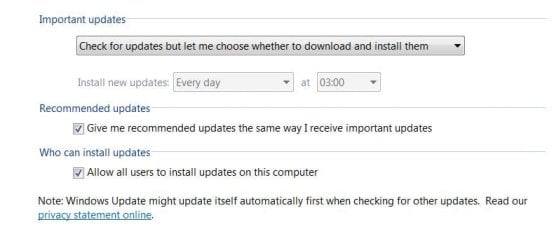
i have this settings
 

Attachments

  • prova.JPG
    prova.JPG
    33.3 KB · Views: 708

My Computer

Computer type
PC/Desktop
OS
windows 7 ultimate 64bit
thanks

but this opens the windows update window
it doesn't check for new updates!
C:\Windows\system32\wuapp.exe

OR

%windir%\system32\wuapp.exe

i have this settings

Yes it checks if there are any updates available. It does not install them.

You setting should be enough for command line automatic update to work.

Kari
 

My Computer

Computer type
Laptop
Computer Manufacturer/Model Number
HP ENVY 17-1150eg
OS
Windows 10 Pro x64 EN-GB
CPU
1.6 GHz Intel Core i7-720QM Processor
Memory
6 GB
Graphics Card(s)
ATI Mobility Radeon HD 5850 Graphics
Sound Card
Beats sound system with integrated subwoofer
Monitor(s) Displays
17" laptop display, 22" LED and 32" Full HD TV through HDMI
Screen Resolution
1600*900 (1), 1920*1080 (2&3)
Hard Drives
Internal: 2 x 500 GB SATA Hard Disk Drive 7200 rpm
External: 2TB for backups, 3TB USB3 network drive for media
Cooling
As Envy runs a bit warm, I have it on a Cooler Master pad
Keyboard
Logitech diNovo Media Desktop Laser (bluetooth)
Mouse
Logitech Performance Mouse MX
Internet Speed
50/10 Mbps VDSL
Antivirus
Windows Defender 4.3.9431.0
Browser
Maxthon 3.5.2., IE11
May I ask: any particular reason as to why? Is there a difference by checking/installing via the GUI.
 

My Computer

OS
Windows XP - Now Windows 7 Home Premium (64-bit).
May I ask: any particular reason as to why? Is there a difference by checking/installing via the GUI.

I want that all important updates are installed as soon as they are available. That's why I have a batch file in all of my Vista and Seven machines (real and virtual ones) that I can launch when I want to shut down the computer, first checking available important updates and installing them. Doing this I know my systems are always updated.

I've placed a shortcut on desktop, and most often instead of choosing Shutdown from Start Menu, I just double click this shortcut to shut down the machine.

The batchfile:
Code:
[FONT="Verdana"]%windir%\system32\wuauclt.exe /detectnow[/FONT]
[FONT="Verdana"]shutdown -s[/FONT]
(this checks if important updates are available, and installs them if answer was yes, shutting then computer down first closing all apps)


Kari
 

My Computer

Computer type
Laptop
Computer Manufacturer/Model Number
HP ENVY 17-1150eg
OS
Windows 10 Pro x64 EN-GB
CPU
1.6 GHz Intel Core i7-720QM Processor
Memory
6 GB
Graphics Card(s)
ATI Mobility Radeon HD 5850 Graphics
Sound Card
Beats sound system with integrated subwoofer
Monitor(s) Displays
17" laptop display, 22" LED and 32" Full HD TV through HDMI
Screen Resolution
1600*900 (1), 1920*1080 (2&3)
Hard Drives
Internal: 2 x 500 GB SATA Hard Disk Drive 7200 rpm
External: 2TB for backups, 3TB USB3 network drive for media
Cooling
As Envy runs a bit warm, I have it on a Cooler Master pad
Keyboard
Logitech diNovo Media Desktop Laser (bluetooth)
Mouse
Logitech Performance Mouse MX
Internet Speed
50/10 Mbps VDSL
Antivirus
Windows Defender 4.3.9431.0
Browser
Maxthon 3.5.2., IE11
^Thanks kindly Kari, very useful info and your script :cool:
 

My Computer

OS
Windows XP - Now Windows 7 Home Premium (64-bit).
May I ask: any particular reason as to why? Is there a difference by checking/installing via the GUI.

I want that all important updates are installed as soon as they are available. That's why I have a batch file in all of my Vista and Seven machines (real and virtual ones) that I can launch when I want to shut down the computer, first checking available important updates and installing them. Doing this I know my systems are always updated.

I've placed a shortcut on desktop, and most often instead of choosing Shutdown from Start Menu, I just double click this shortcut to shut down the machine.

The batchfile:
Code:
[FONT=Verdana]%windir%\system32\wuauclt.exe /detectnow[/FONT]
[FONT=Verdana]shutdown -s[/FONT]
(this checks if important updates are available, and installs them if answer was yes, shutting then computer down first closing all apps)


Kari
you can run this
this checks for update at every boot
 

Attachments

My Computer

Computer type
PC/Desktop
OS
windows 7 ultimate 64bit
you can run this
this checks for update at every boot
I understood from your original question you didn't know how to do that. That's why I posted those batch files.

Your attached file modifies registry, and does check the updates when machine is booted.

I do not want to add something to my registry, and I do not want to check updates when booting because installing updates most often requires a shut down or reboot. My method is IMO more practical because you'll run it when shutting down, and there's no registry editing involved.

Kari
 

My Computer

Computer type
Laptop
Computer Manufacturer/Model Number
HP ENVY 17-1150eg
OS
Windows 10 Pro x64 EN-GB
CPU
1.6 GHz Intel Core i7-720QM Processor
Memory
6 GB
Graphics Card(s)
ATI Mobility Radeon HD 5850 Graphics
Sound Card
Beats sound system with integrated subwoofer
Monitor(s) Displays
17" laptop display, 22" LED and 32" Full HD TV through HDMI
Screen Resolution
1600*900 (1), 1920*1080 (2&3)
Hard Drives
Internal: 2 x 500 GB SATA Hard Disk Drive 7200 rpm
External: 2TB for backups, 3TB USB3 network drive for media
Cooling
As Envy runs a bit warm, I have it on a Cooler Master pad
Keyboard
Logitech diNovo Media Desktop Laser (bluetooth)
Mouse
Logitech Performance Mouse MX
Internet Speed
50/10 Mbps VDSL
Antivirus
Windows Defender 4.3.9431.0
Browser
Maxthon 3.5.2., IE11
Hey Kari! Did a batch with this: %windir%\system32\wuauclt.exe /detectnow
shutdown -s


But does not install all outstanding updates. This is the right script, correct?
 

My Computer

Computer type
PC/Desktop
Computer Manufacturer/Model Number
gateway
OS
win7 Home Premium x64
Antivirus
avast
Browser
Firefox
A little off-topic, but how did this thread get almost 280,000 views in just seven hours?
 

My Computer

Computer type
PC/Desktop
Computer Manufacturer/Model Number
Alienware X51
OS
Windows 7 Home Premium, 64-bit
CPU
i7-3770
Memory
8 GB
Graphics Card(s)
GTX 555
Antivirus
Microsoft Security Essentials
Browser
Internet Explorer, Firefox
A little off-topic, but how did this thread get almost 280,000 views in just seven hours?

That's in seven years actually,

2017-05-16_22h01_23.png
 

My Computer

Computer type
PC/Desktop
Computer Manufacturer/Model Number
Self Built
OS
Win 10 Pro x64
CPU
Intel I5-2500K @3.3GHz
Motherboard
Asrock P67 Extreme4
Memory
16GB G.Skill Ripjaws X (4x4GB)
Graphics Card(s)
EVGA GeForce 750 Ti SC 2GB
Sound Card
ASUS Xonar DG 5.1 Channels 24-bit 96KHz PCI Interface Sound
Monitor(s) Displays
auria eq2367
Screen Resolution
1920 x 1080
Hard Drives
250GB Samsung 850 EVO SSD
1TB WD Blue
1TB Hitachi
PSU
SeaSonic X 650W 80 Plus Gold
Case
Corsair Obsidian 750D
Cooling
Corsair H60, Three 140mm case fans
Keyboard
Logitech Wireless Keyboard K520
Mouse
Logitech Wireless Mouse M310
Internet Speed
Wave Broadband ~ 100 dn 5 up
Antivirus
Windows Defender, Malwarebytes Premium
Browser
Edge, IE11, Chrome
Other Info
Laptop specs: HP g7-1365dx /
CPU: AMD A6-3420M APU with Radeon(tm) HD Graphics /
RAM: Crucial 8Gb (2x4Gb) /
SSD: Crucial M4-CT128M4SSD2 ATA Device/ FW 000F /
GFX: AMD Radeon HD 6520G /
OS: Windows 10 Pro x64
Ah, my bad. I mistook the "Last Post" date as the date the thread was created. *wipes egg off face*
 

My Computer

Computer type
PC/Desktop
Computer Manufacturer/Model Number
Alienware X51
OS
Windows 7 Home Premium, 64-bit
CPU
i7-3770
Memory
8 GB
Graphics Card(s)
GTX 555
Antivirus
Microsoft Security Essentials
Browser
Internet Explorer, Firefox
Ah, my bad. I mistook the "Last Post" date as the date the thread was created. *wipes egg off face*
That's OK ixfd64. Got plenty of that kind of egg myself and not just in my beard!:rolleyes:
 

My Computer

Computer type
PC/Desktop
Computer Manufacturer/Model Number
gateway
OS
win7 Home Premium x64
Antivirus
avast
Browser
Firefox
Back
Top