Should I switch to Windows 7 64 bit from 32 Bit

in relation to your dualboot issue (dont try this yet im just thowing the question out for analysis) can you not just alter your boot ini file from .....

[boot loader]
timeout=30

to

[boot loader]
timeout=0

i did this back in the XP days when i had the same issue
 

My Computer My Computer

At a glance

Win 10 Home Premium 64 BitI7 5930K @ 4.516GB Kingston Hyper X Fury DDR4EVGA 980ti SC + ACX 2.0
Computer type
PC/Desktop
Computer Manufacturer/Model Number
Custom
OS
Win 10 Home Premium 64 Bit
CPU
I7 5930K @ 4.5
Motherboard
Asus X99 s
Memory
16GB Kingston Hyper X Fury DDR4
Graphics Card(s)
EVGA 980ti SC + ACX 2.0
Sound Card
Onboard
Monitor(s) Displays
ROG Swift PG278Q
Screen Resolution
2560x1440
Hard Drives
Kingston Hyper X 250gb SSD
Samsung 2TB mechanical
PSU
Corsair RM 850
Case
NZXT H440 Red
Cooling
Corsair H100i GTX
Keyboard
Razer Reclusa
Mouse
Logitech G5 Gamer
Internet Speed
34mb
Antivirus
Eset Smart Security
Browser
Firefox
in relation to your dualboot issue (dont try this yet im just thowing the question out for analysis) can you not just alter your boot ini file from .....

Boot ini is only used by XP, it does not exist in Vista or Windows 7 which use the BCD. The methods already described by other posters above are the right way to change the boot settings in Vista and Win7.
 

My Computer My Computer

At a glance

Windows 7
OS
Windows 7
A reformat will take care of everything for you. Besides removing the boot option in the msconfig there's a few other options I should mention here.

1) Most here at SF are well familiar with EasyBCD used for dual and multiboot setups that can remove as well as add new entries into the 7 boot loader. Unfortunately the 2.0 version for 7 is still in it's latest Build 91 phase where you have to sign up at the neosmart forums in order to download that or simply go for the 1.7.2 Vista version which can simply be used for removal of the second 7 entry. Download EasyBCD 1.7.2 - NeoSmart Technologies

2) The second is a simply BCD editor tool for renaming entries as well as the removal without any option to add new entries. You can use this for setting the default OS when dual booting. But your interest is simply in removal of the mishap you saw. :D Don't worry we all go through that at times! System Tools - BellaVista

Your main interest once the entry is removed and files backed up will simply be wiping the first external drive where you saw the installation go. Then you can simply copy your files back onto it afterwards. More time consuming then any problem to see done.

Thanks. Once I remove the boot option, I would assume that the Windows 7 files residing on my external HD will basically be "dormant". I intend to reformat, but so long as I am not presented with the annoying dual boot options whenever I reboot my system, I can transfer needed files to my other external drive over the next few days.
 

My Computer My Computer

At a glance

Windows 7 Home Premium 32 bitIntel Quad Q6600 2.4 Ghz4 GbXFX Nvidia GE Force 8800 GT
OS
Windows 7 Home Premium 32 bit
CPU
Intel Quad Q6600 2.4 Ghz
Motherboard
Asus P5K Deluxe Wifi
Memory
4 Gb
Graphics Card(s)
XFX Nvidia GE Force 8800 GT
Sound Card
Asus Xonar Essence STX
Monitor(s) Displays
Dell E228
Screen Resolution
1680X1050
Hard Drives
Seagate 1 TB internal (1), Seagate 1 Tb external (1), and additional 1 TB external all connected via eSata.
Case
Antec P180
Keyboard
Logitech Cordless desktopwave pro
When first mentioning a dual boot setup shrinking the present C for a second primary or adding another spare internal drive was the idea for seeing the 64bit go on. Your external drive installation added a new entry into the 7 BCD store which is easily removed.

First you have to verify which one is for the external drive before deleting the entry. If you drop down the Run command line in Start and type msconfig to open that up you go to the "boot" tab there and will see all entires listed being two. The option to highlight the external drive's entry and click the delete button is seen there.

To avoid deleting the one for your C drive right click on the C drive icon and give the drive a name like W7 64bit or alstein's drive in order to see that on the drives listed. Once removed you can go ahead and reformat the external drive if all files are backed up from it to clean the misintended install off of it. Note external drives can also be installed internally while most are the low performance models intended for storage seen in the premade enclosures.

Thanks for the tip. Wouldn't my external Hard drive have a letter other than C? When I reinstalled Windows 7 64 bit after seeing the problem, I reinstalled, making sure to disconnect my to external drives. My internal hard drive is now labelled "c".
 

My Computer My Computer

At a glance

Windows 7 Home Premium 32 bitIntel Quad Q6600 2.4 Ghz4 GbXFX Nvidia GE Force 8800 GT
OS
Windows 7 Home Premium 32 bit
CPU
Intel Quad Q6600 2.4 Ghz
Motherboard
Asus P5K Deluxe Wifi
Memory
4 Gb
Graphics Card(s)
XFX Nvidia GE Force 8800 GT
Sound Card
Asus Xonar Essence STX
Monitor(s) Displays
Dell E228
Screen Resolution
1680X1050
Hard Drives
Seagate 1 TB internal (1), Seagate 1 Tb external (1), and additional 1 TB external all connected via eSata.
Case
Antec P180
Keyboard
Logitech Cordless desktopwave pro
When booting into any clean install of Windows with the boot loader on the same drive it will see itself as C while you are booted in that particular installation. If you had booted into the install on the external drive your main drive would be seen as D,E,F,G, or another letter assigned right off by Windows until changed.

As far the boot entry even if that was for an installation you intended to keep once removed the option is no longer seen at startup rather you boot into the default OS without the boot options menu appearing. With the external drive's installation there without being started up nothing will be active.

One way to prevent accidental deletion of the main drive's entry which would be seen at the top of the list in the msconfig is simply label the C volume like "W7 Host" or any other name by right clicking on the drives icon in Windows Explorer or Computer. That will be seen when going to delete the unintended entry.

With the entry removed you can take your time going about in backing the files up if you should run into a lack of drive space. when you do finally have all files safe elsewhere then simply reformat the drive to make that available for use again.
 

My Computers My Computers

  • At a glance

    W7 Ultimate x64/W10 Pro x64/W11 Pro Triple Bo...AMD Phenom II X4 975 Deneb 3.6ghz - 965 2nd r...Kingston Hyper X DDR3 1600 1.5v 16gb - Hyper ...MSI HD Radeon 5750 1gb - MSI HD Radeon 6450 o...
    Computer type
    PC/Desktop
    Computer Manufacturer/Model Number
    Custom builds = 2
    OS
    W7 Ultimate x64/W10 Pro x64/W11 Pro Triple Boot - Main PC W7 Remote PC Micro ATX W7 Pro x64/W11 Pro
    CPU
    AMD Phenom II X4 975 Deneb 3.6ghz - 965 2nd remote pc
    Motherboard
    Gigabyte GA-790XTA-UD4-Gigabyte GA-880GM-D2H remote pc
    Memory
    Kingston Hyper X DDR3 1600 1.5v 16gb - Hyper X Fury 8gb 2nd
    Graphics Card(s)
    MSI HD Radeon 5750 1gb - MSI HD Radeon 6450 on mini tower
    Sound Card
    Creative Labs X-Fi Xtreme Audio P - Realtek onooard 2nd case
    Monitor(s) Displays
    ASUS VW199T-P 19" HP 2082a Main-HP 2082a 20" remote pc
    Screen Resolution
    Asus 1440x900 - HP 1600x900
    Hard Drives
    WD Black 1TB HD per OS W7, W10, and pending W11 presently on 500gb OS Drive - Pending Triple 1TB HDs for Spanned Storage/backup volume
    Single 2TB external USB enclosure, single 1TB System 7 Host/Boot drive, Pending 8TB external HD for system image b
    PSU
    Corsair 750TX - primary / Corsair CX600 - second
    Case
    Antec 900-2 - SSD compatible / NZXT Vulcan mini tower
    Cooling
    Zalman CNPS9900A
    Keyboard
    AZIO L70 Backlit Letters Gaming - ONN Cordless/USB
    Mouse
    MSI DS200 Programmable, Logitech Cordless
    Internet Speed
    30mbps upgrade - primary hard wired - mini tower usb WiFi
    Antivirus
    GFI VIPRE Internet Security 2014 on W7 2016 beta on W10,
    Browser
    Cyberfox, WaterFox 64bit FF variants, FireFox x64, Pale Moon
    Other Info
    Accomdata fan cooled usb 2.0 PIDE/Sata II, III external enclosure.
    Sambient usb/eSata PATA/Sata II, III external enclosure.
  • At a glance

    W7 Pro x64/W11 ProAMD Deneb 3.6ghz - 965Kingston Hyper X Fury 8gbMSI HD Radeon 6450 DVI Output
    Computer type
    PC/Desktop
    System Manufacturer/Model Number
    CUSTOM ASSEMBLY
    OS
    W7 Pro x64/W11 Pro
    CPU
    AMD Deneb 3.6ghz - 965
    Motherboard
    Gigabyte GA-880GM-D2H remote pc
    Memory
    Kingston Hyper X Fury 8gb
    Graphics Card(s)
    MSI HD Radeon 6450 DVI Output
    Sound Card
    Realtek onooard Creative or Other separate PENDING
    Monitor(s) Displays
    VIZIO 32" LCD TV Separate LCD Pending
    Screen Resolution
    1600x1080
    Hard Drives
    WD 500GB OS Host/Boot WD Green 1TB Storage/Backup
    PSU
    Corsair 600W - THERMALTAKE 600W spare case
    Case
    NZXT Vulcan mini tower
    Cooling
    Twin 120mm Top Fans - 240mm Side Cover
    Keyboard
    ONN Cordless/USB Logitech Cordless
    Mouse
    ONN USB/Cordless - Logitech Cordless
    Internet Speed
    DSL 5G
    Browser
    MS Edge, FireFox, WaterFox x64, FireFox Nightly
    Other Info
    OS Testing-Remote Access to Main TeamViewer
When first mentioning a dual boot setup shrinking the present C for a second primary or adding another spare internal drive was the idea for seeing the 64bit go on. Your external drive installation added a new entry into the 7 BCD store which is easily removed.

First you have to verify which one is for the external drive before deleting the entry. If you drop down the Run command line in Start and type msconfig to open that up you go to the "boot" tab there and will see all entires listed being two. The option to highlight the external drive's entry and click the delete button is seen there.

To avoid deleting the one for your C drive right click on the C drive icon and give the drive a name like W7 64bit or alstein's drive in order to see that on the drives listed. Once removed you can go ahead and reformat the external drive if all files are backed up from it to clean the misintended install off of it. Note external drives can also be installed internally while most are the low performance models intended for storage seen in the premade enclosures.

Thanks for the tip. Wouldn't my external Hard drive have a letter other than C? When I reinstalled Windows 7 64 bit after seeing the problem, I reinstalled, making sure to disconnect my to external drives. My internal hard drive is now labelled "c".

Your external drive will be E: F: G: ..... it depends on how many optical drives you have, how many card readers you have etc. but it will just grab an available letter. Nothing to worry about .
 

My Computer My Computer

At a glance

Windows 7 Ultimate 64BitC2D E82008GB PNY PC2-6400BFG 9600GT x 2
Computer Manufacturer/Model Number
Myself
OS
Windows 7 Ultimate 64Bit
CPU
C2D E8200
Motherboard
XFX 750i
Memory
8GB PNY PC2-6400
Graphics Card(s)
BFG 9600GT x 2
Sound Card
Stock XFX Optical
Monitor(s) Displays
Gateway 22" HD Display
Hard Drives
C: 1 TB G: 500 GB H: 500 GB
PSU
Ultra LSP 550 Pro Lifetime Series
Case
Xion2
Cooling
ThermalTake
If you are running a laptop without an optical drive by chance Windows would likely by default assign D since you are working with the eSata type connection not through the usb bus there. That was the only reason 7 was able to install on the external drive to start with! :D

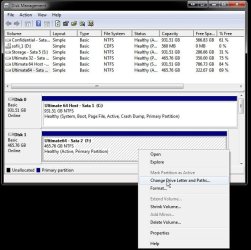
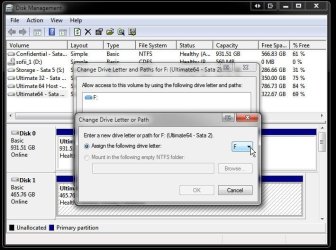
Once you are situated again you can easily choose a specific drive letter by going into the Disk Management tool and right clicking on the drive item there to select the "change drive letter" option.
 

Attachments

  • Chang Drive Letters.jpg
    Chang Drive Letters.jpg
    79.2 KB · Views: 2
  • Chang Drive Letters2.jpg
    Chang Drive Letters2.jpg
    70.3 KB · Views: 2

My Computers My Computers

  • At a glance

    W7 Ultimate x64/W10 Pro x64/W11 Pro Triple Bo...AMD Phenom II X4 975 Deneb 3.6ghz - 965 2nd r...Kingston Hyper X DDR3 1600 1.5v 16gb - Hyper ...MSI HD Radeon 5750 1gb - MSI HD Radeon 6450 o...
    Computer type
    PC/Desktop
    Computer Manufacturer/Model Number
    Custom builds = 2
    OS
    W7 Ultimate x64/W10 Pro x64/W11 Pro Triple Boot - Main PC W7 Remote PC Micro ATX W7 Pro x64/W11 Pro
    CPU
    AMD Phenom II X4 975 Deneb 3.6ghz - 965 2nd remote pc
    Motherboard
    Gigabyte GA-790XTA-UD4-Gigabyte GA-880GM-D2H remote pc
    Memory
    Kingston Hyper X DDR3 1600 1.5v 16gb - Hyper X Fury 8gb 2nd
    Graphics Card(s)
    MSI HD Radeon 5750 1gb - MSI HD Radeon 6450 on mini tower
    Sound Card
    Creative Labs X-Fi Xtreme Audio P - Realtek onooard 2nd case
    Monitor(s) Displays
    ASUS VW199T-P 19" HP 2082a Main-HP 2082a 20" remote pc
    Screen Resolution
    Asus 1440x900 - HP 1600x900
    Hard Drives
    WD Black 1TB HD per OS W7, W10, and pending W11 presently on 500gb OS Drive - Pending Triple 1TB HDs for Spanned Storage/backup volume
    Single 2TB external USB enclosure, single 1TB System 7 Host/Boot drive, Pending 8TB external HD for system image b
    PSU
    Corsair 750TX - primary / Corsair CX600 - second
    Case
    Antec 900-2 - SSD compatible / NZXT Vulcan mini tower
    Cooling
    Zalman CNPS9900A
    Keyboard
    AZIO L70 Backlit Letters Gaming - ONN Cordless/USB
    Mouse
    MSI DS200 Programmable, Logitech Cordless
    Internet Speed
    30mbps upgrade - primary hard wired - mini tower usb WiFi
    Antivirus
    GFI VIPRE Internet Security 2014 on W7 2016 beta on W10,
    Browser
    Cyberfox, WaterFox 64bit FF variants, FireFox x64, Pale Moon
    Other Info
    Accomdata fan cooled usb 2.0 PIDE/Sata II, III external enclosure.
    Sambient usb/eSata PATA/Sata II, III external enclosure.
  • At a glance

    W7 Pro x64/W11 ProAMD Deneb 3.6ghz - 965Kingston Hyper X Fury 8gbMSI HD Radeon 6450 DVI Output
    Computer type
    PC/Desktop
    System Manufacturer/Model Number
    CUSTOM ASSEMBLY
    OS
    W7 Pro x64/W11 Pro
    CPU
    AMD Deneb 3.6ghz - 965
    Motherboard
    Gigabyte GA-880GM-D2H remote pc
    Memory
    Kingston Hyper X Fury 8gb
    Graphics Card(s)
    MSI HD Radeon 6450 DVI Output
    Sound Card
    Realtek onooard Creative or Other separate PENDING
    Monitor(s) Displays
    VIZIO 32" LCD TV Separate LCD Pending
    Screen Resolution
    1600x1080
    Hard Drives
    WD 500GB OS Host/Boot WD Green 1TB Storage/Backup
    PSU
    Corsair 600W - THERMALTAKE 600W spare case
    Case
    NZXT Vulcan mini tower
    Cooling
    Twin 120mm Top Fans - 240mm Side Cover
    Keyboard
    ONN Cordless/USB Logitech Cordless
    Mouse
    ONN USB/Cordless - Logitech Cordless
    Internet Speed
    DSL 5G
    Browser
    MS Edge, FireFox, WaterFox x64, FireFox Nightly
    Other Info
    OS Testing-Remote Access to Main TeamViewer
I bought a PC with no OS and Retail Windows 7.
I installed x64 and had endless problems finding drivers and running not-very-old software. So I installed the 32-bit on the old PC and checked everything.
My main problem was my Epson Perfection scanner and Nero 7. Now I've changed to 32-bit on the new PC and all is relatively well except Nero. But I may be able to live with the indows CD burner. If not a new Nero is affordable whereas a new scanner wasn't.
So my advice is to check all your hard- and software and to hold off x64 until you have a good reason to change.
 

My Computer My Computer

At a glance

Windows 7
OS
Windows 7
Hi there
I'd recommend going to 64 bit --even if you only have 2 GB RAM of memory --you can always upgrade the RAM.

For stuff that simply MUST run on 32 bit OS'es why not run them in a Virtual Machine either XP MODE or even run W7 x-86 under vmware or vbox (vmware server / player and vbox are also free) and won't kill your system either.

Cheers
jimbo

I've made the decison to install Windows 7 Home Premium 64 bit version. I am in the process of listing my applications that I will need to reinstall, and have already run Windows easy transfer. Its a pain, but since my printers and new scanners can run under Wincdows 7 64 bit, I thinnk it will be worthwhile over the long run. I am sure my motherboard, an Asus P5K duluxe wifi will handle the 4 gb ram already installed, as it was purchased a little over two years ago when I was buildng this system.

I bought a PC with no OS and Retail Windows 7.
I installed x64 and had endless problems finding drivers and running not-very-old software. So I installed the 32-bit on the old PC and checked everything.
My main problem was my Epson Perfection scanner and Nero 7. Now I've changed to 32-bit on the new PC and all is relatively well except Nero. But I may be able to live with the indows CD burner. If not a new Nero is affordable whereas a new scanner wasn't.
So my advice is to check all your hard- and software and to hold off x64 until you have a good reason to change.

I think you missed the ball on this one as alstein had already made the decision to install the 64bit Home Premium but ended up seeing the first install go on the wrong drive. oops! He will likely end up staying with the 64bit version once he has everything up and running at least for the time being.

As for finding drivers for the 64bit Windows most often any 64bit Vista updates seem to do the job especially for the main board(chipset drivers, sata controllers), printers, and other addon devices. While running Vista I waited a full year for one company to release just the 32bit updates for a tuner card. When those finally came the 64bit update also then available was the solution for the 64bit 7!
 

My Computers My Computers

  • At a glance

    W7 Ultimate x64/W10 Pro x64/W11 Pro Triple Bo...AMD Phenom II X4 975 Deneb 3.6ghz - 965 2nd r...Kingston Hyper X DDR3 1600 1.5v 16gb - Hyper ...MSI HD Radeon 5750 1gb - MSI HD Radeon 6450 o...
    Computer type
    PC/Desktop
    Computer Manufacturer/Model Number
    Custom builds = 2
    OS
    W7 Ultimate x64/W10 Pro x64/W11 Pro Triple Boot - Main PC W7 Remote PC Micro ATX W7 Pro x64/W11 Pro
    CPU
    AMD Phenom II X4 975 Deneb 3.6ghz - 965 2nd remote pc
    Motherboard
    Gigabyte GA-790XTA-UD4-Gigabyte GA-880GM-D2H remote pc
    Memory
    Kingston Hyper X DDR3 1600 1.5v 16gb - Hyper X Fury 8gb 2nd
    Graphics Card(s)
    MSI HD Radeon 5750 1gb - MSI HD Radeon 6450 on mini tower
    Sound Card
    Creative Labs X-Fi Xtreme Audio P - Realtek onooard 2nd case
    Monitor(s) Displays
    ASUS VW199T-P 19" HP 2082a Main-HP 2082a 20" remote pc
    Screen Resolution
    Asus 1440x900 - HP 1600x900
    Hard Drives
    WD Black 1TB HD per OS W7, W10, and pending W11 presently on 500gb OS Drive - Pending Triple 1TB HDs for Spanned Storage/backup volume
    Single 2TB external USB enclosure, single 1TB System 7 Host/Boot drive, Pending 8TB external HD for system image b
    PSU
    Corsair 750TX - primary / Corsair CX600 - second
    Case
    Antec 900-2 - SSD compatible / NZXT Vulcan mini tower
    Cooling
    Zalman CNPS9900A
    Keyboard
    AZIO L70 Backlit Letters Gaming - ONN Cordless/USB
    Mouse
    MSI DS200 Programmable, Logitech Cordless
    Internet Speed
    30mbps upgrade - primary hard wired - mini tower usb WiFi
    Antivirus
    GFI VIPRE Internet Security 2014 on W7 2016 beta on W10,
    Browser
    Cyberfox, WaterFox 64bit FF variants, FireFox x64, Pale Moon
    Other Info
    Accomdata fan cooled usb 2.0 PIDE/Sata II, III external enclosure.
    Sambient usb/eSata PATA/Sata II, III external enclosure.
  • At a glance

    W7 Pro x64/W11 ProAMD Deneb 3.6ghz - 965Kingston Hyper X Fury 8gbMSI HD Radeon 6450 DVI Output
    Computer type
    PC/Desktop
    System Manufacturer/Model Number
    CUSTOM ASSEMBLY
    OS
    W7 Pro x64/W11 Pro
    CPU
    AMD Deneb 3.6ghz - 965
    Motherboard
    Gigabyte GA-880GM-D2H remote pc
    Memory
    Kingston Hyper X Fury 8gb
    Graphics Card(s)
    MSI HD Radeon 6450 DVI Output
    Sound Card
    Realtek onooard Creative or Other separate PENDING
    Monitor(s) Displays
    VIZIO 32" LCD TV Separate LCD Pending
    Screen Resolution
    1600x1080
    Hard Drives
    WD 500GB OS Host/Boot WD Green 1TB Storage/Backup
    PSU
    Corsair 600W - THERMALTAKE 600W spare case
    Case
    NZXT Vulcan mini tower
    Cooling
    Twin 120mm Top Fans - 240mm Side Cover
    Keyboard
    ONN Cordless/USB Logitech Cordless
    Mouse
    ONN USB/Cordless - Logitech Cordless
    Internet Speed
    DSL 5G
    Browser
    MS Edge, FireFox, WaterFox x64, FireFox Nightly
    Other Info
    OS Testing-Remote Access to Main TeamViewer
Hi there
I'd recommend going to 64 bit --even if you only have 2 GB RAM of memory --you can always upgrade the RAM.

For stuff that simply MUST run on 32 bit OS'es why not run them in a Virtual Machine either XP MODE or even run W7 x-86 under vmware or vbox (vmware server / player and vbox are also free) and won't kill your system either.

Cheers
jimbo

I've made the decison to install Windows 7 Home Premium 64 bit version. I am in the process of listing my applications that I will need to reinstall, and have already run Windows easy transfer. Its a pain, but since my printers and new scanners can run under Wincdows 7 64 bit, I thinnk it will be worthwhile over the long run. I am sure my motherboard, an Asus P5K duluxe wifi will handle the 4 gb ram already installed, as it was purchased a little over two years ago when I was buildng this system.

I bought a PC with no OS and Retail Windows 7.
I installed x64 and had endless problems finding drivers and running not-very-old software. So I installed the 32-bit on the old PC and checked everything.
My main problem was my Epson Perfection scanner and Nero 7. Now I've changed to 32-bit on the new PC and all is relatively well except Nero. But I may be able to live with the indows CD burner. If not a new Nero is affordable whereas a new scanner wasn't.
So my advice is to check all your hard- and software and to hold off x64 until you have a good reason to change.

I think you missed the ball on this one as alstein had already made the decision to install the 64bit Home Premium but ended up seeing the first install go on the wrong drive. oops! He will likely end up staying with the 64bit version once he has everything up and running at least for the time being.

As for finding drivers for the 64bit Windows most often any 64bit Vista updates seem to do the job especially for the main board(chipset drivers, sata controllers), printers, and other addon devices. While running Vista I waited a full year for one company to release just the 32bit updates for a tuner card. When those finally came the 64bit update also then available was the solution for the 64bit 7!

I did finally install Windows 7 64 bit on my C drive. I ended up reformatting both my backup external drives, and restoring needed files to these drives. it took a couple of hours but was not difficult. I have had no problems with 64 bit drivers, for my printers and scanner. My system is running fine. Is it quicker than the 32 bit system? It seems so, but it could be a case of "mind over matter". However, I have no regrets (other than that messup with the external hard drives). Thanks for all your help.
 

My Computer My Computer

At a glance

Windows 7 Home Premium 32 bitIntel Quad Q6600 2.4 Ghz4 GbXFX Nvidia GE Force 8800 GT
OS
Windows 7 Home Premium 32 bit
CPU
Intel Quad Q6600 2.4 Ghz
Motherboard
Asus P5K Deluxe Wifi
Memory
4 Gb
Graphics Card(s)
XFX Nvidia GE Force 8800 GT
Sound Card
Asus Xonar Essence STX
Monitor(s) Displays
Dell E228
Screen Resolution
1680X1050
Hard Drives
Seagate 1 TB internal (1), Seagate 1 Tb external (1), and additional 1 TB external all connected via eSata.
Case
Antec P180
Keyboard
Logitech Cordless desktopwave pro
Wow, so much misinformation and fear about Windows 7 x64. The OP's system specs tell you right away that x64 should be the platform of choice. If you have an old program that doesn't run...virtualize. If you don't buy a version of Win 7 that has XP mode, run VirtualBox. There is very little reason, if any, to avoid or fear x64 now.
Nero 7 works perfectly fine in Windows 7 x64. I'm using it on four separate systems right now without issue. It is also free of the bloat found in Nero 8 and Nero 9. Besides, let's just say you continued to think Nero 7 didn't work. Then you'd simply switch to one of the many free alternatives.
 

My Computer My Computer

At a glance

Windows 7 Ultimate x64 SP1Intel Core i7-260012 GB Patriot Extreme DDR3-1333Nvidia GTX 470
OS
Windows 7 Ultimate x64 SP1
CPU
Intel Core i7-2600
Motherboard
Gigabyte GA-P67A-UD3P-B3
Memory
12 GB Patriot Extreme DDR3-1333
Graphics Card(s)
Nvidia GTX 470
Monitor(s) Displays
Dell UltraSharp 2209WA
Hard Drives
OCZ Agility3 240 GB, WD5001AALS, WD7501AALS
PSU
OCZ ModStream 700W
Case
CoolerMaster HAF 912 Advanced
Cooling
CoolerMaster Hyper 212 Plus
Wow, so much misinformation and fear about Windows 7 x64. The OP's system specs tell you right away that x64 should be the platform of choice. If you have an old program that doesn't run...virtualize. If you don't buy a version of Win 7 that has XP mode, run VirtualBox. There is very little reason, if any, to avoid or fear x64 now.
Nero 7 works perfectly fine in Windows 7 x64. I'm using it on four separate systems right now without issue. It is also free of the bloat found in Nero 8 and Nero 9. Besides, let's just say you continued to think Nero 7 didn't work. Then you'd simply switch to one of the many free alternatives.

Now try running Nero 7 on the XP Mode. It won't! Likewise dvd burning programs will install but produce errors right away since the software utilize physical hardware controllers as part of the process.

The 32bit 7 easily sees the old XP version of one program run without problems while the latest version would have been needed for the 64bit Vista let alone 7. Now take the older XP version and try that on any VM and see nothing but dll library and other errors immediately appear.

TV tuner cards and other addons are likely to run into problems as well on a VM. A virtual machine isn't always the answer for things. It's only one option available while still seeing it's own limitations.

Back to you, alstein, a clean install will always be a bit faster at the start with any version as a rule. The 64bit will seem a bit different once you take into consideration things like seeing less data swapped out to a paging file as part of the 64bit's loading and keeping more data in the active ram. A more efficient handling while not necessarily any giant performance boost.

Glad to see you got everything set so far. After a good run you'll likely find yourself hesitant to go back with the 32bit since most things do run on the 64bit 7 or at least now see a 64bit alternative version.
 

My Computers My Computers

  • At a glance

    W7 Ultimate x64/W10 Pro x64/W11 Pro Triple Bo...AMD Phenom II X4 975 Deneb 3.6ghz - 965 2nd r...Kingston Hyper X DDR3 1600 1.5v 16gb - Hyper ...MSI HD Radeon 5750 1gb - MSI HD Radeon 6450 o...
    Computer type
    PC/Desktop
    Computer Manufacturer/Model Number
    Custom builds = 2
    OS
    W7 Ultimate x64/W10 Pro x64/W11 Pro Triple Boot - Main PC W7 Remote PC Micro ATX W7 Pro x64/W11 Pro
    CPU
    AMD Phenom II X4 975 Deneb 3.6ghz - 965 2nd remote pc
    Motherboard
    Gigabyte GA-790XTA-UD4-Gigabyte GA-880GM-D2H remote pc
    Memory
    Kingston Hyper X DDR3 1600 1.5v 16gb - Hyper X Fury 8gb 2nd
    Graphics Card(s)
    MSI HD Radeon 5750 1gb - MSI HD Radeon 6450 on mini tower
    Sound Card
    Creative Labs X-Fi Xtreme Audio P - Realtek onooard 2nd case
    Monitor(s) Displays
    ASUS VW199T-P 19" HP 2082a Main-HP 2082a 20" remote pc
    Screen Resolution
    Asus 1440x900 - HP 1600x900
    Hard Drives
    WD Black 1TB HD per OS W7, W10, and pending W11 presently on 500gb OS Drive - Pending Triple 1TB HDs for Spanned Storage/backup volume
    Single 2TB external USB enclosure, single 1TB System 7 Host/Boot drive, Pending 8TB external HD for system image b
    PSU
    Corsair 750TX - primary / Corsair CX600 - second
    Case
    Antec 900-2 - SSD compatible / NZXT Vulcan mini tower
    Cooling
    Zalman CNPS9900A
    Keyboard
    AZIO L70 Backlit Letters Gaming - ONN Cordless/USB
    Mouse
    MSI DS200 Programmable, Logitech Cordless
    Internet Speed
    30mbps upgrade - primary hard wired - mini tower usb WiFi
    Antivirus
    GFI VIPRE Internet Security 2014 on W7 2016 beta on W10,
    Browser
    Cyberfox, WaterFox 64bit FF variants, FireFox x64, Pale Moon
    Other Info
    Accomdata fan cooled usb 2.0 PIDE/Sata II, III external enclosure.
    Sambient usb/eSata PATA/Sata II, III external enclosure.
  • At a glance

    W7 Pro x64/W11 ProAMD Deneb 3.6ghz - 965Kingston Hyper X Fury 8gbMSI HD Radeon 6450 DVI Output
    Computer type
    PC/Desktop
    System Manufacturer/Model Number
    CUSTOM ASSEMBLY
    OS
    W7 Pro x64/W11 Pro
    CPU
    AMD Deneb 3.6ghz - 965
    Motherboard
    Gigabyte GA-880GM-D2H remote pc
    Memory
    Kingston Hyper X Fury 8gb
    Graphics Card(s)
    MSI HD Radeon 6450 DVI Output
    Sound Card
    Realtek onooard Creative or Other separate PENDING
    Monitor(s) Displays
    VIZIO 32" LCD TV Separate LCD Pending
    Screen Resolution
    1600x1080
    Hard Drives
    WD 500GB OS Host/Boot WD Green 1TB Storage/Backup
    PSU
    Corsair 600W - THERMALTAKE 600W spare case
    Case
    NZXT Vulcan mini tower
    Cooling
    Twin 120mm Top Fans - 240mm Side Cover
    Keyboard
    ONN Cordless/USB Logitech Cordless
    Mouse
    ONN USB/Cordless - Logitech Cordless
    Internet Speed
    DSL 5G
    Browser
    MS Edge, FireFox, WaterFox x64, FireFox Nightly
    Other Info
    OS Testing-Remote Access to Main TeamViewer

My Computer My Computer

At a glance

Windows 7 ultimate 64 bit / XP Home sp3intel Core 2 Duo E8400 3.0ghz8 gigs 1066 OCZ Fata1tyEVGA GTX 580 Call of Duty Black Ops Edition
Computer Manufacturer/Model Number
Self Built
OS
Windows 7 ultimate 64 bit / XP Home sp3
CPU
intel Core 2 Duo E8400 3.0ghz
Motherboard
Asus P5ND bios 1401
Memory
8 gigs 1066 OCZ Fata1ty
Graphics Card(s)
EVGA GTX 580 Call of Duty Black Ops Edition
Sound Card
Creative Soundblaster Audigy 2zs
Monitor(s) Displays
Asus 24in LCD's 2MS X2
Screen Resolution
1920x1080p @60Hz
Hard Drives
WD Caviar 500 Black/ WD Caviar 200 Blue
PSU
OCZ 700W GameXtreme
Case
NZXT Apollo
Cooling
Corsair H50 CPU/120mm x3 /60mm x2 /Corsair Dominator Ram
Keyboard
Logitech Bluetooth Wireless MX5000
Mouse
Logitech Bluetooth Wireless MX1000
Internet Speed
Download 19.83 Upload 0.97
Other Info
Logitech Z2300 Speakers/ Bose Noise Cancelling Headphones/Avermedia PCI-e Hybrid TV Bravo/Epson NX415 all in one/ 4 Port Powered USB Hub/ LG 10x Bluray Burner /TSST Corp DVDRW External
Now try running Nero 7 on the XP Mode. It won't!
This has been the case with virtualization software for years now. Nero 7 works in Windows 7 just fine, so why would you ever consider running it in a VM?
 

My Computer My Computer

At a glance

Windows 7 Ultimate x64 SP1Intel Core i7-260012 GB Patriot Extreme DDR3-1333Nvidia GTX 470
OS
Windows 7 Ultimate x64 SP1
CPU
Intel Core i7-2600
Motherboard
Gigabyte GA-P67A-UD3P-B3
Memory
12 GB Patriot Extreme DDR3-1333
Graphics Card(s)
Nvidia GTX 470
Monitor(s) Displays
Dell UltraSharp 2209WA
Hard Drives
OCZ Agility3 240 GB, WD5001AALS, WD7501AALS
PSU
OCZ ModStream 700W
Case
CoolerMaster HAF 912 Advanced
Cooling
CoolerMaster Hyper 212 Plus
@OP here is another article posted by BFK on 32 v 64 64-bit: More than just the RAM - Vista Forums Fabe

Here's another to look over if you want more of a total breakdown on things. A Closer Look at 32-Bit vs. 64-Bit Windows - Developer Zone - National Instruments

Now try running Nero 7 on the XP Mode. It won't!
This has been the case with virtualization software for years now. Nero 7 works in Windows 7 just fine, so why would you ever consider running it in a VM?

Prior to getting the latest version of one program here and right after the XP Mode RCs were first seen with the intergrated components now seen I gave an older XP version a look since that wouldn't run on the 64bit 7. Even with the increased access to internal drives and devices the old version installed without problem but just like any other VM wouldn't run.

The installation there primarily was to see if it could be used on the XP Mode compared to other VM wares while not being a preference to start with to see if XP/Vista dual boot still on could be dumped sooner while it does run on the 32bit 7.

The newer version was bought direct from the company for use on the Host OS being the 64bit 7. The new build will primarily see the 64bit 7 there without even having the need for the 32bit or any older version. Problem solved in that sense.
 

My Computers My Computers

  • At a glance

    W7 Ultimate x64/W10 Pro x64/W11 Pro Triple Bo...AMD Phenom II X4 975 Deneb 3.6ghz - 965 2nd r...Kingston Hyper X DDR3 1600 1.5v 16gb - Hyper ...MSI HD Radeon 5750 1gb - MSI HD Radeon 6450 o...
    Computer type
    PC/Desktop
    Computer Manufacturer/Model Number
    Custom builds = 2
    OS
    W7 Ultimate x64/W10 Pro x64/W11 Pro Triple Boot - Main PC W7 Remote PC Micro ATX W7 Pro x64/W11 Pro
    CPU
    AMD Phenom II X4 975 Deneb 3.6ghz - 965 2nd remote pc
    Motherboard
    Gigabyte GA-790XTA-UD4-Gigabyte GA-880GM-D2H remote pc
    Memory
    Kingston Hyper X DDR3 1600 1.5v 16gb - Hyper X Fury 8gb 2nd
    Graphics Card(s)
    MSI HD Radeon 5750 1gb - MSI HD Radeon 6450 on mini tower
    Sound Card
    Creative Labs X-Fi Xtreme Audio P - Realtek onooard 2nd case
    Monitor(s) Displays
    ASUS VW199T-P 19" HP 2082a Main-HP 2082a 20" remote pc
    Screen Resolution
    Asus 1440x900 - HP 1600x900
    Hard Drives
    WD Black 1TB HD per OS W7, W10, and pending W11 presently on 500gb OS Drive - Pending Triple 1TB HDs for Spanned Storage/backup volume
    Single 2TB external USB enclosure, single 1TB System 7 Host/Boot drive, Pending 8TB external HD for system image b
    PSU
    Corsair 750TX - primary / Corsair CX600 - second
    Case
    Antec 900-2 - SSD compatible / NZXT Vulcan mini tower
    Cooling
    Zalman CNPS9900A
    Keyboard
    AZIO L70 Backlit Letters Gaming - ONN Cordless/USB
    Mouse
    MSI DS200 Programmable, Logitech Cordless
    Internet Speed
    30mbps upgrade - primary hard wired - mini tower usb WiFi
    Antivirus
    GFI VIPRE Internet Security 2014 on W7 2016 beta on W10,
    Browser
    Cyberfox, WaterFox 64bit FF variants, FireFox x64, Pale Moon
    Other Info
    Accomdata fan cooled usb 2.0 PIDE/Sata II, III external enclosure.
    Sambient usb/eSata PATA/Sata II, III external enclosure.
  • At a glance

    W7 Pro x64/W11 ProAMD Deneb 3.6ghz - 965Kingston Hyper X Fury 8gbMSI HD Radeon 6450 DVI Output
    Computer type
    PC/Desktop
    System Manufacturer/Model Number
    CUSTOM ASSEMBLY
    OS
    W7 Pro x64/W11 Pro
    CPU
    AMD Deneb 3.6ghz - 965
    Motherboard
    Gigabyte GA-880GM-D2H remote pc
    Memory
    Kingston Hyper X Fury 8gb
    Graphics Card(s)
    MSI HD Radeon 6450 DVI Output
    Sound Card
    Realtek onooard Creative or Other separate PENDING
    Monitor(s) Displays
    VIZIO 32" LCD TV Separate LCD Pending
    Screen Resolution
    1600x1080
    Hard Drives
    WD 500GB OS Host/Boot WD Green 1TB Storage/Backup
    PSU
    Corsair 600W - THERMALTAKE 600W spare case
    Case
    NZXT Vulcan mini tower
    Cooling
    Twin 120mm Top Fans - 240mm Side Cover
    Keyboard
    ONN Cordless/USB Logitech Cordless
    Mouse
    ONN USB/Cordless - Logitech Cordless
    Internet Speed
    DSL 5G
    Browser
    MS Edge, FireFox, WaterFox x64, FireFox Nightly
    Other Info
    OS Testing-Remote Access to Main TeamViewer
Back
Top