More RAM doesn't always amount to better performance

jimbo45

New member
Guru
Gold Member
VIP
Local time
1:14 PM
Messages
5,941
Location
Hafnarfjörður IS
Hi all
Reading these threads a lot I get the impression that a great many people think that simply by adding more RAM on a computer will automatically improve the performance.

This is not necessarily true as there are many many factors that need to be taken into account.

The amount of REAL RAM allocated by the OS is based on very complex algorithims and not purely on the size of the application being run. For example I might have a HUGE powerpoint presentation (say 50 MB -- a lot for a powerpoint demo) but the actual REAL RAM needed is of the order of a few KB (yes Kilobytes).

Most applications (possibly Photoshop is one of the rare exceptions) do not need to be 100% loaded into RAM while working. Only the amount of real data "pages" need to be accessed at any one time. The amount will obviously dependon what the application is doing , other processes etc etc.

For example in the power point example as above the data has to be transferred to a Video display -- whilst this is being done the next "slice" of data can be read from the "paging" disk.

Applications which wait a lot on input from the User (such as word processing) can use actually a very small amount of RAM since the keyboard input is far far slower than any DISK I/O required to get data from paging into real RAM.

So before you go "buying huge amounts of RAM" think what you actually need.

For a lot of people better graphics, faster CPU and above all FASTER DISKS might make for a snappier system than increasing the amount of RAM once you've got a reasonable base amount installed.

An 8GB RAM system with very slow disks and poor graphics is often far more frustrating to use than a 3GB machine with lightning fast disks and a decent graphic card irrespective of the CPU installed .

I would hazard a bet here that the biggest bottleneck in 99.9% of home systems is not RAM or graphic card but poor DISKS.

Cheers
jimbo
 

My Computer My Computer

Computer type
PC/Desktop
Computer Manufacturer/Model Number
Custom built, several laptops HP/ASUS
OS
Linux CENTOS 7 / various Windows OS'es and servers
CPU
Intel i7 Intel i5
Memory
8GB, 16GB
Graphics Card(s)
On Motherboard
Sound Card
Realtek HD audio
Monitor(s) Displays
Apple Cinema display, Samsung LCD
Screen Resolution
1920 X 1080
Hard Drives
4 X 1TB SATA
Mouse
Toshiba wireless laser
Internet Speed
> 20MB up
This is false... :) The amount of VMemory allocated to each program is 4 gigs on a 32 bit system. The amount actually in the RAM can be super small yes. Yes the Disk is possibly the biggest bottleneck, but your title makes it seem like more ram can be worse, where in all reality it won't ever hurt. If you have a crappy hard disk, disable your page file, buy 4 gigs of ram and run completely off ram, this will stop page faults (swapping of memory to the hard drive and vice versa) which is a huge performance gainer...

When it comes to games, Graphics cards are your bigger bottleneck, due to the fact that most of your textures etc are loaded into memory. And if you only have a little RAM then your OS is going to be forced to swap memory in and out of the page file, which will really kill you if you have a crappy hard drive, but if you are playing Crysis, more ram and a kick a video card are a way bigger factor than a fast or slow hard drive.

If you aren't a gamer and your machine sucks, get a core 2 duo or better, with a decent hard drive and a ton of RAM :P

And, it's easier to upgrade ram than say a CPU, also generally more cost effective, but unless you are someone who does some major video editing you probably won't get any performance boost above 2-4 gigs.
 

My Computer My Computer

Computer Manufacturer/Model Number
fakeasdf (c)
OS
Win 7 Pro x64 x 3, Win 7 Pro x86, Ubuntu 9.04
CPU
2 x C2D [email protected] Ghz, C2D [email protected] ghz, P4 @ 3.0 ghz,
Motherboard
GIGABYTE GA-EP35-DS3P LGA 775 Intel P35 ATX Dynamic Energy S
Memory
2x8 GB Corsair, 4GB Kingston, 2GB GSkill
Graphics Card(s)
ATI Radeon 4670 1 GB DDR3, 2600 Pro, 2400 Pro, Intel 965
Sound Card
I don't care... Connected using Optical on Media Center
Monitor(s) Displays
Panasonic Viera 50" Plasma, 2x 19"
Screen Resolution
1080P, 1280x1024's
Hard Drives
4 Terabytes
Case
Antec P182 Gun Metal Black
Internet Speed
20 Mbit U/D
I think this discussion needs to take into account the application's ratio of locked or non-pageable memory to it's working set. More memory will prevent commit paging of memory marked as pageable even if it is allocated in the virtual heap. The metric you really need to look at is hard page faults, that is, when memory has been allocated as pageable but insufficient physical memory conditions have caused those pages to be committed to the page file and purged from physical memory. A hard page fault occurs when that memory is accessed and has to be reloaded from the page file back into memory. That's where performance is impacted. So, more memory is almost always better!
 

My Computer My Computer

Computer type
Laptop
Computer Manufacturer/Model Number
Apple
OS
El Capitan / Windows 10
CPU
i7-4980HQ
Memory
16GB
Graphics Card(s)
Iris 5200
LOL ive just bought 4 gig ram, hope it helps me lol
 

My Computer My Computer

Computer Manufacturer/Model Number
Made by Mastercard
OS
Windows 7 RTM x64
CPU
Core 2 Quad, @3.8 on aircooling
Motherboard
XFX 750i Nforce
Memory
8 Gig Geil Black Dragon
Graphics Card(s)
Nvidia 8800GTX 512 x 2 in SLI
Sound Card
Razor Barracuda
Monitor(s) Displays
2 X 24 Inch Hannsg
Screen Resolution
1600x1050
Hard Drives
1X64 Gig Kingston SSD Drive
2X 320 sata
2X250 ide
1X 320 External. and lets not forget the 8 gig thumbdrive :)
and a partridge in a pear tree
PSU
600 Watt Coolermaster Elite Silent Pro
Case
Coolermaster Storm
Cooling
Coolermaster V8
Keyboard
Razor Lycosa
Mouse
Razor Mamba, sweet as candy
Internet Speed
Virgin 50MB.
Other Info
Zalman Guardian System Fan Controls
Aerocool Modern V system monitor.
And a nice bunch of stickers on the front!! All that money for something that glows blue. But thats why we do it kids. all for the bling!!

100mbit Seedbox, loving that!
Razor Destructor Gaming Mat, Razor Moray Headphones.

To much spare money perhaps? Nah, my mrs has shoes. I have a very expensive way of her shopping for
Have to agree with fakeasdf, I started off with a x86 OS and 2 gig of RAM and I could play Crysis but not with very high settings, then I went to x64 and got 4Gig of Ram, every thing else the same and my performance increased dramatically and I was able to play the game on much higher quality setting.

It's strange the way more memory was always better years ago, you have an old computer with 1 Gig and you add another one and WOW look how much quicker everything is, this is great.

That was until x86 reached it limit and that was like hitting the edge of the Worrld for computing and no one wanted to see past it, there is something over the horizon and it's x64 with potential to keep us going for a life time.

Saying we don't need more then 2 Gig of RAM is like saying the World is flat so wake up and smell the coffee.
 

My Computer My Computer

Computer Manufacturer/Model Number
Home Brew
OS
Windows 7 Ultimate Vista Ultimate x64
CPU
Core 2 Duo E8500 3.16Ghz @ 3.8Ghz
Motherboard
eVGA 750i FTW
Memory
2x2Gigs Patriot PC2-6400 LL
Graphics Card(s)
Inno3D GeForce GTX260 216 SP
Monitor(s) Displays
ASUS VW222U 22" 2ms Response time
Screen Resolution
1680x1050
Hard Drives
SATA 150GB
SATA II 250GB
USB IDE 750GB Ext.
PSU
HYTEC 600W & Thermaltake 650W Toughpower Power Exp
Case
Thermaltake Armor LCS (Liquid Cooling System)
Cooling
Liquid Cooling System
Keyboard
Logitech G15 Gaming Keyboard
Mouse
Logitech G9 Gaming Mouse
lol philosophy from an aussie ;)

if you use ramdisk, or just turn off pagefile, then i think you get lots of performance...HDD is the bottleneck in most cases, but SATA2 is bringing highspeed IO to homeusers
 

My Computer My Computer

OS
vista
LOL ive just bought 4 gig ram, hope it helps me lol

Hey good news M8 sure you will notice the improvement and be able to go 64X = yeah!

Dont wish to (ram) it home but I find the four gig handy do a lot of burning of films and editing etc ... yes a lot of burning indeed recently :)
 

My Computer My Computer

OS
windows 7077
CPU
AMD Athlon 64X2 dual core processor 5000+ 2600 Mhz
Motherboard
FOXCONN A6VMX
Memory
4 gig 8000 Mhz
Graphics Card(s)
N-Vidia Geforce 8400 GS
Sound Card
C-Media
Screen Resolution
1440 X 900 75 hertz
Hard Drives
c: 465.66 GB

I:372.61 GB external usb drive
Cooling
fans
Mouse
Microsoft wireless laser mouse
Internet Speed
8meg

My Computer My Computer

Computer type
PC/Desktop
Computer Manufacturer/Model Number
Systems by SmartEyeball
OS
8 Pro x64
CPU
i7 3770K 4.6GHz
Motherboard
ASUS P8Z77 WS
Memory
16GB G.Skill Trident X 2666mhz
Graphics Card(s)
x2 EVGA 780 Ti Superclocked SLI
Sound Card
SB X-FI Surround 5.1 PRO USB / ATH-AD900 Headphones
Monitor(s) Displays
x3 Dell U2410 / 58" Samsung
Screen Resolution
5760*1200/ 1920*1200
Hard Drives
2x Intel 520 240GB (RAID 0) * 2x WD Caviar Blacks 2TB (RAID 0) * 2TB WD Caviar Black * Sony Optirac DVD
PSU
Silverstone Strider Evolution 1200W
Case
Thermaltake Level 10 GT Snow Edition
Cooling
Noctua NH-D14
Keyboard
Topre Realforce // Ducky Shine MX Black // Filco Ninja TKL
Mouse
Thermaltake Theron (Highly Recommended) + Razer Imperator
Antivirus
MSE
Browser
IE, FF, WaterFox
Other Info
GT Extreme V2 Sim Racing Cockpit + 40" LCD and K/B Mouse stand ▼
Fanatec CSR Elite Wheel + Clubsport V1 Pedals + CSR shifter/7G-H ▼Saitek X52 Pro ▼ TrackIR 5 Pro
Buttkicker v2 Seat Rumbler with Dedicated 5.1 and Sub Woofer attached to frame ▼
=
Bloody Big Grin
I think this discussion needs to take into account the application's ratio of locked or non-pageable memory to it's working set. More memory will prevent commit paging of memory marked as pageable even if it is allocated in the virtual heap. The metric you really need to look at is hard page faults, that is, when memory has been allocated as pageable but insufficient physical memory conditions have caused those pages to be committed to the page file and purged from physical memory. A hard page fault occurs when that memory is accessed and has to be reloaded from the page file back into memory. That's where performance is impacted. So, more memory is almost always better!

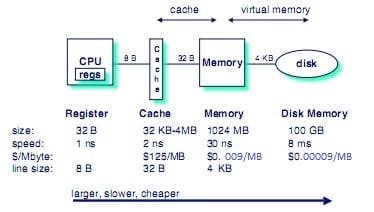
Yes, this calls for a chart... I tried to update the chart to today's prices, but you'll notice when you hit between ram and hard drive the hit cost is tremendous, it goes from 30 nanoseconds to 8 milliseconds! That is a terrible time loss in the computer world... (for those who don't quite understand that, the cost to hit the hard drive over ram is 266,666 times slower!)
 

Attachments

  • MEMORY ACCESS TIME.JPG
    MEMORY ACCESS TIME.JPG
    19.4 KB · Views: 265

My Computer My Computer

Computer Manufacturer/Model Number
fakeasdf (c)
OS
Win 7 Pro x64 x 3, Win 7 Pro x86, Ubuntu 9.04
CPU
2 x C2D [email protected] Ghz, C2D [email protected] ghz, P4 @ 3.0 ghz,
Motherboard
GIGABYTE GA-EP35-DS3P LGA 775 Intel P35 ATX Dynamic Energy S
Memory
2x8 GB Corsair, 4GB Kingston, 2GB GSkill
Graphics Card(s)
ATI Radeon 4670 1 GB DDR3, 2600 Pro, 2400 Pro, Intel 965
Sound Card
I don't care... Connected using Optical on Media Center
Monitor(s) Displays
Panasonic Viera 50" Plasma, 2x 19"
Screen Resolution
1080P, 1280x1024's
Hard Drives
4 Terabytes
Case
Antec P182 Gun Metal Black
Internet Speed
20 Mbit U/D
Last edited by a moderator:

My Computer My Computer

Computer Manufacturer/Model Number
ASUS p5w-dh deluxe & IBM Thinkpad T43
OS
Windows 7 x86 and x64 - RTM
CPU
E6700 (core 2 duo ^3.25GHz) & Pentium M 750 (1.86GHz)
Motherboard
P5W-DH Deluxe & Thinkpad T43
Memory
4GB and 1.5GB
Graphics Card(s)
ATI 4850 & ATI X300
Hah, yes, Toms... That article is all right, but they were showing the differences between 6 and 12 gigs of ram... That's not what most people are at, most people are between 1 - 2, and should go to 3 - 4. But as I said before, if you want better gaming, get a better graphics card:) If you want to encode faster, get a faster CPU. If you want to run a media server in your house, get a gigabit router/switch and nic. If you want to join a fashion and spend more money on weaker computer buy a mac :)
 

My Computer My Computer

Computer Manufacturer/Model Number
fakeasdf (c)
OS
Win 7 Pro x64 x 3, Win 7 Pro x86, Ubuntu 9.04
CPU
2 x C2D [email protected] Ghz, C2D [email protected] ghz, P4 @ 3.0 ghz,
Motherboard
GIGABYTE GA-EP35-DS3P LGA 775 Intel P35 ATX Dynamic Energy S
Memory
2x8 GB Corsair, 4GB Kingston, 2GB GSkill
Graphics Card(s)
ATI Radeon 4670 1 GB DDR3, 2600 Pro, 2400 Pro, Intel 965
Sound Card
I don't care... Connected using Optical on Media Center
Monitor(s) Displays
Panasonic Viera 50" Plasma, 2x 19"
Screen Resolution
1080P, 1280x1024's
Hard Drives
4 Terabytes
Case
Antec P182 Gun Metal Black
Internet Speed
20 Mbit U/D
I do find the four gig of ram runs things just fine I get a 7.1 base score for my memory everything else is slower 5.6 for the CPU and disk data transfer at 5.9.
Cannot for now buy a faster processor but a future option :)
 

My Computer My Computer

OS
windows 7077
CPU
AMD Athlon 64X2 dual core processor 5000+ 2600 Mhz
Motherboard
FOXCONN A6VMX
Memory
4 gig 8000 Mhz
Graphics Card(s)
N-Vidia Geforce 8400 GS
Sound Card
C-Media
Screen Resolution
1440 X 900 75 hertz
Hard Drives
c: 465.66 GB

I:372.61 GB external usb drive
Cooling
fans
Mouse
Microsoft wireless laser mouse
Internet Speed
8meg
The Conclusions drawn in the Toms Hardware article appears to say it all, and matches my experience. I recently upgraded to 4 gigs (from 2) and cant say i have noticed any difference in performance. Hopefully i will in the future.

(Excerpt) If 3 GB worked so well, why do we continue to recommend 4 GB to 6 GB triple-channel kits for performance systems? Perhaps we’re just a little too forward-looking, but we can certainly imagine scenarios a typical “power user” could encounter where 3 GB might not be enough, even if today’s tests didn’t reveal any of them

Conclusion - Review Tom's Hardware : Do You Really Need More Than 6 GB Of RAM?
 

My Computer My Computer

Computer Manufacturer/Model Number
Home made.
OS
7068 64 bit + XP Pro
CPU
[email protected]
Motherboard
Gigabyte GA-P35-DS3L
Memory
4x1Gb Geil Ultra 800Mhz
Graphics Card(s)
Gigabyte 9600GT
Sound Card
Onboard
Monitor(s) Displays
ViewSonic 22" 5000:1 2ms
Screen Resolution
1680x1050
Hard Drives
Samsung Sata 300, 320Gb,
Western Digital 200Gb IDE
PSU
Cheapo 430w Thermaltake
Case
Antec Performance2
Cooling
Standard Intel for CPU, various others for case+ Hardcano.
Keyboard
Microsoft , wired
Mouse
Microsoft, wired Optimouse
The performance difference is subtle in the fact that while there are no 'speed' increases per se (read/write), with 4GB+ you're accessing your pagefile less and less which ultimately 'speeds' everything up.
 

My Computer My Computer

Computer type
PC/Desktop
Computer Manufacturer/Model Number
Systems by SmartEyeball
OS
8 Pro x64
CPU
i7 3770K 4.6GHz
Motherboard
ASUS P8Z77 WS
Memory
16GB G.Skill Trident X 2666mhz
Graphics Card(s)
x2 EVGA 780 Ti Superclocked SLI
Sound Card
SB X-FI Surround 5.1 PRO USB / ATH-AD900 Headphones
Monitor(s) Displays
x3 Dell U2410 / 58" Samsung
Screen Resolution
5760*1200/ 1920*1200
Hard Drives
2x Intel 520 240GB (RAID 0) * 2x WD Caviar Blacks 2TB (RAID 0) * 2TB WD Caviar Black * Sony Optirac DVD
PSU
Silverstone Strider Evolution 1200W
Case
Thermaltake Level 10 GT Snow Edition
Cooling
Noctua NH-D14
Keyboard
Topre Realforce // Ducky Shine MX Black // Filco Ninja TKL
Mouse
Thermaltake Theron (Highly Recommended) + Razer Imperator
Antivirus
MSE
Browser
IE, FF, WaterFox
Other Info
GT Extreme V2 Sim Racing Cockpit + 40" LCD and K/B Mouse stand ▼
Fanatec CSR Elite Wheel + Clubsport V1 Pedals + CSR shifter/7G-H ▼Saitek X52 Pro ▼ TrackIR 5 Pro
Buttkicker v2 Seat Rumbler with Dedicated 5.1 and Sub Woofer attached to frame ▼
=
Bloody Big Grin
Hah, yes, Toms... That article is all right, but they were showing the differences between 6 and 12 gigs of ram... That's not what most people are at, most people are between 1 - 2, and should go to 3 - 4. But as I said before, if you want better gaming, get a better graphics card:) If you want to encode faster, get a faster CPU. If you want to run a media server in your house, get a gigabit router/switch and nic. If you want to join a fashion and spend more money on weaker computer buy a mac :)

Get rep of me for that mate, well said.
 

My Computer My Computer

Computer Manufacturer/Model Number
Custom Build.
OS
Windows 7 Ultimate x64.
CPU
i5 760 @ 4.2Ghz. 1.18v
Motherboard
Gigabyte - H55M-USB3
Memory
4g Corsair xms3 ddr3, 1600Mhz.
Graphics Card(s)
Gigabyte GTX-560Ti soc edition
Sound Card
Asus Xonar Dx - Logitech Z5500.
Monitor(s) Displays
Acer 22" LCD Wide screen 1680-1050 -Samsung 42" Plasma....
Screen Resolution
1680/1050 -----1920/1080p.
Hard Drives
2x 2TB Seagate Go Flex,
1x 1TB Seagate,
1x 640WD Black,
x16 Gig sandisc flash drive,
1x8Gig sandisc flash drive.
PSU
XigmaTek 80plus NRP-PC702 - 700w dual 30a.
Case
Venus Gamers Midi Tower Case with LED Display
Cooling
Arctic Freezer 7 Pro Rev 2... x2 Arctic F8 case fans........
Keyboard
Logitech G15-v2 Gaming.
Mouse
Microsoft Sidewinder X8.
Internet Speed
Virgin Media - 50mb down- 8mb up.
Other Info
x2 Xbox 360 wireless controllers...

Dual layer optical disc drive...

Chrome 79million

A.V = MSE
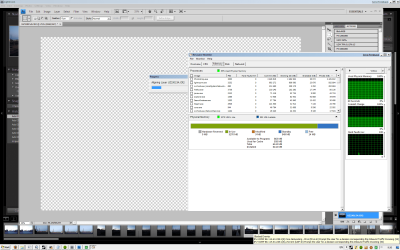
6GB doesn't hurt
 

Attachments

  • ps64bit.png
    ps64bit.png
    85.7 KB · Views: 176

My Computer My Computer

OS
x64
CPU
i7 920 @ 965
Motherboard
Asus Rampage
Memory
12GB 2000Mhz
Graphics Card(s)
4850x2 1GB
Monitor(s) Displays
Eizo ColorEdge 24", Benq 20", Sony Bravia 32"
Screen Resolution
1920x1200, 1680x1050
Hard Drives
5xWD
Keyboard
G15
Mouse
G5
Internet Speed
24/1
4GB ram w/ x86 OS w/512mb gpu never caused me performance loss. In fact it does help. Now a 1GB or 2GB gpu that's a different story.
512mb gpu = 3325mb available system memory (for me anyway)
Plenty for what I need.
 

My Computer My Computer

Computer type
PC/Desktop
Computer Manufacturer/Model Number
Black Shadow IV
OS
Win7 x64
CPU
i5-3570K
Motherboard
Asrock Z77 Extreme4
Memory
2x4GB Rip Jaws 8-9-9-24
Graphics Card(s)
Asus R9 280X
Sound Card
X-Fi Extreme Music
Monitor(s) Displays
Dell U2412M
Screen Resolution
1920x1200
Hard Drives
Samsung Evo 250GB /
OCZ Vertex 4 128GB
PSU
Seasonic 660XP2
Case
Fractal Design R4
Cooling
Noctua NH-U12S
6GB doesn't hurt

That's why I mocked Tom's article... They didn't use any memory intensive programs while testing. No photoshop, premier, vegas video, avid... You want to do an article on high memory amounts, do something that will use it...
 

My Computer My Computer

Computer Manufacturer/Model Number
fakeasdf (c)
OS
Win 7 Pro x64 x 3, Win 7 Pro x86, Ubuntu 9.04
CPU
2 x C2D [email protected] Ghz, C2D [email protected] ghz, P4 @ 3.0 ghz,
Motherboard
GIGABYTE GA-EP35-DS3P LGA 775 Intel P35 ATX Dynamic Energy S
Memory
2x8 GB Corsair, 4GB Kingston, 2GB GSkill
Graphics Card(s)
ATI Radeon 4670 1 GB DDR3, 2600 Pro, 2400 Pro, Intel 965
Sound Card
I don't care... Connected using Optical on Media Center
Monitor(s) Displays
Panasonic Viera 50" Plasma, 2x 19"
Screen Resolution
1080P, 1280x1024's
Hard Drives
4 Terabytes
Case
Antec P182 Gun Metal Black
Internet Speed
20 Mbit U/D
Hi all

I never meant to say DON'T put more RAM in your machine -- all I
wanted to say is that the way most modern OS'es work (and that includes going back as far as the Venerable MVS/370 mainframe stuff from IBM) adding more memory per se won't necessarily buy you improvement.

My point was essentially to say that you might be better off upgrading Disks and Graphics BEFORE considering any upgrade.

Some applications may well load up totally into Virtual memory before starting - but with superfetch and other OS "tricks" this will only be noticed as a delay on starting the application and then probably not even if you only have 2GB RAM in your machine.

I've seen a 1GB notebook running X-64 build 7068 runnng the 64 bit version of Photoshop quite satisfactorily. -- OK you can't process 1000's of photos in Batch like you can on a machine with more RAM but it's adequate.

Remember in any case instructions have to be moved to the CPU decode area for execution and the CPU's are usually these days multi-processor AND multi-threading. The system will while the instruction is executing have already "selected" and "pre-fetched" the next set of instructions so the delay (especially from fast DISK) will be fairly small.

Large RAM is required for these sets of scenarious.

1) Multiple users concurrently using the Machine (such as Database Servers or even just corporate type servers running corporate applications with multiple users -- basic file and print servers excluded).

2) If you are running a LOT of applications at the same time (and I mean A LOT > 10).

3) You need to "Buffer" HUGE amounts of I/O -- for example backing up quickly several TB of data in the largest chunks possible -- but even here you are limited by the speed that the I/O device can read the data from the Buffers -- whilst one buffer is being read the other can be filled.

4) You need to run a whole slew of Virtual Machines at the same time --one application that does "Eat RAM for Breakfast".

It's NOT wrong to put 8GB of RAM in your machine for example but for typical users you won't actually see much advantage or performance gain -- but you most certainly would by swapping say typical "consumer grade" hard disks for expensive but very fast SCSI Raptors or similar.

Cheers
jimbo
 

My Computer My Computer

Computer type
PC/Desktop
Computer Manufacturer/Model Number
Custom built, several laptops HP/ASUS
OS
Linux CENTOS 7 / various Windows OS'es and servers
CPU
Intel i7 Intel i5
Memory
8GB, 16GB
Graphics Card(s)
On Motherboard
Sound Card
Realtek HD audio
Monitor(s) Displays
Apple Cinema display, Samsung LCD
Screen Resolution
1920 X 1080
Hard Drives
4 X 1TB SATA
Mouse
Toshiba wireless laser
Internet Speed
> 20MB up
I accept your apology... Nah, I'm just messing with you man, that's a much better explanation:)

[ame=http://www.colbertnation.com/the-colbert-report-videos/164483/march-20-2008/water-is-life]Water Is Life | March 20,2008 - Dean Kamen | ColbertNation.com[/ame]
 

My Computer My Computer

Computer Manufacturer/Model Number
fakeasdf (c)
OS
Win 7 Pro x64 x 3, Win 7 Pro x86, Ubuntu 9.04
CPU
2 x C2D [email protected] Ghz, C2D [email protected] ghz, P4 @ 3.0 ghz,
Motherboard
GIGABYTE GA-EP35-DS3P LGA 775 Intel P35 ATX Dynamic Energy S
Memory
2x8 GB Corsair, 4GB Kingston, 2GB GSkill
Graphics Card(s)
ATI Radeon 4670 1 GB DDR3, 2600 Pro, 2400 Pro, Intel 965
Sound Card
I don't care... Connected using Optical on Media Center
Monitor(s) Displays
Panasonic Viera 50" Plasma, 2x 19"
Screen Resolution
1080P, 1280x1024's
Hard Drives
4 Terabytes
Case
Antec P182 Gun Metal Black
Internet Speed
20 Mbit U/D
Back
Top