Software migration from WinXP 32bit to Win7 64bit

Nick2

New member
Member
Local time
8:06 AM
Messages
38
I've made my decision, I'm going to stick with Windows 7 Professional.

The problem is that I have lots of 32bit programs that I need to migrate( along with their settings) to their 64bit version.
Is it possible to use settings/profiles from the 32bit version to the 64bit version?

Where do I put the profiles for these programs that in XP were stored in "Application Data" or "Local Settings/Application Data"?

How do I edit permissions for programs that want to edit files from their native folder or from other specified folders?
(for example emule edits it's config folder from Program Files or edits the incomplete temp files)
 

My Computer My Computer

OS
Windows 7 Professional x64

My Computer My Computer

Computer Manufacturer/Model Number
Apple Macbook Pro (April 2009)
OS
W7 Ult. x64 | OS X
CPU
Intel Mobile Core 2 Duo 2.93Ghz [T9800 Penryn]
Motherboard
NVIDIA nForce 730i Rev. B1 [Mac-F2268EC8 (U2E1)]
Memory
4096MB Samsung DDR3 Dual Channel [PC3-8500F 1066Mhz]
Graphics Card(s)
NVIDIA GeForce 9600M GT 512MB [G96M Rev. C1]
Sound Card
SB X-Fi Surround 5.1 USB | Onboard Realtek (Disabled)
Monitor(s) Displays
Acer x223wbd 22" | Apple Anti-Glare 17" (Disabled)
Screen Resolution
{Current} 1440x900 {Acer} 1680x1050 {Apple} 1920x1200
Hard Drives
{Internal}
Seagate Momentus 320GB 2.5" 7200RPM [ST9320421AS]

{Externals}
LaCie 320GB USB 2.0 HDD [301284UR]
LaCie 750GB USB 2.0 FW400 eSATA HDD [301314U]
LaCie 1TB USB 2.0 HDD [301304UR]
PSU
Magsafe
Case
Aluminum/Unibody (MBP52)
Cooling
2 x 6000 RPM Fans
Keyboard
Logitech G-15v2 [PN 920-000379]
Mouse
Logitech G-9 [PN 910-000338]
Internet Speed
12Mbps/2.5Mbps w/ 24Mbps Speed Boost [Comcast]
Other Info
Logitech X-540 Speakers [PN 970223-0122]
Sennheiser PC-151 Headset
Where do I put the profiles for these programs that in XP were stored in "Application Data" or "Local Settings/Application Data"?

Application Data == AppData/Roaming
Local Settings == AppData/Local

How do I edit permissions for programs that want to edit files from their native folder or from other specified folders?
(for example emule edits it's config folder from Program Files or edits the incomplete temp files)

Configure those applications not to do that. Or run those applications as administrator for the first time and set them up, then never again. Now if the applications try to write to any where inside of "Program Files" the write and read should be redirected to VirtualStore.
 

My Computer My Computer

Computer type
PC/Desktop
Computer Manufacturer/Model Number
Alienware Aurora ALX R4
OS
Windows 10 Pro (x64)
CPU
Intel Core i7-3930K (3.2GHz - 4.5GHz)
Motherboard
Alienware Aurora-R4 x79
Memory
4x Samsung 4GB PC3-12800 DDR3 (16GB 1600MHz)
Graphics Card(s)
Nvidia Geforce GTX 690
Sound Card
SteelSeries Siberia Elite
Monitor(s) Displays
Dell UltraSharp U3011
Screen Resolution
2560x1600
Hard Drives
Samsung 850 Pro 256 GB, Seagate 1TB Desktop Hybrid HDD, 2x Western Digital 4TB Green HDD
PSU
875W Some Dell PSU <.<
Case
Alienware Aurora ALX
Cooling
Custom Liquid Cooling (EK CPU & GPU blocks) dual EK 480RAD
Keyboard
Logitech G710+ Mechanical
Mouse
Logitech G700s
Internet Speed
Verizon Fios (50 mbps average)
Other Info
Server: Intel NUC D54250WYK: i5-4250U, 16GB, 256 GB mSATA, Windows Server 2012 R2
Configure those applications not to do that. Or run those applications as administrator for the first time and set them up, then never again. Now if the applications try to write to any where inside of "Program Files" the write and read should be redirected to VirtualStore.

I felt like I was hit by a hammer.:what:

How do I disable this? I don't want the OS to interfere with the software that I install. I don't want any of these virtual folders/paths and stuff like that.
It only makes things worse.
 

My Computer My Computer

OS
Windows 7 Professional x64
How do I disable this? I don't want the OS to interfere with the software that I install. I don't want any of these virtual folders/paths and stuff like that.
Then don't have the software write to protected locations. There is no reason an application needs to write to Program Files. Either configure the application with more reasonable locations to write its data to, or install it into your user directory.

The more you fight against the grain, the more hair you are going to lose.
 

My Computer My Computer

Computer type
PC/Desktop
Computer Manufacturer/Model Number
Alienware Aurora ALX R4
OS
Windows 10 Pro (x64)
CPU
Intel Core i7-3930K (3.2GHz - 4.5GHz)
Motherboard
Alienware Aurora-R4 x79
Memory
4x Samsung 4GB PC3-12800 DDR3 (16GB 1600MHz)
Graphics Card(s)
Nvidia Geforce GTX 690
Sound Card
SteelSeries Siberia Elite
Monitor(s) Displays
Dell UltraSharp U3011
Screen Resolution
2560x1600
Hard Drives
Samsung 850 Pro 256 GB, Seagate 1TB Desktop Hybrid HDD, 2x Western Digital 4TB Green HDD
PSU
875W Some Dell PSU <.<
Case
Alienware Aurora ALX
Cooling
Custom Liquid Cooling (EK CPU & GPU blocks) dual EK 480RAD
Keyboard
Logitech G710+ Mechanical
Mouse
Logitech G700s
Internet Speed
Verizon Fios (50 mbps average)
Other Info
Server: Intel NUC D54250WYK: i5-4250U, 16GB, 256 GB mSATA, Windows Server 2012 R2
I've just reinstalled the OS (just because I had installed XP Mode, Classic Shell and changed a permission rule for emule and forgot how to undo it), because I wanted everything to be brand new and guess what?

After installing NOD32 x64 and Outpost Firewall x64 (original files), not warez, the screen goes black just shortly after log on and the computer does not respond even though I can move the pointer on the screen.

This is a legal Win7 x64 Professional DVD.

As usual, Microsoft never stops to amaze me.
 

My Computer My Computer

OS
Windows 7 Professional x64
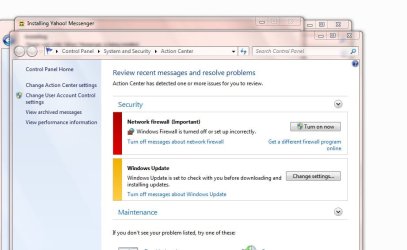
After uninstalling Outpost Firewall from Safe Mode, the standard Windows Firewall gives me this message everytime I log on, saying that it's turned off.
 

Attachments

  • Capture22.jpg
    Capture22.jpg
    52.8 KB · Views: 17

My Computer My Computer

OS
Windows 7 Professional x64
After uninstalling Outpost Firewall from Safe Mode, the standard Windows Firewall gives me this message everytime I log on, saying that it's turned off.

Oh I don't know, maybe because it is off? Just saying.
 

My Computer My Computer

Computer type
PC/Desktop
Computer Manufacturer/Model Number
Alienware Aurora ALX R4
OS
Windows 10 Pro (x64)
CPU
Intel Core i7-3930K (3.2GHz - 4.5GHz)
Motherboard
Alienware Aurora-R4 x79
Memory
4x Samsung 4GB PC3-12800 DDR3 (16GB 1600MHz)
Graphics Card(s)
Nvidia Geforce GTX 690
Sound Card
SteelSeries Siberia Elite
Monitor(s) Displays
Dell UltraSharp U3011
Screen Resolution
2560x1600
Hard Drives
Samsung 850 Pro 256 GB, Seagate 1TB Desktop Hybrid HDD, 2x Western Digital 4TB Green HDD
PSU
875W Some Dell PSU <.<
Case
Alienware Aurora ALX
Cooling
Custom Liquid Cooling (EK CPU & GPU blocks) dual EK 480RAD
Keyboard
Logitech G710+ Mechanical
Mouse
Logitech G700s
Internet Speed
Verizon Fios (50 mbps average)
Other Info
Server: Intel NUC D54250WYK: i5-4250U, 16GB, 256 GB mSATA, Windows Server 2012 R2
Yes, but I turn it on, and it keeps showing me that message every time I start the PC.
 

My Computer My Computer

OS
Windows 7 Professional x64
Back
Top