Crackling sound and audiodg.exe problems

keshek

New member
Local time
5:06 PM
Messages
8
Atm I am having 2 sound problems in Windows 7 x64. I am using a Soundblaster X-FI platinum PCI sound card. I am using the most recent Windows 7 beta drivers for my sound card, found here: Creative Worldwide Support

First problem is that often when multiple programs are using sound such as Media Player and a game and/or Ventrilo I get a slight crackle in the sound that slowly escalates. This gets worse and worse until the sound actually starts to lag and music even slows down and breaks up. At one point as this peaked I actually lost sound for about 30 - 45 seconds.

Second off the audiodg.exe process seems to have a serious memory leak. IT starts at about 11MB memory usage and atm, after about 2 hours of gaming and listening to music it is at 430MB.

I had to reboot about 2 hours ago do to memory usage problems. audiodg.exe was at about 300MB and it was about 1.5 to 2 hours since when I lost sound for about 30 - 45 seconds. I have 4GB of memory and from what I could tell looking at the task manager, I could only account for 2.5GB of the reported 3.5GB usage.

I have also read reports of random audiodg.exe cpu usage spiking. My theory atm is that after a while when the usage on audiodg.exe gets abnormally high, it starts to become unstable and eventually crashes. This would explain why I lost sound for 30 -45 seconds while windows restarted the process. I was not monitoring its memory usage prior to that so I cannot be sure. Also after the temporary loss of sound the crackling lessened and the sound lag went away. And since the reboot it has subsided for the moment, but it is a recurring problem I have had since installing windows 7.

Any input or ideas on how to solve the problem would be helpfull.
 

My Computer My Computer

OS
Windows 7
This file/process used to cause problems in Vista too for some people. It is basically the new audio engine/manager of Windows Vista and now 7. You are experiencing a memory leak that over time, as more applications produce sound, becomes a resource hog and brings down your computer and sound performance. It is similar to how my Alienware AlienFusion Power Management works under Windows 7. I had to disable it. In your case you cant disable audiodg.exe without losing sound, so my best guess is it is a driver issue. Youll have to keep restarting or be patient with Creative (They never have supported Vista properly, let's see if they support 7 better) Do you have integrated audio? Try to use that instead for now if you do.
 

My Computer My Computer

Computer Manufacturer/Model Number
Alienware m15x
OS
Windows Seven 7000 Beta
CPU
Intel Core 2 Duo Extreme X9000 2.8
Motherboard
Alienware m15x
Memory
2.5 DDR2
Graphics Card(s)
nVidia 8600 256MB
Sound Card
Bose Companion 5 USB
Monitor(s) Displays
m15x Built in LCD
Screen Resolution
900p
Hard Drives
120GB 7200RPM
External USB 7200RPM 1TB (for storage)
Case
m15x ripley
Cooling
2 Standard Laptop Fans
Keyboard
Illuminated Alien FX keyboard
Mouse
Touchpad
Internet Speed
6 MBPS
what you can try is go to your control panel then go to sound...
right click your sound device and go to then advance...
there where it says default format lower it...
this should lower the post processing the pc has to do...
also check if any effect are on in the enhancements tab...
if doesnt work what you can do is untick the two boxes in the advance mode in the exclusive mode under the Advance tab....
 

My Computer My Computer

Computer Manufacturer/Model Number
Tx2500z Tablet Pc/Homemade Server
OS
Windows 7 Ult x64(x2), HomePrem x32(x4), Server 08 (+VM), 08 R2 (VM) , SuSe 11.2 (VM), XP 32 (VM)
CPU
Turion X2 ultra (oh well came with laptop)/P4 @3.2 (yes P4)
Motherboard
IDK HP Motherboard / Intel DG965SS
Memory
OCZ Dual Channel 4GB kit/ 1gb Dual Channel
Graphics Card(s)
HD 3200 graphics /GMA x3100 (yay for intergrated!!)
Sound Card
Realtek HD Audio(mic working, well sort of)/Siig IC-70012
Monitor(s) Displays
built-in Hp 12" laptop screen/ Acer 19"
Screen Resolution
1280x800 /1440x900
Cooling
All Air Cooled
Mouse
Logi MX Rev. /MS Wheel Optical 1.1A /Logitech Optical Mouse
Internet Speed
College baby but its still routed through vpn to 1536k...
Other Info
love my wacom pen and pressure sensitivity...
wished it worked in 7, SUSE for that matter though

My Computer My Computer

OS
windows Seven 32bit RC
CPU
AMD Athlon XP 2500+M Barthon @3500
Motherboard
Epox 8RDA3+
Memory
2x Kingston HyperX 1Go
Graphics Card(s)
Gainward 7600GT agp GoldenSample
Monitor(s) Displays
Hitashi CRT 22"
Screen Resolution
1024/768 - 32Hz
Hard Drives
Samsung S-Ata2 500Go SpinPoint
2x Hitashi ata 133 40Go
PSU
Antec SmartPower 450w
Cooling
ArcticCooling Silent2
Internet Speed
3200
This isn't a driver problem (for me), because I have the same cracking sound using the onboard sound card AND using different USB sound cards.

The problem occurs in any music player (in Windows Media Player, or Winamp).

The sound crackles and stutters when the CPU is busy. That is, when I open a Web page, or start a program, I hear pops and garbled sound if I’m playing music.

Here's what I've tried:

Installed the latest drivers.
Tried using 2 different external sound cards.
Installed the Codec lite pack .
Disabled speaker effects (enhancements).
Reset the BIOS to the factory default settings.
Flashed the system BIOS

A reboot fixes the problem, but then it eventually comes back.

I hate this because I love listening to music while I work.

Thanks LOADS for any suggestions!!


Specs:

Video: NVIDIA GeForce GT 220
Sound: NVIDIA (Relatek) High Definition Audio
Processor Intel Intel(R) Core(TM)2 Quad CPU Q8200 @ 2.33GHz
Browser MSIE 8.0
System OS Windows 7 Enterprise x64
Mobo P5QL PRO ASUSTeK Computer INC Version Rev 1.xx
Main Board BIOS American Megatrends Inc. BIOS Date: 03/12/09 10:04:29 Ver: 08.00.14 A_M_I_ - 3000912 20090312
Processor Clock Speed 2330 Mhz
Graphics Description NVIDIA GeForce GT 220
Memory Configuration 2048+2048+2048+2048;DIMM DDR Synchronous
DVD-RAM Model HL-DT-ST DVDRAM GH22NS50
Atheros AR8121/AR8113/AR8114 PCI-E Ethernet Controller
 

My Computer My Computer

Computer Manufacturer/Model Number
Custom
OS
Windows 7
CPU
Intel Core2 Quad 2330
Motherboard
P5QL PRO
Memory
8 GB
Graphics Card(s)
GeForce GT 220 1024 PCI-E
Sound Card
Realtek High def
I just had a look in my taskmanager and seen over 300k handles in use.

Checked the process list and the culprit is audiodg.exe

However the workarounds I see on the net to disable it are no go for me as I have no enhancements tab.

288meg used (seems high but not critical as I have 6 gig of ram)
273,585 handles used (this is the problem)
 

My Computer My Computer

Computer type
PC/Desktop
Computer Manufacturer/Model Number
home built
OS
windows 8.1 Pro x64
CPU
intel i5 4670k @ 4.3ghz
Motherboard
asus z87-plus
Memory
16 gig ram ddr3 @ 1600 corsair vengeance
Graphics Card(s)
evga 970 GTX 4 GIG FTW ACX 2.0
Sound Card
asus xonar D2X
Monitor(s) Displays
benq gw2765ht
Screen Resolution
2560x1440
Hard Drives
Samsung 850 pro SSD 512gig - boot device wooosh
WD black cavalier 640gig WD6401AALS
Seagate 500gig ST3500630AS
WD 2TB Green WDC20EARS
2 x WD Red 3TB WD30EFRX
Samsung 750gig HD753LG - on asmedia controller
PSU
coolermaster silent pro 600watt modular
Case
fractal define R4
Cooling
artic freezer i30, 3 case fans
Keyboard
microsoft business ps2 keyboard
Mouse
microsoft optical black mouse
Internet Speed
80/20 FTTC SkyBB
Antivirus
Nod32 AV v8, HitmanProAlert, SRP, System Hardening
Browser
Chrome x64
Other Info
Intel controller is in AHCI mode currently using IaSTOR 12.8.0.1016 drivers
where might i get 7.1 & what's the expense if any?
 

My Computer My Computer

Computer Manufacturer/Model Number
HP Pavilion Slimline s5120y
OS
64-bit Windows 7 (upgrade from vista)
CPU
AMD Athlon(tm) 7750 Dual-Core 2.70 GHz
Memory
3.8 GB
Monitor(s) Displays
HYUNDAI 24"
Hard Drives
470 GB
in my case the problem was caused by dosbox, when I closed down dosbox the handles all got released.
 

My Computer My Computer

Computer type
PC/Desktop
Computer Manufacturer/Model Number
home built
OS
windows 8.1 Pro x64
CPU
intel i5 4670k @ 4.3ghz
Motherboard
asus z87-plus
Memory
16 gig ram ddr3 @ 1600 corsair vengeance
Graphics Card(s)
evga 970 GTX 4 GIG FTW ACX 2.0
Sound Card
asus xonar D2X
Monitor(s) Displays
benq gw2765ht
Screen Resolution
2560x1440
Hard Drives
Samsung 850 pro SSD 512gig - boot device wooosh
WD black cavalier 640gig WD6401AALS
Seagate 500gig ST3500630AS
WD 2TB Green WDC20EARS
2 x WD Red 3TB WD30EFRX
Samsung 750gig HD753LG - on asmedia controller
PSU
coolermaster silent pro 600watt modular
Case
fractal define R4
Cooling
artic freezer i30, 3 case fans
Keyboard
microsoft business ps2 keyboard
Mouse
microsoft optical black mouse
Internet Speed
80/20 FTTC SkyBB
Antivirus
Nod32 AV v8, HitmanProAlert, SRP, System Hardening
Browser
Chrome x64
Other Info
Intel controller is in AHCI mode currently using IaSTOR 12.8.0.1016 drivers
I have the same issue with my audigy 2. I think we are screwed. I don't have the issue with realtek though. Just creative. I thought it was fixed but was running WMP while using vent and playing MW2 (realtek processing vent/MW2 and creative processing WMP and after about 5 minutes the music started to sound distorted to the point you couldn't understand what was playing. I've been battling this since the beta and it happens on both my pc's when I use any program in conjunction with WMP.
 

My Computer My Computer

Computer Manufacturer/Model Number
Home built
OS
Windows 7 Home Premium x64
CPU
AMD Phenom II X4 945
Motherboard
ASUS M4N98TD EVO AM3 NVIDIA nForce 980a SLI
Memory
8 GB G-Skill 1.5v DDR 3 1333Mhz
Graphics Card(s)
(2) MSI 512MB GTS 250 SLI
Sound Card
Soundblaster Audigy 2 platinum
Monitor(s) Displays
Samsung 2255BW 22"
Screen Resolution
1650 x 1050
Hard Drives
2 WD 250GB 7500RPM
PSU
Antec TP-750. The ultimate bang for the buck PSU
Case
Raidmax
Cooling
Sycthe Slipstream cooling fans(4)
Keyboard
Zboard Merc
Mouse
Logitech MX-518
Internet Speed
3MB
Other Info
LG Blu-Ray/DVD combo drive/LG DVD-RW w/ lightscribe
I've got the same problem, Use DCP latency checker it's always in red, this mean audio cracks everytime the hd reads or the cpu becomes busy. also sometimes ntoskrnl.exe almost use all the cpu time, when reading from the disk, (it's the secondary disk) i should get a new one and see what happens.
 

My Computer My Computer

OS
7
CPU
Amd 2600
Motherboard
asrock k7vt4a pro
Memory
1,5 gb
Graphics Card(s)
ati radeon 9750
Hard Drives
Samsumg 500Gb
Maxtor 300Gb
External:
Seagate 500Gb, 1,5Tb
LaCie 1Tb
I have the same problem as DarrylGittins.
Does somebody of you have a solution yet ?
 

My Computer My Computer

OS
Windows 7
I hate to tell you guys this but this is in fact a driver problem for certain. I had the exact same static sound problems with both my audigy 2 and 2zs cards on two completely different machines. The problem was fixed using the Daniel K drivers. These are the good ones with all the bells and whistles, these are only for the audigy series. You do have to use a torrent to get them though.

It says the drivers are for Vista but work perfectly with Win 7. There is also a Win 7 version of this torrent floating around but they work just as well. You guys with other creative cards should try googling for them. Good luck and don't forget to rep.

Creative Soundblaster Audigy Series Vista Drivers [by daniel k] Torrent Download - Torrent Reactor NET
 

My Computer My Computer

Computer type
PC/Desktop
Computer Manufacturer/Model Number
Home built
OS
Windows 7 Ult, Windows 8.1 Pro,
CPU
Q9650-4.275GHz, E8600 4.5GHz, E6750-3.8GHz
Motherboard
Evga 780i FTW
Memory
G.Skill PC2 9600 1200Mhz 5 5 5 15 2T
Graphics Card(s)
GTX480
Sound Card
Asus Xonar D2
Monitor(s) Displays
HannsG
Screen Resolution
1680X1050
Hard Drives
GSkill Phoenix Pro 120GB SSD
PSU
ThermalTake Toughpower 1000Watt modular
Case
ThermalTake XaserV
Cooling
Xigmatek S1283
Keyboard
Logitech G15
Mouse
Logitech G9
Internet Speed
T1
Audiodg problems ARE related to drivers

I can also confirm that drivers are the big issue with audiodg problems. I'll give you a brief overview of my history of audiodg problems, and my workarounds and solutions thereof:

First off, the build of Windows 7 I'm using now was an upgrade from Windows Vista Ultimate, which was installed in September of 2008. So, technically, I've been on the same "run" of an OS since then. Almost immediately (or within months) of installing Vista, I was having audiodg problems (although I didn't know it was as such at the time). I never have had problems related to cpu or memory usage with audiodg, instead, the problem has always been related to sound "popping" or "crackling" that many (unfortunately) have come to dread.

I have a Realtek onboard sound (don't know the exact model), and although they are better at handling audiodg, it seems Realtek can't shake the "popping" issues. I know other people with realtek boards and the same problem in Vista / 7 (popping issues, but no cpu / memory issues).

What I found in my initial investigation with the problem on Vista was that all the "hand-me-down" suggestions (disabling enhancements, lowering the output quality) had no effect on my system. After trying nearly everything, I eventually found that disabling my network adapter (disabling, not uninstalling) would immediately rectify all sound issues. This was regardless of network usage / cpu / memory usage. I tried a myriad of different experiements with different levels of usage, but, it made no difference. Sound popping would persist as long as the network adapter was enabled. I could have Media Player as the only program running, and the popping would persist, and conversely I could have a bazillion programs on, and I'd have stints where the popping wasn't so bad. However, disabling my network adapter (which was installed on a PCI slot -- it's a Linksys wireless-n adapter with the latest drivers; I also have an internal network adapter which is permanently disabled) would always fully fix the issue.

The sound popping was extremely frustrating, and it nearly led me to doing a clean install of Windows (way back in October 2008). When I could, I would disable my network adapter to listen to pure, uninterrupted music. Re-enabling the adapter would bring the popping back within seconds. However, eventually, the problem just went away, for really no known reason.

What I found out later, after doing a full system defrag (using the -w switch to also defrag files larger than 64 MB), that the sound popping returned. But, after a week or so, the popping disappeared. I ultimately found that performing a full defrag would have temporary effects on the sound popping. It was just something I came to live by.

Eventually, after updating my sound drivers from Realtek (they release updates on a near-weekly basis), I found that the sound popping was completely removed from Vista, even after defrags. My system was running with flying colors.

Forward to October 2009, and I upgrade to Windows 7. Initially, as with the later months of my Vista run, there was initially no sound popping in 7. However, in the last couple of months or so, sound popping has returned, although, not in the severity that it existed in Vista when it was present. The popping seems to have very short stints, or may persist throughout a boot (at which point it often is rectified upon restart). It also now appears to be unrelated to defragging. But, most of the time, it isn't there. There have been one or two occassions where the popping got quite bad, as bad as it was in Vista initially. And, again, disabling the network adapter fixes all issues, as it did in in Vista. But, unlike Vista, there does seem to be a correlation with system usage and the popping in Windows 7. Sound popping is more likely to occur in games now (the opposite seemed to be true with Vista), and in general is more likely to occur when the cpu has more to do.

But, it seems to be all within the drivers. I have yet to upgrade my drivers from the initial upgrade to Windows 7 (which was release R2.35), since then Realtek has offered many more driver updates (currently at R2.47). After updating to the newest drivers, I have yet to report any sound popping problems, but, that could change with time. After all, I went for a couple months in 7 with the same drivers and no sound problems.

In short -- if you continue to have sound popping problems with Realtek sound, explain your situation to Realtek, and hopefully they will improve their drivers in the future. The answer to to audiodg problems has to reside in with the drivers....
 

My Computer My Computer

Computer Manufacturer/Model Number
Custom / Personally built
OS
Windows 7 Ultimate Signature Edition 64-bit
CPU
AMD Althlon 64 X2 5000+ Black Edition
Motherboard
EVGA nForce 590 SLI AM2
Memory
Mushkin XP2-6400 - 8 GB (4x2GB) DDR2 800 MHz
Graphics Card(s)
EVGA e-GeForce 8800GTS 640MB x2 SLI
Sound Card
Onboard Realtek
Monitor(s) Displays
ViewSonic Optiquest Q20wb 20.1" 1680x1050
Hard Drives
Seagate Barracuda 7200.11 ST310005N1A1AS-RK 1TB SATA 3GB/s
Seagate Barracuda 7200.7 Plus ST3160023A 160GB IDE ATA100
PSU
Corsair CMPSU-650TX 650W ATX12V / EPS12V - Single 12V @ 52A
Case
Cooler Master Centurion 532 RC-532-SKN1 Black SECC ATX Mid T
Cooling
Sunbeam CR-CCTF 120 mm Core-Contact Freezer CPU Cooler
I can also confirm that drivers are the big issue with audiodg problems. I'll give you a brief overview of my history of audiodg problems, and my workarounds and solutions thereof:

In short -- if you continue to have sound popping problems with Realtek sound, explain your situation to Realtek, and hopefully they will improve their drivers in the future. The answer to to audiodg problems has to reside in with the drivers....

The thing is, audiodg may show abnormal cpu or memory use if there are driver conflicts within the system. There's been many here with cracking/popping issues, not all were related to the Realtek drivers. Several have been related to background programs from nVidia, or a virus scanner subsystem that continually scans the hard drive.

Here's a great tool for checking your system's realtime capabilities.

DPC Latency Checker

I've been using Realtek audio on a Gigabyte main board, with a built-in Realtek network adapter. The only problem I had early on was hardware related, my speakers weren't making a solid connection and the Realtek driver kept re-setting thinking I had plugged in a different device. Also have an M-Audio-Audiophile 24/96 audio card installed and running well. Caveat.. I have customized this system for audio use, and have built/sold a couple dozen machines for studio use, starting with WinXP, I may have more processes/services disabled compared to your average user.


Here's a list of the things I remember that have caused audio anomalies.

Older BIOS, update the BIOS to the latest available.
Update the motherboard's inf drivers.
Update your audio card's drivers.
Get the latest Network adapter drivers, (including wireless).
Check Task Manager for any processes using an abnormal amount of CPU.
Update your graphic drivers.

Check Task Manager Processes (and Services) for any background programs related to your Video card, disable them for testing.

Re-boot after installing new drivers.

Ap
 

My Computer My Computer

Computer Manufacturer/Model Number
Assembled in my workshop
OS
Windows 7 Home Premium
CPU
Intel Core 2 Duo @ 3.00gHz
Motherboard
Gigabyte GA-P35-S3G
Memory
4 GB
Graphics Card(s)
ATI Radeon HD 2600 XT
Sound Card
RME 24/96 Card, Realtek Internal Audio PreSonus FireStudio
Monitor(s) Displays
Acer 1917 (x2)
Screen Resolution
1280 x 1024 on both monitors
Hard Drives
Three 250GB Seagate SATA Barracuda 7200rpm
PSU
Rosewill 500-watt
Case
Rosewill mid-tower
Cooling
Noctua NH-U9B (CPU), PwrSupply fan + single large case Fan
Keyboard
Macally w/2/USB ports.
Mouse
Trackman Wheel
Other Info
Event 20/20 bas studio monitors, Yamaha sub.
Rackmount Korg/Roland/Yamaha synthesizers,
Cubase MIDI/audio recording. Sony Soundforge audio/mastering software. CD Architect Mastering. RME & Presonus audio interfaces.
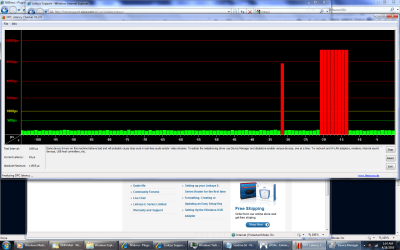
Interesting tool. After some use with it, it basically confirms that that the source of problems reside with my network adapter (a WMP-300N linksys PCI wireless-n adapter.... which, for all intents and purposes, has been outstanding for 4+ years running now... they haven't updated the drivers for the device since 2007). That said, since updating to realtek hd drivers R2.47 yesterday, I've had no sound skipping problems, even though I will get lag spikes on the DPC tool. It makes me wonder what the DPC tool looks like when I actually am getting sound popping....

Also, for reference, I have an EVGA nForce 590 SLI AMD mobo, with the latest nForce drivers installed (just came out last month... 15.25 is it? I don't know, either way, since Windows 7 has come out, there have been problems getting the mobo drivers to fully install with the nForce series below 600 I believe... it seems that the RAID driver doesn't get installed, or something along those lines... that problem didn't appear to be fixed in the latest release, either).

One thing I don't understand about the tool... it says that the test interval is is 1000 microseconds. If I remember my scientific units, that translates to a millisecond. However, the x-axis on the graph is clearly in seconds of time. So, one bar on the graph would actually be 1,000,000 microseconds, not 1000. So, I fail to see why they say the test interval is 1000 microseconds.

But anyway, basically, what I found is that on a regular period of 120 seconds (2 min), there would be a spike of about 7.5 milliseconds (with almost near-precision.... unfortunately, in the screenshot I provided, I could only make the width of the window about 100 seconds in time.... but, as soon as the a red bar would fade out after about another 15 seconds, a new one would pop in... it was definitely occuring in 120 second intervals... without fail).

Then, every five periods (this corresponds to 10 minutes), there would be following the regular lag spike, a sequence of several lag spikes in a row (between 5 and 7 I think) all around 13 milliseconds in time would occur.... this happened, like I said, with very precise regularity. In the attached picture, you can see the first lag spike is the one that happens every two minutes, and the sequence following it is the intense one that happens every 10 minutes.

The lag spikes were independent of network utilization (well, to a point, I suppose... my Internet is capped at 512 kbps.... which is far less than the capacity of the network adapter). Zero network utilization would not affect the period of lag spikes, neither would full bandwidth usage.

Of course, disabling the network adapter in the device manager would make ALL lag spikes disappear, permanently (at least for 20 minutes or so while I was watching it in the background while writing this post!).... so, according to that guy called logic, it must be the network adapter. Furthermore, disabling the network adapter causes some short spikes the moment of disabling, and the same for re-enabling the device (a couple lag spikes occur the moment of enabling the device). This may be a natural phenomenon when disabling / enabling devices, I'm not sure.

My guess is that the driver is doing a something like a hardware poll every 2 minutes or so and is thus holding onto the cpu for an extended period of time during this poll, causing the DPC lag spike. ARP queries are sent out every two minutes, right? Maybe it's something to do with something like that. Who knows. It must be faulty driver programming, whatever the case.

That said, like I said, ever since upgrading yesterday to Realtek version 2.47, I've had no sound popping issues, even when these lag spikes occur. Even during those intense lag spikes, I've had music playing in Media Player, and have observed zero audio drop-outs. So, I'd really like to see what the graphs look like when I am getting those drop-outs.

But, it makes me really wonder -- is it really the wireless card that's the problem, or is it the way the card interfaces with other hardware in the system -- i.e. the mobo -- that's the source of the problems? I mean, it gets complicated when the sound is also onboard... sure, I could put the wireless card in another system, and maybe I'd find out that there are no DPC lags on that system... but, then, is that because the mobo drivers of that system are correct, or is it because the network drivers just happen to work more nicely with it? Where does incidence really lie? And then, there was the crazy thing where I'd only notice it in Vista after defragging for about a week or so, at which point it'd disappear.... talk about crazy! If one could analyze the linksys drivers, maybe there's a poll or some op that it does every 2 min., then we could blame linksys. But, without being able to see the drivers, either from linksys, or from nvidia ... it's really impossible to tell....

I contacted Linksys support about it, and, suprisingly, I got a really nice representative about it, who pretty much took all my claims without questioning them, and then said she'd forward the case onto management.... so, hopefully it'll get fixed (not likley, considering the drivers haven't been updated since 2007 for the wmp-300n).
 

Attachments

  • Untitled.png
    Untitled.png
    100.7 KB · Views: 222
Last edited:

My Computer My Computer

Computer Manufacturer/Model Number
Custom / Personally built
OS
Windows 7 Ultimate Signature Edition 64-bit
CPU
AMD Althlon 64 X2 5000+ Black Edition
Motherboard
EVGA nForce 590 SLI AM2
Memory
Mushkin XP2-6400 - 8 GB (4x2GB) DDR2 800 MHz
Graphics Card(s)
EVGA e-GeForce 8800GTS 640MB x2 SLI
Sound Card
Onboard Realtek
Monitor(s) Displays
ViewSonic Optiquest Q20wb 20.1" 1680x1050
Hard Drives
Seagate Barracuda 7200.11 ST310005N1A1AS-RK 1TB SATA 3GB/s
Seagate Barracuda 7200.7 Plus ST3160023A 160GB IDE ATA100
PSU
Corsair CMPSU-650TX 650W ATX12V / EPS12V - Single 12V @ 52A
Case
Cooler Master Centurion 532 RC-532-SKN1 Black SECC ATX Mid T
Cooling
Sunbeam CR-CCTF 120 mm Core-Contact Freezer CPU Cooler
But, it makes me really wonder -- is it really the wireless card that's the problem, or is it the way the card interfaces with other hardware in the system -- i.e. the mobo -- that's the source of the problems? I mean, it gets complicated when the sound is also onboard... sure, I could put the wireless card in another system, and maybe I'd find out that there are no DPC lags on that system... but, then, is that because the mobo drivers of that system are correct, or is it because the network drivers just happen to work more nicely with it? Where does incidence really lie

Great post hannedog! woof!

I've come to the same conclusion and do believe that a lot of it has to do with the interaction of the onboard hardware devices interacting with the motherboard's BIOS, add to that the way the Win-7 organizes/prioritizes interrupt requests and you have a problem that has many answers. I've been hanging around here for a few months now and that's what I've observed.

One thing that made a huge difference in my system was a BIOS update. Using the DPC latency checker I was seeing spikes in the yellow every 15 seconds, even with all network, Firewire...ect devices disabled in Device manager. Nothing I tried changed the DPC latency, high of 700, low of 110. Updated the BIOS and DPC latency dropped to 47 with only slight variations. If I enabled the HPET (High Precision Event Timer) in BIOS, DPC latency increased to between 80-90, consistent with no spikes.

Users only see, at most, half the actual BIOS settings, probably much less than half. I'm guessing BIOS updates that tune the motherboard for Windows 7 timing are being made and that it will be a few months before driver technology and motherboard tweaks produce consistent results. Possibly a Win-7 service pack as well.

Ap
 

My Computer My Computer

Computer Manufacturer/Model Number
Assembled in my workshop
OS
Windows 7 Home Premium
CPU
Intel Core 2 Duo @ 3.00gHz
Motherboard
Gigabyte GA-P35-S3G
Memory
4 GB
Graphics Card(s)
ATI Radeon HD 2600 XT
Sound Card
RME 24/96 Card, Realtek Internal Audio PreSonus FireStudio
Monitor(s) Displays
Acer 1917 (x2)
Screen Resolution
1280 x 1024 on both monitors
Hard Drives
Three 250GB Seagate SATA Barracuda 7200rpm
PSU
Rosewill 500-watt
Case
Rosewill mid-tower
Cooling
Noctua NH-U9B (CPU), PwrSupply fan + single large case Fan
Keyboard
Macally w/2/USB ports.
Mouse
Trackman Wheel
Other Info
Event 20/20 bas studio monitors, Yamaha sub.
Rackmount Korg/Roland/Yamaha synthesizers,
Cubase MIDI/audio recording. Sony Soundforge audio/mastering software. CD Architect Mastering. RME & Presonus audio interfaces.
Updated the BIOS and DPC latency dropped to 47 with only slight variations. If I enabled the HPET (High Precision Event Timer) in BIOS, DPC latency increased to between 80-90, consistent with no spikes.
Wait, when you enabled HPET you got DPC latency increases? I though HPET was supposed to help. Or are you saying the increase is desirable, as long as it's stable, with no spikes? The moment you mentioned BIOS, the first thing I thought of was HPET, and how you can set it to 32-bit or 64-bit mode. On most BIOS, it defaults to 32-bit, which, of course, if you're using 64-bit Windows...

Too bad for me, I've been using the latest BIOS for, about.... oh, 3 years now. EVGA released a couple of updates for the BIOS shortly after it was released, but, pretty quickly thereafter discontinued official support of the 500 series (which, as a result, makes me unable to use AM2+ cpus.... that never has burned me too much though, besides quad-core, AMD's results with AM2+ were extremely disappointing.... and Phenom quite frankly sucked anyway. I disappointingly have found no AM2 cpu that bests in every way the one I currently have... which, is ridiculous, considering mine was released before AM2+ was).

I'm guessing BIOS updates that tune the motherboard for Windows 7 timing are being made and that it will be a few months before driver technology and motherboard tweaks produce consistent results. Possibly a Win-7 service pack as well.
I wouldn't be as optimistic there on that one. Well, not with regard to the "few months" aspect, anyway. I'm not sure how familiar you are with it, but, Windows 7 uses basically the exact same sound engine as Vista. In other words, parties all around the issue have had ample time to work on things... of course, things should eventually improve, but, they just might be slow-coming. Or, it has to do with hardware design that will only be rectified in the newest of hardware / future releases. I doubt I'll ever see a true fix on my system. But, since I can usually circumevent the problem about 90%, it's mostly a liveable thing (I hate it when it starts acting up, though... oh man, there have been a few occasions where the sound popping just likes to spaz out, it's like it has a personality... and I am almost just in utter disbelief at what's happening... but, strangely, only a few times has that happened... just like the loyal dog who only misbheaves a few times.... lol).
 

My Computer My Computer

Computer Manufacturer/Model Number
Custom / Personally built
OS
Windows 7 Ultimate Signature Edition 64-bit
CPU
AMD Althlon 64 X2 5000+ Black Edition
Motherboard
EVGA nForce 590 SLI AM2
Memory
Mushkin XP2-6400 - 8 GB (4x2GB) DDR2 800 MHz
Graphics Card(s)
EVGA e-GeForce 8800GTS 640MB x2 SLI
Sound Card
Onboard Realtek
Monitor(s) Displays
ViewSonic Optiquest Q20wb 20.1" 1680x1050
Hard Drives
Seagate Barracuda 7200.11 ST310005N1A1AS-RK 1TB SATA 3GB/s
Seagate Barracuda 7200.7 Plus ST3160023A 160GB IDE ATA100
PSU
Corsair CMPSU-650TX 650W ATX12V / EPS12V - Single 12V @ 52A
Case
Cooler Master Centurion 532 RC-532-SKN1 Black SECC ATX Mid T
Cooling
Sunbeam CR-CCTF 120 mm Core-Contact Freezer CPU Cooler
Updated the BIOS and DPC latency dropped to 47 with only slight variations. If I enabled the HPET (High Precision Event Timer) in BIOS, DPC latency increased to between 80-90, consistent with no spikes.
Wait, when you enabled HPET you got DPC latency increases? I though HPET was supposed to help. Or are you saying the increase is desirable, as long as it's stable, with no spikes? The moment you mentioned BIOS, the first thing I thought of was HPET, and how you can set it to 32-bit or 64-bit mode. On most BIOS, it defaults to 32-bit, which, of course, if you're using 64-bit Windows...

I wouldn't be as optimistic there on that one. Well, not with regard to the "few months" aspect, anyway. I'm not sure how familiar you are with it, but, Windows 7 uses basically the exact same sound engine as Vista. In other words, parties all around the issue have had ample time to work on things...

No, the HPET latency increase wasn't desirable, but at least there were no spikes.
All I know is HPET is the new multimedia timer that's supposed to offer some big advantages over the older system timers that were being used.

There has to be something noticably different between Vista's audio sub-system and Win7's. Many users have come here with perfectly working Vista systems unable to get Win7 producing similar results... main complaints: Skips, pops cracks.., low volume, no sound & conflicts with other installed devices.

Ap
 

My Computer My Computer

Computer Manufacturer/Model Number
Assembled in my workshop
OS
Windows 7 Home Premium
CPU
Intel Core 2 Duo @ 3.00gHz
Motherboard
Gigabyte GA-P35-S3G
Memory
4 GB
Graphics Card(s)
ATI Radeon HD 2600 XT
Sound Card
RME 24/96 Card, Realtek Internal Audio PreSonus FireStudio
Monitor(s) Displays
Acer 1917 (x2)
Screen Resolution
1280 x 1024 on both monitors
Hard Drives
Three 250GB Seagate SATA Barracuda 7200rpm
PSU
Rosewill 500-watt
Case
Rosewill mid-tower
Cooling
Noctua NH-U9B (CPU), PwrSupply fan + single large case Fan
Keyboard
Macally w/2/USB ports.
Mouse
Trackman Wheel
Other Info
Event 20/20 bas studio monitors, Yamaha sub.
Rackmount Korg/Roland/Yamaha synthesizers,
Cubase MIDI/audio recording. Sony Soundforge audio/mastering software. CD Architect Mastering. RME & Presonus audio interfaces.
There has to be something noticably different between Vista's audio sub-system and Win7's. Many users have come here with perfectly working Vista systems unable to get Win7 producing similar results... main complaints: Skips, pops cracks.., low volume, no sound & conflicts with other installed devices.
Well, there are differences, but "noticably" is stretching it. Thing is, it seems a lot of Vista people were able to successfully circumvent the problem in some way... only to have the problem re-appear with Windows 7. I'm one of those people. I've been following this issue for years, since, as I stated, it first plagued me with Vista (I'm on the same system as I was with Vista).... and despite my efforts, the problem seemed to disappear on its own after time.... and came back after Windows 7. My guess is the rise in "re-occurrence" with audiodg issues has more to do with other things that have changed in Windows 7 as opposed to the audio engine. Those other areas caused some misbehaving drivers which conversely affected the sound. And, naturally, once those kind of drivers got cleaned up in the months since 7's release, the audio problems for those people disappear pretty soon after that.

But, unfortunately, as for the core issue itself with audiodg, it seems there's still quite a bit of work to be done. As I never really "fixed" my problem when it was on Vista (instead having the good fortune of it just disappearing), the fact that it reappears on Windows 7 whenever it isn't in a good mood kind of reinforces this idea. Myabe there's some BIOS optimizations that could be done (but won't) for my system? Maybe audiodg could be improved? Who knows. But, given this has been the state of things for... going on almost four years now (since Vista's launch), it's likely not going to be fixed any time soon.... or maybe it'll just get fixed when I finally build a new system (in another two years).
 

My Computer My Computer

Computer Manufacturer/Model Number
Custom / Personally built
OS
Windows 7 Ultimate Signature Edition 64-bit
CPU
AMD Althlon 64 X2 5000+ Black Edition
Motherboard
EVGA nForce 590 SLI AM2
Memory
Mushkin XP2-6400 - 8 GB (4x2GB) DDR2 800 MHz
Graphics Card(s)
EVGA e-GeForce 8800GTS 640MB x2 SLI
Sound Card
Onboard Realtek
Monitor(s) Displays
ViewSonic Optiquest Q20wb 20.1" 1680x1050
Hard Drives
Seagate Barracuda 7200.11 ST310005N1A1AS-RK 1TB SATA 3GB/s
Seagate Barracuda 7200.7 Plus ST3160023A 160GB IDE ATA100
PSU
Corsair CMPSU-650TX 650W ATX12V / EPS12V - Single 12V @ 52A
Case
Cooler Master Centurion 532 RC-532-SKN1 Black SECC ATX Mid T
Cooling
Sunbeam CR-CCTF 120 mm Core-Contact Freezer CPU Cooler
Well, there are differences, but "noticably" is stretching it. Thing is, it seems a lot of Vista people were able to successfully circumvent the problem in some way... only to have the problem re-appear with Windows 7. I'm one of those people. I've been following this issue for years, since, as I stated, it first plagued me with Vista (I'm on the same system as I was with Vista).... and despite my efforts, the problem seemed to disappear on its own after time.... and came back after Windows 7. My guess is the rise in "re-occurrence" with audiodg issues has more to do with other things that have changed in Windows 7 as opposed to the audio engine. Those other areas caused some misbehaving drivers which conversely affected the sound. And, naturally, once those kind of drivers got cleaned up in the months since 7's release, the audio problems for those people disappear pretty soon after that.

After the BIOS update... I have zero issues.

As a test I just ran WMP playing a DVD, Winamp playing an MP3 file and IE8 playing a you tube video.

Audiodg checked in at 2 to 4% CPU use and the system was still fast and smooth.
Using the Shark007 codec pack.

I do have some of Windows services disabled as well as not loading a bunch of background applets, especially the Realtek audio configuration panel, no need to keep that in the system tray.

From a clean boot, after the system "settles" I have 27 total background processes running.

Ap
 

My Computer My Computer

Computer Manufacturer/Model Number
Assembled in my workshop
OS
Windows 7 Home Premium
CPU
Intel Core 2 Duo @ 3.00gHz
Motherboard
Gigabyte GA-P35-S3G
Memory
4 GB
Graphics Card(s)
ATI Radeon HD 2600 XT
Sound Card
RME 24/96 Card, Realtek Internal Audio PreSonus FireStudio
Monitor(s) Displays
Acer 1917 (x2)
Screen Resolution
1280 x 1024 on both monitors
Hard Drives
Three 250GB Seagate SATA Barracuda 7200rpm
PSU
Rosewill 500-watt
Case
Rosewill mid-tower
Cooling
Noctua NH-U9B (CPU), PwrSupply fan + single large case Fan
Keyboard
Macally w/2/USB ports.
Mouse
Trackman Wheel
Other Info
Event 20/20 bas studio monitors, Yamaha sub.
Rackmount Korg/Roland/Yamaha synthesizers,
Cubase MIDI/audio recording. Sony Soundforge audio/mastering software. CD Architect Mastering. RME & Presonus audio interfaces.
Back
Top