nView FIX - Got it working for Windows 7 x64

Mr PC Fixit

New member
Member
Local time
10:33 AM
Messages
14
Location
Melbourne, Australia
nView Solution - Got it working for Windows 7 x64

Ok Peoples. Ive been doing some research on how to fix the nView with Windows 7 Issue. Forgive me if someone has already posted this, but haven't been able to find anything else on the net with this fix.
Its a big of a muck-around.. but not too hard.

I'll try to make this as n00b proof as i can possibly can:

Step 1 - Download the latest Drivers from the nVidia website

Step 2 - Download WinRAR

Step 3 - Open the Driver file with WinRAR and extract the nView.CAB file (onto your desktop for now)

Step 4 - Open the nView.cab file with WinRAR and extract all the files into a folder on your desktop

Setp 5 - Run the nviewsetup.exe file as normal.

**Note - Some features are missing from the application, but most of the important features do work including :
- Prevent Windows from opening off-screen
- No Windows Span
- Customize individual applications

Also have it working together with Actual Windows Manager as well. both work great together.

If you run into any other issues, let me know and I'll see what i can do.
 
Last edited:

My Computer

OS
Windows 7 Professional x64
CPU
i7 2600k
Motherboard
MSI P67A-GD55 (MS-7681)
Memory
8Gb
Graphics Card(s)
nVIDIA GeForce GTX470
Monitor(s) Displays
Dual Monitors
Screen Resolution
1680x1050
Mouse
Logitech Performance MX
Internet Speed
ADSL2+
It's not working for me, I tried everything, without tv out i dont use my computer. I gess it's only solution to go back to windows XP and 150.16 version nvidia drivers
 

My Computer

OS
Windows 7
Graphics Card(s)
nvidia 8400gs
It's not working for me, I tried everything, without tv out i dont use my computer. I gess it's only solution to go back to windows XP and 150.16 version nvidia drivers

what Build are you using ?
type of graphics card ?
any error messages ?

I have the nVIDIA GeForce 7600 GS and no issues here at all
 

My Computer

OS
Windows 7 Professional x64
CPU
i7 2600k
Motherboard
MSI P67A-GD55 (MS-7681)
Memory
8Gb
Graphics Card(s)
nVIDIA GeForce GTX470
Monitor(s) Displays
Dual Monitors
Screen Resolution
1680x1050
Mouse
Logitech Performance MX
Internet Speed
ADSL2+
it worked for me. thank you so much.
 

My Computer

Computer Manufacturer/Model Number
Asus - Self Made
OS
Dual boot, Windows 7 x64, WinX86, XP Pro
CPU
Asus-SLI/Nvida
Motherboard
A8N-SLI
Memory
4gb Kingston
Graphics Card(s)
Nvida - 8600 GT
Sound Card
On Board - Realtek 97'
Monitor(s) Displays
Dell 1907FP(DIGITAL), NEC LCD 1760NX, Generic - NON - pnp M
Hard Drives
4 hard drives
400gb
Keyboard
Logitech Trackball, and Mouse, Keyboard
Mouse
Logitech
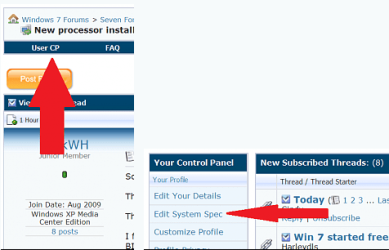
@dsw274 First off welcome to seven forums. Now a request for the future. If you'd go into your user CP's and fill in your system specs, for future reference and help by other members we would greatly appreciate it. Thanks Fabe usercp 1.png
 
Last edited:

My Computer

Computer Manufacturer/Model Number
Self Built
OS
Windows 7 ultimate 64 bit / XP Home sp3
CPU
intel Core 2 Duo E8400 3.0ghz
Motherboard
Asus P5ND bios 1401
Memory
8 gigs 1066 OCZ Fata1ty
Graphics Card(s)
EVGA GTX 580 Call of Duty Black Ops Edition
Sound Card
Creative Soundblaster Audigy 2zs
Monitor(s) Displays
Asus 24in LCD's 2MS X2
Screen Resolution
1920x1080p @60Hz
Hard Drives
WD Caviar 500 Black/ WD Caviar 200 Blue
PSU
OCZ 700W GameXtreme
Case
NZXT Apollo
Cooling
Corsair H50 CPU/120mm x3 /60mm x2 /Corsair Dominator Ram
Keyboard
Logitech Bluetooth Wireless MX5000
Mouse
Logitech Bluetooth Wireless MX1000
Internet Speed
Download 19.83 Upload 0.97
Other Info
Logitech Z2300 Speakers/ Bose Noise Cancelling Headphones/Avermedia PCI-e Hybrid TV Bravo/Epson NX415 all in one/ 4 Port Powered USB Hub/ LG 10x Bluray Burner /TSST Corp DVDRW External
@dsw274 First off welcome to seven forums. Now a request for the future. If you'd go into your user CP's and fill in your system specs, for future reference and help by other members we would greatly appreciate it. Thanks Fabe View attachment 34110

done, lets do one for one..
:D, can you lead me in the correct direction for the installation of Pinnacle with windows 7.
 

My Computer

Computer Manufacturer/Model Number
Asus - Self Made
OS
Dual boot, Windows 7 x64, WinX86, XP Pro
CPU
Asus-SLI/Nvida
Motherboard
A8N-SLI
Memory
4gb Kingston
Graphics Card(s)
Nvida - 8600 GT
Sound Card
On Board - Realtek 97'
Monitor(s) Displays
Dell 1907FP(DIGITAL), NEC LCD 1760NX, Generic - NON - pnp M
Hard Drives
4 hard drives
400gb
Keyboard
Logitech Trackball, and Mouse, Keyboard
Mouse
Logitech
Excellent work with the nView Desktop Manager! I was looking for a way to have the Virtual Desktops without fiddling with 3rd party apps.

Update: needed to reinstall as associated dll's seemed missing after restart. We'll see what happens.
 
Last edited:

My Computer

Computer Manufacturer/Model Number
Custom system
OS
Windows 7 Premium 64bit
CPU
Intel Core 2 Duo E8400 - 3GHz
Motherboard
Abit IP35 Pro
Memory
4GB Corsair - DDR2
Graphics Card(s)
Asus/nVIDIA GeForce EN8600GT
Sound Card
On Board
Monitor(s) Displays
2
Screen Resolution
High
Hard Drives
3 Samsung 7200's - 500/250/160GB
PSU
SeaSonic 450W
Case
LianLi
Internet Speed
Cable
i downloaded my drivers, and extracted it, but there is no nview
 

My Computer

Computer Manufacturer/Model Number
custom
OS
windows 7
CPU
intel e6600
Motherboard
gigabyte ga-ep45-ud3p rev 1.1
Memory
(4x) Corsair XMS2 DHX CM2X2048-6400
Graphics Card(s)
nvidia 7600 gt
Sound Card
onboard
@dsw274 First off welcome to seven forums. Now a request for the future. If you'd go into your user CP's and fill in your system specs, for future reference and help by other members we would greatly appreciate it. Thanks Fabe View attachment 34110

done, lets do one for one..
:D, can you lead me in the correct direction for the installation of Pinnacle with windows 7.
Well I would like to help you but I need more information, such as which version it may not be compatible with 7 but I don't mind doing some searching, as I'm not that familiar with video editing programs. This one is http://www.pinnaclesys.com/PublicSi...cts/Home+Video/Studio+Family/Studio+HD+14.htm
 

My Computer

Computer Manufacturer/Model Number
Self Built
OS
Windows 7 ultimate 64 bit / XP Home sp3
CPU
intel Core 2 Duo E8400 3.0ghz
Motherboard
Asus P5ND bios 1401
Memory
8 gigs 1066 OCZ Fata1ty
Graphics Card(s)
EVGA GTX 580 Call of Duty Black Ops Edition
Sound Card
Creative Soundblaster Audigy 2zs
Monitor(s) Displays
Asus 24in LCD's 2MS X2
Screen Resolution
1920x1080p @60Hz
Hard Drives
WD Caviar 500 Black/ WD Caviar 200 Blue
PSU
OCZ 700W GameXtreme
Case
NZXT Apollo
Cooling
Corsair H50 CPU/120mm x3 /60mm x2 /Corsair Dominator Ram
Keyboard
Logitech Bluetooth Wireless MX5000
Mouse
Logitech Bluetooth Wireless MX1000
Internet Speed
Download 19.83 Upload 0.97
Other Info
Logitech Z2300 Speakers/ Bose Noise Cancelling Headphones/Avermedia PCI-e Hybrid TV Bravo/Epson NX415 all in one/ 4 Port Powered USB Hub/ LG 10x Bluray Burner /TSST Corp DVDRW External
@dsw274 First off welcome to seven forums. Now a request for the future. If you'd go into your user CP's and fill in your system specs, for future reference and help by other members we would greatly appreciate it. Thanks Fabe View attachment 34110

done, lets do one for one..
:D, can you lead me in the correct direction for the installation of Pinnacle with windows 7.
Well I would like to help you but I need more information, such as which version it may not be compatible with 7 but I don't mind doing some searching, as I'm not that familiar with video editing programs. This one is Pinnacle Studio HD ? HD video editing and sharing for anyone
7 x64 7600gt
 

My Computer

Computer Manufacturer/Model Number
custom
OS
windows 7
CPU
intel e6600
Motherboard
gigabyte ga-ep45-ud3p rev 1.1
Memory
(4x) Corsair XMS2 DHX CM2X2048-6400
Graphics Card(s)
nvidia 7600 gt
Sound Card
onboard
Thanks for saving my life, Mr PC Fixit. Can't live without nView.

As of this writing, the latest GeForce driver that contains the nView cab is 195.62:

NVIDIA DRIVERS 195.62 WHQL

I'm currently using the 197.45 driver with nView 195.62 with no apparent difficulties.
 

My Computer

OS
Windows 7
CPU
Intel Core2 6600 @ 2.4GHz
Motherboard
Intel D975-XBX2
Memory
8GB
Graphics Card(s)
nVidia 7600GT
Sound Card
onboard
Monitor(s) Displays
2x Dell 21"
Hard Drives
2x Seagate 1TB 7200rpm (Marvell RAID-1)
PSU
Thermaltake
Case
some generic thing
Keyboard
Kinesis Ergo
Internet Speed
105Mbps
Thanks for saving my life, Mr PC Fixit. Can't live without nView.

As of this writing, the latest GeForce driver that contains the nView cab is 195.62:

NVIDIA DRIVERS 195.62 WHQL

I'm currently using the 197.45 driver with nView 195.62 with no apparent difficulties.

thanks for looking that up for me Brad.
 

My Computer

OS
Windows 7 Professional x64
CPU
i7 2600k
Motherboard
MSI P67A-GD55 (MS-7681)
Memory
8Gb
Graphics Card(s)
nVIDIA GeForce GTX470
Monitor(s) Displays
Dual Monitors
Screen Resolution
1680x1050
Mouse
Logitech Performance MX
Internet Speed
ADSL2+
thanks for looking that up for me Brad.

My pleasure.

A few other differences I've noticed:

Desktop Explorer now shows up on my desktop and can't be moved. Also, it doesn't show the active windows in each desktop in tree view and clicking on a desktop activates it instead of expanding it. You can, however, expand the desktop by adding "\[desktop name]" in the location bar.

Cmd prompts don't seem to want to move between desktops, either.
 

My Computer

OS
Windows 7
CPU
Intel Core2 6600 @ 2.4GHz
Motherboard
Intel D975-XBX2
Memory
8GB
Graphics Card(s)
nVidia 7600GT
Sound Card
onboard
Monitor(s) Displays
2x Dell 21"
Hard Drives
2x Seagate 1TB 7200rpm (Marvell RAID-1)
PSU
Thermaltake
Case
some generic thing
Keyboard
Kinesis Ergo
Internet Speed
105Mbps
Yeah, Nview is running, but it doesn't do anything. I'm trying to span the desktop but its not doing anything. I only get the standard windows "Extended desktop".
 

My Computer

OS
Windows & Ultimate x64
Yeah, Nview is running, but it doesn't do anything. I'm trying to span the desktop but its not doing anything. I only get the standard windows "Extended desktop".

what do you mean trying to span the desktop ?

Things to check
If the install went through correctly, you should be able to see NVIDIA nView Destop Manager in the Control Panel

If its there, click on it, and Enable nView.

If not, then your install didn't go through properly.
Pls update with more details if you need help
 

My Computer

OS
Windows 7 Professional x64
CPU
i7 2600k
Motherboard
MSI P67A-GD55 (MS-7681)
Memory
8Gb
Graphics Card(s)
nVIDIA GeForce GTX470
Monitor(s) Displays
Dual Monitors
Screen Resolution
1680x1050
Mouse
Logitech Performance MX
Internet Speed
ADSL2+
Yeah, Nview is running, but it doesn't do anything. I'm trying to span the desktop but its not doing anything. I only get the standard windows "Extended desktop".

what do you mean trying to span the desktop ?

Things to check
If the install went through correctly, you should be able to see NVIDIA nView Destop Manager in the Control Panel

If its there, click on it, and Enable nView.

If not, then your install didn't go through properly.
Pls update with more details if you need help

There should be an ability to do a horizontal span correct? where windows treats the two displays as one. I should see the taskbar at the bottom to confirm it is working and its not. If I open a full screen application, it only works on one screen.
 

My Computer

OS
Windows & Ultimate x64
Awesome, thx Mr PcFixit.

I was confused at first...installation looked normal but I couldn't find anything. Then I checked the control panel, voila, there it was. :)
 

My Computer

OS
Windows 7 Pro x64
Not working

I have newest Geforce drivers and did the nview install as instructed. I was able to run the install and enable Nview. I do have the extra little control panel at the top right of my windows. However, I do not have the ability to span to my second monitor. It is still working as extended. There is no Nview option in my Nvidia control panel. I had to open the program manually by searching for nview and clicking the nview desktop manager.

Does this still work with current Nvidia drivers?
 

My Computer

OS
windows 7 64
CPU
i7-2600 @ 3.4 GHz (8 CPUs)
Motherboard
Gigabyte P67A-UD3-B3
Memory
8 gig Corsair
Graphics Card(s)
Nvidia GeForce GTX 560 Ti
Sound Card
Realtek (Mobo)
You should be able to setup multiple monitors that way that you want just from the Nvidia Control Panel.
 

My Computer

Computer Manufacturer/Model Number
DIY
OS
W7x64 Pro, SuSe 12.1/** W7 x64 Pro, XP MCE
CPU
Phenom II 1090T w/Noctua NH-D14 /**4400+ X2 w/CM Hyper TX 3
Motherboard
ASRock 890FX Deluxe 4/**A8N-SLI
Memory
2 x 2GB Patriot PGS34g1600LLKA/**4x1GB Corsair VS
Graphics Card(s)
EVGA GTX460 SC/**EVGA 8800GTS
Sound Card
Asus Xonar D2X/**Xonar D1
Monitor(s) Displays
Acer X233H, Dell E152FPc /**LG M237-WD
Screen Resolution
1920x1080 & 1024x768/**1980x1080
Hard Drives
WDC 2TB, 1.5TB, 1TB, 500GB,Seagate 500GB , Maxtor 80GB /**500GB Seagate & WDC 1TB Black
PSU
CM RS600 w/ APC BX1000G/**Antec 500 TP w/ APC BX1000
Case
HAF922/**Antec 1040IIB
Cooling
3x200mm, 1x140 and 1x120mm/**5x80mm fans
Keyboard
Logitech Media USB/**Saitek Eclipse
Mouse
Cordless Trackman Wheel/**Ditto
Internet Speed
3.3Mbps
Other Info
SB 560 5.1 w/ Sennheiser RS140/**Creative T20 speakers, Dvico FusionHDTV7 Gold RT, Cisco E3000, HP 5510V AIO, Linksys E3000, Belkin F5U237 hub and **F5D8055 adapter
(** = 2nd rig)
I sure wish I could. However, it is not an option. Nvidia control panel only allows the option to "extend desktop" to second monitor, not "span" to second monitor. Nview is part of the control panel only with Windows XP drivers. Nview allows for spanning but it is not part of my control panel because I have Windows 7. This thread gave me hope that I could get Nview's spanning capability working with Windows 7.
 

My Computer

OS
windows 7 64
CPU
i7-2600 @ 3.4 GHz (8 CPUs)
Motherboard
Gigabyte P67A-UD3-B3
Memory
8 gig Corsair
Graphics Card(s)
Nvidia GeForce GTX 560 Ti
Sound Card
Realtek (Mobo)
Back
Top