
Clean Install with a Upgrade Windows 7 Version

How to Do a Clean Install with an Upgrade Windows 7 Version


   Information
This will show you how to do a Clean Install using a retail Upgrade Windows 7 installation disc.

   Warning
Remember that you need to legally own a valid qualifying previous version of Windows to use a Upgrade Windows 7, and to stop using (or uninstall) the qualifying OS while you have the upgrade installed. Microsoft only made doing a clean install from a upgrade Windows 7 possible to make it more convenient so you do not have to reinstall both the old Windows version (ex: Vista) and upgrade to Windows 7 everytime you needed or wanted to reinstall.

If you do not legally own a valid qualifying previous version of Windows, then you are violating the terms of Microsoft's Windows 7 End User License Agreement and could get your product key number invalidated by Microsoft. Plus, it is considered illegal.

For more about this, please see: Microsoft SMB Community Blog : Regardless of what any hack says, a Windows 7 Upgrade is an Upgrade. What you need to know.


OPTION ONE

A Normal Clean Install


1. Do a clean install at boot without checking the Automatically activate Windows when I'm online box during the installation process.

2. When the installation is finished, then manually activate Windows 7 with your product key number.

3. If your Windows should fail to activate, then pick up at step 2 in OPTION THREE below.


OPTION TWO

Through a Custom Install


   Note
This option will let you do a clean install of Windows 7 without formating the current Windows installation to have your current Windows installation backed up to the Windows.old folder during the installation of your retail upgrade Windows 7. This way you can copy any files back that you want from the C:\Windows.old folder (previous installation) back into your new installation afterwards.

1. Do a custom install at boot or from within your current Windows installation without checking the Automatically activate Windows when I'm online box during the installation process.

2. When the installation is finished, then manually activate Windows 7 with your product key number.

3. Copy any files that you want back from the C:\Windows.old folder into where you want it in you new installation.

4. You can now delete the Windows.old folder using Disk Cleanup to have a clean install now.


OPTION THREE

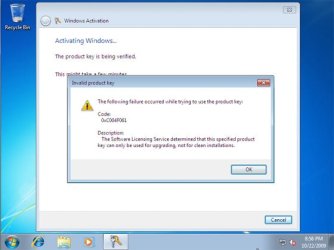
Clean Install with a Registry Workaround for Error Code 0xc004f061


   Note
If you get a activation error code 0xc004f061 while doing OPTION ONE or OPTION TWO above, then you will need to use this option instead
win7_upgrade_media_06.jpg


1. Do a clean install of your upgrade Windows 7 at boot without checking the Automatically activate Windows when I'm online box during the installation process.
NOTE: If you already did this from OPTION ONE above and got a activation error, then skip this step and just proceed to step 2 below instead. There's no need to reinstall again.

2. Click on the Download button below to download the .bat file below, and save it to your desktop.
Activate_Windows_Upgrade_after_Clean_Install.bat


Download


3. Right click on the downloaded .bat file, and click on Run as administrator.

4. If prompted, click/tap on Run and Yes (UAC).
NOTE: If you like, you can stop getting the Run prompt by unblocking the downloaded .bat file.

5. You will now notice a command prompt quickly open and close while applying the changes to your registry.

6. Click/tap on OK. (see screenshot below)
OK.jpg
7. Restart the computer.

8. When the computer is finished restarting, then manually activate Windows 7 with your product key number.


OPTION FOUR

Double Installing Windows 7


   Note
This option is the same that was used to do a clean install of an upgrade copy of Windows 7. It's more work, but if the options above did not work for you, then this should since this is the most reliable option.

1. Do a clean install of your upgrade Windows 7 at boot without checking the Automatically activate Windows when I'm online box during the installation process, and do not activate Windows 7. When finished with the clean install, do not or install any Windows Updates, drivers, or programs yet.

2. When finished with the clean install, start at step 4 at this link to do an in-place "upgrade" install with your upgrade Windows 7 installation disk from within the just now finished clean install of Windows 7.

3. When the in-place upgrade installation is completely finished, then manually activate Windows 7 with your product key number. You can now also install any Windows Updates drivers, and programs you like.
That's it,
Shawn


Attachments

Last edited:
This SAVED me big time!!!

Coming from an OEM copy of XP Pro and a failing HDD, I had to buy a new HDD.

Already installed Win7 2xs on failing HDD, but would not boot up. 2 days of Diagnostics showed it had read failure.

This is just a FANTASTIC option! I hate doing an upgrade install on top of an existing OS, I swear it causes problems. :geek:

I have no problem paying for a new OS, but let me install it the way I want to, MS!:devil:
 

My Computer

Computer type
Laptop
OS
Windows 7 Pro x64 (Upgrade, Clean Install)
You're most welcome Spddemun. I always prefer a clean install myself. :)
 

My Computer

Computer type
PC/Desktop
Computer Manufacturer/Model Number
Self built custom
OS
64-bit Windows 11 Pro for Workstations
CPU
Intel i7-8700K OC'd to 5 GHz
Motherboard
ASUS ROG Maximus XI Formula Z390
Memory
64 GB (4x16GB) G.SKILL TridentZ RGB DDR4 3600 MHz
Graphics Card(s)
ASUS ROG-STRIX-GTX1080TI-O11G-GAMING
Sound Card
Integrated
Monitor(s) Displays
2 x Samsung Odyssey G7 27"
Screen Resolution
2560x1440
Hard Drives
1TB Samsung 990 PRO M.2,
4TB Samsung 990 PRO PRO M.2,
TerraMaster F8 SSD Plus NAS
PSU
Seasonic Prime Titanium 850W
Case
Thermaltake Core P3
Cooling
Corsair Hydro H115i
Keyboard
Logitech wireless K800
Mouse
Logitech MX Master 4
Internet Speed
2 Gb/s Download and 100 Mb/s Upload
Antivirus
Malwarebyte Anti-Malware Premium
Browser
Google Chrome
Other Info
Logitech Z625 speaker system,
Logitech BRIO 4K Pro webcam,
HP Color LaserJet Pro MFP M477fdn,
APC SMART-UPS RT 1000 XL - SURT1000XLI,
Galaxy S23 Plus phone
So this is just telling how to make a clean install of a Windows 7 CD that is a later edition? As opposed to re-installing the same edition? Just wondering that's all.
 

My Computer

OS
Vista
Hello WF,

It's for how to do a clean formatted install of any retail copy of Windows 7 Upgrade edition.

I think you may mean a repair install for reinstalling the same edition again as a in-place upgrade?

Hope this helps,
Shawn
 
Last edited:

My Computer

Computer type
PC/Desktop
Computer Manufacturer/Model Number
Self built custom
OS
64-bit Windows 11 Pro for Workstations
CPU
Intel i7-8700K OC'd to 5 GHz
Motherboard
ASUS ROG Maximus XI Formula Z390
Memory
64 GB (4x16GB) G.SKILL TridentZ RGB DDR4 3600 MHz
Graphics Card(s)
ASUS ROG-STRIX-GTX1080TI-O11G-GAMING
Sound Card
Integrated
Monitor(s) Displays
2 x Samsung Odyssey G7 27"
Screen Resolution
2560x1440
Hard Drives
1TB Samsung 990 PRO M.2,
4TB Samsung 990 PRO PRO M.2,
TerraMaster F8 SSD Plus NAS
PSU
Seasonic Prime Titanium 850W
Case
Thermaltake Core P3
Cooling
Corsair Hydro H115i
Keyboard
Logitech wireless K800
Mouse
Logitech MX Master 4
Internet Speed
2 Gb/s Download and 100 Mb/s Upload
Antivirus
Malwarebyte Anti-Malware Premium
Browser
Google Chrome
Other Info
Logitech Z625 speaker system,
Logitech BRIO 4K Pro webcam,
HP Color LaserJet Pro MFP M477fdn,
APC SMART-UPS RT 1000 XL - SURT1000XLI,
Galaxy S23 Plus phone
Well no I don't mean that, so, what is the difference between a Clean install of Windows 7 and a Clean Install with a Upgrade Windows 7?
 

My Computer

OS
Vista
There is no difference. MS allows you to do a clean install of the retail upgrade version just like a full retail version. :)
 

My Computer

Computer type
PC/Desktop
Computer Manufacturer/Model Number
Self built custom
OS
64-bit Windows 11 Pro for Workstations
CPU
Intel i7-8700K OC'd to 5 GHz
Motherboard
ASUS ROG Maximus XI Formula Z390
Memory
64 GB (4x16GB) G.SKILL TridentZ RGB DDR4 3600 MHz
Graphics Card(s)
ASUS ROG-STRIX-GTX1080TI-O11G-GAMING
Sound Card
Integrated
Monitor(s) Displays
2 x Samsung Odyssey G7 27"
Screen Resolution
2560x1440
Hard Drives
1TB Samsung 990 PRO M.2,
4TB Samsung 990 PRO PRO M.2,
TerraMaster F8 SSD Plus NAS
PSU
Seasonic Prime Titanium 850W
Case
Thermaltake Core P3
Cooling
Corsair Hydro H115i
Keyboard
Logitech wireless K800
Mouse
Logitech MX Master 4
Internet Speed
2 Gb/s Download and 100 Mb/s Upload
Antivirus
Malwarebyte Anti-Malware Premium
Browser
Google Chrome
Other Info
Logitech Z625 speaker system,
Logitech BRIO 4K Pro webcam,
HP Color LaserJet Pro MFP M477fdn,
APC SMART-UPS RT 1000 XL - SURT1000XLI,
Galaxy S23 Plus phone
I know I'm just saying...there must be a slight difference...they are two different tutorials...

What comes to mind is the install upgrade thing...is it similar to that? Meaning, still a clean install but the Windows 7 you're installing is a more recent version? I guess that's it. Either way it doesn't matter in my case, I have one windows 7 CD and that's the only thing I'm going to use if I ever want to do a repair install or clean install which, I'm going to have to do after my most recent incident. :( :( :( pray for me
 

My Computer

OS
Vista
WE,

While Option Two and Option Three are different ways to do so, Option One is identical since clicking on the link in step 1 takes you to the other tutorial.

I wish you luck and hope it goes smoothly for you.
 

My Computer

Computer type
PC/Desktop
Computer Manufacturer/Model Number
Self built custom
OS
64-bit Windows 11 Pro for Workstations
CPU
Intel i7-8700K OC'd to 5 GHz
Motherboard
ASUS ROG Maximus XI Formula Z390
Memory
64 GB (4x16GB) G.SKILL TridentZ RGB DDR4 3600 MHz
Graphics Card(s)
ASUS ROG-STRIX-GTX1080TI-O11G-GAMING
Sound Card
Integrated
Monitor(s) Displays
2 x Samsung Odyssey G7 27"
Screen Resolution
2560x1440
Hard Drives
1TB Samsung 990 PRO M.2,
4TB Samsung 990 PRO PRO M.2,
TerraMaster F8 SSD Plus NAS
PSU
Seasonic Prime Titanium 850W
Case
Thermaltake Core P3
Cooling
Corsair Hydro H115i
Keyboard
Logitech wireless K800
Mouse
Logitech MX Master 4
Internet Speed
2 Gb/s Download and 100 Mb/s Upload
Antivirus
Malwarebyte Anti-Malware Premium
Browser
Google Chrome
Other Info
Logitech Z625 speaker system,
Logitech BRIO 4K Pro webcam,
HP Color LaserJet Pro MFP M477fdn,
APC SMART-UPS RT 1000 XL - SURT1000XLI,
Galaxy S23 Plus phone
Hi, Brink;

Great turorial. But I just want to clarify something, so that I know what to expect. This will work on an already activated copy of a Windows 7 installation? I preordered Windows 7 and have been using it (activated) since it was released last year... I did a custom install on top of my existing Vista installation (maintaining the "windows.old" directory). However, I've got a brand new hard drive on the way and I wish to do a completely clean install of Windows 7 on the new hard drive (I don't want to mess with transferring my current drive to the new one, I want to start absolutely clean by letting Windows 7 format the new drive and install brand new). One of the sites I've seen linked from this one is Paul Thurrott's Super Site for Windows, and the following post caught my eye:

http://community.winsupersite.com/b...r-multiple-installs-with-one-product-key.aspx

In it, he states the following:

"Each product key (with the exception of those supplied by the Windows 7 Family Pack, of course) allows for only one electronic, automatic activation".

Is this true? Am I going to have to call Microsoft this time, to get it activated? Or will the normal online activation work more than once? If I have to call, then so be it... but I just want to make sure I'm prepared with the correct phone number, support hours, etcetra. I would appreciate any clarification that you can offer.

Thanks again for the great post, and for taking the time to follow up with everyone's questions. :)

Jeff
 

My Computer

Computer Manufacturer/Model Number
Dell Dimension XPS Gen 5
OS
Windows 7 Professional, 32-bit (retail upgrade)
CPU
Pentium D 830 with Dual Core Technology (3 GHz, 800 FSB)
Motherboard
Intel
Memory
4 GB Dual Channel DDR2 SDRAM - 800 MHz
Graphics Card(s)
1024MB PCI Express 2.0 x16 nVidia GeForce 9600 GT
Sound Card
Sound Blaster Audigy 2 ZS
Monitor(s) Displays
Dell S2409W 24” 1080p HD Monitor
Screen Resolution
1920x1080 HD
Hard Drives
Dual (non-RAID) Seagate 640 GB SATA Hard Drives (7200 RPM)
Keyboard
Microsoft Natural Keyboard Pro (USB)
Mouse
Microsoft Wireless Laser Mouse 6000 (USB)
Internet Speed
Road Runner Cable (~10 Mb/sec)
Hello Jeff, and welcome to Seven Forums.

Yes, you can activate Windows 7 on that same computer with the same product key number as many times as you like as long as it's only installed on that computer and only once. :)

A retail Windows 7 can be installed and activated on any computer as long as it has been uninstalled from any previous computer first. Sometimes a phone activation may be required instead of a normal online activation.

A OEM Windows 7 can only be installed and activated on the exact same first computer it was activated on. It is permanently tied to the first computer and cannot activated on another computer. This is why a OEM Windows 7 is much cheaper than a retail (full) Windows 7.

Hope this helps,
Shawn
 

My Computer

Computer type
PC/Desktop
Computer Manufacturer/Model Number
Self built custom
OS
64-bit Windows 11 Pro for Workstations
CPU
Intel i7-8700K OC'd to 5 GHz
Motherboard
ASUS ROG Maximus XI Formula Z390
Memory
64 GB (4x16GB) G.SKILL TridentZ RGB DDR4 3600 MHz
Graphics Card(s)
ASUS ROG-STRIX-GTX1080TI-O11G-GAMING
Sound Card
Integrated
Monitor(s) Displays
2 x Samsung Odyssey G7 27"
Screen Resolution
2560x1440
Hard Drives
1TB Samsung 990 PRO M.2,
4TB Samsung 990 PRO PRO M.2,
TerraMaster F8 SSD Plus NAS
PSU
Seasonic Prime Titanium 850W
Case
Thermaltake Core P3
Cooling
Corsair Hydro H115i
Keyboard
Logitech wireless K800
Mouse
Logitech MX Master 4
Internet Speed
2 Gb/s Download and 100 Mb/s Upload
Antivirus
Malwarebyte Anti-Malware Premium
Browser
Google Chrome
Other Info
Logitech Z625 speaker system,
Logitech BRIO 4K Pro webcam,
HP Color LaserJet Pro MFP M477fdn,
APC SMART-UPS RT 1000 XL - SURT1000XLI,
Galaxy S23 Plus phone
Hi, Shawn;

Thank you for the clarification, and the welcome. I should have my new hard drives sometime this week, I hope to take care of all this next weekend. I'll report back on my results.

This is a great forum, I think I'm going to like it here! :thumbsup:

Thanks again;
Jeff
 

My Computer

Computer Manufacturer/Model Number
Dell Dimension XPS Gen 5
OS
Windows 7 Professional, 32-bit (retail upgrade)
CPU
Pentium D 830 with Dual Core Technology (3 GHz, 800 FSB)
Motherboard
Intel
Memory
4 GB Dual Channel DDR2 SDRAM - 800 MHz
Graphics Card(s)
1024MB PCI Express 2.0 x16 nVidia GeForce 9600 GT
Sound Card
Sound Blaster Audigy 2 ZS
Monitor(s) Displays
Dell S2409W 24” 1080p HD Monitor
Screen Resolution
1920x1080 HD
Hard Drives
Dual (non-RAID) Seagate 640 GB SATA Hard Drives (7200 RPM)
Keyboard
Microsoft Natural Keyboard Pro (USB)
Mouse
Microsoft Wireless Laser Mouse 6000 (USB)
Internet Speed
Road Runner Cable (~10 Mb/sec)
You're most welcome Jeff. I hope it goes smoothly. Be sure to let us know if you have any questions or run into any problems. :)
 

My Computer

Computer type
PC/Desktop
Computer Manufacturer/Model Number
Self built custom
OS
64-bit Windows 11 Pro for Workstations
CPU
Intel i7-8700K OC'd to 5 GHz
Motherboard
ASUS ROG Maximus XI Formula Z390
Memory
64 GB (4x16GB) G.SKILL TridentZ RGB DDR4 3600 MHz
Graphics Card(s)
ASUS ROG-STRIX-GTX1080TI-O11G-GAMING
Sound Card
Integrated
Monitor(s) Displays
2 x Samsung Odyssey G7 27"
Screen Resolution
2560x1440
Hard Drives
1TB Samsung 990 PRO M.2,
4TB Samsung 990 PRO PRO M.2,
TerraMaster F8 SSD Plus NAS
PSU
Seasonic Prime Titanium 850W
Case
Thermaltake Core P3
Cooling
Corsair Hydro H115i
Keyboard
Logitech wireless K800
Mouse
Logitech MX Master 4
Internet Speed
2 Gb/s Download and 100 Mb/s Upload
Antivirus
Malwarebyte Anti-Malware Premium
Browser
Google Chrome
Other Info
Logitech Z625 speaker system,
Logitech BRIO 4K Pro webcam,
HP Color LaserJet Pro MFP M477fdn,
APC SMART-UPS RT 1000 XL - SURT1000XLI,
Galaxy S23 Plus phone
Glad I found this post. I had purchased the Windows Pro 7 upgrade disc when it was first offered at a low price.
Once Windows 7 was released, I then changed my mind and purchased Windows 7 Ultimate so never used it.

Finally just got around too installing this on an older Xp computer that I want to give my Dad.
Well anyway it ended up that I formatted the drive,then when it came time to Activate, I recieved the invalid error.
I was like wtf, then realized of course I have formatted the Xp

This will save me some time in not having to reinstall the xp, then the Windows 7 again, lol :D

I was going to call microsoft tomorrow to give them hell, lol., or I thought maybe my key was pirated somehow.:huh:
 

My Computer

Computer type
PC/Desktop
Computer Manufacturer/Model Number
Evga X58
OS
Windows 7 Ultimate x64
CPU
Core i7 950 - 3.06 GHz
Motherboard
EVGA X58 SLI
Memory
Corsair XMS3 Dominator CMP12GX3M3A1600C9 12GB
Graphics Card(s)
eVGA GTX 550 TI-FPB 1GB
Sound Card
High Definition Audio
Monitor(s) Displays
ASUS VH242H 24 LCD
Screen Resolution
1920 X 1080
Hard Drives
2x - Seagate 1000GB Hard Drive SATA 3Gb/s 32MB Cache
Seagate 750GB Barracuda 7200.12 SATA II w/ 32MB Cache
WDC WD2500AAJB-00J3A0 ATA Device
PSU
OCZ ZX Series 1250W PSU
Case
ANTEC NINE HUNDRED TWO
Cooling
Zalman Reserator 3 MAX Dual CPU Cooler
Keyboard
Logitech
Mouse
Logitech
Other Info
2 x- HL-DT-ST DVDRAM GH24NS50 ATA Device
@windrider--Correct me if I'm wrong, but you could have used your Pro discounted-copy and then did the Anytime Upgrade to Ultimate? Don't know what the cost is, but may have been cheaper than Ultimate upfront.

I, too, was SO glad to have found this Forum! Thought I was going to have to do another install with XP under 7! :mad:
 

My Computer

Computer type
Laptop
OS
Windows 7 Pro x64 (Upgrade, Clean Install)
Hello Spddemun,

Yes, Windrider could have used a Anytime Upgrade to upgrade to Ultimate from Home Premium a bit cheaper, but you cannot do a clean install with a Anytime Upgrade copy of Windows 7. Only with a retail Upgrade copy. :(
 

My Computer

Computer type
PC/Desktop
Computer Manufacturer/Model Number
Self built custom
OS
64-bit Windows 11 Pro for Workstations
CPU
Intel i7-8700K OC'd to 5 GHz
Motherboard
ASUS ROG Maximus XI Formula Z390
Memory
64 GB (4x16GB) G.SKILL TridentZ RGB DDR4 3600 MHz
Graphics Card(s)
ASUS ROG-STRIX-GTX1080TI-O11G-GAMING
Sound Card
Integrated
Monitor(s) Displays
2 x Samsung Odyssey G7 27"
Screen Resolution
2560x1440
Hard Drives
1TB Samsung 990 PRO M.2,
4TB Samsung 990 PRO PRO M.2,
TerraMaster F8 SSD Plus NAS
PSU
Seasonic Prime Titanium 850W
Case
Thermaltake Core P3
Cooling
Corsair Hydro H115i
Keyboard
Logitech wireless K800
Mouse
Logitech MX Master 4
Internet Speed
2 Gb/s Download and 100 Mb/s Upload
Antivirus
Malwarebyte Anti-Malware Premium
Browser
Google Chrome
Other Info
Logitech Z625 speaker system,
Logitech BRIO 4K Pro webcam,
HP Color LaserJet Pro MFP M477fdn,
APC SMART-UPS RT 1000 XL - SURT1000XLI,
Galaxy S23 Plus phone
Why are they making things so difficult with this round? :sarc:
 

My Computer

Computer type
Laptop
OS
Windows 7 Pro x64 (Upgrade, Clean Install)
It was this way with Vista as well.

The Anytime Upgrade, student, and OEM copies being restricted like this is why you get Windows 7 at a lower price, and why the full retail copy is more expensive since it does not have these restrictions.
 

My Computer

Computer type
PC/Desktop
Computer Manufacturer/Model Number
Self built custom
OS
64-bit Windows 11 Pro for Workstations
CPU
Intel i7-8700K OC'd to 5 GHz
Motherboard
ASUS ROG Maximus XI Formula Z390
Memory
64 GB (4x16GB) G.SKILL TridentZ RGB DDR4 3600 MHz
Graphics Card(s)
ASUS ROG-STRIX-GTX1080TI-O11G-GAMING
Sound Card
Integrated
Monitor(s) Displays
2 x Samsung Odyssey G7 27"
Screen Resolution
2560x1440
Hard Drives
1TB Samsung 990 PRO M.2,
4TB Samsung 990 PRO PRO M.2,
TerraMaster F8 SSD Plus NAS
PSU
Seasonic Prime Titanium 850W
Case
Thermaltake Core P3
Cooling
Corsair Hydro H115i
Keyboard
Logitech wireless K800
Mouse
Logitech MX Master 4
Internet Speed
2 Gb/s Download and 100 Mb/s Upload
Antivirus
Malwarebyte Anti-Malware Premium
Browser
Google Chrome
Other Info
Logitech Z625 speaker system,
Logitech BRIO 4K Pro webcam,
HP Color LaserJet Pro MFP M477fdn,
APC SMART-UPS RT 1000 XL - SURT1000XLI,
Galaxy S23 Plus phone
Wel it all worked out anyway for me using this method, so no worries.
 

My Computer

Computer type
PC/Desktop
Computer Manufacturer/Model Number
Evga X58
OS
Windows 7 Ultimate x64
CPU
Core i7 950 - 3.06 GHz
Motherboard
EVGA X58 SLI
Memory
Corsair XMS3 Dominator CMP12GX3M3A1600C9 12GB
Graphics Card(s)
eVGA GTX 550 TI-FPB 1GB
Sound Card
High Definition Audio
Monitor(s) Displays
ASUS VH242H 24 LCD
Screen Resolution
1920 X 1080
Hard Drives
2x - Seagate 1000GB Hard Drive SATA 3Gb/s 32MB Cache
Seagate 750GB Barracuda 7200.12 SATA II w/ 32MB Cache
WDC WD2500AAJB-00J3A0 ATA Device
PSU
OCZ ZX Series 1250W PSU
Case
ANTEC NINE HUNDRED TWO
Cooling
Zalman Reserator 3 MAX Dual CPU Cooler
Keyboard
Logitech
Mouse
Logitech
Other Info
2 x- HL-DT-ST DVDRAM GH24NS50 ATA Device
Well, that's my problem...I didn't DO Vista!:D ;)

It was this way with Vista as well.

The Anytime Upgrade, student, and OEM copies being restricted like this is why you get Windows 7 at a lower price, and why the full retail copy is more expensive since it does not have these restrictions.
 

My Computer

Computer type
Laptop
OS
Windows 7 Pro x64 (Upgrade, Clean Install)
LOL, ok. ;)
 

My Computer

Computer type
PC/Desktop
Computer Manufacturer/Model Number
Self built custom
OS
64-bit Windows 11 Pro for Workstations
CPU
Intel i7-8700K OC'd to 5 GHz
Motherboard
ASUS ROG Maximus XI Formula Z390
Memory
64 GB (4x16GB) G.SKILL TridentZ RGB DDR4 3600 MHz
Graphics Card(s)
ASUS ROG-STRIX-GTX1080TI-O11G-GAMING
Sound Card
Integrated
Monitor(s) Displays
2 x Samsung Odyssey G7 27"
Screen Resolution
2560x1440
Hard Drives
1TB Samsung 990 PRO M.2,
4TB Samsung 990 PRO PRO M.2,
TerraMaster F8 SSD Plus NAS
PSU
Seasonic Prime Titanium 850W
Case
Thermaltake Core P3
Cooling
Corsair Hydro H115i
Keyboard
Logitech wireless K800
Mouse
Logitech MX Master 4
Internet Speed
2 Gb/s Download and 100 Mb/s Upload
Antivirus
Malwarebyte Anti-Malware Premium
Browser
Google Chrome
Other Info
Logitech Z625 speaker system,
Logitech BRIO 4K Pro webcam,
HP Color LaserJet Pro MFP M477fdn,
APC SMART-UPS RT 1000 XL - SURT1000XLI,
Galaxy S23 Plus phone
Back
Top