
Explorer Fonts/Windows Washed Out

Lomai

New member
Guru
VIP
Local time
3:05 AM
Messages
1,158
Hi All

Been tinkering with custom themes and icons - it appears that I somehow corrupted my fonts and display. When I revert to using a dark theme, the fonts come out ok but if I use a light theme, what I get is as attached.
I've gone past the system restore stage :doh:

Look forward to any assistance you can offer

Thanks
 

Attachments
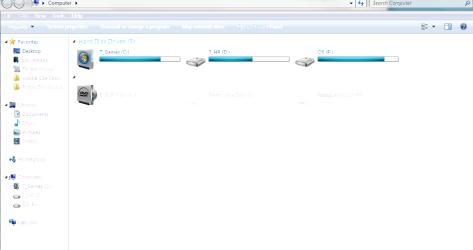
  • Pic.PNG
    Pic.PNG
    23.4 KB · Views: 125

My Computer

Computer Manufacturer/Model Number
Custom
OS
Win7 HP (x64)/Win7 Ultimate (x64)
CPU
Core i7 920
Motherboard
Intel X58
Memory
6 x 2GB Corsair XMS3
Graphics Card(s)
CF HD4890
Sound Card
Asus Xonar
Monitor(s) Displays
Dell 2408WFP
Screen Resolution
1920 x 1200
Hard Drives
2 x 150GB WDC Velociraptors (Raid 0)
1 x 1TB Seagate
1 x 1.5TB Seagate
PSU
Corsair HX1000W
Case
Antec 1200
Keyboard
Razer Lycosa/N52te
Mouse
Razer Lachesis
ok about your icon,i know that black glossy from mr grim if im not mistaken coz im using it too..but what is the theme that messed up your pc
 

My Computer

OS
window's 7
CPU
core 2 quad
Motherboard
gigabyte
Memory
2gb corsair
Graphics Card(s)
ati hd4850
Monitor(s) Displays
lg
Screen Resolution
1600 X 900
Case
power logic
Other Info
none of the spec above is accurate
Are you by any chance running an application called "fullglass.exe" when this happens?
 
Hi kucing/SG

You are both correct on the themes and full glass
What would be the best way to resolve the issue?

TIA
 

My Computer

Computer Manufacturer/Model Number
Custom
OS
Win7 HP (x64)/Win7 Ultimate (x64)
CPU
Core i7 920
Motherboard
Intel X58
Memory
6 x 2GB Corsair XMS3
Graphics Card(s)
CF HD4890
Sound Card
Asus Xonar
Monitor(s) Displays
Dell 2408WFP
Screen Resolution
1920 x 1200
Hard Drives
2 x 150GB WDC Velociraptors (Raid 0)
1 x 1TB Seagate
1 x 1.5TB Seagate
PSU
Corsair HX1000W
Case
Antec 1200
Keyboard
Razer Lycosa/N52te
Mouse
Razer Lachesis
Hi kucing/SG

You are both correct on the themes and full glass
What would be the best way to resolve the issue?

TIA
Aight
Fullglass does not work on themes that are not optimized for it. I suggest that you do not use it, especially not on light themes, where it's nearly 100% certain that it will not work.
Just go to your taskbar's system tray and kill the fullglass.exe ;)
 
fullglass.exe works only on theme with black background if im not mistaken. im using it too and it goes smooth..fullglass wont work on theme with a white background which resulted in what you have right now. i might suggest a theme that suits the fullglass.exe which created by Mr Grim itself Midnight Glass Nature Theme by ~MrGRiM01 on deviantART
 

My Computer

OS
window's 7
CPU
core 2 quad
Motherboard
gigabyte
Memory
2gb corsair
Graphics Card(s)
ati hd4850
Monitor(s) Displays
lg
Screen Resolution
1600 X 900
Case
power logic
Other Info
none of the spec above is accurate
fullglass.exe works only on theme with black background if im not mistaken. im using it too and it goes smooth..fullglass wont work on theme with a white background which resulted in what you have right now. i might suggest a theme that suits the fullglass.exe which created by Mr Grim itself
You are correct. It only works on themes with dark backgrounds ;) All though they do not work on all of those either. I would advise only using fullglass.exe for those themes which it comes with or where you are advised to use it.
 
Hi Guys


Thanks for the response and appreciate your time.
Sorry for responding late - my connection has been a little flaky these past few weeks.

Understood and thanks again

Regards

[Update: Unloaded Full Glass from the SysTray - all is normal - thanks again]
 
Last edited:

My Computer

Computer Manufacturer/Model Number
Custom
OS
Win7 HP (x64)/Win7 Ultimate (x64)
CPU
Core i7 920
Motherboard
Intel X58
Memory
6 x 2GB Corsair XMS3
Graphics Card(s)
CF HD4890
Sound Card
Asus Xonar
Monitor(s) Displays
Dell 2408WFP
Screen Resolution
1920 x 1200
Hard Drives
2 x 150GB WDC Velociraptors (Raid 0)
1 x 1TB Seagate
1 x 1.5TB Seagate
PSU
Corsair HX1000W
Case
Antec 1200
Keyboard
Razer Lycosa/N52te
Mouse
Razer Lachesis
Back
Top