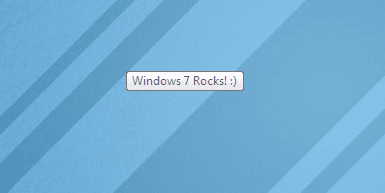
Can I WRITE a TEXT under the cursor of mouse?

Strikerboy

New member
Local time
2:39 PM
Messages
25
Hi to all my friends in SevenForums.
I have a Question:
Can I WRITE a TEXT under the cursor of mouse with Registery Editor?
Thanks for your answers.
 

My Computer

OS
Windows 7 Ultimate,32bit edition
CPU
Dual core 2.5 GHz
Motherboard
ASUS
Memory
2GB
Graphics Card(s)
G-force 8400 xfx
Monitor(s) Displays
LG1760TR
Screen Resolution
1280*1024
Hard Drives
MAXTOR 40GB
Is there any one to answer my question?
You can also answer this:
Can i edit the MouseTrail and chnge it to what i want?
If you can,answer both questions.
Thanks.
 

My Computer

OS
Windows 7 Ultimate,32bit edition
CPU
Dual core 2.5 GHz
Motherboard
ASUS
Memory
2GB
Graphics Card(s)
G-force 8400 xfx
Monitor(s) Displays
LG1760TR
Screen Resolution
1280*1024
Hard Drives
MAXTOR 40GB
By writing text under the mouse... what exactly do you mean? Like text that follows the mouse or something? If so, I have an app that does something like this (makes a tooltip with the current time that follows the mouse) and I could modify it to show what you want it to.... As for the second question, I dunno.
 

My Computer

Computer type
PC/Desktop
Computer Manufacturer/Model Number
Custom built
OS
Windows 8 Pro 64-bit
CPU
Intel Core i7 950 @4.4GHz
Motherboard
EVGA 131-GT-E767
Memory
12GB DDR3 1333MHz @1400 (9-9-9-24)
Graphics Card(s)
2x AMD Radeon HD 6770
Sound Card
Sound Blaster Audigy
Monitor(s) Displays
Acer S231HL + Acer E19T5W
Screen Resolution
1920x1080 + 1440x900
Hard Drives
128GB Samsung 840 Pro
1TB Seagate Barracuda 7200RPM 64mb
500GB Seagate Barracuda 7200RPM 16mb
PSU
Corsair GS800
Case
Custom-made
Cooling
CM Hyper212+, lots of fans
Keyboard
NMB RT8255C+
Mouse
Func MS-3
Internet Speed
30/1.5
Antivirus
Microsoft Security Essentials/Spybot SD/Malwarebytes
Browser
Google Chrome
Other Info
Onkyo TX-27 receiver & two Realistic Optimus T100s.
hey Strikerboy, u can add text under ur mouse pointer by editind the pointer and writing/designing ur own text under it manualy or by attatching a png which contains the text while editing.......for that, u can use "RealWorld Cursor Editor".

Download Link


Again,to change ur mouse trail, u can visit THIS LINK.

........:);):D
 

My Computer

Computer Manufacturer/Model Number
Lenovo ideapad (laptop)
OS
Windows 7 Ultimate/windows XP -dual boot
CPU
Intel Mobile Core2Duo T5800
Motherboard
Lenovo JITR1
Memory
2 GB DDR3
Graphics Card(s)
nVIDIA GeForce 9300M GS
Sound Card
Conexant HD Audio card
Screen Resolution
1280X800
Hard Drives
WDC 320 GB
Thanks for your answers.
Dear Prisoner can you tell me name of that application?
and thanks for DEEP almighty for helping.I will use this program.
But in this way there is a problem:
if i edit a cursor with software and write a text under mouse pointer it will not move like the Trail setting of mouse.it will be like a picture,immovable.
Again,thanks for your guide about editing mouse trail.But i think this is for web page,doesn't it?
I want this feature for windows 7...
thanks.
 

My Computer

OS
Windows 7 Ultimate,32bit edition
CPU
Dual core 2.5 GHz
Motherboard
ASUS
Memory
2GB
Graphics Card(s)
G-force 8400 xfx
Monitor(s) Displays
LG1760TR
Screen Resolution
1280*1024
Hard Drives
MAXTOR 40GB
if you have,please give me all possible registry values for mouse.
 

My Computer

OS
Windows 7 Ultimate,32bit edition
CPU
Dual core 2.5 GHz
Motherboard
ASUS
Memory
2GB
Graphics Card(s)
G-force 8400 xfx
Monitor(s) Displays
LG1760TR
Screen Resolution
1280*1024
Hard Drives
MAXTOR 40GB
Thanks for your answers.
Dear Prisoner can you tell me name of that application?
and thanks for DEEP almighty for helping.I will use this program.
But in this way there is a problem:
if i edit a cursor with software and write a text under mouse pointer it will not move like the Trail setting of mouse.it will be like a picture,immovable.
Again,thanks for your guide about editing mouse trail.But i think this is for web page,doesn't it?
I want this feature for windows 7...
thanks.


ok.....i dont know exactly whether it wil work or nt bt u can give it a try.........download "cursorXP" 1.0 or later.....after installing,under mouse settings,enable cursorxp theme.Under configure tab,u should hav an option to put ur own script......paste the script for ur text trail and see if it works..........
 

My Computer

Computer Manufacturer/Model Number
Lenovo ideapad (laptop)
OS
Windows 7 Ultimate/windows XP -dual boot
CPU
Intel Mobile Core2Duo T5800
Motherboard
Lenovo JITR1
Memory
2 GB DDR3
Graphics Card(s)
nVIDIA GeForce 9300M GS
Sound Card
Conexant HD Audio card
Screen Resolution
1280X800
Hard Drives
WDC 320 GB
I made the application. I can make another version. Is there any specific text you're going to want? Or will you be changing it?
 

My Computer

Computer type
PC/Desktop
Computer Manufacturer/Model Number
Custom built
OS
Windows 8 Pro 64-bit
CPU
Intel Core i7 950 @4.4GHz
Motherboard
EVGA 131-GT-E767
Memory
12GB DDR3 1333MHz @1400 (9-9-9-24)
Graphics Card(s)
2x AMD Radeon HD 6770
Sound Card
Sound Blaster Audigy
Monitor(s) Displays
Acer S231HL + Acer E19T5W
Screen Resolution
1920x1080 + 1440x900
Hard Drives
128GB Samsung 840 Pro
1TB Seagate Barracuda 7200RPM 64mb
500GB Seagate Barracuda 7200RPM 16mb
PSU
Corsair GS800
Case
Custom-made
Cooling
CM Hyper212+, lots of fans
Keyboard
NMB RT8255C+
Mouse
Func MS-3
Internet Speed
30/1.5
Antivirus
Microsoft Security Essentials/Spybot SD/Malwarebytes
Browser
Google Chrome
Other Info
Onkyo TX-27 receiver & two Realistic Optimus T100s.
Thanks for your answers.
Dear Prisoner can you tell me name of that application?
and thanks for DEEP almighty for helping.I will use this program.
But in this way there is a problem:
if i edit a cursor with software and write a text under mouse pointer it will not move like the Trail setting of mouse.it will be like a picture,immovable.
Again,thanks for your guide about editing mouse trail.But i think this is for web page,doesn't it?
I want this feature for windows 7...
thanks.


ok.....i dont know exactly whether it wil work or nt bt u can give it a try.........download "cursorXP" 1.0 or later.....after installing,under mouse settings,enable cursorxp theme.Under configure tab,u should hav an option to put ur own script......paste the script for ur text trail and see if it works..........
Thank you my dear friend DEEP almighty. i will now test it.
and put the result at this topic.
 

My Computer

OS
Windows 7 Ultimate,32bit edition
CPU
Dual core 2.5 GHz
Motherboard
ASUS
Memory
2GB
Graphics Card(s)
G-force 8400 xfx
Monitor(s) Displays
LG1760TR
Screen Resolution
1280*1024
Hard Drives
MAXTOR 40GB
I made the application. I can make another version. Is there any specific text you're going to want? Or will you be changing it?
Yes my dear friend.i may change the text .but for example if you can put "Windows 7" under it.thanks for answers.
 

My Computer

OS
Windows 7 Ultimate,32bit edition
CPU
Dual core 2.5 GHz
Motherboard
ASUS
Memory
2GB
Graphics Card(s)
G-force 8400 xfx
Monitor(s) Displays
LG1760TR
Screen Resolution
1280*1024
Hard Drives
MAXTOR 40GB
dear DEEP almighty is "CursorFX" the same "CursorXP"?
Or these are different?
 

My Computer

OS
Windows 7 Ultimate,32bit edition
CPU
Dual core 2.5 GHz
Motherboard
ASUS
Memory
2GB
Graphics Card(s)
G-force 8400 xfx
Monitor(s) Displays
LG1760TR
Screen Resolution
1280*1024
Hard Drives
MAXTOR 40GB

My Computer

Computer type
PC/Desktop
Computer Manufacturer/Model Number
Custom built
OS
Windows 8 Pro 64-bit
CPU
Intel Core i7 950 @4.4GHz
Motherboard
EVGA 131-GT-E767
Memory
12GB DDR3 1333MHz @1400 (9-9-9-24)
Graphics Card(s)
2x AMD Radeon HD 6770
Sound Card
Sound Blaster Audigy
Monitor(s) Displays
Acer S231HL + Acer E19T5W
Screen Resolution
1920x1080 + 1440x900
Hard Drives
128GB Samsung 840 Pro
1TB Seagate Barracuda 7200RPM 64mb
500GB Seagate Barracuda 7200RPM 16mb
PSU
Corsair GS800
Case
Custom-made
Cooling
CM Hyper212+, lots of fans
Keyboard
NMB RT8255C+
Mouse
Func MS-3
Internet Speed
30/1.5
Antivirus
Microsoft Security Essentials/Spybot SD/Malwarebytes
Browser
Google Chrome
Other Info
Onkyo TX-27 receiver & two Realistic Optimus T100s.
View attachment 73330
View attachment 73331
Instructions are contained in the Documentation.txt file, but they're not really needed. It's a very simple app.
Oh...Really this is good...Very good...but if delete the cadre around the text and just text there was a text,it will the best...
Really thanks...Can you do this?
And another question:
This program runs in background of windows and minimizes to tray,is there any way to close the program ,but it's effect still go on?
thanks.
Sorry,my English isn't good and I can't speak well.
 

My Computer

OS
Windows 7 Ultimate,32bit edition
CPU
Dual core 2.5 GHz
Motherboard
ASUS
Memory
2GB
Graphics Card(s)
G-force 8400 xfx
Monitor(s) Displays
LG1760TR
Screen Resolution
1280*1024
Hard Drives
MAXTOR 40GB
dear DEEP almighty is "CursorFX" the same "CursorXP"?
Or these are different?


Both of them r basically same.CursorFX is a replacement for Stardock's immensely popular cursor skinning program CursorXP

Download CursorXP HERE
 

My Computer

Computer Manufacturer/Model Number
Lenovo ideapad (laptop)
OS
Windows 7 Ultimate/windows XP -dual boot
CPU
Intel Mobile Core2Duo T5800
Motherboard
Lenovo JITR1
Memory
2 GB DDR3
Graphics Card(s)
nVIDIA GeForce 9300M GS
Sound Card
Conexant HD Audio card
Screen Resolution
1280X800
Hard Drives
WDC 320 GB
A new and enhanced version of cursor FX called "CursorFX Plus" has a functionality called Trail elements......i dont know wht it is bt may hav something 2 customize d trail.....bt m unable 2 find any download link where this can b downloaded for free.......:(
 

My Computer

Computer Manufacturer/Model Number
Lenovo ideapad (laptop)
OS
Windows 7 Ultimate/windows XP -dual boot
CPU
Intel Mobile Core2Duo T5800
Motherboard
Lenovo JITR1
Memory
2 GB DDR3
Graphics Card(s)
nVIDIA GeForce 9300M GS
Sound Card
Conexant HD Audio card
Screen Resolution
1280X800
Hard Drives
WDC 320 GB
A new and enhanced version of cursor FX called "CursorFX Plus" has a functionality called Trail elements......i dont know wht it is bt may hav something 2 customize d trail.....bt m unable 2 find any download link where this can b downloaded for free.......:(
Thank you dear DEEP almighty...
but i can't see the import setting to import scripts...
 

My Computer

OS
Windows 7 Ultimate,32bit edition
CPU
Dual core 2.5 GHz
Motherboard
ASUS
Memory
2GB
Graphics Card(s)
G-force 8400 xfx
Monitor(s) Displays
LG1760TR
Screen Resolution
1280*1024
Hard Drives
MAXTOR 40GB
I don't think it would be possible to make it fully transparent without some lag and a slow down on your computer, and it would do it to all tooltips.

As for the hidden menu, I can get that done sometime later. :p
 

My Computer

Computer type
PC/Desktop
Computer Manufacturer/Model Number
Custom built
OS
Windows 8 Pro 64-bit
CPU
Intel Core i7 950 @4.4GHz
Motherboard
EVGA 131-GT-E767
Memory
12GB DDR3 1333MHz @1400 (9-9-9-24)
Graphics Card(s)
2x AMD Radeon HD 6770
Sound Card
Sound Blaster Audigy
Monitor(s) Displays
Acer S231HL + Acer E19T5W
Screen Resolution
1920x1080 + 1440x900
Hard Drives
128GB Samsung 840 Pro
1TB Seagate Barracuda 7200RPM 64mb
500GB Seagate Barracuda 7200RPM 16mb
PSU
Corsair GS800
Case
Custom-made
Cooling
CM Hyper212+, lots of fans
Keyboard
NMB RT8255C+
Mouse
Func MS-3
Internet Speed
30/1.5
Antivirus
Microsoft Security Essentials/Spybot SD/Malwarebytes
Browser
Google Chrome
Other Info
Onkyo TX-27 receiver & two Realistic Optimus T100s.
Thank you Prisoner..
and if you can please answer My last question:
Can I create Value(s) in registry to do this?without any program?
Just with creating and editing keys and values of Registry Editor?
 

My Computer

OS
Windows 7 Ultimate,32bit edition
CPU
Dual core 2.5 GHz
Motherboard
ASUS
Memory
2GB
Graphics Card(s)
G-force 8400 xfx
Monitor(s) Displays
LG1760TR
Screen Resolution
1280*1024
Hard Drives
MAXTOR 40GB
I don't believe so, as the developers probably never thought of having a tooltip follow the mouse :p

There's not much practicality to it, other than showing the time without needing to look at the tray clock, or in my case, my alarm clock. Such an app I made a while back for another app (so many apps! XD) so... I made this one using that one as a base. Hehe
 

My Computer

Computer type
PC/Desktop
Computer Manufacturer/Model Number
Custom built
OS
Windows 8 Pro 64-bit
CPU
Intel Core i7 950 @4.4GHz
Motherboard
EVGA 131-GT-E767
Memory
12GB DDR3 1333MHz @1400 (9-9-9-24)
Graphics Card(s)
2x AMD Radeon HD 6770
Sound Card
Sound Blaster Audigy
Monitor(s) Displays
Acer S231HL + Acer E19T5W
Screen Resolution
1920x1080 + 1440x900
Hard Drives
128GB Samsung 840 Pro
1TB Seagate Barracuda 7200RPM 64mb
500GB Seagate Barracuda 7200RPM 16mb
PSU
Corsair GS800
Case
Custom-made
Cooling
CM Hyper212+, lots of fans
Keyboard
NMB RT8255C+
Mouse
Func MS-3
Internet Speed
30/1.5
Antivirus
Microsoft Security Essentials/Spybot SD/Malwarebytes
Browser
Google Chrome
Other Info
Onkyo TX-27 receiver & two Realistic Optimus T100s.
I don't believe so, as the developers probably never thought of having a tooltip follow the mouse :p

There's not much practicality to it, other than showing the time without needing to look at the tray clock, or in my case, my alarm clock. Such an app I made a while back for another app (so many apps! XD) so... I made this one using that one as a base. Hehe
:D Okey...Thanks...:pgood luck...i hope you can write best programs...:thumbsup:
 

My Computer

OS
Windows 7 Ultimate,32bit edition
CPU
Dual core 2.5 GHz
Motherboard
ASUS
Memory
2GB
Graphics Card(s)
G-force 8400 xfx
Monitor(s) Displays
LG1760TR
Screen Resolution
1280*1024
Hard Drives
MAXTOR 40GB
Back
Top