Media Center only on my Machine (ideas?)

AreoX

New member
Local time
9:41 AM
Messages
22
About three weeks ago I took a trip to Disney Land, California. One of the attractions I visited was Innoventions in Tomorrow Land. If anybody has been there, it is full of Windows touch-pannels running Windows Media Center.

I was wondering if there was a way I could do that. I would like to have a small PC solely dedicated to Media Center. i.e. when you boot up the computer it loads directly into Media Center.

My preffered option would be to have this as the only OS, or not have the entire WinSeven operating system but only the Media Center. I would probably be able to just install winseven and have Media Center run on startup, but if I have the entire OS it will take up more disk space I would like to dedicated to Music and Videos.

Any links or help would be appreciated ;)
 

My Computer My Computer

At a glance

Windows 7 (build7000) 32-bit1GB SDRAM
OS
Windows 7 (build7000) 32-bit
Memory
1GB SDRAM
Screen Resolution
1440x900
Hard Drives
80GB
Internet Speed
Fast
I don't think you can have it without the entire OS but you can have Media center run on startup.
 

My Computer My Computer

At a glance

Windows 7 Ultimate Vista Ultimate x64Core 2 Duo E8500 3.16Ghz @ 3.8Ghz2x2Gigs Patriot PC2-6400 LLInno3D GeForce GTX260 216 SP
Computer Manufacturer/Model Number
Home Brew
OS
Windows 7 Ultimate Vista Ultimate x64
CPU
Core 2 Duo E8500 3.16Ghz @ 3.8Ghz
Motherboard
eVGA 750i FTW
Memory
2x2Gigs Patriot PC2-6400 LL
Graphics Card(s)
Inno3D GeForce GTX260 216 SP
Monitor(s) Displays
ASUS VW222U 22" 2ms Response time
Screen Resolution
1680x1050
Hard Drives
SATA 150GB
SATA II 250GB
USB IDE 750GB Ext.
PSU
HYTEC 600W & Thermaltake 650W Toughpower Power Exp
Case
Thermaltake Armor LCS (Liquid Cooling System)
Cooling
Liquid Cooling System
Keyboard
Logitech G15 Gaming Keyboard
Mouse
Logitech G9 Gaming Mouse
About three weeks ago I took a trip to Disney Land, California. One of the attractions I visited was Innoventions in Tomorrow Land. If anybody has been there, it is full of Windows touch-pannels running Windows Media Center.

I was wondering if there was a way I could do that. I would like to have a small PC solely dedicated to Media Center. i.e. when you boot up the computer it loads directly into Media Center.

My preffered option would be to have this as the only OS, or not have the entire WinSeven operating system but only the Media Center. I would probably be able to just install winseven and have Media Center run on startup, but if I have the entire OS it will take up more disk space I would like to dedicated to Music and Videos.

Any links or help would be appreciated ;)

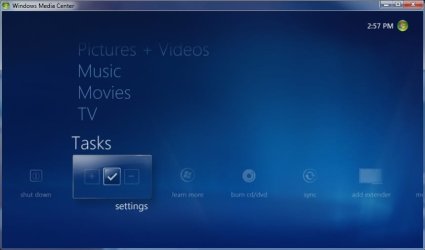
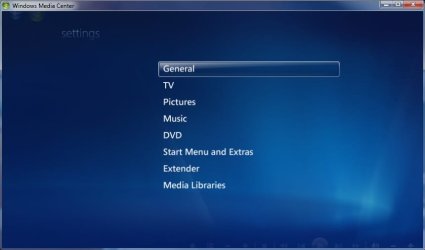
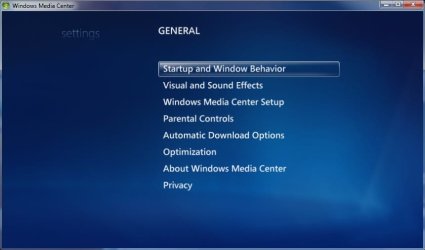
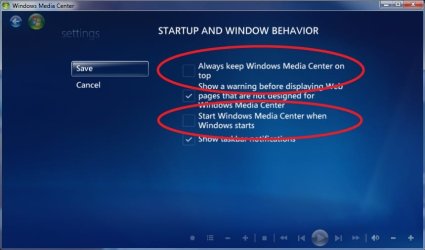
There's an option to go media only and start WMC within the Media Center configuration screens. I think what you're looking for though is to replace Windows Explorer with Media Center as the operating system "shell". You can do that via the registry but you lose you volume control via the remote.
 

My Computer My Computer

At a glance

El Capitan / Windows 10i7-4980HQ16GBIris 5200
Computer type
Laptop
Computer Manufacturer/Model Number
Apple
OS
El Capitan / Windows 10
CPU
i7-4980HQ
Memory
16GB
Graphics Card(s)
Iris 5200
You can use Vlite to reduce the size of a 7 install
by removing components of the OS that you know you will not ever need.
Vlite is very easy to use and depending on the amount of things that you take out,
i.e. games, aero, print spooler and so on you can seriously reduce the size of the install
But you must retain the key components of the OS in order for Media Center to operate.

I hope I answered your questions
DemonSeed
 
Last edited:

My Computer My Computer

At a glance

7 Ultimate x64AMD Athlon 64X2 4600+ 2.51Ghz6GB DDR2 900 Kingston2x BFG Nvidia 9600 GT-OC
Computer Manufacturer/Model Number
Custom Built Rig BY ME "My Baby"
OS
7 Ultimate x64
CPU
AMD Athlon 64X2 4600+ 2.51Ghz
Motherboard
ASUS M2N-E SLI
Memory
6GB DDR2 900 Kingston
Graphics Card(s)
2x BFG Nvidia 9600 GT-OC
Sound Card
SoundBlaster XF-I
Monitor(s) Displays
19"acer, 22"acer, 19"acer, 48" HITACHI HDTV
Screen Resolution
1400x900, 1680x1050, 1400x900, 1920x1080
Hard Drives
Seagate 500GB Sata
Seagate 500GB Sata
Seagate 500GB Sata
Seagate 500GB Sata
Seagate 320 Sata (Primary)
Western Digital 500GB IDE
Western Digital 300GB IDE
Maxter 720 Sata (USB)
PSU
BFG 800 Watt SLI Power Supply
Case
Game Master
Cooling
Thermotake
Keyboard
Logitech (Bluetooth)
Mouse
Logitech (Bluetooth)
Internet Speed
Turbo Cable
Other Info
ATI 650HD TV Tuner X2,
Samsung (Light scribe) DVD-R,
Sony (Dual Layer) DVD-R
You can use Vlite to reduce the size of a 7 install
by removing components of the OS that you know you will not ever need.
Vlite is very easy to use and depending on the amount of things that you take out,
i.e. games, aero, print spooler and so on you can seriously reduce the size of the install
But you must retain the key components of the OS in order for Media Center to operate.

Not even vLite's author nuhi can tell you what's safe to remove yet. He explicitly refrains from stating any official Windows 7 support. Best to stay away from it and just use these settings:
1.jpg2.jpg3.jpg4.jpg
 

My Computer My Computer

At a glance

El Capitan / Windows 10i7-4980HQ16GBIris 5200
Computer type
Laptop
Computer Manufacturer/Model Number
Apple
OS
El Capitan / Windows 10
CPU
i7-4980HQ
Memory
16GB
Graphics Card(s)
Iris 5200
@ DemonSeed: That looks like what Im looking for. I will just remove basic applications I will never use like Paint etc...
@ baarod: Hey man, thank a lot! I will probably go about removing basic things with vLite, and then use the options you showed me.

The reason I want to to this is because the junky computer Im using has a 6GB HDD as the master to install the OS and the slave will contain all my media.
 

My Computer My Computer

At a glance

Windows 7 (build7000) 32-bit1GB SDRAM
OS
Windows 7 (build7000) 32-bit
Memory
1GB SDRAM
Screen Resolution
1440x900
Hard Drives
80GB
Internet Speed
Fast
@ DemonSeed: That looks like what Im looking for. I will just remove basic applications I will never use like Paint etc...
@ baarod: Hey man, thank a lot! I will probably go about removing basic things with vLite, and then use the options you showed me.

The reason I want to to this is because the junky computer Im using has a 6GB HDD as the master to install the OS and the slave will contain all my media.

I've got a vLite config file that works to pare my 7068 and now 7077 down to fit into 3GB on an eeePC. You'll have to add back WMC since it's of little use on an eee I removed it. When you add it back in, it should pick up all the dependencies. You'll probably also want to use my imagex direct extract method rather than the installer since you're low on space. Here's the config file: View attachment Last Session.zip
 

My Computer My Computer

At a glance

El Capitan / Windows 10i7-4980HQ16GBIris 5200
Computer type
Laptop
Computer Manufacturer/Model Number
Apple
OS
El Capitan / Windows 10
CPU
i7-4980HQ
Memory
16GB
Graphics Card(s)
Iris 5200
Back
Top