Non-Existent Icon Stuck on Desktop - Can't Delete

flowingfire

New member
Local time
4:20 AM
Messages
12
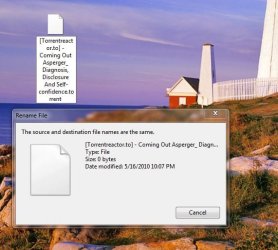
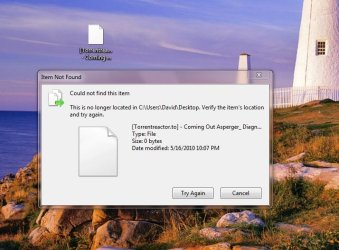
I have an icon on my Windows 7 desktop that won't delete. If I drag it to the Recycle Bin, it does nothing. If I right click and say "delete," it pops-up a dialogue saying the file doesn't exist.

I scanned for viruses. Nothing. I scanned the supposedly non-existing file for viruses. Nothing. I restarted in safe-mode, and tried to delete it. Same problem.

So, if I don't have a virus, I can't delete this icon in safe-mode, and restarting over-and-over doesn't get rid of it, what do I do? I just have an obnoxious icon stuck on my desktop forever.

I can't even rename this thing. What happens if I try to rename it, is that it tells me the file doesn't exist, and then pops up dialogue boxes eternally telling me that the source and destination files are the same. I can't ctrl-alt-del out of it, and have to restart to get the stupid windows out of my face.

Any ideas?
 

Attachments
  • cantdelete.JPG
    cantdelete.JPG
    63.7 KB · Views: 143
  • cannotrename.JPG
    cannotrename.JPG
    51 KB · Views: 127

My Computer My Computer

At a glance

Windows 7 UltimateAMD Athlon Dual Core 4400+4 GBNVIDIA GeForce 6150
Computer Manufacturer/Model Number
HP Pavilion m7560n
OS
Windows 7 Ultimate
CPU
AMD Athlon Dual Core 4400+
Memory
4 GB
Graphics Card(s)
NVIDIA GeForce 6150
Monitor(s) Displays
NEC MultiSync 90GX2
Hard Drives
350 GB WD
500 GB Hitachi
I have an icon on my Windows 7 desktop that won't delete. If I drag it to the Recycle Bin, it does nothing. If I right click and say "delete," it pops-up a dialogue saying the file doesn't exist.

I scanned for viruses. Nothing. I scanned the supposedly non-existing file for viruses. Nothing. I restarted in safe-mode, and tried to delete it. Same problem.

So, if I don't have a virus, I can't delete this icon in safe-mode, and restarting over-and-over doesn't get rid of it, what do I do? I just have an obnoxious icon stuck on my desktop forever.

I can't even rename this thing. What happens if I try to rename it, is that it tells me the file doesn't exist, and then pops up dialogue boxes eternally telling me that the source and destination files are the same. I can't ctrl-alt-del out of it, and have to restart to get the stupid windows out of my face.

Any ideas?

Boot from win 7 dvd, during boot hit shift F10 to open cmd window. navigate to desktop, find and delete file. If still stubborn try renaming extension to *.txt

Ken
 

My Computer My Computer

At a glance

Win 8 Release candidate 8400[email protected]4 gigsNvidia 9600M
Computer Manufacturer/Model Number
HP Pavillion dv-7 1005 Tx
OS
Win 8 Release candidate 8400
CPU
[email protected]
Memory
4 gigs
Graphics Card(s)
Nvidia 9600M
Sound Card
HD built-in
Monitor(s) Displays
17" Wxga
Screen Resolution
1440x900
Cooling
none
Internet Speed
45Mb down 5Mb up

My Computer My Computer

At a glance

Windows 10, Home Clean InstallIntel Core2 processsor Q8200(2.33Ghz 1333FSB)...6 gbATI Radeon 256MB HD3650
Computer type
PC/Desktop
Computer Manufacturer/Model Number
Dell XPS 420
OS
Windows 10, Home Clean Install
CPU
Intel Core2 processsor Q8200(2.33Ghz 1333FSB) Quad Core Tech
Motherboard
Dell
Memory
6 gb
Graphics Card(s)
ATI Radeon 256MB HD3650
Sound Card
Intergrated 7.1 Channel Audio
Monitor(s) Displays
Dell SP2009W 20"
Hard Drives
640 GB Serial ATA Hard drive
Cooling
Fan
Keyboard
Dell USB Keyboard
Mouse
Dell Premium Optical USB
Internet Speed
DSL 2.85
Shift-F10 did not open a command window at any point during the start-up procedure on several attempts to start up using my Windows 7 disc. It did not work prior to startup, during the "Loading Windows Files" phase, or any time after.

That said, I unsuccessfully tried using the command prompt while inside Windows 7 to find the file and delete it. What I did:
cd desktop
dir
erase [name of file]

It gave me another error. Renaming doesn't work either.
 

My Computer My Computer

At a glance

Windows 7 UltimateAMD Athlon Dual Core 4400+4 GBNVIDIA GeForce 6150
Computer Manufacturer/Model Number
HP Pavilion m7560n
OS
Windows 7 Ultimate
CPU
AMD Athlon Dual Core 4400+
Memory
4 GB
Graphics Card(s)
NVIDIA GeForce 6150
Monitor(s) Displays
NEC MultiSync 90GX2
Hard Drives
350 GB WD
500 GB Hitachi
See my above post.

Also, try dragging to documents and see if it can be deleted from that location; try changing the name

It appears to be from a torrent download. You have to be so careful with those.
 

My Computer My Computer

At a glance

Windows 10, Home Clean InstallIntel Core2 processsor Q8200(2.33Ghz 1333FSB)...6 gbATI Radeon 256MB HD3650
Computer type
PC/Desktop
Computer Manufacturer/Model Number
Dell XPS 420
OS
Windows 10, Home Clean Install
CPU
Intel Core2 processsor Q8200(2.33Ghz 1333FSB) Quad Core Tech
Motherboard
Dell
Memory
6 gb
Graphics Card(s)
ATI Radeon 256MB HD3650
Sound Card
Intergrated 7.1 Channel Audio
Monitor(s) Displays
Dell SP2009W 20"
Hard Drives
640 GB Serial ATA Hard drive
Cooling
Fan
Keyboard
Dell USB Keyboard
Mouse
Dell Premium Optical USB
Internet Speed
DSL 2.85
Well, I tried clearing the cache in several different ways. I tried clearing the RAM cache, and I also used the "Rebuild Icon Cache" program download from right here on the 7-forums.

Then I ran the CCleaner program, enabling a number of the optional options.

The icon is still there....


I also tried what you suggested: dragging and dropping it to another folder. It says it doesn't exist when I'm trying to do that, too....

So.... file still there.... No viruses that the scanner can find.... It's just kinda stuck there.... Oh, and the torrent file was legit, not a virus or anything-- it was an ebook download. I scan everything coming in, and the torrent files themselves don't have a virus.
 

My Computer My Computer

At a glance

Windows 7 UltimateAMD Athlon Dual Core 4400+4 GBNVIDIA GeForce 6150
Computer Manufacturer/Model Number
HP Pavilion m7560n
OS
Windows 7 Ultimate
CPU
AMD Athlon Dual Core 4400+
Memory
4 GB
Graphics Card(s)
NVIDIA GeForce 6150
Monitor(s) Displays
NEC MultiSync 90GX2
Hard Drives
350 GB WD
500 GB Hitachi
OK last thing that I know. Right click>rename> add .zip to the name. Then cross fingers.

Whatever you are told about the file not exisiting hit OK.
 

My Computer My Computer

At a glance

Windows 10, Home Clean InstallIntel Core2 processsor Q8200(2.33Ghz 1333FSB)...6 gbATI Radeon 256MB HD3650
Computer type
PC/Desktop
Computer Manufacturer/Model Number
Dell XPS 420
OS
Windows 10, Home Clean Install
CPU
Intel Core2 processsor Q8200(2.33Ghz 1333FSB) Quad Core Tech
Motherboard
Dell
Memory
6 gb
Graphics Card(s)
ATI Radeon 256MB HD3650
Sound Card
Intergrated 7.1 Channel Audio
Monitor(s) Displays
Dell SP2009W 20"
Hard Drives
640 GB Serial ATA Hard drive
Cooling
Fan
Keyboard
Dell USB Keyboard
Mouse
Dell Premium Optical USB
Internet Speed
DSL 2.85
lol, that didn't work either! Thanks for all the help, though.

When I tried to add .zip as an extension or rename it to anything whatsoever, it says, "Could not find this item. This is no longer located in C:\Users\David\Desktop. Verify the item's location and try again."

I even tried right-clicking and going into properties, and then selecting "hidden" to hide the non-existing icon. The error it gave me is as follows:
"An error occurred applying attributes to the file:
...\[Torrentreactor.to] - Coming Out A...
The system cannot find the file specified."


Awww crap.
 

My Computer My Computer

At a glance

Windows 7 UltimateAMD Athlon Dual Core 4400+4 GBNVIDIA GeForce 6150
Computer Manufacturer/Model Number
HP Pavilion m7560n
OS
Windows 7 Ultimate
CPU
AMD Athlon Dual Core 4400+
Memory
4 GB
Graphics Card(s)
NVIDIA GeForce 6150
Monitor(s) Displays
NEC MultiSync 90GX2
Hard Drives
350 GB WD
500 GB Hitachi

My Computer My Computer

At a glance

Windows 10, Home Clean InstallIntel Core2 processsor Q8200(2.33Ghz 1333FSB)...6 gbATI Radeon 256MB HD3650
Computer type
PC/Desktop
Computer Manufacturer/Model Number
Dell XPS 420
OS
Windows 10, Home Clean Install
CPU
Intel Core2 processsor Q8200(2.33Ghz 1333FSB) Quad Core Tech
Motherboard
Dell
Memory
6 gb
Graphics Card(s)
ATI Radeon 256MB HD3650
Sound Card
Intergrated 7.1 Channel Audio
Monitor(s) Displays
Dell SP2009W 20"
Hard Drives
640 GB Serial ATA Hard drive
Cooling
Fan
Keyboard
Dell USB Keyboard
Mouse
Dell Premium Optical USB
Internet Speed
DSL 2.85
Nope, refresh didn't work!

I tried creating a file with the exact same name, putting it on the desktop, and then dragging the non-existent file by the same name into the recycle bin......

It didn't get rid of the phantom icon, BUT, it deleted the new one I created instead... It's kinda a funny magic trick!

LOL
 

My Computer My Computer

At a glance

Windows 7 UltimateAMD Athlon Dual Core 4400+4 GBNVIDIA GeForce 6150
Computer Manufacturer/Model Number
HP Pavilion m7560n
OS
Windows 7 Ultimate
CPU
AMD Athlon Dual Core 4400+
Memory
4 GB
Graphics Card(s)
NVIDIA GeForce 6150
Monitor(s) Displays
NEC MultiSync 90GX2
Hard Drives
350 GB WD
500 GB Hitachi

My Computer My Computer

At a glance

Windows 10, Home Clean InstallIntel Core2 processsor Q8200(2.33Ghz 1333FSB)...6 gbATI Radeon 256MB HD3650
Computer type
PC/Desktop
Computer Manufacturer/Model Number
Dell XPS 420
OS
Windows 10, Home Clean Install
CPU
Intel Core2 processsor Q8200(2.33Ghz 1333FSB) Quad Core Tech
Motherboard
Dell
Memory
6 gb
Graphics Card(s)
ATI Radeon 256MB HD3650
Sound Card
Intergrated 7.1 Channel Audio
Monitor(s) Displays
Dell SP2009W 20"
Hard Drives
640 GB Serial ATA Hard drive
Cooling
Fan
Keyboard
Dell USB Keyboard
Mouse
Dell Premium Optical USB
Internet Speed
DSL 2.85
Okay, I got it! Thanks for that thread-link.

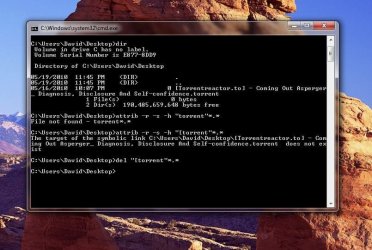
In the command prompt, I entered each of the following lines, as recommended in that thread:
cd %USERPROFILE%\desktop
attrib -r -s -h "[torrent"*.*
del "[torrent"*.*

:geek::geek::geek::geek::geek:

That said, because the guy in the other thread accidentally, through this process, deleted all the desktop icons on his desktop, I moved everything to a folder. Then, I deleted it.

It worked!

WoOOOO!
 

Attachments

  • Capture.JPG
    Capture.JPG
    80 KB · Views: 670

My Computer My Computer

At a glance

Windows 7 UltimateAMD Athlon Dual Core 4400+4 GBNVIDIA GeForce 6150
Computer Manufacturer/Model Number
HP Pavilion m7560n
OS
Windows 7 Ultimate
CPU
AMD Athlon Dual Core 4400+
Memory
4 GB
Graphics Card(s)
NVIDIA GeForce 6150
Monitor(s) Displays
NEC MultiSync 90GX2
Hard Drives
350 GB WD
500 GB Hitachi
I am really glad. So much satifaction when an idea works. Take care my friend.
 

My Computer My Computer

At a glance

Windows 10, Home Clean InstallIntel Core2 processsor Q8200(2.33Ghz 1333FSB)...6 gbATI Radeon 256MB HD3650
Computer type
PC/Desktop
Computer Manufacturer/Model Number
Dell XPS 420
OS
Windows 10, Home Clean Install
CPU
Intel Core2 processsor Q8200(2.33Ghz 1333FSB) Quad Core Tech
Motherboard
Dell
Memory
6 gb
Graphics Card(s)
ATI Radeon 256MB HD3650
Sound Card
Intergrated 7.1 Channel Audio
Monitor(s) Displays
Dell SP2009W 20"
Hard Drives
640 GB Serial ATA Hard drive
Cooling
Fan
Keyboard
Dell USB Keyboard
Mouse
Dell Premium Optical USB
Internet Speed
DSL 2.85
Thanks a bunch for all the help, Richard! <HUGZ!>
 

My Computer My Computer

At a glance

Windows 7 UltimateAMD Athlon Dual Core 4400+4 GBNVIDIA GeForce 6150
Computer Manufacturer/Model Number
HP Pavilion m7560n
OS
Windows 7 Ultimate
CPU
AMD Athlon Dual Core 4400+
Memory
4 GB
Graphics Card(s)
NVIDIA GeForce 6150
Monitor(s) Displays
NEC MultiSync 90GX2
Hard Drives
350 GB WD
500 GB Hitachi
You are very welcome.
 

My Computer My Computer

At a glance

Windows 10, Home Clean InstallIntel Core2 processsor Q8200(2.33Ghz 1333FSB)...6 gbATI Radeon 256MB HD3650
Computer type
PC/Desktop
Computer Manufacturer/Model Number
Dell XPS 420
OS
Windows 10, Home Clean Install
CPU
Intel Core2 processsor Q8200(2.33Ghz 1333FSB) Quad Core Tech
Motherboard
Dell
Memory
6 gb
Graphics Card(s)
ATI Radeon 256MB HD3650
Sound Card
Intergrated 7.1 Channel Audio
Monitor(s) Displays
Dell SP2009W 20"
Hard Drives
640 GB Serial ATA Hard drive
Cooling
Fan
Keyboard
Dell USB Keyboard
Mouse
Dell Premium Optical USB
Internet Speed
DSL 2.85
Just do a system restore and the file will be gone.
 

My Computer My Computer

At a glance

Windows® 8 Pro (64-bit)Intel® Core™ i5 Processor 2467M (1.60GHz, 3MB...6GB DDR3 System Memory at 1,333MHz (on BD 4GB...AMD Radeon™ HD7550M 1GB DDR3 (Ext. Graphic)
Computer Manufacturer/Model Number
Samsung NP530U4B-S02IN
OS
Windows® 8 Pro (64-bit)
CPU
Intel® Core™ i5 Processor 2467M (1.60GHz, 3MB L3 Cache)
Motherboard
Samsung Electronics
Memory
6GB DDR3 System Memory at 1,333MHz (on BD 4GB + 2GB x 1)
Graphics Card(s)
AMD Radeon™ HD7550M 1GB DDR3 (Ext. Graphic)
Sound Card
Realtek High Definition Audio
Monitor(s) Displays
35.56cm (14.0) SuperBright 300nit HD LED Display
Screen Resolution
1366x768
Hard Drives
1TB S-ATA II Hard Drive (5400RPM) with ExpressCache 16GB SSD
Internet Speed
sucks
Antivirus
Microsoft Security Essentials
Browser
Google Chrome (Sync enabled)
TY for your kind words and rep. I am really glad that I was able to help.
 

My Computer My Computer

At a glance

Windows 10, Home Clean InstallIntel Core2 processsor Q8200(2.33Ghz 1333FSB)...6 gbATI Radeon 256MB HD3650
Computer type
PC/Desktop
Computer Manufacturer/Model Number
Dell XPS 420
OS
Windows 10, Home Clean Install
CPU
Intel Core2 processsor Q8200(2.33Ghz 1333FSB) Quad Core Tech
Motherboard
Dell
Memory
6 gb
Graphics Card(s)
ATI Radeon 256MB HD3650
Sound Card
Intergrated 7.1 Channel Audio
Monitor(s) Displays
Dell SP2009W 20"
Hard Drives
640 GB Serial ATA Hard drive
Cooling
Fan
Keyboard
Dell USB Keyboard
Mouse
Dell Premium Optical USB
Internet Speed
DSL 2.85
I had a similar problem with a remaining Network Magic desktop icon. Here's what did the trick for me:

I deleted...[HKEY_LOCAL_MACHINE\SOFTWARE\Microsoft\Windows\CurrentVersion\Explorer\Desktop\NameSpace\{C55C499D-3518-44a1-998E-796AC5FC989D}]
@="NetworkMagic

So maybe you could check your reg files for the offender?
 

My Computer My Computer

At a glance

Windows 7 HP 64-bit4GB/4GB
Computer Manufacturer/Model Number
Gateway DX4720-03/HP Pavilion dv6
OS
Windows 7 HP 64-bit
Memory
4GB/4GB
Antivirus
Avast Pro
Browser
Firefox, the latest
Back
Top