Lexmark x8350-any way to get it to work with 64 bit Windows Seven?

pittguy578

New member
Local time
8:55 AM
Messages
38
Ok-I posted earlier about my problems getting my Lexmark X8350 to work-it would print, but I could not get the scanner to work. I thought maybe there was something wrong with the hardware...I am running Windows 7-64 bit on my desktop.

I then remember my wife has her laptop downstairs..her laptop has the 32 BIT Version of Windows 7 installed-I connect the scanner up and it works PERFECTLY with the 32 bit version of Windows 7..

I am not sure what I can do-the Lexmark indicates I can use the 64 bit version of the Vista driver for Windows 7-obviously that is not working.

Anyone know of anything I can do? Or am I just screwed? No scanning on this PC?

Jim
 

My Computer My Computer

OS
Windows 7
Not to be a smartass, but I tried those drivers-they are no different from the ones on the USA web site. I just do not think this scanner is compatible with 64 bit Windows 7-worked fine with the 32 bit version.
 

My Computer My Computer

OS
Windows 7
Not to be a smartass, but I tried those drivers-they are no different from the ones on the USA web site. I just do not think this scanner is compatible with 64 bit Windows 7-worked fine with the 32 bit version.

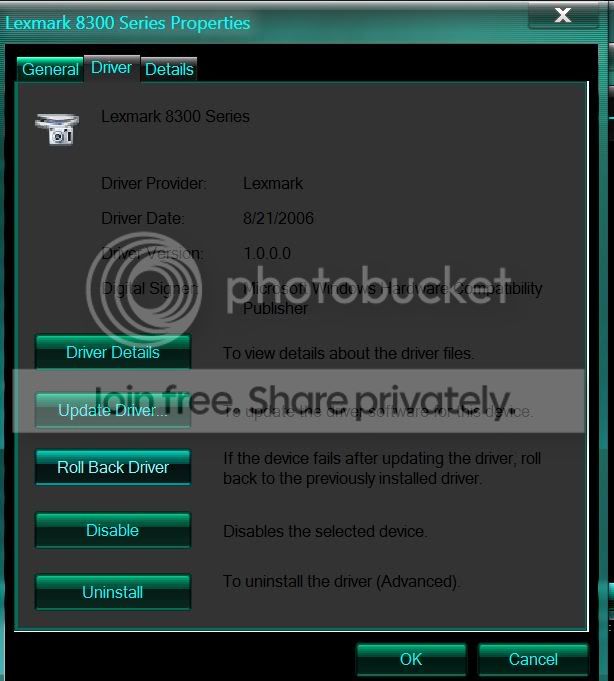
I have the same printer and downloaded the Vista driver and my scanner works on my 64bit 7.

Have this driver?
driver.jpg
 

My Computer My Computer

Computer Manufacturer/Model Number
HP Pavillion- p6331-p
OS
Windows 7 (64bit)
CPU
AMD Athlon II X4 630 2.8 GHz
Motherboard
Foxconn: H-Rs780-uATX
Memory
8.00GB DDR3-SDRAM (1333 MHz) ( Max allowed-16GB)
Graphics Card(s)
ATI Radeon HD 4200
Sound Card
Realtek High Def Audio
Monitor(s) Displays
HP 20" high Def Widescreen
Screen Resolution
1600x 900
Hard Drives
Seagate ST3750528AS- 700 GB
Keyboard
Logitech EX110 Cordless
Mouse
Logitech LX Laser Cordless
Internet Speed
25/25
Dan,

Thanks for the response-when you say Vista driver-is it the 64 bit Vista driver?
That is the one I have been downloading.

Maybe something got messed up with my Windows 7 configuration?
I don't know if a clean install would work. This is boggling my mind.
Even the MS web site says the printer is compatible with the 64 bit version of 7.
 

My Computer My Computer

OS
Windows 7
May sound like a dumb question, but is your scanner working? The reason I am asking is I can get it to print-just no scanning.
 

My Computer My Computer

OS
Windows 7
Sorry I didn't read-duh:) Downloading now. Will see how this work.
 

My Computer My Computer

OS
Windows 7
I downloaded it-it will not install at all.
 

My Computer My Computer

OS
Windows 7

My Computer My Computer

Computer Manufacturer/Model Number
HP Pavillion- p6331-p
OS
Windows 7 (64bit)
CPU
AMD Athlon II X4 630 2.8 GHz
Motherboard
Foxconn: H-Rs780-uATX
Memory
8.00GB DDR3-SDRAM (1333 MHz) ( Max allowed-16GB)
Graphics Card(s)
ATI Radeon HD 4200
Sound Card
Realtek High Def Audio
Monitor(s) Displays
HP 20" high Def Widescreen
Screen Resolution
1600x 900
Hard Drives
Seagate ST3750528AS- 700 GB
Keyboard
Logitech EX110 Cordless
Mouse
Logitech LX Laser Cordless
Internet Speed
25/25
I think it may be an issue with my motherboard? It is a Gigabyte-they have been known to have strange USB issues-some things work-some things don't. I reinstalled Windows 7 and it did not help. Looks like I will be going to Wal-mart to get a new scanner tomorrow.
 

My Computer My Computer

OS
Windows 7
In the end it was pointless for me to go waste so much time-should have just gone to Walmart to begin with. I got a Canon printer/scanner for $50. I rarely print anything so that is more than adequate.
 

My Computer My Computer

OS
Windows 7
Back
Top