All files open in background??

I HAVE SOLVED THE PROBLEM!!! You must delete two files.
1. Close ObjectDock.
2. Locate and open the ObjectDock directory folder on your hard Drive.
3. Delete the following files: Dock64.dll Dock64.exe
4. Right-click the ObjectDock executable folder and Go to properties-compatability-run program in compatability mode for : WindowsXP SP3.
 

My Computer My Computer

OS
Windows 7
Gavel, you are on to something. This fixed the issue when opening photos, however, not when opening video.

I have hope now, however, and really appreciate you posting this fix.

Thanks again!!
 

My Computer My Computer

Computer Manufacturer/Model Number
HP-Pavilion
OS
Windows 7 Home Premium x64
CPU
Intel Core i7 920 @ 2.67 GHz Quad Core
Memory
6 GB
Graphics Card(s)
Nvidia GeForce 9600 GS 768 MB
Sound Card
Realtek High Definition Audio
Screen Resolution
1920 x 1080
Sweet! Just tried it and voila!

Thanks dude!!!

I haven't tried video yet because I'm RDP'ing to my PC right now but I'll try it tonight.
 

My Computer My Computer

OS
Windows 7
I HAVE SOLVED THE PROBLEM!!! You must delete two files.
1. Close ObjectDock.
2. Locate and open the ObjectDock directory folder on your hard Drive.
3. Delete the following files: Dock64.dll Dock64.exe
4. Right-click the ObjectDock executable folder and Go to properties-compatability-run program in compatability mode for : WindowsXP SP3.

Really, good. Allow me to give you 1/2 the points that you wil need to get your skilled badge.
 

My Computer My Computer

Computer type
PC/Desktop
Computer Manufacturer/Model Number
Dell XPS 420
OS
Windows 10, Home Clean Install
CPU
Intel Core2 processsor Q8200(2.33Ghz 1333FSB) Quad Core Tech
Motherboard
Dell
Memory
6 gb
Graphics Card(s)
ATI Radeon 256MB HD3650
Sound Card
Intergrated 7.1 Channel Audio
Monitor(s) Displays
Dell SP2009W 20"
Hard Drives
640 GB Serial ATA Hard drive
Cooling
Fan
Keyboard
Dell USB Keyboard
Mouse
Dell Premium Optical USB
Internet Speed
DSL 2.85
The only problem now is anything launched from the ObjectDock, meaning when you click on any shortcuts, everything opens in Windows XP SP3 compatibility mode. I just noticed it because my Firefox menu highlights change to something other than normal compared to when I launch it from the Start Menu.
 

My Computer My Computer

OS
Windows 7
Back to square one

Well, unfortunately this wasn't the fix after all. It worked great for a couple of days, but today I couldn't get Chrome to launch from the dock. It kept giving me a message that it was unable to launch. I could only start from Start Menu.

I was forced to return the two deleted files and turn off the compatibility mode in order to get it to launch correctly again. **sigh**

I'm going to try the process again, but this sucks. I was pretty excited there for a couple of days.
 

My Computer My Computer

Computer Manufacturer/Model Number
HP-Pavilion
OS
Windows 7 Home Premium x64
CPU
Intel Core i7 920 @ 2.67 GHz Quad Core
Memory
6 GB
Graphics Card(s)
Nvidia GeForce 9600 GS 768 MB
Sound Card
Realtek High Definition Audio
Screen Resolution
1920 x 1080
In a mire, aren't we?

Here's the other hitch. . . it only affects the very first file I open from a folder. After that, all subsequent files are opened on top. However, once I close the folder and go to a new folder, the problem starts again.
You're right, Huff, it's pretty quirky behavior.

I, for one, am not ready to give up ObjectDock. Bugged, yes, is my soul...

I did try the compatibility preferences (nice bit of messing around there!), but, again:
The only problem now is anything launched from the ObjectDock, meaning when you click on any shortcuts, everything opens in Windows XP SP3 compatibility mode.
More baggage than necessary there.

I'm tinkering with the 'Miscellaneous Properties' of ObjDock now, which seems to have stuff about window interaction (i'm sure all of you have done this already...). Needs restarts, though, so i'm not sure if i've touched all the possibilities.

On another note. it's quite remarkable that all of us turned out to be ObjectDock users. I'm in awe, again, of the might of (forum) communication.
Let me marvel at this, so as to distract myself from the helplessness of the situation. I guess i'll learn to live with it. Until Stardock comes up with upgrades (wow! Spoilt, aren't we?).
 

My Computer My Computer

OS
Windows 7
I got that too, hate when I open something and it opens behind anything else that is open; I opened it and it means I want it on top.

Anyway what worked for me is the following (small warning, involves a registry edit),

1. Open regedit and navigate to the following,

HKEY_CURRENT_USER\Control Panel\Desktop

2. Once there locate ForeGroundLockTimeout

3. Right click and select modify, change the Base to Decimal and make the new value 0

4. Log off or reboot for the change to take effect.

Once done you should also be able to turn off compatibility mode for Object Dock.
 

My Computer My Computer

Computer type
PC/Desktop
Computer Manufacturer/Model Number
Me
OS
Win 7 Ultimate x64
CPU
FX-8350 @ 4.6 GHz so far
Motherboard
Asus M5A97 EVO
Memory
ADATA XPG V1 Series Black 8GB DDR3 1600
Graphics Card(s)
Sapphire R9 270x Dual-X
Sound Card
Xonar DGX w/ Corsair Vengence 1300
Monitor(s) Displays
Acer S232HL Abid
Screen Resolution
1920x1080
Hard Drives
120 GB OCZ Vertex 3
500 GB Seagate 7200.12
PSU
Antec Earthwatts 650W Green
Case
Antec Three Hundred
Cooling
Cooler Master 212 EVO
Keyboard
Logitech G510
Mouse
Logitech G500s
Internet Speed
35000/3000
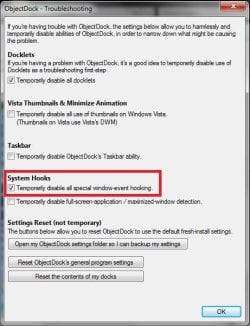
The solution:
Dock Settings>Troubleshooting Options:
Check the box - Temporarily disable all special window-event hooking>Restart computer.
 

Attachments

  • OD.jpg
    OD.jpg
    41.9 KB · Views: 127

My Computer My Computer

Computer Manufacturer/Model Number
Lenovo Y430
OS
Win 7 Ultimate 32bit
Back
Top