Games Explorer Folder - Customize Context Menu

   Information
"Back in Vista there was an option to customize right-click options for our games in GEF and now has been removed in Seven."

Rod Lopez from Windows Blog said:
As for removing features, we carefully study how our customers use our software, and try to act based on that input. The large majority of our customers don't customize game shortcuts, and for those that do, it's a one time only thing. In order to simplify Games Explorer, we left that option out, and instead left it as something that can be done manually...


Here is how you can add them manually for your non GFWL games:
For this example I'm going to use: COD4MW
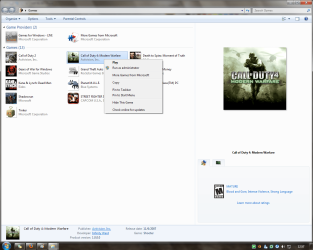
GEF Rc 01.png
Without multiplayer option.
Step 1: Navigate to this location
C:\Users\%username%\AppData\Local\Microsoft\Windows\GameExplorer\
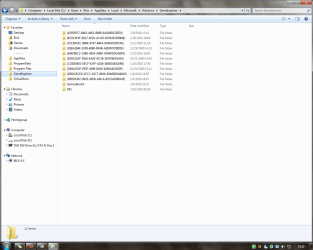
GEF Rc 02.png
The AppData folder is hidden by default you can learn how to unhide it in this tutorial.
Each of your games should be within GameExplorer folder, just find the one you are looking in the sub-folder "...\PlayTasks\0"
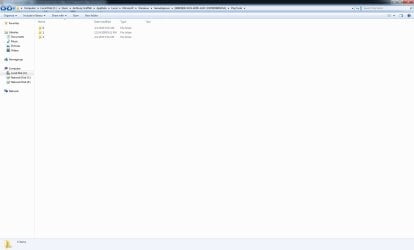
Step 2: Create a new folder in "...\PlayTasks" and name it 1
Step 3: Copy the item you wanna add as an option.
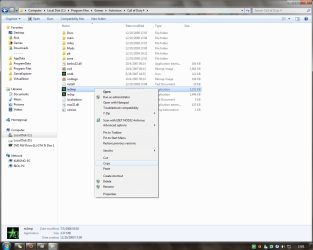
GEF Rc 03.png
This is the multiplayer executable.
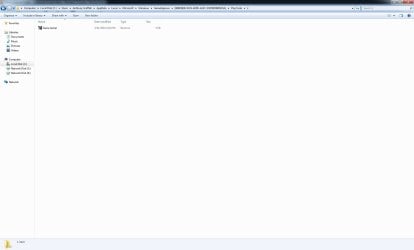
Step 4: Now paste a shortcut in "...\PlayTasks\1"
Step 5: Rename the new item.
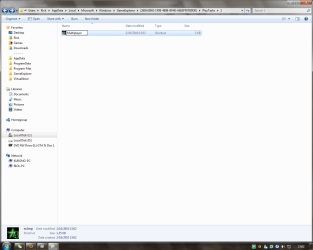
GEF Rc 04.png
This name will be displayed in the option menu.

The new option should now be displayed in GEF right-click option menu.
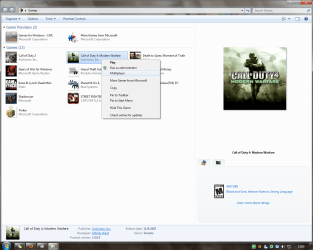
GEF Rc 05.png
With multiplayer option.
   Note
If you want to add more options just keep adding folders in "...\PlayTasks" and name it with the next number available...

That's all for now...
Rjck.


Last edited by a moderator:
I am currently trying to do this and have created the folder and shortcut needed but the new option is not showing up in my Games Explorer context menu. Is a reboot or anything else required for the new option to show up?
 

My Computer

Computer Manufacturer/Model Number
Alienware m17x
OS
Windows 7 x64 Home Premium
CPU
Intel Core2 Extreme Quad QX9300
Memory
4GB DDR3 at 1333MHz
Graphics Card(s)
Dual 280M GTX in SLI
Sound Card
Creative X-Fi Xtreme Notebook
Screen Resolution
1920x1200
Hard Drives
2 x 500GB 7200 RPM HDD Raid 0
Hi kqmaverick. No, a reboot isnt required, would u mind taking a screenshot of the "C:\Users\username\AppData\Local\Microsoft\Windows\GameExplorer\...\PlayTasks\1" path.
 
Last edited:

My Computer

Computer type
PC/Desktop
OS
Windows 7 Ultimate x64
CPU
Intel Core i5-2500K @4.5Ghz
Motherboard
Asus Maximus V GENE
Memory
x2 Kingston KHX1600C9D3/4G
Graphics Card(s)
NVIDIA GeForce GTS 250 - 1024MB
Sound Card
SupremeFX III built-in 8-Channel High Definition Audio
Monitor(s) Displays
Samsung Syncmaster P2270
Screen Resolution
1920x1080
Hard Drives
x1 Seagate Barracuda ST3160811AS
x2 Seagate Barracuda ST380817AS
PSU
Corsair TX750
Case
Cooler Master HAF 922 Side Window Model
Cooling
Stock Intel Cooler + Tuniq TX2
Keyboard
Dell SK-8135
Mouse
Logitech G5
Internet Speed
2 Mbps
Other Info
x2 Xbox 360 Wireless Controller for Windows
Logitech Z-5550
Sennheiser HD555
My game actually already had a 1 folder so i used 2.
 

Attachments

  • Pic1.jpg
    Pic1.jpg
    46.5 KB · Views: 976
  • Pic2.jpg
    Pic2.jpg
    43.6 KB · Views: 922

My Computer

Computer Manufacturer/Model Number
Alienware m17x
OS
Windows 7 x64 Home Premium
CPU
Intel Core2 Extreme Quad QX9300
Memory
4GB DDR3 at 1333MHz
Graphics Card(s)
Dual 280M GTX in SLI
Sound Card
Creative X-Fi Xtreme Notebook
Screen Resolution
1920x1200
Hard Drives
2 x 500GB 7200 RPM HDD Raid 0
All seems to be fine... have u tried with other game and see if it works?
which game is it btw...
 
Last edited:

My Computer

Computer type
PC/Desktop
OS
Windows 7 Ultimate x64
CPU
Intel Core i5-2500K @4.5Ghz
Motherboard
Asus Maximus V GENE
Memory
x2 Kingston KHX1600C9D3/4G
Graphics Card(s)
NVIDIA GeForce GTS 250 - 1024MB
Sound Card
SupremeFX III built-in 8-Channel High Definition Audio
Monitor(s) Displays
Samsung Syncmaster P2270
Screen Resolution
1920x1080
Hard Drives
x1 Seagate Barracuda ST3160811AS
x2 Seagate Barracuda ST380817AS
PSU
Corsair TX750
Case
Cooler Master HAF 922 Side Window Model
Cooling
Stock Intel Cooler + Tuniq TX2
Keyboard
Dell SK-8135
Mouse
Logitech G5
Internet Speed
2 Mbps
Other Info
x2 Xbox 360 Wireless Controller for Windows
Logitech Z-5550
Sennheiser HD555
The above posted is Batman: Arkham Asylum. Ive also tried it with Crysis with the same result. I even went as far as trying to replace the default action but there was also no change.
 

My Computer

Computer Manufacturer/Model Number
Alienware m17x
OS
Windows 7 x64 Home Premium
CPU
Intel Core2 Extreme Quad QX9300
Memory
4GB DDR3 at 1333MHz
Graphics Card(s)
Dual 280M GTX in SLI
Sound Card
Creative X-Fi Xtreme Notebook
Screen Resolution
1920x1200
Hard Drives
2 x 500GB 7200 RPM HDD Raid 0
mmm... ur right i tried with batman aa and it wont show up, it appears it only works with games you added... :(
 

My Computer

Computer type
PC/Desktop
OS
Windows 7 Ultimate x64
CPU
Intel Core i5-2500K @4.5Ghz
Motherboard
Asus Maximus V GENE
Memory
x2 Kingston KHX1600C9D3/4G
Graphics Card(s)
NVIDIA GeForce GTS 250 - 1024MB
Sound Card
SupremeFX III built-in 8-Channel High Definition Audio
Monitor(s) Displays
Samsung Syncmaster P2270
Screen Resolution
1920x1080
Hard Drives
x1 Seagate Barracuda ST3160811AS
x2 Seagate Barracuda ST380817AS
PSU
Corsair TX750
Case
Cooler Master HAF 922 Side Window Model
Cooling
Stock Intel Cooler + Tuniq TX2
Keyboard
Dell SK-8135
Mouse
Logitech G5
Internet Speed
2 Mbps
Other Info
x2 Xbox 360 Wireless Controller for Windows
Logitech Z-5550
Sennheiser HD555
Just to let everyone know, this doesnt work with just about any game made after 2008/2009, and some, like crysis above, still don't work either (2007).
 

My Computer

Computer Manufacturer/Model Number
My Own
OS
Windows 7 Ultimate 64-Bit
CPU
AMD Phenom II X4 955 BE OC to 3.62Ghz
Motherboard
Gigabyte MA770T-UD3
Memory
G-Skill NT 4GB
Graphics Card(s)
Sapphire Radeon HD 4670
Monitor(s) Displays
Dell 20' and some 16' inch Generic
Screen Resolution
1680x1050
Hard Drives
250GB ?
500GB Western Digital
PSU
Seasonic M12 II Bronze 520W
Case
NZXT Guardian 921
Cooling
Xigmatek S1283 Red Scorpion
Keyboard
Dell
Mouse
Dell
Internet Speed
6000Mbps
Just to let everyone know, this doesnt work with just about any game made after 2008/2009, and some, like crysis above, still don't work either (2007).
Why is that? I was about to try anyways. Latest games like Just Cause 2,Assassin Creed 2 and Splinter Cell conviction :rolleyes:
 

My Computer

OS
window's 7
CPU
core 2 quad
Motherboard
gigabyte
Memory
2gb corsair
Graphics Card(s)
ati hd4850
Monitor(s) Displays
lg
Screen Resolution
1600 X 900
Case
power logic
Other Info
none of the spec above is accurate
Just to let everyone know, this doesnt work with just about any game made after 2008/2009, and some, like crysis above, still don't work either (2007).

???...:shock:, i think it works for games that are non GFWL like for example Blur(2010).
just give it a try ;)
 

My Computer

Computer type
PC/Desktop
OS
Windows 7 Ultimate x64
CPU
Intel Core i5-2500K @4.5Ghz
Motherboard
Asus Maximus V GENE
Memory
x2 Kingston KHX1600C9D3/4G
Graphics Card(s)
NVIDIA GeForce GTS 250 - 1024MB
Sound Card
SupremeFX III built-in 8-Channel High Definition Audio
Monitor(s) Displays
Samsung Syncmaster P2270
Screen Resolution
1920x1080
Hard Drives
x1 Seagate Barracuda ST3160811AS
x2 Seagate Barracuda ST380817AS
PSU
Corsair TX750
Case
Cooler Master HAF 922 Side Window Model
Cooling
Stock Intel Cooler + Tuniq TX2
Keyboard
Dell SK-8135
Mouse
Logitech G5
Internet Speed
2 Mbps
Other Info
x2 Xbox 360 Wireless Controller for Windows
Logitech Z-5550
Sennheiser HD555
i think that must be the reason there must be something extra you have to do. I found after doing this anyway, the context menu didn't change.
 

My Computer

Computer Manufacturer/Model Number
My Own
OS
Windows 7 Ultimate 64-Bit
CPU
AMD Phenom II X4 955 BE OC to 3.62Ghz
Motherboard
Gigabyte MA770T-UD3
Memory
G-Skill NT 4GB
Graphics Card(s)
Sapphire Radeon HD 4670
Monitor(s) Displays
Dell 20' and some 16' inch Generic
Screen Resolution
1680x1050
Hard Drives
250GB ?
500GB Western Digital
PSU
Seasonic M12 II Bronze 520W
Case
NZXT Guardian 921
Cooling
Xigmatek S1283 Red Scorpion
Keyboard
Dell
Mouse
Dell
Internet Speed
6000Mbps
Just to let everyone know, this doesnt work with just about any game made after 2008/2009, and some, like crysis above, still don't work either (2007).

???...:shock:, i think it works for games that are non GFWL like for example Blur(2010).
just give it a try ;)

thanks for the explanation Rjck. I'll give it a try later
 

My Computer

OS
window's 7
CPU
core 2 quad
Motherboard
gigabyte
Memory
2gb corsair
Graphics Card(s)
ati hd4850
Monitor(s) Displays
lg
Screen Resolution
1600 X 900
Case
power logic
Other Info
none of the spec above is accurate
Yep, for me this only worked for games I manually added. I can confirm this tutorial does not work with any gfw game automatically added by an installer.
 

My Computer

Computer Manufacturer/Model Number
My Own
OS
Windows 7 Ultimate 64-Bit
CPU
AMD Phenom II X4 955 BE OC to 3.62Ghz
Motherboard
Gigabyte MA770T-UD3
Memory
G-Skill NT 4GB
Graphics Card(s)
Sapphire Radeon HD 4670
Monitor(s) Displays
Dell 20' and some 16' inch Generic
Screen Resolution
1680x1050
Hard Drives
250GB ?
500GB Western Digital
PSU
Seasonic M12 II Bronze 520W
Case
NZXT Guardian 921
Cooling
Xigmatek S1283 Red Scorpion
Keyboard
Dell
Mouse
Dell
Internet Speed
6000Mbps
there is an easier way............
Just D&D the game shortcut from the start menu to the Game Explorer window or menu.
I had to be careful where I dropped it b/c it didn't seem to want to sort by name.
U can only HIDE the pre-installed games - I did the internet ones as I never use them.
U can remove any that u D&D to the menu. Do this by rt clk the item.
If u use the MENU instead of the LINK, as I do, u have to rt clk GAMES and OPEN it to get the window.
U can't hide or remove or rename from the menu.
 

My Computer

OS
windows 7
This tutorial has NOTHING to do with customizing Games Explorer context menu. I want to add "Open file location" option to all games and remove "Pin to taskbar"/"Pin to start menu" context menu options. This tutorial has absolute N-O-T-H-I-N-G related to that, to actually customizing the context menu. It just tells how to add commands to games of your choice.
 

My Computer

OS
Windows 7 Ultimate x86
This tutorial has NOTHING to do with customizing Games Explorer context menu. I want to add "Open file location" option to all games and remove "Pin to taskbar"/"Pin to start menu" context menu options. This tutorial has absolute N-O-T-H-I-N-G related to that, to actually customizing the context menu. It just tells how to add commands to games of your choice.

That's because what you want is for the context menu for all folders, and is not related to the context menu of specific game tiles in the Games Explorer folder that this tutorial is for instead. ;)


You could use the tutorials below to remove the items you want instead, but it will remove them from all files and folders.
 

My Computer

Computer type
PC/Desktop
Computer Manufacturer/Model Number
Self built custom
OS
64-bit Windows 11 Pro for Workstations
CPU
Intel i7-8700K OC'd to 5 GHz
Motherboard
ASUS ROG Maximus XI Formula Z390
Memory
64 GB (4x16GB) G.SKILL TridentZ RGB DDR4 3600 MHz
Graphics Card(s)
ASUS ROG-STRIX-GTX1080TI-O11G-GAMING
Sound Card
Integrated
Monitor(s) Displays
2 x Samsung Odyssey G7 27"
Screen Resolution
2560x1440
Hard Drives
1TB Samsung 990 PRO M.2,
4TB Samsung 990 PRO PRO M.2,
TerraMaster F8 SSD Plus NAS
PSU
Seasonic Prime Titanium 850W
Case
Thermaltake Core P3
Cooling
Corsair Hydro H115i
Keyboard
Logitech wireless K800
Mouse
Logitech MX Master 4
Internet Speed
2 Gb/s Download and 100 Mb/s Upload
Antivirus
Malwarebyte Anti-Malware Premium
Browser
Google Chrome
Other Info
Logitech Z625 speaker system,
Logitech BRIO 4K Pro webcam,
HP Color LaserJet Pro MFP M477fdn,
APC SMART-UPS RT 1000 XL - SURT1000XLI,
Galaxy S23 Plus phone
Back
Top