Show Us Your WEI (2)

Status
Not open for further replies.
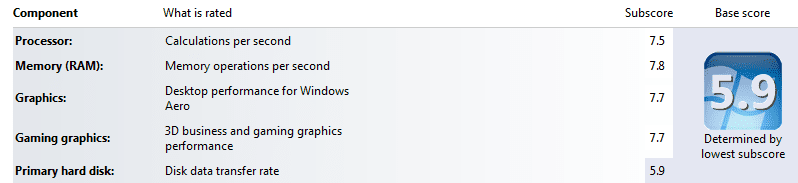
Here's my latest WEI

WEI2.png
 

My Computer My Computer

Computer type
PC/Desktop
Computer Manufacturer/Model Number
Custom Build
OS
Windows 7 Pro 64 bit
CPU
Intel i7-3770K Processor
Motherboard
ASRock > Products > Fatal1ty Z77 Professional
Memory
32gb [RipjawsX] F3-12800CL10Q-32GBXL
Graphics Card(s)
ASUS HD7970-DC2T-3GD5
Sound Card
Asus Xonar D2/PM
Monitor(s) Displays
Iiyama prolite E2773HDS
Screen Resolution
1920 x 1080
Hard Drives
Crucial - 128GB M4 - CT128M4SSD2// 2TB Seagate Barracuda Green // 2TB Hitachi | Deskstar 5K3000 //
PSU
Corsair HX850 Modular PSU
Case
Bitfenix Shinobi XL
Cooling
Water cooled CPU loop
Keyboard
Tt esports
Mouse
Logitech G700 gaming mouse
Internet Speed
38mb
Antivirus
MSE
Browser
Chrome
Other Info
Lite-On iHAS624 DVD RW - Internal.
Buffalo Nfiniti WBMR-G300N router.
DuoSwap MB971SP-B 2.5"/3.5" SATA Hot Swap Drive Caddy.
@ xXSevenXx,

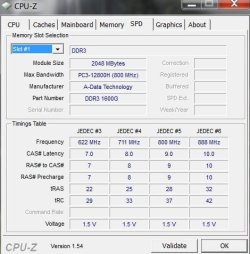
D/L CPUZ 64bit v1.54 and post a screen shot of the Memory & SPD tabs.

This will show you what it's running at.
 

My Computer My Computer

Computer type
PC/Desktop
Computer Manufacturer/Model Number
76~2.0
OS
Windows 7 Ult x64 - SP1/ Windows 8 Pro x64
CPU
Intel Core i5-3570K 4.6GHz
Motherboard
Gigabyte GA-Z77X UD3H, f18
Memory
8GB (2X4GB) DDR3 1600 Corsair Vengeance CL8 1.5v
Graphics Card(s)
Sapphire HD 7770 Vapor-X OC 1GB DDR5
Sound Card
Onboard VIA VT2021
Monitor(s) Displays
22" LCD Dell
Screen Resolution
1680x1050
Hard Drives
Samsung 840Pro 128GB SSD,
Seagate Barracuda 500GB SATA2 7200rpm 32MB cache, Seagate Barracuda 1TB SATA2 7200rpm 32MB cache,
PSU
Corsair HX650W
Case
Cooler Master Storm Scout
Cooling
Corsair H80 2x12cm Noctua NF P12 , 2x14cm case fans
Keyboard
Logitech Wave
Mouse
CM Sentinel
Internet Speed
Dismal
Antivirus
Avast
Browser
Opera Next
Other Info
Haswell laptop: HP Envy 17t-j, i7-4700MQ, GeForce 740M 2GB DDR3, 17.3" Full HD 1920x1080, 16GB RAM, Samsung 840 Pro 128GB, 1TB Hitachi 7200 HDD,
Desktop: eSATA ports,
External eSATA Seagate 500GB SATA2 7200rpm,
External WD USB 500GB

Attachments

  • a.JPG
    a.JPG
    36 KB · Views: 8
  • b.JPG
    b.JPG
    42.6 KB · Views: 6

My Computer My Computer

Computer type
PC/Desktop
Computer Manufacturer/Model Number
Home Built
OS
Windows 7 Ultimate SP1 64- bit
CPU
Intel Core i7-3770K @3.50ghz
Motherboard
EVGA Z77 FTW
Memory
Kingston Technology 16GB (2x 8GB) 2133MHz DDR3 Non-ECC
Graphics Card(s)
EVGA GTX 670 4gb SC
Sound Card
Nil
Monitor(s) Displays
Samsung 22"
Screen Resolution
1920 x 1080 60hz
Hard Drives
OCZ Vertex 4 SSD 128GB
SAMSUNG Spinpoint F3 HD502HJ 500GB 7200 RPM
PSU
Enermax Platinax EPM1000EWT Special OC Edition
Case
Cooler Master HAF Full Tower nVIDIA Edition
Cooling
CoolerMaster Hyper 212 Plus
Keyboard
HP Wireless Keyboard
Mouse
Corsair Vengeance M90
Internet Speed
20 Mb
Other Info
ASUS DRW-24B1ST/BLK/B/AS Black SATA 24X DVD Burner
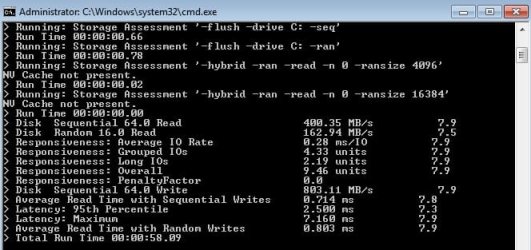
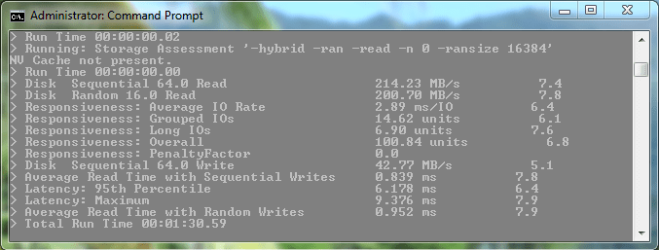
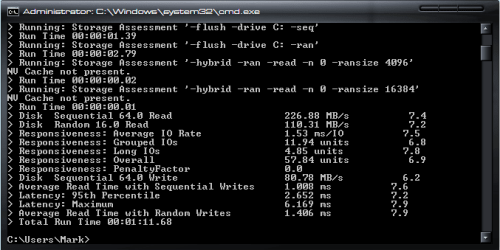
winsat disk assessment

cmd>winsat disk>enter
Mine is>


yours?
 

Attachments

  • disk assessment.jpg
    disk assessment.jpg
    44.1 KB · Views: 69

My Computer My Computer

Computer Manufacturer/Model Number
DIY #3, #2
OS
W7 Ulti/64, XP Pro/32
CPU
INTEL i7 920 DO, Core2 Duo 6400
Motherboard
GIGABYTE EX58 UD3R-SLI, EP45-UD3R
Memory
KINGSTON DDR3 1333MHz, CORSAIR DDR2 800MHz
Graphics Card(s)
EVGA GTX 260 x2, 8800 GTX
Sound Card
REALTEK HD onboard, ditto
Monitor(s) Displays
SONY 40" BRAVIA LCD
Screen Resolution
1360 X 768
Hard Drives
OCZ VERTEX/RAID0 -3, Vertex 30GB
PSU
COOLERMASTER 900W, ENERMAX 850W
Case
COOLERMASTER HAF 932 x2
Cooling
stock
Keyboard
MS
Mouse
MS
Internet Speed
ADSL 3MB/768KBs
Other Info
amateur enthusiast
Thanks for sharing this method, interesting to see what the they use to get the WEI score for Primary hard disk, disk data transfer rate.

Just to know what we're looking at, you have a lot of disks listed, is this the Boot/80GB RAID 0 ?
They appear to be Intel X25 M 80GB X2, is that right?

Excellent scores BTW.

Mine is an entry level Intel X25 V 40GB, with a crippled half of a controller, but seems to get a good WEI score, 7.6.
Was wondering why it gets such a good WEI score and a good AS SSD score.
Would like to find out what the criteria is for the AS SSD score.

WEI assessment breakdown X25 V 30May10.PNG

I'm definitely write penalized, but the reads are pretty good.

By comparing some of those numbers it looks like your way off scale on the upper end.
 

My Computer My Computer

Computer type
PC/Desktop
Computer Manufacturer/Model Number
76~2.0
OS
Windows 7 Ult x64 - SP1/ Windows 8 Pro x64
CPU
Intel Core i5-3570K 4.6GHz
Motherboard
Gigabyte GA-Z77X UD3H, f18
Memory
8GB (2X4GB) DDR3 1600 Corsair Vengeance CL8 1.5v
Graphics Card(s)
Sapphire HD 7770 Vapor-X OC 1GB DDR5
Sound Card
Onboard VIA VT2021
Monitor(s) Displays
22" LCD Dell
Screen Resolution
1680x1050
Hard Drives
Samsung 840Pro 128GB SSD,
Seagate Barracuda 500GB SATA2 7200rpm 32MB cache, Seagate Barracuda 1TB SATA2 7200rpm 32MB cache,
PSU
Corsair HX650W
Case
Cooler Master Storm Scout
Cooling
Corsair H80 2x12cm Noctua NF P12 , 2x14cm case fans
Keyboard
Logitech Wave
Mouse
CM Sentinel
Internet Speed
Dismal
Antivirus
Avast
Browser
Opera Next
Other Info
Haswell laptop: HP Envy 17t-j, i7-4700MQ, GeForce 740M 2GB DDR3, 17.3" Full HD 1920x1080, 16GB RAM, Samsung 840 Pro 128GB, 1TB Hitachi 7200 HDD,
Desktop: eSATA ports,
External eSATA Seagate 500GB SATA2 7200rpm,
External WD USB 500GB

My Computer My Computer

Computer type
PC/Desktop
OS
Windows 10 Home x64
CPU
INTEL Core i5-750 Quad-Core 3.37GHz
Motherboard
ASUS P7P55D
Memory
HyperX Fury Black Series 8GB (2 x 4GB) 1866Mhz
Graphics Card(s)
EVGA GeForce GTX 750 Superclocked 1GB 128-Bit GDDR5
Monitor(s) Displays
LG 32MA68HY 32" IPS
Screen Resolution
1920 x 1080
Hard Drives
Samsung 840 Evo 120GB, SEAGATE 500GB Barracuda® 7200.12, SATA 3 Gb/s, 7200 RPM, 16MB cache
PSU
ANTEC TruePower New TP-550, 80 PLUS, 550W
Case
ANTEC Three Hundred Illusion
Cooling
COOLER MASTER Hyper 212 Plus, 4 x 120mm 1 x 140mm Noctua's
Internet Speed
85 + Mbps
Antivirus
Avast
Browser
Vivaldi
@ xXSevenXx,

D/L CPUZ 64bit v1.54 and post a screen shot of the Memory & SPD tabs.

This will show you what it's running at.

I'm glad someone can make sense of it.lol

It appears that your RAM is running at (534.6 X 2 = 1069.2) 1066 MHz.

Run the memory assessment, instructions are on the first post, What's your memory assessment speed?
Post your results there.

Adjusting the settings on RAM is a lot more complicated than just changing the voltage setting. You can damage the CPU by increasing the RAM voltage on the X58 (and X55) motherboards. This must be done with care and knowledge of the side effects. You should be able to change the RAM frequency without changing the voltage.

If your new computer is running good and it's doing what you need, then everything is fine.
If you want to start fine tuning and playing with settings and adjustments, you will need to do some research. You need to know the basics of what is going on, how to adjust BIOS settings, when to ask a question about a setting or result from a changed setting.

Just following someones suggestion blindly is very risky, to say the least. Your computer can be damaged, RAM, CPU and/or MOBO, beyond repair.
Proper cooling is required and must be evaluated and likely upgraded if stock. All depending on the amount of adjusting or overclocking you want to try.

Changing the BIOS settings can result in a BSOD, which means the settings need adjusted and the system is not stable. This can be a long process to get to the stable settings for your specific hardware, and will not be the same for any other computer unless it has the exact same hardware.

Read your motherboard manual, BIOS section, you'll need to know what the settings names are and what they can do.

Good place to start is Wikipedia, DDR3 SDRAM

Read up on relevant information from this and other forums.

Tom's Hardware Core i7 Memory Scaling: From DDR3-800 to DDR3-1600

Try searching your RAM and MOBO, example: 'Overclocking ram asus p6x58d'.
This will help you find any limitations others with the same MOBO are experiencing.
RAM configuration help needed - 6 GB works
This one is relevant:
Final review on my i7 computer
Quote from raybob95:
4) You could, or you could be like me. I left the i7 at standard clocks, and raised the memory multiplier from the standard 8x to 12x (20 seconds to do) and my RAM went up from 1066 to 1600 MHz. I never noticed a difference. The i7 technically only supports 800 and 1066 MHz memory, not even 1333. But if you were to leave the multiplier where it is, then it would be useful for overclocking. For example, if you have 1600 MHz ram and you overclock your i7 from 20x133 MHz to 20x200 MHz, then your RAM speed will go from 1066 MHz to ~1603 MHz. Therefore you're still safe on the RAM, which you wouldn't be with the standard 1066 MHz RAM.

Remember the disclaimer for blindly following suggestions....

These type of forum posts will give you a general idea of what can/might be done with your system.

OCZ has a good forum, where you can read about your MOBO, just remember your RAM timings and voltage settings will be different, but good info on adjusting your BIOS on your MOBO.

OCZ3G1600LV6GK and P6T SE

More RAM info at Overclock.net
RAM 101
Ram Timings For Dummies
Some good info for you:
1600 running at 1033?
if ur pc is at default speeds, the memory will run at 1033 assuming is has multi of 8x.

EDIT: you can make them run at there specified speed but u will need to change the ram multi to 12.

That's a lot of info to digest, but will get you started.
Questions should be posted at Performance & Maintenance

 
Last edited:

My Computer My Computer

Computer type
PC/Desktop
Computer Manufacturer/Model Number
76~2.0
OS
Windows 7 Ult x64 - SP1/ Windows 8 Pro x64
CPU
Intel Core i5-3570K 4.6GHz
Motherboard
Gigabyte GA-Z77X UD3H, f18
Memory
8GB (2X4GB) DDR3 1600 Corsair Vengeance CL8 1.5v
Graphics Card(s)
Sapphire HD 7770 Vapor-X OC 1GB DDR5
Sound Card
Onboard VIA VT2021
Monitor(s) Displays
22" LCD Dell
Screen Resolution
1680x1050
Hard Drives
Samsung 840Pro 128GB SSD,
Seagate Barracuda 500GB SATA2 7200rpm 32MB cache, Seagate Barracuda 1TB SATA2 7200rpm 32MB cache,
PSU
Corsair HX650W
Case
Cooler Master Storm Scout
Cooling
Corsair H80 2x12cm Noctua NF P12 , 2x14cm case fans
Keyboard
Logitech Wave
Mouse
CM Sentinel
Internet Speed
Dismal
Antivirus
Avast
Browser
Opera Next
Other Info
Haswell laptop: HP Envy 17t-j, i7-4700MQ, GeForce 740M 2GB DDR3, 17.3" Full HD 1920x1080, 16GB RAM, Samsung 840 Pro 128GB, 1TB Hitachi 7200 HDD,
Desktop: eSATA ports,
External eSATA Seagate 500GB SATA2 7200rpm,
External WD USB 500GB
mine...
winsat_disk.PNG
 

My Computer My Computer

Computer Manufacturer/Model Number
tw33k
OS
Windows 7 Ultimate (x64) SP1
CPU
Intel 3770k 4.6GHz
Motherboard
ASUS Maximus V Formula
Memory
8GB (2x 4GB) Crucial Ballistix
Graphics Card(s)
Sapphire 7950 (1060/1600)
Sound Card
On Board Realtek HD Audio
Monitor(s) Displays
27" Acer B273HU (via HDMI)
Screen Resolution
2048 x 1152
Hard Drives
Crucial M4 128GB
2TB WD Black
1TB Samsung F3 SATA
1TB WD Elite External
2TB WD USB 3.0
PSU
Corsair AX750 Gold
Case
Corsair Obsidian 800DW
Cooling
Corsair H100 (2x AP-121/2x UK-3000 push/pull)
Keyboard
Microsoft Wireless 5000
Mouse
Microsoft Wireless 5000
Internet Speed
5mb/s
Other Info
Logitech z-2300 2.1 speakers
Lamptron FC-5 v2

My Computer My Computer

Computer Manufacturer/Model Number
Gigabyte EX58Extreme
OS
win7 Enterprise X64
CPU
i7 920
Motherboard
Gigabyte Ex58 Extreme
Memory
OCZ 6GB DDR3 1600 MHZ, runnong @ 1560
Graphics Card(s)
Sapphair HD 5850 1 GB GDDR5
Sound Card
Built in SPDIF, Samsung hometheater system 5.1
Monitor(s) Displays
Hitachi 42" LCD 1920 X 1080
Screen Resolution
1920 x 1080
Hard Drives
2X 160GB Maxtor RAID0, 500GB WD (Bakcup & movies), 2TB Seagate.
PSU
thermaltake thoughpower 850 WATT
Case
thearmaltake Armur
Cooling
Satandard Intel CPU, Standard thermaltake Arum fans
Keyboard
Microsoft IR wireless
Mouse
Microsoft IR wireless
Internet Speed
4MB
Thanks for sharing this method, interesting to see what the they use to get the WEI score for Primary hard disk, disk data transfer rate.

Just to know what we're looking at, you have a lot of disks listed, is this the Boot/80GB RAID 0 ?
They appear to be Intel X25 M 80GB X2, is that right?

Excellent scores BTW.

Mine is an entry level Intel X25 V 40GB, with a crippled half of a controller, but seems to get a good WEI score, 7.6.
Was wondering why it gets such a good WEI score and a good AS SSD score.
Would like to find out what the criteria is for the AS SSD score.

View attachment 75700

I'm definitely write penalized, but the reads are pretty good.

By comparing some of those numbers it looks like your way off scale on the upper end.

YW. More details than the WEI format.
Yes,
OCZ VERTEX SSD's, FW 1.5. 3 in a RAID 0 array.
 

My Computer My Computer

Computer Manufacturer/Model Number
DIY #3, #2
OS
W7 Ulti/64, XP Pro/32
CPU
INTEL i7 920 DO, Core2 Duo 6400
Motherboard
GIGABYTE EX58 UD3R-SLI, EP45-UD3R
Memory
KINGSTON DDR3 1333MHz, CORSAIR DDR2 800MHz
Graphics Card(s)
EVGA GTX 260 x2, 8800 GTX
Sound Card
REALTEK HD onboard, ditto
Monitor(s) Displays
SONY 40" BRAVIA LCD
Screen Resolution
1360 X 768
Hard Drives
OCZ VERTEX/RAID0 -3, Vertex 30GB
PSU
COOLERMASTER 900W, ENERMAX 850W
Case
COOLERMASTER HAF 932 x2
Cooling
stock
Keyboard
MS
Mouse
MS
Internet Speed
ADSL 3MB/768KBs
Other Info
amateur enthusiast
Soliciting suggestions on improving with SSD

So I just built this machine, loaded Win7 x64, and checked the performance. Seems the conventional hard drive is the only piece not in sync. So I would welcome some further information about using SSDs to improve performance. Specifically, since I have a system built already, should I add an SSD and use this just for ReadyBoost, or should I reinstall Win7 to the SSD? While 6 GB RAM sounds like a lot, PhotoShop CS5 and other graphic apps seem capable of slurping a good portion of it.

I'd like to hear your experiences with trying different Win7 setups with an SSD if you have tried more than one. I welcome hearing how this impacts gaming and Adobe CS5 apps in particular if you can speak to that.

Also, is there an easy way to specify to Win7 during installation that OS and Program Files should reside on the SSD drive, while user accounts should reside on a conventional drive? Are there still problems installing applications that expect everything to reside on a single C: drive? Which should be the focus for improvement--shuttling program, data, or both?

Thanks in advance for suggestions.
 

Attachments

  • PerformanceSnip.PNG
    PerformanceSnip.PNG
    25.1 KB · Views: 62

My Computer My Computer

Computer Manufacturer/Model Number
- personal build -
OS
Windows 7 Ultimate x64
CPU
Core I7 930 2.8 Ghz
Motherboard
Gigabyte GA-X58A-UD3R
Memory
6 GB Corsair Dominator DDR3 1600
Graphics Card(s)
Sapphire Radeon 5830 1 GB 256-bit GDDR5
Sound Card
- none added -
Monitor(s) Displays
Samsung SyncMaster 2233
Hard Drives
(2x) Seagate Barracuda 7200.12 ST31000528AS 1TB 7200 RPM 32MB Cache SATA 3.0Gb/s [Second drive for Windows 7 x86 clean install multiboot]
PSU
Corsair CMPSU-750TX 750W
Case
Cooler Master Cosmos 1000
Cooling
Fans
Here's mine, not the best score ever, but it's good enough to run Aero fine and to browse the internet and write documents, that's all I care about, at the moment:D.
 

Attachments

  • windows experience index.PNG
    windows experience index.PNG
    12 KB · Views: 60

My Computer My Computer

Computer Manufacturer/Model Number
self built
OS
Windows 8 Pro x64; Win 7 Home Premium x64 SP1 on VirtualBox
CPU
Intel Core i3-2120 @ 3.3GHz
Motherboard
ASUS P8Z68-M Pro
Memory
8GB DDR3
Graphics Card(s)
ZOTAC GeForce GTX 560 Ti
Sound Card
Realteck HD Audio
Monitor(s) Displays
ASUS VS228 21.5" 1080p
Screen Resolution
1920x1080
Hard Drives
120GB SanDisk SSD;
500GB 7200RPM HDD
PSU
500W 80PLUS Bronze Certified
Case
Antec Three Hundred Illusion
Keyboard
Microsoft Comfort Curve Keyboard 2000 v1.0
Mouse
Microsoft Wireless Mobile Mouse 3000
Internet Speed
26/22Mbps Verizon FiOS
Other Info
very first PC build
wei performnce.PNG
 

My Computer My Computer

OS
window's 7
CPU
core 2 quad
Motherboard
gigabyte
Memory
2gb corsair
Graphics Card(s)
ati hd4850
Monitor(s) Displays
lg
Screen Resolution
1600 X 900
Case
power logic
Other Info
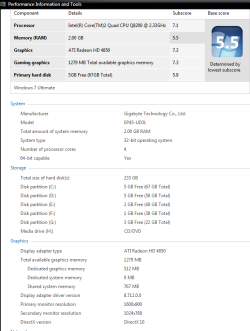
none of the spec above is accurate
Maxed with the equip I have

It's going to take an OCed 980 to get 7.8, and takes Raid 0 SSD's to peg 7.9, ( so no TRIM ) I gave up on Pegging the meter. Not willing to spend a grand for .1, But I keep checking back, I would like to see someone do it. My 920 is running 20X206 with turbo enabled for just over 4.3

SysInfo.png

ssdhdtune.png
 
Last edited:

My Computer My Computer

Computer Manufacturer/Model Number
EVGA
OS
Windows 7
CPU
I-7 980X
Motherboard
EVGA X58
Memory
12 GB CORSEAIR XMS3
Graphics Card(s)
2 GTX295'S IN quad SLI
Sound Card
REALTECK ON BOARD
Monitor(s) Displays
LG HDTV, 35in 1080P
Screen Resolution
1920 X1080
Hard Drives
2 Seagate 7200 1TB SATAII IN RAID 0 for vista
3 Intel X25M-G80's Raid 0
PSU
CORSAIR HX1200W
Case
COOLER MASTER HAF-X
Cooling
H-70
Other Info
OC TO 4.0
Win 7 RC1 WEI 6.4
So I just built this machine, loaded Win7 x64, and checked the performance. Seems the conventional hard drive is the only piece not in sync. So I would welcome some further information about using SSDs to improve performance. Specifically, since I have a system built already, should I add an SSD and use this just for ReadyBoost, or should I reinstall Win7 to the SSD? While 6 GB RAM sounds like a lot, PhotoShop CS5 and other graphic apps seem capable of slurping a good portion of it.

I'd like to hear your experiences with trying different Win7 setups with an SSD if you have tried more than one. I welcome hearing how this impacts gaming and Adobe CS5 apps in particular if you can speak to that.

Also, is there an easy way to specify to Win7 during installation that OS and Program Files should reside on the SSD drive, while user accounts should reside on a conventional drive? Are there still problems installing applications that expect everything to reside on a single C: drive? Which should be the focus for improvement--shuttling program, data, or both?

Thanks in advance for suggestions.

Welcome to Seven Forums WumpusWhumper.

Nice scores BTW.

For a little information you can read the Show us your SSD performance thread.

A SSD will have a noticeable performance gain. Startups and shutdowns are much faster, installed programs load quicker. Best upgrade I've ever done.

You will find that pretty much everywhere will recommend using a SSD for your OS.
If you have more than 3GB RAM, Ready Boost will not give you any noticeable performance increase.

If your a heavy user of PhotoShop CS5, I would recommend adding RAM before using Ready Boost.
As I'm not a gamer, can't tell you what improvement you'll see. Have read of improved loading time, and marginal performance increase. You can find many comments on this by searching (Google or?).

Best way to install win7 on a SSD is to leave it in raw, unformatted, state. Take it out of the box, plug in the power and SATA cable, point to it when asked where to install win7.
Win7 will align it, disable the minimum processes, as it will detect that it is a SSD.
Most people recommend to set your BIOS to SATA AHCI or RAID before installation. Besides the standard benefits, you will be able to use the Trim function, which keeps the SSD deleted files erased and helps the SSD to perform as when new.

Depending on the SSD you buy, Gen2 SSDs require very few changes.
When you see a long list of recommended changes, they are for older models of SSDs. One of the important ones is to disable Defrag, a SSD does not need defragging and will cause un-necessary wear.

Check this tutorial, SSD Tweaks and Optimizations in Windows 7.

Let us know if you have any more questions.
 

My Computer My Computer

Computer type
PC/Desktop
Computer Manufacturer/Model Number
76~2.0
OS
Windows 7 Ult x64 - SP1/ Windows 8 Pro x64
CPU
Intel Core i5-3570K 4.6GHz
Motherboard
Gigabyte GA-Z77X UD3H, f18
Memory
8GB (2X4GB) DDR3 1600 Corsair Vengeance CL8 1.5v
Graphics Card(s)
Sapphire HD 7770 Vapor-X OC 1GB DDR5
Sound Card
Onboard VIA VT2021
Monitor(s) Displays
22" LCD Dell
Screen Resolution
1680x1050
Hard Drives
Samsung 840Pro 128GB SSD,
Seagate Barracuda 500GB SATA2 7200rpm 32MB cache, Seagate Barracuda 1TB SATA2 7200rpm 32MB cache,
PSU
Corsair HX650W
Case
Cooler Master Storm Scout
Cooling
Corsair H80 2x12cm Noctua NF P12 , 2x14cm case fans
Keyboard
Logitech Wave
Mouse
CM Sentinel
Internet Speed
Dismal
Antivirus
Avast
Browser
Opera Next
Other Info
Haswell laptop: HP Envy 17t-j, i7-4700MQ, GeForce 740M 2GB DDR3, 17.3" Full HD 1920x1080, 16GB RAM, Samsung 840 Pro 128GB, 1TB Hitachi 7200 HDD,
Desktop: eSATA ports,
External eSATA Seagate 500GB SATA2 7200rpm,
External WD USB 500GB
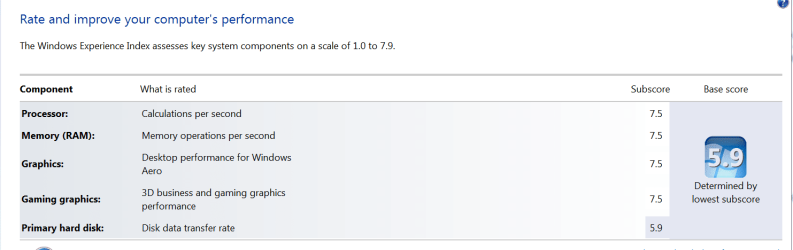
I do hope everyone isn't driven by WEI scores. Sure, it's nice to have good numbers, and it does indicate great performing hardware. But I'm hoping everyone is searching for increased real world performance and usability. Not the ever elusive 7.9, lol. I'm not going over 5.9 because I'm not going to be changing HDDs and reinstalling Windows when my HDDs are just over a month and a 1/2 old. Numbers are nice, but they are only numbers. A Guy ;)
 

My Computer My Computer

Computer type
PC/Desktop
OS
Windows 10 Home x64
CPU
INTEL Core i5-750 Quad-Core 3.37GHz
Motherboard
ASUS P7P55D
Memory
HyperX Fury Black Series 8GB (2 x 4GB) 1866Mhz
Graphics Card(s)
EVGA GeForce GTX 750 Superclocked 1GB 128-Bit GDDR5
Monitor(s) Displays
LG 32MA68HY 32" IPS
Screen Resolution
1920 x 1080
Hard Drives
Samsung 840 Evo 120GB, SEAGATE 500GB Barracuda® 7200.12, SATA 3 Gb/s, 7200 RPM, 16MB cache
PSU
ANTEC TruePower New TP-550, 80 PLUS, 550W
Case
ANTEC Three Hundred Illusion
Cooling
COOLER MASTER Hyper 212 Plus, 4 x 120mm 1 x 140mm Noctua's
Internet Speed
85 + Mbps
Antivirus
Avast
Browser
Vivaldi
It's going to take an OCed 980 to get 7.8, and takes Raid 0 SSD's to peg 7.9, ( so no TRIM ) I gave up on Pegging the meter. Not willing to spend a grand for .1, But I keep checking back, I would like to see someone do it. My 920 is running 20X206 with turbo enabled for just over 4.3


Hello Moore, I was wondering if a 980 would do it, too bad.
 

My Computer My Computer

Computer Manufacturer/Model Number
* BFK Customs *
OS
W 7 64-bit Ultimate
CPU
Intel Q9550 Yorkfield
Motherboard
ASUS P5Q Pro
Memory
8GB Dominator 8500C5D
Graphics Card(s)
ATI : XFX 5870
Sound Card
Realtek HD Audio 7-1
Monitor(s) Displays
1x 47" LCD HDMI & 3x 26" LCD HDMI
Screen Resolution
1920x1080P & 1920x1200
Hard Drives
1x 80GB Intel X25-M G2 SSD : 1x 500GB & 1x 640GB WD Caviar Black(s)
PSU
Corsair 620HX
Case
Cooler Master RC-690
Cooling
Tuniq Tower 120, 2x 140mm and 3x 120mm case fans
Keyboard
Microsoft 500
Mouse
Razer Diamondback 3G
Internet Speed
14 Mb/s
Other Info
1x Koutech 3Gb/s SATA HDD Hot Swap Rack

My Computer My Computer

OS
window's 7
CPU
core 2 quad
Motherboard
gigabyte
Memory
2gb corsair
Graphics Card(s)
ati hd4850
Monitor(s) Displays
lg
Screen Resolution
1600 X 900
Case
power logic
Other Info
none of the spec above is accurate
It's going to take an OCed 980 to get 7.8, and takes Raid 0 SSD's to peg 7.9, ( so no TRIM ) I gave up on Pegging the meter. Not willing to spend a grand for .1, But I keep checking back, I would like to see someone do it. My 920 is running 20X206 with turbo enabled for just over 4.3

It seems like you are the man :D

Q: how did you arrange those 3 SSDs in Raid 0 ?
 

My Computer My Computer

Computer Manufacturer/Model Number
Gigabyte EX58Extreme
OS
win7 Enterprise X64
CPU
i7 920
Motherboard
Gigabyte Ex58 Extreme
Memory
OCZ 6GB DDR3 1600 MHZ, runnong @ 1560
Graphics Card(s)
Sapphair HD 5850 1 GB GDDR5
Sound Card
Built in SPDIF, Samsung hometheater system 5.1
Monitor(s) Displays
Hitachi 42" LCD 1920 X 1080
Screen Resolution
1920 x 1080
Hard Drives
2X 160GB Maxtor RAID0, 500GB WD (Bakcup & movies), 2TB Seagate.
PSU
thermaltake thoughpower 850 WATT
Case
thearmaltake Armur
Cooling
Satandard Intel CPU, Standard thermaltake Arum fans
Keyboard
Microsoft IR wireless
Mouse
Microsoft IR wireless
Internet Speed
4MB
Latest WEI
 

Attachments

  • wei.PNG
    wei.PNG
    11.7 KB · Views: 32

My Computer My Computer

Computer type
PC/Desktop
Computer Manufacturer/Model Number
Home Built
OS
Windows 7 Ultimate SP1 64- bit
CPU
Intel Core i7-3770K @3.50ghz
Motherboard
EVGA Z77 FTW
Memory
Kingston Technology 16GB (2x 8GB) 2133MHz DDR3 Non-ECC
Graphics Card(s)
EVGA GTX 670 4gb SC
Sound Card
Nil
Monitor(s) Displays
Samsung 22"
Screen Resolution
1920 x 1080 60hz
Hard Drives
OCZ Vertex 4 SSD 128GB
SAMSUNG Spinpoint F3 HD502HJ 500GB 7200 RPM
PSU
Enermax Platinax EPM1000EWT Special OC Edition
Case
Cooler Master HAF Full Tower nVIDIA Edition
Cooling
CoolerMaster Hyper 212 Plus
Keyboard
HP Wireless Keyboard
Mouse
Corsair Vengeance M90
Internet Speed
20 Mb
Other Info
ASUS DRW-24B1ST/BLK/B/AS Black SATA 24X DVD Burner
Status
Not open for further replies.
Back
Top