How to Autorun USB on Win 7

aaaltd

New member
Local time
12:45 AM
Messages
4
Hi,

I want to make a USB flash drive auto run a website link in Windows 7.

I know the auto run function has been removed in Win 7, but can I at least make a pop up window appear whenever a USB flash drive is inserted in the PC and have the user the option to click and open the link???

Help anyone...please:confused:
 

My Computer My Computer

At a glance

W7 and Vista
OS
W7 and Vista

My Computer My Computer

At a glance

Windows® 8 Pro (64-bit)Intel® Core™ i5 Processor 2467M (1.60GHz, 3MB...6GB DDR3 System Memory at 1,333MHz (on BD 4GB...AMD Radeon™ HD7550M 1GB DDR3 (Ext. Graphic)
Computer Manufacturer/Model Number
Samsung NP530U4B-S02IN
OS
Windows® 8 Pro (64-bit)
CPU
Intel® Core™ i5 Processor 2467M (1.60GHz, 3MB L3 Cache)
Motherboard
Samsung Electronics
Memory
6GB DDR3 System Memory at 1,333MHz (on BD 4GB + 2GB x 1)
Graphics Card(s)
AMD Radeon™ HD7550M 1GB DDR3 (Ext. Graphic)
Sound Card
Realtek High Definition Audio
Monitor(s) Displays
35.56cm (14.0) SuperBright 300nit HD LED Display
Screen Resolution
1366x768
Hard Drives
1TB S-ATA II Hard Drive (5400RPM) with ExpressCache 16GB SSD
Internet Speed
sucks
Antivirus
Microsoft Security Essentials
Browser
Google Chrome (Sync enabled)

My Computer My Computer

At a glance

Win 10 Pro x64Intel I5-2500K @3.3GHz16GB G.Skill Ripjaws X (4x4GB)EVGA GeForce 750 Ti SC 2GB
Computer type
PC/Desktop
Computer Manufacturer/Model Number
Self Built
OS
Win 10 Pro x64
CPU
Intel I5-2500K @3.3GHz
Motherboard
Asrock P67 Extreme4
Memory
16GB G.Skill Ripjaws X (4x4GB)
Graphics Card(s)
EVGA GeForce 750 Ti SC 2GB
Sound Card
ASUS Xonar DG 5.1 Channels 24-bit 96KHz PCI Interface Sound
Monitor(s) Displays
auria eq2367
Screen Resolution
1920 x 1080
Hard Drives
250GB Samsung 850 EVO SSD
1TB WD Blue
1TB Hitachi
PSU
SeaSonic X 650W 80 Plus Gold
Case
Corsair Obsidian 750D
Cooling
Corsair H60, Three 140mm case fans
Keyboard
Logitech Wireless Keyboard K520
Mouse
Logitech Wireless Mouse M310
Internet Speed
Wave Broadband ~ 100 dn 5 up
Antivirus
Windows Defender, Malwarebytes Premium
Browser
Edge, IE11, Chrome
Other Info
Laptop specs: HP g7-1365dx /
CPU: AMD A6-3420M APU with Radeon(tm) HD Graphics /
RAM: Crucial 8Gb (2x4Gb) /
SSD: Crucial M4-CT128M4SSD2 ATA Device/ FW 000F /
GFX: AMD Radeon HD 6520G /
OS: Windows 10 Pro x64
Thanks Dinesh.

I forgot to mention though...without having to alter any setting on the Windows 7 PC. Basically, is there something that can be done in the autorun.inf file stored in the USB flash drive so that when inserted, it will prompt a pop up window...kinda like what happens with Vista. So the Windows 7 user will have the option to click the link once the window pops up and again, without having the user alter any security settings on thier windows 7 PC.
 

My Computer My Computer

At a glance

W7 and Vista
OS
W7 and Vista
Thanks Dinesh.

I forgot to mention though...without having to alter any setting on the Windows 7 PC. Basically, is there something that can be done in the autorun.inf file stored in the USB flash drive so that when inserted, it will prompt a pop up window...kinda like what happens with Vista. So the Windows 7 user will have the option to click the link once the window pops up and again, without having the user alter any security settings on thier windows 7 PC.

#2 has clearly answered you, if you read the link carefully, you will know what to do.
 

My Computer My Computer

At a glance

Windows 7 Professional x86
OS
Windows 7 Professional x86
#2 has clearly answered you, if you read the link carefully, you will know what to do.

Thanks Xiezhoupeng351.

Unless I'm missing something from the link, my understanding is that one has to alter the setting in their PC for it to auto play. I prefer not to do that. I am planning to give usb flash drives with a link to a website. I want it to auto play when plugged into the computer so it opens the browser automatically and they can right away see the website so the receipient doesn't have to do anything.

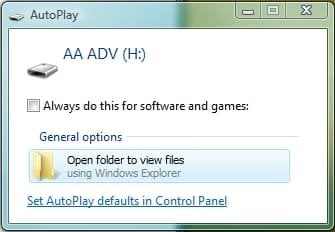
For security reasons, I know most pc by default has this turned off. So my next best option is to have a pop up window option. Please see attachment.

This pop up window automatically comes out in XP & Vista but not W7. When the usb flash drive is inserted in a W7 PC, it doesn't respond at all.

Is there a way to make the pop out window come up in W7 without doing alterations on the PC. I prefer not to give out usb flash drives with instructions on altering their PC's security settings...?
 

Attachments

  • pop-up.jpg
    pop-up.jpg
    11.8 KB · Views: 35

My Computer My Computer

At a glance

W7 and Vista
OS
W7 and Vista
It's right there in the tutorial, method 1. There is no editing security settings just enabling autoplay.
 

Attachments

  • autoplay.JPG
    autoplay.JPG
    26.5 KB · Views: 529

My Computer My Computer

At a glance

Win 10 Pro x64Intel I5-2500K @3.3GHz16GB G.Skill Ripjaws X (4x4GB)EVGA GeForce 750 Ti SC 2GB
Computer type
PC/Desktop
Computer Manufacturer/Model Number
Self Built
OS
Win 10 Pro x64
CPU
Intel I5-2500K @3.3GHz
Motherboard
Asrock P67 Extreme4
Memory
16GB G.Skill Ripjaws X (4x4GB)
Graphics Card(s)
EVGA GeForce 750 Ti SC 2GB
Sound Card
ASUS Xonar DG 5.1 Channels 24-bit 96KHz PCI Interface Sound
Monitor(s) Displays
auria eq2367
Screen Resolution
1920 x 1080
Hard Drives
250GB Samsung 850 EVO SSD
1TB WD Blue
1TB Hitachi
PSU
SeaSonic X 650W 80 Plus Gold
Case
Corsair Obsidian 750D
Cooling
Corsair H60, Three 140mm case fans
Keyboard
Logitech Wireless Keyboard K520
Mouse
Logitech Wireless Mouse M310
Internet Speed
Wave Broadband ~ 100 dn 5 up
Antivirus
Windows Defender, Malwarebytes Premium
Browser
Edge, IE11, Chrome
Other Info
Laptop specs: HP g7-1365dx /
CPU: AMD A6-3420M APU with Radeon(tm) HD Graphics /
RAM: Crucial 8Gb (2x4Gb) /
SSD: Crucial M4-CT128M4SSD2 ATA Device/ FW 000F /
GFX: AMD Radeon HD 6520G /
OS: Windows 10 Pro x64
Is nobody reading the Question? LOL.


my understanding is that one has to alter the setting in their PC for it to auto play. I prefer not to do that...I want it to auto play when plugged into the computer so it opens the browser automatically ...

No , there isn't a way ( that I know of ) without the user enabling it themselves.
 

My Computers My Computers

  • At a glance

    7 X64i5 84002x8gb 3200mhz
    Computer type
    PC/Desktop
    OS
    7 X64
    CPU
    i5 8400
    Motherboard
    gigabyte b365m ds3h
    Memory
    2x8gb 3200mhz
    Hard Drives
    various
    PSU
    pure power 11 400w cm
    Case
    Coolermaster
    Cooling
    cryorig m9i
  • At a glance

    7x64g54008gb ddr4 2400
    Computer type
    PC/Desktop
    OS
    7x64
    CPU
    g5400
    Motherboard
    ga b365m ds3h
    Memory
    8gb ddr4 2400
    PSU
    xfx pro 450w
Is nobody reading the Question? LOL.


my understanding is that one has to alter the setting in their PC for it to auto play. I prefer not to do that...I want it to auto play when plugged into the computer so it opens the browser automatically ...

No , there isn't a way ( that I know of ) without the user enabling it themselves.

I guess I misunderstood, my bad.:o
 

My Computer My Computer

At a glance

Win 10 Pro x64Intel I5-2500K @3.3GHz16GB G.Skill Ripjaws X (4x4GB)EVGA GeForce 750 Ti SC 2GB
Computer type
PC/Desktop
Computer Manufacturer/Model Number
Self Built
OS
Win 10 Pro x64
CPU
Intel I5-2500K @3.3GHz
Motherboard
Asrock P67 Extreme4
Memory
16GB G.Skill Ripjaws X (4x4GB)
Graphics Card(s)
EVGA GeForce 750 Ti SC 2GB
Sound Card
ASUS Xonar DG 5.1 Channels 24-bit 96KHz PCI Interface Sound
Monitor(s) Displays
auria eq2367
Screen Resolution
1920 x 1080
Hard Drives
250GB Samsung 850 EVO SSD
1TB WD Blue
1TB Hitachi
PSU
SeaSonic X 650W 80 Plus Gold
Case
Corsair Obsidian 750D
Cooling
Corsair H60, Three 140mm case fans
Keyboard
Logitech Wireless Keyboard K520
Mouse
Logitech Wireless Mouse M310
Internet Speed
Wave Broadband ~ 100 dn 5 up
Antivirus
Windows Defender, Malwarebytes Premium
Browser
Edge, IE11, Chrome
Other Info
Laptop specs: HP g7-1365dx /
CPU: AMD A6-3420M APU with Radeon(tm) HD Graphics /
RAM: Crucial 8Gb (2x4Gb) /
SSD: Crucial M4-CT128M4SSD2 ATA Device/ FW 000F /
GFX: AMD Radeon HD 6520G /
OS: Windows 10 Pro x64
Back
Top