Can't connect to internet - "Unidentified network"

Jofo

New member
Local time
12:00 PM
Messages
10
I know this problem has been discussed on this forum before, but none of the solutions worked for me.

I just reformatted my hard drive about 3 days ago after it refused to boot up. I reinstalled Windows 7 and everything was working just fine for about 2 hours, then for no apparent reason my internet connection dropped while I was browsing the internet. That was 3 days ago. My connection is still down.

My wireless card is picking up the signal from my router, but when I try to connect to the network it tells me I am connected to an "Unidentified network" and have no internet access. I tried uninstalling and reinstalling the network drivers, system restore, as well as "netsh winsock reset" "netsh int ip reset reset.log" and "netsh winsock reset catalog".

The "ipconfig /renew" command gives me the following message: "An error occurred while renewing interface Wireless Network Connection : unable to contact your DHCP server. Request has timed out."

Windows Network Diagnostics says I have two problems.
1) "Problem with wireless adapter or access point."
2) "Wireless Network Connection doesn't have a valid IP configuration."

I have never encountered this problem before, and I have been using this same PC and wireless card for 6 months. I would really appreciate some help with this because recently my PC has just been having one problem after the next.

Here is my "ipconfig /all" information as well as the messages I get when using the /renew command. I noticed I don't have a default gateway listed, which I'm hoping might be a clue to my problem:

C:\Users\Jason>ipconfig /all

Windows IP Configuration

Host Name . . . . . . . . . . . . : Jason-PC
Primary Dns Suffix . . . . . . . :
Node Type . . . . . . . . . . . . : Hybrid
IP Routing Enabled. . . . . . . . : No
WINS Proxy Enabled. . . . . . . . : No

Wireless LAN adapter Wireless Network Connection:

Connection-specific DNS Suffix . :
Description . . . . . . . . . . . : Realtek 8185 Extensible 802.11b/g Wireles
s Device
Physical Address. . . . . . . . . : 08-10-74-54-31-84
DHCP Enabled. . . . . . . . . . . : Yes
Autoconfiguration Enabled . . . . : Yes
Link-local IPv6 Address . . . . . : fe80::91ee:a82e:d02d:296e%20(Preferred)
Autoconfiguration IPv4 Address. . : 169.254.41.110(Preferred)
Subnet Mask . . . . . . . . . . . : 255.255.0.0
Default Gateway . . . . . . . . . :
DHCPv6 IAID . . . . . . . . . . . : 336072820
DHCPv6 Client DUID. . . . . . . . : 00-01-00-01-13-A3-52-80-00-1F-BC-08-DF-D2

DNS Servers . . . . . . . . . . . : fec0:0:0:ffff::1%1
fec0:0:0:ffff::2%1
fec0:0:0:ffff::3%1
NetBIOS over Tcpip. . . . . . . . : Enabled

Ethernet adapter Local Area Connection:

Media State . . . . . . . . . . . : Media disconnected
Connection-specific DNS Suffix . :
Description . . . . . . . . . . . : Realtek RTL8168D/8111D Family PCI-E Gigab
it Ethernet NIC (NDIS 6.20)
Physical Address. . . . . . . . . : 00-1F-BC-08-DF-D2
DHCP Enabled. . . . . . . . . . . : Yes
Autoconfiguration Enabled . . . . : Yes

Tunnel adapter isatap.{2A0C0216-94EF-4A16-BD52-AA9E46DC508E}:

Media State . . . . . . . . . . . : Media disconnected
Connection-specific DNS Suffix . :
Description . . . . . . . . . . . : Microsoft ISATAP Adapter
Physical Address. . . . . . . . . : 00-00-00-00-00-00-00-E0
DHCP Enabled. . . . . . . . . . . : No
Autoconfiguration Enabled . . . . : Yes

Tunnel adapter Teredo Tunneling Pseudo-Interface:

Media State . . . . . . . . . . . : Media disconnected
Connection-specific DNS Suffix . :
Description . . . . . . . . . . . : Teredo Tunneling Pseudo-Interface
Physical Address. . . . . . . . . : 00-00-00-00-00-00-00-E0
DHCP Enabled. . . . . . . . . . . : No
Autoconfiguration Enabled . . . . : Yes

Tunnel adapter isatap.{0C2D1EDC-BC22-471D-BEF0-0CB4943FB217}:

Media State . . . . . . . . . . . : Media disconnected
Connection-specific DNS Suffix . :
Description . . . . . . . . . . . : Microsoft ISATAP Adapter #2
Physical Address. . . . . . . . . : 00-00-00-00-00-00-00-E0
DHCP Enabled. . . . . . . . . . . : No
Autoconfiguration Enabled . . . . : Yes

C:\Users\Jason>ipconfig /renew

Windows IP Configuration

An error occurred while renewing interface Wireless Network Connection : unable
to contact your DHCP server. Request has timed out.
No operation can be performed on Local Area Connection while it has its media di
sconnected.
An error occurred while releasing interface Loopback Pseudo-Interface 1 : The sy
stem cannot find the file specified.
 

My Computer My Computer

At a glance

Windows 7 Home PremiumIntel Core i7 920Corsair XMS3 12GB HX3X12G1333C9ATI Radeon HD 4870
Computer Manufacturer/Model Number
Self-built
OS
Windows 7 Home Premium
CPU
Intel Core i7 920
Motherboard
EVGA X58 SLI LE 141-BL-E757-TR
Memory
Corsair XMS3 12GB HX3X12G1333C9
Graphics Card(s)
ATI Radeon HD 4870
Monitor(s) Displays
ASUS VW198T
Hard Drives
Western Digital 640GB WD6400AAKS
PSU
Ultra LSP750 750w
Case
Antec Three Hundred
Cooling
Cooler Master Hyper 212 Plus
I know this problem has been discussed on this forum before, but none of the solutions worked for me.

I just reformatted my hard drive about 3 days ago after it refused to boot up. I reinstalled Windows 7 and everything was working just fine for about 2 hours, then for no apparent reason my internet connection dropped while I was browsing the internet. That was 3 days ago. My connection is still down.

My wireless card is picking up the signal from my router, but when I try to connect to the network it tells me I am connected to an "Unidentified network" and have no internet access. I tried uninstalling and reinstalling the network drivers, system restore, as well as "netsh winsock reset" "netsh int ip reset reset.log" and "netsh winsock reset catalog".

The "ipconfig /renew" command gives me the following message: "An error occurred while renewing interface Wireless Network Connection : unable to contact your DHCP server. Request has timed out."

Windows Network Diagnostics says I have two problems.
1) "Problem with wireless adapter or access point."
2) "Wireless Network Connection doesn't have a valid IP configuration."

I have never encountered this problem before, and I have been using this same PC and wireless card for 6 months. I would really appreciate some help with this because recently my PC has just been having one problem after the next.

Here is my "ipconfig /all" information as well as the messages I get when using the /renew command. I noticed I don't have a default gateway listed, which I'm hoping might be a clue to my problem:

C:\Users\Jason>ipconfig /all

Windows IP Configuration

Host Name . . . . . . . . . . . . : Jason-PC
Primary Dns Suffix . . . . . . . :
Node Type . . . . . . . . . . . . : Hybrid
IP Routing Enabled. . . . . . . . : No
WINS Proxy Enabled. . . . . . . . : No

Wireless LAN adapter Wireless Network Connection:

Connection-specific DNS Suffix . :
Description . . . . . . . . . . . : Realtek 8185 Extensible 802.11b/g Wireles
s Device
Physical Address. . . . . . . . . : 08-10-74-54-31-84
DHCP Enabled. . . . . . . . . . . : Yes
Autoconfiguration Enabled . . . . : Yes
Link-local IPv6 Address . . . . . : fe80::91ee:a82e:d02d:296e%20(Preferred)
Autoconfiguration IPv4 Address. . : 169.254.41.110(Preferred)
Subnet Mask . . . . . . . . . . . : 255.255.0.0
Default Gateway . . . . . . . . . :
DHCPv6 IAID . . . . . . . . . . . : 336072820
DHCPv6 Client DUID. . . . . . . . : 00-01-00-01-13-A3-52-80-00-1F-BC-08-DF-D2

DNS Servers . . . . . . . . . . . : fec0:0:0:ffff::1%1
fec0:0:0:ffff::2%1
fec0:0:0:ffff::3%1
NetBIOS over Tcpip. . . . . . . . : Enabled

Ethernet adapter Local Area Connection:

Media State . . . . . . . . . . . : Media disconnected
Connection-specific DNS Suffix . :
Description . . . . . . . . . . . : Realtek RTL8168D/8111D Family PCI-E Gigab
it Ethernet NIC (NDIS 6.20)
Physical Address. . . . . . . . . : 00-1F-BC-08-DF-D2
DHCP Enabled. . . . . . . . . . . : Yes
Autoconfiguration Enabled . . . . : Yes

Tunnel adapter isatap.{2A0C0216-94EF-4A16-BD52-AA9E46DC508E}:

Media State . . . . . . . . . . . : Media disconnected
Connection-specific DNS Suffix . :
Description . . . . . . . . . . . : Microsoft ISATAP Adapter
Physical Address. . . . . . . . . : 00-00-00-00-00-00-00-E0
DHCP Enabled. . . . . . . . . . . : No
Autoconfiguration Enabled . . . . : Yes

Tunnel adapter Teredo Tunneling Pseudo-Interface:

Media State . . . . . . . . . . . : Media disconnected
Connection-specific DNS Suffix . :
Description . . . . . . . . . . . : Teredo Tunneling Pseudo-Interface
Physical Address. . . . . . . . . : 00-00-00-00-00-00-00-E0
DHCP Enabled. . . . . . . . . . . : No
Autoconfiguration Enabled . . . . : Yes

Tunnel adapter isatap.{0C2D1EDC-BC22-471D-BEF0-0CB4943FB217}:

Media State . . . . . . . . . . . : Media disconnected
Connection-specific DNS Suffix . :
Description . . . . . . . . . . . : Microsoft ISATAP Adapter #2
Physical Address. . . . . . . . . : 00-00-00-00-00-00-00-E0
DHCP Enabled. . . . . . . . . . . : No
Autoconfiguration Enabled . . . . : Yes

C:\Users\Jason>ipconfig /renew

Windows IP Configuration

An error occurred while renewing interface Wireless Network Connection : unable
to contact your DHCP server. Request has timed out.
No operation can be performed on Local Area Connection while it has its media di
sconnected.
An error occurred while releasing interface Loopback Pseudo-Interface 1 : The sy
stem cannot find the file specified.


Your wifi card is not connecting to the router (IP 169.254.x.x is local to the card). It may be trying to connect via IPv6 and not succeeding.

There is one easy test you can do. Make a new network connection using "workgroup" instead of "homegroup". Workgroup uses IPv4 which seems to work much better especially with somewhat older hardware. If workgroup is fine you can disable IPv6 and kill network


Let us know if you need help with this change


Ken
 

My Computer My Computer

At a glance

Win 8 Release candidate 8400[email protected]4 gigsNvidia 9600M
Computer Manufacturer/Model Number
HP Pavillion dv-7 1005 Tx
OS
Win 8 Release candidate 8400
CPU
[email protected]
Memory
4 gigs
Graphics Card(s)
Nvidia 9600M
Sound Card
HD built-in
Monitor(s) Displays
17" Wxga
Screen Resolution
1440x900
Cooling
none
Internet Speed
45Mb down 5Mb up
It looked like my computer was already on a workgroup, but I went ahead and made another one. Still no internet access. I also tried unchecking IPv6 in the network adapter properties, which I assume is what you meant. Didn't seem to change anything.
 

My Computer My Computer

At a glance

Windows 7 Home PremiumIntel Core i7 920Corsair XMS3 12GB HX3X12G1333C9ATI Radeon HD 4870
Computer Manufacturer/Model Number
Self-built
OS
Windows 7 Home Premium
CPU
Intel Core i7 920
Motherboard
EVGA X58 SLI LE 141-BL-E757-TR
Memory
Corsair XMS3 12GB HX3X12G1333C9
Graphics Card(s)
ATI Radeon HD 4870
Monitor(s) Displays
ASUS VW198T
Hard Drives
Western Digital 640GB WD6400AAKS
PSU
Ultra LSP750 750w
Case
Antec Three Hundred
Cooling
Cooler Master Hyper 212 Plus
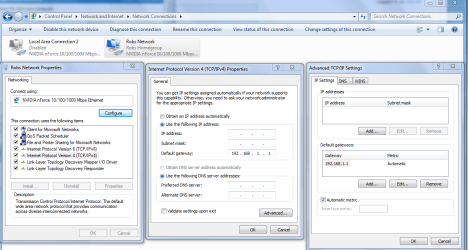
This problem sometimes has to do with a rogue secondary default gateway which Windows 7 doesn't like. In your case there is no default gateway showing up at all. This problem can usually be fixed entering the correct default gateway into your IPv4 properties window. You can usually get this info from your routers set up page.

The link below shows you how to enter the correct default gateway manually. Resetting the router or updating your routers firmware might also help. Reinstalling your wireless network driver might be worth a try.

Windows 7 Unidentified Network, Limited Access, No Internet Connection Problem Resolved
 

My Computer My Computer

At a glance

Windows 7 Ult, Windows 8.1 Pro,Q9650-4.275GHz, E8600 4.5GHz, E6750-3.8GHzG.Skill PC2 9600 1200Mhz 5 5 5 15 2TGTX480
Computer type
PC/Desktop
Computer Manufacturer/Model Number
Home built
OS
Windows 7 Ult, Windows 8.1 Pro,
CPU
Q9650-4.275GHz, E8600 4.5GHz, E6750-3.8GHz
Motherboard
Evga 780i FTW
Memory
G.Skill PC2 9600 1200Mhz 5 5 5 15 2T
Graphics Card(s)
GTX480
Sound Card
Asus Xonar D2
Monitor(s) Displays
HannsG
Screen Resolution
1680X1050
Hard Drives
GSkill Phoenix Pro 120GB SSD
PSU
ThermalTake Toughpower 1000Watt modular
Case
ThermalTake XaserV
Cooling
Xigmatek S1283
Keyboard
Logitech G15
Mouse
Logitech G9
Internet Speed
T1
I should have mentioned that there are several other computers and laptops in the house that do have an internet connection. I actually read that blog post in the link earlier today and tried manually entering the default gateway number that I obtained by running ipconfig on my other computers (I assume all my computers use the same default gateway?).

The thing is that if I choose to manually enter the default gateway in the IPv4 properties, it requires me to enter all the numbers for IP address, subnet mask, and DNS server addresses as well. I'm not sure what these values should be, so I tried copying all those properties exactly as they are listed in my laptop (which has internet). My PC said it had an internet connection for a few seconds before I got some message about an IP address conflict (since I was using my laptop's IP) and then it stopped working again.

What should those other numbers be?
 

My Computer My Computer

At a glance

Windows 7 Home PremiumIntel Core i7 920Corsair XMS3 12GB HX3X12G1333C9ATI Radeon HD 4870
Computer Manufacturer/Model Number
Self-built
OS
Windows 7 Home Premium
CPU
Intel Core i7 920
Motherboard
EVGA X58 SLI LE 141-BL-E757-TR
Memory
Corsair XMS3 12GB HX3X12G1333C9
Graphics Card(s)
ATI Radeon HD 4870
Monitor(s) Displays
ASUS VW198T
Hard Drives
Western Digital 640GB WD6400AAKS
PSU
Ultra LSP750 750w
Case
Antec Three Hundred
Cooling
Cooler Master Hyper 212 Plus
If DHCP isn't working then it could be the driver is messed up which may require you to reinstall it or find a better one. Or if there are no other Win 7 PC's in your network it could require that you update your routers firmware to make it work with Windows 7 which is a common problem.

You can get the default gateway info from any one of the other machines in your LAN by doing an ipconfig on them "yes they should all be using the same default gateway,subnet mask and DNS".

You might also want to post an ipconfig /all from one of the working machines in your network just to make sure that the IP you use is in the range of your router.

Then enter the DNS and default gateway, subnet mask,and IP into the IPv4 advanced properties window of the machine with the problem. You shouldn't need to do any of this if DHCP is working correctly. There could be a problem with the driver or the router if DHCP isn't working.

If you are using any type of A/V software this can also cause this sort of problem.
 

Attachments

  • IPV4 properties manual default gateway entry.PNG
    IPV4 properties manual default gateway entry.PNG
    63.2 KB · Views: 1,375
Last edited:

My Computer My Computer

At a glance

Windows 7 Ult, Windows 8.1 Pro,Q9650-4.275GHz, E8600 4.5GHz, E6750-3.8GHzG.Skill PC2 9600 1200Mhz 5 5 5 15 2TGTX480
Computer type
PC/Desktop
Computer Manufacturer/Model Number
Home built
OS
Windows 7 Ult, Windows 8.1 Pro,
CPU
Q9650-4.275GHz, E8600 4.5GHz, E6750-3.8GHz
Motherboard
Evga 780i FTW
Memory
G.Skill PC2 9600 1200Mhz 5 5 5 15 2T
Graphics Card(s)
GTX480
Sound Card
Asus Xonar D2
Monitor(s) Displays
HannsG
Screen Resolution
1680X1050
Hard Drives
GSkill Phoenix Pro 120GB SSD
PSU
ThermalTake Toughpower 1000Watt modular
Case
ThermalTake XaserV
Cooling
Xigmatek S1283
Keyboard
Logitech G15
Mouse
Logitech G9
Internet Speed
T1
I tried entering all those values in again and still no go. I tried uninstalling my network adapter drivers earlier, but Windows reinstalled them on boot-up and it didn't solve the problem. Also I don't have any antivirus or firewall software installed on my PC at the moment.

Here is the ipconfig log from my laptop with working internet:

Windows IP Configuration

Host Name . . . . . . . . . . . . : Home
Primary Dns Suffix . . . . . . . :
Node Type . . . . . . . . . . . . : Unknown
IP Routing Enabled. . . . . . . . : No
WINS Proxy Enabled. . . . . . . . : No
DNS Suffix Search List. . . . . . : hsd1.ga.comcast.net.

Ethernet adapter Local Area Connection:

Media State . . . . . . . . . . . : Media disconnected
Description . . . . . . . . . . . : Broadcom 440x 10/100 Integrated Cont
roller
Physical Address. . . . . . . . . : 00-19-B9-77-26-1C

Ethernet adapter Wireless Network Connection:

Connection-specific DNS Suffix . : hsd1.ga.comcast.net.
Description . . . . . . . . . . . : Dell Wireless 1390 WLAN Mini-Card
Physical Address. . . . . . . . . : 00-1B-FC-46-B1-1D
Dhcp Enabled. . . . . . . . . . . : Yes
Autoconfiguration Enabled . . . . : Yes
IP Address. . . . . . . . . . . . : 192.168.1.100
Subnet Mask . . . . . . . . . . . : 255.255.255.0
Default Gateway . . . . . . . . . : 192.168.1.1
DHCP Server . . . . . . . . . . . : 192.168.1.1
DNS Servers . . . . . . . . . . . : 68.87.68.166
68.87.74.166
Lease Obtained. . . . . . . . . . : Saturday, June 12, 2010 3:31:56 PM
Lease Expires . . . . . . . . . . : Sunday, June 13, 2010 3:31:56 PM

Ethernet adapter {44367AE8-D131-4BE6-B4BE-C2A4D2C66F71}:

Media State . . . . . . . . . . . : Media disconnected
Description . . . . . . . . . . . : TAP-Win32 Adapter V9 - Packet Schedu
ler Miniport
Physical Address. . . . . . . . . : 00-FF-44-36-7A-E8


And in case it matters, here is my ipconfig log from the problematic PC after manually entering those values:

Windows IP Configuration

Host Name . . . . . . . . . . . . : Jason-PC
Primary Dns Suffix . . . . . . . :
Node Type . . . . . . . . . . . . : Hybrid
IP Routing Enabled. . . . . . . . : No
WINS Proxy Enabled. . . . . . . . : No

Wireless LAN adapter Wireless Network Connection:

Connection-specific DNS Suffix . :
Description . . . . . . . . . . . : Realtek 8185 Extensible 802.11b/g Wireles
s Device
Physical Address. . . . . . . . . : 08-10-74-54-31-84
DHCP Enabled. . . . . . . . . . . : No
Autoconfiguration Enabled . . . . : Yes
Link-local IPv6 Address . . . . . : fe80::91ee:a82e:d02d:296e%13(Preferred)
IPv4 Address. . . . . . . . . . . : 192.168.1.101(Preferred)
Subnet Mask . . . . . . . . . . . : 255.255.255.0
Default Gateway . . . . . . . . . : 192.168.1.1
DHCPv6 IAID . . . . . . . . . . . : 336072820
DHCPv6 Client DUID. . . . . . . . : 00-01-00-01-13-A3-52-80-00-1F-BC-08-DF-D2

DNS Servers . . . . . . . . . . . : 68.87.68.166
68.87.74.166
NetBIOS over Tcpip. . . . . . . . : Enabled

Ethernet adapter Local Area Connection:

Media State . . . . . . . . . . . : Media disconnected
Connection-specific DNS Suffix . :
Description . . . . . . . . . . . : Realtek RTL8168D/8111D Family PCI-E Gigab
it Ethernet NIC (NDIS 6.20)
Physical Address. . . . . . . . . : 00-1F-BC-08-DF-D2
DHCP Enabled. . . . . . . . . . . : Yes
Autoconfiguration Enabled . . . . : Yes

Tunnel adapter isatap.{2A0C0216-94EF-4A16-BD52-AA9E46DC508E}:

Media State . . . . . . . . . . . : Media disconnected
Connection-specific DNS Suffix . :
Description . . . . . . . . . . . : Microsoft ISATAP Adapter
Physical Address. . . . . . . . . : 00-00-00-00-00-00-00-E0
DHCP Enabled. . . . . . . . . . . : No
Autoconfiguration Enabled . . . . : Yes

Tunnel adapter Teredo Tunneling Pseudo-Interface:

Media State . . . . . . . . . . . : Media disconnected
Connection-specific DNS Suffix . :
Description . . . . . . . . . . . : Teredo Tunneling Pseudo-Interface
Physical Address. . . . . . . . . : 00-00-00-00-00-00-00-E0
DHCP Enabled. . . . . . . . . . . : No
Autoconfiguration Enabled . . . . : Yes

Tunnel adapter isatap.{0C2D1EDC-BC22-471D-BEF0-0CB4943FB217}:

Media State . . . . . . . . . . . : Media disconnected
Connection-specific DNS Suffix . :
Description . . . . . . . . . . . : Microsoft ISATAP Adapter #2
Physical Address. . . . . . . . . : 00-00-00-00-00-00-00-E0
DHCP Enabled. . . . . . . . . . . : No
Autoconfiguration Enabled . . . . : Yes


edit: oops. posted the same log twice.
 

My Computer My Computer

At a glance

Windows 7 Home PremiumIntel Core i7 920Corsair XMS3 12GB HX3X12G1333C9ATI Radeon HD 4870
Computer Manufacturer/Model Number
Self-built
OS
Windows 7 Home Premium
CPU
Intel Core i7 920
Motherboard
EVGA X58 SLI LE 141-BL-E757-TR
Memory
Corsair XMS3 12GB HX3X12G1333C9
Graphics Card(s)
ATI Radeon HD 4870
Monitor(s) Displays
ASUS VW198T
Hard Drives
Western Digital 640GB WD6400AAKS
PSU
Ultra LSP750 750w
Case
Antec Three Hundred
Cooling
Cooler Master Hyper 212 Plus
Did you install the chipset and network drivers that are available from the EVGA support website?
 

My Computer My Computer

At a glance

Windows 7 Ultimate x64 SP1Core i7-2670QM8GB DDR3 PC3-10600Intel HD Graphics 3000 + GeForce GT 540M
Computer Manufacturer/Model Number
Dell XPS 15 L502x
OS
Windows 7 Ultimate x64 SP1
CPU
Core i7-2670QM
Memory
8GB DDR3 PC3-10600
Graphics Card(s)
Intel HD Graphics 3000 + GeForce GT 540M
Screen Resolution
1920x1080
Hard Drives
1TB 5400RPM Seagate
I just now tried installing EVGA's support drivers. I also installed updated drivers from Realtek. Still no connectivity.
 

My Computer My Computer

At a glance

Windows 7 Home PremiumIntel Core i7 920Corsair XMS3 12GB HX3X12G1333C9ATI Radeon HD 4870
Computer Manufacturer/Model Number
Self-built
OS
Windows 7 Home Premium
CPU
Intel Core i7 920
Motherboard
EVGA X58 SLI LE 141-BL-E757-TR
Memory
Corsair XMS3 12GB HX3X12G1333C9
Graphics Card(s)
ATI Radeon HD 4870
Monitor(s) Displays
ASUS VW198T
Hard Drives
Western Digital 640GB WD6400AAKS
PSU
Ultra LSP750 750w
Case
Antec Three Hundred
Cooling
Cooler Master Hyper 212 Plus
Well at least the ipconfig looks normal again so the setting did take which tends to point to a chipset problem or bios problem. Unless of course there is some funky A/V blocking something,so assuming there isn't an A/V involved here. There was also a rogue IP showing up before, I'm not sure where that came from.

Ok I have some more tricks up my sleeve for this one. These EVGA boards I know pretty well. What happens is that the chipsets can get hosed and the only way to fix it is to clear the cmos on the board. I've fixed my board and a few others this way, it's standard procedure when it comes to these EVGA boards, thats why they have a little button for clearing the cmos.

After clearing the cmos be sure and enable your SATA drives and return to normal any other settings to how they were before cmos clear.

That should get you back online again and DHCP should be working so you can probably return your ipv4 settings back to DHCP.
 

My Computer My Computer

At a glance

Windows 7 Ult, Windows 8.1 Pro,Q9650-4.275GHz, E8600 4.5GHz, E6750-3.8GHzG.Skill PC2 9600 1200Mhz 5 5 5 15 2TGTX480
Computer type
PC/Desktop
Computer Manufacturer/Model Number
Home built
OS
Windows 7 Ult, Windows 8.1 Pro,
CPU
Q9650-4.275GHz, E8600 4.5GHz, E6750-3.8GHz
Motherboard
Evga 780i FTW
Memory
G.Skill PC2 9600 1200Mhz 5 5 5 15 2T
Graphics Card(s)
GTX480
Sound Card
Asus Xonar D2
Monitor(s) Displays
HannsG
Screen Resolution
1680X1050
Hard Drives
GSkill Phoenix Pro 120GB SSD
PSU
ThermalTake Toughpower 1000Watt modular
Case
ThermalTake XaserV
Cooling
Xigmatek S1283
Keyboard
Logitech G15
Mouse
Logitech G9
Internet Speed
T1
Unfortunately clearing the CMOS didn't do the trick. I tried it twice just to make sure. After doing that and setting IPv4 settings back to automatic, my ipconfig log looks the same as it did before when I was missing a default gateway and all that.
 

My Computer My Computer

At a glance

Windows 7 Home PremiumIntel Core i7 920Corsair XMS3 12GB HX3X12G1333C9ATI Radeon HD 4870
Computer Manufacturer/Model Number
Self-built
OS
Windows 7 Home Premium
CPU
Intel Core i7 920
Motherboard
EVGA X58 SLI LE 141-BL-E757-TR
Memory
Corsair XMS3 12GB HX3X12G1333C9
Graphics Card(s)
ATI Radeon HD 4870
Monitor(s) Displays
ASUS VW198T
Hard Drives
Western Digital 640GB WD6400AAKS
PSU
Ultra LSP750 750w
Case
Antec Three Hundred
Cooling
Cooler Master Hyper 212 Plus
If that didn't work than something is pretty messed up, possibly a hardware problem, hard to say from way over here when I can't even see the machine. :rolleyes:

If you havn't reset your router you should do so without hesitation, also try updating the router's firmware if you havn't yet. The rogue Ip that showed up in your ipconfig leads me to believe that your modem was giving you this rogue IP, which means the routers DHCP wasn't not working correctly for Windows 7. The firmware update would definately be required if this is the only Win 7 machine in your network.

I'm assuming you have all the required Windows updates installed for your system? If not try installing them.

If that doens't work then reinstall Win 7 and update your system with all important updates using Windows update.

Lately it's been nothing but impossible to solve problems for some reason. If I actually had access to some of these machines I believe the results would be much different. :sarc:
 
Last edited:

My Computer My Computer

At a glance

Windows 7 Ult, Windows 8.1 Pro,Q9650-4.275GHz, E8600 4.5GHz, E6750-3.8GHzG.Skill PC2 9600 1200Mhz 5 5 5 15 2TGTX480
Computer type
PC/Desktop
Computer Manufacturer/Model Number
Home built
OS
Windows 7 Ult, Windows 8.1 Pro,
CPU
Q9650-4.275GHz, E8600 4.5GHz, E6750-3.8GHz
Motherboard
Evga 780i FTW
Memory
G.Skill PC2 9600 1200Mhz 5 5 5 15 2T
Graphics Card(s)
GTX480
Sound Card
Asus Xonar D2
Monitor(s) Displays
HannsG
Screen Resolution
1680X1050
Hard Drives
GSkill Phoenix Pro 120GB SSD
PSU
ThermalTake Toughpower 1000Watt modular
Case
ThermalTake XaserV
Cooling
Xigmatek S1283
Keyboard
Logitech G15
Mouse
Logitech G9
Internet Speed
T1
Updating the firmware didn't seem to do anything. As for installing Windows updates, don't I need an internet connection to do that?

It doesn't seem like those things would logically be the problem anyway. I had an internet connection on the PC for 6 months straight. Not to mention a few days ago I had internet for a good 2 hours immediately following the Windows 7 re-installation before it stopped working for no apparent reason. I will most likely re-install Windows 7 again and just see what happens, but I have a feeling I'll run into the same problem again.

If it is a hardware problem, is there a specific component that is most likely to be causing the trouble? Would it more likely be the motherboard than, say, the RAM for example? Is there a way to pinpoint exactly where the source of the problem is?
 

My Computer My Computer

At a glance

Windows 7 Home PremiumIntel Core i7 920Corsair XMS3 12GB HX3X12G1333C9ATI Radeon HD 4870
Computer Manufacturer/Model Number
Self-built
OS
Windows 7 Home Premium
CPU
Intel Core i7 920
Motherboard
EVGA X58 SLI LE 141-BL-E757-TR
Memory
Corsair XMS3 12GB HX3X12G1333C9
Graphics Card(s)
ATI Radeon HD 4870
Monitor(s) Displays
ASUS VW198T
Hard Drives
Western Digital 640GB WD6400AAKS
PSU
Ultra LSP750 750w
Case
Antec Three Hundred
Cooling
Cooler Master Hyper 212 Plus
Okay, so something strange happened. I was messing around with stuff and testing out random troubleshooting ideas. I have two network adapter drivers. One is for the wireless card and I think the other one is for ethernet. I decided to disable the ethernet driver and uninstall the wireless driver, then boot into safe mode with networking.

When safe mode booted up, Windows automatically re-installed the wireless card driver as I expected. I tried connecting to my home network once again and lo and behold it was a success! I had an internet connection. I opened up Internet Explorer and the MSN homepage loaded. I went to Google just to further confirm that I did indeed have internet and the Google homepage loaded up too.

Now for the frustrating part. I quickly rebooted back into normal Windows to see what would happen. Of course, I got the familiar "Unidentified network" error. So I recreated the exact conditions and repeated the exact same steps I took 2 minutes earlier when I got the PC to connect. Disable this driver, uninstall that driver, reboot into safe mode. Unidentified network. My internet connection is gone once again, and I can't replicate the success I just experienced.

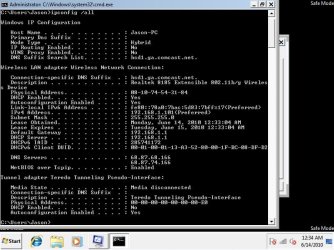
I took a snapshot of my ipconfig log when my internet was functioning for those brief couple of minutes:

http://i47.tinypic.com/241v0oy.jpg

All of the IPv4 properties were set to automatic. I have no idea why on earth it worked all of the sudden after one reboot and then never again.
 

Attachments

  • safemode.jpg
    safemode.jpg
    70.6 KB · Views: 124

My Computer My Computer

At a glance

Windows 7 Home PremiumIntel Core i7 920Corsair XMS3 12GB HX3X12G1333C9ATI Radeon HD 4870
Computer Manufacturer/Model Number
Self-built
OS
Windows 7 Home Premium
CPU
Intel Core i7 920
Motherboard
EVGA X58 SLI LE 141-BL-E757-TR
Memory
Corsair XMS3 12GB HX3X12G1333C9
Graphics Card(s)
ATI Radeon HD 4870
Monitor(s) Displays
ASUS VW198T
Hard Drives
Western Digital 640GB WD6400AAKS
PSU
Ultra LSP750 750w
Case
Antec Three Hundred
Cooling
Cooler Master Hyper 212 Plus
The ipconfig looks good but I'm not familior with those DNS servers, you might try using Googles DNS servers instead. Google Public DNS

Sounds like the drivers are somehow messing everything up which is strange. If you were able to connect in safe mode than most likely there is a third party program or some type of malware blocking the connection. Maybe running Malware bytes would help, hard to say. Malwarebytes' Anti-Malware: Malwarebytes

I can't see what third party programs you have installed from here but if I could I'm certain that I would see something I didn't like.

Reinstalling the OP system may be the way to go here.
 
Last edited:

My Computer My Computer

At a glance

Windows 7 Ult, Windows 8.1 Pro,Q9650-4.275GHz, E8600 4.5GHz, E6750-3.8GHzG.Skill PC2 9600 1200Mhz 5 5 5 15 2TGTX480
Computer type
PC/Desktop
Computer Manufacturer/Model Number
Home built
OS
Windows 7 Ult, Windows 8.1 Pro,
CPU
Q9650-4.275GHz, E8600 4.5GHz, E6750-3.8GHz
Motherboard
Evga 780i FTW
Memory
G.Skill PC2 9600 1200Mhz 5 5 5 15 2T
Graphics Card(s)
GTX480
Sound Card
Asus Xonar D2
Monitor(s) Displays
HannsG
Screen Resolution
1680X1050
Hard Drives
GSkill Phoenix Pro 120GB SSD
PSU
ThermalTake Toughpower 1000Watt modular
Case
ThermalTake XaserV
Cooling
Xigmatek S1283
Keyboard
Logitech G15
Mouse
Logitech G9
Internet Speed
T1
FINALLY!!!! A SOLUTION!!!

Okay, so after 5 days of troubleshooting the problem with every spare moment I had, it has finally been resolved. You were right, chev65. It was a driver problem. The driver that Windows 7 was automatically installing for my wireless card was somehow interrupting my internet connection.

I became really worried yesterday when I tried reinstalling Windows 7 and the problem persisted. At that point I really began to suspect that a hardware component was the culprit. Then, after hours of reformatting, reinstalling Windows 7, reformatting, installing Windows XP, putting the wireless card in another PC, and so on and so on, I finally determined that it HAD to be a driver issue.

In case anyone else is experiencing the same problem and stumbles onto this thread through Google or something, here is exactly what I did:
1. Manually downloaded the Vista driver for my wireless card. I had tried downloading the latest drivers from Realtek's website but they were no help, so I had to resort to driverscollection.com since it had drivers for my wifi card's specific brand and model (a Hiro H50069, for reference). The site didn't have a Windows 7 driver so I had to go with the Vista driver.
2. Opened Device Manager, looked for my wireless card driver, right-clicked it and then clicked Properties.
3. Clicked the "Update Driver" button.
4. Clicked "Browse my computer for driver software"
5. Clicked "Let me pick a list of device drivers on my computer"
6. Clicked the "Have disk..." button and browsed for the .inf driver file I just downloaded. Selected it and let the installation take over.

This was the only method I could figure out to manually choose which driver to install, because Windows was being a pain and insisted on automatically installing its own driver even when I changed the Windows device installation settings to prevent this.

Here's hoping the problem doesn't crop up again. Thanks chev65 and everyone else who helped me narrow down the problem!
 

My Computer My Computer

At a glance

Windows 7 Home PremiumIntel Core i7 920Corsair XMS3 12GB HX3X12G1333C9ATI Radeon HD 4870
Computer Manufacturer/Model Number
Self-built
OS
Windows 7 Home Premium
CPU
Intel Core i7 920
Motherboard
EVGA X58 SLI LE 141-BL-E757-TR
Memory
Corsair XMS3 12GB HX3X12G1333C9
Graphics Card(s)
ATI Radeon HD 4870
Monitor(s) Displays
ASUS VW198T
Hard Drives
Western Digital 640GB WD6400AAKS
PSU
Ultra LSP750 750w
Case
Antec Three Hundred
Cooling
Cooler Master Hyper 212 Plus
Glad that you figured this out JoFo, I have heard the Vista drivers work better with older wireless adaptors. Looks like the auto install Win 7 drivers for your older wifi adaptor were the real problem in this case.

I'm sure the wired connection would have worked fine with the Windows 7 drivers but the older wireless adaptor sure didn't seem to like the drivers that Win 7 auto installed. Installing the driver though device manager always seems to work better in these situations. Nice work on that. ;)
 

My Computer My Computer

At a glance

Windows 7 Ult, Windows 8.1 Pro,Q9650-4.275GHz, E8600 4.5GHz, E6750-3.8GHzG.Skill PC2 9600 1200Mhz 5 5 5 15 2TGTX480
Computer type
PC/Desktop
Computer Manufacturer/Model Number
Home built
OS
Windows 7 Ult, Windows 8.1 Pro,
CPU
Q9650-4.275GHz, E8600 4.5GHz, E6750-3.8GHz
Motherboard
Evga 780i FTW
Memory
G.Skill PC2 9600 1200Mhz 5 5 5 15 2T
Graphics Card(s)
GTX480
Sound Card
Asus Xonar D2
Monitor(s) Displays
HannsG
Screen Resolution
1680X1050
Hard Drives
GSkill Phoenix Pro 120GB SSD
PSU
ThermalTake Toughpower 1000Watt modular
Case
ThermalTake XaserV
Cooling
Xigmatek S1283
Keyboard
Logitech G15
Mouse
Logitech G9
Internet Speed
T1
You're exactly right, chev. Yesterday I dragged my PC into the other room so that it was within reach of an ethernet cable. The PC could connect to the internet just fine when plugged in through ethernet. It was just the wireless adapter that was acting fussy.

Thanks again! :D
 

My Computer My Computer

At a glance

Windows 7 Home PremiumIntel Core i7 920Corsair XMS3 12GB HX3X12G1333C9ATI Radeon HD 4870
Computer Manufacturer/Model Number
Self-built
OS
Windows 7 Home Premium
CPU
Intel Core i7 920
Motherboard
EVGA X58 SLI LE 141-BL-E757-TR
Memory
Corsair XMS3 12GB HX3X12G1333C9
Graphics Card(s)
ATI Radeon HD 4870
Monitor(s) Displays
ASUS VW198T
Hard Drives
Western Digital 640GB WD6400AAKS
PSU
Ultra LSP750 750w
Case
Antec Three Hundred
Cooling
Cooler Master Hyper 212 Plus
Back
Top