ACHI Problems

morrowmedia

New member
Local time
5:47 AM
Messages
51
Okay, my system is accurate under my profile...so on with my question. Thanks again to this forum, it has been a lifesaver!

I just got the Corsair 800D case. One of the features is the Hot Swappable drive bays in the front. I thought I had previously enabled AHCI but I enabled AHCI for the GSATA not the SATA. So now that it is set right, I put my C drive in the 1st hot swappable drive bay, which plugs into Sata0, then the second one, I put a 1TB WD Black Sata drive which plugs into Sata1 on the board respectively.

Once I got into Windows 7, the OS started installing the drivers which took about 2 minutes, then it finished. I removed the secondary HD from bay 2 (sata1) after using "safley remove hardware" to stop the drive. All went find. about 2 minutes later, I plug it back into the same bay, the computer then restarts without warning. It consistently does this and I am not sure why. The computer also acts very buggy, takes a long time to boot up, and just acts strange...where should I start as far as diagnosing the problem?

Any suggestions would be greatly appreciated.

Zach
 
Last edited:

My Computer

OS
Windows 7 Ultimate
CPU
Intel Core i5 750 (Quad Core)
Motherboard
Gigabyte P55A-UD3
Memory
4GB DDR3 1600
Graphics Card(s)
XFX ATI Radeon HD5770
Sound Card
On board
Monitor(s) Displays
2
Screen Resolution
1280x1024
Hard Drives
1tb Hitachi Sata
PSU
Thermaltake 750W
Case
Corsair 800D
Cooling
Corsair H50
Keyboard
Logitech Wireless
Mouse
Logitech WIreless
Internet Speed
Cable Internet
LOL, wow, 40 views and no comments. :-) I guess I've stumped the masses. LOL j/j I also misspelled it, so that could be why. AHCI is what I ment to say.
 

My Computer

OS
Windows 7 Ultimate
CPU
Intel Core i5 750 (Quad Core)
Motherboard
Gigabyte P55A-UD3
Memory
4GB DDR3 1600
Graphics Card(s)
XFX ATI Radeon HD5770
Sound Card
On board
Monitor(s) Displays
2
Screen Resolution
1280x1024
Hard Drives
1tb Hitachi Sata
PSU
Thermaltake 750W
Case
Corsair 800D
Cooling
Corsair H50
Keyboard
Logitech Wireless
Mouse
Logitech WIreless
Internet Speed
Cable Internet
that's one of the main reasons I wanted this case, besides it obvious beauty, I want to be able to add sata drives while the computer is on so that I can scan them and clean them, etc.
 

My Computer

OS
Windows 7 Ultimate
CPU
Intel Core i5 750 (Quad Core)
Motherboard
Gigabyte P55A-UD3
Memory
4GB DDR3 1600
Graphics Card(s)
XFX ATI Radeon HD5770
Sound Card
On board
Monitor(s) Displays
2
Screen Resolution
1280x1024
Hard Drives
1tb Hitachi Sata
PSU
Thermaltake 750W
Case
Corsair 800D
Cooling
Corsair H50
Keyboard
Logitech Wireless
Mouse
Logitech WIreless
Internet Speed
Cable Internet
Don't believe you can "hot" swap the drives.
You can add and remove the drives with the system powered down. Which is a much safer approach.
 

My Computer

Computer type
PC/Desktop
Computer Manufacturer/Model Number
custom build
OS
WinXP / Win 7 / Win 8.1 64bit Dual Boot
CPU
i7-4770K
Motherboard
Asus Z87-A
Memory
16 gb G.Skill Ripjaws
Graphics Card(s)
on board 4600
Sound Card
On Board Soundmax HD
Monitor(s) Displays
Dell 19" Flat Panel
Screen Resolution
1280x1024
Hard Drives
Samsung 840 Pro 512gb SSD
WD1001 Caviar Win 7 Boot
WD500 Caviar Win XP Boot
2xWD500 Caviar (Raid 0)
WD750 Caviar (Backup)
PSU
Aerocool StrikeX 800w x2
Case
Aerocool Strike X
Cooling
Air
Keyboard
Microsoft Wireless
Mouse
Microsoft Wireless
Internet Speed
Cable
Other Info
Asus 12x Blu-ray writer
Do not Hot Swappable the drives.
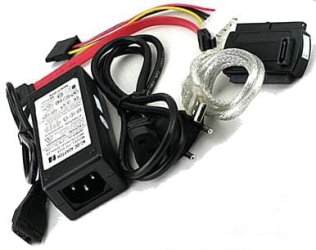
Use one of those.USB.

USB to IDE.jpg
 
Last edited:

My Computer

OS
ME/XP/Vista/Win7
Are the drives themselves made for hot swappable applications.
 

My Computer

Computer Manufacturer/Model Number
Custom built
OS
Windows 7 Ultimate 64 bit
CPU
AMD Phenom II X4 965 Black Edition
Motherboard
Gigabyte GA-MA790X-DS4
Memory
GSkill 4 X 2 GB PC 8500
Graphics Card(s)
XFX Radeon HD 6790 D
Sound Card
On board RealTek HD
Monitor(s) Displays
Dual monitors:Samsung SyncMaster S20B300
Screen Resolution
1600 X 900
Hard Drives
Seagate Barracuda 1TB (primary)
Seagate Barracuda 2 X 320 GB
PSU
Ultra X4 750 watt fully modular
Case
Thermaltake Overseer RX 1 full tower
Cooling
Core-Contact 92 mm CPU Cooler
Keyboard
Logitech G510
Mouse
Razor DeathAdder
Internet Speed
50/5 Mbps UL/DL
Other Info
Optical: Super Muliti DVD burner w/lightscribe, Hauppauge WinTV HVR-1800
when I anable AHCI in my bios on the sata ports, the drives show up under the "safely remove hardware and media" application. I can "eject" the hard drive I want, and then it says it is safe to remove. Afterwards if I plug it back in is when the computer will crash. Is this not something that is possible? I thought that was one of the features of AHCI.
Quote from wikipedia "AHCI is separate from the SATA 3Gb/s standard, although it exposes SATA's advanced capabilities (such as hot-plugging and native command queuing) such that host systems can utilize them."
 

My Computer

OS
Windows 7 Ultimate
CPU
Intel Core i5 750 (Quad Core)
Motherboard
Gigabyte P55A-UD3
Memory
4GB DDR3 1600
Graphics Card(s)
XFX ATI Radeon HD5770
Sound Card
On board
Monitor(s) Displays
2
Screen Resolution
1280x1024
Hard Drives
1tb Hitachi Sata
PSU
Thermaltake 750W
Case
Corsair 800D
Cooling
Corsair H50
Keyboard
Logitech Wireless
Mouse
Logitech WIreless
Internet Speed
Cable Internet
Although the drives CAN be hot swapped, I would advise against it. as theog said, it is much safer to not hot swap them and do it while the machine is powered down.

TBH I have never really seen the point of Hot Swapping.
 

My Computer

Computer type
PC/Desktop
Computer Manufacturer/Model Number
Medion Erazer (note to self: insert model number) - with custom additions
OS
Windows 10 Pro x64
CPU
Intel Core i5 7400 @ 3.00GHz
Motherboard
OEM supllied with PC
Memory
8GB 2133Mhz DDR4 (OEM supplied)
Graphics Card(s)
Gygabyte Windforce GTX 1050Ti (Factory Overclocked)
Sound Card
Realtek
Monitor(s) Displays
Acer Al1980 + HKC
Screen Resolution
1360*768(HKC) / 1280*1024(Acer)
Hard Drives
1TB Toshiba
1TB WD Caviar Green
120GB Samsung Evo 840
PSU
OEM supplied (no power rating on case)
Case
OEM Supplied
Cooling
Stock
Keyboard
Logitech Wireless
Mouse
Logitect Wireless
Internet Speed
40Mb/s Down 10Mb/s Up
Antivirus
Defender
Browser
Firefox
I thought I had previously enabled AHCI but I enabled AHCI for the GSATA not the SATA. So now that it is set right.....

So if I understand this correctly, you installed W7 on your system drive before you set the SATA configuration in the BIOS to AHCI. Correct?

You cannot switch SATA modes after installing W7 without problems*. To use AHCI mode you need to clean install W7 again after setting the mode in BIOS.

*There are ways to edit the registry to correct the condition (I am told) but just reinstalling windows in the proper mode is faster and easier IMHO.
 

My Computer

Computer type
PC/Desktop
Computer Manufacturer/Model Number
Home Built - Jan 2013
OS
Windows 7 64 Bit Home Premium SP1
CPU
i7-3820
Motherboard
Asus P9X79-PRO - Bios 4608
Memory
GSkill F3-14900CL9Q - 16GB
Graphics Card(s)
EVGA GeForce GTX660 - Driver 352.86
Sound Card
On board Realtek ALC898
Monitor(s) Displays
Acer S271HL
Screen Resolution
1920 x 1080
Hard Drives
#1- Samsung 840 Pro Series
#2- Western Digital WD1002FAEX Sata3 Black
#3- Western Digital WD1002FAEX Sata3 Black
PSU
Corsair CMPSU-850TX-V2 - 850 watt (by Seasonic)
Case
Corsair Obsidian 550D
Cooling
Standard 3 120mm case fans, Cooler Master Hyper 212 EVO
Keyboard
MS KC-0405
Mouse
Intellimouse 5-button
Internet Speed
56 Mbits/Sec (on a good day)
Antivirus
Avast & Malwarebytes
Browser
Firefox
Other Info
Asus DVD - DRW-24B1ST 24X

My Computer

Computer type
PC/Desktop
Computer Manufacturer/Model Number
Medion Erazer (note to self: insert model number) - with custom additions
OS
Windows 10 Pro x64
CPU
Intel Core i5 7400 @ 3.00GHz
Motherboard
OEM supllied with PC
Memory
8GB 2133Mhz DDR4 (OEM supplied)
Graphics Card(s)
Gygabyte Windforce GTX 1050Ti (Factory Overclocked)
Sound Card
Realtek
Monitor(s) Displays
Acer Al1980 + HKC
Screen Resolution
1360*768(HKC) / 1280*1024(Acer)
Hard Drives
1TB Toshiba
1TB WD Caviar Green
120GB Samsung Evo 840
PSU
OEM supplied (no power rating on case)
Case
OEM Supplied
Cooling
Stock
Keyboard
Logitech Wireless
Mouse
Logitect Wireless
Internet Speed
40Mb/s Down 10Mb/s Up
Antivirus
Defender
Browser
Firefox
THank you for your comments! I think this will help in my endeavor.

Zach
 

My Computer

OS
Windows 7 Ultimate
CPU
Intel Core i5 750 (Quad Core)
Motherboard
Gigabyte P55A-UD3
Memory
4GB DDR3 1600
Graphics Card(s)
XFX ATI Radeon HD5770
Sound Card
On board
Monitor(s) Displays
2
Screen Resolution
1280x1024
Hard Drives
1tb Hitachi Sata
PSU
Thermaltake 750W
Case
Corsair 800D
Cooling
Corsair H50
Keyboard
Logitech Wireless
Mouse
Logitech WIreless
Internet Speed
Cable Internet
My "start" value was never any number but 0. So that fix does not apply to me I dont think.
 

My Computer

OS
Windows 7 Ultimate
CPU
Intel Core i5 750 (Quad Core)
Motherboard
Gigabyte P55A-UD3
Memory
4GB DDR3 1600
Graphics Card(s)
XFX ATI Radeon HD5770
Sound Card
On board
Monitor(s) Displays
2
Screen Resolution
1280x1024
Hard Drives
1tb Hitachi Sata
PSU
Thermaltake 750W
Case
Corsair 800D
Cooling
Corsair H50
Keyboard
Logitech Wireless
Mouse
Logitech WIreless
Internet Speed
Cable Internet
You may need to go into BIOS, reset to IDE, Boot into Windows, reset the registry string (which should now be 3), to 0, then restart, BIOS, set AHCI.
The issue is to get W7 to install the AHCI drivers.
 

My Computer

Computer type
PC/Desktop
Computer Manufacturer/Model Number
Home Built - Jan 2013
OS
Windows 7 64 Bit Home Premium SP1
CPU
i7-3820
Motherboard
Asus P9X79-PRO - Bios 4608
Memory
GSkill F3-14900CL9Q - 16GB
Graphics Card(s)
EVGA GeForce GTX660 - Driver 352.86
Sound Card
On board Realtek ALC898
Monitor(s) Displays
Acer S271HL
Screen Resolution
1920 x 1080
Hard Drives
#1- Samsung 840 Pro Series
#2- Western Digital WD1002FAEX Sata3 Black
#3- Western Digital WD1002FAEX Sata3 Black
PSU
Corsair CMPSU-850TX-V2 - 850 watt (by Seasonic)
Case
Corsair Obsidian 550D
Cooling
Standard 3 120mm case fans, Cooler Master Hyper 212 EVO
Keyboard
MS KC-0405
Mouse
Intellimouse 5-button
Internet Speed
56 Mbits/Sec (on a good day)
Antivirus
Avast & Malwarebytes
Browser
Firefox
Other Info
Asus DVD - DRW-24B1ST 24X
Hot Swapping

Good morning and welcome to the Windows 7 support forums,
My limited experience throughout the RC and the final release has been that AHCI was designed for SATA/IDE as a redundant utilisation. SATA connect was never intended as a hot swap/cold plug on the motherboard. True "HOT CONNECT/COLD PLUG" design is for SCSII and USB connect where the peripheral can safely be ejected while the system is live. Windows redundancy allows for 2+ more peripherals to record and back each other up to the lowest or smallest sized drive. We must realize that all peripherals are recorded onto the system profile. So I hypothosize that removing a peripheral while connected via the SATA connect causes the Operating system to as: "Whats going on here?" "This does not match the system profile?" Hence you get a reboot and the operating system has to write a new system profile.
 

My Computer

Computer Manufacturer/Model Number
Custom Build
OS
Windows 7 7600 1 X64
CPU
AMD PHENOM II X 550 PROCESSOR 3.1 ghz
Motherboard
ASUS M4A78-TE
Memory
Corsair 4 gig ddr 3
Graphics Card(s)
ati radeon 3300
Sound Card
ati hd
Monitor(s) Displays
syncmaster 2033sw
Screen Resolution
1600X900 60 hz refresh
Hard Drives
twin_seagates SATA's 1 TB & 500 Gig, hitachi_slimline 160 gig
PSU
antec_550 watt
Case
cooler master GLite
Cooling
stock_heat sink
Internet Speed
20mbs up/ 1.5mbs down
Other Info
favorite child "stewie"
favorite dog "brian"
I thought I had previously enabled AHCI but I enabled AHCI for the GSATA not the SATA. So now that it is set right.....

So if I understand this correctly, you installed W7 on your system drive before you set the SATA configuration in the BIOS to AHCI. Correct?

You cannot switch SATA modes after installing W7 without problems*. To use AHCI mode you need to clean install W7 again after setting the mode in BIOS.

*There are ways to edit the registry to correct the condition (I am told) but just reinstalling windows in the proper mode is faster and easier IMHO.

So how do you actually set/change the bios to AHCI before installing an OS? I'm curious to understand that myself.
 

My Computer

Computer Manufacturer/Model Number
Custom built
OS
Windows 7 Ultimate 64 bit
CPU
AMD Phenom II X4 965 Black Edition
Motherboard
Gigabyte GA-MA790X-DS4
Memory
GSkill 4 X 2 GB PC 8500
Graphics Card(s)
XFX Radeon HD 6790 D
Sound Card
On board RealTek HD
Monitor(s) Displays
Dual monitors:Samsung SyncMaster S20B300
Screen Resolution
1600 X 900
Hard Drives
Seagate Barracuda 1TB (primary)
Seagate Barracuda 2 X 320 GB
PSU
Ultra X4 750 watt fully modular
Case
Thermaltake Overseer RX 1 full tower
Cooling
Core-Contact 92 mm CPU Cooler
Keyboard
Logitech G510
Mouse
Razor DeathAdder
Internet Speed
50/5 Mbps UL/DL
Other Info
Optical: Super Muliti DVD burner w/lightscribe, Hauppauge WinTV HVR-1800
I thought I had previously enabled AHCI but I enabled AHCI for the GSATA not the SATA. So now that it is set right.....

So if I understand this correctly, you installed W7 on your system drive before you set the SATA configuration in the BIOS to AHCI. Correct?

You cannot switch SATA modes after installing W7 without problems*. To use AHCI mode you need to clean install W7 again after setting the mode in BIOS.

*There are ways to edit the registry to correct the condition (I am told) but just reinstalling windows in the proper mode is faster and easier IMHO.

So how do you actually set/change the bios to AHCI before installing an OS? I'm curious to understand that myself.

you Boot, hit the BIOS button until it opens... then you change your HDD mode to AHCI and then you install the OS
 

My Computer

Computer type
PC/Desktop
Computer Manufacturer/Model Number
Medion Erazer (note to self: insert model number) - with custom additions
OS
Windows 10 Pro x64
CPU
Intel Core i5 7400 @ 3.00GHz
Motherboard
OEM supllied with PC
Memory
8GB 2133Mhz DDR4 (OEM supplied)
Graphics Card(s)
Gygabyte Windforce GTX 1050Ti (Factory Overclocked)
Sound Card
Realtek
Monitor(s) Displays
Acer Al1980 + HKC
Screen Resolution
1360*768(HKC) / 1280*1024(Acer)
Hard Drives
1TB Toshiba
1TB WD Caviar Green
120GB Samsung Evo 840
PSU
OEM supplied (no power rating on case)
Case
OEM Supplied
Cooling
Stock
Keyboard
Logitech Wireless
Mouse
Logitect Wireless
Internet Speed
40Mb/s Down 10Mb/s Up
Antivirus
Defender
Browser
Firefox
you Boot, hit the BIOS button until it opens... then you change your HDD mode to AHCI and then you install the OS

Just to expand on what Martin said:
In an AMI BIOS you usually press DELete during the initial boot to enter the BIOS.

On the first tab "MAIN" there is a item called "Storage Configuration". Highlight that and hit ENTER.

The first item is "Configure SATA as", and the default is [IDE]. With the item highlighted, press the + key till it reads [AHCI] or [RAID].

Tab over to the Exit tab and select "Exit and save changes" and hit enter.

You can now reboot the system with the W7 disk in the drive and begin the OS install in AHCI mode.
 

My Computer

Computer type
PC/Desktop
Computer Manufacturer/Model Number
Home Built - Jan 2013
OS
Windows 7 64 Bit Home Premium SP1
CPU
i7-3820
Motherboard
Asus P9X79-PRO - Bios 4608
Memory
GSkill F3-14900CL9Q - 16GB
Graphics Card(s)
EVGA GeForce GTX660 - Driver 352.86
Sound Card
On board Realtek ALC898
Monitor(s) Displays
Acer S271HL
Screen Resolution
1920 x 1080
Hard Drives
#1- Samsung 840 Pro Series
#2- Western Digital WD1002FAEX Sata3 Black
#3- Western Digital WD1002FAEX Sata3 Black
PSU
Corsair CMPSU-850TX-V2 - 850 watt (by Seasonic)
Case
Corsair Obsidian 550D
Cooling
Standard 3 120mm case fans, Cooler Master Hyper 212 EVO
Keyboard
MS KC-0405
Mouse
Intellimouse 5-button
Internet Speed
56 Mbits/Sec (on a good day)
Antivirus
Avast & Malwarebytes
Browser
Firefox
Other Info
Asus DVD - DRW-24B1ST 24X
The Advanced Host Controller Interface (AHCI) is an application programming interface defined by Intel which defines the operation of Serial ATA host bus adapters in a non-implementation-specific manner. The specification describes a system memory structure for computer hardware vendors to exchange data between host system memory and attached storage devices. As of June 2008, the current version of the specification is v. 1.3.[1] AHCI gives software developers and hardware designers a standard method for detecting, configuring, and programming SATA/AHCI adapters. AHCI is separate from the SATA 3Gb/s standard, although it exposes SATA's advanced capabilities (such as hot-plugging and native command queuing) such that host systems can utilize them.

Hot swapping and hot plugging are terms used to describe the functions of replacing system components without shutting down the system. More specifically, hot swapping describes replacing components without significant interruption to the system, while hot plugging describes the addition of components that would expand the system without significant interruption to the operation of the system.[1] Once the appropriate software is installed on the computer, a user can plug and unplug the component without rebooting. A well-known example of this functionality is the Universal Serial Bus (USB) that allows users to add or remove peripheral components such as a mouse, keyboard, or printer.

And HDDs, I've been doing this for a couple of years, eSATA externals HDDs as well as internal HDDs. This will include Hot Swappable drive bays.

Intel Serial ATA, Advanced Host Controller Interface (AHCI)

AHCI encompasses a PCI device. It contains a PCI BAR (Base Address Register) to implement native
SATA features. AHCI contains definitions for the following features:
• Support for 32 ports
• 64-bit addressing
• Elimination of Master / Slave Handling
• Large LBA support
• Hot Plug
• Power Management
• HW Assisted Native Command Queuing
• Staggered Spin-up
• Cold device presence detect
• Serial ATA superset registers
• Activity LED generation
• Port Multiplier

When an eSATA external HD is plugged into an eSATA port, this port is normally directly connected to a SATA port on the motherboard. Sometimes it will go to a controller.

With your computer running you can plug in an external HD via eSATA or a Hot Swappable drive bay, even internally to the computer, it will be recognized and function as if it was booted at startup.
To disconnect use 'Safely Remove Hardware', wait until it says it can be removed and then unplug it.

If the MS 'Safely Remove Hardware' function isn't working you can D/L this app that looks and acts just like the MS 'Safely Remove Hardware' function.
HotSwap

I have used this program for a couple of years and works with 32-bit and 64-bit OS.

This tutorial works for most computers, AHCI : Enable in Windows 7 / Vista.

I did this in a similar fashion a couple of years ago, it worked with no problems. No need to re-install the OS, unless you want to.
 
Last edited:

My Computer

Computer type
PC/Desktop
Computer Manufacturer/Model Number
76~2.0
OS
Windows 7 Ult x64 - SP1/ Windows 8 Pro x64
CPU
Intel Core i5-3570K 4.6GHz
Motherboard
Gigabyte GA-Z77X UD3H, f18
Memory
8GB (2X4GB) DDR3 1600 Corsair Vengeance CL8 1.5v
Graphics Card(s)
Sapphire HD 7770 Vapor-X OC 1GB DDR5
Sound Card
Onboard VIA VT2021
Monitor(s) Displays
22" LCD Dell
Screen Resolution
1680x1050
Hard Drives
Samsung 840Pro 128GB SSD,
Seagate Barracuda 500GB SATA2 7200rpm 32MB cache, Seagate Barracuda 1TB SATA2 7200rpm 32MB cache,
PSU
Corsair HX650W
Case
Cooler Master Storm Scout
Cooling
Corsair H80 2x12cm Noctua NF P12 , 2x14cm case fans
Keyboard
Logitech Wave
Mouse
CM Sentinel
Internet Speed
Dismal
Antivirus
Avast
Browser
Opera Next
Other Info
Haswell laptop: HP Envy 17t-j, i7-4700MQ, GeForce 740M 2GB DDR3, 17.3" Full HD 1920x1080, 16GB RAM, Samsung 840 Pro 128GB, 1TB Hitachi 7200 HDD,
Desktop: eSATA ports,
External eSATA Seagate 500GB SATA2 7200rpm,
External WD USB 500GB
Back
Top