Want to install Windows 7 on eSata drive

auburncoast

New member
Local time
12:10 PM
Messages
14
Hi everyone, I've been trying unsuccessfully to install windows 7 on a SATA drive that is connected via eSata to my laptop. Here is the rundown: I've made a partition on my drive which is connected via eSata because I already have data on it. The Partition is 40GB and formatted as NTFS with drive letter Y. I currently have Windows 7 installed on my internal drive. When I run the Windows 7 installer and select my eSATA drive for installation either by booting from CD or launching from within Windows 7 I get this error: Windows cannot be installed to this disk. This computer's hardware may not support booting to this disk. Ensure that the disk's controller is enabled in the computer's BIOS menu.
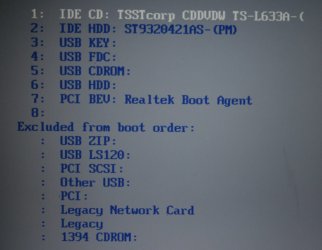
Here is where the next problem arises. I was looking for a solution and found that maybe if I changed the boot order in the bios that perhaps it would allow me to install this way. The problem is my eSATA drive does not show up in the bios. Currently my system is set to ACHI so that it will support hot swapping.
Another thing I found was that maybe if I take out my internal drive that it would allow me to install. I don't wish to do this because I want my internal drive to retain the MBR and be able to boot without problems into either system.
So my main problems are that Windows 7 won't install on my eSATA drive and that my eSATA drive isn't recognized in my BIOS Boot Order.
Any help would be greatly appreciated. Hope I've given enough info.
 

My Computer My Computer

At a glance

Windows 7 x64
Computer Manufacturer/Model Number
Clevo M570TU
OS
Windows 7 x64
Hi everyone, I've been trying unsuccessfully to install windows 7 on a SATA drive that is connected via eSata to my laptop. Here is the rundown: I've made a partition on my drive which is connected via eSata because I already have data on it. The Partition is 40GB and formatted as NTFS with drive letter Y. I currently have Windows 7 installed on my internal drive. When I run the Windows 7 installer and select my eSATA drive for installation either by booting from CD or launching from within Windows 7 I get this error: Windows cannot be installed to this disk. This computer's hardware may not support booting to this disk. Ensure that the disk's controller is enabled in the computer's BIOS menu.
Here is where the next problem arises. I was looking for a solution and found that maybe if I changed the boot order in the bios that perhaps it would allow me to install this way. The problem is my eSATA drive does not show up in the bios. Currently my system is set to ACHI so that it will support hot swapping.
Another thing I found was that maybe if I take out my internal drive that it would allow me to install. I don't wish to do this because I want my internal drive to retain the MBR and be able to boot without problems into either system.
So my main problems are that Windows 7 won't install on my eSATA drive and that my eSATA drive isn't recognized in my BIOS Boot Order.
Any help would be greatly appreciated. Hope I've given enough info.

If Windows 7 can't see a ACHI drive without a driver, how can BIOS? ACHI is a BIOS extension that loads after BIOS is done patching the ATAPI table in memory. That's why hot swap works. The OS driver just patches the same table on IRQ14 (or others).

No bootable ACHI since legacy BIOS USB support is already loaded when ACHI activates...
 

My Computer My Computer

At a glance

El Capitan / Windows 10i7-4980HQ16GBIris 5200
Computer type
Laptop
Computer Manufacturer/Model Number
Apple
OS
El Capitan / Windows 10
CPU
i7-4980HQ
Memory
16GB
Graphics Card(s)
Iris 5200
wow, okay that went a little bit over my head but from what I'm gathering here I can't boot in ACHI mode because it is something that is loaded after the boot and therefor not bootable? But what I don't understand then is how can Windows be installed on my internal drive. Isn't the eSATA connection the same outside as it is inside? I guess it depends on how it is all hooked up but lets say that its simply connected to another sata port. More layman terms would be good for me. I'm not too familiar with things like IRQ14. Thanks for the help though.
 

My Computer My Computer

At a glance

Windows 7 x64
Computer Manufacturer/Model Number
Clevo M570TU
OS
Windows 7 x64
wow, okay that went a little bit over my head but from what I'm gathering here I can't boot in ACHI mode because it is something that is loaded after the boot and therefor not bootable? But what I don't understand then is how can Windows be installed on my internal drive. Isn't the eSATA connection the same outside as it is inside? I guess it depends on how it is all hooked up but lets say that its simply connected to another sata port. More layman terms would be good for me. I'm not too familiar with things like IRQ14. Thanks for the help though.

Your BIOS may not be able to boot from eSATA. Look for an option there. Better yet -- post make and model of motherboard and I'll look at it.
 

My Computer My Computer

At a glance

El Capitan / Windows 10i7-4980HQ16GBIris 5200
Computer type
Laptop
Computer Manufacturer/Model Number
Apple
OS
El Capitan / Windows 10
CPU
i7-4980HQ
Memory
16GB
Graphics Card(s)
Iris 5200
Baarod, I wish I were on a desktop where this would be easier. Unfortunately this is on a laptop. The best I can give you as far as I know is that I have a Clevo M570TU otherwise known as Sager Np5796. Here is the info below that comes up for my motherboard in SIW. I'm judging by the fact that eSATA is not in the Boot list in bios that I will be able to boot from it but if you can say otherwise I'd be happy to hear it. Thanks again. Edit: I added an image of my Bios Boot list with my eSATA drive attached and turned on.

Property Value
Manufacturer CLEVO CO.
Model M570TU
Version Not Applicable
Serial Number Not Applicable

North Bridge Intel PM45 Revision 07
South Bridge Intel 82801IM (ICH9-M) Revision 07

CPU Intel(R) Core(TM)2 Duo CPU P9500 @ 2.53GHz
Cpu Socket Socket P (478)

System Slots 5 PCI

Memory Summary
Maximum Capacity 4096 MBytes
Memory Slots 2
Error Correction None

Warning! Accuracy of DMI data cannot be guaranteed
 

Attachments

  • _MG_0240.JPG
    _MG_0240.JPG
    81.7 KB · Views: 13
Last edited:

My Computer My Computer

At a glance

Windows 7 x64
Computer Manufacturer/Model Number
Clevo M570TU
OS
Windows 7 x64
I am connecting eSATA via a mixed eSATA/USB port on the back of my laptop.
I do have the latest bios revision from my manufacturer.
I have no idea what Realtek PCI Boot agent is. Time to google it! (I haven't been able to find much info on this)
I'll try to do a cmos reset if you think that helps. I'll read up your linked article first.
Will resetting the CMOS revert me back to an older Bios revision? What are some of the things that could go wrong if I do this?
Thanks for the help.
 

My Computer My Computer

At a glance

Windows 7 x64
Computer Manufacturer/Model Number
Clevo M570TU
OS
Windows 7 x64
If you connect your external with to a usb port you can install windows 7 on it and use it to boot your system, but it will only boot the computer it was installed to. eSATA isn't really any faster than USB anyway
 
You can not install Windows to a Ex HD.
 
Last edited:

My Computer My Computer

At a glance

ME/XP/Vista/Win7
OS
ME/XP/Vista/Win7
If you connect your external with to a usb port you can install windows 7 on it and use it to boot your system, but it will only boot the computer it was installed to. eSATA isn't really any faster than USB anyway

eSATA is much faster than USB. Not sure where your getting your info from. I won't be running on USB that is for sure.


You can install Windows to a Ex HD.

Did you mean to say can't? why did you post this?
 

My Computer My Computer

At a glance

Windows 7 x64
Computer Manufacturer/Model Number
Clevo M570TU
OS
Windows 7 x64
typo.

You need to use a internal HD.
 

My Computer My Computer

At a glance

ME/XP/Vista/Win7
OS
ME/XP/Vista/Win7
typo.

You need to use a internal HD.

Thats what I thought you meant. But shouldn't a hard drive that is plugged in through eSATA be recognized as an internal? It should be seen simply as another internal drive as far as I know.
 

My Computer My Computer

At a glance

Windows 7 x64
Computer Manufacturer/Model Number
Clevo M570TU
OS
Windows 7 x64
Whilst there is no difference in the functionality and speed of an ESATA port and a standard SATA port, the similarity ends there. By its very nature, an ESATA port is designed to connect an external hard drive to the system in much the same way as a conventional USB ext. drive. However, a drive connected to an ESATA port operates at the same speed as it would were it connected to an internal SATA port. There is one exception, and that is a drive that is connected to an ESATA port, whether externally or internally, cannot be bootable.
 

My Computer My Computer

At a glance

Windows 8.1 Pro RTM x64Intel Core-i5-3570K 4-core @ 3.4GHz (Ivy Brid...4 x 4GB DDR3-1600 Corsair Vengeance CMZ8GX3M2...MSI GeForce GTX770 Gaming OC 2GB
Computer type
PC/Desktop
Computer Manufacturer/Model Number
Dwarf Dwf/11/2012 r09/2013
OS
Windows 8.1 Pro RTM x64
CPU
Intel Core-i5-3570K 4-core @ 3.4GHz (Ivy Bridge) (OC 4.4GHz)
Motherboard
ASRock Z77 Extreme4-M
Memory
4 x 4GB DDR3-1600 Corsair Vengeance CMZ8GX3M2A1600C9B (16GB)
Graphics Card(s)
MSI GeForce GTX770 Gaming OC 2GB
Sound Card
Realtek High Definition on board solution (ALC 898)
Monitor(s) Displays
ViewSonic VA1912w Widescreen (VGA)
Screen Resolution
1440x900
Hard Drives
OCZ Agility 3 SSD 120GB SATA III x2 (RAID 0)
Samsung HD501LJ 500GB SATA II x2
Hitachi HDS721010CLA332 1TB SATA II
Iomega 1.5TB Ext USB 2.0
WD 2.0TB Ext USB 3.0
PSU
XFX Pro Series 850W Semi-Modular
Case
Gigabyte IF233
Cooling
1 x 120mm Front Inlet 1 x 120mm Rear Exhaust
Keyboard
Microsoft Comfort Curve Keyboard 3000 (USB)
Mouse
Microsoft Comfort Mouse 3000 for Business (USB)
Internet Speed
NetGear DG834Gv3 ADSL Modem/Router (Ethernet) ~4.0 Mb/s (O2)
Antivirus
Avast! 8.0.1497
Browser
IE 11
Other Info
Optical Drive: HL-DT-ST BD-RE BH10LS30 SATA Bluray
Lexmark S305 Printer/Scanner/Copier (USB)
WEI Score: 8.1/8.1/8.5/8.5/8.25
Asus Eee PC 1011PX Netbook (Windows 7 x86 Starter)
okay but lets say I have two hard drives connected directly to SATA ports on a desktop. would both be recognized as internal? Another variation. Lets say that I have an eSATA port directly connected to a SATA port and from the eSATA port a hard drive connected to it. The eSATA simply means external in this case and would therefore be seen as a regular internal drive too would it not?
12-816-069-S01
 

My Computer My Computer

At a glance

Windows 7 x64
Computer Manufacturer/Model Number
Clevo M570TU
OS
Windows 7 x64
All sata ports & sata HD need to be internal.
 

My Computer My Computer

At a glance

ME/XP/Vista/Win7
OS
ME/XP/Vista/Win7
I guess where I'm getting confused is the fact that I don't understand the difference between SATA and eSATA. From my research it appears that only the connector is a bit different but otherwise is the same connection. Can someone verify or tell me otherwise? If it is a different type of connection all together then I understand but if it is simply a sata connection made externally then what is the big deal?
 

My Computer My Computer

At a glance

Windows 7 x64
Computer Manufacturer/Model Number
Clevo M570TU
OS
Windows 7 x64
Sata = internal.
eSata = External.

You can install Windows to a any type of external HD.
 

My Computer My Computer

At a glance

ME/XP/Vista/Win7
OS
ME/XP/Vista/Win7
yes I understand that you can't install to external but shouldn't eSATA be recognized as internal? That is what I'm getting at. I always understood eSATA and SATA to be the same type of connection meaning Windows wouldn't known whether one is internal or one was external.
 

My Computer My Computer

At a glance

Windows 7 x64
Computer Manufacturer/Model Number
Clevo M570TU
OS
Windows 7 x64
eSATA is much faster than USB. Not sure where your getting your info from. I won't be running on USB that is for sure.

It's a moot point because the hdd can only transfer info as fast as it can read or write and except for a short burst of speed as the cache is read, I have yet to see an external hdd that can read or write at a sustained speed much higher than 50 MB/second.. so it really doesn't whether an external is connected via eSATA or USB. Sure the specs will say 1.5, 3.0, or even 6 Gb/s for eSATA but the HDD itself can't read or write at a speed that even approaches the max for USB
 
It's a moot point because the hdd can only transfer info as fast as it can read or write and except for a short burst of speed as the cache is read, I have yet to see an external hdd that can read or write at a sustained speed much higher than 50 MB/second.. so it really doesn't whether an external is connected via eSATA or USB. Sure the specs will say 1.5, 3.0, or even 6 Gb/s for eSATA but the HDD itself can't read or write at a speed that even approaches the max for USB

Thats a good point but I'd rather go with a connection that will give me that short burst. I do music production and I've found that eSATA makes a huge difference compared to USB. Your right that in most cases its not going to be seen but from my experience I'd rather use eSATA.
 

My Computer My Computer

At a glance

Windows 7 x64
Computer Manufacturer/Model Number
Clevo M570TU
OS
Windows 7 x64
Back
Top