If you wanted to install the latest driver for X1200 (catalyst 9.3) in Win7, maybe, (I SAID MAYBE. YOU'VE BEEN WARNED.

) i have the trick. Here goes.
1. Install the Vista's 9.1 driver. Restart.
2. Then open Device Manager, go to Display Adapters, go to Driver tab, click Driver Details. Write down the list of the driver files.
3. Install the Vista's 9.3 driver. Make sure the Catalyst Control Center and Display Driver were checked, if you choose custom installation. Ignore all error, I repeat IGNORE ALL ERROR. (at least you got your Catalyst Install Manager updated, right?) Restart.
4. Open the folder where you extract the content of the 9.3 driver (in my case, C:\ATI\Support\9_3_vista32_win7_32_dd_ccc_wdm_enu) then go to Packages >> Drivers >> Display >> LH_INF >> (the only folder left there, got it?)
5. Copy all files that listed on your driver files list (step 2). This prevents any other important files get overwrited, MAYBE.
6. Open the folder where you extract the content of the 9.1 driver (in my case, C:\ATI\Support\9-1_vista32_dd_ccc_wdm_enu_74233\Driver) then go to Packages >> Drivers >> Display >> LH_INF >> (the only folder left there, again...) and paste those files. Overwrite all.
7. And now uninstall the Display Adapter driver through Device Manager. (I never tried using the Catalyst Install Manager, so I don't know what will happen if you use it.) Don't forget to check "Delete the software driver for this device". Restart.
8. Install the 9.1 again, but instead using the downloaded executable file, use the extracted setup (in my case, C:\ATI\Support\9-1_vista32_dd_ccc_wdm_enu_74233\Driver\Setup.exe). If you got a warning, choose to install the driver. Restart.
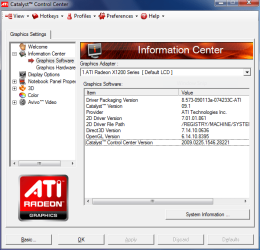
Voila! Although the driver listed as 8.573.000 (the 9.1 version), the files inside were from 8.591.000 (the 9.3 version).
And if this don't worked out on your machine or the driver files were un-updated, reassure yourself that you do the same steps.
And if this trick blow up your machine... Well, YOU'VE BEEN WARNED!
Prove?
See attachment.
I wish you all get it right like I do. (If you so obsessed with updating every driver you have in your machine like me... Well...)
Good luck!