
You are using an out of date browser. It may not display this or other websites correctly.
You should upgrade or use an alternative browser.
You should upgrade or use an alternative browser.
Problem Driver ATI X1200 in Seven RC1
- Thread starter Suku
- Start date

Microsoft is no longer supporting the ATI X1200. Right after build 7000 came out, I installed it on a machine with an ATI X1400. When I performed a Windows Update, it installed a Windows 7 pre-release driver for the ATI X1xxx Series. That driver is gone as of a week ago or so. I had to use a Vista driver when I installed build 7077 last week. For now, you will have to do the same. Hopefully, Microsoft will correct and replace the ATI drivers soon.
Bye.
Bye.
Last edited:
My Computer
- Computer Manufacturer/Model Number
- Home Brew
- OS
- Windows 7 Ultimate x64
- CPU
- i7 970
- Motherboard
- ASUS Rampage III GENE
- Memory
- 9 GB
- Graphics Card(s)
- 9600GT
- Monitor(s) Displays
- dual 24" Samsung
- Screen Resolution
- 1920x1200
- Hard Drives
- VelociRaptor and 4TB of Hitachi RAID 0
- PSU
- Thermaltake toughpower W0104RU 650W
- Case
- Thermaltake LANBOX Lite
- Internet Speed
- 30 Mbps Download 1 Mbps Upload (Speedtest.com)

12eason
New member
- Local time
- 3:08 AM
- Messages
- 290

Messiah360
New member
- Local time
- 9:08 PM
- Messages
- 20
Hello everybody, I'm New Here I have and the same problem with the ATI x1200 not get Windows7 recognize my graphics card, therefore urge Suzu need to help you tell me please how to install the driver to install it I always mark error in installing the driver I just installed the CCC driver but nothing help me please. I have the same graphics x1200 and Windows 7 Build 7100

EDITED
Now Resolved the problem with Windows Update, i found the driver and now i can see Aero Theme

Last edited:
My Computer
- Computer Manufacturer/Model Number
- Toshiba Satellite A215
- OS
- Windows Seven
- CPU
- AMD Athlon(tm) 64 X2 Dual-core Processor TK-55 1,80 GHz
- Memory
- 1,5 GB
- Graphics Card(s)
- ATi Xpress 1200 128MB Dedicated 572 Ram
- Screen Resolution
- 1200x800
- Internet Speed
- 1 mb
12eason
New member
- Local time
- 3:08 AM
- Messages
- 290
Yeah windows update has it, but it's no frills. You won't be able to crank up the settings like you can with CCC.
If you feel like having a go again in future, use 'driver sweeper' between uninstalling the old driver and installing the new one.
If you feel like having a go again in future, use 'driver sweeper' between uninstalling the old driver and installing the new one.
My Computer
- OS
- Windows 7077
Messiah360
New member
- Local time
- 9:08 PM
- Messages
- 20
And how can I make this type of installation, which is "driver sweeper," I really recommend having the features of CCC, I use my pc for gaming but when I had Windows Vista CCC never adjusted anything there, because it never considers necessary, I hope your answer. Greetings
My Computer
- Computer Manufacturer/Model Number
- Toshiba Satellite A215
- OS
- Windows Seven
- CPU
- AMD Athlon(tm) 64 X2 Dual-core Processor TK-55 1,80 GHz
- Memory
- 1,5 GB
- Graphics Card(s)
- ATi Xpress 1200 128MB Dedicated 572 Ram
- Screen Resolution
- 1200x800
- Internet Speed
- 1 mb
ronzalonis
New member
- Local time
- 9:08 PM
- Messages
- 2
Has anyone been able to get the Catalyst 9.3 drivers (the last supported X1200 drivers) to work with the X1200 and Windows 7 build 7100?
If so, how did you install the drivers.
Thanks in advance
If so, how did you install the drivers.
Thanks in advance
My Computer
- OS
- Windows 7 build 7100
12eason
New member
- Local time
- 3:08 AM
- Messages
- 290
Sorry; Driver SweeperAnd how can I make this type of installation, which is "driver sweeper," I really recommend having the features of CCC, I use my pc for gaming but when I had Windows Vista CCC never adjusted anything there, because it never considers necessary, I hope your answer. Greetings
Procedure would be;
Run driver sweeper, remove Ati driver remnants, restart, open device manger, uninstall microsoft ati driver, launch catalyst 9.1 driver/CCC and install as normal, then reboot & retest.
Quite a few people have had luck with 9.2. It failed for me but by all means give it a go. I'd advise installing 9.1 first though, then 'upgrading' to 9.2.
My Computer
- OS
- Windows 7077
12eason
New member
- Local time
- 3:08 AM
- Messages
- 290
I tried 9.3 and 9.4 in a hundred different ways, they are both pure fail.Has anyone been able to get the Catalyst 9.3 drivers (the last supported X1200 drivers) to work with the X1200 and Windows 7 build 7100?
If so, how did you install the drivers.
Thanks in advance
My Computer
- OS
- Windows 7077
Messiah360
New member
- Local time
- 9:08 PM
- Messages
- 20
Thanks i test but i have 1 question more how unisntall microsoft ati driver????
EDITED:
I had problems with Age of Empires III and Spore, the games send me instant crash after black screen of loading, what happen????, maybe the reazon is ati driver or what?? Some ideas??? or someone have the same problem??? :sarc:
greetings
EDITED 2:
I reinstall windows and install Catalyst 9.1 and works thanks. And now only have the problem with the games
EDITED:
I had problems with Age of Empires III and Spore, the games send me instant crash after black screen of loading, what happen????, maybe the reazon is ati driver or what?? Some ideas??? or someone have the same problem??? :sarc:
greetings
EDITED 2:
I reinstall windows and install Catalyst 9.1 and works thanks. And now only have the problem with the games
Last edited:
My Computer
- Computer Manufacturer/Model Number
- Toshiba Satellite A215
- OS
- Windows Seven
- CPU
- AMD Athlon(tm) 64 X2 Dual-core Processor TK-55 1,80 GHz
- Memory
- 1,5 GB
- Graphics Card(s)
- ATi Xpress 1200 128MB Dedicated 572 Ram
- Screen Resolution
- 1200x800
- Internet Speed
- 1 mb
ronzalonis
New member
- Local time
- 9:08 PM
- Messages
- 2
Has anyone gotten ANY drivers for the ATI X1200 to work with Build 7100 x64 outside of the standard VGA adapter that is the default installation.
I did a clean install of Build 7100 x64 and cannot find any ATI drivers for my integrated X1200 that work and am thus limited to a 1024 x 768 resolution, and no Aero support.
A phone call to ATI tech support simply had the tech tell me the X1200 has no Windows 7 support, and that Windows 7 is not a released OS, as yet and would not be receiving any new support in the near future from it's legacy drivers.
The X1200 does not support the Catalyst v. 9.4 (9.3 was the last version to support this integrated video card.) Has anyone had any luck with 9.1 or 9.2 on a 64 bit version of Build 7100? If so can you post how you installed the driver?
Thanks again
@ 12eason - Are you running a 64 but version of Build 7100?
UPDATE: Installed Catalyst v.9.1 (driver only) normally from ATI download site, and it installed smoothly without issues and is functioning without a hitch, thus far. I have not tried updating to v. 9.2. Once I get my programs reinstalled, and if I'm feeling bold, I may attempt that or hope for an update from Microsoft or ATI (unlikely) that will work.
Thanks for all those who responded to help solve this issue.
I did a clean install of Build 7100 x64 and cannot find any ATI drivers for my integrated X1200 that work and am thus limited to a 1024 x 768 resolution, and no Aero support.
A phone call to ATI tech support simply had the tech tell me the X1200 has no Windows 7 support, and that Windows 7 is not a released OS, as yet and would not be receiving any new support in the near future from it's legacy drivers.
The X1200 does not support the Catalyst v. 9.4 (9.3 was the last version to support this integrated video card.) Has anyone had any luck with 9.1 or 9.2 on a 64 bit version of Build 7100? If so can you post how you installed the driver?
Thanks again
@ 12eason - Are you running a 64 but version of Build 7100?
UPDATE: Installed Catalyst v.9.1 (driver only) normally from ATI download site, and it installed smoothly without issues and is functioning without a hitch, thus far. I have not tried updating to v. 9.2. Once I get my programs reinstalled, and if I'm feeling bold, I may attempt that or hope for an update from Microsoft or ATI (unlikely) that will work.
Thanks for all those who responded to help solve this issue.
Last edited:
My Computer
- OS
- Windows 7 build 7100
Messiah360
New member
- Local time
- 9:08 PM
- Messages
- 20
Hi, me again ¬¬ i have other problem, now i can run Spore, but the new problem is with the resolution in game, when i chosse a small resolution, example emm 800x600 the screen looks small and i cant play in full screen why???, the problem is with graphics card o what happen???
greetings
EDITED (again >.<)
The problem is with all games, example Empire Earth have the same problem.
greetings
EDITED (again >.<)
The problem is with all games, example Empire Earth have the same problem.
My Computer
- Computer Manufacturer/Model Number
- Toshiba Satellite A215
- OS
- Windows Seven
- CPU
- AMD Athlon(tm) 64 X2 Dual-core Processor TK-55 1,80 GHz
- Memory
- 1,5 GB
- Graphics Card(s)
- ATi Xpress 1200 128MB Dedicated 572 Ram
- Screen Resolution
- 1200x800
- Internet Speed
- 1 mb
Hi!
I've problems too.
I've Win7 B7100 x32 (clean inst)
I've a ATI x1200 motherboard/intergrated graphic card (says the manual).
Windows doesn't recognise it.
I've tried installing Catalyst 9.4, 9,3, 9.2 and 9.1.
The only one finding my graphic card is the 9.1 and it installes a driver för X1150.
Fine! But every now and then my monitor says theres no signal and turns black. The only thing left to is to hard reset the computer.
It seems that its depending of what I am doing on the computer. If a leave it, it will work properly. But if a start some programs it won't be long before it happens.
Thank you for your help.
/dL
I've problems too.
I've Win7 B7100 x32 (clean inst)
I've a ATI x1200 motherboard/intergrated graphic card (says the manual).
Windows doesn't recognise it.
I've tried installing Catalyst 9.4, 9,3, 9.2 and 9.1.
The only one finding my graphic card is the 9.1 and it installes a driver för X1150.
Fine! But every now and then my monitor says theres no signal and turns black. The only thing left to is to hard reset the computer.
It seems that its depending of what I am doing on the computer. If a leave it, it will work properly. But if a start some programs it won't be long before it happens.
Thank you for your help.
/dL
My Computer
- OS
- Win7 B7100
According to the Microsoft Update Catalog for Windows 7, you should be able to just do a Windows Update. You could also try this:
Microsoft Update Catalog
Bye.
Microsoft Update Catalog
Bye.
My Computer
- Computer Manufacturer/Model Number
- Home Brew
- OS
- Windows 7 Ultimate x64
- CPU
- i7 970
- Motherboard
- ASUS Rampage III GENE
- Memory
- 9 GB
- Graphics Card(s)
- 9600GT
- Monitor(s) Displays
- dual 24" Samsung
- Screen Resolution
- 1920x1200
- Hard Drives
- VelociRaptor and 4TB of Hitachi RAID 0
- PSU
- Thermaltake toughpower W0104RU 650W
- Case
- Thermaltake LANBOX Lite
- Internet Speed
- 30 Mbps Download 1 Mbps Upload (Speedtest.com)
Tried to install 9.1 again. It installed ok.
Tried to update windows, but it says that there's no uddates.
Tried to download the cab-files you recommended, but I really don't know what to do with them.
Anyway I unzipped the cab-file most recent (the big one) and copied the files to Windows/system32 and a few files were overwritten. I don't know if this gave any result since the files overwritten were newer (I saved them of cource).
Also I made all the changes I could think of in the Catalyst Control Centre.
Finally I set windows to "adjust for best performance".
Well, what happend?
Noting... same problem. I get the feeling it works a little bit longer before the screen turns black, but the fault is there. If a start IE and click on a tv-clip on a local newspaperpage I seem to get the fault rather quickly.
/dL
Tried to update windows, but it says that there's no uddates.
Tried to download the cab-files you recommended, but I really don't know what to do with them.
Anyway I unzipped the cab-file most recent (the big one) and copied the files to Windows/system32 and a few files were overwritten. I don't know if this gave any result since the files overwritten were newer (I saved them of cource).
Also I made all the changes I could think of in the Catalyst Control Centre.
Finally I set windows to "adjust for best performance".
Well, what happend?
Noting... same problem. I get the feeling it works a little bit longer before the screen turns black, but the fault is there. If a start IE and click on a tv-clip on a local newspaperpage I seem to get the fault rather quickly.
/dL
My Computer
- OS
- Win7 B7100
I just got bluescreen (Instead of Blackscreen)
See info: (I also have the .dmp-file mensioned below, see attached file)
Problem signature:
Problem Event Name: BlueScreen
OS Version: 6.1.7100.2.0.0.256.1
Locale ID: 1053
Additional information about the problem:
BCCode: 116
BCP1: 85248510
BCP2: 90C4D9F4
BCP3: C0000001
BCP4: 00000003
OS Version: 6_1_7100
Service Pack: 0_0
Product: 256_1
Files that help describe the problem:
C:\Windows\Minidump\052109-19110-01.dmp
C:\Users\Danielh\AppData\Local\Temp\WER-67018-0.sysdata.xml
Read our privacy statement online:
http://go.microsoft.com/fwlink/?linkid=104288&clcid=0x0409
If the online privacy statement is not available, please read our privacy statement offline:
C:\Windows\system32\en-US\erofflps.txt
See info: (I also have the .dmp-file mensioned below, see attached file)
Problem signature:
Problem Event Name: BlueScreen
OS Version: 6.1.7100.2.0.0.256.1
Locale ID: 1053
Additional information about the problem:
BCCode: 116
BCP1: 85248510
BCP2: 90C4D9F4
BCP3: C0000001
BCP4: 00000003
OS Version: 6_1_7100
Service Pack: 0_0
Product: 256_1
Files that help describe the problem:
C:\Windows\Minidump\052109-19110-01.dmp
C:\Users\Danielh\AppData\Local\Temp\WER-67018-0.sysdata.xml
Read our privacy statement online:
http://go.microsoft.com/fwlink/?linkid=104288&clcid=0x0409
If the online privacy statement is not available, please read our privacy statement offline:
C:\Windows\system32\en-US\erofflps.txt
Attachments
My Computer
- OS
- Win7 B7100
12eason
New member
- Local time
- 3:08 AM
- Messages
- 290
It shouldn't of even let you do that. That would cause some serious problems.Anyway I unzipped the cab-file most recent (the big one) and copied the files to Windows/system32 and a few files were overwritten.
My Computer
- OS
- Windows 7077
Raxiel Noir
New member
- Local time
- 9:08 AM
- Messages
- 1
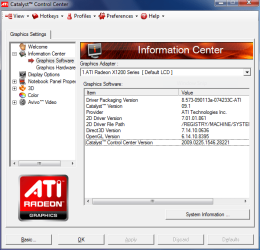
If you wanted to install the latest driver for X1200 (catalyst 9.3) in Win7, maybe, (I SAID MAYBE. YOU'VE BEEN WARNED.  ) i have the trick. Here goes.
1. Install the Vista's 9.1 driver. Restart.
2. Then open Device Manager, go to Display Adapters, go to Driver tab, click Driver Details. Write down the list of the driver files.
3. Install the Vista's 9.3 driver. Make sure the Catalyst Control Center and Display Driver were checked, if you choose custom installation. Ignore all error, I repeat IGNORE ALL ERROR. (at least you got your Catalyst Install Manager updated, right?) Restart.
4. Open the folder where you extract the content of the 9.3 driver (in my case, C:\ATI\Support\9_3_vista32_win7_32_dd_ccc_wdm_enu) then go to Packages >> Drivers >> Display >> LH_INF >> (the only folder left there, got it?)
5. Copy all files that listed on your driver files list (step 2). This prevents any other important files get overwrited, MAYBE.
6. Open the folder where you extract the content of the 9.1 driver (in my case, C:\ATI\Support\9-1_vista32_dd_ccc_wdm_enu_74233\Driver) then go to Packages >> Drivers >> Display >> LH_INF >> (the only folder left there, again...) and paste those files. Overwrite all.
7. And now uninstall the Display Adapter driver through Device Manager. (I never tried using the Catalyst Install Manager, so I don't know what will happen if you use it.) Don't forget to check "Delete the software driver for this device". Restart.
8. Install the 9.1 again, but instead using the downloaded executable file, use the extracted setup (in my case, C:\ATI\Support\9-1_vista32_dd_ccc_wdm_enu_74233\Driver\Setup.exe). If you got a warning, choose to install the driver. Restart.
Voila! Although the driver listed as 8.573.000 (the 9.1 version), the files inside were from 8.591.000 (the 9.3 version).
And if this don't worked out on your machine or the driver files were un-updated, reassure yourself that you do the same steps.
And if this trick blow up your machine... Well, YOU'VE BEEN WARNED!
Prove?
See attachment.
I wish you all get it right like I do. (If you so obsessed with updating every driver you have in your machine like me... Well...)
Good luck!
) i have the trick. Here goes.1. Install the Vista's 9.1 driver. Restart.
2. Then open Device Manager, go to Display Adapters, go to Driver tab, click Driver Details. Write down the list of the driver files.
3. Install the Vista's 9.3 driver. Make sure the Catalyst Control Center and Display Driver were checked, if you choose custom installation. Ignore all error, I repeat IGNORE ALL ERROR. (at least you got your Catalyst Install Manager updated, right?) Restart.
4. Open the folder where you extract the content of the 9.3 driver (in my case, C:\ATI\Support\9_3_vista32_win7_32_dd_ccc_wdm_enu) then go to Packages >> Drivers >> Display >> LH_INF >> (the only folder left there, got it?)
5. Copy all files that listed on your driver files list (step 2). This prevents any other important files get overwrited, MAYBE.
6. Open the folder where you extract the content of the 9.1 driver (in my case, C:\ATI\Support\9-1_vista32_dd_ccc_wdm_enu_74233\Driver) then go to Packages >> Drivers >> Display >> LH_INF >> (the only folder left there, again...) and paste those files. Overwrite all.
7. And now uninstall the Display Adapter driver through Device Manager. (I never tried using the Catalyst Install Manager, so I don't know what will happen if you use it.) Don't forget to check "Delete the software driver for this device". Restart.
8. Install the 9.1 again, but instead using the downloaded executable file, use the extracted setup (in my case, C:\ATI\Support\9-1_vista32_dd_ccc_wdm_enu_74233\Driver\Setup.exe). If you got a warning, choose to install the driver. Restart.
Voila! Although the driver listed as 8.573.000 (the 9.1 version), the files inside were from 8.591.000 (the 9.3 version).
And if this don't worked out on your machine or the driver files were un-updated, reassure yourself that you do the same steps.
And if this trick blow up your machine... Well, YOU'VE BEEN WARNED!
Prove?
See attachment.
I wish you all get it right like I do. (If you so obsessed with updating every driver you have in your machine like me... Well...)
Good luck!
Attachments

My Computer
- Computer Manufacturer/Model Number
- Toshiba Satellite A215-S5818
- OS
- Windows 7
- CPU
- AMD Turion 64 X2 TL-60
- Motherboard
- -
- Memory
- 2x2GB PC2-6400 Kingston
- Graphics Card(s)
- ATI Radeon X1200 series
- Sound Card
- HD Audio Realtek
- Monitor(s) Displays
- -
- Hard Drives
- -
- PSU
- -
- Case
- -
- Cooling
- -
Devans Plymouth
New member
- Local time
- 9:08 PM
- Messages
- 3
I had the same problem with a 0x000007 BSOD error, and found a handy little tool online called BlueScreenView, which allows you to analyse the minidump file. I used this and found that the ATI Radeon drivers that Windows 7 installed were causing the fault. I downloaded the ATI Radeon Xpress 1200 drivers for Vista, and installed them, and hey presto, no more BSOD's!
The BlueScreenView is a very handy tool. I am now using the 9.3 drivers without any problems at all.
The BlueScreenView is a very handy tool. I am now using the 9.3 drivers without any problems at all.
My Computer
- OS
- Windows 7
Similar threads


- Replies
- 4
- Views
- 5K