At the end of my wit with windows live messenger.. Constant problem!

@Nem ahh i see

@TimeStitt, nope still nothing same error :(

it used to be that i could sign in send a message or 2 then it would crash leaving most of the features (not all) disabled , any attempt to use would crash, not it crashes as soon as i sign in.
 

My Computer My Computer

At a glance

Windows 7 Premium (64 Bit)Intel Core i5-2320 3.0 Ghz8 GBAMD Radeon HD 6670
Computer type
PC/Desktop
Computer Manufacturer/Model Number
ADVENT DT1411
OS
Windows 7 Premium (64 Bit)
CPU
Intel Core i5-2320 3.0 Ghz
Motherboard
N Foxconn
Memory
8 GB
Graphics Card(s)
AMD Radeon HD 6670
Sound Card
Built in
Monitor(s) Displays
21.5" Samsung LED HD
Screen Resolution
1920x1080
Hard Drives
1x 1.5TB
1x 1TB
PSU
405v
Case
Advent standard
Keyboard
Acer
Mouse
Trust GTX
Internet Speed
Sky Broadband 20Mgbs
Antivirus
E-Trust
Browser
Firefox

My Computer My Computer

At a glance

Windows 7 Premium (64 Bit)Intel Core i5-2320 3.0 Ghz8 GBAMD Radeon HD 6670
Computer type
PC/Desktop
Computer Manufacturer/Model Number
ADVENT DT1411
OS
Windows 7 Premium (64 Bit)
CPU
Intel Core i5-2320 3.0 Ghz
Motherboard
N Foxconn
Memory
8 GB
Graphics Card(s)
AMD Radeon HD 6670
Sound Card
Built in
Monitor(s) Displays
21.5" Samsung LED HD
Screen Resolution
1920x1080
Hard Drives
1x 1.5TB
1x 1TB
PSU
405v
Case
Advent standard
Keyboard
Acer
Mouse
Trust GTX
Internet Speed
Sky Broadband 20Mgbs
Antivirus
E-Trust
Browser
Firefox
omg would you believe it i finally found a solution which could be a bug :P either way i got it ;)

i recently installed a private beta version of new upcoming version 15 and reverted back to current version as the beta i had was buggy, but now theres an official beta release i installed the package and Windows live now works fine with this new sexy layout, in which case i'll be sticking to this beta version on top of this could the two have been conflicting in anyway? even though the beta was uninstalled before.

However i have a smaller , annoying bug atm, as it's BETA it's to be expected however

for some reason my little brothers account info was saved and everytime i open messenger now it automatically signs him in even though i have clicked forget me, how to i erase all traces of his account on my computer without messing up my messenger?
 
Last edited:

My Computer My Computer

At a glance

Windows 7 Premium (64 Bit)Intel Core i5-2320 3.0 Ghz8 GBAMD Radeon HD 6670
Computer type
PC/Desktop
Computer Manufacturer/Model Number
ADVENT DT1411
OS
Windows 7 Premium (64 Bit)
CPU
Intel Core i5-2320 3.0 Ghz
Motherboard
N Foxconn
Memory
8 GB
Graphics Card(s)
AMD Radeon HD 6670
Sound Card
Built in
Monitor(s) Displays
21.5" Samsung LED HD
Screen Resolution
1920x1080
Hard Drives
1x 1.5TB
1x 1TB
PSU
405v
Case
Advent standard
Keyboard
Acer
Mouse
Trust GTX
Internet Speed
Sky Broadband 20Mgbs
Antivirus
E-Trust
Browser
Firefox
omg would you believe it i finally found a solution which could be a bug :P either way i got it ;)

i recently installed a private beta version of new upcoming version 15 and reverted back to current version as the beta i had was buggy, but now theres an official beta release i installed the package and Windows live now works fine with this new sexy layout, in which case i'll be sticking to this beta version on top of this could the two have been conflicting in anyway? even though the beta was uninstalled before.

However i have a smaller , annoying bug atm, as it's BETA it's to be expected however

for some reason my little brothers account info was saved and everytime i open messenger now it automatically signs him in even though i have clicked forget me, how to i erase all traces of his account on my computer without messing up my messenger?

What you had a beta installed? *slaps forehead*.... Note to self, next time say Latest Version no betas, not just latest version installed. Well at least you posted the solution.

RE: your brothers details. If it's under your login, then open control panel and go to User accounts. Click on Manage your credentials and remove his details from the vault.
 

My Computer My Computer

At a glance

Windows 7 Ultimate 64 bitIntel(R) Core(TM)2 Quad CPU Q8200 @ 2.33GHz8 GB KingstonNvidia GeForce 9600GT
Computer Manufacturer/Model Number
Custom Hack job
OS
Windows 7 Ultimate 64 bit
CPU
Intel(R) Core(TM)2 Quad CPU Q8200 @ 2.33GHz
Motherboard
GigaByte EP45-UD3
Memory
8 GB Kingston
Graphics Card(s)
Nvidia GeForce 9600GT
Sound Card
Soundblaster Audigy
Monitor(s) Displays
AOC x2 22"
Hard Drives
2 x Samsung 500GB (RAID)
2 x Samsung 2TB
1 x WD Green 2TB
1 x Seagate 1TB
1 x Samsung 500GB
PSU
Thermaltake QFan 750W
Case
CM Scout Gaming
Cooling
Coolermaster V10
Keyboard
Microsoft Wireless Keyboard 1000
Mouse
Microsoft Wireless Optical 2000
Internet Speed
320
Other Info
Winfast PVR2000CP
LG DVD-RAM DVD/RW/DL Super Multi
Linksys WMP300Nx2 Wireless Adapter
his details are somewhere else it's still signing him in even after i deleted from the vault, i dont mind wipeing traces of all accounts as it's only a matter of typing my msn address and pass in again and clicking save.

Yes it is strange i had uninstalled the BETA long ago then normal msn was working fine then just stopped although for some reason i am suspecting my wee brother is hideing something from me about this because i wasn't certainly around when he signed in on my computer.
 

My Computer My Computer

At a glance

Windows 7 Premium (64 Bit)Intel Core i5-2320 3.0 Ghz8 GBAMD Radeon HD 6670
Computer type
PC/Desktop
Computer Manufacturer/Model Number
ADVENT DT1411
OS
Windows 7 Premium (64 Bit)
CPU
Intel Core i5-2320 3.0 Ghz
Motherboard
N Foxconn
Memory
8 GB
Graphics Card(s)
AMD Radeon HD 6670
Sound Card
Built in
Monitor(s) Displays
21.5" Samsung LED HD
Screen Resolution
1920x1080
Hard Drives
1x 1.5TB
1x 1TB
PSU
405v
Case
Advent standard
Keyboard
Acer
Mouse
Trust GTX
Internet Speed
Sky Broadband 20Mgbs
Antivirus
E-Trust
Browser
Firefox
Ok, I've got 2 little brothers, so I'm hearing you.

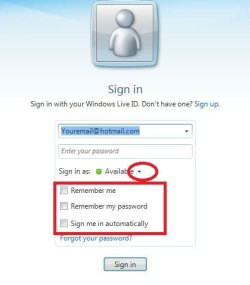
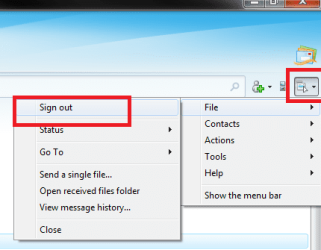
Start Live messenger, it will log in as your little bro.

Then sign him out (see print), Before you sign back in as you, drop the arrow (see other print) and make yours the default to sign in automatically.
 

Attachments

  • sign in.JPG
    sign in.JPG
    23.9 KB · Views: 0
  • sign out.png
    sign out.png
    18.3 KB · Views: 1

My Computer My Computer

At a glance

Windows 7 Ultimate 64 bitIntel(R) Core(TM)2 Quad CPU Q8200 @ 2.33GHz8 GB KingstonNvidia GeForce 9600GT
Computer Manufacturer/Model Number
Custom Hack job
OS
Windows 7 Ultimate 64 bit
CPU
Intel(R) Core(TM)2 Quad CPU Q8200 @ 2.33GHz
Motherboard
GigaByte EP45-UD3
Memory
8 GB Kingston
Graphics Card(s)
Nvidia GeForce 9600GT
Sound Card
Soundblaster Audigy
Monitor(s) Displays
AOC x2 22"
Hard Drives
2 x Samsung 500GB (RAID)
2 x Samsung 2TB
1 x WD Green 2TB
1 x Seagate 1TB
1 x Samsung 500GB
PSU
Thermaltake QFan 750W
Case
CM Scout Gaming
Cooling
Coolermaster V10
Keyboard
Microsoft Wireless Keyboard 1000
Mouse
Microsoft Wireless Optical 2000
Internet Speed
320
Other Info
Winfast PVR2000CP
LG DVD-RAM DVD/RW/DL Super Multi
Linksys WMP300Nx2 Wireless Adapter
haha my msn is the public beta version as the latest release doesn't work but i had a different beta that might have messed this up, however i have tried that and it still signs him in :(

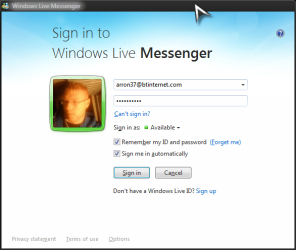
this is how my messenger looks > yet as soon as i open it even though i have deleted his credentials and clicked 'the forget me' button for his account it still signs him in automatically when i open Messenger
 

Attachments

  • Untitled.png
    Untitled.png
    34.4 KB · Views: 3

My Computer My Computer

At a glance

Windows 7 Premium (64 Bit)Intel Core i5-2320 3.0 Ghz8 GBAMD Radeon HD 6670
Computer type
PC/Desktop
Computer Manufacturer/Model Number
ADVENT DT1411
OS
Windows 7 Premium (64 Bit)
CPU
Intel Core i5-2320 3.0 Ghz
Motherboard
N Foxconn
Memory
8 GB
Graphics Card(s)
AMD Radeon HD 6670
Sound Card
Built in
Monitor(s) Displays
21.5" Samsung LED HD
Screen Resolution
1920x1080
Hard Drives
1x 1.5TB
1x 1TB
PSU
405v
Case
Advent standard
Keyboard
Acer
Mouse
Trust GTX
Internet Speed
Sky Broadband 20Mgbs
Antivirus
E-Trust
Browser
Firefox
Well that's Beta's for you. ;)
I'm not familiar with it, but it would stand to reason to check the registry and files (do a search) for his credentials, remove all credentials that are saved for every user (like I showed you earlier in user accounts). Open all browsers and delete all history including passwords, uninstall your beta software, do a windows clean-up.

If that doesn't resolve it, then get rid of the beta until it's approved mate.
 

My Computer My Computer

At a glance

Windows 7 Ultimate 64 bitIntel(R) Core(TM)2 Quad CPU Q8200 @ 2.33GHz8 GB KingstonNvidia GeForce 9600GT
Computer Manufacturer/Model Number
Custom Hack job
OS
Windows 7 Ultimate 64 bit
CPU
Intel(R) Core(TM)2 Quad CPU Q8200 @ 2.33GHz
Motherboard
GigaByte EP45-UD3
Memory
8 GB Kingston
Graphics Card(s)
Nvidia GeForce 9600GT
Sound Card
Soundblaster Audigy
Monitor(s) Displays
AOC x2 22"
Hard Drives
2 x Samsung 500GB (RAID)
2 x Samsung 2TB
1 x WD Green 2TB
1 x Seagate 1TB
1 x Samsung 500GB
PSU
Thermaltake QFan 750W
Case
CM Scout Gaming
Cooling
Coolermaster V10
Keyboard
Microsoft Wireless Keyboard 1000
Mouse
Microsoft Wireless Optical 2000
Internet Speed
320
Other Info
Winfast PVR2000CP
LG DVD-RAM DVD/RW/DL Super Multi
Linksys WMP300Nx2 Wireless Adapter
Back
Top