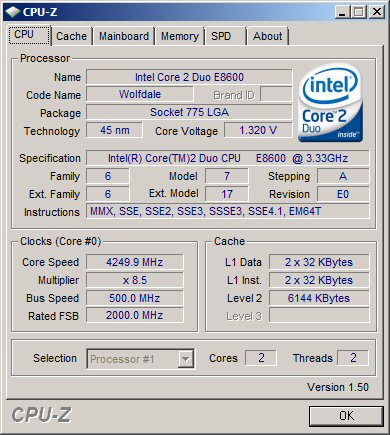
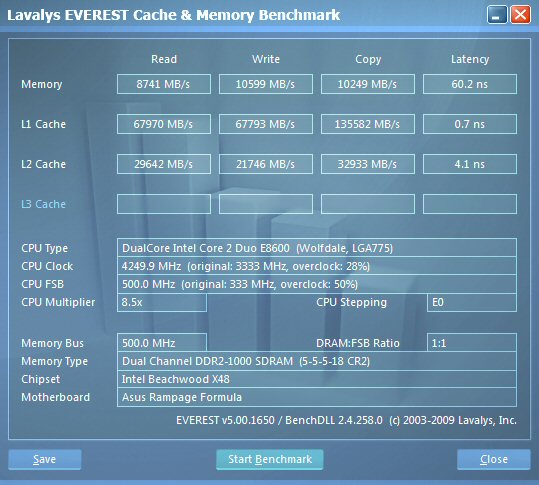
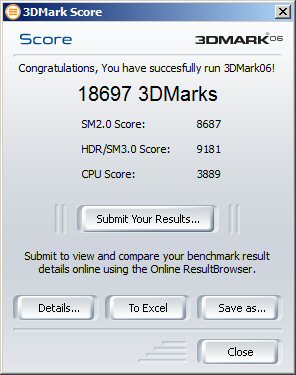
My New Computer. Impressed with the O/c.

Ok, thanks for the reassurance.
Things should get better when I move to California. And/or I get WaterCooling.

~Lordbob
 

My Computer My Computer

At a glance

Windows 7 Ultimate x64, Mint 9Intel i5-2500k2x 4Gb Corsair VENGEANCE DDR3-1600NVidia GeForce N260GTX Twin Frozr
Computer Manufacturer/Model Number
Hera
OS
Windows 7 Ultimate x64, Mint 9
CPU
Intel i5-2500k
Motherboard
ASUS P8P67 Pro
Memory
2x 4Gb Corsair VENGEANCE DDR3-1600
Graphics Card(s)
NVidia GeForce N260GTX Twin Frozr
Sound Card
Realtek HD OnBoard Audio
Monitor(s) Displays
ASUS 24" Monitor
Screen Resolution
1920x1080
Hard Drives
G.SKILL Phoenix Series 60GB SATA II MLC Internal Solid State Drive (SSD)
SAMSUNG Spinpoint F3R 1TB 7200 RPM 32MB Cache SATA II
PSU
Cooler Master Real Power Pro 750W
Case
Cooler Master Haf 932
Cooling
Fans
Keyboard
Razer Tarantula
Mouse
Razer Lachesis
Internet Speed
not fast enough
Even with water cooling the ambient temp greatly effects the idle temps because you are still trying to cool the rads with high ambient temps. You might try improving the case flow some although your temps are safe as is and fairly typical for an area with such a high ambient. It's been cool in Cali here on the coast, we have hardly hit the 70's yet, wait till July or August though it will get hotter but not Arizona hot.
 

My Computer My Computer

At a glance

Windows 7 Ult, Windows 8.1 Pro,Q9650-4.275GHz, E8600 4.5GHz, E6750-3.8GHzG.Skill PC2 9600 1200Mhz 5 5 5 15 2TGTX480
Computer type
PC/Desktop
Computer Manufacturer/Model Number
Home built
OS
Windows 7 Ult, Windows 8.1 Pro,
CPU
Q9650-4.275GHz, E8600 4.5GHz, E6750-3.8GHz
Motherboard
Evga 780i FTW
Memory
G.Skill PC2 9600 1200Mhz 5 5 5 15 2T
Graphics Card(s)
GTX480
Sound Card
Asus Xonar D2
Monitor(s) Displays
HannsG
Screen Resolution
1680X1050
Hard Drives
GSkill Phoenix Pro 120GB SSD
PSU
ThermalTake Toughpower 1000Watt modular
Case
ThermalTake XaserV
Cooling
Xigmatek S1283
Keyboard
Logitech G15
Mouse
Logitech G9
Internet Speed
T1
Even with water cooling the ambient temp greatly effects the idle temps because you are still trying to cool the rads with high ambient temps. You might try improving the case flow some although your temps are safe as is and fairly typical for an area with such a high ambient. It's been cool in Cali here on the coast, we have hardly hit the 70's yet, wait till July or August though it will get hotter but not Arizona hot.
Yeah, I do know that. It probably doesn't help that I have my computer in between my desk and nightstand, so it is like a cabinet, but open at the top...

~Lordbob
 

My Computer My Computer

At a glance

Windows 7 Ultimate x64, Mint 9Intel i5-2500k2x 4Gb Corsair VENGEANCE DDR3-1600NVidia GeForce N260GTX Twin Frozr
Computer Manufacturer/Model Number
Hera
OS
Windows 7 Ultimate x64, Mint 9
CPU
Intel i5-2500k
Motherboard
ASUS P8P67 Pro
Memory
2x 4Gb Corsair VENGEANCE DDR3-1600
Graphics Card(s)
NVidia GeForce N260GTX Twin Frozr
Sound Card
Realtek HD OnBoard Audio
Monitor(s) Displays
ASUS 24" Monitor
Screen Resolution
1920x1080
Hard Drives
G.SKILL Phoenix Series 60GB SATA II MLC Internal Solid State Drive (SSD)
SAMSUNG Spinpoint F3R 1TB 7200 RPM 32MB Cache SATA II
PSU
Cooler Master Real Power Pro 750W
Case
Cooler Master Haf 932
Cooling
Fans
Keyboard
Razer Tarantula
Mouse
Razer Lachesis
Internet Speed
not fast enough
It probably doesn't help that I have my computer in between my desk and nightstand, so it is like a cabinet, but open at the top...

~Lordbob

Is there any space at all between the side fan and the desk, or is it literally 'wedged' between the two?

A cabinet scenario would definitely have an impact as well.

The front 230mm fan does an okay job at cooling the HDD cage area, but it doesn't really push much cool air further than that.

How is your cooler currently orientated?

Horizontal (exhaust to rear) or vertical (exhaust towards top)

Exhausting straight out the top through the 230mm may net you a few extra degrees, but as already stated - you're still well within the 'safe' zone, so it's probably not worth the hassle of re-orientating/re-pasting etc.
 

My Computer My Computer

At a glance

8 Pro x64i7 3770K 4.6GHz16GB G.Skill Trident X 2666mhzx2 EVGA 780 Ti Superclocked SLI
Computer type
PC/Desktop
Computer Manufacturer/Model Number
Systems by SmartEyeball
OS
8 Pro x64
CPU
i7 3770K 4.6GHz
Motherboard
ASUS P8Z77 WS
Memory
16GB G.Skill Trident X 2666mhz
Graphics Card(s)
x2 EVGA 780 Ti Superclocked SLI
Sound Card
SB X-FI Surround 5.1 PRO USB / ATH-AD900 Headphones
Monitor(s) Displays
x3 Dell U2410 / 58" Samsung
Screen Resolution
5760*1200/ 1920*1200
Hard Drives
2x Intel 520 240GB (RAID 0) * 2x WD Caviar Blacks 2TB (RAID 0) * 2TB WD Caviar Black * Sony Optirac DVD
PSU
Silverstone Strider Evolution 1200W
Case
Thermaltake Level 10 GT Snow Edition
Cooling
Noctua NH-D14
Keyboard
Topre Realforce // Ducky Shine MX Black // Filco Ninja TKL
Mouse
Thermaltake Theron (Highly Recommended) + Razer Imperator
Antivirus
MSE
Browser
IE, FF, WaterFox
Other Info
GT Extreme V2 Sim Racing Cockpit + 40" LCD and K/B Mouse stand ▼
Fanatec CSR Elite Wheel + Clubsport V1 Pedals + CSR shifter/7G-H ▼Saitek X52 Pro ▼ TrackIR 5 Pro
Buttkicker v2 Seat Rumbler with Dedicated 5.1 and Sub Woofer attached to frame ▼
=
Bloody Big Grin
For all I know, it is pointing inwards! I will have to take a look.

It is not wedges, but there is only really about an inch gap. I know I am within the safe zones, so it only has to last about 3 more months. :p

~Lordbob
 

My Computer My Computer

At a glance

Windows 7 Ultimate x64, Mint 9Intel i5-2500k2x 4Gb Corsair VENGEANCE DDR3-1600NVidia GeForce N260GTX Twin Frozr
Computer Manufacturer/Model Number
Hera
OS
Windows 7 Ultimate x64, Mint 9
CPU
Intel i5-2500k
Motherboard
ASUS P8P67 Pro
Memory
2x 4Gb Corsair VENGEANCE DDR3-1600
Graphics Card(s)
NVidia GeForce N260GTX Twin Frozr
Sound Card
Realtek HD OnBoard Audio
Monitor(s) Displays
ASUS 24" Monitor
Screen Resolution
1920x1080
Hard Drives
G.SKILL Phoenix Series 60GB SATA II MLC Internal Solid State Drive (SSD)
SAMSUNG Spinpoint F3R 1TB 7200 RPM 32MB Cache SATA II
PSU
Cooler Master Real Power Pro 750W
Case
Cooler Master Haf 932
Cooling
Fans
Keyboard
Razer Tarantula
Mouse
Razer Lachesis
Internet Speed
not fast enough
For all I know, it is pointing inwards! I will have to take a look.

:roflmao:

It is not wedges, but there is only really about an inch gap. I know I am within the safe zones, so it only has to last about 3 more months. :p

~Lordbob

An inch doesn't invite much cool air in, but I think she'll make it another 3 months ;)
 

My Computer My Computer

At a glance

8 Pro x64i7 3770K 4.6GHz16GB G.Skill Trident X 2666mhzx2 EVGA 780 Ti Superclocked SLI
Computer type
PC/Desktop
Computer Manufacturer/Model Number
Systems by SmartEyeball
OS
8 Pro x64
CPU
i7 3770K 4.6GHz
Motherboard
ASUS P8Z77 WS
Memory
16GB G.Skill Trident X 2666mhz
Graphics Card(s)
x2 EVGA 780 Ti Superclocked SLI
Sound Card
SB X-FI Surround 5.1 PRO USB / ATH-AD900 Headphones
Monitor(s) Displays
x3 Dell U2410 / 58" Samsung
Screen Resolution
5760*1200/ 1920*1200
Hard Drives
2x Intel 520 240GB (RAID 0) * 2x WD Caviar Blacks 2TB (RAID 0) * 2TB WD Caviar Black * Sony Optirac DVD
PSU
Silverstone Strider Evolution 1200W
Case
Thermaltake Level 10 GT Snow Edition
Cooling
Noctua NH-D14
Keyboard
Topre Realforce // Ducky Shine MX Black // Filco Ninja TKL
Mouse
Thermaltake Theron (Highly Recommended) + Razer Imperator
Antivirus
MSE
Browser
IE, FF, WaterFox
Other Info
GT Extreme V2 Sim Racing Cockpit + 40" LCD and K/B Mouse stand ▼
Fanatec CSR Elite Wheel + Clubsport V1 Pedals + CSR shifter/7G-H ▼Saitek X52 Pro ▼ TrackIR 5 Pro
Buttkicker v2 Seat Rumbler with Dedicated 5.1 and Sub Woofer attached to frame ▼
=
Bloody Big Grin
What i have done is wrong, i have just read the thread over all 5 pages and then LOL'd when i saw how many people say its bad.

I'm glad i've posted, otherwise i'd been starting a thread "my cpu has died?"

Thanks

P.s. I';ll read the thread.
 

My Computer My Computer

At a glance

Windows 7 Pro X64Intel i7, 930 2.8Ghz - O/c to 4Ghz @ 1.29v3x2GB = 6GB Mushkin Redline 998805Nvidia Geforce 8800GTX
Computer Manufacturer/Model Number
Home Grown
OS
Windows 7 Pro X64
CPU
Intel i7, 930 2.8Ghz - O/c to 4Ghz @ 1.29v
Motherboard
ASUS Rampage II Gene
Memory
3x2GB = 6GB Mushkin Redline 998805
Graphics Card(s)
Nvidia Geforce 8800GTX
Sound Card
Audigy Soundblaster 24 Bit Extreme
Monitor(s) Displays
Samsung SyncMaster 913N
Screen Resolution
1280 x 1024
Hard Drives
1x Western Digital 500GB, 16MB Crèche, 7,200RPM
1x Western Digital 150GB, 2MB Crèche, 7,200RPM
1x Seagate 250GB, 16MB Crèche, 7,200RPM
PSU
Thermaltake 850W PSU
Case
A butchered case with holes cut out for extra cooling lol
Cooling
CPU = Corsair H50 with 2x 120mm Noctua NF-S12B fans on rad
Keyboard
QWERTY
Mouse
Micky
Internet Speed
Not fast enough
We're glad you listened - not all do :)

Overclocking is part science, part art and part luck.
 

My Computer My Computer

At a glance

8 Pro x64i7 3770K 4.6GHz16GB G.Skill Trident X 2666mhzx2 EVGA 780 Ti Superclocked SLI
Computer type
PC/Desktop
Computer Manufacturer/Model Number
Systems by SmartEyeball
OS
8 Pro x64
CPU
i7 3770K 4.6GHz
Motherboard
ASUS P8Z77 WS
Memory
16GB G.Skill Trident X 2666mhz
Graphics Card(s)
x2 EVGA 780 Ti Superclocked SLI
Sound Card
SB X-FI Surround 5.1 PRO USB / ATH-AD900 Headphones
Monitor(s) Displays
x3 Dell U2410 / 58" Samsung
Screen Resolution
5760*1200/ 1920*1200
Hard Drives
2x Intel 520 240GB (RAID 0) * 2x WD Caviar Blacks 2TB (RAID 0) * 2TB WD Caviar Black * Sony Optirac DVD
PSU
Silverstone Strider Evolution 1200W
Case
Thermaltake Level 10 GT Snow Edition
Cooling
Noctua NH-D14
Keyboard
Topre Realforce // Ducky Shine MX Black // Filco Ninja TKL
Mouse
Thermaltake Theron (Highly Recommended) + Razer Imperator
Antivirus
MSE
Browser
IE, FF, WaterFox
Other Info
GT Extreme V2 Sim Racing Cockpit + 40" LCD and K/B Mouse stand ▼
Fanatec CSR Elite Wheel + Clubsport V1 Pedals + CSR shifter/7G-H ▼Saitek X52 Pro ▼ TrackIR 5 Pro
Buttkicker v2 Seat Rumbler with Dedicated 5.1 and Sub Woofer attached to frame ▼
=
Bloody Big Grin
Hmmm...good thread, and good advice since Intel lists the max volts for an i7-930 as 1.375.

Anyways while reading this thread I ran across Lordbob's post about his high idle temps and thought I’d share my thoughts/experience with my i7-930's idle temps.

My setup is in an Antec P182 case, see system specs; my room temps are about 23 Celsius (75 Fahrenheit). I’m using a Noctua NH-C12P SE14 for my CPU cooler; my CPU is running at 3.52gig on 1.125 volts. QPI/Vtt 1.2volts.

With that my idle temps ran mid to high 40's, and no matter what I tried... voltage tweaks, replacing the Cooler, reseating/reorienting the cooler several times, trying different thermo pastes, AS5, Noctua's NT-H1 paste, and now Arctic Silver's MX-3 (which gives the lowest temps by 2 degrees) I still find myself in the mid 40's idle, low 70’s load.

In the end I’ve come to the conclusion that these are good temps considering these factors.

Now a couple of notes…

The NF-P14 fan that comes with the cooler is a 140mm 3 pin fan so it should be running at a constant 1200RPM’s +/-10 percent, however Speedfan, Everest, and my motherboard’s (GA-X58A-UD5) BIOS all state the fan is running at 900ish without a load. What’s more interesting is that I have "CPU Smart Fan Control" disabled my BIOS so the board should give full voltage to the fan headers.
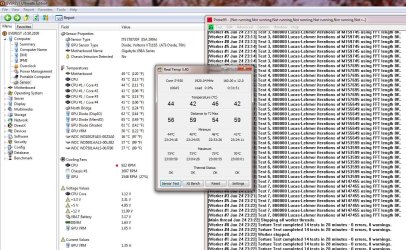
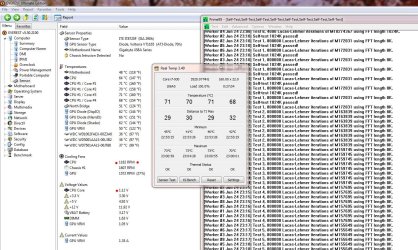
However with this BIOS setting and the fact that the fan isn't variable, the fan’s speed increases to the 1200 range as the CPU temps climb as seen in these images….

Everest Temp readings - Jun 24 - NL.JPG
This image shows no load on processor, CPU fan running a 900+RPM

Everest Temp readings - Jun 24.JPG
This image shows a load on the processor, CPU fan running high 1180's RPM

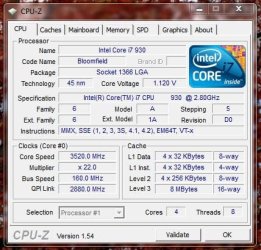
CPUZ - FL - Jun 24.JPG
CPU-Z reading with prime 95 full load.

Hmmm… Apparently the board does vary it’s voltage to the headers, even with the BIOS set to disable smart fan. Odd.

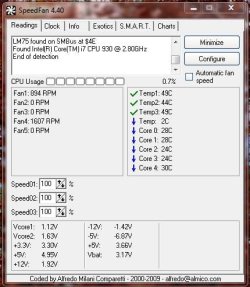
Core Temp and Real Temp show the same temp readings while Speedfan reads 15 degrees lower under idle and load speeds...

Speedfan readings-24 jun.JPG

At any rate the bottom line is that I have a quiet system with good temps.

Thoughts/Opinions???
 

My Computer My Computer

At a glance

Windows 10 ProIntel Core i7-4770K (3.5Ghz)32 gig Corsair Dominator Platinum (4x8Gig)Sapphire Tri-X R9 Fury
Computer type
PC/Desktop
Computer Manufacturer/Model Number
Custom built by me.
OS
Windows 10 Pro
CPU
Intel Core i7-4770K (3.5Ghz)
Motherboard
Gigabyte G1 Sniper 5 (F10 Bios)
Memory
32 gig Corsair Dominator Platinum (4x8Gig)
Graphics Card(s)
Sapphire Tri-X R9 Fury
Sound Card
Soundblaster ZXR
Monitor(s) Displays
NEC PA242W 24" LCD Monitor
Screen Resolution
1920 x 1200
Hard Drives
Primary - Samsung 850 Pro (512gig), Samsung 840 Pro (256gig), 2TB WD Caviar Black.
PSU
EVGA Supernova 1000 G2
Case
Cooler Master HAF X
Cooling
Corsair H100i with Corsair Air Series SP120 Quiet Fans
Keyboard
Logitech Wireless Wave
Mouse
Logitech Performance MX
Internet Speed
High Speed Cable
Antivirus
Norton Security
Browser
IE11
Other Info
Memory Timings - 1866MHz @ 9-9-9-27-1T @ 1.5 volts
Hmmm… Apparently the board does vary it’s voltage to the headers, even with the BIOS set to disable smart fan. Odd.

It could be BIOS / board specific as my board only varies 50rpm+/- or so with the equivalent settings disabled, regardless of load or temps when connected to the CPU and FAN headers.

Core Temp and Real Temp show the same temp readings while Speedfan reads 15 degrees lower under idle and load speeds...


Thoughts/Opinions???

TBH, I've never really relied on Speedfan for monitoring as I've never particularly trusted any of it's readings. (CPU temps, GPU temps, fan speeds, voltages etc)

Core/Real Temp + Everest + mobo + GPU-Z et al have always seemed to be closer in comparison compared to Speedfans 'reporting'.

OT, when did you upgrade? I must have missed it - the last I remember you were considering it :o (kudos btw)
 

My Computer My Computer

At a glance

8 Pro x64i7 3770K 4.6GHz16GB G.Skill Trident X 2666mhzx2 EVGA 780 Ti Superclocked SLI
Computer type
PC/Desktop
Computer Manufacturer/Model Number
Systems by SmartEyeball
OS
8 Pro x64
CPU
i7 3770K 4.6GHz
Motherboard
ASUS P8Z77 WS
Memory
16GB G.Skill Trident X 2666mhz
Graphics Card(s)
x2 EVGA 780 Ti Superclocked SLI
Sound Card
SB X-FI Surround 5.1 PRO USB / ATH-AD900 Headphones
Monitor(s) Displays
x3 Dell U2410 / 58" Samsung
Screen Resolution
5760*1200/ 1920*1200
Hard Drives
2x Intel 520 240GB (RAID 0) * 2x WD Caviar Blacks 2TB (RAID 0) * 2TB WD Caviar Black * Sony Optirac DVD
PSU
Silverstone Strider Evolution 1200W
Case
Thermaltake Level 10 GT Snow Edition
Cooling
Noctua NH-D14
Keyboard
Topre Realforce // Ducky Shine MX Black // Filco Ninja TKL
Mouse
Thermaltake Theron (Highly Recommended) + Razer Imperator
Antivirus
MSE
Browser
IE, FF, WaterFox
Other Info
GT Extreme V2 Sim Racing Cockpit + 40" LCD and K/B Mouse stand ▼
Fanatec CSR Elite Wheel + Clubsport V1 Pedals + CSR shifter/7G-H ▼Saitek X52 Pro ▼ TrackIR 5 Pro
Buttkicker v2 Seat Rumbler with Dedicated 5.1 and Sub Woofer attached to frame ▼
=
Bloody Big Grin
OT, when did you upgrade? I must have missed it - the last I remember you were considering it :o (kudos btw)

May. And yeah I’m loving the new system. This is the post where I got it setup .... http://www.sevenforums.com/hardware-devices/81169-experience-gigabyte-motherboards-2.html#post717247

I double-checked the BIOS and found that I do/did in fact have Smart Fan enabled. Still, it's curious that the fan would vary that much considering it's a non-variable fan.

Seems to me Gigabyte has the board setup to have the CPU fan header setup to vary its current based on temps when Smart Fan is enabled, regardless of whether you use a 3 or 4-pin fan. That’s too large a variable to think otherwise.

At any rate it’s not an issue as far as I’m concerned, just something I never expected.

Here's the cooler...

NH-C12P-SE14-installed.jpg
 

My Computer My Computer

At a glance

Windows 10 ProIntel Core i7-4770K (3.5Ghz)32 gig Corsair Dominator Platinum (4x8Gig)Sapphire Tri-X R9 Fury
Computer type
PC/Desktop
Computer Manufacturer/Model Number
Custom built by me.
OS
Windows 10 Pro
CPU
Intel Core i7-4770K (3.5Ghz)
Motherboard
Gigabyte G1 Sniper 5 (F10 Bios)
Memory
32 gig Corsair Dominator Platinum (4x8Gig)
Graphics Card(s)
Sapphire Tri-X R9 Fury
Sound Card
Soundblaster ZXR
Monitor(s) Displays
NEC PA242W 24" LCD Monitor
Screen Resolution
1920 x 1200
Hard Drives
Primary - Samsung 850 Pro (512gig), Samsung 840 Pro (256gig), 2TB WD Caviar Black.
PSU
EVGA Supernova 1000 G2
Case
Cooler Master HAF X
Cooling
Corsair H100i with Corsair Air Series SP120 Quiet Fans
Keyboard
Logitech Wireless Wave
Mouse
Logitech Performance MX
Internet Speed
High Speed Cable
Antivirus
Norton Security
Browser
IE11
Other Info
Memory Timings - 1866MHz @ 9-9-9-27-1T @ 1.5 volts

My Computer My Computer

At a glance

Windows 7 Home Premium x64Intel Core i7-2600 @3.40GHz8.00GB DDR3NVIDIA GeForce GTX 555 w/1.0GB RAM
Computer Manufacturer/Model Number
Alienware X51
OS
Windows 7 Home Premium x64
CPU
Intel Core i7-2600 @3.40GHz
Memory
8.00GB DDR3
Graphics Card(s)
NVIDIA GeForce GTX 555 w/1.0GB RAM
Monitor(s) Displays
BenQ XL2420TX
Screen Resolution
1920x1080@120Hz
Hard Drives
1TB
PSU
330-watt
Keyboard
Logitech Wireless Illuminated Keyboard K800
Mouse
Razer Orochi
Internet Speed
Campus Internet

My Computer My Computer

At a glance

Windows 10 ProIntel Core i7-4770K (3.5Ghz)32 gig Corsair Dominator Platinum (4x8Gig)Sapphire Tri-X R9 Fury
Computer type
PC/Desktop
Computer Manufacturer/Model Number
Custom built by me.
OS
Windows 10 Pro
CPU
Intel Core i7-4770K (3.5Ghz)
Motherboard
Gigabyte G1 Sniper 5 (F10 Bios)
Memory
32 gig Corsair Dominator Platinum (4x8Gig)
Graphics Card(s)
Sapphire Tri-X R9 Fury
Sound Card
Soundblaster ZXR
Monitor(s) Displays
NEC PA242W 24" LCD Monitor
Screen Resolution
1920 x 1200
Hard Drives
Primary - Samsung 850 Pro (512gig), Samsung 840 Pro (256gig), 2TB WD Caviar Black.
PSU
EVGA Supernova 1000 G2
Case
Cooler Master HAF X
Cooling
Corsair H100i with Corsair Air Series SP120 Quiet Fans
Keyboard
Logitech Wireless Wave
Mouse
Logitech Performance MX
Internet Speed
High Speed Cable
Antivirus
Norton Security
Browser
IE11
Other Info
Memory Timings - 1866MHz @ 9-9-9-27-1T @ 1.5 volts
Still, it's curious that the fan would vary that much considering it's a non-variable fan.

:roflmao:

Have something of substance to add or are we just adding to our post count???

Sorry! Just thought that was really funny!

I'll add that I agree mid-40s idling isn't too bad. I have a system I'm working on that idles in mid-50s, so ... yeah. Glad you can achieve both good temps and low noise though ... I was never able to do that with custom components.
 

My Computer My Computer

At a glance

Windows 7 Home Premium x64Intel Core i7-2600 @3.40GHz8.00GB DDR3NVIDIA GeForce GTX 555 w/1.0GB RAM
Computer Manufacturer/Model Number
Alienware X51
OS
Windows 7 Home Premium x64
CPU
Intel Core i7-2600 @3.40GHz
Memory
8.00GB DDR3
Graphics Card(s)
NVIDIA GeForce GTX 555 w/1.0GB RAM
Monitor(s) Displays
BenQ XL2420TX
Screen Resolution
1920x1080@120Hz
Hard Drives
1TB
PSU
330-watt
Keyboard
Logitech Wireless Illuminated Keyboard K800
Mouse
Razer Orochi
Internet Speed
Campus Internet
:roflmao:

Have something of substance to add or are we just adding to our post count???

Sorry! Just thought that was really funny!

Perhaps reading this would enlighten your funny bone...

The NF-P14 fan that comes with the cooler is a 140mm 3 pin fan so it should be running at a constant 1200RPM’s +/-10 percent, however Speedfan, Everest, and my motherboard’s (GA-X58A-UD5) BIOS all state the fan is running at 900ish without a load. What’s more interesting is that I have "CPU Smart Fan Control" disabled my BIOS so the board should give full voltage to the fan headers.

BTW I am aware that all fans are variable if attached to a power source, like a pontentiometer, or a PWM source, such as those employed on most motherboards for the CPU header ;)

At any rate I am happy with the temps I have considering my room temp is currently 80F/26C :o
 
Last edited:

My Computer My Computer

At a glance

Windows 10 ProIntel Core i7-4770K (3.5Ghz)32 gig Corsair Dominator Platinum (4x8Gig)Sapphire Tri-X R9 Fury
Computer type
PC/Desktop
Computer Manufacturer/Model Number
Custom built by me.
OS
Windows 10 Pro
CPU
Intel Core i7-4770K (3.5Ghz)
Motherboard
Gigabyte G1 Sniper 5 (F10 Bios)
Memory
32 gig Corsair Dominator Platinum (4x8Gig)
Graphics Card(s)
Sapphire Tri-X R9 Fury
Sound Card
Soundblaster ZXR
Monitor(s) Displays
NEC PA242W 24" LCD Monitor
Screen Resolution
1920 x 1200
Hard Drives
Primary - Samsung 850 Pro (512gig), Samsung 840 Pro (256gig), 2TB WD Caviar Black.
PSU
EVGA Supernova 1000 G2
Case
Cooler Master HAF X
Cooling
Corsair H100i with Corsair Air Series SP120 Quiet Fans
Keyboard
Logitech Wireless Wave
Mouse
Logitech Performance MX
Internet Speed
High Speed Cable
Antivirus
Norton Security
Browser
IE11
Other Info
Memory Timings - 1866MHz @ 9-9-9-27-1T @ 1.5 volts
The room in which the mid-50s machine is running has a room temp of about 76F. According to our flags, we're from the same state, so you know how hot it's been? Well, the air conditioner vent blows ice air on this machine (and on its user ... brrr) all day and all night, but still can't get the temps below 50C.

So yeah, 40C idling with a room temp of 80F is GREAT!
 

My Computer My Computer

At a glance

Windows 7 Home Premium x64Intel Core i7-2600 @3.40GHz8.00GB DDR3NVIDIA GeForce GTX 555 w/1.0GB RAM
Computer Manufacturer/Model Number
Alienware X51
OS
Windows 7 Home Premium x64
CPU
Intel Core i7-2600 @3.40GHz
Memory
8.00GB DDR3
Graphics Card(s)
NVIDIA GeForce GTX 555 w/1.0GB RAM
Monitor(s) Displays
BenQ XL2420TX
Screen Resolution
1920x1080@120Hz
Hard Drives
1TB
PSU
330-watt
Keyboard
Logitech Wireless Illuminated Keyboard K800
Mouse
Razer Orochi
Internet Speed
Campus Internet
The central air unit we have doesn't cool all rooms adequately. While my living room feels like Antarctica, our back bedrooms feel like the Sahara desert. You could say we have two climate zones here :eek:


Unfortunately we can’t vary the vents because of the fire suppression system that requires all vents be open at all times, so we have the non-variable type…. There goes that word again :)
 

My Computer My Computer

At a glance

Windows 10 ProIntel Core i7-4770K (3.5Ghz)32 gig Corsair Dominator Platinum (4x8Gig)Sapphire Tri-X R9 Fury
Computer type
PC/Desktop
Computer Manufacturer/Model Number
Custom built by me.
OS
Windows 10 Pro
CPU
Intel Core i7-4770K (3.5Ghz)
Motherboard
Gigabyte G1 Sniper 5 (F10 Bios)
Memory
32 gig Corsair Dominator Platinum (4x8Gig)
Graphics Card(s)
Sapphire Tri-X R9 Fury
Sound Card
Soundblaster ZXR
Monitor(s) Displays
NEC PA242W 24" LCD Monitor
Screen Resolution
1920 x 1200
Hard Drives
Primary - Samsung 850 Pro (512gig), Samsung 840 Pro (256gig), 2TB WD Caviar Black.
PSU
EVGA Supernova 1000 G2
Case
Cooler Master HAF X
Cooling
Corsair H100i with Corsair Air Series SP120 Quiet Fans
Keyboard
Logitech Wireless Wave
Mouse
Logitech Performance MX
Internet Speed
High Speed Cable
Antivirus
Norton Security
Browser
IE11
Other Info
Memory Timings - 1866MHz @ 9-9-9-27-1T @ 1.5 volts
40C is acceptable....at least from my experience in the C2D world. (Havent moved up to an i(x) chip yet..)

I found this thread a bit of hoot...and am glad to see others stepping up to keep this new OC'er from nuking his machine(or burning down his house.)

OC'in can take some time if you want something really stable.
It took me nearly a week (Probably about 15+ hours of debating, setting and testing) to get stable with my E8600.

I too found the magical 4.5Ghz goal a bit elusive(on an E8600 of course). I could get there, but long term stability was a problem.
I finally settled for a rock solid 4.2Ghz. And this is all on air (See my specs)
ballz42-2.jpg

ballz42-ev-2.jpg

ballz3d2.jpg


The voltage above is acceptable. A bit of sweet spot for what its doing...

Bragging rights is one thing. We see it all the time.
But you want something SOLID that you can depend on.
My setup I've described? Its been running 24x7 for over a YEAR only having to be powered off for an occasional case cleaning or neighborhood power outage.

Good luck to any/all OC'ers.
It takes time and patience to get it right.
 

My Computer My Computer

At a glance

Win7/XPINTEL E8600 @ 4.2GHz8GB PC8500 Corsiar DominatornVidia GTX 280
Computer Manufacturer/Model Number
HomeBrew
OS
Win7/XP
CPU
INTEL E8600 @ 4.2GHz
Motherboard
Asus P5E w/Formula Rampage BIOS
Memory
8GB PC8500 Corsiar Dominator
Graphics Card(s)
nVidia GTX 280
Sound Card
Asus FXII (SoundMax controlled)
Monitor(s) Displays
2 x I-INC 28'
Screen Resolution
1920x1200
Hard Drives
2 x Seagate 1.5TB
PSU
Ultra 700W
Case
Something..with alot of air
Cooling
Tuniq 120 CPU - Several 80mm and one 120MM fan
Keyboard
IBM MODEL M - YA BABY!!! NEVER SAY DIE!
Mouse
MS Intellimouse
Internet Speed
50/5
OT, when did you upgrade? I must have missed it - the last I remember you were considering it :o (kudos btw)

May. And yeah I’m loving the new system. This is the post where I got it setup .... http://www.sevenforums.com/hardware-devices/81169-experience-gigabyte-motherboards-2.html#post717247

I double-checked the BIOS and found that I do/did in fact have Smart Fan enabled. Still, it's curious that the fan would vary that much considering it's a non-variable fan.

Sorry I missed it, but a belated congrats any way :)

As for the variance, it's actually not that odd when you think about it.

Those fans will run between 700-900 RPM with the LN/ULN adapters if used - having the cooling option enabled in the BIOS is essentially doing the same job as the voltage adapters, hence the variance.


Good luck to any/all OC'ers.
It takes time and patience to get it right.

Ain't that the truth ;)
 

My Computer My Computer

At a glance

8 Pro x64i7 3770K 4.6GHz16GB G.Skill Trident X 2666mhzx2 EVGA 780 Ti Superclocked SLI
Computer type
PC/Desktop
Computer Manufacturer/Model Number
Systems by SmartEyeball
OS
8 Pro x64
CPU
i7 3770K 4.6GHz
Motherboard
ASUS P8Z77 WS
Memory
16GB G.Skill Trident X 2666mhz
Graphics Card(s)
x2 EVGA 780 Ti Superclocked SLI
Sound Card
SB X-FI Surround 5.1 PRO USB / ATH-AD900 Headphones
Monitor(s) Displays
x3 Dell U2410 / 58" Samsung
Screen Resolution
5760*1200/ 1920*1200
Hard Drives
2x Intel 520 240GB (RAID 0) * 2x WD Caviar Blacks 2TB (RAID 0) * 2TB WD Caviar Black * Sony Optirac DVD
PSU
Silverstone Strider Evolution 1200W
Case
Thermaltake Level 10 GT Snow Edition
Cooling
Noctua NH-D14
Keyboard
Topre Realforce // Ducky Shine MX Black // Filco Ninja TKL
Mouse
Thermaltake Theron (Highly Recommended) + Razer Imperator
Antivirus
MSE
Browser
IE, FF, WaterFox
Other Info
GT Extreme V2 Sim Racing Cockpit + 40" LCD and K/B Mouse stand ▼
Fanatec CSR Elite Wheel + Clubsport V1 Pedals + CSR shifter/7G-H ▼Saitek X52 Pro ▼ TrackIR 5 Pro
Buttkicker v2 Seat Rumbler with Dedicated 5.1 and Sub Woofer attached to frame ▼
=
Bloody Big Grin
Sygnus, since computer fans operate from 5v to 12V, they will run on any voltage between the two.

Regardless if the fan is "variable" or not, you can vary the speed simply by changing the voltage. Which is exactly what the motherboard smart fan does.

~Lordbob
 

My Computer My Computer

At a glance

Windows 7 Ultimate x64, Mint 9Intel i5-2500k2x 4Gb Corsair VENGEANCE DDR3-1600NVidia GeForce N260GTX Twin Frozr
Computer Manufacturer/Model Number
Hera
OS
Windows 7 Ultimate x64, Mint 9
CPU
Intel i5-2500k
Motherboard
ASUS P8P67 Pro
Memory
2x 4Gb Corsair VENGEANCE DDR3-1600
Graphics Card(s)
NVidia GeForce N260GTX Twin Frozr
Sound Card
Realtek HD OnBoard Audio
Monitor(s) Displays
ASUS 24" Monitor
Screen Resolution
1920x1080
Hard Drives
G.SKILL Phoenix Series 60GB SATA II MLC Internal Solid State Drive (SSD)
SAMSUNG Spinpoint F3R 1TB 7200 RPM 32MB Cache SATA II
PSU
Cooler Master Real Power Pro 750W
Case
Cooler Master Haf 932
Cooling
Fans
Keyboard
Razer Tarantula
Mouse
Razer Lachesis
Internet Speed
not fast enough
Back
Top