HELP No Local Area Connection but have Broadband??

Orion09

New member
Local time
2:59 AM
Messages
6
OK so I dont know much about Connections and things.. And Im new to this forum site.. So I apologize if im doing things wrong..

My problem Im having lately is Before I just plugged in my Ethernet cable to my laptop and I would have internet access. Now I just have a connection but a yellow icon saying I have No Internet Access.

I messed around a lil bit and set up a broadband connection and I have internet through that but it takes forever to connect sometimes..

I have Verizon DSL and Im using a Westel 6100 without Firmware installed

On my Local Area Connection " Network 2 " Realtek PCIe FE Family Contoller

its says...
IPv4 Connectivity - No Internet Access
IPv6 Connectivity - No Internet Access


PLEASE HELP..
 
Last edited:

My Computer My Computer

At a glance

Windows 7 64Pentium(R) Dual-Core CPU T4300@ 2.10GHz3.00 GB RAM
Computer Manufacturer/Model Number
Dell Inspiron 1440
OS
Windows 7 64
CPU
Pentium(R) Dual-Core CPU T4300@ 2.10GHz
Memory
3.00 GB RAM

My Computer My Computer

At a glance

Windows 7 Home Premium 64bitIntel(R)Core(TM)2 quad [email protected] 2.39GHz6GB DDR2 6400GeForce 8500/512MB
Computer Manufacturer/Model Number
HP M9077c
OS
Windows 7 Home Premium 64bit
CPU
Intel(R)Core(TM)2 quad [email protected] 2.39GHz
Motherboard
ASUSeK
Memory
6GB DDR2 6400
Graphics Card(s)
GeForce 8500/512MB
Sound Card
Realtek High Def Audio
Monitor(s) Displays
HP w2408 LCD 24" widescreen
Screen Resolution
1920x1200
Cooling
6 pack of Bud
Keyboard
MS wireless Inteli
Mouse
MS wireless Inteli
Thanks but didnt work..
 

My Computer My Computer

At a glance

Windows 7 64Pentium(R) Dual-Core CPU T4300@ 2.10GHz3.00 GB RAM
Computer Manufacturer/Model Number
Dell Inspiron 1440
OS
Windows 7 64
CPU
Pentium(R) Dual-Core CPU T4300@ 2.10GHz
Memory
3.00 GB RAM
Have you tried disconnecting Verizon DSL, power it down and power it back up, then connect your pc to it and see what happens. IMO
 

My Computer My Computer

At a glance

Windows 7 Home Premium 64bitIntel(R)Core(TM)2 quad [email protected] 2.39GHz6GB DDR2 6400GeForce 8500/512MB
Computer Manufacturer/Model Number
HP M9077c
OS
Windows 7 Home Premium 64bit
CPU
Intel(R)Core(TM)2 quad [email protected] 2.39GHz
Motherboard
ASUSeK
Memory
6GB DDR2 6400
Graphics Card(s)
GeForce 8500/512MB
Sound Card
Realtek High Def Audio
Monitor(s) Displays
HP w2408 LCD 24" widescreen
Screen Resolution
1920x1200
Cooling
6 pack of Bud
Keyboard
MS wireless Inteli
Mouse
MS wireless Inteli
Yes Ive tried that.. Tried the reset but also and nothing...

I have internet through Local Area Connection.. Thought it might be the modem is bad..
However I set up a Broadband Connection and I can get the internet that way.. But I have to enter my password and sometimes it doesnt cnnect when it dials.. its just a pain that way
 

My Computer My Computer

At a glance

Windows 7 64Pentium(R) Dual-Core CPU T4300@ 2.10GHz3.00 GB RAM
Computer Manufacturer/Model Number
Dell Inspiron 1440
OS
Windows 7 64
CPU
Pentium(R) Dual-Core CPU T4300@ 2.10GHz
Memory
3.00 GB RAM
Try this. I won't quit if you don't!
Except for bedtime!

Control Panel\All Control Panel Items\Network and Sharing Center
 

My Computer My Computer

At a glance

Windows 7 Home Premium 64bitIntel(R)Core(TM)2 quad [email protected] 2.39GHz6GB DDR2 6400GeForce 8500/512MB
Computer Manufacturer/Model Number
HP M9077c
OS
Windows 7 Home Premium 64bit
CPU
Intel(R)Core(TM)2 quad [email protected] 2.39GHz
Motherboard
ASUSeK
Memory
6GB DDR2 6400
Graphics Card(s)
GeForce 8500/512MB
Sound Card
Realtek High Def Audio
Monitor(s) Displays
HP w2408 LCD 24" widescreen
Screen Resolution
1920x1200
Cooling
6 pack of Bud
Keyboard
MS wireless Inteli
Mouse
MS wireless Inteli
Hi Orion09 welcome to W7F :)

I also have VerizonDSL with the westell 6100, been a couple of years now.....

Your not seeing any red lights on the DSL modem are you?
The bottom one that indicates Internet connectivity will be red especially if the ISP is down.

Do you have a spare Cat5 cable to rule-out a bad cable?

This tutorial by Dinesh may help:
http://www.sevenforums.com/tutorials/18203-internet-troubleshooting-guide.html?filter

Anak
 

My Computer My Computer

At a glance

Originally Win 7 Hm Prem x64 Ver 6.1.7600 Bui...Intel i3 530 2.93GHz, 2933MHz 2 Cores 4 Logic...6GB of 1,333MHz DDR3 SDRAM32MB Intel Graphics Media Accelerator HD IGChip
Computer type
PC/Desktop
Computer Manufacturer/Model Number
Gateway DX4831-01e (Mid-Tower Desktop)
OS
Originally Win 7 Hm Prem x64 Ver 6.1.7600 Build 7601-SP1 | Upgraded to Windows 10 December 14, 2019
CPU
Intel i3 530 2.93GHz, 2933MHz 2 Cores 4 Logical Processors
Motherboard
Gateway H57M01 133 megahertz
Memory
6GB of 1,333MHz DDR3 SDRAM
Graphics Card(s)
32MB Intel Graphics Media Accelerator HD IGChip
Sound Card
Realtek High Definition Audio
Monitor(s) Displays
Gateway HX2000 20inch TFT active matrix TN
Screen Resolution
1600 x 900 x 59 hertz
Hard Drives
WDC WD10EADS-00M2B0 [HDD] (1000.20 GB) -- drive 0,
HL-DT-ST DVDRAM GH41N [CD-ROM dr]
Four card readers, and Four USB 2.0
PSU
300watts.
Case
Mid-Tower Desktop
Cooling
Stock from Gateway
Keyboard
Natural Ergonomic Keyboard 4000, see Other Info
Mouse
Orig. Gateway wore out now using Insignia USB wired optical
Internet Speed
Vz FIOS 10ms png 57.64Mbps down 65.53Mbps up Speedtest.org
Antivirus
Zamana Anti-logger with Anti-malware, MSE, Windows Firewall,
Browser
IE11.0.9600.19399-Upd ver11.0.135, Firefox 68.0.1 x64
Other Info
System Specs by Belarc.

BIOS: American Megatrends Inc. P01-A0 11/17/2009

Replaced the MS 'Natural' Standard PS/2 Enhanced 101-102 Keyboard with a new Natural Ergonomic Keyboard 4000 on August 1st 2014.

Canon Pixma MG3222 Printer.

Updated to IE11 on 12102015 | Fios Quantum Router g1100

Additional AV: SpywareBlaster, manual Mbam, SAS
Howling: this is what what my network sharing looks like

http://farm5.static.flickr.com/4119/4736922333_e468bc8d5a_b.jpg


Anak: No I dont have a spare cable but I will go get one and see if that is a problem..

However Im still able to connect to the Modem using the cable but only if Im in broadband mode.. is it still possible that the cable can be bad if im still getting a connection through broadband setup?
 

My Computer My Computer

At a glance

Windows 7 64Pentium(R) Dual-Core CPU T4300@ 2.10GHz3.00 GB RAM
Computer Manufacturer/Model Number
Dell Inspiron 1440
OS
Windows 7 64
CPU
Pentium(R) Dual-Core CPU T4300@ 2.10GHz
Memory
3.00 GB RAM
Howling: this is what what my network sharing looks like

http://farm5.static.flickr.com/4119/4736922333_e468bc8d5a_b.jpg


Anak: No I dont have a spare cable but I will go get one and see if that is a problem..

However Im still able to connect to the Modem using the cable but only if Im in broadband mode.. is it still possible that the cable can be bad if im still getting a connection through broadband setup?
No. If you are getting a connection, then the cable should be good.

If you have a broadband connection, but no local area connection this brings me to another check you can preform.....The in-line filters Verizon gave to you to install between the phone jack, and the DSL router. Make sure there is one on every land-line connection, even if it isn't connected to a phone.

If there is no reason for you to have multiple networks, I would get rid of (Leave) the broadband homegroup.

See here on how to do that:
http://www.sevenforums.com/tutorials/43980-homegroup-leave.html?filter


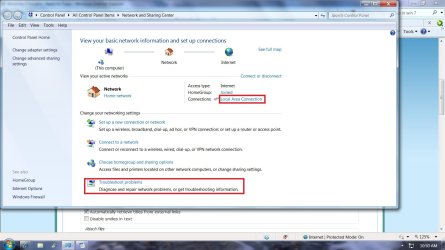
Then run the troubleshooter located at the bottom of the Network and Sharing Center page.
When the next page opens, click on Internet Connections, and allow the Shooter to run its diagnostic.

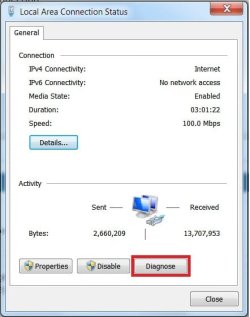
You can also access this Shooter by clicking on the remaining Local area Connection located to the right of the "View your active networks section" See highlites in attachment.
When the next dialog box opens "Local area connection status", click on the "diagnose" button, and let it run.


Once you have done all this report back on what the troubleshooters found or if they were able to repair your connection.
 

Attachments

  • Net and Share Center.jpg
    Net and Share Center.jpg
    124.1 KB · Views: 117
  • LAC Status.jpg
    LAC Status.jpg
    27.6 KB · Views: 19

My Computer My Computer

At a glance

Originally Win 7 Hm Prem x64 Ver 6.1.7600 Bui...Intel i3 530 2.93GHz, 2933MHz 2 Cores 4 Logic...6GB of 1,333MHz DDR3 SDRAM32MB Intel Graphics Media Accelerator HD IGChip
Computer type
PC/Desktop
Computer Manufacturer/Model Number
Gateway DX4831-01e (Mid-Tower Desktop)
OS
Originally Win 7 Hm Prem x64 Ver 6.1.7600 Build 7601-SP1 | Upgraded to Windows 10 December 14, 2019
CPU
Intel i3 530 2.93GHz, 2933MHz 2 Cores 4 Logical Processors
Motherboard
Gateway H57M01 133 megahertz
Memory
6GB of 1,333MHz DDR3 SDRAM
Graphics Card(s)
32MB Intel Graphics Media Accelerator HD IGChip
Sound Card
Realtek High Definition Audio
Monitor(s) Displays
Gateway HX2000 20inch TFT active matrix TN
Screen Resolution
1600 x 900 x 59 hertz
Hard Drives
WDC WD10EADS-00M2B0 [HDD] (1000.20 GB) -- drive 0,
HL-DT-ST DVDRAM GH41N [CD-ROM dr]
Four card readers, and Four USB 2.0
PSU
300watts.
Case
Mid-Tower Desktop
Cooling
Stock from Gateway
Keyboard
Natural Ergonomic Keyboard 4000, see Other Info
Mouse
Orig. Gateway wore out now using Insignia USB wired optical
Internet Speed
Vz FIOS 10ms png 57.64Mbps down 65.53Mbps up Speedtest.org
Antivirus
Zamana Anti-logger with Anti-malware, MSE, Windows Firewall,
Browser
IE11.0.9600.19399-Upd ver11.0.135, Firefox 68.0.1 x64
Other Info
System Specs by Belarc.

BIOS: American Megatrends Inc. P01-A0 11/17/2009

Replaced the MS 'Natural' Standard PS/2 Enhanced 101-102 Keyboard with a new Natural Ergonomic Keyboard 4000 on August 1st 2014.

Canon Pixma MG3222 Printer.

Updated to IE11 on 12102015 | Fios Quantum Router g1100

Additional AV: SpywareBlaster, manual Mbam, SAS
Howling: this is what what my network sharing looks like

http://farm5.static.flickr.com/4119/4736922333_e468bc8d5a_b.jpg


Anak: No I dont have a spare cable but I will go get one and see if that is a problem..

However Im still able to connect to the Modem using the cable but only if Im in broadband mode.. is it still possible that the cable can be bad if im still getting a connection through broadband setup?
No. If you are getting a connection, then the cable should be good.

If you have a broadband connection, but no local area connection this brings me to another check you can preform.....The in-line filters Verizon gave to you to install between the phone jack, and the DSL router. Make sure there is one on every land-line connection, even if it isn't connected to a phone.

If there is no reason for you to have multiple networks, I would get rid of (Leave) the broadband homegroup.

See here on how to do that:
http://www.sevenforums.com/tutorials/43980-homegroup-leave.html?filter


Then run the troubleshooter located at the bottom of the Network and Sharing Center page.
When the next page opens, click on Internet Connections, and allow the Shooter to run its diagnostic.

You can also access this Shooter by clicking on the remaining Local area Connection located to the right of the "View your active networks section" See highlites in attachment.
When the next dialog box opens "Local area connection status", click on the "diagnose" button, and let it run.


Once you have done all this report back on what the troubleshooters found or if they were able to repair your connection.


troubleshooting%202.jpg


Ok Ive done what you ask and these are my results.. I also took it upon myself to dig my old desktop outa storage to see if I could get an internet connection on that. And Im having the same problem.. It showing I have a connection but NO internet.. Im beginning to think its a Modem issue. If both computers are doing the same thing..


http://farm5.static.flickr.com/4102/4740542469_5bf133ac45_b.jpg Test result

http://farm5.static.flickr.com/4100/4740541891_7d784ffcbe_b.jpg Result 2

http://farm5.static.flickr.com/4134/4741177824_24e68fa2bf_b.jpg Other info..
 

My Computer My Computer

At a glance

Windows 7 64Pentium(R) Dual-Core CPU T4300@ 2.10GHz3.00 GB RAM
Computer Manufacturer/Model Number
Dell Inspiron 1440
OS
Windows 7 64
CPU
Pentium(R) Dual-Core CPU T4300@ 2.10GHz
Memory
3.00 GB RAM
The connection between your access point, router, cable modem, and the internet is broken.
Did you follow through with Denish's tutorial?

http://www.sevenforums.com/tutorials/18203-internet-troubleshooting-guide.html?filter

I saw on your one pix that you run norton
http://farm5.static.flickr.com/4134/...e68fa2bf_b.jpg

There is a section that deals with your problems, but you have to follow it step by step to get there.


  • If ping to Default Gateway and website is successful but you cannot browse any websites:
Temporarily disable/remove your antivirus program and your internet will start working.
Note: You can also boot to safe mode with networking to check the internet connectivity. (Press F8 when you turn on your computer and select Safe mode with networking option to boot the computer to safe mode with networking).
 

My Computer My Computer

At a glance

Originally Win 7 Hm Prem x64 Ver 6.1.7600 Bui...Intel i3 530 2.93GHz, 2933MHz 2 Cores 4 Logic...6GB of 1,333MHz DDR3 SDRAM32MB Intel Graphics Media Accelerator HD IGChip
Computer type
PC/Desktop
Computer Manufacturer/Model Number
Gateway DX4831-01e (Mid-Tower Desktop)
OS
Originally Win 7 Hm Prem x64 Ver 6.1.7600 Build 7601-SP1 | Upgraded to Windows 10 December 14, 2019
CPU
Intel i3 530 2.93GHz, 2933MHz 2 Cores 4 Logical Processors
Motherboard
Gateway H57M01 133 megahertz
Memory
6GB of 1,333MHz DDR3 SDRAM
Graphics Card(s)
32MB Intel Graphics Media Accelerator HD IGChip
Sound Card
Realtek High Definition Audio
Monitor(s) Displays
Gateway HX2000 20inch TFT active matrix TN
Screen Resolution
1600 x 900 x 59 hertz
Hard Drives
WDC WD10EADS-00M2B0 [HDD] (1000.20 GB) -- drive 0,
HL-DT-ST DVDRAM GH41N [CD-ROM dr]
Four card readers, and Four USB 2.0
PSU
300watts.
Case
Mid-Tower Desktop
Cooling
Stock from Gateway
Keyboard
Natural Ergonomic Keyboard 4000, see Other Info
Mouse
Orig. Gateway wore out now using Insignia USB wired optical
Internet Speed
Vz FIOS 10ms png 57.64Mbps down 65.53Mbps up Speedtest.org
Antivirus
Zamana Anti-logger with Anti-malware, MSE, Windows Firewall,
Browser
IE11.0.9600.19399-Upd ver11.0.135, Firefox 68.0.1 x64
Other Info
System Specs by Belarc.

BIOS: American Megatrends Inc. P01-A0 11/17/2009

Replaced the MS 'Natural' Standard PS/2 Enhanced 101-102 Keyboard with a new Natural Ergonomic Keyboard 4000 on August 1st 2014.

Canon Pixma MG3222 Printer.

Updated to IE11 on 12102015 | Fios Quantum Router g1100

Additional AV: SpywareBlaster, manual Mbam, SAS
Thanks Anak.. I just got off the phone with Verizon tech. I had to reprogram the Modem.. some of which was pretty much what the tutorial said. But I didnt have to disable my Norton..

Im finally back online properly =)
But thanks for all your help..
 

My Computer My Computer

At a glance

Windows 7 64Pentium(R) Dual-Core CPU T4300@ 2.10GHz3.00 GB RAM
Computer Manufacturer/Model Number
Dell Inspiron 1440
OS
Windows 7 64
CPU
Pentium(R) Dual-Core CPU T4300@ 2.10GHz
Memory
3.00 GB RAM
Glad to hear you are up and running.
Have a great week!
 

My Computer My Computer

At a glance

Windows 7 Home Premium 64bitIntel(R)Core(TM)2 quad [email protected] 2.39GHz6GB DDR2 6400GeForce 8500/512MB
Computer Manufacturer/Model Number
HP M9077c
OS
Windows 7 Home Premium 64bit
CPU
Intel(R)Core(TM)2 quad [email protected] 2.39GHz
Motherboard
ASUSeK
Memory
6GB DDR2 6400
Graphics Card(s)
GeForce 8500/512MB
Sound Card
Realtek High Def Audio
Monitor(s) Displays
HP w2408 LCD 24" widescreen
Screen Resolution
1920x1200
Cooling
6 pack of Bud
Keyboard
MS wireless Inteli
Mouse
MS wireless Inteli
Yes, that is good news!

Just being curious (since I have the same router), was it a matter of going into the set-up page, and changing a few settings or did you have to upgrade the software?
 

My Computer My Computer

At a glance

Originally Win 7 Hm Prem x64 Ver 6.1.7600 Bui...Intel i3 530 2.93GHz, 2933MHz 2 Cores 4 Logic...6GB of 1,333MHz DDR3 SDRAM32MB Intel Graphics Media Accelerator HD IGChip
Computer type
PC/Desktop
Computer Manufacturer/Model Number
Gateway DX4831-01e (Mid-Tower Desktop)
OS
Originally Win 7 Hm Prem x64 Ver 6.1.7600 Build 7601-SP1 | Upgraded to Windows 10 December 14, 2019
CPU
Intel i3 530 2.93GHz, 2933MHz 2 Cores 4 Logical Processors
Motherboard
Gateway H57M01 133 megahertz
Memory
6GB of 1,333MHz DDR3 SDRAM
Graphics Card(s)
32MB Intel Graphics Media Accelerator HD IGChip
Sound Card
Realtek High Definition Audio
Monitor(s) Displays
Gateway HX2000 20inch TFT active matrix TN
Screen Resolution
1600 x 900 x 59 hertz
Hard Drives
WDC WD10EADS-00M2B0 [HDD] (1000.20 GB) -- drive 0,
HL-DT-ST DVDRAM GH41N [CD-ROM dr]
Four card readers, and Four USB 2.0
PSU
300watts.
Case
Mid-Tower Desktop
Cooling
Stock from Gateway
Keyboard
Natural Ergonomic Keyboard 4000, see Other Info
Mouse
Orig. Gateway wore out now using Insignia USB wired optical
Internet Speed
Vz FIOS 10ms png 57.64Mbps down 65.53Mbps up Speedtest.org
Antivirus
Zamana Anti-logger with Anti-malware, MSE, Windows Firewall,
Browser
IE11.0.9600.19399-Upd ver11.0.135, Firefox 68.0.1 x64
Other Info
System Specs by Belarc.

BIOS: American Megatrends Inc. P01-A0 11/17/2009

Replaced the MS 'Natural' Standard PS/2 Enhanced 101-102 Keyboard with a new Natural Ergonomic Keyboard 4000 on August 1st 2014.

Canon Pixma MG3222 Printer.

Updated to IE11 on 12102015 | Fios Quantum Router g1100

Additional AV: SpywareBlaster, manual Mbam, SAS
Back
Top