Acer Recovery

My Computer My Computer

Computer type
PC/Desktop
Computer Manufacturer/Model Number
Custom Build
OS
Windows 7 Professional SP1 - x64 [Non-UEFI Boot]
CPU
Ivy Bridge Core i5 3570K (Delidded)
Motherboard
Asus P8Z77-V LE PLUS
Memory
G.Skill "Ares" DDR3 PC3-12800 - 1600MHz (16Gb)
Graphics Card(s)
Asus Dual-RX480-O4G
Sound Card
Creative Sound Blaster Z w/5.1 sound system
Monitor(s) Displays
Asus IPS 23"
Screen Resolution
16/9
Hard Drives
Internal:
500Go Sata 6Gb/s (x2)
500Go Sata 3Gb/s (x2)
SSD 60Go Sata 6Gb/s
PSU
In Win C 900W Series 80+ Platinum
Case
Thermaltake Chaser A71
Cooling
Custom Water Cooling Loop
Keyboard
Cooler Master QuickFire XTi
Mouse
Razer Imperator 2012 (4G)
Antivirus
MSE
Browser
IE 11.0.xxx Rtm
Other Info
"Raid0" with Intel Smart Response Technology (HDD/SSD)
While we're waiting to see that, let's back up a bit: Why are you needing to return to Factory settings?

Do you only need to reinstall a Win7 Upgrade version, because if so you don't really have to reinstall Vista. And a clean install from your Win7 installer is a much superior install.

When you press Alt F10 to run Recovery, it marks the Recovery partition Active so that it will boot up to run Recovery to reimage your HD. So if that isn't working then it is likely your WIn7 install broke the link to Recov Partition.

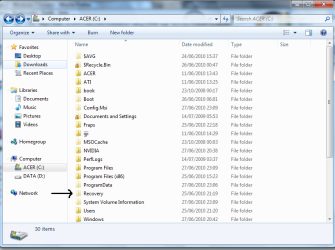
So we need you to look at Disk Mgmt drive map to see if it shows a Recov Partition, or find a Recovery folder in C (less likely, but possible)

I think i have shown the recov partition in the post above. I need to do this because i recently upgraded to 64 bit from 32 and didnt find that is was running as smoothly so i just installed 32 bit again. i showed my hard drive to a friend and he told me that the computer still thinks that it is still 64 bit as it has 2 program files.
 

My Computer My Computer

Computer Manufacturer/Model Number
Acer
OS
Windows 7
CPU
Intel(R) Core(TM)2 Quad CPU Q9300 @ 2.50GHz 2.50 GHz
Memory
4 GB
Graphics Card(s)
GeForce GTX 470
Sound Card
Realtek Digital Output (Realtek High Definition Audio)
Monitor(s) Displays
24" samsung
Screen Resolution
1920 x 1080
Case
Aspire M7711
Keyboard
Razer Lycosa
Mouse
Logitech G9
Internet Speed
20 MB

My Computer My Computer

Computer Manufacturer/Model Number
Acer
OS
Windows 7
CPU
Intel(R) Core(TM)2 Quad CPU Q9300 @ 2.50GHz 2.50 GHz
Memory
4 GB
Graphics Card(s)
GeForce GTX 470
Sound Card
Realtek Digital Output (Realtek High Definition Audio)
Monitor(s) Displays
24" samsung
Screen Resolution
1920 x 1080
Case
Aspire M7711
Keyboard
Razer Lycosa
Mouse
Logitech G9
Internet Speed
20 MB
So you want to reinstall Win7, and you want the cleanest possible slate so that no prior installation interferes?

You do not need to restore to Vista to reinstall Win7. We can test your Recov partition to see if it is even worth keeping since it sits on your boot sector and would be better gone if you don't want to restore to Vista.

On Acers I find that the best approach for 7 install is to zero the HD to get all the useless utility partitions off, including Recovery partiiton if you order the free disk set within 90 days, don't see a need to return to Vista or are willing to order them from Acer for shipping cost if you ever need them, or just find a Vista installer and unlock all versions to install with your key.

Let us know what you want, or ask any other questions. I have two Acers at home with Vista HD's zeroed using WIn7 Upgrade kit DVD.

Edit: The C folder shows Acer utility folders which should have been wiped off if you clean installed Win7 32 bit then 64 then 32 bit again. Are you using Acer Upgrade kit? Was your original Vista 32 or 64 bit?
 
Last edited:
Ok let me clarify. I had vista and then upgraded to windows 7 32 bit. I then found out that i had the 64-bit disc and it would optimize my ram as 32bit didnt not use it to its full potiential. after i installed 64bit my computer didnt seem to run as smoothly so i just put the 32 bit disc in and installed that again. because i went back and forward i was left with alot of windows folders shown below.
windows tabs.PNG
I showed this to a friend as i wanted to delete them because they took up alot of space and then he noticed i had 2 program files. He said this ment that my computer still thought it was 64 bit and could lead to problems in the future when i install new programs. That is when i went to restore to factory settings and the problems occured.
program files.PNG

And yes, i would just like windows 7 with a clean slate.
 

My Computer My Computer

Computer Manufacturer/Model Number
Acer
OS
Windows 7
CPU
Intel(R) Core(TM)2 Quad CPU Q9300 @ 2.50GHz 2.50 GHz
Memory
4 GB
Graphics Card(s)
GeForce GTX 470
Sound Card
Realtek Digital Output (Realtek High Definition Audio)
Monitor(s) Displays
24" samsung
Screen Resolution
1920 x 1080
Case
Aspire M7711
Keyboard
Razer Lycosa
Mouse
Logitech G9
Internet Speed
20 MB
Uuh! I understand your needs...follow what gregrocker first suggested.:zip:
 

Attachments

  • Recovery.PNG
    Recovery.PNG
    43.6 KB · Views: 11

My Computer My Computer

Computer type
PC/Desktop
Computer Manufacturer/Model Number
Custom Build
OS
Windows 7 Professional SP1 - x64 [Non-UEFI Boot]
CPU
Ivy Bridge Core i5 3570K (Delidded)
Motherboard
Asus P8Z77-V LE PLUS
Memory
G.Skill "Ares" DDR3 PC3-12800 - 1600MHz (16Gb)
Graphics Card(s)
Asus Dual-RX480-O4G
Sound Card
Creative Sound Blaster Z w/5.1 sound system
Monitor(s) Displays
Asus IPS 23"
Screen Resolution
16/9
Hard Drives
Internal:
500Go Sata 6Gb/s (x2)
500Go Sata 3Gb/s (x2)
SSD 60Go Sata 6Gb/s
PSU
In Win C 900W Series 80+ Platinum
Case
Thermaltake Chaser A71
Cooling
Custom Water Cooling Loop
Keyboard
Cooler Master QuickFire XTi
Mouse
Razer Imperator 2012 (4G)
Antivirus
MSE
Browser
IE 11.0.xxx Rtm
Other Info
"Raid0" with Intel Smart Response Technology (HDD/SSD)
Uuh! I understand your needs...follow what gregrocker first suggested.:zip:

If i click on that it says c:/Recovery is not accessible. Acess is denied.

Also do you agree that my computer still thinks it is 64 bit and could cause problems in the future?
 

My Computer My Computer

Computer Manufacturer/Model Number
Acer
OS
Windows 7
CPU
Intel(R) Core(TM)2 Quad CPU Q9300 @ 2.50GHz 2.50 GHz
Memory
4 GB
Graphics Card(s)
GeForce GTX 470
Sound Card
Realtek Digital Output (Realtek High Definition Audio)
Monitor(s) Displays
24" samsung
Screen Resolution
1920 x 1080
Case
Aspire M7711
Keyboard
Razer Lycosa
Mouse
Logitech G9
Internet Speed
20 MB
Do you have any desire to go back to Vista? If not, are you willing to wipe the Recovery partition to give you the cleanest possible slate for a 32 bit Win7 Clean reinstall? It only means you would need to find a Vista installer or order Vista Recov disks if you should ever want to sell your computer and keep your Win7 upgrade for yourself, reverting the computer to it's licensed Vista.

The reason I ask is because your best approach now is to wipe the HD using DISKPART from the Win7 DVD Repair console Command Line.

To deep clean and pre-partition your HD, boot the Windows 7 installer, at first screen Press Shift F10, type:
DISKPART
LIST DISK
SELECT DISK # (for Windows 7 disk)
clean all (writes zeroes, takes about an hour per 320gb, drop "all" for faster)
create partition primary
select partition 1
assign letter=c:
active
format
exit

Now boot the WIn7 DVD, choose Custom to install to partition you have formatted. Skip the first request for Product key and afterwards use one of the workarounds given here to activate using Upgrade Version key: http://www.sevenforums.com/tutorials/31402-clean-install-upgrade-windows-7-version.html

A slightly less clean install is to boot the DVD, choose Custom install, use Drive Options to delete all partitions, create new one(s) as you wish, then format before installing WIn7 to first partition. DVD will scan the HD to see an OS and allow Upgrade version key up front.
 
Uuh! I understand your needs...follow what gregrocker first suggested.:zip:

If i click on that it says c:/Recovery is not accessible. Acess is denied.

Also do you agree that my computer still thinks it is 64 bit and could cause problems in the future?

The REcovery folder is WINre. No needed.
 

My Computer My Computer

OS
ME/XP/Vista/Win7
Uuh! I understand your needs...follow what gregrocker first suggested.:zip:

If i click on that it says c:/Recovery is not accessible. Acess is denied.

Also do you agree that my computer still thinks it is 64 bit and could cause problems in the future?

The probs is that having reinstall x32 after x64 then x32 had let many traces and old files...So i guess the better to do, is to "Clean Install" again in the version that does suits you the best.

Backup your personal files and follow tutorial and advices here.

PS: You'll spend more time cleaning all the mess left than reinstall the OS...IMO
 

My Computer My Computer

Computer type
PC/Desktop
Computer Manufacturer/Model Number
Custom Build
OS
Windows 7 Professional SP1 - x64 [Non-UEFI Boot]
CPU
Ivy Bridge Core i5 3570K (Delidded)
Motherboard
Asus P8Z77-V LE PLUS
Memory
G.Skill "Ares" DDR3 PC3-12800 - 1600MHz (16Gb)
Graphics Card(s)
Asus Dual-RX480-O4G
Sound Card
Creative Sound Blaster Z w/5.1 sound system
Monitor(s) Displays
Asus IPS 23"
Screen Resolution
16/9
Hard Drives
Internal:
500Go Sata 6Gb/s (x2)
500Go Sata 3Gb/s (x2)
SSD 60Go Sata 6Gb/s
PSU
In Win C 900W Series 80+ Platinum
Case
Thermaltake Chaser A71
Cooling
Custom Water Cooling Loop
Keyboard
Cooler Master QuickFire XTi
Mouse
Razer Imperator 2012 (4G)
Antivirus
MSE
Browser
IE 11.0.xxx Rtm
Other Info
"Raid0" with Intel Smart Response Technology (HDD/SSD)
I have found 3 recovery dvds. How do i go about running these?
 

My Computer My Computer

Computer Manufacturer/Model Number
Acer
OS
Windows 7
CPU
Intel(R) Core(TM)2 Quad CPU Q9300 @ 2.50GHz 2.50 GHz
Memory
4 GB
Graphics Card(s)
GeForce GTX 470
Sound Card
Realtek Digital Output (Realtek High Definition Audio)
Monitor(s) Displays
24" samsung
Screen Resolution
1920 x 1080
Case
Aspire M7711
Keyboard
Razer Lycosa
Mouse
Logitech G9
Internet Speed
20 MB

My Computer My Computer

Computer type
PC/Desktop
Computer Manufacturer/Model Number
Custom Build
OS
Windows 7 Professional SP1 - x64 [Non-UEFI Boot]
CPU
Ivy Bridge Core i5 3570K (Delidded)
Motherboard
Asus P8Z77-V LE PLUS
Memory
G.Skill "Ares" DDR3 PC3-12800 - 1600MHz (16Gb)
Graphics Card(s)
Asus Dual-RX480-O4G
Sound Card
Creative Sound Blaster Z w/5.1 sound system
Monitor(s) Displays
Asus IPS 23"
Screen Resolution
16/9
Hard Drives
Internal:
500Go Sata 6Gb/s (x2)
500Go Sata 3Gb/s (x2)
SSD 60Go Sata 6Gb/s
PSU
In Win C 900W Series 80+ Platinum
Case
Thermaltake Chaser A71
Cooling
Custom Water Cooling Loop
Keyboard
Cooler Master QuickFire XTi
Mouse
Razer Imperator 2012 (4G)
Antivirus
MSE
Browser
IE 11.0.xxx Rtm
Other Info
"Raid0" with Intel Smart Response Technology (HDD/SSD)

I already created the recovery discs when i first got the computer but how do i run them?
 

My Computer My Computer

Computer Manufacturer/Model Number
Acer
OS
Windows 7
CPU
Intel(R) Core(TM)2 Quad CPU Q9300 @ 2.50GHz 2.50 GHz
Memory
4 GB
Graphics Card(s)
GeForce GTX 470
Sound Card
Realtek Digital Output (Realtek High Definition Audio)
Monitor(s) Displays
24" samsung
Screen Resolution
1920 x 1080
Case
Aspire M7711
Keyboard
Razer Lycosa
Mouse
Logitech G9
Internet Speed
20 MB

My Computer My Computer

Computer Manufacturer/Model Number
Acer
OS
Windows 7
CPU
Intel(R) Core(TM)2 Quad CPU Q9300 @ 2.50GHz 2.50 GHz
Memory
4 GB
Graphics Card(s)
GeForce GTX 470
Sound Card
Realtek Digital Output (Realtek High Definition Audio)
Monitor(s) Displays
24" samsung
Screen Resolution
1920 x 1080
Case
Aspire M7711
Keyboard
Razer Lycosa
Mouse
Logitech G9
Internet Speed
20 MB
I have found 3 recovery dvds. How do i go about running these?

There is no reason to run Vista Recovery disks unless there is a reason you must do an in-place Upgrade of Win7, which is much inferior to a clean install.

I gave you the steps to wipe your HD and reinstall Win7.

Do you have a WIn7 install DVD to use to get the cleanest possible install? If so, follow the steps given earlier.
 

My Computer My Computer

Computer Manufacturer/Model Number
Acer
OS
Windows 7
CPU
Intel(R) Core(TM)2 Quad CPU Q9300 @ 2.50GHz 2.50 GHz
Memory
4 GB
Graphics Card(s)
GeForce GTX 470
Sound Card
Realtek Digital Output (Realtek High Definition Audio)
Monitor(s) Displays
24" samsung
Screen Resolution
1920 x 1080
Case
Aspire M7711
Keyboard
Razer Lycosa
Mouse
Logitech G9
Internet Speed
20 MB
Back
Top