Call of Duty Modern Warfare 4

candidcamera

New member
Local time
2:24 AM
Messages
13
I have Windows 7, 64-bit, but can't install CoD4. I've looked around and some people have said they can play it on theirs, but I can't figure out how to install it still. Do I need to download an upgrade or a patch? Any help would be great! Thanks!

CC
 

My Computer My Computer

Computer Manufacturer/Model Number
Toshiba Satellite L555D
OS
Windows 7
CPU
Dual-Core 2.30GHz
Memory
4.00GB
hi candidcamera, and welcome to sevenforums,

what problems do you have with it?

does it install ok, but won't let you play because of punkbuster problems?

this thread may help you
 

My Computer My Computer

Computer Manufacturer/Model Number
mickey megabyte 1234
OS
ultimate 64 sp1
CPU
i5 2500K [email protected]
Motherboard
MSI P67A-GD53
Memory
8 gigs GSkill Ripjaws 1600
Graphics Card(s)
amd hd6950
Sound Card
creative x-fi gamer
Monitor(s) Displays
samsung 24"
Screen Resolution
1920x1080
Hard Drives
ocz vertex 2e 60 gig, samsung f3 1tb, buffalo 2tb ext
PSU
antec 550
Case
antec three hundred
Cooling
i'm a cooling fan
Keyboard
saitek eclipse ii
Mouse
logitech g3
Internet Speed
about 4 Mbps
Other Info
i love win7
No, and that's what puzzles me. I can't even install it, it says it's not compatible. But I have seen other topics like that talking about PB and Windows 7, so they somehow managed to install it I thought but I can't find out how.

CC
 

My Computer My Computer

Computer Manufacturer/Model Number
Toshiba Satellite L555D
OS
Windows 7
CPU
Dual-Core 2.30GHz
Memory
4.00GB
i found this, it may help:

1. Delete the string values (Except for (Default)) in HKLM\Software\Microsoft\SQMClient\Windows\DisabledSessions
2. Start gpedit.msc
3. Expand Computer Configuration, expand Administrative Templates, expand System, expand Internet Communication Management, and then click Internet Communication settings.
4. In the details pane, double-click Turn off Windows Customer Experience Improvement Program, and then click Enabled.

dunno if it'll work, but it's worth a try....
 

My Computer My Computer

Computer Manufacturer/Model Number
mickey megabyte 1234
OS
ultimate 64 sp1
CPU
i5 2500K [email protected]
Motherboard
MSI P67A-GD53
Memory
8 gigs GSkill Ripjaws 1600
Graphics Card(s)
amd hd6950
Sound Card
creative x-fi gamer
Monitor(s) Displays
samsung 24"
Screen Resolution
1920x1080
Hard Drives
ocz vertex 2e 60 gig, samsung f3 1tb, buffalo 2tb ext
PSU
antec 550
Case
antec three hundred
Cooling
i'm a cooling fan
Keyboard
saitek eclipse ii
Mouse
logitech g3
Internet Speed
about 4 Mbps
Other Info
i love win7
Um, I don't really understand any of that or how to find any of the mentioned things. And I just try to be safe so I don't like deleting files without knowing what they are, I hope you understand. But I don't even know how to try to find these things you've mentioned... :/

CC
 

My Computer My Computer

Computer Manufacturer/Model Number
Toshiba Satellite L555D
OS
Windows 7
CPU
Dual-Core 2.30GHz
Memory
4.00GB
Hi there,

I have the same game installed on my VAIO Laptop running on Windows Seven 64-Bit (also COD6 MW2). Both of them running perfectly and smoothly.

My COD4 is already updated until the latest patch 1.7 (1.5 in Multiplayer Mode).

The initial problem I've encountered after installed was the DirectX update. If all the requirements is passed including this, maybe you have some problem in the installation. Try re-install the game and all the patches. ;)
 

My Computer My Computer

Computer Manufacturer/Model Number
SONY VAIO Laptop
OS
Windows® 7 Home Basic 64bit, Build 7600
CPU
Inter Core 2 Duo CPU T6600 @ 2.20GHz
Memory
4GB
Graphics Card(s)
nVidia GeForce G210M
Sound Card
Realtek HD Integrated Audio
Monitor(s) Displays
LG TV-1 (NVIDIA High Definition Audio)
Screen Resolution
1366 x 768 (Wide)
Hard Drives
320GB HDD - Internal
360GB - External
500GB (x2) - External
1TB - External
PSU
Internal
Keyboard
Integrated
Mouse
Synaptic Keypad & A4tech Cordless MOuse
Internet Speed
LAN, T1
Other Info
A4tech Analog Joypad
Well, when I went to hit "install", it said the file version of setup.exe was not compatible with the version of Windows I was running, Windows 7 64-bit. Now, you're saying that if I go and install all of the patches for this game, it should help? I just want to understand what y'all are saying before I go and download or delete stuff. (:

CC
 

My Computer My Computer

Computer Manufacturer/Model Number
Toshiba Satellite L555D
OS
Windows 7
CPU
Dual-Core 2.30GHz
Memory
4.00GB
I've tried to install the patches, but almost all of them require the program to already be installed, which I'm having trouble doing. I can't even start the installation process because the setup.exe file is having issues with compatibility. Any thoughts??

CC
 

My Computer My Computer

Computer Manufacturer/Model Number
Toshiba Satellite L555D
OS
Windows 7
CPU
Dual-Core 2.30GHz
Memory
4.00GB
have you tried compatibility modes? if not, try running in XP compatibility
(right click -> properties -> compatibility)
 

My Computer My Computer

Computer Manufacturer/Model Number
Sh*tBox 2.0.0.18
OS
Windows 7 Enterprise X64
CPU
Intel Core I3 550 @ 3.6 GHz
Motherboard
Gigabyte S-series H55M-S2
Memory
4GB DDR3 @ 1333MHz
Graphics Card(s)
ATI Radeon HD 5670
Sound Card
Realtek High Definition Audio ?
Monitor(s) Displays
BENQ FP93G S
Screen Resolution
1280x1024
Hard Drives
1TB SAMSUNG HD103SJ ATA Device
PSU
havent checked
Case
Xigmatek Asgard
Cooling
Stock something
Keyboard
Logitech Internet 350 Keyboard
Mouse
Logitech
Internet Speed
schools ISP @ 300 kbit/s - 100 mbit/s
Other Info
«And on the eighth day, god created Intel Core i3.»

My Computer My Computer

Computer Manufacturer/Model Number
mickey megabyte 1234
OS
ultimate 64 sp1
CPU
i5 2500K [email protected]
Motherboard
MSI P67A-GD53
Memory
8 gigs GSkill Ripjaws 1600
Graphics Card(s)
amd hd6950
Sound Card
creative x-fi gamer
Monitor(s) Displays
samsung 24"
Screen Resolution
1920x1080
Hard Drives
ocz vertex 2e 60 gig, samsung f3 1tb, buffalo 2tb ext
PSU
antec 550
Case
antec three hundred
Cooling
i'm a cooling fan
Keyboard
saitek eclipse ii
Mouse
logitech g3
Internet Speed
about 4 Mbps
Other Info
i love win7
What does the directx have to do with installing it?
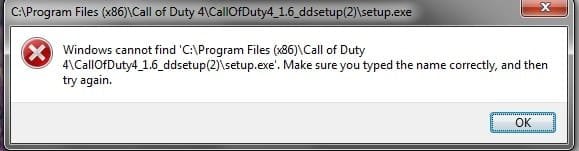
But just now, I ran the setup.exe file as admin (I forgot to do that the first time) and it popped up a new complaint, that it couldn't find the address for the file I just ran, namely the setup.exe file.

CC
 

My Computer My Computer

Computer Manufacturer/Model Number
Toshiba Satellite L555D
OS
Windows 7
CPU
Dual-Core 2.30GHz
Memory
4.00GB
Oh, and yes, I did try running it in a different mode like you said, but it didn't work. Why would an XP compatibility work on a Windows 7 machine?

CC
 

My Computer My Computer

Computer Manufacturer/Model Number
Toshiba Satellite L555D
OS
Windows 7
CPU
Dual-Core 2.30GHz
Memory
4.00GB
What does the directx have to do with installing it?
But just now, I ran the setup.exe file as admin (I forgot to do that the first time) and it popped up a new complaint, that it couldn't find the address for the file I just ran, namely the setup.exe file.

CC

i suggested directx, as i did a bit of googling and saw that it helped others with a similar problem to you.

what exactly is the error message you see? press include a screenshot of it if you can, so we've got more to go on, and can be more helpful.

Oh, and yes, I did try running it in a different mode like you said, but it didn't work. Why would an XP compatibility work on a Windows 7 machine?

CC

compatibility mode is a windows 7 feature that allows certain old software to run fine in windows 7. the operating system 'pretends' to be xp (or vista), so the problem program is happy. unfortunately this didn't help you with your cod4 error, but it often sorts out similar problems.
 

My Computer My Computer

Computer Manufacturer/Model Number
mickey megabyte 1234
OS
ultimate 64 sp1
CPU
i5 2500K [email protected]
Motherboard
MSI P67A-GD53
Memory
8 gigs GSkill Ripjaws 1600
Graphics Card(s)
amd hd6950
Sound Card
creative x-fi gamer
Monitor(s) Displays
samsung 24"
Screen Resolution
1920x1080
Hard Drives
ocz vertex 2e 60 gig, samsung f3 1tb, buffalo 2tb ext
PSU
antec 550
Case
antec three hundred
Cooling
i'm a cooling fan
Keyboard
saitek eclipse ii
Mouse
logitech g3
Internet Speed
about 4 Mbps
Other Info
i love win7
Alright, here is the picture of my latest problem. I'm installing the DirectX right now, we'll see what that does...

CC
 

Attachments

  • COD4 Setup.exe error message.jpg
    COD4 Setup.exe error message.jpg
    14.5 KB · Views: 27

My Computer My Computer

Computer Manufacturer/Model Number
Toshiba Satellite L555D
OS
Windows 7
CPU
Dual-Core 2.30GHz
Memory
4.00GB
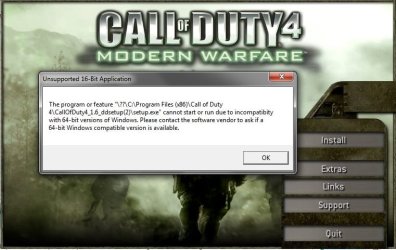
On the other hand, when I go and run the actual game and hit install from there, this is what I get:

CC
 

Attachments

  • COD4 Menu - Installation.jpg
    COD4 Menu - Installation.jpg
    51.8 KB · Views: 37

My Computer My Computer

Computer Manufacturer/Model Number
Toshiba Satellite L555D
OS
Windows 7
CPU
Dual-Core 2.30GHz
Memory
4.00GB
ok, i'm only guessing here, and may be completely wrong in my suggestions, BUT...

it looks like there's a problem installing the patch included in the setup files. i don't like the look of the file locations shown in the screenshots.

try downloading the patch seperately from here, and try installing it. it might work...

if it doesn't help, then i'm all out of ideas, sorry.
 

My Computer My Computer

Computer Manufacturer/Model Number
mickey megabyte 1234
OS
ultimate 64 sp1
CPU
i5 2500K [email protected]
Motherboard
MSI P67A-GD53
Memory
8 gigs GSkill Ripjaws 1600
Graphics Card(s)
amd hd6950
Sound Card
creative x-fi gamer
Monitor(s) Displays
samsung 24"
Screen Resolution
1920x1080
Hard Drives
ocz vertex 2e 60 gig, samsung f3 1tb, buffalo 2tb ext
PSU
antec 550
Case
antec three hundred
Cooling
i'm a cooling fan
Keyboard
saitek eclipse ii
Mouse
logitech g3
Internet Speed
about 4 Mbps
Other Info
i love win7
Alright, I'll try that. Either way, thank you very much for helping!!

CC
 

My Computer My Computer

Computer Manufacturer/Model Number
Toshiba Satellite L555D
OS
Windows 7
CPU
Dual-Core 2.30GHz
Memory
4.00GB
updating your Directx may fix some problems like explained here:

Update your Direct X files - Contrary to popular belief, just because Windows 7 is DX11 capable doesn’t mean it has the latest DX9 files!!! Most game issues can be fixed by simply updating the DX files.

BTW - Windows 7 is fully compatible with games and hardware that use older versions of DirectX

When I installed CoD4:MW from DVD-ROM on W7 x64 I didn't use any compatibilty mode or admin rights

I installed CoD4:MW skipping the step where Punkbuster was installed, updated to 1.7 with patches downloaded beforehand (patch order 1.6 then 1.6-1.7), updated DirectX 9.0c runtimes (link above), used PBsetup to setup PB and the game has run with no problems at all

check out Tips on Troubleshooting Game Issues for help more also
 

My Computer My Computer

OS
Windows 8 Professional x64
CPU
Intel Core i7-3770K @4.5 GHz
Motherboard
Asus Sabertooth Z77
Memory
16GB G.Skill Ripjaws DDR3-1600
Graphics Card(s)
Gigabyte GeForce GTX 670 OC
Sound Card
Realtek
Monitor(s) Displays
HP 2711x 27" LED
Screen Resolution
1920 X 1080p
Hard Drives
Crucial m4 256GB SSD (system)
Seagate Barracuda XT 2TB 7200 RPM (storage)
PSU
Strider Gold Evolution ST1000-G
Case
Raven RV01
Cooling
Noctua NH-D14
Keyboard
Logitech K800
Mouse
Logitech Performance Mouse MX
Internet Speed
FIOS - 75/35 Mbps
Other Info
Pioneer black internal CD/DVD/BD read/write
Logitech Z506 5.1 speakers
--------------------------------------------------
Alienware X51/i7-3770/EVGA GTX 660ti FTW/16GB 1600/Blu-ray/2TB SATA III HD
Do you know where it installed DirectX? I already updated it, so it should be up to the latest version, but I'm not entirely sure where it installed it so I can't go find out for sure.

But I don't even have the option yet of skipping steps, it simply won't open up the installer. If I can get to that stage, I'll take your advice but my problem currently is simply getting the installer to open.

Now, Mickey, your advice was to download that patch you gave me the link to and just install it and it should do its thing? Well, I went ahead and tried installing it and it told me that "a validated installation of [the program] could not be found", therefore it wouldn't install the patch. (picture included) So, is there something I'm doing wrong?

CC
 

My Computer My Computer

Computer Manufacturer/Model Number
Toshiba Satellite L555D
OS
Windows 7
CPU
Dual-Core 2.30GHz
Memory
4.00GB
I've tried to install the patches, but almost all of them require the program to already be installed, which I'm having trouble doing. I can't even start the installation process because the setup.exe file is having issues with compatibility. Any thoughts??

CC

Un-install all (COD4 including patches) so that when you re-install again including the patches from 1.0 through 1.7, no problem will arise, don't worry on the 'incompatibility issue thingy' it's part of the game's precautionary warning that this might won't run on your current O.S. but mine's working including the MW2.
 

My Computer My Computer

Computer Manufacturer/Model Number
SONY VAIO Laptop
OS
Windows® 7 Home Basic 64bit, Build 7600
CPU
Inter Core 2 Duo CPU T6600 @ 2.20GHz
Memory
4GB
Graphics Card(s)
nVidia GeForce G210M
Sound Card
Realtek HD Integrated Audio
Monitor(s) Displays
LG TV-1 (NVIDIA High Definition Audio)
Screen Resolution
1366 x 768 (Wide)
Hard Drives
320GB HDD - Internal
360GB - External
500GB (x2) - External
1TB - External
PSU
Internal
Keyboard
Integrated
Mouse
Synaptic Keypad & A4tech Cordless MOuse
Internet Speed
LAN, T1
Other Info
A4tech Analog Joypad
Back
Top