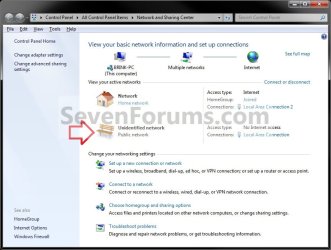
Unidentified Networks - Set as Private or Public

How to Set Unidentified Networks to be a Private or Public Network Location

   Information
Sometimes Windows 7 is unable to identify the network it is connected to due to a network issue or lack of identifiable characteristics. This type of network is called a unidentified network.

A network location identifies the type of network that a computer is connected to and automatically sets the appropriate firewall settings for that location. This will show you how to set a unidentified network to always be set as a private (work) or public network location as displayed in the Network and Sharing Center.
   Note

  • Choose Private network (Work) for small office or other workplace networks. Network discovery, which allows you to see other computers and devices on a network and allows other network users to see your computer, is on by default, but you can't create or join a homegroup.
    • All computers are peers; no computer has control over another computer.
    • Each computer has a set of user accounts. To log on to any computer in the workgroup, you must have an account on that computer.
    • There are typically no more than twenty computers.
    • A workgroup is not protected by a password.
    • All computers must be on the same local network or subnet.
  • Choose Public network for networks in public places (such as coffee shops or airports). This location is designed to keep your computer from being visible to other computers around you and to help protect your computer from any malicious software from the Internet. HomeGroup is not available on public networks, and network discovery is turned off. You should also choose this option if you're connected directly to the Internet without using a router, or if you have a mobile broadband connection.
   Warning
You will only be able to do this while logged in as an administrator.
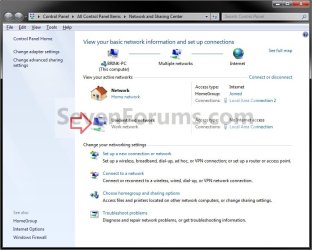
EXAMPLE: Unidentified Network set as Private or Public Unidentified_Private-Work.jpg

Unidentified_Public.jpg


OPTION ONE

Through Network List Manager Policies
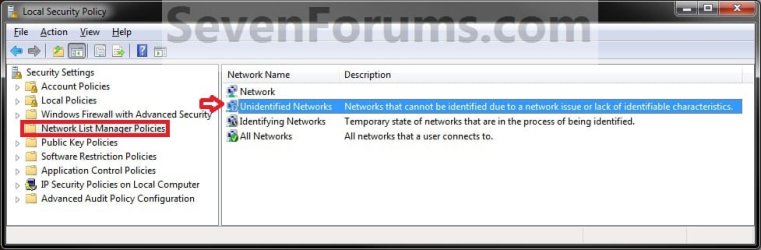
1. Open the Local Security Policy editor. A) In the left pane, select Network List Manager Policies. (see screenshot below) SECPOL-1.jpg
B) Go to step 3.
OR

2. Open the Local Group Policy Editor. A) In the left pane, click on to expand Computer Configuration, Windows Settings, Security Settings, and Network List Manager Policies. (see screenshot below) GPEDIT-1.jpg
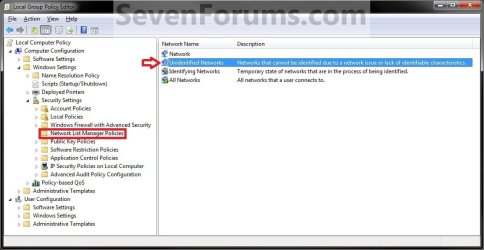
3. In the right pane, double click on Unidentified Networks. (see screenshots above)

4. To Restore Unidentified Networks to Default Not Configured
NOTE: This allows Windows 7 to set the unidentified network to be either Public or Private (work) as it so determines automatically. A) Under Location type, select (dot) Not Configured and click on OK. step1.jpg
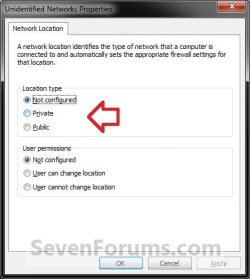
B) Go to step 7.
5. To Set Unidentified Networks to Public Network Location A) Under Location type, select (dot) Public and click on OK. (see screenshot below step 4A)

B) Go to step 7.
6. To Set Unidentified Networks to Private Network Location A) Under Location type, select (dot) Private (Work) and click on OK. (see screenshot below step 4A)
7. Close the Local Security Policy or Local Group Policy Editor.

8. Open the Network and Sharing Center to see the change.
NOTE: You can open the Network and Sharing Center from within the Control Panel, or by right clicking on your Network icon in taskbar notification area.


OPTION TWO

Through a REG File Download

1. To Restore Unidentified Networks to Default Not Configured
NOTE: This allows Windows 7 to set the unidentified network to be either Public or Private (work) as it so determines automatically. A) Click on the Download button below to download the file below. Set_Unidentified_Networks_Default-Not_Configured.reg

Download


B) Go to step 4.
2. To Set Unidentified Networks to Public Network Location A) Click on the Download button below to download the file below. Set_Unidentified_Networks_Public.reg

Download


B) Go to step 4.
3. To Set Unidentified Networks to Private (Work) Network Location A) Click on the Download button below to download the file below. Set_Unidentified_Networks_Private.reg

Download


4. Click on Save, and save the .reg file to the desktop.

5. Right click the downloaded .reg file and click on Merge.

6. Click on Run, Yes, Yes, and OK when prompted.

7. Open the Network and Sharing Center to see the change.
NOTE: You can open the Network and Sharing Center from within the Control Panel, or by right clicking on your Network icon in taskbar notification area.

8. When done, you can delete the downloaded .reg file on the desktop if you like.
That's it,
Shawn


Attachments

Last edited:
I am using Home Premium. I tried Option 2. When i get click on Run (in step 6) it opens notepad. How do i continue as there is no Yes option?

UPDATE:
I managed to get my wireless connection working. I went into the wireless connection properties and changed the settings for Internet Protocol Version 4 properties to Obtain an IP address automatically. Such a simple fix for so many frustrating hours.
 
Last edited by a moderator:

My Computer

Computer Manufacturer/Model Number
Acer aspire
OS
Windows 7 Home Premium
CPU
Celeron t3000
Memory
4gb
Hello Ruds, and welcome to Seven Forums.

I'm happy to hear that you got your problem sorted. :)

However, it sounds like your REG file associations are not correct. Double check in Default Programs to make sure that the .reg file extension has it's "Current Default" program set as Registry Editor (C:\Windows\regedit.exe) and not Notepad.

Hope this helps,
Shawn
 

My Computer

Computer type
PC/Desktop
Computer Manufacturer/Model Number
Self built custom
OS
64-bit Windows 11 Pro for Workstations
CPU
Intel i7-8700K OC'd to 5 GHz
Motherboard
ASUS ROG Maximus XI Formula Z390
Memory
64 GB (4x16GB) G.SKILL TridentZ RGB DDR4 3600 MHz
Graphics Card(s)
ASUS ROG-STRIX-GTX1080TI-O11G-GAMING
Sound Card
Integrated
Monitor(s) Displays
2 x Samsung Odyssey G7 27"
Screen Resolution
2560x1440
Hard Drives
1TB Samsung 990 PRO M.2,
4TB Samsung 990 PRO PRO M.2,
TerraMaster F8 SSD Plus NAS
PSU
Seasonic Prime Titanium 850W
Case
Thermaltake Core P3
Cooling
Corsair Hydro H115i
Keyboard
Logitech wireless K800
Mouse
Logitech MX Master 4
Internet Speed
2 Gb/s Download and 100 Mb/s Upload
Antivirus
Malwarebyte Anti-Malware Premium
Browser
Google Chrome
Other Info
Logitech Z625 speaker system,
Logitech BRIO 4K Pro webcam,
HP Color LaserJet Pro MFP M477fdn,
APC SMART-UPS RT 1000 XL - SURT1000XLI,
Galaxy S23 Plus phone
Thanks. I have changed my default program.
I had problems connecting to my wireless network again. After connecting to ethernet it worked. I disconnected the ethernet and rebooted the computer and the wireless still worked. I am not sure why. I will test it a few more times and seek further advice if necessary.
 

My Computer

Computer Manufacturer/Model Number
Acer aspire
OS
Windows 7 Home Premium
CPU
Celeron t3000
Memory
4gb
Hi all,

thank you very much for this :-) I was looking a long time to find a solution for Windows Home Prium without the Policy possibility.

So I downloaded the "Set_Unidentified_Networks_Public.reg" script and run as Administrator. The information was finally add to registry. Fine.

I then added to a new network but the Pop Up appears again. I was asked to which network I wanted to add it ???

Did I understand this article wrong? Does the Pop Up always come even after defining the network?

Or is it possible that tis only works on English release an not other languages (mine is German)

Thank you in advance

Alex
 

My Computer

OS
Windows 7 Home Premium
You're welcome Alex, and welcome to Seven Forums.

It may be some issue with the language difference. After you selected which network you wanted, did it apply it properly and not come back?

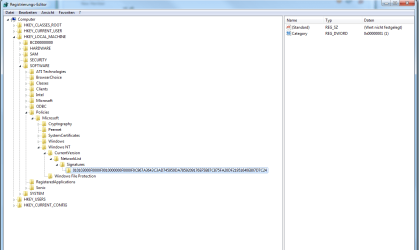
Could you post a screenshot of this registry location below from your computer?

Code:
HKEY_LOCAL_MACHINE\SOFTWARE\Policies\Microsoft\Windows NT\CurrentVersion\NetworkList\Signatures\010103000F0000F0010000000F0000F0C967A3643C3AD745950DA7859209176EF5B87C875FA20DF21951640E807D7C24
 

My Computer

Computer type
PC/Desktop
Computer Manufacturer/Model Number
Self built custom
OS
64-bit Windows 11 Pro for Workstations
CPU
Intel i7-8700K OC'd to 5 GHz
Motherboard
ASUS ROG Maximus XI Formula Z390
Memory
64 GB (4x16GB) G.SKILL TridentZ RGB DDR4 3600 MHz
Graphics Card(s)
ASUS ROG-STRIX-GTX1080TI-O11G-GAMING
Sound Card
Integrated
Monitor(s) Displays
2 x Samsung Odyssey G7 27"
Screen Resolution
2560x1440
Hard Drives
1TB Samsung 990 PRO M.2,
4TB Samsung 990 PRO PRO M.2,
TerraMaster F8 SSD Plus NAS
PSU
Seasonic Prime Titanium 850W
Case
Thermaltake Core P3
Cooling
Corsair Hydro H115i
Keyboard
Logitech wireless K800
Mouse
Logitech MX Master 4
Internet Speed
2 Gb/s Download and 100 Mb/s Upload
Antivirus
Malwarebyte Anti-Malware Premium
Browser
Google Chrome
Other Info
Logitech Z625 speaker system,
Logitech BRIO 4K Pro webcam,
HP Color LaserJet Pro MFP M477fdn,
APC SMART-UPS RT 1000 XL - SURT1000XLI,
Galaxy S23 Plus phone
One question Shawn...
What if i click on the Icon, comes up a window telling me priority of the network, just underneath it tells me if i want to merge both network together...What's the consequences of doing that?

Thanks.
 

My Computer

Computer type
PC/Desktop
Computer Manufacturer/Model Number
Custom Build
OS
Windows 7 Professional SP1 - x64 [Non-UEFI Boot]
CPU
Ivy Bridge Core i5 3570K (Delidded)
Motherboard
Asus P8Z77-V LE PLUS
Memory
G.Skill "Ares" DDR3 PC3-12800 - 1600MHz (16Gb)
Graphics Card(s)
Asus Dual-RX480-O4G
Sound Card
Creative Sound Blaster Z w/5.1 sound system
Monitor(s) Displays
Asus IPS 23"
Screen Resolution
16/9
Hard Drives
Internal:
500Go Sata 6Gb/s (x2)
500Go Sata 3Gb/s (x2)
SSD 60Go Sata 6Gb/s
PSU
In Win C 900W Series 80+ Platinum
Case
Thermaltake Chaser A71
Cooling
Custom Water Cooling Loop
Keyboard
Cooler Master QuickFire XTi
Mouse
Razer Imperator 2012 (4G)
Antivirus
MSE
Browser
IE 11.0.xxx Rtm
Other Info
"Raid0" with Intel Smart Response Technology (HDD/SSD)
Hello NoN,

It would be like if you are connected through one wired connection (ex: Network 1), that is your default network, and one wireless connection (ex: Network 2), then if one connection drops, the other one will automatically take over.
 

My Computer

Computer type
PC/Desktop
Computer Manufacturer/Model Number
Self built custom
OS
64-bit Windows 11 Pro for Workstations
CPU
Intel i7-8700K OC'd to 5 GHz
Motherboard
ASUS ROG Maximus XI Formula Z390
Memory
64 GB (4x16GB) G.SKILL TridentZ RGB DDR4 3600 MHz
Graphics Card(s)
ASUS ROG-STRIX-GTX1080TI-O11G-GAMING
Sound Card
Integrated
Monitor(s) Displays
2 x Samsung Odyssey G7 27"
Screen Resolution
2560x1440
Hard Drives
1TB Samsung 990 PRO M.2,
4TB Samsung 990 PRO PRO M.2,
TerraMaster F8 SSD Plus NAS
PSU
Seasonic Prime Titanium 850W
Case
Thermaltake Core P3
Cooling
Corsair Hydro H115i
Keyboard
Logitech wireless K800
Mouse
Logitech MX Master 4
Internet Speed
2 Gb/s Download and 100 Mb/s Upload
Antivirus
Malwarebyte Anti-Malware Premium
Browser
Google Chrome
Other Info
Logitech Z625 speaker system,
Logitech BRIO 4K Pro webcam,
HP Color LaserJet Pro MFP M477fdn,
APC SMART-UPS RT 1000 XL - SURT1000XLI,
Galaxy S23 Plus phone
Hello NoN,

It would be like if you are connected through one wired connection (ex: Network 1), that is your default network, and one wireless connection (ex: Network 2), then if one connection drops, the other one will automatically take over.

Ha, allright, so i'll have to be both wired and wireless connected. It is just bizarre to me that one call "virtual Wi-fi" and the other "Wi-fi" network, and the first one could serve needs for a hot-spot wi-fi. It shows ethernet cable with turned on, that why i'm a little puzzled about it.

Thanks!
 

My Computer

Computer type
PC/Desktop
Computer Manufacturer/Model Number
Custom Build
OS
Windows 7 Professional SP1 - x64 [Non-UEFI Boot]
CPU
Ivy Bridge Core i5 3570K (Delidded)
Motherboard
Asus P8Z77-V LE PLUS
Memory
G.Skill "Ares" DDR3 PC3-12800 - 1600MHz (16Gb)
Graphics Card(s)
Asus Dual-RX480-O4G
Sound Card
Creative Sound Blaster Z w/5.1 sound system
Monitor(s) Displays
Asus IPS 23"
Screen Resolution
16/9
Hard Drives
Internal:
500Go Sata 6Gb/s (x2)
500Go Sata 3Gb/s (x2)
SSD 60Go Sata 6Gb/s
PSU
In Win C 900W Series 80+ Platinum
Case
Thermaltake Chaser A71
Cooling
Custom Water Cooling Loop
Keyboard
Cooler Master QuickFire XTi
Mouse
Razer Imperator 2012 (4G)
Antivirus
MSE
Browser
IE 11.0.xxx Rtm
Other Info
"Raid0" with Intel Smart Response Technology (HDD/SSD)
NoN,

No, that was just an example above. You can have any type of connections that you like and merge them.
 

My Computer

Computer type
PC/Desktop
Computer Manufacturer/Model Number
Self built custom
OS
64-bit Windows 11 Pro for Workstations
CPU
Intel i7-8700K OC'd to 5 GHz
Motherboard
ASUS ROG Maximus XI Formula Z390
Memory
64 GB (4x16GB) G.SKILL TridentZ RGB DDR4 3600 MHz
Graphics Card(s)
ASUS ROG-STRIX-GTX1080TI-O11G-GAMING
Sound Card
Integrated
Monitor(s) Displays
2 x Samsung Odyssey G7 27"
Screen Resolution
2560x1440
Hard Drives
1TB Samsung 990 PRO M.2,
4TB Samsung 990 PRO PRO M.2,
TerraMaster F8 SSD Plus NAS
PSU
Seasonic Prime Titanium 850W
Case
Thermaltake Core P3
Cooling
Corsair Hydro H115i
Keyboard
Logitech wireless K800
Mouse
Logitech MX Master 4
Internet Speed
2 Gb/s Download and 100 Mb/s Upload
Antivirus
Malwarebyte Anti-Malware Premium
Browser
Google Chrome
Other Info
Logitech Z625 speaker system,
Logitech BRIO 4K Pro webcam,
HP Color LaserJet Pro MFP M477fdn,
APC SMART-UPS RT 1000 XL - SURT1000XLI,
Galaxy S23 Plus phone
NoN,

No, that was just an example above. You can have any type of connections that you like and merge them.

Thanks for your respond Shawn, I think i have set it up right but decided not merging those networks.
 

My Computer

Computer type
PC/Desktop
Computer Manufacturer/Model Number
Custom Build
OS
Windows 7 Professional SP1 - x64 [Non-UEFI Boot]
CPU
Ivy Bridge Core i5 3570K (Delidded)
Motherboard
Asus P8Z77-V LE PLUS
Memory
G.Skill "Ares" DDR3 PC3-12800 - 1600MHz (16Gb)
Graphics Card(s)
Asus Dual-RX480-O4G
Sound Card
Creative Sound Blaster Z w/5.1 sound system
Monitor(s) Displays
Asus IPS 23"
Screen Resolution
16/9
Hard Drives
Internal:
500Go Sata 6Gb/s (x2)
500Go Sata 3Gb/s (x2)
SSD 60Go Sata 6Gb/s
PSU
In Win C 900W Series 80+ Platinum
Case
Thermaltake Chaser A71
Cooling
Custom Water Cooling Loop
Keyboard
Cooler Master QuickFire XTi
Mouse
Razer Imperator 2012 (4G)
Antivirus
MSE
Browser
IE 11.0.xxx Rtm
Other Info
"Raid0" with Intel Smart Response Technology (HDD/SSD)
You're welcome. :)

Yeah, merging them is pretty much pointless unless the internet connection comes from two separate independent sources (ex: modems). That way if one modem fails, the other picks up.
 

My Computer

Computer type
PC/Desktop
Computer Manufacturer/Model Number
Self built custom
OS
64-bit Windows 11 Pro for Workstations
CPU
Intel i7-8700K OC'd to 5 GHz
Motherboard
ASUS ROG Maximus XI Formula Z390
Memory
64 GB (4x16GB) G.SKILL TridentZ RGB DDR4 3600 MHz
Graphics Card(s)
ASUS ROG-STRIX-GTX1080TI-O11G-GAMING
Sound Card
Integrated
Monitor(s) Displays
2 x Samsung Odyssey G7 27"
Screen Resolution
2560x1440
Hard Drives
1TB Samsung 990 PRO M.2,
4TB Samsung 990 PRO PRO M.2,
TerraMaster F8 SSD Plus NAS
PSU
Seasonic Prime Titanium 850W
Case
Thermaltake Core P3
Cooling
Corsair Hydro H115i
Keyboard
Logitech wireless K800
Mouse
Logitech MX Master 4
Internet Speed
2 Gb/s Download and 100 Mb/s Upload
Antivirus
Malwarebyte Anti-Malware Premium
Browser
Google Chrome
Other Info
Logitech Z625 speaker system,
Logitech BRIO 4K Pro webcam,
HP Color LaserJet Pro MFP M477fdn,
APC SMART-UPS RT 1000 XL - SURT1000XLI,
Galaxy S23 Plus phone
Hi,

thank you very much for the annswer and sorry for my late answer.

Just for my understanding: After adding the information to the regestry (e.g. by the Set_Unidentified_Networks_Private script) all new networks should be automatically defined as home network. There should be no popup or anything else. Is this right?

Heres the screenshot of my reges´try key:

Thank you in advance

Alex
 

Attachments

  • screenNetworks.png
    screenNetworks.png
    92.2 KB · Views: 953

My Computer

OS
Windows 7 Home Premium
Hello Alex,

It will only automatically set "unidentified" networks as a Home network. You will still get the pop-up when you create a new network to ask what type of network you want it to be.
 
Last edited:

My Computer

Computer type
PC/Desktop
Computer Manufacturer/Model Number
Self built custom
OS
64-bit Windows 11 Pro for Workstations
CPU
Intel i7-8700K OC'd to 5 GHz
Motherboard
ASUS ROG Maximus XI Formula Z390
Memory
64 GB (4x16GB) G.SKILL TridentZ RGB DDR4 3600 MHz
Graphics Card(s)
ASUS ROG-STRIX-GTX1080TI-O11G-GAMING
Sound Card
Integrated
Monitor(s) Displays
2 x Samsung Odyssey G7 27"
Screen Resolution
2560x1440
Hard Drives
1TB Samsung 990 PRO M.2,
4TB Samsung 990 PRO PRO M.2,
TerraMaster F8 SSD Plus NAS
PSU
Seasonic Prime Titanium 850W
Case
Thermaltake Core P3
Cooling
Corsair Hydro H115i
Keyboard
Logitech wireless K800
Mouse
Logitech MX Master 4
Internet Speed
2 Gb/s Download and 100 Mb/s Upload
Antivirus
Malwarebyte Anti-Malware Premium
Browser
Google Chrome
Other Info
Logitech Z625 speaker system,
Logitech BRIO 4K Pro webcam,
HP Color LaserJet Pro MFP M477fdn,
APC SMART-UPS RT 1000 XL - SURT1000XLI,
Galaxy S23 Plus phone
Hi,

thank you very much for your answer. This was helping me a lot. Is there a way to also stop this window popping up? The problem is e.g. when putting my small backup system (With Windows 7 Pro) to a unknown network and wants to log on it by remote desktop, then I only could do it after confirming home network on the system. If you have a monitor in use - no problem but without you do not have a chance :-(

Thanks in advance and Regards,

Alex
 

My Computer

OS
Windows 7 Home Premium
Alex,

I'm not aware of a way to do so, but you might post that in the "Network & Sharing" forum to see if someone may know of a way.
 

My Computer

Computer type
PC/Desktop
Computer Manufacturer/Model Number
Self built custom
OS
64-bit Windows 11 Pro for Workstations
CPU
Intel i7-8700K OC'd to 5 GHz
Motherboard
ASUS ROG Maximus XI Formula Z390
Memory
64 GB (4x16GB) G.SKILL TridentZ RGB DDR4 3600 MHz
Graphics Card(s)
ASUS ROG-STRIX-GTX1080TI-O11G-GAMING
Sound Card
Integrated
Monitor(s) Displays
2 x Samsung Odyssey G7 27"
Screen Resolution
2560x1440
Hard Drives
1TB Samsung 990 PRO M.2,
4TB Samsung 990 PRO PRO M.2,
TerraMaster F8 SSD Plus NAS
PSU
Seasonic Prime Titanium 850W
Case
Thermaltake Core P3
Cooling
Corsair Hydro H115i
Keyboard
Logitech wireless K800
Mouse
Logitech MX Master 4
Internet Speed
2 Gb/s Download and 100 Mb/s Upload
Antivirus
Malwarebyte Anti-Malware Premium
Browser
Google Chrome
Other Info
Logitech Z625 speaker system,
Logitech BRIO 4K Pro webcam,
HP Color LaserJet Pro MFP M477fdn,
APC SMART-UPS RT 1000 XL - SURT1000XLI,
Galaxy S23 Plus phone
hey, can i have a tutorial for 7 home premium? kthnxbi
 

My Computer

Computer Manufacturer/Model Number
Oracle/VirtualBox
OS
Windows 7 Home Premium 64bit as VM
CPU
AMD vision premium
Motherboard
u/k
Memory
3 GB RAM
Graphics Card(s)
u/k
Sound Card
u/k
Monitor(s) Displays
1 or 2
Screen Resolution
Monitor 1 - 1366 X 768 Monitor 2 - it depends
Hard Drives
1 HDD 500 GB
PSU
u/k
Case
acer aspire 5552 laptop chassis
Cooling
u/k
Keyboard
standard built-in qwerty keyboard with a UK layout
Mouse
2 button "Smartpad" trackpad
Internet Speed
not tested
Other Info
Host OS - Ubuntu 11.4, other laptop - Windows XP
Hello Cyber, and welcome to Seven Forums.

The OPTION TWO section in the tutorial with the REG files will work in all editions of Windows 7. :)
 

My Computer

Computer type
PC/Desktop
Computer Manufacturer/Model Number
Self built custom
OS
64-bit Windows 11 Pro for Workstations
CPU
Intel i7-8700K OC'd to 5 GHz
Motherboard
ASUS ROG Maximus XI Formula Z390
Memory
64 GB (4x16GB) G.SKILL TridentZ RGB DDR4 3600 MHz
Graphics Card(s)
ASUS ROG-STRIX-GTX1080TI-O11G-GAMING
Sound Card
Integrated
Monitor(s) Displays
2 x Samsung Odyssey G7 27"
Screen Resolution
2560x1440
Hard Drives
1TB Samsung 990 PRO M.2,
4TB Samsung 990 PRO PRO M.2,
TerraMaster F8 SSD Plus NAS
PSU
Seasonic Prime Titanium 850W
Case
Thermaltake Core P3
Cooling
Corsair Hydro H115i
Keyboard
Logitech wireless K800
Mouse
Logitech MX Master 4
Internet Speed
2 Gb/s Download and 100 Mb/s Upload
Antivirus
Malwarebyte Anti-Malware Premium
Browser
Google Chrome
Other Info
Logitech Z625 speaker system,
Logitech BRIO 4K Pro webcam,
HP Color LaserJet Pro MFP M477fdn,
APC SMART-UPS RT 1000 XL - SURT1000XLI,
Galaxy S23 Plus phone
Hello Brink,

Thanks for the post this solved a big problem I was having with my Window 7 Pro 64bit.

I'm still having a problem with Windows Home Premium 64-bit. I did option 2 and that change from a Public to a private network. but I still can't see the Network shares from a Linux.

From the Linux machine a I can see all my PC's (running XP, Vista, Windows 7 Pro 64.bit) but I can't seem to see the Windows 7 Home Premium 64bit machine. Any ideas?

Thanks

JW
 

My Computer

OS
Windows Home Premium 64bit
Hello JW, and welcome to Seven Forums.

I'm happy to hear that this tutorial was able to help you change it to a private network, but I would recommend to create a new thread on the other separate network shares from a Linux in the Network & Sharing forum area to get the best help on it. :)
 

My Computer

Computer type
PC/Desktop
Computer Manufacturer/Model Number
Self built custom
OS
64-bit Windows 11 Pro for Workstations
CPU
Intel i7-8700K OC'd to 5 GHz
Motherboard
ASUS ROG Maximus XI Formula Z390
Memory
64 GB (4x16GB) G.SKILL TridentZ RGB DDR4 3600 MHz
Graphics Card(s)
ASUS ROG-STRIX-GTX1080TI-O11G-GAMING
Sound Card
Integrated
Monitor(s) Displays
2 x Samsung Odyssey G7 27"
Screen Resolution
2560x1440
Hard Drives
1TB Samsung 990 PRO M.2,
4TB Samsung 990 PRO PRO M.2,
TerraMaster F8 SSD Plus NAS
PSU
Seasonic Prime Titanium 850W
Case
Thermaltake Core P3
Cooling
Corsair Hydro H115i
Keyboard
Logitech wireless K800
Mouse
Logitech MX Master 4
Internet Speed
2 Gb/s Download and 100 Mb/s Upload
Antivirus
Malwarebyte Anti-Malware Premium
Browser
Google Chrome
Other Info
Logitech Z625 speaker system,
Logitech BRIO 4K Pro webcam,
HP Color LaserJet Pro MFP M477fdn,
APC SMART-UPS RT 1000 XL - SURT1000XLI,
Galaxy S23 Plus phone
Back
Top