Unidentified Networks - Set as Private or Public

How to Set Unidentified Networks to be a Private or Public Network Location

   Information
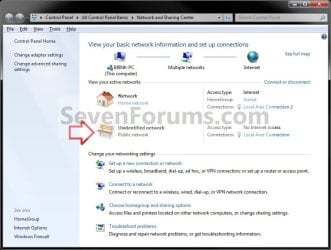
Sometimes Windows 7 is unable to identify the network it is connected to due to a network issue or lack of identifiable characteristics. This type of network is called a unidentified network.

A network location identifies the type of network that a computer is connected to and automatically sets the appropriate firewall settings for that location. This will show you how to set a unidentified network to always be set as a private (work) or public network location as displayed in the Network and Sharing Center.
   Note

  • Choose Private network (Work) for small office or other workplace networks. Network discovery, which allows you to see other computers and devices on a network and allows other network users to see your computer, is on by default, but you can't create or join a homegroup.
    • All computers are peers; no computer has control over another computer.
    • Each computer has a set of user accounts. To log on to any computer in the workgroup, you must have an account on that computer.
    • There are typically no more than twenty computers.
    • A workgroup is not protected by a password.
    • All computers must be on the same local network or subnet.
  • Choose Public network for networks in public places (such as coffee shops or airports). This location is designed to keep your computer from being visible to other computers around you and to help protect your computer from any malicious software from the Internet. HomeGroup is not available on public networks, and network discovery is turned off. You should also choose this option if you're connected directly to the Internet without using a router, or if you have a mobile broadband connection.
   Warning
You will only be able to do this while logged in as an administrator.
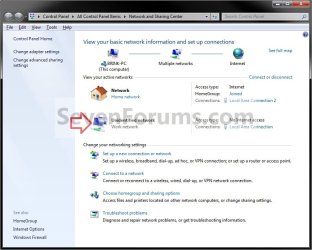
EXAMPLE: Unidentified Network set as Private or Public Unidentified_Private-Work.jpg

Unidentified_Public.jpg


OPTION ONE

Through Network List Manager Policies
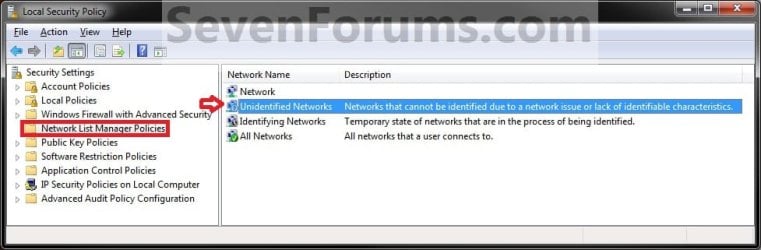
1. Open the Local Security Policy editor. A) In the left pane, select Network List Manager Policies. (see screenshot below) SECPOL-1.jpg
B) Go to step 3.
OR

2. Open the Local Group Policy Editor. A) In the left pane, click on to expand Computer Configuration, Windows Settings, Security Settings, and Network List Manager Policies. (see screenshot below) GPEDIT-1.jpg
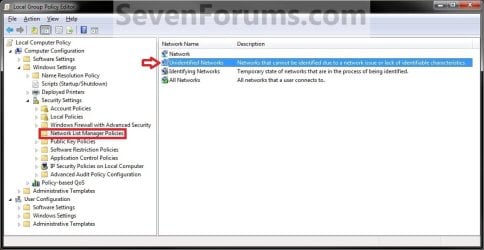
3. In the right pane, double click on Unidentified Networks. (see screenshots above)

4. To Restore Unidentified Networks to Default Not Configured
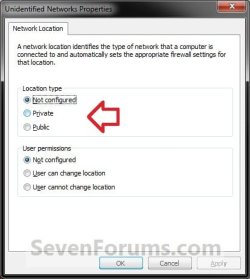
NOTE: This allows Windows 7 to set the unidentified network to be either Public or Private (work) as it so determines automatically. A) Under Location type, select (dot) Not Configured and click on OK. step1.jpg
B) Go to step 7.
5. To Set Unidentified Networks to Public Network Location A) Under Location type, select (dot) Public and click on OK. (see screenshot below step 4A)

B) Go to step 7.
6. To Set Unidentified Networks to Private Network Location A) Under Location type, select (dot) Private (Work) and click on OK. (see screenshot below step 4A)
7. Close the Local Security Policy or Local Group Policy Editor.

8. Open the Network and Sharing Center to see the change.
NOTE: You can open the Network and Sharing Center from within the Control Panel, or by right clicking on your Network icon in taskbar notification area.


OPTION TWO

Through a REG File Download

1. To Restore Unidentified Networks to Default Not Configured
NOTE: This allows Windows 7 to set the unidentified network to be either Public or Private (work) as it so determines automatically. A) Click on the Download button below to download the file below. Set_Unidentified_Networks_Default-Not_Configured.reg

Download


B) Go to step 4.
2. To Set Unidentified Networks to Public Network Location A) Click on the Download button below to download the file below. Set_Unidentified_Networks_Public.reg

Download


B) Go to step 4.
3. To Set Unidentified Networks to Private (Work) Network Location A) Click on the Download button below to download the file below. Set_Unidentified_Networks_Private.reg

Download


4. Click on Save, and save the .reg file to the desktop.

5. Right click the downloaded .reg file and click on Merge.

6. Click on Run, Yes, Yes, and OK when prompted.

7. Open the Network and Sharing Center to see the change.
NOTE: You can open the Network and Sharing Center from within the Control Panel, or by right clicking on your Network icon in taskbar notification area.

8. When done, you can delete the downloaded .reg file on the desktop if you like.
That's it,
Shawn


Attachments

Last edited:
Hi, Brink,
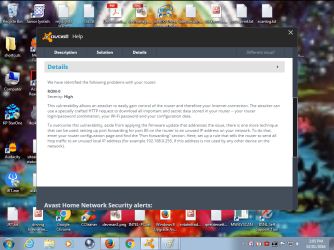
I have found out what made the change of home work group. It is a router attack, that has changed my gateway to 169.254.90.67, which ip address i could not found on the web. It has changed my private to public. When deeply getting in to details, i found s3amazonws.com is trying to download a version 3 from somewhere else. I got my internet access thro typing static address in the ipv4 settings. But , how to stop this attack.
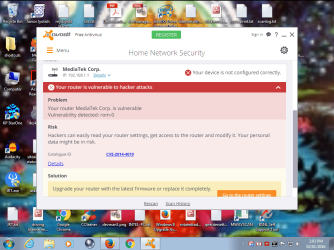
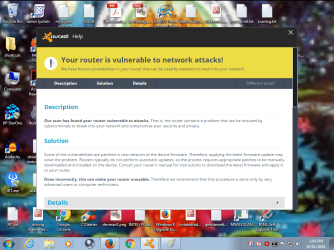
I tried port forwarding http 80 port to some other ips. Still avast scan found vulnerability of rom 0 vulnerability of which i only know that it attacked router.
I scanned with avast again, the vulnerability was shown again and my router is teracom , and it showed port 80, and ftp port 21 vulnerable and liable to attack.
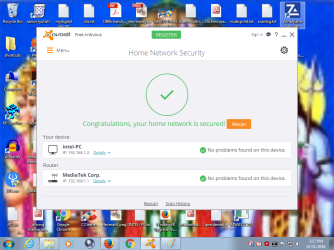
I just clicked update router in simple port forward tool , which captured my router , but shown in different name onda.... I took the risk of updating , it updated . and i tested again with avast. I was shown complete protection of router also. It showed no vulnerability, but my router name changed to some other name, some MediaTek, and i was happy that the problem is resolved.
But one more scan, revealed the old vulnerability screen, by the same avast.
I do not know how the modem name changed and i was given green signal in the scan and another renamed my router as teracom and posted the vulnerability picture.
 

Attachments

  • secured router.png
    secured router.png
    659.1 KB · Views: 142
  • rom 0attack.png
    rom 0attack.png
    162.9 KB · Views: 123
  • rom 0 attack2.png
    rom 0 attack2.png
    164.5 KB · Views: 114
  • rom 0 attack3.png
    rom 0 attack3.png
    162.9 KB · Views: 134

My Computer My Computer

At a glance

Microsoft Windows 7 Ultimate 64-bit 7601 Mult...Intel(R) Core(TM)2 Duo CPU E7200 @ 2.53GHz4.00 GBNVIDIA GeForce 210
Computer type
PC/Desktop
Computer Manufacturer/Model Number
custom build
OS
Microsoft Windows 7 Ultimate 64-bit 7601 Multiprocessor Free Service Pack 1
CPU
Intel(R) Core(TM)2 Duo CPU E7200 @ 2.53GHz
Motherboard
To be filled by O.E.M. To be filled by O.E.M.
Memory
4.00 GB
Graphics Card(s)
NVIDIA GeForce 210
Sound Card
(1) NVIDIA High Definition Audio (2) Realtek High Definiti
Screen Resolution
1920 x 1080 x 32 bits (4294967296 colors) @ 60 Hz
Hard Drives
ST3500312CS ATA Device
jraju,

I'm glad you found the cause, but it would be best to post that issue in the Network & Sharing forum area instead to get help with. :(
 

My Computer My Computer

At a glance

64-bit Windows 11 Pro for WorkstationsIntel i7-8700K OC'd to 5 GHz64 GB (4x16GB) G.SKILL TridentZ RGB DDR4 3600...ASUS ROG-STRIX-GTX1080TI-O11G-GAMING
Computer type
PC/Desktop
Computer Manufacturer/Model Number
Self built custom
OS
64-bit Windows 11 Pro for Workstations
CPU
Intel i7-8700K OC'd to 5 GHz
Motherboard
ASUS ROG Maximus XI Formula Z390
Memory
64 GB (4x16GB) G.SKILL TridentZ RGB DDR4 3600 MHz
Graphics Card(s)
ASUS ROG-STRIX-GTX1080TI-O11G-GAMING
Sound Card
Integrated
Monitor(s) Displays
2 x Samsung Odyssey G7 27"
Screen Resolution
2560x1440
Hard Drives
1TB Samsung 990 PRO M.2,
4TB Samsung 990 PRO PRO M.2,
TerraMaster F8 SSD Plus NAS
PSU
Seasonic Prime Titanium 850W
Case
Thermaltake Core P3
Cooling
Corsair Hydro H115i
Keyboard
Logitech wireless K800
Mouse
Logitech MX Master 4
Internet Speed
2 Gb/s Download and 100 Mb/s Upload
Antivirus
Malwarebyte Anti-Malware Premium
Browser
Google Chrome
Other Info
Logitech Z625 speaker system,
Logitech BRIO 4K Pro webcam,
HP Color LaserJet Pro MFP M477fdn,
APC SMART-UPS RT 1000 XL - SURT1000XLI,
Galaxy S23 Plus phone
Hi

I've stumbled across this thread as I am trying to do this on Win 10 Home

Using these reg files seems to have no effect so perhaps the keys have moved ?

I have been able to use the powershell technique but this is only temporary and the network becomes Public again on cable reconnection or restart

I'm really hoping to find a permanent solution to this

Thanks in advance
 

My Computer My Computer

At a glance

Win 10 Home
Computer type
PC/Desktop
OS
Win 10 Home
Hello minieggs, and welcome to Seven Forums. :)

I have just checked, and the registry keys are the same in Windows 10 as well. If you haven't already, you might see if restarting the computer after merging the .reg file may help.
 

My Computer My Computer

At a glance

64-bit Windows 11 Pro for WorkstationsIntel i7-8700K OC'd to 5 GHz64 GB (4x16GB) G.SKILL TridentZ RGB DDR4 3600...ASUS ROG-STRIX-GTX1080TI-O11G-GAMING
Computer type
PC/Desktop
Computer Manufacturer/Model Number
Self built custom
OS
64-bit Windows 11 Pro for Workstations
CPU
Intel i7-8700K OC'd to 5 GHz
Motherboard
ASUS ROG Maximus XI Formula Z390
Memory
64 GB (4x16GB) G.SKILL TridentZ RGB DDR4 3600 MHz
Graphics Card(s)
ASUS ROG-STRIX-GTX1080TI-O11G-GAMING
Sound Card
Integrated
Monitor(s) Displays
2 x Samsung Odyssey G7 27"
Screen Resolution
2560x1440
Hard Drives
1TB Samsung 990 PRO M.2,
4TB Samsung 990 PRO PRO M.2,
TerraMaster F8 SSD Plus NAS
PSU
Seasonic Prime Titanium 850W
Case
Thermaltake Core P3
Cooling
Corsair Hydro H115i
Keyboard
Logitech wireless K800
Mouse
Logitech MX Master 4
Internet Speed
2 Gb/s Download and 100 Mb/s Upload
Antivirus
Malwarebyte Anti-Malware Premium
Browser
Google Chrome
Other Info
Logitech Z625 speaker system,
Logitech BRIO 4K Pro webcam,
HP Color LaserJet Pro MFP M477fdn,
APC SMART-UPS RT 1000 XL - SURT1000XLI,
Galaxy S23 Plus phone
unidentified ad hoc

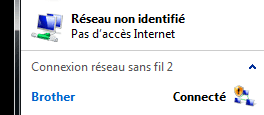
Hi, I have an ad hoc network to which I gave a name (Brother), but it shows as unidentified in network and sharing center - is that normal?
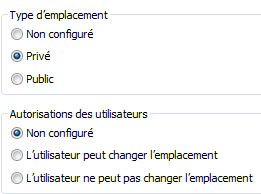
In Network List Manager Policies, unidentified networks are set as private...
 

Attachments

  • Image1.png
    Image1.png
    3.2 KB · Views: 80
  • Capture.PNG
    Capture.PNG
    2.5 KB · Views: 82

My Computer My Computer

At a glance

Microsoft Windows 7 Professionnel 64 bits 760...Intel(R) Core(TM) i5-4310U CPU @ 2.00GHz8,00 GBIntel(R) HD Graphics Family
Computer type
Laptop
Computer Manufacturer/Model Number
Dell Latitude E7240
OS
Microsoft Windows 7 Professionnel 64 bits 7601 Multiprocessor Free Service Pack 1
CPU
Intel(R) Core(TM) i5-4310U CPU @ 2.00GHz
Motherboard
Dell Inc. 08YF01
Memory
8,00 GB
Graphics Card(s)
Intel(R) HD Graphics Family
Sound Card
(1) Bluetooth Audio (2) Périphérique High Definition Audio
Monitor(s) Displays
Mobile Intel 965
Screen Resolution
1366 x 768 x 32 bits (4294967296 colors) @ 59 Hz
Hard Drives
SK hynix SH920 mSATA 128
Hi, I have an ad hoc network to which I gave a name (Brother), but it shows as unidentified in network and sharing center - is that normal?
In Network List Manager Policies, unidentified networks are set as private...

Hello jmm, :-)

It's normal for it to be an "unidentified network" whenever Windows is unable to ID the network.

As long as the network connection works and you are able to set its network location to what you want, it's fine.
 

My Computer My Computer

At a glance

64-bit Windows 11 Pro for WorkstationsIntel i7-8700K OC'd to 5 GHz64 GB (4x16GB) G.SKILL TridentZ RGB DDR4 3600...ASUS ROG-STRIX-GTX1080TI-O11G-GAMING
Computer type
PC/Desktop
Computer Manufacturer/Model Number
Self built custom
OS
64-bit Windows 11 Pro for Workstations
CPU
Intel i7-8700K OC'd to 5 GHz
Motherboard
ASUS ROG Maximus XI Formula Z390
Memory
64 GB (4x16GB) G.SKILL TridentZ RGB DDR4 3600 MHz
Graphics Card(s)
ASUS ROG-STRIX-GTX1080TI-O11G-GAMING
Sound Card
Integrated
Monitor(s) Displays
2 x Samsung Odyssey G7 27"
Screen Resolution
2560x1440
Hard Drives
1TB Samsung 990 PRO M.2,
4TB Samsung 990 PRO PRO M.2,
TerraMaster F8 SSD Plus NAS
PSU
Seasonic Prime Titanium 850W
Case
Thermaltake Core P3
Cooling
Corsair Hydro H115i
Keyboard
Logitech wireless K800
Mouse
Logitech MX Master 4
Internet Speed
2 Gb/s Download and 100 Mb/s Upload
Antivirus
Malwarebyte Anti-Malware Premium
Browser
Google Chrome
Other Info
Logitech Z625 speaker system,
Logitech BRIO 4K Pro webcam,
HP Color LaserJet Pro MFP M477fdn,
APC SMART-UPS RT 1000 XL - SURT1000XLI,
Galaxy S23 Plus phone
ok thanks
and happy new year btw...
 

My Computer My Computer

At a glance

Microsoft Windows 7 Professionnel 64 bits 760...Intel(R) Core(TM) i5-4310U CPU @ 2.00GHz8,00 GBIntel(R) HD Graphics Family
Computer type
Laptop
Computer Manufacturer/Model Number
Dell Latitude E7240
OS
Microsoft Windows 7 Professionnel 64 bits 7601 Multiprocessor Free Service Pack 1
CPU
Intel(R) Core(TM) i5-4310U CPU @ 2.00GHz
Motherboard
Dell Inc. 08YF01
Memory
8,00 GB
Graphics Card(s)
Intel(R) HD Graphics Family
Sound Card
(1) Bluetooth Audio (2) Périphérique High Definition Audio
Monitor(s) Displays
Mobile Intel 965
Screen Resolution
1366 x 768 x 32 bits (4294967296 colors) @ 59 Hz
Hard Drives
SK hynix SH920 mSATA 128
Back
Top