Win7 x64 install error: stating "wrong version" on Vista laptop... ?

VulcanSoulPatch

New member
Win7 x64 install error: stating "wrong version" on Vista laptop... ?

[Note: I apologize in advance for the second-hand information... I will be seeing this in person in the morning, but thought I might go armed with some insight from you all. TIA!]

A daughter of a friend just bought Win7 Pro x64 from her university bookstore, and when she put the DVD into her laptop drive, she is greeted with a "wrong version" or "incorrect version" error message. She tells me she is running Vista (I am assuming x86) and that she has ~4GB of memory. Has anybody ever heard of something similar happening?

She told me that she has almost all of her info on an EHD, so I told her to backup whatever else she wanted to keep off of the HDD and when I visit tomorrow we will attempt to do the install, most likely a custom install for a fresh start (laptop ~2 years old).

Since I have read in several places here on the forums that the key included with the disc is good for both x64 and x86 versions of Win7, if it turns out that she has <4GB of RAM, is it possible to install the x86 from the disc? If so, is it easy to locate? If not, is there someplace we can dl it from? She tells me that she uses it mostly for Office (reports, presentations, etc) and used to run games on it (not sure what type), so I don't know if she would "need" x64 unless she has 4GB+ of RAM, right?

Any info would be greatly appreciated. If there are any specific questions I should be asking of her or things to look for when I am in front of the laptop, please let me know. I will check in here before I take off in the morning, and also follow-up with findings in the evening. Hopefully this is an easy fix and a custom install will do the trick, but I like to be prepared.

Thanks!

VSP
 

My Computer

Computer Manufacturer/Model Number
Custom Built
OS
Win7 Pro x64
CPU
i7 860 @ 2.80GHZ
Motherboard
Gigabyte P55A-UD4P
Memory
Corsair Dominator DDR3 1600 (8GB) in XMP mode
Graphics Card(s)
Radeon HD 5850 XFX XXX Edition
Monitor(s) Displays
Hanns-G HG281D
Screen Resolution
1920 x 1200
Hard Drives
Seagate Barracuda 7200.11 1.5TB (300GB C: part ;) )
PSU
Corsair TX750W
Case
NZXT Tempest EVO
Cooling
Asetek LCLC 120, NZXT Stock Fans (4x120mm, 2x140mm)
Keyboard
Cyber Snipa V2 (oh, and MS Natural Multimedia 1.0A)
Mouse
Wolfking Trooper MVP Blue
Internet Speed
FiOS 15/5
as far as i understood you entered the Key that came with Windows 7 DVD, if so then she should go back to the store, cuz the key is wrong and ask for at least trying to install it infront of her. and for running windows 7 smoothly you need at least 2GB ram, Core 2 Duo processor with 2GH frequency and 3 MB L2 Cach, in this case it will run smoothly.
Now a starting fix will be: Check if the processor is compatible with x64, also when is the message appearing after doing what?
cuz i don't know what to say until i know where the message starts appearing :)
 

My Computer

OS
Windows 7 Ultimate x64
CPU
Core 2 Quad Q6600 2.40 GHz, 8 MB L2 Cach
Motherboard
MSI P35
Memory
4 GB DDR2
Graphics Card(s)
1GB MSI nvidia 8600 GeForce
Sound Card
Realtech
Monitor(s) Displays
Samsung 19 inch LCD
Hard Drives
500 GB SATA
Internet Speed
DSL 512Kbps :( VERY SLOW :(
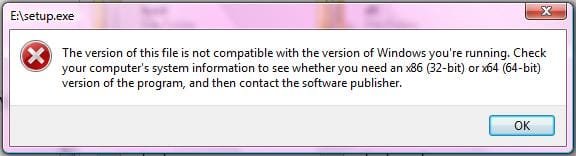
OK, so here is the error message she is getting (it occurs when either autorunning the disc or clicking on the setup file from the root dir of the disc):
SetupError.jpg

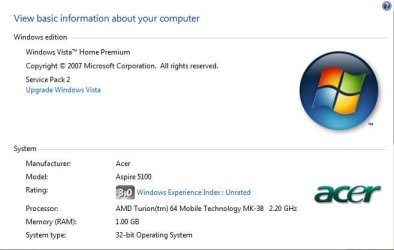
And here is her system info:
SysInfo.jpg

DeepUnknown, from your post, it seems that this computer would not be able to run Win7 "smoothly" (since from what I can tell it is only a single core processor, and has less than 2GB of RAM), but I am thinking it should at least be able to attempt to install it. Does anyone have any ideas why this error message is popping up? And again, if we need the x86 version of Win7 to be able to get it to install, where would we go about finding it? I browsed the disc, but could not find anything. Also, the version that she got from the univ is just the disc and it states "October 2009 Systems Student Media" on the label.

Let me know what you all think, or what other info is necessary, or if this is a lost cause. Don't know if this is returnable or not, but hopefully wewon't have to find out!

VSP
 

My Computer

Computer Manufacturer/Model Number
Custom Built
OS
Win7 Pro x64
CPU
i7 860 @ 2.80GHZ
Motherboard
Gigabyte P55A-UD4P
Memory
Corsair Dominator DDR3 1600 (8GB) in XMP mode
Graphics Card(s)
Radeon HD 5850 XFX XXX Edition
Monitor(s) Displays
Hanns-G HG281D
Screen Resolution
1920 x 1200
Hard Drives
Seagate Barracuda 7200.11 1.5TB (300GB C: part ;) )
PSU
Corsair TX750W
Case
NZXT Tempest EVO
Cooling
Asetek LCLC 120, NZXT Stock Fans (4x120mm, 2x140mm)
Keyboard
Cyber Snipa V2 (oh, and MS Natural Multimedia 1.0A)
Mouse
Wolfking Trooper MVP Blue
Internet Speed
FiOS 15/5
if it's a single core processor it's not recommended to install win 7, cuz my friend has: Pentium 4 3GH frequency and 3 MB L2 Cach along with 4GB RAM and it freezes sometimes.
by the way if you want to install the windows you should run the DVD / CD from DOS, not from windows it self, cuz that will take a way the possibility to format.
Anyways if she got the x64 then you won't find the x86 in the same DVD / CD.
Also since it's a single core processor it doesn't support x64 OS.
 

My Computer

OS
Windows 7 Ultimate x64
CPU
Core 2 Quad Q6600 2.40 GHz, 8 MB L2 Cach
Motherboard
MSI P35
Memory
4 GB DDR2
Graphics Card(s)
1GB MSI nvidia 8600 GeForce
Sound Card
Realtech
Monitor(s) Displays
Samsung 19 inch LCD
Hard Drives
500 GB SATA
Internet Speed
DSL 512Kbps :( VERY SLOW :(
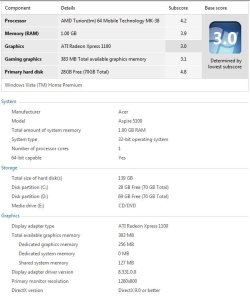
OK, so here is a Performance Info & Tools screenie for the laptop (not sure why I didn't think of posting this earlier...):
WPI.jpg

As you can see, Windows Vista does report the comp is 64-bit capable (according to MS here), so I am still unsure as to why we are getting the error message in the first place. In understand that the specs are low, but we are just trying to weigh out options here.

Keep the posts coming. Will check back later in the day. Thanks!

VSP
 

My Computer

Computer Manufacturer/Model Number
Custom Built
OS
Win7 Pro x64
CPU
i7 860 @ 2.80GHZ
Motherboard
Gigabyte P55A-UD4P
Memory
Corsair Dominator DDR3 1600 (8GB) in XMP mode
Graphics Card(s)
Radeon HD 5850 XFX XXX Edition
Monitor(s) Displays
Hanns-G HG281D
Screen Resolution
1920 x 1200
Hard Drives
Seagate Barracuda 7200.11 1.5TB (300GB C: part ;) )
PSU
Corsair TX750W
Case
NZXT Tempest EVO
Cooling
Asetek LCLC 120, NZXT Stock Fans (4x120mm, 2x140mm)
Keyboard
Cyber Snipa V2 (oh, and MS Natural Multimedia 1.0A)
Mouse
Wolfking Trooper MVP Blue
Internet Speed
FiOS 15/5
if it's a single core processor it's not recommended to install win 7, cuz my friend has: Pentium 4 3GH frequency and 3 MB L2 Cach along with 4GB RAM and it freezes sometimes.
Just because your friend has an issue, doesn't mean it isn't recommended. I have a friend who claims he was abducted by aliens and was experimented on. That doesn't make it factual information. Single core processors can be well above the minimum required specs.
Also since it's a single core processor it doesn't support x64 OS.
Many single core processors support x64 OSes, even down to the Celeron levels.

To the OP, now that we've gotten the correct info out, what version and platform of Windows 7 is the upgrade from? My guess is, the install is failing because to upgrade a 32 bit OS to a 64 bit OS, you'd need to do a clean install. It sounds like she needs to use the x86 upgrade disc, or go back to the point of sale and try to obtain on if she didn't get it.
 

My Computer

OS
Windows 7 Ultimate x64 SP1
CPU
Intel Core i7-2600
Motherboard
Gigabyte GA-P67A-UD3P-B3
Memory
12 GB Patriot Extreme DDR3-1333
Graphics Card(s)
Nvidia GTX 470
Monitor(s) Displays
Dell UltraSharp 2209WA
Hard Drives
OCZ Agility3 240 GB, WD5001AALS, WD7501AALS
PSU
OCZ ModStream 700W
Case
CoolerMaster HAF 912 Advanced
Cooling
CoolerMaster Hyper 212 Plus
The message is likely because she tried to run the 64 bit disk instead of booting it as must be done.

Run the Windows 7 Upgrade Advisor to check if there are any hardware incompatibilities. Your processor shows it is 64 bit, so no problem there. She should add at least another 3gb of RAM if she wants to run 64 bit, another gig if she wants to run 32 bit although 32 bit will run ok on a gig.

You are correct that each license is allowed to use either 32 or 64 bit. If she bought the student special under the University's program, they should have a 32 bit installer for her. Otherwise MS made good on the failure by their Student download supplier to provide 32 bit ISO's here: Microsoft Fixes Windows 7 Student Edition Upgrade Problems Unlock all versions to install her licensed version using this: Ei.cfg Removal Utility Lets You Use Any Product Key With Your Windows 7 Disc
 
Thank you guys for the detailed info. I appreciate it.
To the OP, now that we've gotten the correct info out, what version and platform of Windows 7 is the upgrade from? My guess is, the install is failing because to upgrade a 32 bit OS to a 64 bit OS, you'd need to do a clean install. It sounds like she needs to use the x86 upgrade disc, or go back to the point of sale and try to obtain on if she didn't get it.
The laptop currently has Vista x86 installed. That is the environment where we are receiving the error.
The message is likely because she tried to run the 64 bit disk instead of booting it as must be done.
Makes sense. I hadn't tried booting the computer with the disc since I didn't want to mess up the install without knowing what I was doing and inadvertently brick her computer in the middle of the term.
Run the Windows 7 Upgrade Advisor to check if there are any hardware incompatibilities. Your processor shows it is 64 bit, so no problem there. She should add at least another 3gb of RAM if she wants to run 64 bit, another gig if she wants to run 32 bit although 32 bit will run ok on a gig.

You are correct that each license is allowed to use either 32 or 64 bit. If she bought the student special under the University's program, they should have a 32 bit installer for her. Otherwise MS made good on the failure by their Student download supplier to provide 32 bit ISO's here: Microsoft Fixes Windows 7 Student Edition Upgrade Problems Unlock all versions to install her licensed version using this: Ei.cfg Removal Utility Lets You Use Any Product Key With Your Windows 7 Disc
OK, will run the upgrade advisor. Thanks for the link. Already recommended the mem upgrade.

She has the student disc. I bummed around the disc looking for something that would specify an x86 installer, but did not find anything. Any ideas where it could be?

As to the Ei.cfg util, exactly when and how do you use it... the article did not specify.

Thanks again! Few steps closer!

VSP

P.S.: BTW, found out what type of gaming she does... BIG time Warcraft fiend!
 

My Computer

Computer Manufacturer/Model Number
Custom Built
OS
Win7 Pro x64
CPU
i7 860 @ 2.80GHZ
Motherboard
Gigabyte P55A-UD4P
Memory
Corsair Dominator DDR3 1600 (8GB) in XMP mode
Graphics Card(s)
Radeon HD 5850 XFX XXX Edition
Monitor(s) Displays
Hanns-G HG281D
Screen Resolution
1920 x 1200
Hard Drives
Seagate Barracuda 7200.11 1.5TB (300GB C: part ;) )
PSU
Corsair TX750W
Case
NZXT Tempest EVO
Cooling
Asetek LCLC 120, NZXT Stock Fans (4x120mm, 2x140mm)
Keyboard
Cyber Snipa V2 (oh, and MS Natural Multimedia 1.0A)
Mouse
Wolfking Trooper MVP Blue
Internet Speed
FiOS 15/5
if it's a single core processor it's not recommended to install win 7, cuz my friend has: Pentium 4 3GH frequency and 3 MB L2 Cach along with 4GB RAM and it freezes sometimes.
Just because your friend has an issue, doesn't mean it isn't recommended. I have a friend who claims he was abducted by aliens and was experimented on. That doesn't make it factual information. Single core processors can be well above the minimum required specs.
Also since it's a single core processor it doesn't support x64 OS.
Many single core processors support x64 OSes, even down to the Celeron levels.

To the OP, now that we've gotten the correct info out, what version and platform of Windows 7 is the upgrade from? My guess is, the install is failing because to upgrade a 32 bit OS to a 64 bit OS, you'd need to do a clean install. It sounds like she needs to use the x86 upgrade disc, or go back to the point of sale and try to obtain on if she didn't get it.

i guess you are right, sorry for posting wrong info, cuz I thought that single core processor will have lots of work to do so it might freez! anyways thnx for correcting me :)

and about the single core processors not being comptaible with x64 I didn't know that since i only read about new processors :S again thnx for correcting me and sorry for the wrong info.
 

My Computer

OS
Windows 7 Ultimate x64
CPU
Core 2 Quad Q6600 2.40 GHz, 8 MB L2 Cach
Motherboard
MSI P35
Memory
4 GB DDR2
Graphics Card(s)
1GB MSI nvidia 8600 GeForce
Sound Card
Realtech
Monitor(s) Displays
Samsung 19 inch LCD
Hard Drives
500 GB SATA
Internet Speed
DSL 512Kbps :( VERY SLOW :(
I actually know the answer to this. My computer did the same thing when I got my new hard drive. Because I only have the professional upgrade disc, I has to install Windows XP Pro before installing 7. I stuck the disc in while XP was running and got the same error message (not that I cared since I can't do a direct upgrade from XP anyways). All you have to do is boot from the Windows 7 disc. It will boot from it fine. Then you can do a custom install with no problem. You might even be able to do a direct upgrade.

Edit: One other thing. By student copy I assume you mean the ~$30 copy only students can get. IIRC those disc only have the x86 or the x64, not both. This might have changed but I know when they first started the program you could on get on or the other for low price. If you want both you have to buy the $200 copy from a local retailer. Also, the ones you get from a regular store have 2 disc inside the package. One for 32-bit and one for 64-bit. So basically both versions cannot fit on one DVD-rom disc.
 

My Computer

Computer type
Laptop
Computer Manufacturer/Model Number
Toshiba P775-S7100
OS
Windows 7 Professional SP1 64-bit
CPU
Intel Core i5-2450M @2.5 GHz
Memory
6 GB DDR3 1333MHz
Graphics Card(s)
Intel HD 3000
Monitor(s) Displays
Built-in 17.3" LED; 22" Insignia NS-L22Q-10A
Screen Resolution
1600x900; 1360x768
Hard Drives
750 GB Hitachi
1TB Seagate FreeAgent External
Internet Speed
Verizon DSL Speed(Down/Up): 3360 Kbps / 800 Kbps
Antivirus
MSE and MBAM Pro
Browser
IE10
Thanks for the info Petey7... the version she bought was a single disc student version, and, as far as I can tell, it only has the x64 version on it. Unfortunately, she paid more than $30... quite a bit more. Now that I realize that MS has dropped the price via the Ultimate Steal back down to what it was at the end of last year, I will try to see if she can return it and just purchase it from Digital River (my guess is the univ will not take it back, though).

Not sure why she didn't check the Ultimate site first (or ask me about it), since I had mentioned it to her a few months back when I was trying to procure a copy of Win7 Pro x64 for myself. I ended up using my wife's... erm... "active" student e-mail account to complete the transaction (after I found out from them that they don't actually check up on any .edu transactions). This was back in March when it was up to $69 via the Ultimate Steal, but that was a far cry better than the $135 that the sys builder I bought from wanted for it!
 

My Computer

Computer Manufacturer/Model Number
Custom Built
OS
Win7 Pro x64
CPU
i7 860 @ 2.80GHZ
Motherboard
Gigabyte P55A-UD4P
Memory
Corsair Dominator DDR3 1600 (8GB) in XMP mode
Graphics Card(s)
Radeon HD 5850 XFX XXX Edition
Monitor(s) Displays
Hanns-G HG281D
Screen Resolution
1920 x 1200
Hard Drives
Seagate Barracuda 7200.11 1.5TB (300GB C: part ;) )
PSU
Corsair TX750W
Case
NZXT Tempest EVO
Cooling
Asetek LCLC 120, NZXT Stock Fans (4x120mm, 2x140mm)
Keyboard
Cyber Snipa V2 (oh, and MS Natural Multimedia 1.0A)
Mouse
Wolfking Trooper MVP Blue
Internet Speed
FiOS 15/5
I remember looking under the "Am I Eligible" link before and not finding my school on the list you look at. After reading your post I just typed in my email and it sent it to me. Not sure if I'll actually buy the copy or not. I'll see if my parents want to upgrade their PC to professional and if they do I will buy it for them.
 

My Computer

Computer type
Laptop
Computer Manufacturer/Model Number
Toshiba P775-S7100
OS
Windows 7 Professional SP1 64-bit
CPU
Intel Core i5-2450M @2.5 GHz
Memory
6 GB DDR3 1333MHz
Graphics Card(s)
Intel HD 3000
Monitor(s) Displays
Built-in 17.3" LED; 22" Insignia NS-L22Q-10A
Screen Resolution
1600x900; 1360x768
Hard Drives
750 GB Hitachi
1TB Seagate FreeAgent External
Internet Speed
Verizon DSL Speed(Down/Up): 3360 Kbps / 800 Kbps
Antivirus
MSE and MBAM Pro
Browser
IE10
gregrocker, that is an interesting article but I don't really need it at this point. I will bookmark it though for future reference. It would be nice to be able to upgrade to Ultimate for no extra cost if I ever need to.
 

My Computer

Computer type
Laptop
Computer Manufacturer/Model Number
Toshiba P775-S7100
OS
Windows 7 Professional SP1 64-bit
CPU
Intel Core i5-2450M @2.5 GHz
Memory
6 GB DDR3 1333MHz
Graphics Card(s)
Intel HD 3000
Monitor(s) Displays
Built-in 17.3" LED; 22" Insignia NS-L22Q-10A
Screen Resolution
1600x900; 1360x768
Hard Drives
750 GB Hitachi
1TB Seagate FreeAgent External
Internet Speed
Verizon DSL Speed(Down/Up): 3360 Kbps / 800 Kbps
Antivirus
MSE and MBAM Pro
Browser
IE10
The ei.cfg removal utility removes that file from the ISO file, unlocking all versions so you can burn it to DVD or write to flashstick.

OK, I think I get it... so I can run the util on the iso that I dl'd from Digital River and make a bootable DVD, then use her key during install and load any version she wants... is that correct?

Now, I am guessing that this util will not be of use to me since I already installed Win7 Pro x64 and attached my key to that version. I am guessing that you can't activate a different version of Windows with the same key even if it is on the same computer, is that correct? (During subsequent installs, that is... not making a multi-boot system.)
 

My Computer

Computer Manufacturer/Model Number
Custom Built
OS
Win7 Pro x64
CPU
i7 860 @ 2.80GHZ
Motherboard
Gigabyte P55A-UD4P
Memory
Corsair Dominator DDR3 1600 (8GB) in XMP mode
Graphics Card(s)
Radeon HD 5850 XFX XXX Edition
Monitor(s) Displays
Hanns-G HG281D
Screen Resolution
1920 x 1200
Hard Drives
Seagate Barracuda 7200.11 1.5TB (300GB C: part ;) )
PSU
Corsair TX750W
Case
NZXT Tempest EVO
Cooling
Asetek LCLC 120, NZXT Stock Fans (4x120mm, 2x140mm)
Keyboard
Cyber Snipa V2 (oh, and MS Natural Multimedia 1.0A)
Mouse
Wolfking Trooper MVP Blue
Internet Speed
FiOS 15/5
Correct, I only linked it in case you ended up with another version and needed to unlock your licensed version.

No other version will activate with that key besides your licensed version.
 
Back
Top