How do I undo Homegroup to start a new?

flycaster

New member
Member
VIP
Local time
9:23 AM
Messages
472
Location
Boynton Beach, FL
Two computers linked by ethernet cable. Both OSs Windows 7 HP 64-bit. Want to do network sharing. As I followed directions I found that I already appeared to have setup networks. My desktop was Network 5 and the laptop was Network. I was able to find each ones password, but nowheres was I able to find a screen that asked me to "Join Now" (the button, that is). So, I'd like to start over (if I need to), and would like to know how to undo my netork status and start over. BTW, if the two computers were together on a network, how does one get to see the shared files? Just go into Iexplorer??? I'm so new at this.
 

My Computer My Computer

At a glance

Windows 7 HP 64-bit4GB/4GB
Computer Manufacturer/Model Number
Gateway DX4720-03/HP Pavilion dv6
OS
Windows 7 HP 64-bit
Memory
4GB/4GB
Antivirus
Avast Pro
Browser
Firefox, the latest

My Computer My Computer

At a glance

64-bit Windows 11 Pro for WorkstationsIntel i7-8700K OC'd to 5 GHz64 GB (4x16GB) G.SKILL TridentZ RGB DDR4 3600...ASUS ROG-STRIX-GTX1080TI-O11G-GAMING
Computer type
PC/Desktop
Computer Manufacturer/Model Number
Self built custom
OS
64-bit Windows 11 Pro for Workstations
CPU
Intel i7-8700K OC'd to 5 GHz
Motherboard
ASUS ROG Maximus XI Formula Z390
Memory
64 GB (4x16GB) G.SKILL TridentZ RGB DDR4 3600 MHz
Graphics Card(s)
ASUS ROG-STRIX-GTX1080TI-O11G-GAMING
Sound Card
Integrated
Monitor(s) Displays
2 x Samsung Odyssey G7 27"
Screen Resolution
2560x1440
Hard Drives
1TB Samsung 990 PRO M.2,
4TB Samsung 990 PRO PRO M.2,
TerraMaster F8 SSD Plus NAS
PSU
Seasonic Prime Titanium 850W
Case
Thermaltake Core P3
Cooling
Corsair Hydro H115i
Keyboard
Logitech wireless K800
Mouse
Logitech MX Master 4
Internet Speed
2 Gb/s Download and 100 Mb/s Upload
Antivirus
Malwarebyte Anti-Malware Premium
Browser
Google Chrome
Other Info
Logitech Z625 speaker system,
Logitech BRIO 4K Pro webcam,
HP Color LaserJet Pro MFP M477fdn,
APC SMART-UPS RT 1000 XL - SURT1000XLI,
Galaxy S23 Plus phone
Hate to say this, Shawn, but I've been going around the block with this and keep coming to the same end. Let me explain:

1. I get out of homegroups in both computers as directed in tutorial.
2. On both computers I get as far as writing down the new passwords for each computer.
3. However, I can't find where to enter the passwords. I'm assuming that the desktop's pw goes somewheres into the laptop, and the laptop's pw goes somewheres into the desktop...utter confusion.
4. Some more info. And when I now go to the Network Sharing Center for the desktop I get the following for "View your active networks": Network 5, Access Type - Internet, HomeGroup - Joined, Connections - "some kind of icon and Local Area Connection. And for the laptop the only difference is instead of Network 5, it simply says Network...everything else being the same for both computers.
5. So this is where I'm at: Have passwords for both computers; I'm told that I'be joined even though I know that I didn't see anything that asked me to join; and even if I were properly connected. I'm not sure how one goes about viewing files from the other computer.
 

My Computer My Computer

At a glance

Windows 7 HP 64-bit4GB/4GB
Computer Manufacturer/Model Number
Gateway DX4720-03/HP Pavilion dv6
OS
Windows 7 HP 64-bit
Memory
4GB/4GB
Antivirus
Avast Pro
Browser
Firefox, the latest
Ok Flycaster,

Here are the steps to double check with: :)
NOTE: Be sure to click on the links below for full details on how to fully do each step.

1. First, make sure that you have removed both computers from the Homegroup.
2. On computer A, create a Homegroup and write down this Homegroup's password.
3. On computer B, join it to the Homegroup using the password from step 2.
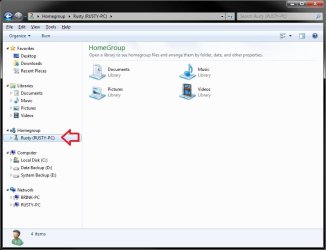
After both computers A & B are joined in the Homegroup. You will be able to access the other computer's library files, that you have selected to share, in Windows Explorer by selecting that computer under Homegroup in the navigation pane.

HomeGorup.jpg
 

My Computer My Computer

At a glance

64-bit Windows 11 Pro for WorkstationsIntel i7-8700K OC'd to 5 GHz64 GB (4x16GB) G.SKILL TridentZ RGB DDR4 3600...ASUS ROG-STRIX-GTX1080TI-O11G-GAMING
Computer type
PC/Desktop
Computer Manufacturer/Model Number
Self built custom
OS
64-bit Windows 11 Pro for Workstations
CPU
Intel i7-8700K OC'd to 5 GHz
Motherboard
ASUS ROG Maximus XI Formula Z390
Memory
64 GB (4x16GB) G.SKILL TridentZ RGB DDR4 3600 MHz
Graphics Card(s)
ASUS ROG-STRIX-GTX1080TI-O11G-GAMING
Sound Card
Integrated
Monitor(s) Displays
2 x Samsung Odyssey G7 27"
Screen Resolution
2560x1440
Hard Drives
1TB Samsung 990 PRO M.2,
4TB Samsung 990 PRO PRO M.2,
TerraMaster F8 SSD Plus NAS
PSU
Seasonic Prime Titanium 850W
Case
Thermaltake Core P3
Cooling
Corsair Hydro H115i
Keyboard
Logitech wireless K800
Mouse
Logitech MX Master 4
Internet Speed
2 Gb/s Download and 100 Mb/s Upload
Antivirus
Malwarebyte Anti-Malware Premium
Browser
Google Chrome
Other Info
Logitech Z625 speaker system,
Logitech BRIO 4K Pro webcam,
HP Color LaserJet Pro MFP M477fdn,
APC SMART-UPS RT 1000 XL - SURT1000XLI,
Galaxy S23 Plus phone
All goes well (Homegroup established with password on computer A (desktop)) until I get to Step 7 (http://www.sevenforums.com/tutorials/43972-homegroup-add-computer-join.html) for computer B (the laptop). At this point there is no button to join, only a button to Create a HomeGroup. Why is this continually happening even though I do have a HomeGroup established on A? See my point 4 above, Network 5 is the network on A. Once again, I have never seen a join button.
 

My Computer My Computer

At a glance

Windows 7 HP 64-bit4GB/4GB
Computer Manufacturer/Model Number
Gateway DX4720-03/HP Pavilion dv6
OS
Windows 7 HP 64-bit
Memory
4GB/4GB
Antivirus
Avast Pro
Browser
Firefox, the latest
Flycaster,

Double check to make sure that you have a "Home network" location (step 4) set for both Computer A & B. Could you post a screenshot of your Network and Sharing Center from both computers? Maybe I may be able to spot something.

Have you also tried creating the Homegroup on Computer B and joining Computer A?
 

My Computer My Computer

At a glance

64-bit Windows 11 Pro for WorkstationsIntel i7-8700K OC'd to 5 GHz64 GB (4x16GB) G.SKILL TridentZ RGB DDR4 3600...ASUS ROG-STRIX-GTX1080TI-O11G-GAMING
Computer type
PC/Desktop
Computer Manufacturer/Model Number
Self built custom
OS
64-bit Windows 11 Pro for Workstations
CPU
Intel i7-8700K OC'd to 5 GHz
Motherboard
ASUS ROG Maximus XI Formula Z390
Memory
64 GB (4x16GB) G.SKILL TridentZ RGB DDR4 3600 MHz
Graphics Card(s)
ASUS ROG-STRIX-GTX1080TI-O11G-GAMING
Sound Card
Integrated
Monitor(s) Displays
2 x Samsung Odyssey G7 27"
Screen Resolution
2560x1440
Hard Drives
1TB Samsung 990 PRO M.2,
4TB Samsung 990 PRO PRO M.2,
TerraMaster F8 SSD Plus NAS
PSU
Seasonic Prime Titanium 850W
Case
Thermaltake Core P3
Cooling
Corsair Hydro H115i
Keyboard
Logitech wireless K800
Mouse
Logitech MX Master 4
Internet Speed
2 Gb/s Download and 100 Mb/s Upload
Antivirus
Malwarebyte Anti-Malware Premium
Browser
Google Chrome
Other Info
Logitech Z625 speaker system,
Logitech BRIO 4K Pro webcam,
HP Color LaserJet Pro MFP M477fdn,
APC SMART-UPS RT 1000 XL - SURT1000XLI,
Galaxy S23 Plus phone
Flycaster, I have the exact problem. NO button to Join now, only to Create a homegroup. This is on my wireless laptop. I have created a homegroup and have the password on the desktop. I have done this in reverse also. Then on desktop I can not get a Join Now button, only to create.
 

My Computer My Computer

At a glance

Windows 7
OS
Windows 7
Laptop has joined the homegroup. It was BitDefender Firewall blocking access. I uninstalled BitDefender and downloaded and installed MS Security Essentials.
 

My Computer My Computer

At a glance

Windows 7
OS
Windows 7
Laptop has joined the homegroup. It was BitDefender Firewall blocking access. I uninstalled BitDefender and downloaded and installed MS Security Essentials.

How did you find out where the problem was? My defenses arer: Spywareblaster, Windows Defender, Norton 360.
 

My Computer My Computer

At a glance

Windows 7 HP 64-bit4GB/4GB
Computer Manufacturer/Model Number
Gateway DX4720-03/HP Pavilion dv6
OS
Windows 7 HP 64-bit
Memory
4GB/4GB
Antivirus
Avast Pro
Browser
Firefox, the latest
Flycaster,

As a test, you can temporarily uninstall Norton 360 completely, then try setting up the Homegroup again to see if that may be the issue.
 

My Computer My Computer

At a glance

64-bit Windows 11 Pro for WorkstationsIntel i7-8700K OC'd to 5 GHz64 GB (4x16GB) G.SKILL TridentZ RGB DDR4 3600...ASUS ROG-STRIX-GTX1080TI-O11G-GAMING
Computer type
PC/Desktop
Computer Manufacturer/Model Number
Self built custom
OS
64-bit Windows 11 Pro for Workstations
CPU
Intel i7-8700K OC'd to 5 GHz
Motherboard
ASUS ROG Maximus XI Formula Z390
Memory
64 GB (4x16GB) G.SKILL TridentZ RGB DDR4 3600 MHz
Graphics Card(s)
ASUS ROG-STRIX-GTX1080TI-O11G-GAMING
Sound Card
Integrated
Monitor(s) Displays
2 x Samsung Odyssey G7 27"
Screen Resolution
2560x1440
Hard Drives
1TB Samsung 990 PRO M.2,
4TB Samsung 990 PRO PRO M.2,
TerraMaster F8 SSD Plus NAS
PSU
Seasonic Prime Titanium 850W
Case
Thermaltake Core P3
Cooling
Corsair Hydro H115i
Keyboard
Logitech wireless K800
Mouse
Logitech MX Master 4
Internet Speed
2 Gb/s Download and 100 Mb/s Upload
Antivirus
Malwarebyte Anti-Malware Premium
Browser
Google Chrome
Other Info
Logitech Z625 speaker system,
Logitech BRIO 4K Pro webcam,
HP Color LaserJet Pro MFP M477fdn,
APC SMART-UPS RT 1000 XL - SURT1000XLI,
Galaxy S23 Plus phone
Flycaster,

As a test, you can temporarily uninstall Norton 360 completely, then try setting up the Homegroup again to see if that may be the issue.

Couldn't I just disable Norton?
 

My Computer My Computer

At a glance

Windows 7 HP 64-bit4GB/4GB
Computer Manufacturer/Model Number
Gateway DX4720-03/HP Pavilion dv6
OS
Windows 7 HP 64-bit
Memory
4GB/4GB
Antivirus
Avast Pro
Browser
Firefox, the latest
That doesn't always work. Usually you have to completely uninstall it. You can always reinstall it after testing though.

EDIT:
If Norton is the problem, then you can do what Chev posted below to allow the IP address in Norton.
 
Last edited:

My Computer My Computer

At a glance

64-bit Windows 11 Pro for WorkstationsIntel i7-8700K OC'd to 5 GHz64 GB (4x16GB) G.SKILL TridentZ RGB DDR4 3600...ASUS ROG-STRIX-GTX1080TI-O11G-GAMING
Computer type
PC/Desktop
Computer Manufacturer/Model Number
Self built custom
OS
64-bit Windows 11 Pro for Workstations
CPU
Intel i7-8700K OC'd to 5 GHz
Motherboard
ASUS ROG Maximus XI Formula Z390
Memory
64 GB (4x16GB) G.SKILL TridentZ RGB DDR4 3600 MHz
Graphics Card(s)
ASUS ROG-STRIX-GTX1080TI-O11G-GAMING
Sound Card
Integrated
Monitor(s) Displays
2 x Samsung Odyssey G7 27"
Screen Resolution
2560x1440
Hard Drives
1TB Samsung 990 PRO M.2,
4TB Samsung 990 PRO PRO M.2,
TerraMaster F8 SSD Plus NAS
PSU
Seasonic Prime Titanium 850W
Case
Thermaltake Core P3
Cooling
Corsair Hydro H115i
Keyboard
Logitech wireless K800
Mouse
Logitech MX Master 4
Internet Speed
2 Gb/s Download and 100 Mb/s Upload
Antivirus
Malwarebyte Anti-Malware Premium
Browser
Google Chrome
Other Info
Logitech Z625 speaker system,
Logitech BRIO 4K Pro webcam,
HP Color LaserJet Pro MFP M477fdn,
APC SMART-UPS RT 1000 XL - SURT1000XLI,
Galaxy S23 Plus phone
I believe that Norton uses IP ranges to allow networked machines through it's firewall. So to allow it to work with Homegroups you would need to know the IP range that your router is using and allow that range of IP's through the Norton firewall. Uninstalling also works but I believe the problem is with the Norton firewall permissions.
 

My Computer My Computer

At a glance

Windows 7 Ult, Windows 8.1 Pro,Q9650-4.275GHz, E8600 4.5GHz, E6750-3.8GHzG.Skill PC2 9600 1200Mhz 5 5 5 15 2TGTX480
Computer type
PC/Desktop
Computer Manufacturer/Model Number
Home built
OS
Windows 7 Ult, Windows 8.1 Pro,
CPU
Q9650-4.275GHz, E8600 4.5GHz, E6750-3.8GHz
Motherboard
Evga 780i FTW
Memory
G.Skill PC2 9600 1200Mhz 5 5 5 15 2T
Graphics Card(s)
GTX480
Sound Card
Asus Xonar D2
Monitor(s) Displays
HannsG
Screen Resolution
1680X1050
Hard Drives
GSkill Phoenix Pro 120GB SSD
PSU
ThermalTake Toughpower 1000Watt modular
Case
ThermalTake XaserV
Cooling
Xigmatek S1283
Keyboard
Logitech G15
Mouse
Logitech G9
Internet Speed
T1
I did a Google of Windows7/Norton/Homegroup and yes, indeed, there are problem with communication and setting up homegroups. I then called Norton and they were able to change N's firewall settings on both computers so that "Home or work (private) networks were connected" (Control Panel/System and Security/Windows firewall). I re-booted the computers and on the laptop, tried to get a "join" button to appear. Didn't happen, nor did it happen on the desktop. So far, I can't get a "join" button.

If I totally uninstall N, would that be any different than having changed the firewall settings to allow networking? Also, if I do uninstall, and assuming I get networking to work, does putting it back screw things up? And lastly, what free alternative (and easy to setup) antivirus program would you recommend in its place.
 

My Computer My Computer

At a glance

Windows 7 HP 64-bit4GB/4GB
Computer Manufacturer/Model Number
Gateway DX4720-03/HP Pavilion dv6
OS
Windows 7 HP 64-bit
Memory
4GB/4GB
Antivirus
Avast Pro
Browser
Firefox, the latest
Flycaster,

Changing "Windows Firewall" settings would not be the same as changing them in Norton. You would need to change them in Norton as well.
 

My Computer My Computer

At a glance

64-bit Windows 11 Pro for WorkstationsIntel i7-8700K OC'd to 5 GHz64 GB (4x16GB) G.SKILL TridentZ RGB DDR4 3600...ASUS ROG-STRIX-GTX1080TI-O11G-GAMING
Computer type
PC/Desktop
Computer Manufacturer/Model Number
Self built custom
OS
64-bit Windows 11 Pro for Workstations
CPU
Intel i7-8700K OC'd to 5 GHz
Motherboard
ASUS ROG Maximus XI Formula Z390
Memory
64 GB (4x16GB) G.SKILL TridentZ RGB DDR4 3600 MHz
Graphics Card(s)
ASUS ROG-STRIX-GTX1080TI-O11G-GAMING
Sound Card
Integrated
Monitor(s) Displays
2 x Samsung Odyssey G7 27"
Screen Resolution
2560x1440
Hard Drives
1TB Samsung 990 PRO M.2,
4TB Samsung 990 PRO PRO M.2,
TerraMaster F8 SSD Plus NAS
PSU
Seasonic Prime Titanium 850W
Case
Thermaltake Core P3
Cooling
Corsair Hydro H115i
Keyboard
Logitech wireless K800
Mouse
Logitech MX Master 4
Internet Speed
2 Gb/s Download and 100 Mb/s Upload
Antivirus
Malwarebyte Anti-Malware Premium
Browser
Google Chrome
Other Info
Logitech Z625 speaker system,
Logitech BRIO 4K Pro webcam,
HP Color LaserJet Pro MFP M477fdn,
APC SMART-UPS RT 1000 XL - SURT1000XLI,
Galaxy S23 Plus phone
Flycaster,

Changing "Windows Firewall" settings would not be the same as changing them in Norton. You would need to change them in Norton as well.

I thought that that is what Norton did, but I guess not. I'll have to get back to then to do as you suggest. However, I'm not quite sure about what they should actually do. Should they help me do as chev65 suggests: "...need to know the IP range that your router is using and allow that range of IP's through the Norton firewall"? If so, then I'll first go to Linksys to find out my router's (Linksys wrt620N)IP range (unless someone here can tell how to find it.
 

My Computer My Computer

At a glance

Windows 7 HP 64-bit4GB/4GB
Computer Manufacturer/Model Number
Gateway DX4720-03/HP Pavilion dv6
OS
Windows 7 HP 64-bit
Memory
4GB/4GB
Antivirus
Avast Pro
Browser
Firefox, the latest
The IP range for that router is most likely 192.168.0.1-192.168.0.200.

You should also try and delate the following file on the problem machine that is unable to join the Homegroup.
The fix seems to be Deleting the file idstore.sst under C:\windows\serviceProfiles\LocalService\AppData\Roaming\PeerNetworking
 

My Computer My Computer

At a glance

Windows 7 Ult, Windows 8.1 Pro,Q9650-4.275GHz, E8600 4.5GHz, E6750-3.8GHzG.Skill PC2 9600 1200Mhz 5 5 5 15 2TGTX480
Computer type
PC/Desktop
Computer Manufacturer/Model Number
Home built
OS
Windows 7 Ult, Windows 8.1 Pro,
CPU
Q9650-4.275GHz, E8600 4.5GHz, E6750-3.8GHz
Motherboard
Evga 780i FTW
Memory
G.Skill PC2 9600 1200Mhz 5 5 5 15 2T
Graphics Card(s)
GTX480
Sound Card
Asus Xonar D2
Monitor(s) Displays
HannsG
Screen Resolution
1680X1050
Hard Drives
GSkill Phoenix Pro 120GB SSD
PSU
ThermalTake Toughpower 1000Watt modular
Case
ThermalTake XaserV
Cooling
Xigmatek S1283
Keyboard
Logitech G15
Mouse
Logitech G9
Internet Speed
T1
Back
Top