How do I get Windows Explorer to START "responding?"

KissMyGlass

New member
Local time
3:38 PM
Messages
6
Location
Middle of Nowhere (Illinois)
Hi all!

I am starting to get really annoyed at my stupid laptop.

I am constantly getting error messages that say things like "Windows Explorer Has Stopped Responding..."

But it doesn't just happen in Explorer, it happens in several different places, like iCloud, Safari, Internet Explorer, etcetera. I work with a lot of photos - editing, moving, etc, And almost every single time I open a folder that contains photos, while it's loading, I'll get that message (that it's not responding) usually right after I see up at the top of the window, right after the name of the window, it will say: "(Not Responding)"

This is so inconvenient, so time-consuming, and now- SO frequent. :(


Those of you geniuses who ARE willing to help me, you should know right up front:
I am a complete imbecile when it comes to computer stuff. I am a quick learner, but I just don't know much about the technology and vernacular. *But I am willing to learn!*
There you go. You can't say I didn't warn you :)


Okay, so before I posted this here, I did my best to look around here and find an answer that way.

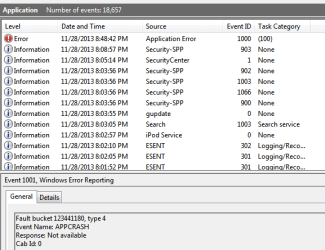
The only thing I got was that I need to post a screenshot of my Event Log.
So here's that, I could only figure out how to include the image as an attachment... Sorry

Please and Thank You for anyone willing to generously share their thoughts and expertise!
Amanda
 

Attachments
  • event log.png
    event log.png
    8.5 KB · Views: 49

My Computer My Computer

Computer type
Laptop
Computer Manufacturer/Model Number
Hewlett-Packard HP G60 Notebook PC
OS
OS 7 64-bit
CPU
Pentium® Dual-Core CPU T4300 @ 2.10 GHz
Memory
3.00 GB
From what I can see by the specs of your notebook.
Amazon.com: HP G60-440US 16-Inch Laptop: Computers & Accessories
------------------------
My System Specs
Computer type Laptop
System Manufacturer/Model Number Hewlett-Packard HP G60 Notebook PC
OS OS 7 64-bit
CPU Pentium® Dual-Core CPU T4300 @ 2.10 GHz
Memory 3.00 GB

---------------------------
Editing photos and running other programs at the same time you could just be running out of computer capabilities.
 
Last edited:

My Computer My Computer

Computer type
PC/Desktop
Computer Manufacturer/Model Number
Home made Desktop
OS
Windows 10 Pro. 64/ version 1709 Windows 7 Pro/64
CPU
Intel i7-6800K @ 4.3
Motherboard
ASUS X-99 Deluxe II
Memory
Corsair Platinum 16 gig @2400
Graphics Card(s)
EVGA GTX 1070 OC
Monitor(s) Displays
Asus 27" LED LCD/VE278Q
Screen Resolution
1920-1080 or 1280-720 HDMI
Hard Drives
INTEL SSD 730-240 Gb Sata 3.0/
PSU
EVGA Platium 1200W
Case
Phanteks Luxe Tempered Glass 8 fans/ one radiator
Cooling
XSPC/ Water Cooled CPU
Keyboard
Das 4 Professional
Mouse
Logitech M705/MX Anywhere 2-S
Internet Speed
100 mbits
Antivirus
Microsoft Security Essentials/ Malwarebytes Premium 3.0/ SAS
Browser
I.E. 11 default/Firefox/ ISP Time Warner Cable/Spectrum
Other Info
LG BluRay Burner/
Sound system-KLipsch-THX/
Icy Dock ssd Hot Swap bays.
That's what I thought, too... So I started just only having one folder open at a time.

In fact, just before I came here, I didn't have anything else running, I wasn't working on anything... I opened the Control Panel folder, and within seconds, I got the message and it all shut down. :(

I didn't even get to the part of clicking on Programs... All I did was open Control Panel...

That's totally confusing to me, as I thought I was doing right by not having 2 or 3 folders open at the same time.

But it does it no matter what.

Are there any suggestions?

Please please I would really appreciate it!
 

My Computer My Computer

Computer type
Laptop
Computer Manufacturer/Model Number
Hewlett-Packard HP G60 Notebook PC
OS
OS 7 64-bit
CPU
Pentium® Dual-Core CPU T4300 @ 2.10 GHz
Memory
3.00 GB
Or what other "programs" could I eliminate (that I'm not using)... Like I said, I'm only usually working between two (maybe three) folders. And I don't have any special, fancy photo editing stuff, I just crop and rotate and junk like that. :)

Like, if there's certain things "running" somewhere else, that I don't see, that takes up a lot of capability, would I be able to shut those off?

I hope that makes sense... I'm sorry, I don't know the proper terminology for what I'm trying to ask.

But hopefully somebody will know what to tell me to do...? :)

Amanda
 

My Computer My Computer

Computer type
Laptop
Computer Manufacturer/Model Number
Hewlett-Packard HP G60 Notebook PC
OS
OS 7 64-bit
CPU
Pentium® Dual-Core CPU T4300 @ 2.10 GHz
Memory
3.00 GB
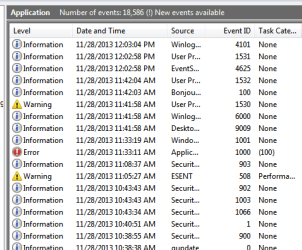
I don't know if this helps, but here is the event log for just now...
 

Attachments

  • event log.png
    event log.png
    9.6 KB · Views: 41

My Computer My Computer

Computer type
Laptop
Computer Manufacturer/Model Number
Hewlett-Packard HP G60 Notebook PC
OS
OS 7 64-bit
CPU
Pentium® Dual-Core CPU T4300 @ 2.10 GHz
Memory
3.00 GB
Really? Why can't anybody help me?
 

My Computer My Computer

Computer type
Laptop
Computer Manufacturer/Model Number
Hewlett-Packard HP G60 Notebook PC
OS
OS 7 64-bit
CPU
Pentium® Dual-Core CPU T4300 @ 2.10 GHz
Memory
3.00 GB

My Computer My Computer

Computer type
PC/Desktop
Computer Manufacturer/Model Number
Home made Desktop
OS
Windows 10 Pro. 64/ version 1709 Windows 7 Pro/64
CPU
Intel i7-6800K @ 4.3
Motherboard
ASUS X-99 Deluxe II
Memory
Corsair Platinum 16 gig @2400
Graphics Card(s)
EVGA GTX 1070 OC
Monitor(s) Displays
Asus 27" LED LCD/VE278Q
Screen Resolution
1920-1080 or 1280-720 HDMI
Hard Drives
INTEL SSD 730-240 Gb Sata 3.0/
PSU
EVGA Platium 1200W
Case
Phanteks Luxe Tempered Glass 8 fans/ one radiator
Cooling
XSPC/ Water Cooled CPU
Keyboard
Das 4 Professional
Mouse
Logitech M705/MX Anywhere 2-S
Internet Speed
100 mbits
Antivirus
Microsoft Security Essentials/ Malwarebytes Premium 3.0/ SAS
Browser
I.E. 11 default/Firefox/ ISP Time Warner Cable/Spectrum
Other Info
LG BluRay Burner/
Sound system-KLipsch-THX/
Icy Dock ssd Hot Swap bays.
If this was happening to me, I would backup my data and re install windows. Forensics can be fun, but in the end, re installing may be the quickest way to resolve your problem ... Good luck! ;)
 

My Computer My Computer

Computer type
PC/Desktop
Computer Manufacturer/Model Number
LENOVO K450 @3.0GHZ
OS
64-bit Windows 8.1 Pro
CPU
Core(TM) i5 CPU 4330 Haswell @ 3.20GHz
Motherboard
LENOVO
Memory
12.00 GB
Graphics Card(s)
Intel(R) HD Graphics
Sound Card
Intel HD integtrated
Monitor(s) Displays
HP 25' ISP Monitor
Screen Resolution
1900/1020
Hard Drives
(1) ST1000DM003-1CH162 (2) Generic STORAGE DEVICE USB Device (3) Generic STORAGE DEVICE USB Device
Internet Speed
100mb down/10mb up
Try Details or Separate Process

You mentioned that you work with pictures.

Windows struggles if it has to generate thumbnails.
If you have lots of multi-megapixel pictures, it will totally bog down trying to generate thumbnails for them.

If the pictures are on an external USB HDD it will be even worse, due to the poor performance of those type of HDDs.

You could set the "View" of all of your folders to "Details" instead of icons (not very helpful).

You could also try setting the "Launch folder windows in a separate process" option.
My Windows Explorer was becoming increasingly "crash happy" until I set that option.

  • Type "folder" into the Start Menu search box (no quotes)
  • Choose "Folder Options" from the results
  • Go to the View tab
256259d1361451358-explorer-crashes-folder-option-separate-process.gif

 
Last edited:

My Computer My Computer

Computer type
PC/Desktop
Computer Manufacturer/Model Number
n/a
OS
W7 Ultimate SP1, LM19.2 MATE, W10 Home 1703, W10 Pro 1703 VM, #All 64 bit
CPU
AMD Phenom II x6 1100T, 3.3 GHz
Motherboard
ASUS M4A88T-M/USB3 (AM3)
Memory
12GB DDR3 1333 G-Skill (4GB x 2), G-Skill (2GB x 2)
Graphics Card(s)
NVIDIA GeForce GTX 660
Sound Card
Realtek?
Monitor(s) Displays
Samsung S23B350
Screen Resolution
1920x1080
Hard Drives
WD Green 2TB (SATA), WD Green 3TB (SATA), WD Blue 4TB (SATA), WD Blue 6TB (SATA)
PSU
Cooler Master
Case
Antec GX300 Tower
Cooling
3x Antec TRICOOL 120mm Fans
Mouse
Wired Optical
Internet Speed
DSL
Antivirus
Avast
Browser
Pale Moon (64 bit)
Other Info
2018-12-27 Upgraded HDDs
2015-12-10 Upgraded case, graphics card, storage
2015-08-15 Upgraded motherboard & RAM
2015-07-15 Upgraded LM17.1 to LM17.2
Hi all-

This morning I noticed, when I opened Help and Support, that the error message I actually get is:

"Windows has Stopped Working"

So, maybe that helps with diagnosing...?


Lehnerus2000,
Thank you for all that information! I don't have any kind of external USB HDD, and I already have my view set to "List."
And I already had the folder options set to open in another process.

Layback Bear,
I tried to check the tempature, using RealTemp, but when I tried to use it, I got an error message that it couldn't be done because I was missing WinRing0.dll. I don't know what that means, so there ya go.

Thanks again for all of your input!
I really REALLY appreciate you!
Amanda
 

My Computer My Computer

Computer type
Laptop
Computer Manufacturer/Model Number
Hewlett-Packard HP G60 Notebook PC
OS
OS 7 64-bit
CPU
Pentium® Dual-Core CPU T4300 @ 2.10 GHz
Memory
3.00 GB
Lehnerus2000,
Thank you for all that information! I don't have any kind of external USB HDD, and I already have my view set to "List."
And I already had the folder options set to open in another process.

Sorry that info wasn't helpful. :(

Have you tried running "sfc" as suggested by Layback Bear (Post #7)?
 

My Computer My Computer

Computer type
PC/Desktop
Computer Manufacturer/Model Number
n/a
OS
W7 Ultimate SP1, LM19.2 MATE, W10 Home 1703, W10 Pro 1703 VM, #All 64 bit
CPU
AMD Phenom II x6 1100T, 3.3 GHz
Motherboard
ASUS M4A88T-M/USB3 (AM3)
Memory
12GB DDR3 1333 G-Skill (4GB x 2), G-Skill (2GB x 2)
Graphics Card(s)
NVIDIA GeForce GTX 660
Sound Card
Realtek?
Monitor(s) Displays
Samsung S23B350
Screen Resolution
1920x1080
Hard Drives
WD Green 2TB (SATA), WD Green 3TB (SATA), WD Blue 4TB (SATA), WD Blue 6TB (SATA)
PSU
Cooler Master
Case
Antec GX300 Tower
Cooling
3x Antec TRICOOL 120mm Fans
Mouse
Wired Optical
Internet Speed
DSL
Antivirus
Avast
Browser
Pale Moon (64 bit)
Other Info
2018-12-27 Upgraded HDDs
2015-12-10 Upgraded case, graphics card, storage
2015-08-15 Upgraded motherboard & RAM
2015-07-15 Upgraded LM17.1 to LM17.2
Have you run a full scan with your Antivirus and/or anti-malware programs?
 

My Computer My Computer

Computer type
PC/Desktop
Computer Manufacturer/Model Number
Bruce ... somewhere in his 40's
OS
Windows 7 Ultimate 32bit SP1
CPU
Intel(R) Core(TM)2 Quad CPU @ 2.40GHz, 2400 MHz
Motherboard
INTEL/D975XBX2
Memory
4 GB
Graphics Card(s)
ATI Radeon HD 2600 Pro
Monitor(s) Displays
Samsung SyncMaster 914v
Screen Resolution
1280 x 1024
Hard Drives
2/500GB each ... ST3500630AS ATA Device.
One is not connected
PSU
Rocketfish 700 W
Case
G.Skill Gigabyte Chassis
Keyboard
Standard PS/2 Keyboard
Mouse
Microsoft PS/2 Mouse
Internet Speed
DSL
Antivirus
Avira Internet Security
Browser
IE 11
Other Info
ATI HDMI Audio
Back
Top