resolution problem after installation of windows 7

wouter

New member
Local time
4:15 PM
Messages
26
Hi everybody,

I'm new here.
I've got a problem with windows 7 and the resolution and color settings.
I've been searching for almost 2 whole. Just sitting behing my laptop searching for an answer but i can't find one.
So i hope you can help me.

Here is my problem.
I have clean installed windows 7 32 bit on my Acer laptop apsire 5720zg with Nvidia GeForce 8400M GS. The original OS on the Acer was Vista.
At the first time at startup my resolution was down to 640x480 and I can't change it.
And my colors are set back to 16 mb. I thought I had to download the newest driver of Nvidia. I did that but when i installed it and restarted my laptop it gave me an error code 43.

I've been trying several drivers from Nvidia but it doesn't help.

Can someone please help me.

Wouter
 

My Computer My Computer

Computer Manufacturer/Model Number
acer aspire 5720ZG
OS
windows 7
Graphics Card(s)
nvidia 8400 gs

My Computer My Computer

Computer type
PC/Desktop
Computer Manufacturer/Model Number
self build
OS
win 7 ultimate32bit, Win8.1pro wmc 32bit
CPU
amd phenom x4 9600
Motherboard
asus m2n32-sli deluxe
Memory
corsair twinxs 2x2gb
Graphics Card(s)
2x nvidia 1gb 8500gt
Sound Card
onboard
Monitor(s) Displays
23" PB Viseo 233d
Screen Resolution
1920x1080
Hard Drives
maxtor sata 500gb
maxtor sata 320gb
fujitsu sata200gb
PSU
oryxx tornado 750w
Case
thermaltake xaser lll
Cooling
artic freezer64 pro + 7 case fans
How you run Windows Update yet to get the latest hardware drivers installed?
 

My Computer My Computer

Computer type
PC/Desktop
Computer Manufacturer/Model Number
Custom Desktop PC
OS
Windows 7 / Windows 8.1
CPU
Devils Canyon i7-4790K @ 4.8 GHz ~ 1.33v
Motherboard
Asus Z97 Deluxe
Memory
Corsair Vengeance Pro PC3-19200 DDR3 2400MHz
Graphics Card(s)
EVGA GeForce GTX 980 SuperClocked ACX 2.0
Sound Card
Realtek ALC1150 8 channels
Monitor(s) Displays
BenQ XL2720Z 27"
Screen Resolution
1920 x 1080 @ 144Hz
Hard Drives
SSD1: 512GB Samsung 850 Pro
SSD2: 1TB Samsung 850 EVO
SSD3: 1TB Samsung 850 EVO
HDD: 4TB Western Digital Black
Backup: Western Digital My Book Duo 8TB
PSU
Corsair HX1000i / CyberPower CP1500PFCLCD PFC Sinewave UPS 1
Case
Corsair Graphite 780T
Cooling
Custom single loop liquid; CPU delidded; Aerocool DS Fans
Keyboard
Logitech G710 Cherry MX Blue
Mouse
LogitechG502 Proteus Core
Internet Speed
Download: 119MBs /Upload 39.12MBs via Optimum 101 Ultra
Antivirus
MYOB
Browser
Firefox
Other Info
Cooling: EK-Supremecy MX Waterblock, XSPC AX360 Radiator, Swiftech MCP655 Series 12VDC D5 Pump, EK-RES x3 250 Reservoir, Primochill Ice Intensified Coolant, 11x AerocoolDS fans, Primochill Primoflex Avanced LRT Tubing
Hi everybody,

I'm new here.
I've got a problem with windows 7 and the resolution and color settings.
I've been searching for almost 2 whole. Just sitting behing my laptop searching for an answer but i can't find one.
So i hope you can help me.

Here is my problem.
I have clean installed windows 7 32 bit on my Acer laptop apsire 5720zg with Nvidia GeForce 8400M GS. The original OS on the Acer was Vista.
At the first time at startup my resolution was down to 640x480 and I can't change it.
And my colors are set back to 16 mb. I thought I had to download the newest driver of Nvidia. I did that but when i installed it and restarted my laptop it gave me an error code 43.

I've been trying several drivers from Nvidia but it doesn't help.

Can someone please help me.

Wouter

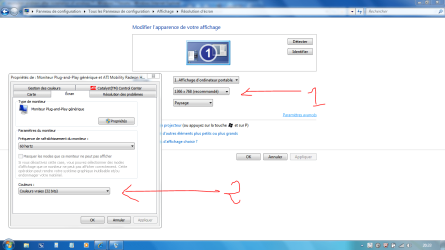
So you mean you can't change anything here ?: (see attached thumbnail)

Control Panel=> Display=> Change Display Parameters
 

Attachments

  • Capture.PNG
    Capture.PNG
    61.2 KB · Views: 85

My Computer My Computer

Computer type
PC/Desktop
Computer Manufacturer/Model Number
Custom Build
OS
Windows 7 Professional SP1 - x64 [Non-UEFI Boot]
CPU
Ivy Bridge Core i5 3570K (Delidded)
Motherboard
Asus P8Z77-V LE PLUS
Memory
G.Skill "Ares" DDR3 PC3-12800 - 1600MHz (16Gb)
Graphics Card(s)
Asus Dual-RX480-O4G
Sound Card
Creative Sound Blaster Z w/5.1 sound system
Monitor(s) Displays
Asus IPS 23"
Screen Resolution
16/9
Hard Drives
Internal:
500Go Sata 6Gb/s (x2)
500Go Sata 3Gb/s (x2)
SSD 60Go Sata 6Gb/s
PSU
In Win C 900W Series 80+ Platinum
Case
Thermaltake Chaser A71
Cooling
Custom Water Cooling Loop
Keyboard
Cooler Master QuickFire XTi
Mouse
Razer Imperator 2012 (4G)
Antivirus
MSE
Browser
IE 11.0.xxx Rtm
Other Info
"Raid0" with Intel Smart Response Technology (HDD/SSD)
Hi wouter, welcome to the forums , hereis the link to your drivers Acer Europe - Service & Support, Drivers & Utilities, Downloads as with most laptops the graphic driver is unique to the mobo manufacturer ;)


Pebbly is right on point here! If you have a spare USB thumb drive or some sort of external storage it would also be a great idea to save a copy of each drivers install file in case you need to reinstall Windows 7 down the road. I have all of my Dell drivers on my external HDD *just in case*. :)
 

My Computer My Computer

Computer type
PC/Desktop
Computer Manufacturer/Model Number
Custom Desktop PC
OS
Windows 7 / Windows 8.1
CPU
Devils Canyon i7-4790K @ 4.8 GHz ~ 1.33v
Motherboard
Asus Z97 Deluxe
Memory
Corsair Vengeance Pro PC3-19200 DDR3 2400MHz
Graphics Card(s)
EVGA GeForce GTX 980 SuperClocked ACX 2.0
Sound Card
Realtek ALC1150 8 channels
Monitor(s) Displays
BenQ XL2720Z 27"
Screen Resolution
1920 x 1080 @ 144Hz
Hard Drives
SSD1: 512GB Samsung 850 Pro
SSD2: 1TB Samsung 850 EVO
SSD3: 1TB Samsung 850 EVO
HDD: 4TB Western Digital Black
Backup: Western Digital My Book Duo 8TB
PSU
Corsair HX1000i / CyberPower CP1500PFCLCD PFC Sinewave UPS 1
Case
Corsair Graphite 780T
Cooling
Custom single loop liquid; CPU delidded; Aerocool DS Fans
Keyboard
Logitech G710 Cherry MX Blue
Mouse
LogitechG502 Proteus Core
Internet Speed
Download: 119MBs /Upload 39.12MBs via Optimum 101 Ultra
Antivirus
MYOB
Browser
Firefox
Other Info
Cooling: EK-Supremecy MX Waterblock, XSPC AX360 Radiator, Swiftech MCP655 Series 12VDC D5 Pump, EK-RES x3 250 Reservoir, Primochill Ice Intensified Coolant, 11x AerocoolDS fans, Primochill Primoflex Avanced LRT Tubing
So you mean you can't change anything here ?: (see attached thumbnail)

Control Panel=> Display=> Change Display Parameters


You can also right-click on your desktop and select Personalize. On the bottom-left corner you will see Display.
 

My Computer My Computer

Computer type
PC/Desktop
Computer Manufacturer/Model Number
Custom Desktop PC
OS
Windows 7 / Windows 8.1
CPU
Devils Canyon i7-4790K @ 4.8 GHz ~ 1.33v
Motherboard
Asus Z97 Deluxe
Memory
Corsair Vengeance Pro PC3-19200 DDR3 2400MHz
Graphics Card(s)
EVGA GeForce GTX 980 SuperClocked ACX 2.0
Sound Card
Realtek ALC1150 8 channels
Monitor(s) Displays
BenQ XL2720Z 27"
Screen Resolution
1920 x 1080 @ 144Hz
Hard Drives
SSD1: 512GB Samsung 850 Pro
SSD2: 1TB Samsung 850 EVO
SSD3: 1TB Samsung 850 EVO
HDD: 4TB Western Digital Black
Backup: Western Digital My Book Duo 8TB
PSU
Corsair HX1000i / CyberPower CP1500PFCLCD PFC Sinewave UPS 1
Case
Corsair Graphite 780T
Cooling
Custom single loop liquid; CPU delidded; Aerocool DS Fans
Keyboard
Logitech G710 Cherry MX Blue
Mouse
LogitechG502 Proteus Core
Internet Speed
Download: 119MBs /Upload 39.12MBs via Optimum 101 Ultra
Antivirus
MYOB
Browser
Firefox
Other Info
Cooling: EK-Supremecy MX Waterblock, XSPC AX360 Radiator, Swiftech MCP655 Series 12VDC D5 Pump, EK-RES x3 250 Reservoir, Primochill Ice Intensified Coolant, 11x AerocoolDS fans, Primochill Primoflex Avanced LRT Tubing
So you mean you can't change anything here ?: (see attached thumbnail)

Control Panel=> Display=> Change Display Parameters


You can also right-click on your desktop and select Personalize. On the bottom-left corner you will see Display.

That's nothing to do with the proper display!:)

same way!
 

My Computer My Computer

Computer type
PC/Desktop
Computer Manufacturer/Model Number
Custom Build
OS
Windows 7 Professional SP1 - x64 [Non-UEFI Boot]
CPU
Ivy Bridge Core i5 3570K (Delidded)
Motherboard
Asus P8Z77-V LE PLUS
Memory
G.Skill "Ares" DDR3 PC3-12800 - 1600MHz (16Gb)
Graphics Card(s)
Asus Dual-RX480-O4G
Sound Card
Creative Sound Blaster Z w/5.1 sound system
Monitor(s) Displays
Asus IPS 23"
Screen Resolution
16/9
Hard Drives
Internal:
500Go Sata 6Gb/s (x2)
500Go Sata 3Gb/s (x2)
SSD 60Go Sata 6Gb/s
PSU
In Win C 900W Series 80+ Platinum
Case
Thermaltake Chaser A71
Cooling
Custom Water Cooling Loop
Keyboard
Cooler Master QuickFire XTi
Mouse
Razer Imperator 2012 (4G)
Antivirus
MSE
Browser
IE 11.0.xxx Rtm
Other Info
"Raid0" with Intel Smart Response Technology (HDD/SSD)
Hi everybody,

I'm new here.
I've got a problem with windows 7 and the resolution and color settings.
I've been searching for almost 2 whole. Just sitting behing my laptop searching for an answer but i can't find one.
So i hope you can help me.

Here is my problem.
I have clean installed windows 7 32 bit on my Acer laptop apsire 5720zg with Nvidia GeForce 8400M GS. The original OS on the Acer was Vista.
At the first time at startup my resolution was down to 640x480 and I can't change it.
And my colors are set back to 16 mb. I thought I had to download the newest driver of Nvidia. I did that but when i installed it and restarted my laptop it gave me an error code 43.

I've been trying several drivers from Nvidia but it doesn't help.

Can someone please help me.

Wouter

So you mean you can't change anything here ?: (see attached thumbnail)

Control Panel=> Display=> Change Display Parameters

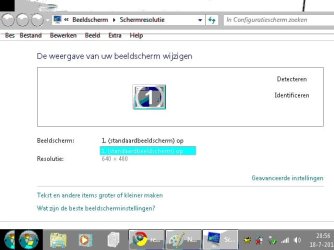
No I can't do anything (see attached thumbnail).
And I also made a backup of al the drivers on vista but the Nvidia driver of the vista version also doesn't work.

And I don't if you can see the poor colors on the tumbnail but that is how it is from the beginning after the installation.

Thanx for the fast replys everone!
 

Attachments

  • Naamloos.jpg
    Naamloos.jpg
    32.4 KB · Views: 28

My Computer My Computer

Computer Manufacturer/Model Number
acer aspire 5720ZG
OS
windows 7
Graphics Card(s)
nvidia 8400 gs
Hi everybody,

I'm new here.
I've got a problem with windows 7 and the resolution and color settings.
I've been searching for almost 2 whole. Just sitting behing my laptop searching for an answer but i can't find one.
So i hope you can help me.

Here is my problem.
I have clean installed windows 7 32 bit on my Acer laptop apsire 5720zg with Nvidia GeForce 8400M GS. The original OS on the Acer was Vista.
At the first time at startup my resolution was down to 640x480 and I can't change it.
And my colors are set back to 16 mb. I thought I had to download the newest driver of Nvidia. I did that but when i installed it and restarted my laptop it gave me an error code 43.

I've been trying several drivers from Nvidia but it doesn't help.

Can someone please help me.

Wouter

So you mean you can't change anything here ?: (see attached thumbnail)

Control Panel=> Display=> Change Display Parameters

No I can't do anything (see attached thumbnail).
And I also made a backup of al the drivers on vista but the Nvidia driver of the vista version also doesn't work.

And I don't if you can see the poor colors on the tumbnail but that is how it is from the beginning after the installation.

Thanx for the fast replys everone!


with the drivers being designed for Vista ,you will have to install them in compatibility mode http://www.sevenforums.com/tutorials/316-compatibility-mode.html ;)
 

My Computer My Computer

Computer type
PC/Desktop
Computer Manufacturer/Model Number
self build
OS
win 7 ultimate32bit, Win8.1pro wmc 32bit
CPU
amd phenom x4 9600
Motherboard
asus m2n32-sli deluxe
Memory
corsair twinxs 2x2gb
Graphics Card(s)
2x nvidia 1gb 8500gt
Sound Card
onboard
Monitor(s) Displays
23" PB Viseo 233d
Screen Resolution
1920x1080
Hard Drives
maxtor sata 500gb
maxtor sata 320gb
fujitsu sata200gb
PSU
oryxx tornado 750w
Case
thermaltake xaser lll
Cooling
artic freezer64 pro + 7 case fans
So you mean you can't change anything here ?: (see attached thumbnail)

Control Panel=> Display=> Change Display Parameters

No I can't do anything (see attached thumbnail).
And I also made a backup of al the drivers on vista but the Nvidia driver of the vista version also doesn't work.

And I don't if you can see the poor colors on the tumbnail but that is how it is from the beginning after the installation.

Thanx for the fast replys everone!


with the drivers being designed for Vista ,you will have to install them in compatibility mode http://www.sevenforums.com/tutorials/316-compatibility-mode.html ;)

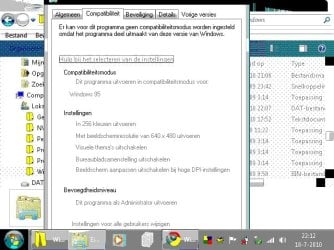
I tried the compatible but it doesn't change anything.
Then somehow i was looking if explorer.exe was compatible (it should be because i installed it from the Windows 7 cd) but what i saw was explorer.exe is compatible with windows 95??? (see atachted tumbnail).
That's not right i think....
 

Attachments

  • Naamloos2.jpg
    Naamloos2.jpg
    56.6 KB · Views: 21

My Computer My Computer

Computer Manufacturer/Model Number
acer aspire 5720ZG
OS
windows 7
Graphics Card(s)
nvidia 8400 gs
Could it be a bios setting? Might want to look at the bios on boot.
 

My Computer My Computer

Computer type
PC/Desktop
Computer Manufacturer/Model Number
Custom Build
OS
Windows 7 Professional SP1 - x64 [Non-UEFI Boot]
CPU
Ivy Bridge Core i5 3570K (Delidded)
Motherboard
Asus P8Z77-V LE PLUS
Memory
G.Skill "Ares" DDR3 PC3-12800 - 1600MHz (16Gb)
Graphics Card(s)
Asus Dual-RX480-O4G
Sound Card
Creative Sound Blaster Z w/5.1 sound system
Monitor(s) Displays
Asus IPS 23"
Screen Resolution
16/9
Hard Drives
Internal:
500Go Sata 6Gb/s (x2)
500Go Sata 3Gb/s (x2)
SSD 60Go Sata 6Gb/s
PSU
In Win C 900W Series 80+ Platinum
Case
Thermaltake Chaser A71
Cooling
Custom Water Cooling Loop
Keyboard
Cooler Master QuickFire XTi
Mouse
Razer Imperator 2012 (4G)
Antivirus
MSE
Browser
IE 11.0.xxx Rtm
Other Info
"Raid0" with Intel Smart Response Technology (HDD/SSD)
Could it be a bios setting? Might want to look at the bios on boot.

And what am i looking for in bios?
I saw on the acer website that i could download bios settings for my laptop.
 

My Computer My Computer

Computer Manufacturer/Model Number
acer aspire 5720ZG
OS
windows 7
Graphics Card(s)
nvidia 8400 gs
What drivers have you download from Acer?
 

My Computer My Computer

OS
ME/XP/Vista/Win7
Could it be a bios setting? Might want to look at the bios on boot.

And what am i looking for in bios?
I saw on the acer website that i could download bios settings for my laptop.

Got that from Acer Site, Windows 7 Home Premium x32bits:

-BIOS AcerBIOS V1.45 - 1.4 MB 2008/12/08
-VGA NVIDIAVGA Driver 8.16.11.8926 - 77.5 MB 2010/03/04
 

My Computer My Computer

Computer type
PC/Desktop
Computer Manufacturer/Model Number
Custom Build
OS
Windows 7 Professional SP1 - x64 [Non-UEFI Boot]
CPU
Ivy Bridge Core i5 3570K (Delidded)
Motherboard
Asus P8Z77-V LE PLUS
Memory
G.Skill "Ares" DDR3 PC3-12800 - 1600MHz (16Gb)
Graphics Card(s)
Asus Dual-RX480-O4G
Sound Card
Creative Sound Blaster Z w/5.1 sound system
Monitor(s) Displays
Asus IPS 23"
Screen Resolution
16/9
Hard Drives
Internal:
500Go Sata 6Gb/s (x2)
500Go Sata 3Gb/s (x2)
SSD 60Go Sata 6Gb/s
PSU
In Win C 900W Series 80+ Platinum
Case
Thermaltake Chaser A71
Cooling
Custom Water Cooling Loop
Keyboard
Cooler Master QuickFire XTi
Mouse
Razer Imperator 2012 (4G)
Antivirus
MSE
Browser
IE 11.0.xxx Rtm
Other Info
"Raid0" with Intel Smart Response Technology (HDD/SSD)

My Computer My Computer

Computer Manufacturer/Model Number
acer aspire 5720ZG
OS
windows 7
Graphics Card(s)
nvidia 8400 gs
Could it be a bios setting? Might want to look at the bios on boot.

And what am i looking for in bios?
I saw on the acer website that i could download bios settings for my laptop.

Got that from Acer Site, Windows 7 Home Premium x32bits:

-BIOS AcerBIOS V1.45 - 1.4 MB 2008/12/08
-VGA NVIDIAVGA Driver8.16.11.8926 - 77.5 MB 2010/03/04

Should i get that?
 

My Computer My Computer

Computer Manufacturer/Model Number
acer aspire 5720ZG
OS
windows 7
Graphics Card(s)
nvidia 8400 gs
And what am i looking for in bios?
I saw on the acer website that i could download bios settings for my laptop.

Got that from Acer Site, Windows 7 Home Premium x32bits:

-BIOS AcerBIOS V1.45 - 1.4 MB 2008/12/08
-VGA NVIDIAVGA Driver8.16.11.8926 - 77.5 MB 2010/03/04

Should i get that?

You should enter the bios by pressing F2 key on boot to see which version is installed before install the VGA NVIDIA

You might need to update your bios before.
 

My Computer My Computer

Computer type
PC/Desktop
Computer Manufacturer/Model Number
Custom Build
OS
Windows 7 Professional SP1 - x64 [Non-UEFI Boot]
CPU
Ivy Bridge Core i5 3570K (Delidded)
Motherboard
Asus P8Z77-V LE PLUS
Memory
G.Skill "Ares" DDR3 PC3-12800 - 1600MHz (16Gb)
Graphics Card(s)
Asus Dual-RX480-O4G
Sound Card
Creative Sound Blaster Z w/5.1 sound system
Monitor(s) Displays
Asus IPS 23"
Screen Resolution
16/9
Hard Drives
Internal:
500Go Sata 6Gb/s (x2)
500Go Sata 3Gb/s (x2)
SSD 60Go Sata 6Gb/s
PSU
In Win C 900W Series 80+ Platinum
Case
Thermaltake Chaser A71
Cooling
Custom Water Cooling Loop
Keyboard
Cooler Master QuickFire XTi
Mouse
Razer Imperator 2012 (4G)
Antivirus
MSE
Browser
IE 11.0.xxx Rtm
Other Info
"Raid0" with Intel Smart Response Technology (HDD/SSD)
Back
Top