64 bit Control Panel

This is true, I have done it many times. The catch is that if someone else needs to work on the computer they have no idea that you did this and must assume that all software in (x86) is 32bit and all not in (x86) is 64bit.

My advice is to try to keep 32bit and 64bit programs in the correct folders for ease of working on your system and/or if others need to work on it too. JMHO.

Nobody touches my system but me so it isn't a problem. :sarc:
 

My Computer My Computer

At a glance

Windows 7 Home Premium x64Intel Core 2 Quad Q9450 @ 3.2GHz4GB DDR2-800MSI Radeon HD 5850
OS
Windows 7 Home Premium x64
CPU
Intel Core 2 Quad Q9450 @ 3.2GHz
Motherboard
Asus P5Q PRO Turbo
Memory
4GB DDR2-800
Graphics Card(s)
MSI Radeon HD 5850
Sound Card
Creative Labs Audigy2 ZS
Monitor(s) Displays
Samsung 225BW
Hard Drives
(2) 1TB Samsung F1, (2) 1.5TB Samsung F2, 1TB Samsung F2, 2TB Samsung F3
PSU
Corsair HX650
Case
Antec Nine Hundred
Father Jack wrote:
My, does not display 32 bit in its title.

Your ODBC appears to be missing, either that or it really is too early for me ......

WindowsStar wrote:
Is this something that you can easily uninstall and then re-install to do some testing??

I can uninstall/reinstall this program, but if control panel is only showing one version of ODBC then wont the results remain the same?

BTW, which version of ODBC is control panel showing? It says 32 bits, but it is running the odbcad32.exe that is in System32 directory, which someone said is the 64 bit version .....

Regards
Bidski
 

My Computer My Computer

At a glance

Windows 7 Premium 64 bit
OS
Windows 7 Premium 64 bit
Father Jack wrote:
My, does not display 32 bit in its title.

Your ODBC appears to be missing, either that or it really is too early for me ......

WindowsStar wrote:
Is this something that you can easily uninstall and then re-install to do some testing??

I can uninstall/reinstall this program, but if control panel is only showing one version of ODBC then wont the results remain the same?

BTW, which version of ODBC is control panel showing? It says 32 bits, but it is running the odbcad32.exe that is in System32 directory, which someone said is the 64 bit version .....

Regards
Bidski

Maybe, however a re-install may fix it. Maybe it is just labeled wrong and really is running in 64bit??
 

My Computer My Computer

At a glance

Windows 7 Enterprise (x64); Windows Server 20...16GB
Computer type
PC/Desktop
Computer Manufacturer/Model Number
Dell OP7010
OS
Windows 7 Enterprise (x64); Windows Server 2008 R2 (x64)
Memory
16GB
Monitor(s) Displays
4 Dell 24" LCD
Screen Resolution
1280x1024
Keyboard
Dell
Mouse
Dell Optical
Internet Speed
40meg
Father Jack wrote:
My, does not display 32 bit in its title.

Your ODBC appears to be missing, either that or it really is too early for me ......

WindowsStar wrote:
Is this something that you can easily uninstall and then re-install to do some testing??

I can uninstall/reinstall this program, but if control panel is only showing one version of ODBC then wont the results remain the same?

BTW, which version of ODBC is control panel showing? It says 32 bits, but it is running the odbcad32.exe that is in System32 directory, which someone said is the 64 bit version .....

Regards
Bidski

Have you tried post #2.................After all the help you are getting we are almost back to #2
 

My Computer My Computer

At a glance

Windows 7 Home Premium 64bitIntel(R)Core(TM)2 quad [email protected] 2.39GHz6GB DDR2 6400GeForce 8500/512MB
Computer Manufacturer/Model Number
HP M9077c
OS
Windows 7 Home Premium 64bit
CPU
Intel(R)Core(TM)2 quad [email protected] 2.39GHz
Motherboard
ASUSeK
Memory
6GB DDR2 6400
Graphics Card(s)
GeForce 8500/512MB
Sound Card
Realtek High Def Audio
Monitor(s) Displays
HP w2408 LCD 24" widescreen
Screen Resolution
1920x1200
Cooling
6 pack of Bud
Keyboard
MS wireless Inteli
Mouse
MS wireless Inteli
Have you tried post #2.................After all the help you are getting we are almost back to #2

Just tried this, not only did it not work but Windows, in its infinite wisdom, decided to overwrite the boot record. Now I have lost access to the other OS that I had installed on my system.

Regards
Bidski
 

My Computer My Computer

At a glance

Windows 7 Premium 64 bit
OS
Windows 7 Premium 64 bit
Maybe, however a re-install may fix it. Maybe it is just labeled wrong and really is running in 64bit??

Well the quickest way to test that is to run the program and then open Task manager under the processes tab, if it says "ODBC (or whatever)*32 then its running in 32 bit
 

My Computer My Computer

At a glance

Windows 10 Pro x64Intel Core i5 7400 @ 3.00GHz8GB 2133Mhz DDR4 (OEM supplied)Gygabyte Windforce GTX 1050Ti (Factory Overcl...
Computer type
PC/Desktop
Computer Manufacturer/Model Number
Medion Erazer (note to self: insert model number) - with custom additions
OS
Windows 10 Pro x64
CPU
Intel Core i5 7400 @ 3.00GHz
Motherboard
OEM supllied with PC
Memory
8GB 2133Mhz DDR4 (OEM supplied)
Graphics Card(s)
Gygabyte Windforce GTX 1050Ti (Factory Overclocked)
Sound Card
Realtek
Monitor(s) Displays
Acer Al1980 + HKC
Screen Resolution
1360*768(HKC) / 1280*1024(Acer)
Hard Drives
1TB Toshiba
1TB WD Caviar Green
120GB Samsung Evo 840
PSU
OEM supplied (no power rating on case)
Case
OEM Supplied
Cooling
Stock
Keyboard
Logitech Wireless
Mouse
Logitect Wireless
Internet Speed
40Mb/s Down 10Mb/s Up
Antivirus
Defender
Browser
Firefox
Father Jack wrote:
My, does not display 32 bit in its title.
Your ODBC appears to be missing, either that or it really is too early for me ......
Not missing, just hidden. Only the "regularly used" applets are shown, tucked the rest away.
 

My Computer My Computer

At a glance

Windows 7 x64
OS
Windows 7 x64
Well the quickest way to test that is to run the program and then open Task manager under the processes tab, if it says "ODBC (or whatever)*32 then its running in 32 bit

No *32 on ODBC

Regards
Bidski
 

My Computer My Computer

At a glance

Windows 7 Premium 64 bit
OS
Windows 7 Premium 64 bit
does anyone have any other thoughts on this?

Regards
Bidski
 

My Computer My Computer

At a glance

Windows 7 Premium 64 bit
OS
Windows 7 Premium 64 bit
wow, for real? nothing?

Regards
Bidski
 

My Computer My Computer

At a glance

Windows 7 Premium 64 bit
OS
Windows 7 Premium 64 bit
I ran a test:

odbcad32.exe in the System32 runs 64bit.
odbcad32.exe in the SysWOW64 runs 32bit.

Everything seems to work fine. The icons in the Control Panel are correct, one for the 64bit and one for the 32bit.

Did that take care of it??

-WS
 

My Computer My Computer

At a glance

Windows 7 Enterprise (x64); Windows Server 20...16GB
Computer type
PC/Desktop
Computer Manufacturer/Model Number
Dell OP7010
OS
Windows 7 Enterprise (x64); Windows Server 2008 R2 (x64)
Memory
16GB
Monitor(s) Displays
4 Dell 24" LCD
Screen Resolution
1280x1024
Keyboard
Dell
Mouse
Dell Optical
Internet Speed
40meg
Did that take care of it??

Well no. Why does my control panel show ODBC (32-bit) but run the 64 bit version and not show any 32 bit drivers?

Regards
Bidski
 

My Computer My Computer

At a glance

Windows 7 Premium 64 bit
OS
Windows 7 Premium 64 bit
Humm, not sure, maybe some older software added a CPL that has that ICON and Windows 7 is smart enough to know it is 32 bit? Have you looked for a .CPL file in your system32 directory?
 

My Computer My Computer

At a glance

Windows 7 Enterprise (x64); Windows Server 20...16GB
Computer type
PC/Desktop
Computer Manufacturer/Model Number
Dell OP7010
OS
Windows 7 Enterprise (x64); Windows Server 2008 R2 (x64)
Memory
16GB
Monitor(s) Displays
4 Dell 24" LCD
Screen Resolution
1280x1024
Keyboard
Dell
Mouse
Dell Optical
Internet Speed
40meg
Humm, not sure, maybe some older software added a CPL that has that ICON and Windows 7 is smart enough to know it is 32 bit?

The version of ODBC that Windows 7 runs from the control panel is the 64 bit version, I am sure of that. So if Windows 7 is being smart and calling it the 32 bit version its being pretty dumb about it.

Have you looked for a .CPL file in your system32 directory?

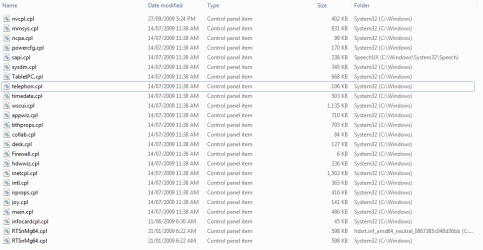
I have attached a screenshot of all .cpl files in my system32 directory.

Regards
Bidski
 

Attachments

  • CPL.png
    CPL.png
    13.9 KB · Views: 102

My Computer My Computer

At a glance

Windows 7 Premium 64 bit
OS
Windows 7 Premium 64 bit
I don't see it there: Maybe in the "C:\Windows\SysWOW64" folder? Maybe just search the whole machine for .CPL and see what it comes up with. I have no idea how that Icon is coming up.
 

My Computer My Computer

At a glance

Windows 7 Enterprise (x64); Windows Server 20...16GB
Computer type
PC/Desktop
Computer Manufacturer/Model Number
Dell OP7010
OS
Windows 7 Enterprise (x64); Windows Server 2008 R2 (x64)
Memory
16GB
Monitor(s) Displays
4 Dell 24" LCD
Screen Resolution
1280x1024
Keyboard
Dell
Mouse
Dell Optical
Internet Speed
40meg
Ok, there is a ODBCCP32.CPL file in the SysWOW64 directory, thats the only ODBC looking one i can find on my system.

Regards
Bidski
 

My Computer My Computer

At a glance

Windows 7 Premium 64 bit
OS
Windows 7 Premium 64 bit
Ok, there is a ODBCCP32.CPL file in the SysWOW64 directory, thats the only ODBC looking one i can find on my system.

Regards
Bidski

Ok for a test let's rename this file or cut and paste it to a Flash Drive so the machine cannot find it. Does that remove the 32bit version in the control panel? If it does then we know where it is coming from. You can remove it and call the odbcad32.exe directly and you will be accessing the 64bit all the time. Or you can leave it now that you know where it came from. Maybe we figured this one out. :)
 

My Computer My Computer

At a glance

Windows 7 Enterprise (x64); Windows Server 20...16GB
Computer type
PC/Desktop
Computer Manufacturer/Model Number
Dell OP7010
OS
Windows 7 Enterprise (x64); Windows Server 2008 R2 (x64)
Memory
16GB
Monitor(s) Displays
4 Dell 24" LCD
Screen Resolution
1280x1024
Keyboard
Dell
Mouse
Dell Optical
Internet Speed
40meg
Ok, removed that files from the SysWOW64 directory and went to control panel. As expected the ODBC (32 bit) entry was no longer present in control panel.

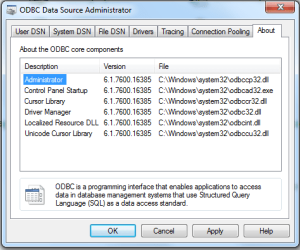
The problem still remains that the control panel is still running odbcad32.exe in the System32 directory. Attached is a screenshot of the about page from ODBC (run from the control panel). This page is also the same if I run SysWOW64\odbcad32.exe.

The problem still remains. ODBC only shows all the drivers if I run SysWOW64\odbcad32.exe, if I run System32\odbcad32.exe or run ODBC from the control panel I only get a small portion of all the drivers.

Regards
Bidski
 

Attachments

  • ODBC.png
    ODBC.png
    14.3 KB · Views: 7

My Computer My Computer

At a glance

Windows 7 Premium 64 bit
OS
Windows 7 Premium 64 bit
The problem still remains that the control panel is still running odbcad32.exe in the System32 directory. Attached is a screenshot of the about page from ODBC (run from the control panel). This page is also the same if I run SysWOW64\odbcad32.exe.

The problem still remains. ODBC only shows all the drivers if I run SysWOW64\odbcad32.exe, if I run System32\odbcad32.exe or run ODBC from the control panel I only get a small portion of all the drivers.

Regards
Bidski

Just so Im clear here: You think it's the 32 bit version, because it says "System 32" right?

This is going to sound REALLY stupid, but on 64 bit Windows, anything ran from "System 32" is 64 bit, and anything ran from "WOW64" is 32 bit. Exactly the opposite of what you'd think it was I know, but WOW64 is actually Window's 32 bit emulation layer, (WOW stands for "Windows on Windows")

Couple that with the fact you said that ODBC was showing as ODBC and not ODBC*32 in Task Manager, and I can't help thinking that you actually dont have a problem at all....

Of course if Im completely misunderstanding the situation then please set me straight :)
 

My Computer My Computer

At a glance

Windows 10 Pro x64Intel Core i5 7400 @ 3.00GHz8GB 2133Mhz DDR4 (OEM supplied)Gygabyte Windforce GTX 1050Ti (Factory Overcl...
Computer type
PC/Desktop
Computer Manufacturer/Model Number
Medion Erazer (note to self: insert model number) - with custom additions
OS
Windows 10 Pro x64
CPU
Intel Core i5 7400 @ 3.00GHz
Motherboard
OEM supllied with PC
Memory
8GB 2133Mhz DDR4 (OEM supplied)
Graphics Card(s)
Gygabyte Windforce GTX 1050Ti (Factory Overclocked)
Sound Card
Realtek
Monitor(s) Displays
Acer Al1980 + HKC
Screen Resolution
1360*768(HKC) / 1280*1024(Acer)
Hard Drives
1TB Toshiba
1TB WD Caviar Green
120GB Samsung Evo 840
PSU
OEM supplied (no power rating on case)
Case
OEM Supplied
Cooling
Stock
Keyboard
Logitech Wireless
Mouse
Logitect Wireless
Internet Speed
40Mb/s Down 10Mb/s Up
Antivirus
Defender
Browser
Firefox
The problem is as follows

Control Panel shows "ODBC (32-bit)". The ODBC control panel file (ODBCCP32.CPL) is located in the SysWOW64 directory, but it is running the 64 bit version of ODBC (as shown by the lack of a *32 in task manager and by the ODBC About page showing files in the System32 directory).

ODBC is also not showing a lot of drivers that are shown by running SysWOW64\odbcad32.exe. I believe this is because they are 32-bit drivers and so the 64 bit version of ODBC doesnt recognise them.

Does that spell it out more clearly?

Regards
Bidski
 

My Computer My Computer

At a glance

Windows 7 Premium 64 bit
OS
Windows 7 Premium 64 bit
Back
Top