- Local time
- 5:03 PM
- Messages
- 1,258
When Media Player is in "Library" view, more specifically, when the view is set to "Icon", it displays as an icon the album art of an album, with the "Album Name" and "Album Artist" underneath as titles:
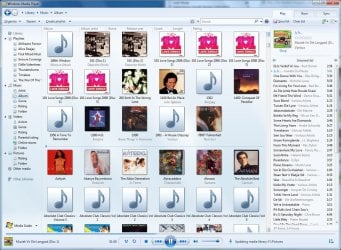
Media Player Library View
The icon is at a default size of 96x96 pixels.
What I want to know is (even if a registry edit is required), can the size of the Icon be changed to maybe 128x128 or larger? I ask this because if you look at the above screenshot, you'll see that sometimes if the album name is relatively long ("101 Love Songs 2008 (Disc 1)" and "1492: Conquest of Paradise" for example), then the text will be wrapped, and the "Album Artist" part of the icon titles is not displayed.
It is my hope that by increasing the size of the icon, there will be more room available to display the "Album Name" without pushing off the "Album Artist".
Also related, how do I force WMP to totally ignore my pictures? It doesn't make sense to have pictures in a media library...
Media Player Library View
The icon is at a default size of 96x96 pixels.
What I want to know is (even if a registry edit is required), can the size of the Icon be changed to maybe 128x128 or larger? I ask this because if you look at the above screenshot, you'll see that sometimes if the album name is relatively long ("101 Love Songs 2008 (Disc 1)" and "1492: Conquest of Paradise" for example), then the text will be wrapped, and the "Album Artist" part of the icon titles is not displayed.
It is my hope that by increasing the size of the icon, there will be more room available to display the "Album Name" without pushing off the "Album Artist".
Also related, how do I force WMP to totally ignore my pictures? It doesn't make sense to have pictures in a media library...
My Computer
At a glance
Windows 7 Professional 32-bit SP1AMD A4/A63.00GB EDOVMware SVGA 3D
- Computer type
- PC/Desktop
- Computer Manufacturer/Model Number
- Virtual Machine
- OS
- Windows 7 Professional 32-bit SP1
- CPU
- AMD A4/A6
- Motherboard
- Intel Corporation 440BX Desktop Reference Platform
- Memory
- 3.00GB EDO
- Graphics Card(s)
- VMware SVGA 3D
- Sound Card
- High Definition Audio Device
- Monitor(s) Displays
- Generic Non-PnP Monitor on VMware SVGA 3D
- Screen Resolution
- 1440x900
- Hard Drives
- 1 x 60GB VMware Virtual SATA Hard Drive ATA Device
- Antivirus
- Kaspersky Total Security