How do I change Windows Media Player Library View Icon Sizes?

Dzomlija

Dark Lord of the Sith
Guru
VIP
Local time
10:41 AM
Messages
1,258
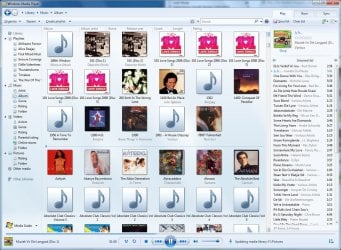
When Media Player is in "Library" view, more specifically, when the view is set to "Icon", it displays as an icon the album art of an album, with the "Album Name" and "Album Artist" underneath as titles:
wmp_library_albums.jpg
Media Player Library View​

The icon is at a default size of 96x96 pixels.

What I want to know is (even if a registry edit is required), can the size of the Icon be changed to maybe 128x128 or larger? I ask this because if you look at the above screenshot, you'll see that sometimes if the album name is relatively long ("101 Love Songs 2008 (Disc 1)" and "1492: Conquest of Paradise" for example), then the text will be wrapped, and the "Album Artist" part of the icon titles is not displayed.

It is my hope that by increasing the size of the icon, there will be more room available to display the "Album Name" without pushing off the "Album Artist".

Also related, how do I force WMP to totally ignore my pictures? It doesn't make sense to have pictures in a media library...
 

My Computer My Computer

At a glance

Windows 7 Professional 32-bit SP1AMD A4/A63.00GB EDOVMware SVGA 3D
Computer type
PC/Desktop
Computer Manufacturer/Model Number
Virtual Machine
OS
Windows 7 Professional 32-bit SP1
CPU
AMD A4/A6
Motherboard
Intel Corporation 440BX Desktop Reference Platform
Memory
3.00GB EDO
Graphics Card(s)
VMware SVGA 3D
Sound Card
High Definition Audio Device
Monitor(s) Displays
Generic Non-PnP Monitor on VMware SVGA 3D
Screen Resolution
1440x900
Hard Drives
1 x 60GB VMware Virtual SATA Hard Drive ATA Device
Antivirus
Kaspersky Total Security
Hi Peter !

I dont have any answer for your first question . Actually I am also searching for it :o

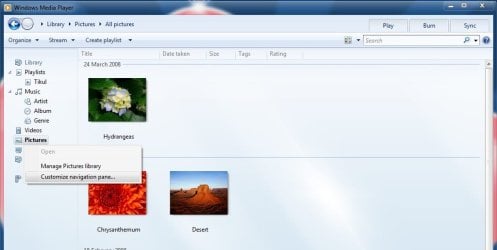
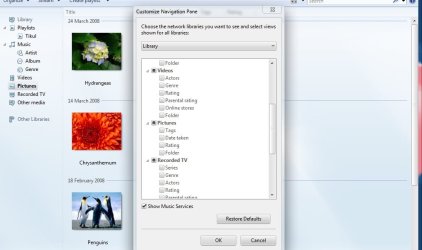
But there may be a way to remove all the pictures from WMP library. Right click on the picture tab in the left navigation pane, select customize navigation pane, and uncheck picture there . Now click ok .

No more pictures are there :D

You may see the snips . Snip 1 : Right click and Customize navigation pane
1.jpg

Snip 2 : Uncheck pictures . Be careful ... at first click, it will remove the square, but check all boxes under pictures. you need to have a second click
2.jpg

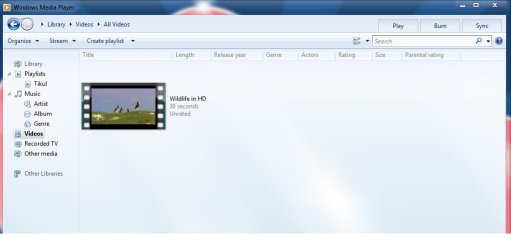
Snip 3: Nevigate to some other library, and there is no pictures at all
3.jpg
 

My Computer My Computer

At a glance

Microsoft Windows 10 Pro Insider Preview 64-bitIntel(R) Core(TM) i3-4130 CPU @ 3.40GHzCorsair Vengence 4GB x2 (8.00GB Dual-Channel ...2047MB GeForce GTS 450 (ZOTAC International)
Computer type
PC/Desktop
Computer Manufacturer/Model Number
Self Assembled
OS
Microsoft Windows 10 Pro Insider Preview 64-bit
CPU
Intel(R) Core(TM) i3-4130 CPU @ 3.40GHz
Motherboard
Gigabyte Technology Co., Ltd. B85M-D3H
Memory
Corsair Vengence 4GB x2 (8.00GB Dual-Channel DDR3 @ 798MHz)
Graphics Card(s)
2047MB GeForce GTS 450 (ZOTAC International)
Sound Card
Onboard (Realtek High Definition Audio)
Monitor(s) Displays
LG Flatron E2040T
Screen Resolution
1600x900
Hard Drives
Western Digital 1 TB
Seagate 500 GB
PSU
Corsair VS550
Case
Cooler Master K380
Cooling
Cooler Master Seidon 120V Plus
Keyboard
Logitech MK260r
Mouse
Logitech MK260r
Internet Speed
PMPL Broadband
Antivirus
Windows Defender + MBAM
Browser
Firefox
Other Info
Dell Studio 15" Laptop
Hi Peter !

I dont have any answer for your first question . Actually I am also searching for it :o

But there may be a way to remove all the pictures from WMP library. Right click on the picture tab in the left navigation pane, select customize navigation pane, and uncheck picture there . Now click ok .

No more pictures are there :D

You may see the snips . Snip 1 : Right click and Customize navigation pane
View attachment 86543

Snip 2 : Uncheck pictures . Be careful ... at first click, it will remove the square, but check all boxes under pictures. you need to have a second click
View attachment 86544

Snip 3: Nevigate to some other library, and there is no pictures at all
View attachment 86545

Thanks, Arc, but the problem is, even if I do remove "Pictures" from the navigation pane, WMP still wants to do updates from My Pictures. The second I do anything in My Pictures (like change a tag, or save a new file), then WMP does it's "Updating media library F:\Pictures" thing. I don't want WMP to do anything with my pictures...

As for my first question, I'm looking also, but no luck so far on changing the icon sizes...
 

My Computer My Computer

At a glance

Windows 7 Professional 32-bit SP1AMD A4/A63.00GB EDOVMware SVGA 3D
Computer type
PC/Desktop
Computer Manufacturer/Model Number
Virtual Machine
OS
Windows 7 Professional 32-bit SP1
CPU
AMD A4/A6
Motherboard
Intel Corporation 440BX Desktop Reference Platform
Memory
3.00GB EDO
Graphics Card(s)
VMware SVGA 3D
Sound Card
High Definition Audio Device
Monitor(s) Displays
Generic Non-PnP Monitor on VMware SVGA 3D
Screen Resolution
1440x900
Hard Drives
1 x 60GB VMware Virtual SATA Hard Drive ATA Device
Antivirus
Kaspersky Total Security
Back
Top