What don't you like about Windows 7?

Status
Not open for further replies.
Windows Logo Key Shortcuts 2

Those descriptions refer to Vista and 7 (some of them also apply to XP).
The red ones are specific to Windows 7.


If you have changed the "Power" button function in the "Start Menu", then this shortcut will perform that action (instead of Shutdown).
[FONT=&quot]
Logo key [/FONT]
[FONT=&quot], →, Enter[/FONT]
[FONT=&quot]Shutdown

[/FONT]I've edited the original post, to correct the error/omission. :)
 
Last edited:

My Computer My Computer

At a glance

W7 Ultimate SP1, LM19.2 MATE, W10 Home 1703, ...AMD Phenom II x6 1100T, 3.3 GHz12GB DDR3 1333 G-Skill (4GB x 2), G-Skill (2G...NVIDIA GeForce GTX 660
Computer type
PC/Desktop
Computer Manufacturer/Model Number
n/a
OS
W7 Ultimate SP1, LM19.2 MATE, W10 Home 1703, W10 Pro 1703 VM, #All 64 bit
CPU
AMD Phenom II x6 1100T, 3.3 GHz
Motherboard
ASUS M4A88T-M/USB3 (AM3)
Memory
12GB DDR3 1333 G-Skill (4GB x 2), G-Skill (2GB x 2)
Graphics Card(s)
NVIDIA GeForce GTX 660
Sound Card
Realtek?
Monitor(s) Displays
Samsung S23B350
Screen Resolution
1920x1080
Hard Drives
WD Green 2TB (SATA), WD Green 3TB (SATA), WD Blue 4TB (SATA), WD Blue 6TB (SATA)
PSU
Cooler Master
Case
Antec GX300 Tower
Cooling
3x Antec TRICOOL 120mm Fans
Mouse
Wired Optical
Internet Speed
DSL
Antivirus
Avast
Browser
Pale Moon (64 bit)
Other Info
2018-12-27 Upgraded HDDs
2015-12-10 Upgraded case, graphics card, storage
2015-08-15 Upgraded motherboard & RAM
2015-07-15 Upgraded LM17.1 to LM17.2
Those descriptions refer to Vista and 7 (some of them also apply to XP).
The red ones are specific to Windows 7.
In your list I think the Logo Key + E will open "Computer" not Libraries in Windows 7 and XP (My Computer)!
 

My Computer My Computer

At a glance

Microsoft Windows 7 Home Premium 64-bit 7601 ...Intel(R) Core(TM) i7-3770 CPU @ 3.40GHz8.00 GBIntel(R) HD Graphics 4000
Computer type
PC/Desktop
OS
Microsoft Windows 7 Home Premium 64-bit 7601 Multiprocessor Free Service Pack 1
CPU
Intel(R) Core(TM) i7-3770 CPU @ 3.40GHz
Motherboard
ASUSTeK COMPUTER INC. P8H77-M
Memory
8.00 GB
Graphics Card(s)
Intel(R) HD Graphics 4000
Sound Card
On Board
Monitor(s) Displays
Dell 24"
Screen Resolution
1920 x 1080
Hard Drives
(1) INTEL SSDSC2CT180A3 ATA Device (2) ST500DM002-1BD142 ATA Device (3) WDC WD3200AAKS-75L9A0 ATA Device (4) Generic- Compact Flash USB Device (5) Generic- MS/MS-Pro USB Device (6) Generic- SD/MMC USB Device (7) Generic- SM/xD-Picture USB
PSU
500w Corsair
Case
Cooler Master
Cooling
3 Fans
Keyboard
Logitech MK300
Mouse
Logitech WOM
Internet Speed
75Mb
Antivirus
Norton 360
Browser
Firefox, Opera, IE
Hammerhead's "third party file manager" says it all really. With all the free (not even paid for) file managers that offer a million more features than Explorer isn't it about time Microsoft started implementing these features themselves? If someone else is doing it better - catch up. Geez that's not rocket science. And what these other file managers are doing isn't rocket science either - it's not like it's terribly hard stuff that Microsoft is unable to do.

Batch file/folder renaming is one of the biggest peeves I have with Windows and always have. It's one of the few instances when I use another "third party file manager" and it bugs the heck out of me that I have to.

Not being able to decide for myself, me, the user, what I want to have on my Explorer toolbar is another one. Why would I want to have Burn available for every file I click instead of a Delete button? Yes you can add it to the toolbar with a registry tweak but if it can be done in the registry it should be offered in the GUI so people don't have to go there.

And that's probably the thing that peeves me the most - there should be much more user customisation available across the board. And the customisations that can be done should be easier to get to. If there are so many things that can be changed via the registry or other 'hacks' then why not put them in a GUI? If the features are accessible but 'hidden' what's the point of that?????? Adding new features is great but taking old ones out should be done as little as possible and let people have the choice. And 'hiding' them is just dumb. One of the biggest gripes I've seen posted on the net is the lack of a Classic Start Menu option. Apparently Microsoft's answer to people wanting one is "the Classic Start Menu is outdated - move on". Fine attitude that. Microsoft make too many decisions about how I use my computer.

.
I second that.
 

My Computer My Computer

At a glance

XP Media Edition / Vista /Win 7 Home PremiumWin 7 Machine: Intel Core 2 Duo T5850 @ 2.16G...4GB Dual Channel DDR2 @ 333MHz 5-5-5-15Nvidia Defaul 1920X1200 256MB GeForce 9300M
Computer Manufacturer/Model Number
HP Touchsmart
OS
XP Media Edition / Vista /Win 7 Home Premium
CPU
Win 7 Machine: Intel Core 2 Duo T5850 @ 2.16GHz Merom 65nm
Motherboard
Pegatron Corp. EVE Model
Memory
4GB Dual Channel DDR2 @ 333MHz 5-5-5-15
Graphics Card(s)
Nvidia Defaul 1920X1200 256MB GeForce 9300M
Sound Card
SoundMAX Integrated Digital HD Audio
Monitor(s) Displays
HP 25" Flat Panel Touch Screen
Screen Resolution
1900X1200
Hard Drives
500 GB Seagate ST3500620as (Sata) 1.5 TB Seagate External
Keyboard
HP Model RK713A
Internet Speed
3.0Gb
A Mail Client for me, i don't want to go down the live route

Thunderbird

the threads about what you don't like about win 7, not other software to add on to it to make it work, like i said in another post.


i've tried TB, didn't like it much, OE/WM was nice and simple, was thinking about upgrading my mums PC to win 7, she's 71 and trying to get her to work another email program would probably be too much for her :eek: even when i think it's just a bit too busy/complicated to use
A mail client used to be part of the OS. It's REMOVAL is morned by some. :)
 
Last edited:

My Computer My Computer

At a glance

XP Media Edition / Vista /Win 7 Home PremiumWin 7 Machine: Intel Core 2 Duo T5850 @ 2.16G...4GB Dual Channel DDR2 @ 333MHz 5-5-5-15Nvidia Defaul 1920X1200 256MB GeForce 9300M
Computer Manufacturer/Model Number
HP Touchsmart
OS
XP Media Edition / Vista /Win 7 Home Premium
CPU
Win 7 Machine: Intel Core 2 Duo T5850 @ 2.16GHz Merom 65nm
Motherboard
Pegatron Corp. EVE Model
Memory
4GB Dual Channel DDR2 @ 333MHz 5-5-5-15
Graphics Card(s)
Nvidia Defaul 1920X1200 256MB GeForce 9300M
Sound Card
SoundMAX Integrated Digital HD Audio
Monitor(s) Displays
HP 25" Flat Panel Touch Screen
Screen Resolution
1900X1200
Hard Drives
500 GB Seagate ST3500620as (Sata) 1.5 TB Seagate External
Keyboard
HP Model RK713A
Internet Speed
3.0Gb
oh another thing. the stubborn side panel of the windows...why must i chose from only two options...i really don't want this new "library" thing there...and i certainly don't want to open my pin-up of "my computer" only to find the damn library again...i don't use that thing...why are they trying to annoy the hell out of me......
If you took the time to give the libraries a chance, you might just like it. I was skeptical at first, but I definitely appreciate them now.;)
I don't complain about Libraries. A lot of people like them. If they do... keep them in. I played with them, but don't like or use them personaly. I disabled them and Prefer they stay that way. Not everyone will like or use all the apps/functions included in the OS. I guess that's the "P" in PC. :)
 

My Computer My Computer

At a glance

XP Media Edition / Vista /Win 7 Home PremiumWin 7 Machine: Intel Core 2 Duo T5850 @ 2.16G...4GB Dual Channel DDR2 @ 333MHz 5-5-5-15Nvidia Defaul 1920X1200 256MB GeForce 9300M
Computer Manufacturer/Model Number
HP Touchsmart
OS
XP Media Edition / Vista /Win 7 Home Premium
CPU
Win 7 Machine: Intel Core 2 Duo T5850 @ 2.16GHz Merom 65nm
Motherboard
Pegatron Corp. EVE Model
Memory
4GB Dual Channel DDR2 @ 333MHz 5-5-5-15
Graphics Card(s)
Nvidia Defaul 1920X1200 256MB GeForce 9300M
Sound Card
SoundMAX Integrated Digital HD Audio
Monitor(s) Displays
HP 25" Flat Panel Touch Screen
Screen Resolution
1900X1200
Hard Drives
500 GB Seagate ST3500620as (Sata) 1.5 TB Seagate External
Keyboard
HP Model RK713A
Internet Speed
3.0Gb
Yeah, and what's up with all these colors? Nobody really ever needs more than 16 colors anyway, right?
You can turn that off, you know...or get a different skin. Hehe. I want to see the functional B&W win color scheme, that isn't just a monitor or video card setting.
 

My Computer My Computer

At a glance

Depends...
OS
Depends...
Thanks mitchell65

Those descriptions refer to Vista and 7 (some of them also apply to XP).
The red ones are specific to Windows 7.
In your list I think the Logo Key + E will open "Computer" not Libraries in Windows 7 and XP (My Computer)!

My bad! :o
Thanks mitchell65. :)

I've edited the original post, to correct the error.
With the Taskbar pinning in Windows 7, I don't use Logo Key + E very often (I use it a lot in XP).
 
Last edited:

My Computer My Computer

At a glance

W7 Ultimate SP1, LM19.2 MATE, W10 Home 1703, ...AMD Phenom II x6 1100T, 3.3 GHz12GB DDR3 1333 G-Skill (4GB x 2), G-Skill (2G...NVIDIA GeForce GTX 660
Computer type
PC/Desktop
Computer Manufacturer/Model Number
n/a
OS
W7 Ultimate SP1, LM19.2 MATE, W10 Home 1703, W10 Pro 1703 VM, #All 64 bit
CPU
AMD Phenom II x6 1100T, 3.3 GHz
Motherboard
ASUS M4A88T-M/USB3 (AM3)
Memory
12GB DDR3 1333 G-Skill (4GB x 2), G-Skill (2GB x 2)
Graphics Card(s)
NVIDIA GeForce GTX 660
Sound Card
Realtek?
Monitor(s) Displays
Samsung S23B350
Screen Resolution
1920x1080
Hard Drives
WD Green 2TB (SATA), WD Green 3TB (SATA), WD Blue 4TB (SATA), WD Blue 6TB (SATA)
PSU
Cooler Master
Case
Antec GX300 Tower
Cooling
3x Antec TRICOOL 120mm Fans
Mouse
Wired Optical
Internet Speed
DSL
Antivirus
Avast
Browser
Pale Moon (64 bit)
Other Info
2018-12-27 Upgraded HDDs
2015-12-10 Upgraded case, graphics card, storage
2015-08-15 Upgraded motherboard & RAM
2015-07-15 Upgraded LM17.1 to LM17.2
Hammerhead's "third party file manager" says it all really. With all the free (not even paid for) file managers that offer a million more features than Explorer isn't it about time Microsoft started implementing these features themselves? If someone else is doing it better - catch up. Geez that's not rocket science. And what these other file managers are doing isn't rocket science either - it's not like it's terribly hard stuff that Microsoft is unable to do.

Batch file/folder renaming is one of the biggest peeves I have with Windows and always have. It's one of the few instances when I use another "third party file manager" and it bugs the heck out of me that I have to.

Not being able to decide for myself, me, the user, what I want to have on my Explorer toolbar is another one. Why would I want to have Burn available for every file I click instead of a Delete button? Yes you can add it to the toolbar with a registry tweak but if it can be done in the registry it should be offered in the GUI so people don't have to go there.

And that's probably the thing that peeves me the most - there should be much more user customisation available across the board. And the customisations that can be done should be easier to get to. If there are so many things that can be changed via the registry or other 'hacks' then why not put them in a GUI? If the features are accessible but 'hidden' what's the point of that?????? Adding new features is great but taking old ones out should be done as little as possible and let people have the choice. And 'hiding' them is just dumb. One of the biggest gripes I've seen posted on the net is the lack of a Classic Start Menu option. Apparently Microsoft's answer to people wanting one is "the Classic Start Menu is outdated - move on". Fine attitude that. Microsoft make too many decisions about how I use my computer.

.
I second that.

What peeves me the most are people complaining about things like the missing Classic Menu, the Customizable Explorer Toolbar, Non-Customizable Details Pane, Hidden Features with No GUI etc, etc, ad infinitum!

While some of the complaints are genuine (I, for one, don't miss the Classic Start Menu), what I don't understand is why are people complaining? If I remember correctly, the Windows 7 Public BETA Program was the largest public beta ever conducted by Microsoft, and testers had ample opportunity to voice their concerns or suggest changes.

And don't give me that "But I didn't want to try the beta" rant. With my circle of friends, I was the only one I know that had the guts to try the beta, but many of the suggestions I made via the "Send Feedback" link where made by my friend who where "looking over my shoulder".

My point is this: If not enough people asked for the Classic Start Menu to be included, then Microsoft had no reason to include it. and the same applies for other features also.

So don't go complaining now about something missing when you you had an opportunity to do something about it, but didn't act.

Although I must point out that I was hoping for some of these complaints top be addressed with SP1, which has turned out to be nothing more than a roll-up of the past year's updates. I guess we'll have to wait for SP2 then to be able to customise what info get's displayed in the Explorer Details Pane, or to be able to customize it's toolbar.
 

My Computer My Computer

At a glance

Windows 7 Professional 32-bit SP1AMD A4/A63.00GB EDOVMware SVGA 3D
Computer type
PC/Desktop
Computer Manufacturer/Model Number
Virtual Machine
OS
Windows 7 Professional 32-bit SP1
CPU
AMD A4/A6
Motherboard
Intel Corporation 440BX Desktop Reference Platform
Memory
3.00GB EDO
Graphics Card(s)
VMware SVGA 3D
Sound Card
High Definition Audio Device
Monitor(s) Displays
Generic Non-PnP Monitor on VMware SVGA 3D
Screen Resolution
1440x900
Hard Drives
1 x 60GB VMware Virtual SATA Hard Drive ATA Device
Antivirus
Kaspersky Total Security
I thought I quite clearly stated that Microsoft have told people "the Classic Start Menu is outdated - move on". So plenty of people obviously did want it but Microsoft didn't care. And just because they ask for beta feedback doesn't mean they're going to pay any attention to it.

And isn't the whole bottom of this thread the fact that we don't have the CHOICE!!! All we want is to have the CHOICE.
 

My Computer My Computer

At a glance

windows 7 Home PremiumIntel Core i5 @ 2.27GHz 32nm TechnologyDDR3 4.0GBIntel(R) Graphics Media Accelerator HD
Computer Manufacturer/Model Number
Acer Aspire 5741
OS
windows 7 Home Premium
CPU
Intel Core i5 @ 2.27GHz 32nm Technology
Motherboard
Acer Aspire 5741 (CPU)
Memory
DDR3 4.0GB
Graphics Card(s)
Intel(R) Graphics Media Accelerator HD
Sound Card
Realtek High Definition Audio Intel(R) Display Audio
Monitor(s) Displays
Generic PnP Monitor on Intel Graphics Media Accelerator HD
Screen Resolution
1366x768
Hard Drives
Seagate 2.5" SATA 500GB
Keyboard
Synaptics PS/2 Port TouchPad
Mouse
Microsoft Comfort Mouse 4500 (IntelliPoint)
I thought I quite clearly stated that Microsoft have told people "the Classic Start Menu is outdated - move on". So plenty of people obviously did want it but Microsoft didn't care. And just because they ask for beta feedback doesn't mean they're going to pay any attention to it.

And isn't the whole bottom of this thread the fact that we don't have the CHOICE!!! All we want is to have the CHOICE.

Maybe not enough wanted it for Microsoft to change their minds? But as for Microsoft not listening, I disagree. One item in particular somes to mind, although a small item, shows that Microsoft did pay attention to feedback. In Windows Live Photo Gallery (when it was wtill part of the Windows Beta), hovering over a photo tag only showed the lowest-level tag in the tree assigned to the picture. In later BETAs, it was changed to show the entire tag: "Source Images\Friends\Odile" instead of only "Odile". So yes, after I sent my feedback, I got a positive response, as I did with many other items for which I sent feedback.

And I agree with you about choice. But speaking as a developer. Sometimes the timeline of a project does not allow for the addition of ALL the features and functionality we may want include. If the project release date is pushed back everytime users want a change or a new "feel good" feature added, then the project will never get released.

Or have you forgotten that we had to wait for XP Service Pack 2 to get such features as the Windows Firewall, and notifications about Anti-Virus software, etc?

The first release isn't always what the developer envisioned, and there will always, ALWAYS be something that someone doesn't like or agree with.
 

My Computer My Computer

At a glance

Windows 7 Professional 32-bit SP1AMD A4/A63.00GB EDOVMware SVGA 3D
Computer type
PC/Desktop
Computer Manufacturer/Model Number
Virtual Machine
OS
Windows 7 Professional 32-bit SP1
CPU
AMD A4/A6
Motherboard
Intel Corporation 440BX Desktop Reference Platform
Memory
3.00GB EDO
Graphics Card(s)
VMware SVGA 3D
Sound Card
High Definition Audio Device
Monitor(s) Displays
Generic Non-PnP Monitor on VMware SVGA 3D
Screen Resolution
1440x900
Hard Drives
1 x 60GB VMware Virtual SATA Hard Drive ATA Device
Antivirus
Kaspersky Total Security
Why is Task Manager not activated by Ctrl + Alt + Del anymore? Something else happens when I press that key combination and Task Manager has been given a new one Ctrl + Shift + Esc. Now who thinks it makes more sense to do that than keep the old Task Manager combination and give the new combination to the new feature? Dumb!!!!

Task Manager was always CTRL + SHIFT + ESC, Only in Windows XP was the default action for CTRL + ALT + DELETE (client systems) was it to open Task Manager. Otherwise it would open a Windows Security dialog like it does in Window 2000, Server 2003/2008, Vista, 7.

actually i got CTRL + SHIFT + ESC to work on xp & vista
 

My Computer My Computer

At a glance

Windows 7 Enterprise x64 SP1Intel Core i3-2100 @ 3.10GHz10 GB DDR3Asus EAH5450 series (Radeon)
Computer Manufacturer/Model Number
ATX Custom Build 2012
OS
Windows 7 Enterprise x64 SP1
CPU
Intel Core i3-2100 @ 3.10GHz
Motherboard
Intel DH67CL desktop ATX
Memory
10 GB DDR3
Graphics Card(s)
Asus EAH5450 series (Radeon)
Monitor(s) Displays
Samsung SyncMaster 226BW, Samsung Syncmaster P2450H
Screen Resolution
226BW: 1680 x 1050 & P2450H: 1920 x 1080
Hard Drives
Western Digital 320 GB sata (boot), Samsung 640 GB sata, Seagate 2 TB sata (data)
PSU
Cooler Master Extreme Power Plus 500W
Case
Thermaltake V3 Black Edition
Cooling
stock cooling with added intake fan
Keyboard
HP Wireless Elite Keyboard Wireless Keyboard
Mouse
Microsoft Touch
Internet Speed
Comcast Cable business class <=18Mb {averages 12Mb}
Other Info
Optical drives: LG SuperMulti Blue, HP DVD 1260T
Other: Kensington Bluetooth Receiver
Network: Buffalo Wireless N USB, DLink N router/DLink Ethernet Switch/DLink Xtreme N wireless bridge
Printer: HP Photosmart Plus, HP Officejet Pro 8600 Plus
PCs: HP dv6-3040us (7 x64 SP1), HP DM4-2165dx (7 x64 SP1), HP Pavilion zv6130us (7 x86), Apple Macbook Air (Lion)
************
Let's get negative.

I've been computing since 1979. I beta tested Windows from WFWG through Win2000. I presently run Windows 7 Ultimate. Do you think I will ever need to have someone log onto my machine to help me with a problem ? But with Ultimate I do get Remote Desktop.

My 78 year old friend who bought his computer from F/Shop and has Windows Home Premium installed needs help twice a week but of course HE DOESN'T HAVE REMOTE DESKTOP available ! So I have to access his computer via sneakernet every time he has a problem at the carbon based silicon interface unit !!:mad:

What moron dreamed that up ????:(
 

My Computer My Computer

At a glance

Windows 7 UltimateI7-92012 GB DDR3-1333nVidia GTX 260
OS
Windows 7 Ultimate
CPU
I7-920
Motherboard
TBGM01
Memory
12 GB DDR3-1333
Graphics Card(s)
nVidia GTX 260
Sound Card
none
Monitor(s) Displays
2xGateway FHX2300
Hard Drives
OCZ Vertex 2
Kingston SNV425S2/64GB SSD
ST31000528AS Seagate
WDC WD1001FALS x 2 Western Digital
PSU
750w
Cooling
Air
Internet Speed
30M down, 1.8M up
Other Info
Router DGL-400
Let's get negative.

I've been computing since 1979. I beta tested Windows from WFWG through Win2000. I presently run Windows 7 Ultimate. Do you think I will ever need to have someone log onto my machine to help me with a problem ? But with Ultimate I do get Remote Desktop.

My 78 year old friend who bought his computer from F/Shop and has Windows Home Premium installed needs help twice a week but of course HE DOESN'T HAVE REMOTE DESKTOP available ! So I have to access his computer via sneakernet every time he has a problem at the carbon based silicon interface unit !!:mad:

What moron dreamed that up ????:(

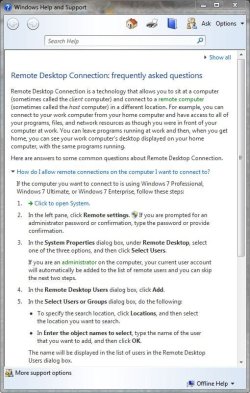
I've got home premium and I have remote desktop, according to this,

Remote Desktop Connection - Windows 7 features - Microsoft Windows

He would have to connect to you, instead of you to him though.
 

Attachments

  • remote.JPG
    remote.JPG
    86.4 KB · Views: 5

My Computer My Computer

At a glance

Win 10 Pro x64Intel I5-2500K @3.3GHz16GB G.Skill Ripjaws X (4x4GB)EVGA GeForce 750 Ti SC 2GB
Computer type
PC/Desktop
Computer Manufacturer/Model Number
Self Built
OS
Win 10 Pro x64
CPU
Intel I5-2500K @3.3GHz
Motherboard
Asrock P67 Extreme4
Memory
16GB G.Skill Ripjaws X (4x4GB)
Graphics Card(s)
EVGA GeForce 750 Ti SC 2GB
Sound Card
ASUS Xonar DG 5.1 Channels 24-bit 96KHz PCI Interface Sound
Monitor(s) Displays
auria eq2367
Screen Resolution
1920 x 1080
Hard Drives
250GB Samsung 850 EVO SSD
1TB WD Blue
1TB Hitachi
PSU
SeaSonic X 650W 80 Plus Gold
Case
Corsair Obsidian 750D
Cooling
Corsair H60, Three 140mm case fans
Keyboard
Logitech Wireless Keyboard K520
Mouse
Logitech Wireless Mouse M310
Internet Speed
Wave Broadband ~ 100 dn 5 up
Antivirus
Windows Defender, Malwarebytes Premium
Browser
Edge, IE11, Chrome
Other Info
Laptop specs: HP g7-1365dx /
CPU: AMD A6-3420M APU with Radeon(tm) HD Graphics /
RAM: Crucial 8Gb (2x4Gb) /
SSD: Crucial M4-CT128M4SSD2 ATA Device/ FW 000F /
GFX: AMD Radeon HD 6520G /
OS: Windows 10 Pro x64
I think it's a quality operating system.
 

My Computer My Computer

At a glance

Windows 7 64-bitIntel Core i7-2700K CPU @ 3.50GHz (8 CPUs) OC...32GB Corsair 12800J DDR32 x Asus NVIDIA GeForce GTX 560Ti
Computer Manufacturer/Model Number
Custom Made
OS
Windows 7 64-bit
CPU
Intel Core i7-2700K CPU @ 3.50GHz (8 CPUs) OC 4.5GHz
Motherboard
Asus P8Z68-V PRO GEN3
Memory
32GB Corsair 12800J DDR3
Graphics Card(s)
2 x Asus NVIDIA GeForce GTX 560Ti
Monitor(s) Displays
2 x Asus VS228H Monitors
Screen Resolution
1920 x 1080
Hard Drives
2 x Seagate ST2000DM001
PSU
Powercool 1050w 80+ Modular
Case
Coolermaster CM690 II
Cooling
ThermalTake Contac Ultra Silent Cooler, 2 x Noctua NF-P12
Keyboard
Logitech K300
Mouse
Logitech LS1
Let's get negative.

I've been computing since 1979. I beta tested Windows from WFWG through Win2000. I presently run Windows 7 Ultimate. Do you think I will ever need to have someone log onto my machine to help me with a problem ? But with Ultimate I do get Remote Desktop.

My 78 year old friend who bought his computer from F/Shop and has Windows Home Premium installed needs help twice a week but of course HE DOESN'T HAVE REMOTE DESKTOP available ! So I have to access his computer via sneakernet every time he has a problem at the carbon based silicon interface unit !!:mad:

What moron dreamed that up ????:(

This is an age old (as long ago as XP anyway) annoyance with the home versions of the windows operating system. There is an easier way than sneaker net which is the remote assistance option which is available in the home versions. the difference between the two features is that the assistance is a collaborative system which is ideal for the fault finding scenario you mention, the full unattended RDP is I will admit less of a regular requirement for home systems although I can see the need for an ability to remote into the home system from work to collect files or check mail.

I am a long time user ofTeamviewer (free for personal use) which provides all the options you could need and runs on all windows systems (even from a web browser) and now includes chat VOIP and video capabilities
 

My Computers My Computers

  • At a glance

    Windows 11 Pro x64 [Latest Release and Releas...Ryzen 9 5950X, 3.8 - 5.2 MHz64GB [2 x 32GB] DDR4 3200MHz4GB NVIDIA GEFORCE GTX 1650 Ti
    Computer type
    PC/Desktop
    Computer Manufacturer/Model Number
    ChillBlast - Custom to my design
    OS
    Windows 11 Pro x64 [Latest Release and Release Preview]
    CPU
    Ryzen 9 5950X, 3.8 - 5.2 MHz
    Motherboard
    Asus Prime X570-Pro
    Memory
    64GB [2 x 32GB] DDR4 3200MHz
    Graphics Card(s)
    4GB NVIDIA GEFORCE GTX 1650 Ti
    Sound Card
    On-board SPDIF to 5.1 System + HDMI [5.1 system]
    Monitor(s) Displays
    32" UHD 32 Bit HDR Monitor + 43" UHD 4K 32Bit HDR TV
    Screen Resolution
    2 x 3840 x 2160 @60Hz
    Hard Drives
    1TB M2 SSD OS, 500GB Fast Access SSD, 2 x 8TB Data + Various Externals from 1TB to 4TB, 10TB NAS
    PSU
    NZXT C750 80 PLUS Gold 750W Modular PSU
    Case
    Workstation Case [Matt Black]
    Cooling
    NZXT Kraken X63 280mm CPU Cooler +2x Quiet Case fans
    Keyboard
    Logitech Wireless MX Keys & K400 + others
    Mouse
    Logitech Wireless MX Master 3S
    Internet Speed
    920 MB Down 50 MB Up
    Antivirus
    BitDefender Total Security Pro
    Browser
    Chrome (always run latest Non-Beta)
    Other Info
    Also run ...
    Laptop - Quad 8GB - Windows 10 Pro x64
    Nexus 7 Android tablet x2
    Samsung 10.2" tablet
    Blackview TAB 8 4G Android Tablet c/w Keyboard
    Wacom Intuos Pro Medium Pen Pad
    Wacom Intuos Pro Small Pen Pad
    Wacom Expresskeys Remote
    Loopdeck+ Graphics Controller
    Shuttle Pro v2 Control
  • At a glance

    Windows 11 Pro x64 Latest RPIntel I7 10750H 5.0GHz32GB [2x16GB] DDR4 2933 MHznVidia GTX1650Ti 4 GB GDDR6
    Computer type
    Laptop
    System Manufacturer/Model Number
    Dell XPS 17 10750H
    OS
    Windows 11 Pro x64 Latest RP
    CPU
    Intel I7 10750H 5.0GHz
    Motherboard
    Dell XPS
    Memory
    32GB [2x16GB] DDR4 2933 MHz
    Graphics Card(s)
    nVidia GTX1650Ti 4 GB GDDR6
    Sound Card
    Stock [Realtek] 4 Speaker
    Monitor(s) Displays
    17" IPS UHD+ Infinity Edge Touchscreen
    Screen Resolution
    3840 x 2400
    Hard Drives
    2TB M2 NVMe, 4TB External + various 500GB & 1TB External NVMe (also have access to spinner HDD from
    PSU
    Stock
    Case
    Stock XPS Aluminium & Carbon Fibre
    Cooling
    Stock - Active Fan Control
    Keyboard
    Backlit + Various Logitech
    Mouse
    Stock Track Pad + Logitech MX Trackball
    Internet Speed
    72 MB Down 18MB Up
    Browser
    Chrome
    Other Info
    Also run ...
    Laptop - Quad 8GB - Windows 10 Pro x64
    Nexus 7 Android tablet x2
    10.2" tablet
    Sony Z3 Android Smartphone
    Wacom Intuos Pro Medium Pen Pad
    Wacom Intuos Pro Small Pen Pad
    Wacom Expresskeys Remote
    Loopdeck+ Graphics Controller
    Shuttle Pro v2 Control Pad
    10TB NAS
Hammerhead's "third party file manager" says it all really. With all the free (not even paid for) file managers that offer a million more features than Explorer isn't it about time Microsoft started implementing these features themselves? If someone else is doing it better - catch up. Geez that's not rocket science. And what these other file managers are doing isn't rocket science either - it's not like it's terribly hard stuff that Microsoft is unable to do.

Batch file/folder renaming is one of the biggest peeves I have with Windows and always have. It's one of the few instances when I use another "third party file manager" and it bugs the heck out of me that I have to.

Not being able to decide for myself, me, the user, what I want to have on my Explorer toolbar is another one. Why would I want to have Burn available for every file I click instead of a Delete button? Yes you can add it to the toolbar with a registry tweak but if it can be done in the registry it should be offered in the GUI so people don't have to go there.

And that's probably the thing that peeves me the most - there should be much more user customisation available across the board. And the customisations that can be done should be easier to get to. If there are so many things that can be changed via the registry or other 'hacks' then why not put them in a GUI? If the features are accessible but 'hidden' what's the point of that?????? Adding new features is great but taking old ones out should be done as little as possible and let people have the choice. And 'hiding' them is just dumb. One of the biggest gripes I've seen posted on the net is the lack of a Classic Start Menu option. Apparently Microsoft's answer to people wanting one is "the Classic Start Menu is outdated - move on". Fine attitude that. Microsoft make too many decisions about how I use my computer.

.
I second that.

What peeves me the most are people complaining about things like the missing Classic Menu, the Customizable Explorer Toolbar, Non-Customizable Details Pane, Hidden Features with No GUI etc, etc, ad infinitum!

While some of the complaints are genuine (I, for one, don't miss the Classic Start Menu), what I don't understand is why are people complaining? If I remember correctly, the Windows 7 Public BETA Program was the largest public beta ever conducted by Microsoft, and testers had ample opportunity to voice their concerns or suggest changes.

And don't give me that "But I didn't want to try the beta" rant. With my circle of friends, I was the only one I know that had the guts to try the beta, but many of the suggestions I made via the "Send Feedback" link where made by my friend who where "looking over my shoulder".

My point is this: If not enough people asked for the Classic Start Menu to be included, then Microsoft had no reason to include it. and the same applies for other features also.

So don't go complaining now about something missing when you you had an opportunity to do something about it, but didn't act.

Although I must point out that I was hoping for some of these complaints top be addressed with SP1, which has turned out to be nothing more than a roll-up of the past year's updates. I guess we'll have to wait for SP2 then to be able to customise what info get's displayed in the Explorer Details Pane, or to be able to customize it's toolbar.
:D A GREAT many people didn't even know about the beata. some, If they heard about it they didn't understand exactly what it was. I don't use some functions/apps myself. Those people who do use a function/app however, (Especialy something that was removed from another OS.) deserve to be heard and considered. Even at this late date. Lets hope MS is not ignoring users because they missed the beata. If you don't complain, nobody will ever know your concerns.:)

I agree with you about SP2. Perhaps some of the peeves/issues/concerns that have been mentioned during and after the beata may be addressed. One can hope.
 

My Computer My Computer

At a glance

XP Media Edition / Vista /Win 7 Home PremiumWin 7 Machine: Intel Core 2 Duo T5850 @ 2.16G...4GB Dual Channel DDR2 @ 333MHz 5-5-5-15Nvidia Defaul 1920X1200 256MB GeForce 9300M
Computer Manufacturer/Model Number
HP Touchsmart
OS
XP Media Edition / Vista /Win 7 Home Premium
CPU
Win 7 Machine: Intel Core 2 Duo T5850 @ 2.16GHz Merom 65nm
Motherboard
Pegatron Corp. EVE Model
Memory
4GB Dual Channel DDR2 @ 333MHz 5-5-5-15
Graphics Card(s)
Nvidia Defaul 1920X1200 256MB GeForce 9300M
Sound Card
SoundMAX Integrated Digital HD Audio
Monitor(s) Displays
HP 25" Flat Panel Touch Screen
Screen Resolution
1900X1200
Hard Drives
500 GB Seagate ST3500620as (Sata) 1.5 TB Seagate External
Keyboard
HP Model RK713A
Internet Speed
3.0Gb
If you would like classic view back just stop the Themes Service and you will get 90% of classic back. And as a bonus you will have one less service running.
 

My Computer My Computer

At a glance

Windows 7 Enterprise (x64); Windows Server 20...16GB
Computer type
PC/Desktop
Computer Manufacturer/Model Number
Dell OP7010
OS
Windows 7 Enterprise (x64); Windows Server 2008 R2 (x64)
Memory
16GB
Monitor(s) Displays
4 Dell 24" LCD
Screen Resolution
1280x1024
Keyboard
Dell
Mouse
Dell Optical
Internet Speed
40meg
snip ... snip ...

And isn't the whole bottom of this thread the fact that we don't have the CHOICE!!! All we want is to have the CHOICE.

Download Classic Shell from here.

It not only adds classic shell, it adds all the missing tools from the explorer tool bar !

Enjoy .....
 

My Computer My Computer

At a glance

Windows 7 UltimateI7-92012 GB DDR3-1333nVidia GTX 260
OS
Windows 7 Ultimate
CPU
I7-920
Motherboard
TBGM01
Memory
12 GB DDR3-1333
Graphics Card(s)
nVidia GTX 260
Sound Card
none
Monitor(s) Displays
2xGateway FHX2300
Hard Drives
OCZ Vertex 2
Kingston SNV425S2/64GB SSD
ST31000528AS Seagate
WDC WD1001FALS x 2 Western Digital
PSU
750w
Cooling
Air
Internet Speed
30M down, 1.8M up
Other Info
Router DGL-400
another thing I don't like about 7 ius adjusting volume in 7 dose not work as well as with XP
 

My Computer My Computer

At a glance

Windows 7 Pro X64AMD Phenom II X4 975 Black EditionCORSAIR Vengeance 8GB (2 x 4GB) 240-Pin DDR3 ...ASUS EN9800GT HB/HTDI/512M GeForce 9800 GT 51...
Computer Manufacturer/Model Number
custom build
OS
Windows 7 Pro X64
CPU
AMD Phenom II X4 975 Black Edition
Motherboard
MSI 870A-G54 (FX)
Memory
CORSAIR Vengeance 8GB (2 x 4GB) 240-Pin DDR3 SDRAM DDR3 1600
Graphics Card(s)
ASUS EN9800GT HB/HTDI/512M GeForce 9800 GT 512MB 256-bit GDD
Sound Card
Realtek ALC892
Monitor(s) Displays
Viewsonic 19' 16:10
Screen Resolution
1680X1050
Hard Drives
Western Digital Caviar Black WD6401AALS 640GB 7200 RPM SATA,
Western Digital Caviar Black 1TB 7200RPM SATA
PSU
Thermaltake Purepower W0100RU 500W ATX 12V
Case
COOLER MASTER Elite RC-331-KKN1-GP Black SECC ATX Mid Tower
Cooling
Nothing beyond what etch part came with
Keyboard
Logitech G11
Mouse
USB Logitech gaming mouse
Internet Speed
Cable
Other Info
New CPU, Motherboard, and Ram installed 02/2012

Logitech G35 Headset
??? Adjusting the volume works exactly the same in Win 7 as it did in XP. Now, you may have a problem as far as the driver in your sound card or keyboard, which may make for example a volume key on the keyboard not perform, but the mixer in Win 7 itself performs exactly the same as in XP and Vista.

If this is the case, you might try looking for a driver update to your keyboard, or sound card's software (you were not very specific in where you were having a volume setting problem?)
 

My Computer My Computer

At a glance

Windows 7 Home Premium 64 bit
OS
Windows 7 Home Premium 64 bit
Status
Not open for further replies.
Back
Top