
Clean Install with a Upgrade Windows 7 Version

How to Do a Clean Install with an Upgrade Windows 7 Version


   Information
This will show you how to do a Clean Install using a retail Upgrade Windows 7 installation disc.

   Warning
Remember that you need to legally own a valid qualifying previous version of Windows to use a Upgrade Windows 7, and to stop using (or uninstall) the qualifying OS while you have the upgrade installed. Microsoft only made doing a clean install from a upgrade Windows 7 possible to make it more convenient so you do not have to reinstall both the old Windows version (ex: Vista) and upgrade to Windows 7 everytime you needed or wanted to reinstall.

If you do not legally own a valid qualifying previous version of Windows, then you are violating the terms of Microsoft's Windows 7 End User License Agreement and could get your product key number invalidated by Microsoft. Plus, it is considered illegal.

For more about this, please see: Microsoft SMB Community Blog : Regardless of what any hack says, a Windows 7 Upgrade is an Upgrade. What you need to know.


OPTION ONE

A Normal Clean Install


1. Do a clean install at boot without checking the Automatically activate Windows when I'm online box during the installation process.

2. When the installation is finished, then manually activate Windows 7 with your product key number.

3. If your Windows should fail to activate, then pick up at step 2 in OPTION THREE below.


OPTION TWO

Through a Custom Install


   Note
This option will let you do a clean install of Windows 7 without formating the current Windows installation to have your current Windows installation backed up to the Windows.old folder during the installation of your retail upgrade Windows 7. This way you can copy any files back that you want from the C:\Windows.old folder (previous installation) back into your new installation afterwards.

1. Do a custom install at boot or from within your current Windows installation without checking the Automatically activate Windows when I'm online box during the installation process.

2. When the installation is finished, then manually activate Windows 7 with your product key number.

3. Copy any files that you want back from the C:\Windows.old folder into where you want it in you new installation.

4. You can now delete the Windows.old folder using Disk Cleanup to have a clean install now.


OPTION THREE

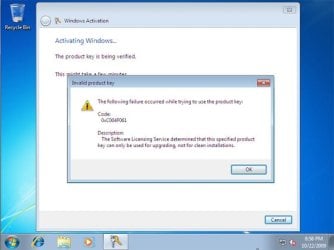
Clean Install with a Registry Workaround for Error Code 0xc004f061


   Note
If you get a activation error code 0xc004f061 while doing OPTION ONE or OPTION TWO above, then you will need to use this option instead
win7_upgrade_media_06.jpg


1. Do a clean install of your upgrade Windows 7 at boot without checking the Automatically activate Windows when I'm online box during the installation process.
NOTE: If you already did this from OPTION ONE above and got a activation error, then skip this step and just proceed to step 2 below instead. There's no need to reinstall again.

2. Click on the Download button below to download the .bat file below, and save it to your desktop.
Activate_Windows_Upgrade_after_Clean_Install.bat


Download


3. Right click on the downloaded .bat file, and click on Run as administrator.

4. If prompted, click/tap on Run and Yes (UAC).
NOTE: If you like, you can stop getting the Run prompt by unblocking the downloaded .bat file.

5. You will now notice a command prompt quickly open and close while applying the changes to your registry.

6. Click/tap on OK. (see screenshot below)
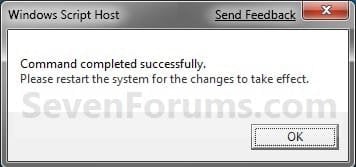
OK.jpg
7. Restart the computer.

8. When the computer is finished restarting, then manually activate Windows 7 with your product key number.


OPTION FOUR

Double Installing Windows 7


   Note
This option is the same that was used to do a clean install of an upgrade copy of Windows 7. It's more work, but if the options above did not work for you, then this should since this is the most reliable option.

1. Do a clean install of your upgrade Windows 7 at boot without checking the Automatically activate Windows when I'm online box during the installation process, and do not activate Windows 7. When finished with the clean install, do not or install any Windows Updates, drivers, or programs yet.

2. When finished with the clean install, start at step 4 at this link to do an in-place "upgrade" install with your upgrade Windows 7 installation disk from within the just now finished clean install of Windows 7.

3. When the in-place upgrade installation is completely finished, then manually activate Windows 7 with your product key number. You can now also install any Windows Updates drivers, and programs you like.
That's it,
Shawn


Attachments

Last edited:
I'm afraid not. You cannot do a upgrade/clean install like this with a student copy. :(
 

My Computer My Computer

Computer type
PC/Desktop
Computer Manufacturer/Model Number
Self built custom
OS
64-bit Windows 11 Pro for Workstations
CPU
Intel i7-8700K OC'd to 5 GHz
Motherboard
ASUS ROG Maximus XI Formula Z390
Memory
64 GB (4x16GB) G.SKILL TridentZ RGB DDR4 3600 MHz
Graphics Card(s)
ASUS ROG-STRIX-GTX1080TI-O11G-GAMING
Sound Card
Integrated
Monitor(s) Displays
2 x Samsung Odyssey G7 27"
Screen Resolution
2560x1440
Hard Drives
1TB Samsung 990 PRO M.2,
4TB Samsung 990 PRO PRO M.2,
TerraMaster F8 SSD Plus NAS
PSU
Seasonic Prime Titanium 850W
Case
Thermaltake Core P3
Cooling
Corsair Hydro H115i
Keyboard
Logitech wireless K800
Mouse
Logitech MX Master 4
Internet Speed
2 Gb/s Download and 100 Mb/s Upload
Antivirus
Malwarebyte Anti-Malware Premium
Browser
Google Chrome
Other Info
Logitech Z625 speaker system,
Logitech BRIO 4K Pro webcam,
HP Color LaserJet Pro MFP M477fdn,
APC SMART-UPS RT 1000 XL - SURT1000XLI,
Galaxy S23 Plus phone
Just wondering if this still works?

or...

Has M$ had a fix to stop this? I understand that they want as mush moola as possible, but in this day and age who can really afford full price for an OS.

Thanks,

D.
 

My Computer My Computer

Computer Manufacturer/Model Number
Me
OS
Window 7 Pro 64 Bit
CPU
AMD Phenom 2 X4 940 Black
Motherboard
ASUS M3N78 Pro
Memory
4Gb DDR2 800
Graphics Card(s)
Evga 8800 GTS
Monitor(s) Displays
SOYO 19" & Envision 21"
Hard Drives
2 WD 320 GB sata
Case
Custom CoolerMaster by Me
Cooling
CoolIT ALC
Internet Speed
DSL 7 mbs
Hello Doug,

Yes, it still works just perfect for retail copies of Windows 7 Upgrade. :)
 

My Computer My Computer

Computer type
PC/Desktop
Computer Manufacturer/Model Number
Self built custom
OS
64-bit Windows 11 Pro for Workstations
CPU
Intel i7-8700K OC'd to 5 GHz
Motherboard
ASUS ROG Maximus XI Formula Z390
Memory
64 GB (4x16GB) G.SKILL TridentZ RGB DDR4 3600 MHz
Graphics Card(s)
ASUS ROG-STRIX-GTX1080TI-O11G-GAMING
Sound Card
Integrated
Monitor(s) Displays
2 x Samsung Odyssey G7 27"
Screen Resolution
2560x1440
Hard Drives
1TB Samsung 990 PRO M.2,
4TB Samsung 990 PRO PRO M.2,
TerraMaster F8 SSD Plus NAS
PSU
Seasonic Prime Titanium 850W
Case
Thermaltake Core P3
Cooling
Corsair Hydro H115i
Keyboard
Logitech wireless K800
Mouse
Logitech MX Master 4
Internet Speed
2 Gb/s Download and 100 Mb/s Upload
Antivirus
Malwarebyte Anti-Malware Premium
Browser
Google Chrome
Other Info
Logitech Z625 speaker system,
Logitech BRIO 4K Pro webcam,
HP Color LaserJet Pro MFP M477fdn,
APC SMART-UPS RT 1000 XL - SURT1000XLI,
Galaxy S23 Plus phone
Thanks Brink.

Just wanted to know.
 

My Computer My Computer

Computer Manufacturer/Model Number
Me
OS
Window 7 Pro 64 Bit
CPU
AMD Phenom 2 X4 940 Black
Motherboard
ASUS M3N78 Pro
Memory
4Gb DDR2 800
Graphics Card(s)
Evga 8800 GTS
Monitor(s) Displays
SOYO 19" & Envision 21"
Hard Drives
2 WD 320 GB sata
Case
Custom CoolerMaster by Me
Cooling
CoolIT ALC
Internet Speed
DSL 7 mbs
You're welcome. :)
 

My Computer My Computer

Computer type
PC/Desktop
Computer Manufacturer/Model Number
Self built custom
OS
64-bit Windows 11 Pro for Workstations
CPU
Intel i7-8700K OC'd to 5 GHz
Motherboard
ASUS ROG Maximus XI Formula Z390
Memory
64 GB (4x16GB) G.SKILL TridentZ RGB DDR4 3600 MHz
Graphics Card(s)
ASUS ROG-STRIX-GTX1080TI-O11G-GAMING
Sound Card
Integrated
Monitor(s) Displays
2 x Samsung Odyssey G7 27"
Screen Resolution
2560x1440
Hard Drives
1TB Samsung 990 PRO M.2,
4TB Samsung 990 PRO PRO M.2,
TerraMaster F8 SSD Plus NAS
PSU
Seasonic Prime Titanium 850W
Case
Thermaltake Core P3
Cooling
Corsair Hydro H115i
Keyboard
Logitech wireless K800
Mouse
Logitech MX Master 4
Internet Speed
2 Gb/s Download and 100 Mb/s Upload
Antivirus
Malwarebyte Anti-Malware Premium
Browser
Google Chrome
Other Info
Logitech Z625 speaker system,
Logitech BRIO 4K Pro webcam,
HP Color LaserJet Pro MFP M477fdn,
APC SMART-UPS RT 1000 XL - SURT1000XLI,
Galaxy S23 Plus phone
I need some advice from you guys.

So my friend bought the Windows 7 Pro upgrade key from the MS student promotion for his new computer thinking that it would work as a clean install. However, he ran into nothing but problems. The first two methods wouldn't allow him to activate his key - an error code would appear. The third method appeared to work, but his computer would BSOD for no apparent reason. He had installed his OS using a copy of my retail Windows 7 Pro.

If he installs Windows XP first, and then upgrade to Windows 7 Pro, would his student key work then?

Thanks in advance.
 

My Computer My Computer

OS
Windows 7
Hello Benkhc,

Unfortunately he will not be able to upgrade from XP to Windows 7. He will only be able to do a upgrade install from Vista, or do a Anytime Upgrade from a lower edition of Windows 7, to the Windows 7 Professional upgrade edition.

His student key will only work with the student edition of Windows 7 that he purchased. It will not work with another type of Windows 7 (ex: retail, OEM, etc....).

You or him might also post about the BSOD in the Crashes and Debugging forum area here to see if it may be due to some other reason to check all bases.
 
Last edited:

My Computer My Computer

Computer type
PC/Desktop
Computer Manufacturer/Model Number
Self built custom
OS
64-bit Windows 11 Pro for Workstations
CPU
Intel i7-8700K OC'd to 5 GHz
Motherboard
ASUS ROG Maximus XI Formula Z390
Memory
64 GB (4x16GB) G.SKILL TridentZ RGB DDR4 3600 MHz
Graphics Card(s)
ASUS ROG-STRIX-GTX1080TI-O11G-GAMING
Sound Card
Integrated
Monitor(s) Displays
2 x Samsung Odyssey G7 27"
Screen Resolution
2560x1440
Hard Drives
1TB Samsung 990 PRO M.2,
4TB Samsung 990 PRO PRO M.2,
TerraMaster F8 SSD Plus NAS
PSU
Seasonic Prime Titanium 850W
Case
Thermaltake Core P3
Cooling
Corsair Hydro H115i
Keyboard
Logitech wireless K800
Mouse
Logitech MX Master 4
Internet Speed
2 Gb/s Download and 100 Mb/s Upload
Antivirus
Malwarebyte Anti-Malware Premium
Browser
Google Chrome
Other Info
Logitech Z625 speaker system,
Logitech BRIO 4K Pro webcam,
HP Color LaserJet Pro MFP M477fdn,
APC SMART-UPS RT 1000 XL - SURT1000XLI,
Galaxy S23 Plus phone
Hi Brink, thanks for the fast reply!

I never knew the cd keys from the student promotion were categorized separately from the OEM/retail ones. I guess I'll tell him to download the ISO installation file from the promotion that is specific to his type of cd key.

Thanks for the BSOD log suggestion, I'll forward him the link.
 

My Computer My Computer

OS
Windows 7
You're welcome. I hope it goes well.
 

My Computer My Computer

Computer type
PC/Desktop
Computer Manufacturer/Model Number
Self built custom
OS
64-bit Windows 11 Pro for Workstations
CPU
Intel i7-8700K OC'd to 5 GHz
Motherboard
ASUS ROG Maximus XI Formula Z390
Memory
64 GB (4x16GB) G.SKILL TridentZ RGB DDR4 3600 MHz
Graphics Card(s)
ASUS ROG-STRIX-GTX1080TI-O11G-GAMING
Sound Card
Integrated
Monitor(s) Displays
2 x Samsung Odyssey G7 27"
Screen Resolution
2560x1440
Hard Drives
1TB Samsung 990 PRO M.2,
4TB Samsung 990 PRO PRO M.2,
TerraMaster F8 SSD Plus NAS
PSU
Seasonic Prime Titanium 850W
Case
Thermaltake Core P3
Cooling
Corsair Hydro H115i
Keyboard
Logitech wireless K800
Mouse
Logitech MX Master 4
Internet Speed
2 Gb/s Download and 100 Mb/s Upload
Antivirus
Malwarebyte Anti-Malware Premium
Browser
Google Chrome
Other Info
Logitech Z625 speaker system,
Logitech BRIO 4K Pro webcam,
HP Color LaserJet Pro MFP M477fdn,
APC SMART-UPS RT 1000 XL - SURT1000XLI,
Galaxy S23 Plus phone
Hello Doug,

Yes, it still works just perfect for retail copies of Windows 7 Upgrade. :)

So this is probably a silly question, but with all the confusion about the Student Upgrade version I have a question:

I currently have Vista Business 32-bit installed - OEM on a Dell. If I purchase the Student Upgrade Disk for Windows 7 I can do a clean install with it correct?

Just wanted to double check before spending the money on it now since the $30 promotion is over. Thanks!
 

My Computer My Computer

Computer Manufacturer/Model Number
Dell Latitude E6400
OS
Windows 7 64-bit
CPU
Intel Mobile Core 2 Duo P8600 @ 2.40GHz
Motherboard
Dell Inc. 0HT027 (Microprocessor)
Memory
3.0GB Dual-Channel DDR2 @ 398MHz (6-6-6-18)
Graphics Card(s)
Mobile Intel(R) 4 Series Express Chipset Family
Sound Card
IDT High Definition Audio CODEC
Monitor(s) Displays
Generic PnP Monitor @ 1280x800
Hard Drives
FUJITSU MHZ2160BJ FFS G2
Manufacturer Unknown manufacturer
Interface SCSI
Capacity 156GB
Real size 160,041,885,696 bytes
Other Info
CD/DVD: HL-DT-ST CDRWDVD MU10N
Hello Doug,

Yes, it still works just perfect for retail copies of Windows 7 Upgrade. :)

So this is probably a silly question, but with all the confusion about the Student Upgrade version I have a question:

I currently have Vista Business 32-bit installed - OEM on a Dell. If I purchase the Student Upgrade Disk for Windows 7 I can do a clean install with it correct?

Just wanted to double check before spending the money on it now since the $30 promotion is over. Thanks!


Hello Buckedthead, and welcome to Seven Forums.

While other members have reported that they were able to do a clean install at the link below with a student upgrade disk, I cannot confirm it as certain though. :(

http://www.sevenforums.com/tutorials/31402-clean-install-upgrade-windows-7-version.html#post333213
 

My Computer My Computer

Computer type
PC/Desktop
Computer Manufacturer/Model Number
Self built custom
OS
64-bit Windows 11 Pro for Workstations
CPU
Intel i7-8700K OC'd to 5 GHz
Motherboard
ASUS ROG Maximus XI Formula Z390
Memory
64 GB (4x16GB) G.SKILL TridentZ RGB DDR4 3600 MHz
Graphics Card(s)
ASUS ROG-STRIX-GTX1080TI-O11G-GAMING
Sound Card
Integrated
Monitor(s) Displays
2 x Samsung Odyssey G7 27"
Screen Resolution
2560x1440
Hard Drives
1TB Samsung 990 PRO M.2,
4TB Samsung 990 PRO PRO M.2,
TerraMaster F8 SSD Plus NAS
PSU
Seasonic Prime Titanium 850W
Case
Thermaltake Core P3
Cooling
Corsair Hydro H115i
Keyboard
Logitech wireless K800
Mouse
Logitech MX Master 4
Internet Speed
2 Gb/s Download and 100 Mb/s Upload
Antivirus
Malwarebyte Anti-Malware Premium
Browser
Google Chrome
Other Info
Logitech Z625 speaker system,
Logitech BRIO 4K Pro webcam,
HP Color LaserJet Pro MFP M477fdn,
APC SMART-UPS RT 1000 XL - SURT1000XLI,
Galaxy S23 Plus phone
Well I will take my chance. Worst case I figure I call Microsoft to get a key to fix the error.

Thanks for the lighting quick reply.
 

My Computer My Computer

Computer Manufacturer/Model Number
Dell Latitude E6400
OS
Windows 7 64-bit
CPU
Intel Mobile Core 2 Duo P8600 @ 2.40GHz
Motherboard
Dell Inc. 0HT027 (Microprocessor)
Memory
3.0GB Dual-Channel DDR2 @ 398MHz (6-6-6-18)
Graphics Card(s)
Mobile Intel(R) 4 Series Express Chipset Family
Sound Card
IDT High Definition Audio CODEC
Monitor(s) Displays
Generic PnP Monitor @ 1280x800
Hard Drives
FUJITSU MHZ2160BJ FFS G2
Manufacturer Unknown manufacturer
Interface SCSI
Capacity 156GB
Real size 160,041,885,696 bytes
Other Info
CD/DVD: HL-DT-ST CDRWDVD MU10N
You're welcome. Hopefully you will still be able to. :)
 

My Computer My Computer

Computer type
PC/Desktop
Computer Manufacturer/Model Number
Self built custom
OS
64-bit Windows 11 Pro for Workstations
CPU
Intel i7-8700K OC'd to 5 GHz
Motherboard
ASUS ROG Maximus XI Formula Z390
Memory
64 GB (4x16GB) G.SKILL TridentZ RGB DDR4 3600 MHz
Graphics Card(s)
ASUS ROG-STRIX-GTX1080TI-O11G-GAMING
Sound Card
Integrated
Monitor(s) Displays
2 x Samsung Odyssey G7 27"
Screen Resolution
2560x1440
Hard Drives
1TB Samsung 990 PRO M.2,
4TB Samsung 990 PRO PRO M.2,
TerraMaster F8 SSD Plus NAS
PSU
Seasonic Prime Titanium 850W
Case
Thermaltake Core P3
Cooling
Corsair Hydro H115i
Keyboard
Logitech wireless K800
Mouse
Logitech MX Master 4
Internet Speed
2 Gb/s Download and 100 Mb/s Upload
Antivirus
Malwarebyte Anti-Malware Premium
Browser
Google Chrome
Other Info
Logitech Z625 speaker system,
Logitech BRIO 4K Pro webcam,
HP Color LaserJet Pro MFP M477fdn,
APC SMART-UPS RT 1000 XL - SURT1000XLI,
Galaxy S23 Plus phone
Well install went just fine - and so did activation. I did the custom install for a clean install going from 32-bit Vista to 64-bit 7 and it went pretty smooth, with one exception. It seems on my computer there is a 30GB OEM partition that I could not do anything about during install. Any ideas on how I might be able to recover that space? Or am I SOL on that one?
 

My Computer My Computer

Computer Manufacturer/Model Number
Dell Latitude E6400
OS
Windows 7 64-bit
CPU
Intel Mobile Core 2 Duo P8600 @ 2.40GHz
Motherboard
Dell Inc. 0HT027 (Microprocessor)
Memory
3.0GB Dual-Channel DDR2 @ 398MHz (6-6-6-18)
Graphics Card(s)
Mobile Intel(R) 4 Series Express Chipset Family
Sound Card
IDT High Definition Audio CODEC
Monitor(s) Displays
Generic PnP Monitor @ 1280x800
Hard Drives
FUJITSU MHZ2160BJ FFS G2
Manufacturer Unknown manufacturer
Interface SCSI
Capacity 156GB
Real size 160,041,885,696 bytes
Other Info
CD/DVD: HL-DT-ST CDRWDVD MU10N
Buckethead,

Unless you just really need the HDD space, I would recommend to leave the 30GB partition as is. This way you will have a easy and more reliable way to reinstall the OS that came with your computer if needed. It would also be a good idea to create a set of Dell recovery discs (see links below for how) to use to reinstall the original OS instead in case of total HDD failure.

Using the Dell

OR

Creating Your System Recovery Discs with Dell DataSafe Local Backup 2.0 | Dell


If you truly do not need or want it, then go ahead and post a new thread on this issue, and post back a link to it. I'll be happy to help with it. :)
 

My Computer My Computer

Computer type
PC/Desktop
Computer Manufacturer/Model Number
Self built custom
OS
64-bit Windows 11 Pro for Workstations
CPU
Intel i7-8700K OC'd to 5 GHz
Motherboard
ASUS ROG Maximus XI Formula Z390
Memory
64 GB (4x16GB) G.SKILL TridentZ RGB DDR4 3600 MHz
Graphics Card(s)
ASUS ROG-STRIX-GTX1080TI-O11G-GAMING
Sound Card
Integrated
Monitor(s) Displays
2 x Samsung Odyssey G7 27"
Screen Resolution
2560x1440
Hard Drives
1TB Samsung 990 PRO M.2,
4TB Samsung 990 PRO PRO M.2,
TerraMaster F8 SSD Plus NAS
PSU
Seasonic Prime Titanium 850W
Case
Thermaltake Core P3
Cooling
Corsair Hydro H115i
Keyboard
Logitech wireless K800
Mouse
Logitech MX Master 4
Internet Speed
2 Gb/s Download and 100 Mb/s Upload
Antivirus
Malwarebyte Anti-Malware Premium
Browser
Google Chrome
Other Info
Logitech Z625 speaker system,
Logitech BRIO 4K Pro webcam,
HP Color LaserJet Pro MFP M477fdn,
APC SMART-UPS RT 1000 XL - SURT1000XLI,
Galaxy S23 Plus phone
Upgrading from an Upgrade

I am perplexed with all the confusion regarding statements that in order to use Windows 7 Update Media, you must own a FULL version of a qualifying product. Witness statement in your reference of SMB Community Blog. That statment is found in many places on the internet.

I searched everywhere including my Window 7 Upgrade Media DVD. Nowhwere does it say specifically that I need a FULL version of eithr Windows XP or Vista. It merely state I need to have a qualifying product license. Even Windows 7 Upgrade Advisor doesn't spcify any such condition of Full Version when I run it from an upgrade product.

So can I do a legal installation of Windows 7 from an Upgrade Media when the qualifying product is in fact another ugrade?

Yes or no?
 

My Computer My Computer

Computer Manufacturer/Model Number
Dell E520 & My Build
OS
Windows 7 (retail) both
CPU
E6300 and AMD X2 5200
Motherboard
Intel 965G and Asus M3A78-CM
Memory
2 GB & 4 GB
Graphics Card(s)
on board video for both
Hello Rockfarmer,

Since you are able to do a clean install from a upgrade using either option in the tutorial, it's fine if the previous OS is a Upgrade or Full version. :)
 

My Computer My Computer

Computer type
PC/Desktop
Computer Manufacturer/Model Number
Self built custom
OS
64-bit Windows 11 Pro for Workstations
CPU
Intel i7-8700K OC'd to 5 GHz
Motherboard
ASUS ROG Maximus XI Formula Z390
Memory
64 GB (4x16GB) G.SKILL TridentZ RGB DDR4 3600 MHz
Graphics Card(s)
ASUS ROG-STRIX-GTX1080TI-O11G-GAMING
Sound Card
Integrated
Monitor(s) Displays
2 x Samsung Odyssey G7 27"
Screen Resolution
2560x1440
Hard Drives
1TB Samsung 990 PRO M.2,
4TB Samsung 990 PRO PRO M.2,
TerraMaster F8 SSD Plus NAS
PSU
Seasonic Prime Titanium 850W
Case
Thermaltake Core P3
Cooling
Corsair Hydro H115i
Keyboard
Logitech wireless K800
Mouse
Logitech MX Master 4
Internet Speed
2 Gb/s Download and 100 Mb/s Upload
Antivirus
Malwarebyte Anti-Malware Premium
Browser
Google Chrome
Other Info
Logitech Z625 speaker system,
Logitech BRIO 4K Pro webcam,
HP Color LaserJet Pro MFP M477fdn,
APC SMART-UPS RT 1000 XL - SURT1000XLI,
Galaxy S23 Plus phone
Hello Rockfarmer,

Since you are able to do a clean install from a upgrade using either option in the tutorial, it's fine if the previous OS is a Upgrade or Full version. :)

Well, I didn't want Microsoft on my case for using an upgrade version as the qualifying product. Have to wonder though why so many people are adamant that you can only use a FULL version as a qualifier. I know this is a different subject but can you keep either a Vista intact as a dual boot and do a custom install of 7 in a different partition? It seems on the surface you are in violation of the EULA, but you can only use one operating system at a time.
 

My Computer My Computer

Computer Manufacturer/Model Number
Dell E520 & My Build
OS
Windows 7 (retail) both
CPU
E6300 and AMD X2 5200
Motherboard
Intel 965G and Asus M3A78-CM
Memory
2 GB & 4 GB
Graphics Card(s)
on board video for both
Technically, you are suppose to no longer use what you are upgrading from when doing a clean install with a upgrade version. However, as long as you have it all installed on the same computer where you can only use one OS at a time, I don't think Microsoft is going to mind.
 

My Computer My Computer

Computer type
PC/Desktop
Computer Manufacturer/Model Number
Self built custom
OS
64-bit Windows 11 Pro for Workstations
CPU
Intel i7-8700K OC'd to 5 GHz
Motherboard
ASUS ROG Maximus XI Formula Z390
Memory
64 GB (4x16GB) G.SKILL TridentZ RGB DDR4 3600 MHz
Graphics Card(s)
ASUS ROG-STRIX-GTX1080TI-O11G-GAMING
Sound Card
Integrated
Monitor(s) Displays
2 x Samsung Odyssey G7 27"
Screen Resolution
2560x1440
Hard Drives
1TB Samsung 990 PRO M.2,
4TB Samsung 990 PRO PRO M.2,
TerraMaster F8 SSD Plus NAS
PSU
Seasonic Prime Titanium 850W
Case
Thermaltake Core P3
Cooling
Corsair Hydro H115i
Keyboard
Logitech wireless K800
Mouse
Logitech MX Master 4
Internet Speed
2 Gb/s Download and 100 Mb/s Upload
Antivirus
Malwarebyte Anti-Malware Premium
Browser
Google Chrome
Other Info
Logitech Z625 speaker system,
Logitech BRIO 4K Pro webcam,
HP Color LaserJet Pro MFP M477fdn,
APC SMART-UPS RT 1000 XL - SURT1000XLI,
Galaxy S23 Plus phone
Hi Shawn,

Sorry if this was asked before, but I want to be certain as I have a thread where this has become a very key point. According to Microsoft, approved upgrade paths are as follows: Windows 7 Upgrade Paths.

Do those rules apply to using this tutorial?

For example, the user wants to upgrade from Vista Home Premium to Windows 7 Pro. According to Microsoft, this is not an approved upgrade. Can it be done anyway by using this process or does it only work when an upgrade option is approved in the above link? I don't want them buying the upgrade package and finding out that they can't activate.

Thank you very much in advance.
 

My Computer My Computer

OS
32-bit Vista Business SP2
Back
Top