Memory management stress testing: Lol, I love 7

napilopez

Member
Power User
VIP
Local time
6:21 AM
Messages
232
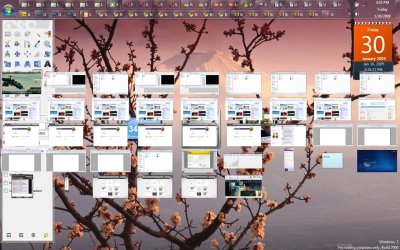
So, I decided to open a bazillion processes with 7 to see how it would perform with a bunch of apps open, as in more instances of apps and individual apps than I, or almost anyone would ever need to have open.

I think the image speaks for itself. My PC has 2 gb of ram, part of which is shared with the video card for graphics.

Of course it slowed down a bit at first with 42 windows open(plus 7 tabs in opera, including more resource hogging cites like Cnet, facebook, and youtube(playing a video muted)), but I was still able to watch a DVD quality movie without drops in framerate. What amazed me more though is that when I went to the bathroom and returned, rather than continue to run slowly, my computer actually sped up to near how it was performing with only 5 windows open.

I tried doing this with vista once, and I couldn't bear the performance past 12 or so windows. This is some seriously improved memory management.
 

Attachments
  • Gazillion2.jpg
    Gazillion2.jpg
    178.7 KB · Views: 2,466
Last edited:

My Computer My Computer

At a glance

Windows 7 Build 7077 x64AMD Athlon Dual Core QL-60 - 1.9Ghz2GBNVIDIA GeForce 8200 M G
Computer Manufacturer/Model Number
Compaq CQ50-107NR
OS
Windows 7 Build 7077 x64
CPU
AMD Athlon Dual Core QL-60 - 1.9Ghz
Memory
2GB
Graphics Card(s)
NVIDIA GeForce 8200 M G
Screen Resolution
1280 x 800
Hard Drives
120GB, Not sure of RPM but prolly 5400 or lower.
I agree that memory management is much improved in Seven. But just so you know, your test is not really valid. Had you given Vista a moment as you did seven, then you probably would have seen an improvement in performance there also as all of the programs that you are not using could/would be moved to the swap/page file until you made them active again. Seven may be faster at doing that. Really the only programs that needed to be in memory were the video (Opera) and the DVD player, by what you posted. Having 12 or 42 windows open doesn't make that many programs active in memory. That's what the swap/page file is for.

Gary
 

My Computer My Computer

At a glance

Vista Ult 64 bit Seven Ult RTM x64Intel Core2 Quad Q6600 2.40 gigahertzCrucial Ballistix 4x2GB PC2 6400NVIDIA GeForce 8600 GTS 256 MB
Computer Manufacturer/Model Number
Dell XPS420
OS
Vista Ult 64 bit Seven Ult RTM x64
CPU
Intel Core2 Quad Q6600 2.40 gigahertz
Memory
Crucial Ballistix 4x2GB PC2 6400
Graphics Card(s)
NVIDIA GeForce 8600 GTS 256 MB
Sound Card
Creative SB X-Fi audio
Monitor(s) Displays
HP w2207 + HPvs15
Screen Resolution
1680x1050 + 1024x768
Hard Drives
2-WD5000AAKS-500 GB
WD5000AAV-500 GB external
Keyboard
Microsoft Comfort Curve
Mouse
MX Revolution
Other Info
Wacom Intuos 2 Graphics Tablet
Experience Index=5.5
Gah, I forgot about the page file since I had turned mine off in Vista(after performing the test). I did also have a video editing thing open in one of the instances of Sony vegas.

Oh well, :P. Ill try next time loading several youtube videos in different instances and stuff, and using apps that are actively using memory to get a better assessment. But yea, I think we all feel 7s memory management is superior
 

My Computer My Computer

At a glance

Windows 7 Build 7077 x64AMD Athlon Dual Core QL-60 - 1.9Ghz2GBNVIDIA GeForce 8200 M G
Computer Manufacturer/Model Number
Compaq CQ50-107NR
OS
Windows 7 Build 7077 x64
CPU
AMD Athlon Dual Core QL-60 - 1.9Ghz
Memory
2GB
Graphics Card(s)
NVIDIA GeForce 8200 M G
Screen Resolution
1280 x 800
Hard Drives
120GB, Not sure of RPM but prolly 5400 or lower.
The thing that first tipped me off to Seven's handling of memory was google earth. In vista I could play around for 30-40 minutes and then it would just stop functioning. Look at the ram usage-85+%. Close earth and it would drop back to normal and I could open earth and play again for 30-40 mins. First time I tried earth in seven beta, I crusied around for over an hour and my ram was still at about 40%. This was when I was running only 32 bit systems and had 4GB of Ram. Haven't tried that yet with x64 and 8GB, but should be interesting.

Gary
 

My Computer My Computer

At a glance

Vista Ult 64 bit Seven Ult RTM x64Intel Core2 Quad Q6600 2.40 gigahertzCrucial Ballistix 4x2GB PC2 6400NVIDIA GeForce 8600 GTS 256 MB
Computer Manufacturer/Model Number
Dell XPS420
OS
Vista Ult 64 bit Seven Ult RTM x64
CPU
Intel Core2 Quad Q6600 2.40 gigahertz
Memory
Crucial Ballistix 4x2GB PC2 6400
Graphics Card(s)
NVIDIA GeForce 8600 GTS 256 MB
Sound Card
Creative SB X-Fi audio
Monitor(s) Displays
HP w2207 + HPvs15
Screen Resolution
1680x1050 + 1024x768
Hard Drives
2-WD5000AAKS-500 GB
WD5000AAV-500 GB external
Keyboard
Microsoft Comfort Curve
Mouse
MX Revolution
Other Info
Wacom Intuos 2 Graphics Tablet
Experience Index=5.5
You should not have the pagfile(s) disabled!!! Even with 8GB of RAM, you are usually hurting performance and overall stability. RAM CAN swap/page, but those tasks won't be time-critical, and in the meantime - you'll be wasting MORE RAM! One way or another, data WILL be retrieved off the HDD; the PF will help streamline the entire process.

Of course, there is no reason for JAI-NORMUS PFs...1.5x is quite absurd.
BUT-
512MB+512MB NOT!= 1GB (not exactly anyway - it's my understanding that this wastes some of the purpose of a dual PF) <- and in my opinion this is very small (TOO SMALL).

Memory management - if anything - is FAR more complex these days. Hungry programs, different platforms (x64 vs x86),
and flat-out different forms of implementing memory in an app at any given time. Leave some room for apps that can't manage large chunks of RAM - just in case.

These are not the days of XP...Windows will max-out those RAM modules all by itself...and it SHOULD be making your experience nearly transparent; everything should be FAST (if not instant). Seeing your free memory reach " 0 " is a very GOOD thing, and loading a first-time-use app of approx 1GB+ will not be any slower...with a large enough PF - maybe faster. This is the ONLY real test of Windows 7 - but I can assure you, there will always be room for improvements - it's Microsoft! No matter how much they start to get something right - efficiency is sacrificed to some degree. If that means a little tweak here or there can do something - OK, but we should try and stay pretty close to the standard these days. NO to NO PAGEFILES!!! LOL
 
Last edited:

My Computer My Computer

At a glance

Vista (x64)
OS
Vista (x64)
You should not have the pagfile(s) disabled!!!

etc., etc., etc...


This old debate. Well, in 8 years I've never found a need for one (ok once, I think when I tried to install Dungeon Keeper it needed an actual swap) the pagefile is a relic. An apendix that is no longer needed. And before you start ranting, consider that I use the following setup - oh, the horror!

C:\ is for system. One small but very fast drive (currently SSD)
My desktop, temp/tmp, user profile folders are all on a seperate RAID10 setup, a 30GB partition I use for temp internet files and all the random nonsense that Windows like to create. All those little files make a mess on the platter, all of it leads to heavy fragmentation and degraded performance. I've run countless tests in and out of labs on this very topic. In all cases, no page is good page. Use the RAM, that's what it's for.
 

My Computer My Computer

At a glance

Windows 7 Home Premium x64Intel QX9650 Extreme 4.0 GHz8GB (4x2) Corsair Dominator DDR32x Radeon R390X [8GB]
Computer type
PC/Desktop
Computer Manufacturer/Model Number
Custom Build/Mod
OS
Windows 7 Home Premium x64
CPU
Intel QX9650 Extreme 4.0 GHz
Motherboard
ASUS Rampage Extreme Rev2
Memory
8GB (4x2) Corsair Dominator DDR3
Graphics Card(s)
2x Radeon R390X [8GB]
Sound Card
SupremeFX X-Fi
Monitor(s) Displays
Dell 2408WFP 26" Panel
Screen Resolution
1920x1200
Hard Drives
4x WD 2TB (8TB+ Total)
2x Crucial SSD 128GB (RAID-0)
1x LG Blu-ray read/write
1x Phillips LightScribe DVD read/write
PSU
Corsair HX1000
Case
CoolerMaster - Cosmos S
Cooling
Custom Liquid - 320mm rad w/ 3x 80mm fans, CPU/NB/SB Blocks
Keyboard
Logitech Illuminater Pro
Mouse
Logitech
Internet Speed
Fractional T1 - 125Mbps
Antivirus
ESET Security Suite / Microsoft Security Essentials
Browser
Cyberfox Intel x64
Other Info
OC'd to 5.0GHz @ 44c under full load
Oww, now i dont know what side to take :S:S:S :(

Enzo.
 

My Computer My Computer

At a glance

W7 RTM Ultimate x64Intel Q8400 @ 2.66GHZ4GB DDR2-800Gainward GTS 450 GLH 1GB Edition
Computer Manufacturer/Model Number
Custom Build
OS
W7 RTM Ultimate x64
CPU
Intel Q8400 @ 2.66GHZ
Motherboard
Gigabyte GA-EG45M-UD2H
Memory
4GB DDR2-800
Graphics Card(s)
Gainward GTS 450 GLH 1GB Edition
Sound Card
Integrated 8 Channel
Monitor(s) Displays
AOC 23.6 Inch Widescreen LCD
Screen Resolution
1920x1080
Hard Drives
Seagate 500GB Internal
Western Digital 1TB Internal

Hitachi 1TB External
PSU
Apevia Java Power 500W
Case
Cooler Master HAF 922 Black
Cooling
Stock Intel CPU Fan
Keyboard
HP SK-2960 Multimedia Keyboard
Mouse
Logitech M350 Wireless Gaming Mouse
Internet Speed
1.5MB
Oww, now i dont know what side to take :S:S:S :(

Enzo.


The easy solution is to simply disable it and try it. Provided you have enough RAM (and you appear to) Windows will hum along quite nicely. Much faster than with a pagefile. Try it, you'll see! ;)

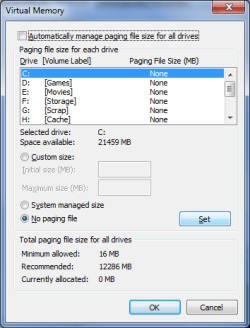
Select 'No paging file' and hit 'Set'. Reboot.
 

Attachments

  • Nopage.png
    Nopage.png
    12.5 KB · Views: 286

My Computer My Computer

At a glance

Windows 7 Home Premium x64Intel QX9650 Extreme 4.0 GHz8GB (4x2) Corsair Dominator DDR32x Radeon R390X [8GB]
Computer type
PC/Desktop
Computer Manufacturer/Model Number
Custom Build/Mod
OS
Windows 7 Home Premium x64
CPU
Intel QX9650 Extreme 4.0 GHz
Motherboard
ASUS Rampage Extreme Rev2
Memory
8GB (4x2) Corsair Dominator DDR3
Graphics Card(s)
2x Radeon R390X [8GB]
Sound Card
SupremeFX X-Fi
Monitor(s) Displays
Dell 2408WFP 26" Panel
Screen Resolution
1920x1200
Hard Drives
4x WD 2TB (8TB+ Total)
2x Crucial SSD 128GB (RAID-0)
1x LG Blu-ray read/write
1x Phillips LightScribe DVD read/write
PSU
Corsair HX1000
Case
CoolerMaster - Cosmos S
Cooling
Custom Liquid - 320mm rad w/ 3x 80mm fans, CPU/NB/SB Blocks
Keyboard
Logitech Illuminater Pro
Mouse
Logitech
Internet Speed
Fractional T1 - 125Mbps
Antivirus
ESET Security Suite / Microsoft Security Essentials
Browser
Cyberfox Intel x64
Other Info
OC'd to 5.0GHz @ 44c under full load
hey guys how do you make all the windows small like in the op's picture?
 

My Computer My Computer

At a glance

win 7 rc
OS
win 7 rc
So, your telling me that 4GB of ram is sufficient enough to run W7 without pagefile and its likely it wont crash?

Enzo.
 

My Computer My Computer

At a glance

W7 RTM Ultimate x64Intel Q8400 @ 2.66GHZ4GB DDR2-800Gainward GTS 450 GLH 1GB Edition
Computer Manufacturer/Model Number
Custom Build
OS
W7 RTM Ultimate x64
CPU
Intel Q8400 @ 2.66GHZ
Motherboard
Gigabyte GA-EG45M-UD2H
Memory
4GB DDR2-800
Graphics Card(s)
Gainward GTS 450 GLH 1GB Edition
Sound Card
Integrated 8 Channel
Monitor(s) Displays
AOC 23.6 Inch Widescreen LCD
Screen Resolution
1920x1080
Hard Drives
Seagate 500GB Internal
Western Digital 1TB Internal

Hitachi 1TB External
PSU
Apevia Java Power 500W
Case
Cooler Master HAF 922 Black
Cooling
Stock Intel CPU Fan
Keyboard
HP SK-2960 Multimedia Keyboard
Mouse
Logitech M350 Wireless Gaming Mouse
Internet Speed
1.5MB
So, your telling me that 4GB of ram is sufficient enough to run W7 without pagefile and its likely it wont crash?

Enzo.


Yes. In fact, you would be hard-pressed to eat it all.

Photoshop CS4 (x64) can chew it up quickly but, generally, not so bad that you would crash. Besides, Windows will warn you if you're low. You would be absolutely fine with 4GB.
 

My Computer My Computer

At a glance

Windows 7 Home Premium x64Intel QX9650 Extreme 4.0 GHz8GB (4x2) Corsair Dominator DDR32x Radeon R390X [8GB]
Computer type
PC/Desktop
Computer Manufacturer/Model Number
Custom Build/Mod
OS
Windows 7 Home Premium x64
CPU
Intel QX9650 Extreme 4.0 GHz
Motherboard
ASUS Rampage Extreme Rev2
Memory
8GB (4x2) Corsair Dominator DDR3
Graphics Card(s)
2x Radeon R390X [8GB]
Sound Card
SupremeFX X-Fi
Monitor(s) Displays
Dell 2408WFP 26" Panel
Screen Resolution
1920x1200
Hard Drives
4x WD 2TB (8TB+ Total)
2x Crucial SSD 128GB (RAID-0)
1x LG Blu-ray read/write
1x Phillips LightScribe DVD read/write
PSU
Corsair HX1000
Case
CoolerMaster - Cosmos S
Cooling
Custom Liquid - 320mm rad w/ 3x 80mm fans, CPU/NB/SB Blocks
Keyboard
Logitech Illuminater Pro
Mouse
Logitech
Internet Speed
Fractional T1 - 125Mbps
Antivirus
ESET Security Suite / Microsoft Security Essentials
Browser
Cyberfox Intel x64
Other Info
OC'd to 5.0GHz @ 44c under full load
hmm, what about photoshop cs3?

im considering it :)

Enzo.
 

My Computer My Computer

At a glance

W7 RTM Ultimate x64Intel Q8400 @ 2.66GHZ4GB DDR2-800Gainward GTS 450 GLH 1GB Edition
Computer Manufacturer/Model Number
Custom Build
OS
W7 RTM Ultimate x64
CPU
Intel Q8400 @ 2.66GHZ
Motherboard
Gigabyte GA-EG45M-UD2H
Memory
4GB DDR2-800
Graphics Card(s)
Gainward GTS 450 GLH 1GB Edition
Sound Card
Integrated 8 Channel
Monitor(s) Displays
AOC 23.6 Inch Widescreen LCD
Screen Resolution
1920x1080
Hard Drives
Seagate 500GB Internal
Western Digital 1TB Internal

Hitachi 1TB External
PSU
Apevia Java Power 500W
Case
Cooler Master HAF 922 Black
Cooling
Stock Intel CPU Fan
Keyboard
HP SK-2960 Multimedia Keyboard
Mouse
Logitech M350 Wireless Gaming Mouse
Internet Speed
1.5MB
One small problem, i cant remember where the pagefile setting are located, anyone wana point me in the right direction?

Thanks,

Enzo.
 

My Computer My Computer

At a glance

W7 RTM Ultimate x64Intel Q8400 @ 2.66GHZ4GB DDR2-800Gainward GTS 450 GLH 1GB Edition
Computer Manufacturer/Model Number
Custom Build
OS
W7 RTM Ultimate x64
CPU
Intel Q8400 @ 2.66GHZ
Motherboard
Gigabyte GA-EG45M-UD2H
Memory
4GB DDR2-800
Graphics Card(s)
Gainward GTS 450 GLH 1GB Edition
Sound Card
Integrated 8 Channel
Monitor(s) Displays
AOC 23.6 Inch Widescreen LCD
Screen Resolution
1920x1080
Hard Drives
Seagate 500GB Internal
Western Digital 1TB Internal

Hitachi 1TB External
PSU
Apevia Java Power 500W
Case
Cooler Master HAF 922 Black
Cooling
Stock Intel CPU Fan
Keyboard
HP SK-2960 Multimedia Keyboard
Mouse
Logitech M350 Wireless Gaming Mouse
Internet Speed
1.5MB
One small problem, i cant remember where the pagefile setting are located, anyone wana point me in the right direction?

Thanks,

Enzo.

Click the Start button or press the Windows key, type "pagefile" and select "How to change the size of virtual memory."
 

My Computer My Computer

At a glance

Windows 7 x64Intel Core i7 2600K8 GB ADATA DDR3 1600HIS Hightech Radeon 4670 (fanless)
OS
Windows 7 x64
CPU
Intel Core i7 2600K
Motherboard
Asus P8P67 Deluxe
Memory
8 GB ADATA DDR3 1600
Graphics Card(s)
HIS Hightech Radeon 4670 (fanless)
Sound Card
Creative X-Fi XtremeGamer
Monitor(s) Displays
Samsung 213T
Screen Resolution
1600 x 1200
Hard Drives
Western Digital Black 640GB (boot), Western Digital Black 2TB x 2 (data and scratch), Western Digital Green 2TB (backup)
PSU
Corsair TX650W
Case
Antec P182
Cooling
Prolimatech Megahalems Rev.B
Keyboard
HP Elite wireless
Mouse
Logitech Performance MX
ok ok,
A. i found it and turned it off.
B. restarted and came to the conclusion my computer was lagging like a fat man in a marathon..
C. i turned PF back on..
D. back to normal speed :)


Enzo.
 

My Computer My Computer

At a glance

W7 RTM Ultimate x64Intel Q8400 @ 2.66GHZ4GB DDR2-800Gainward GTS 450 GLH 1GB Edition
Computer Manufacturer/Model Number
Custom Build
OS
W7 RTM Ultimate x64
CPU
Intel Q8400 @ 2.66GHZ
Motherboard
Gigabyte GA-EG45M-UD2H
Memory
4GB DDR2-800
Graphics Card(s)
Gainward GTS 450 GLH 1GB Edition
Sound Card
Integrated 8 Channel
Monitor(s) Displays
AOC 23.6 Inch Widescreen LCD
Screen Resolution
1920x1080
Hard Drives
Seagate 500GB Internal
Western Digital 1TB Internal

Hitachi 1TB External
PSU
Apevia Java Power 500W
Case
Cooler Master HAF 922 Black
Cooling
Stock Intel CPU Fan
Keyboard
HP SK-2960 Multimedia Keyboard
Mouse
Logitech M350 Wireless Gaming Mouse
Internet Speed
1.5MB
I have disabled it with 4gb of memory and did no notice any change in performance at all. I will keep it like this for some time.

My question is, do the pagefile is actually used if your memory is not completly full? If no, what's the point to disable it?
 

My Computer My Computer

At a glance

Windows 7 build 7127 x64Intel Core-i7 2600k 3.4 GHzPatriot Extreme Performance 4GB PC2-6400 4-4-...Intel G31
OS
Windows 7 build 7127 x64
CPU
Intel Core-i7 2600k 3.4 GHz
Motherboard
Onboard audio (Realtek ALC662 codec)
Memory
Patriot Extreme Performance 4GB PC2-6400 4-4-4-12
Graphics Card(s)
Intel G31
Sound Card
Creative Sound Blaster Audigy 2
Monitor(s) Displays
Viewsonic Professional Series P95f+
Screen Resolution
1280x1024 @ 85Hz
Hard Drives
Western Digital Raptor, 74GB 10000RPM (system drive)
Maxtor DiamondMax 10, 200GB 7200RPM
Seagate Barracuda 7200.10, 500GB 7200RPM
PSU
Antec Truepower 430watt
Case
Cooler Master TAC-T01 WaveMaster
Cooling
Intel & Nvidia stock cooller + 3 80mm case fans
Keyboard
Logitech Internet Navigator
Mouse
Logitech MX-518
Internet Speed
8/1MBPS
We are now discussing which is faster at paging, RAM or HDD - the answer is obvious...RAM! What needs to be explained, is how using RAM-based-Paging affects the swapping process and ALL contents within the memory system.

Windows (Vista and beyond) will try to max out your memory usage with items that you consistently use. With this form of memory management, the purpose of paging is to keep a sorted list of all objects and relieve RAM of the more redundant objects. Think of a pagefile as being a clone of what's currently in RAM + what COULD be useful, but just isn't at that time. Even though they don't belong in the RAM, they still benefit by being sorted and kept in a special place. This is why having your pagefile located in the proper place can be important. Non-fragmented pagefiles located at the beginning of good-performing disks can ensure that our sorted data loads MUCH faster. Problem is, Microsoft's implementation of Pagefile-configuration doesn't include any automated quality-control. If your pagefile is scattered about or located in a low-performing location, it MAY - in some situations - increase the responsiveness of your PC by disabling the PF. However, you should note that overall it will be the opposite effect. Here’s why:

If you load up a program called 'Ms. Piggy', she's going to boss everyone around until they decide to go to another room (aka the pagefile). If the building has no other room, they're going to either leave the building completely, or partition the first room. This partitioning will cause Ms. Piggy to place her purse in the other room, and force all but the very-most-VIPs (if not everyone) to go home. When Ms Piggy’s number is over, we run into a problem... We will have to call up some cab drivers, get them to go to everybody's house and pick them and/or their stuff up and bring it back to the office. There will be traffic along the way, and maybe even a few jams…this may take a LONG, LONG TIME. On the other hand, had we actually had a pagefile - the VIPs could stick around and observe Ms Piggy's performance. At the moment it ended, the VIPs could’ve started working immediately. All the secondary staff and related files could also be brought back in from the nearby storage area. Maybe that storage area was located on another floor, maybe it was a mail-room, doesn’t really matter cause it still beats having to travel across town.

Again, EVERYONE should understand that this ONLY pertain to a Windows OS of Vista and beyond (greater than XP...). In windows XP, RAM is NOT properly used by the OS in any manner; Paging takes on a virtual-memory-like role as opposed to the queuing-role that is used in Vista and 7. BUT!!! Because XP doesn't use extended amounts RAM except when required, using that space as an enhanced-paging-file can be a possible way to trick Windows into keeping more objects inside RAM. This is why Disabling/enabling a PF in XP can be a matter of discussion, in Vista and up, it generally can-not.

XP: If you have LOTS of RAM...and aren't in threat of any programs going bonkers due to a lack of a large-PF - disabled can offer benefits.

'Vista and beyond': RAM should be filled down to 0MB free by the OS. Programs should load faster and quieter, PF usage handles all the tracking and relocation of lesser-used apps/data in the background. No benefits should be gained by disabling a PF.

The arguments of NO PF are based almost ENTIRELY on the XP loophole. It does not hold true for later operating systems.

I proably should have clarified some of these things the first time around...I'm not that good at organizing thoughts in a one-shot environment...sry bout that.
 
Last edited:

My Computer My Computer

At a glance

Vista (x64)
OS
Vista (x64)
Probably the best explanation of the pagefile I've read (and I've read quite a few).
 

My Computer My Computer

At a glance

Windows 7 64AMD Phenom II X4 Black Edition 9408 GBNvidia 8800GTS
OS
Windows 7 64
CPU
AMD Phenom II X4 Black Edition 940
Motherboard
Gigabyte GA-MA790X-UD3P
Memory
8 GB
Graphics Card(s)
Nvidia 8800GTS
Monitor(s) Displays
Benq G2420HDBL
Screen Resolution
1920x1080
Case
Lian-Li
Internet Speed
10/10 mb/s
Im to dumb to understand it :S, not really i getcha :)

Enzo.
 

My Computer My Computer

At a glance

W7 RTM Ultimate x64Intel Q8400 @ 2.66GHZ4GB DDR2-800Gainward GTS 450 GLH 1GB Edition
Computer Manufacturer/Model Number
Custom Build
OS
W7 RTM Ultimate x64
CPU
Intel Q8400 @ 2.66GHZ
Motherboard
Gigabyte GA-EG45M-UD2H
Memory
4GB DDR2-800
Graphics Card(s)
Gainward GTS 450 GLH 1GB Edition
Sound Card
Integrated 8 Channel
Monitor(s) Displays
AOC 23.6 Inch Widescreen LCD
Screen Resolution
1920x1080
Hard Drives
Seagate 500GB Internal
Western Digital 1TB Internal

Hitachi 1TB External
PSU
Apevia Java Power 500W
Case
Cooler Master HAF 922 Black
Cooling
Stock Intel CPU Fan
Keyboard
HP SK-2960 Multimedia Keyboard
Mouse
Logitech M350 Wireless Gaming Mouse
Internet Speed
1.5MB
Back
Top