
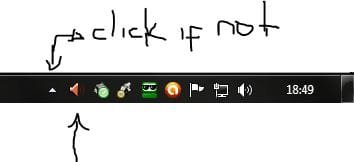
Help. I recently did a clean install of Windows 7 64bit (on my HP Vista 32 machine). Life is grand! My problems started when I tried to listen to the microphone input through my speakers. The front microphone inputs did not work so I downlaed the Realtek HD Audio Drivers (recently updated) from the realtek site. The inputs now work and I can record from the microphone through the Sound Recorder app in Accessories but can not hear the microphone through the speakers while I am recording. After searching the web I noticed a lot of chatter about setting things up in the Realtek HD Audio Manager. This app does not show up in my control panel. Does anyone know where I can get it (if I really need it). The Realtek site only has the driver download (not the manager). Am I missing something, am I confused, or both?
My Computer
- Computer Manufacturer/Model Number
- HP M8120n
- OS
- Windows 7 64 Bit
- CPU
- INtel Core 2Quad Q6600 2.4 GHz

 Is your problem really solved?!...
 Therefore, I ask that you report this thread as solved. How? Just click on the triangle that is on the top right of this post and report.