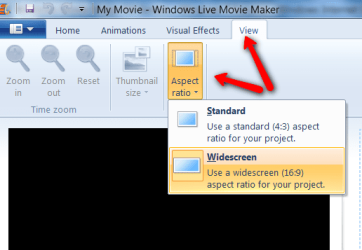
Maybe I should straighten this out. The files are 4:3 tv shows. In the info, it says they're 352x240. That's not 4:3, is it ?
Don't worry about that, there is a facility called "Unsquare pixel rendering" that takes care of the difference. That's why PAL standard is 720x576 but NTSC which is your area is 720x476
On one set of files, the 4:3 square goes from top to bottom. On the other set of files, the same 352x240 square has a slight bar on top and bottom and larger bars on the sides.
WHat format are they files?
This second set of files appears to be a 4:3 image that's been pillarboxed. This is when they are played in Windows Media Player. If I play the second set of files on Divxplayer, the 4:3 image goes from top to bottom slightly more, but it also a little squished in on the sides.
I just checked in Windows DVD Maker, and the preview window is widescreen.
What have you got the Options set to?
When I play the files in the preview window, the video appears to go from top to bottom. I think that maybe the files appear wonky because of the programs they're played in.
Remember that is a Preview it does not signify what the final DVD will look like
Do you think that if I burn a dvd with them that they'll appear like they do in the preview window in Windows DVD Maker ?
Best answer to that is get some DVD R+W discs and test everything. Be aware though that these files are small, they will not produce a good quality DVD that you can view on a TV. "You can't make a silk purse out of a sows ear" as they say!
Also if the originals are 4:3 they will not make widescreen videos!