Windows Movie Maker Fill Screen

Local time
3:59 AM
Messages
63
Location
Independence, Missouri
I have never made a dvd before, so I have a question. I have seasons of a show that I want to make a dvd of. The first file, as is most of the files, is 352 by 240. If I burn a dvd of a file this size, will it fill the screen of a 4:3 tv or fit in the correct 4:3 ratio, the image going from top to bottom with the bars on the sides, of a 16:9 screen ?
 

My Computer My Computer

OS
Windows 7 Home Premium
Graphics Card(s)
Nvidia
Hi Spottedfeather, we meet again.
Exactly what are you asking as what you say happens is perfectly correct. You can make a 4x3 aspect video fit a widescreen 16x9 but it will either look distorted or or will loose some of the top and bottom if you maintain the aspect ratio. As you source clips are already small this will cause a loss of quality as you will have to zoom in to fill the screen.
 

My Computer My Computer

Computer type
PC/Desktop
OS
Microsoft Windows 7 Home Premium 64-bit 7601 Multiprocessor Free Service Pack 1
CPU
Intel(R) Core(TM) i7-3770 CPU @ 3.40GHz
Motherboard
ASUSTeK COMPUTER INC. P8H77-M
Memory
8.00 GB
Graphics Card(s)
Intel(R) HD Graphics 4000
Sound Card
On Board
Monitor(s) Displays
Dell 24"
Screen Resolution
1920 x 1080
Hard Drives
(1) INTEL SSDSC2CT180A3 ATA Device (2) ST500DM002-1BD142 ATA Device (3) WDC WD3200AAKS-75L9A0 ATA Device (4) Generic- Compact Flash USB Device (5) Generic- MS/MS-Pro USB Device (6) Generic- SD/MMC USB Device (7) Generic- SM/xD-Picture USB
PSU
500w Corsair
Case
Cooler Master
Cooling
3 Fans
Keyboard
Logitech MK300
Mouse
Logitech WOM
Internet Speed
75Mb
Antivirus
Norton 360
Browser
Firefox, Opera, IE
Alright, but how do I get a 4:3 aspect video to go from top to bottom on a screen and how do I get a 16:9 video to fill a 16:9 screen and fit, bars on top and bottom, a 4:3 tv ?
 

My Computer My Computer

OS
Windows 7 Home Premium
Graphics Card(s)
Nvidia
Alright, but how do I get a 4:3 aspect video to go from top to bottom on a screen and how do I get a 16:9 video to fill a 16:9 screen and fit, bars on top and bottom, a 4:3 tv ?

You will need a good video editing program. One of the easiest to use IMHO is Corel Video Studio x3. You can download a trial version of this, just Google it!
You need to use the overlay tracks and use the distortfacility. Happy to help with this if you take this route but bear in mind my post above, your clips are small so will never look really good filling a big screen!
 

My Computer My Computer

Computer type
PC/Desktop
OS
Microsoft Windows 7 Home Premium 64-bit 7601 Multiprocessor Free Service Pack 1
CPU
Intel(R) Core(TM) i7-3770 CPU @ 3.40GHz
Motherboard
ASUSTeK COMPUTER INC. P8H77-M
Memory
8.00 GB
Graphics Card(s)
Intel(R) HD Graphics 4000
Sound Card
On Board
Monitor(s) Displays
Dell 24"
Screen Resolution
1920 x 1080
Hard Drives
(1) INTEL SSDSC2CT180A3 ATA Device (2) ST500DM002-1BD142 ATA Device (3) WDC WD3200AAKS-75L9A0 ATA Device (4) Generic- Compact Flash USB Device (5) Generic- MS/MS-Pro USB Device (6) Generic- SD/MMC USB Device (7) Generic- SM/xD-Picture USB
PSU
500w Corsair
Case
Cooler Master
Cooling
3 Fans
Keyboard
Logitech MK300
Mouse
Logitech WOM
Internet Speed
75Mb
Antivirus
Norton 360
Browser
Firefox, Opera, IE
Windows movie maker is such a terrible program, anything else would be better :)
 

My Computer My Computer

Computer Manufacturer/Model Number
Self Built
OS
Windows 7 Ultimate x64
CPU
[email protected]
Motherboard
MSI P67A-GD80 B3
Memory
Corsair Vengeance 1600MHz 16GB
Graphics Card(s)
MSI Geforce 580 Twin Frozr II @ SLI
Sound Card
Creative Sound Blaster Pro (USB)
Monitor(s) Displays
Dell Ultrasharp 27"
Screen Resolution
2560x1440
Hard Drives
Intel 510 Series 250GB SSD
Corsair Reactor Series 120GB SSD
WD Caviar Black 1TB
3x External HDD's.
PSU
Corsair AX 1200W
Case
Corsair Obsidian 800D
Cooling
Antec Kuhler H2O 920 & 3x Scythe Gentle Typhoon AP-15
Keyboard
Mionix Cibal 60
Mouse
CM Storm SENTINEL
Internet Speed
Pretty Fast
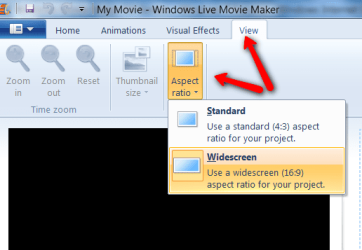
Actually it works very well with Windows Live Movie Maker. All you do is set the aspect ratio correctly before you save the movie,
 

Attachments

  • 2010-08-14_1209.png
    2010-08-14_1209.png
    19.8 KB · Views: 9

My Computer My Computer

Computer Manufacturer/Model Number
HP, Dell, Gateway, Toshiba - 4 laptops and 2 desktops
OS
Vista, Windows7, Mint Mate, Zorin, Windows 8
CPU
from 1.6GHz Duo to i7
Monitor(s) Displays
2x HP w2207
Hard Drives
5x HDD, 7x SSD, 12x Externals
Keyboard
with trackball - no mices
Mouse
Trackball mice
Internet Speed
DSL 6000
Like all software, some people love it, some people hate it. I just find the Corel so much easier to use ans as a bought program it does offer me the sort of effects, transitions and moe sophisticated facilities that I need. But then I do a lot of Video Editing. Lets see what spottedfeather wants to do with his finished Video then we can see what will suit him best!
 

My Computer My Computer

Computer type
PC/Desktop
OS
Microsoft Windows 7 Home Premium 64-bit 7601 Multiprocessor Free Service Pack 1
CPU
Intel(R) Core(TM) i7-3770 CPU @ 3.40GHz
Motherboard
ASUSTeK COMPUTER INC. P8H77-M
Memory
8.00 GB
Graphics Card(s)
Intel(R) HD Graphics 4000
Sound Card
On Board
Monitor(s) Displays
Dell 24"
Screen Resolution
1920 x 1080
Hard Drives
(1) INTEL SSDSC2CT180A3 ATA Device (2) ST500DM002-1BD142 ATA Device (3) WDC WD3200AAKS-75L9A0 ATA Device (4) Generic- Compact Flash USB Device (5) Generic- MS/MS-Pro USB Device (6) Generic- SD/MMC USB Device (7) Generic- SM/xD-Picture USB
PSU
500w Corsair
Case
Cooler Master
Cooling
3 Fans
Keyboard
Logitech MK300
Mouse
Logitech WOM
Internet Speed
75Mb
Antivirus
Norton 360
Browser
Firefox, Opera, IE
Like all software, some people love it, some people hate it. I just find the Corel so much easier to use ans as a bought program it does offer me the sort of effects, transitions and moe sophisticated facilities that I need. But then I do a lot of Video Editing. Lets see what spottedfeather wants to do with his finished Video then we can see what will suit him best!
mitch, I never tried Corel Video Studio, but maybe I should because I do a fair amount of video work too. I responded mainly because hawkin90 took an extreme position on WMM. I think WLMM is a lot better in many aspects although it is ashame that they put away with the timeline.
 

My Computer My Computer

Computer Manufacturer/Model Number
HP, Dell, Gateway, Toshiba - 4 laptops and 2 desktops
OS
Vista, Windows7, Mint Mate, Zorin, Windows 8
CPU
from 1.6GHz Duo to i7
Monitor(s) Displays
2x HP w2207
Hard Drives
5x HDD, 7x SSD, 12x Externals
Keyboard
with trackball - no mices
Mouse
Trackball mice
Internet Speed
DSL 6000
mitch, I never tried Corel Video Studio, but maybe I should because I do a fair amount of video work too. I responded mainly because hawkin90 took an extreme position on WMM. I think WLMM is a lot better in many aspects although it is ashame that they put away with the timeline.
Hi Wolfgang
Have PM'd you regarding Corel products as this is going off Topic and we are discussing 3rd Party Software. Should hate to get in trouble with Admin as I have a clean sheet in that dept. at the moment which is, I have to say, quite a novelty for me!:o
 

My Computer My Computer

Computer type
PC/Desktop
OS
Microsoft Windows 7 Home Premium 64-bit 7601 Multiprocessor Free Service Pack 1
CPU
Intel(R) Core(TM) i7-3770 CPU @ 3.40GHz
Motherboard
ASUSTeK COMPUTER INC. P8H77-M
Memory
8.00 GB
Graphics Card(s)
Intel(R) HD Graphics 4000
Sound Card
On Board
Monitor(s) Displays
Dell 24"
Screen Resolution
1920 x 1080
Hard Drives
(1) INTEL SSDSC2CT180A3 ATA Device (2) ST500DM002-1BD142 ATA Device (3) WDC WD3200AAKS-75L9A0 ATA Device (4) Generic- Compact Flash USB Device (5) Generic- MS/MS-Pro USB Device (6) Generic- SD/MMC USB Device (7) Generic- SM/xD-Picture USB
PSU
500w Corsair
Case
Cooler Master
Cooling
3 Fans
Keyboard
Logitech MK300
Mouse
Logitech WOM
Internet Speed
75Mb
Antivirus
Norton 360
Browser
Firefox, Opera, IE
Thanks Mitch. I will be on the lookout for the PM - did not se it yet.
 

My Computer My Computer

Computer Manufacturer/Model Number
HP, Dell, Gateway, Toshiba - 4 laptops and 2 desktops
OS
Vista, Windows7, Mint Mate, Zorin, Windows 8
CPU
from 1.6GHz Duo to i7
Monitor(s) Displays
2x HP w2207
Hard Drives
5x HDD, 7x SSD, 12x Externals
Keyboard
with trackball - no mices
Mouse
Trackball mice
Internet Speed
DSL 6000
Thanks Mitch. I will be on the lookout for the PM - did not se it yet.
No I type slow and the cat wanted her dinner!!!:D:D
Have done it now!
 

My Computer My Computer

Computer type
PC/Desktop
OS
Microsoft Windows 7 Home Premium 64-bit 7601 Multiprocessor Free Service Pack 1
CPU
Intel(R) Core(TM) i7-3770 CPU @ 3.40GHz
Motherboard
ASUSTeK COMPUTER INC. P8H77-M
Memory
8.00 GB
Graphics Card(s)
Intel(R) HD Graphics 4000
Sound Card
On Board
Monitor(s) Displays
Dell 24"
Screen Resolution
1920 x 1080
Hard Drives
(1) INTEL SSDSC2CT180A3 ATA Device (2) ST500DM002-1BD142 ATA Device (3) WDC WD3200AAKS-75L9A0 ATA Device (4) Generic- Compact Flash USB Device (5) Generic- MS/MS-Pro USB Device (6) Generic- SD/MMC USB Device (7) Generic- SM/xD-Picture USB
PSU
500w Corsair
Case
Cooler Master
Cooling
3 Fans
Keyboard
Logitech MK300
Mouse
Logitech WOM
Internet Speed
75Mb
Antivirus
Norton 360
Browser
Firefox, Opera, IE
Hi Mitch, I did send you an answer but I am not sure whether you'll get it since I accidently had lost your initial PM.
 

My Computer My Computer

Computer Manufacturer/Model Number
HP, Dell, Gateway, Toshiba - 4 laptops and 2 desktops
OS
Vista, Windows7, Mint Mate, Zorin, Windows 8
CPU
from 1.6GHz Duo to i7
Monitor(s) Displays
2x HP w2207
Hard Drives
5x HDD, 7x SSD, 12x Externals
Keyboard
with trackball - no mices
Mouse
Trackball mice
Internet Speed
DSL 6000
Yes got the message fine.
 

My Computer My Computer

Computer type
PC/Desktop
OS
Microsoft Windows 7 Home Premium 64-bit 7601 Multiprocessor Free Service Pack 1
CPU
Intel(R) Core(TM) i7-3770 CPU @ 3.40GHz
Motherboard
ASUSTeK COMPUTER INC. P8H77-M
Memory
8.00 GB
Graphics Card(s)
Intel(R) HD Graphics 4000
Sound Card
On Board
Monitor(s) Displays
Dell 24"
Screen Resolution
1920 x 1080
Hard Drives
(1) INTEL SSDSC2CT180A3 ATA Device (2) ST500DM002-1BD142 ATA Device (3) WDC WD3200AAKS-75L9A0 ATA Device (4) Generic- Compact Flash USB Device (5) Generic- MS/MS-Pro USB Device (6) Generic- SD/MMC USB Device (7) Generic- SM/xD-Picture USB
PSU
500w Corsair
Case
Cooler Master
Cooling
3 Fans
Keyboard
Logitech MK300
Mouse
Logitech WOM
Internet Speed
75Mb
Antivirus
Norton 360
Browser
Firefox, Opera, IE
Actually it works very well with Windows Live Movie Maker. All you do is set the aspect ratio correctly before you save the movie,

If I do that, and set the aspect to 4:3, will the square picture go from top to bottom with the black bars on the sides of a widescreen ? And will it fill a normal 4:3 tv ?
 

My Computer My Computer

OS
Windows 7 Home Premium
Graphics Card(s)
Nvidia
Actually it works very well with Windows Live Movie Maker. All you do is set the aspect ratio correctly before you save the movie,

If I do that, and set the aspect to 4:3, will the square picture go from top to bottom with the black bars on the sides of a widescreen ? And will it fill a normal 4:3 tv ?
That will depend on the aspect ratio of your TV.
 

My Computer My Computer

Computer Manufacturer/Model Number
HP, Dell, Gateway, Toshiba - 4 laptops and 2 desktops
OS
Vista, Windows7, Mint Mate, Zorin, Windows 8
CPU
from 1.6GHz Duo to i7
Monitor(s) Displays
2x HP w2207
Hard Drives
5x HDD, 7x SSD, 12x Externals
Keyboard
with trackball - no mices
Mouse
Trackball mice
Internet Speed
DSL 6000
So, if I set the aspect in Windows DVD Maker to 4:3, the file will fill the screen ? What about if I burn a dvd with the aspect to 16:9 ?
 

My Computer My Computer

OS
Windows 7 Home Premium
Graphics Card(s)
Nvidia
So, if I set the aspect in Windows DVD Maker to 4:3, the file will fill the screen ? What about if I burn a dvd with the aspect to 16:9 ?
1.Setting to 4:3 should fill the screen, but try it to make sure!
2.Then you will get black bars at the top and bottom of a 4:3 screen!
 

My Computer My Computer

Computer type
PC/Desktop
OS
Microsoft Windows 7 Home Premium 64-bit 7601 Multiprocessor Free Service Pack 1
CPU
Intel(R) Core(TM) i7-3770 CPU @ 3.40GHz
Motherboard
ASUSTeK COMPUTER INC. P8H77-M
Memory
8.00 GB
Graphics Card(s)
Intel(R) HD Graphics 4000
Sound Card
On Board
Monitor(s) Displays
Dell 24"
Screen Resolution
1920 x 1080
Hard Drives
(1) INTEL SSDSC2CT180A3 ATA Device (2) ST500DM002-1BD142 ATA Device (3) WDC WD3200AAKS-75L9A0 ATA Device (4) Generic- Compact Flash USB Device (5) Generic- MS/MS-Pro USB Device (6) Generic- SD/MMC USB Device (7) Generic- SM/xD-Picture USB
PSU
500w Corsair
Case
Cooler Master
Cooling
3 Fans
Keyboard
Logitech MK300
Mouse
Logitech WOM
Internet Speed
75Mb
Antivirus
Norton 360
Browser
Firefox, Opera, IE
Maybe I should straighten this out. The files are 4:3 tv shows. In the info, it says they're 352x240. That's not 4:3, is it ? On one set of files, the 4:3 square goes from top to bottom. On the other set of files, the same 352x240 square has a slight bar on top and bottom and larger bars on the sides. This second set of files appears to be a 4:3 image that's been pillarboxed. This is when they are played in Windows Media Player. If I play the second set of files on Divxplayer, the 4:3 image goes from top to bottom slightly more, but it also a little squished in on the sides.

I just checked in Windows DVD Maker, and the preview window is widescreen. When I play the files in the preview window, the video appears to go from top to bottom. I think that maybe the files appear wonky because of the programs they're played in. Do you think that if I burn a dvd with them that they'll appear like they do in the preview window in Windows DVD Maker ?
 

My Computer My Computer

OS
Windows 7 Home Premium
Graphics Card(s)
Nvidia
Maybe I should straighten this out. The files are 4:3 tv shows. In the info, it says they're 352x240. That's not 4:3, is it ?
Don't worry about that, there is a facility called "Unsquare pixel rendering" that takes care of the difference. That's why PAL standard is 720x576 but NTSC which is your area is 720x476
On one set of files, the 4:3 square goes from top to bottom. On the other set of files, the same 352x240 square has a slight bar on top and bottom and larger bars on the sides.
WHat format are they files?
This second set of files appears to be a 4:3 image that's been pillarboxed. This is when they are played in Windows Media Player. If I play the second set of files on Divxplayer, the 4:3 image goes from top to bottom slightly more, but it also a little squished in on the sides.

I just checked in Windows DVD Maker, and the preview window is widescreen.
What have you got the Options set to?
When I play the files in the preview window, the video appears to go from top to bottom. I think that maybe the files appear wonky because of the programs they're played in.
Remember that is a Preview it does not signify what the final DVD will look like
Do you think that if I burn a dvd with them that they'll appear like they do in the preview window in Windows DVD Maker ?
Best answer to that is get some DVD R+W discs and test everything. Be aware though that these files are small, they will not produce a good quality DVD that you can view on a TV. "You can't make a silk purse out of a sows ear" as they say!
Also if the originals are 4:3 they will not make widescreen videos!

Thought it easier to answer each bit! Hpe this helps.
Finally the best advice I can give is Trial and Errror!
 

My Computer My Computer

Computer type
PC/Desktop
OS
Microsoft Windows 7 Home Premium 64-bit 7601 Multiprocessor Free Service Pack 1
CPU
Intel(R) Core(TM) i7-3770 CPU @ 3.40GHz
Motherboard
ASUSTeK COMPUTER INC. P8H77-M
Memory
8.00 GB
Graphics Card(s)
Intel(R) HD Graphics 4000
Sound Card
On Board
Monitor(s) Displays
Dell 24"
Screen Resolution
1920 x 1080
Hard Drives
(1) INTEL SSDSC2CT180A3 ATA Device (2) ST500DM002-1BD142 ATA Device (3) WDC WD3200AAKS-75L9A0 ATA Device (4) Generic- Compact Flash USB Device (5) Generic- MS/MS-Pro USB Device (6) Generic- SD/MMC USB Device (7) Generic- SM/xD-Picture USB
PSU
500w Corsair
Case
Cooler Master
Cooling
3 Fans
Keyboard
Logitech MK300
Mouse
Logitech WOM
Internet Speed
75Mb
Antivirus
Norton 360
Browser
Firefox, Opera, IE
Hi Spottedfeather
Have just re-read your previous thread headed "Video Editor" and that remains unresolved really as you do not have any DVD's to try. I really think that unless you have a couple of DVD R+W discs we will keep going round and round in circles here. If you would like to shorten one of your clips again, host it as you did before and send me the link to download it I will happily have a look at it and report back. Then you will have an easy to follow workflow that will achieve the best you can get from your clips. BTW did you download the trial version of the Video Editor I suggested to you?
 

My Computer My Computer

Computer type
PC/Desktop
OS
Microsoft Windows 7 Home Premium 64-bit 7601 Multiprocessor Free Service Pack 1
CPU
Intel(R) Core(TM) i7-3770 CPU @ 3.40GHz
Motherboard
ASUSTeK COMPUTER INC. P8H77-M
Memory
8.00 GB
Graphics Card(s)
Intel(R) HD Graphics 4000
Sound Card
On Board
Monitor(s) Displays
Dell 24"
Screen Resolution
1920 x 1080
Hard Drives
(1) INTEL SSDSC2CT180A3 ATA Device (2) ST500DM002-1BD142 ATA Device (3) WDC WD3200AAKS-75L9A0 ATA Device (4) Generic- Compact Flash USB Device (5) Generic- MS/MS-Pro USB Device (6) Generic- SD/MMC USB Device (7) Generic- SM/xD-Picture USB
PSU
500w Corsair
Case
Cooler Master
Cooling
3 Fans
Keyboard
Logitech MK300
Mouse
Logitech WOM
Internet Speed
75Mb
Antivirus
Norton 360
Browser
Firefox, Opera, IE
  • Like
Reactions: JMH
Back
Top