can't initialize to MBR!

Update:
I tried to clean the XP installation CD first, but it still failed. Then I put on my analytical hat and tried another old XP installation CD, which did the same thing. Conclusion - its not the CD's fault! With regard to the read head of the CD drive, it reads all CDs fine otherwise. What next?
 

My Computer

Computer Manufacturer/Model Number
HP p6347c
OS
W7
CPU
AMD Athlon(tm) II X4 630 Processor
Motherboard
AMD RS780/RS880
Memory
8 GB
Graphics Card(s)
ATI Radeon HD 4200
Sound Card
Realtek High Definition Audio
Monitor(s) Displays
HP w2338h (HP w2338h Wide LCD Monitor)
Hard Drives
WDC WD6400AAKS-65A7B SCSI Disk Device
Your optical drive may be bad which is less likely and the board sounds too new to be requiring a sata driver disk for XP. But that is another possibility if the XP installer wasn't seeing the drive.

The idea of first unplugging the present 7 drive was simply to maintain the present master boot record entries for 7 on it. The guide explains that when custom installing XP after 7 is on will make 7 unbootable at first requiring the use of the 7 dvd repair tools>startup repair to correct that.

Out of curiosity I have to ask this one. Are you using pre-SP1 XP cds by chance? Those would have problems without the first service pack like breaking the 137gb barrier for the drive depending on how large the new one is.

Another thing of course would be the driver disk. Out of curiosity I have to ask another one here as to the make, model, and most importantly the type of drive the new is?

For an ide or Sata drive(possible driver disk need for onboard sata/Raid controllers) XP should go right on without a hitch. If the new drive was an SSD however that might be a problem. As a last resort however if nothing works to get XP on the alternative would be the XP Mode.
 

My Computers

System One System Two

  • Computer type
    PC/Desktop
    Computer Manufacturer/Model Number
    Custom builds = 2
    OS
    W7 Ultimate x64/W10 Pro x64/W11 Pro Triple Boot - Main PC W7 Remote PC Micro ATX W7 Pro x64/W11 Pro
    CPU
    AMD Phenom II X4 975 Deneb 3.6ghz - 965 2nd remote pc
    Motherboard
    Gigabyte GA-790XTA-UD4-Gigabyte GA-880GM-D2H remote pc
    Memory
    Kingston Hyper X DDR3 1600 1.5v 16gb - Hyper X Fury 8gb 2nd
    Graphics Card(s)
    MSI HD Radeon 5750 1gb - MSI HD Radeon 6450 on mini tower
    Sound Card
    Creative Labs X-Fi Xtreme Audio P - Realtek onooard 2nd case
    Monitor(s) Displays
    ASUS VW199T-P 19" HP 2082a Main-HP 2082a 20" remote pc
    Screen Resolution
    Asus 1440x900 - HP 1600x900
    Hard Drives
    WD Black 1TB HD per OS W7, W10, and pending W11 presently on 500gb OS Drive - Pending Triple 1TB HDs for Spanned Storage/backup volume
    Single 2TB external USB enclosure, single 1TB System 7 Host/Boot drive, Pending 8TB external HD for system image b
    PSU
    Corsair 750TX - primary / Corsair CX600 - second
    Case
    Antec 900-2 - SSD compatible / NZXT Vulcan mini tower
    Cooling
    Zalman CNPS9900A
    Keyboard
    AZIO L70 Backlit Letters Gaming - ONN Cordless/USB
    Mouse
    MSI DS200 Programmable, Logitech Cordless
    Internet Speed
    30mbps upgrade - primary hard wired - mini tower usb WiFi
    Antivirus
    GFI VIPRE Internet Security 2014 on W7 2016 beta on W10,
    Browser
    Cyberfox, WaterFox 64bit FF variants, FireFox x64, Pale Moon
    Other Info
    Accomdata fan cooled usb 2.0 PIDE/Sata II, III external enclosure.
    Sambient usb/eSata PATA/Sata II, III external enclosure.
  • Computer type
    PC/Desktop
    System Manufacturer/Model Number
    CUSTOM ASSEMBLY
    OS
    W7 Pro x64/W11 Pro
    CPU
    AMD Deneb 3.6ghz - 965
    Motherboard
    Gigabyte GA-880GM-D2H remote pc
    Memory
    Kingston Hyper X Fury 8gb
    Graphics Card(s)
    MSI HD Radeon 6450 DVI Output
    Sound Card
    Realtek onooard Creative or Other separate PENDING
    Monitor(s) Displays
    VIZIO 32" LCD TV Separate LCD Pending
    Screen Resolution
    1600x1080
    Hard Drives
    WD 500GB OS Host/Boot WD Green 1TB Storage/Backup
    PSU
    Corsair 600W - THERMALTAKE 600W spare case
    Case
    NZXT Vulcan mini tower
    Cooling
    Twin 120mm Top Fans - 240mm Side Cover
    Keyboard
    ONN Cordless/USB Logitech Cordless
    Mouse
    ONN USB/Cordless - Logitech Cordless
    Internet Speed
    DSL 5G
    Browser
    MS Edge, FireFox, WaterFox x64, FireFox Nightly
    Other Info
    OS Testing-Remote Access to Main TeamViewer
The idea of first unplugging the present 7 drive was simply to maintain the present master boot record entries for 7 on it. The guide explains that when custom installing XP after 7 is on will make 7 unbootable at first requiring the use of the 7 dvd repair tools>startup repair to correct that.
Are you suggesting I should do that next? Would I get the dual boot offered after reconnecting it?
Out of curiosity I have to ask this one. Are you using pre-SP1 XP cds by chance? Those would have problems without the first service pack like breaking the 137gb barrier for the drive depending on how large the new one is.
The XP CD states it is XP Home SP2.
My new drive is a WD 500 GB.
Another thing of course would be the driver disk. Out of curiosity I have to ask another one here as to the make, model, and most importantly the type of drive the new is?
I have to assume you are asking about the CD drive:
CD-ROM Drive
hp DVD A DH16AAL SCSI CdRom Device
Model Number hp DVD A DH16AAL
Drive Serial Number 3B9944001287
For an ide or Sata drive(possible driver disk need for onboard sata/Raid controllers) XP should go right on without a hitch. If the new drive was an SSD however that might be a problem. As a last resort however if nothing works to get XP on the alternative would be the XP Mode.
I have the W7 Home Edition, which does not offer an XP mode.
 

My Computer

Computer Manufacturer/Model Number
HP p6347c
OS
W7
CPU
AMD Athlon(tm) II X4 630 Processor
Motherboard
AMD RS780/RS880
Memory
8 GB
Graphics Card(s)
ATI Radeon HD 4200
Sound Card
Realtek High Definition Audio
Monitor(s) Displays
HP w2338h (HP w2338h Wide LCD Monitor)
Hard Drives
WDC WD6400AAKS-65A7B SCSI Disk Device
For adding a new boot entry into the 7 boot loader the guide posted earlier covers all this. Unplugging the 7 drive does two things for you to make like a little easier. Note the boot order as far as hard drives will be changed by the unplugging and replug of the 7 later.

The first thing is seeing the 7 drive remain bootable for 7 as is without the need for the startup repair or use of the command prompt option while booted with the 7 dvd later. That will save you some repair steps after XP is installed and suddenly you find 7 won't start? due the XP installer replacing that 7 entries with those needed for XP.

You would need to copy the boot files over however doing that way and edit the boot.ini to point at the second drive. Once you go into the Windows Explorer menu bar>Tools>Folder options>View tab you would uncheck the "extensions for known file types" and "hidden protected systems files" item to have the boot files visible to copy over to the root of the 7 drive since XP would be isolated at first.

The advantage? Each drive can be booted independently of each other rather then counting solely on the present 7 host/boot drive if you later had to replace or decided to upgrade that.

The second item is seeing the new drive XP is going onto made bootable on it's own when the 7 drive isn't present. You can still add XP into the 7 boot loader easy enough however. The same method for a dual boot of Vista with XP applies to an XP/7 dual boot setup.

You could be having a problem of one type with the optical drive itself. One idea would be making a temp folder on the second drive and simply copy + pasting a large amount of files into the temp folder to watch how things go from a disk in the drive.

If copying a large amount of files is a problem while the optical drive maybe good the new cable you added in recently could be at fault. http://www.sevenforums.com/hardware-devices/102038-installing-ide-new-tower.html

As for the Home Premium not supporting the Virtual PC from running there the alternative for the XP Mode is the WM Lite Workstation for the XP Mode. Just of late I had been running an old Socket A build without any virtualization support being too old but still saw the XP Mode running with the alternate program.

VMLite Workstation/VMLite XP Mode v3.2.6 binaries (x86/amd64)

What was interesting about the first install of that there still saw the integrated components supported. That was still on the Ultimate while another tryout with the Home Premium is a thought since I am just finishing a new build that will run that edition. But the VM ware would still run on HP as well as Ultimate.
 

My Computers

System One System Two

  • Computer type
    PC/Desktop
    Computer Manufacturer/Model Number
    Custom builds = 2
    OS
    W7 Ultimate x64/W10 Pro x64/W11 Pro Triple Boot - Main PC W7 Remote PC Micro ATX W7 Pro x64/W11 Pro
    CPU
    AMD Phenom II X4 975 Deneb 3.6ghz - 965 2nd remote pc
    Motherboard
    Gigabyte GA-790XTA-UD4-Gigabyte GA-880GM-D2H remote pc
    Memory
    Kingston Hyper X DDR3 1600 1.5v 16gb - Hyper X Fury 8gb 2nd
    Graphics Card(s)
    MSI HD Radeon 5750 1gb - MSI HD Radeon 6450 on mini tower
    Sound Card
    Creative Labs X-Fi Xtreme Audio P - Realtek onooard 2nd case
    Monitor(s) Displays
    ASUS VW199T-P 19" HP 2082a Main-HP 2082a 20" remote pc
    Screen Resolution
    Asus 1440x900 - HP 1600x900
    Hard Drives
    WD Black 1TB HD per OS W7, W10, and pending W11 presently on 500gb OS Drive - Pending Triple 1TB HDs for Spanned Storage/backup volume
    Single 2TB external USB enclosure, single 1TB System 7 Host/Boot drive, Pending 8TB external HD for system image b
    PSU
    Corsair 750TX - primary / Corsair CX600 - second
    Case
    Antec 900-2 - SSD compatible / NZXT Vulcan mini tower
    Cooling
    Zalman CNPS9900A
    Keyboard
    AZIO L70 Backlit Letters Gaming - ONN Cordless/USB
    Mouse
    MSI DS200 Programmable, Logitech Cordless
    Internet Speed
    30mbps upgrade - primary hard wired - mini tower usb WiFi
    Antivirus
    GFI VIPRE Internet Security 2014 on W7 2016 beta on W10,
    Browser
    Cyberfox, WaterFox 64bit FF variants, FireFox x64, Pale Moon
    Other Info
    Accomdata fan cooled usb 2.0 PIDE/Sata II, III external enclosure.
    Sambient usb/eSata PATA/Sata II, III external enclosure.
  • Computer type
    PC/Desktop
    System Manufacturer/Model Number
    CUSTOM ASSEMBLY
    OS
    W7 Pro x64/W11 Pro
    CPU
    AMD Deneb 3.6ghz - 965
    Motherboard
    Gigabyte GA-880GM-D2H remote pc
    Memory
    Kingston Hyper X Fury 8gb
    Graphics Card(s)
    MSI HD Radeon 6450 DVI Output
    Sound Card
    Realtek onooard Creative or Other separate PENDING
    Monitor(s) Displays
    VIZIO 32" LCD TV Separate LCD Pending
    Screen Resolution
    1600x1080
    Hard Drives
    WD 500GB OS Host/Boot WD Green 1TB Storage/Backup
    PSU
    Corsair 600W - THERMALTAKE 600W spare case
    Case
    NZXT Vulcan mini tower
    Cooling
    Twin 120mm Top Fans - 240mm Side Cover
    Keyboard
    ONN Cordless/USB Logitech Cordless
    Mouse
    ONN USB/Cordless - Logitech Cordless
    Internet Speed
    DSL 5G
    Browser
    MS Edge, FireFox, WaterFox x64, FireFox Nightly
    Other Info
    OS Testing-Remote Access to Main TeamViewer
For adding a new boot entry into the 7 boot loader the guide posted earlier covers all this. Unplugging the 7 drive does two things for you to make like a little easier. Note the boot order as far as hard drives will be changed by the unplugging and replug of the 7 later.
So let me get this straight, to be sure of what to do tomorrow morning.
1. Unplug the data connector from drive 0 (W7).
2. Reboot with XP installation CD in CD drive.
3. Reconnect drive 0 with W7.
4. Pray.
5. reboot and add a new boot entry into the 7 boot loader
Question: when you say the boot order will be changed - it will boot into W7, so I can add the new boot entry into the 7 boot loader?
 

My Computer

Computer Manufacturer/Model Number
HP p6347c
OS
W7
CPU
AMD Athlon(tm) II X4 630 Processor
Motherboard
AMD RS780/RS880
Memory
8 GB
Graphics Card(s)
ATI Radeon HD 4200
Sound Card
Realtek High Definition Audio
Monitor(s) Displays
HP w2338h (HP w2338h Wide LCD Monitor)
Hard Drives
WDC WD6400AAKS-65A7B SCSI Disk Device
If you install XP fresh without the 7 drive plugged in that will set up the drive as a stand alone install rather then placing the XP boot files on the 7 host drive and replace the 7 boot entries in the master boot record(mbr). For a short time the XP drive will be the default hard drive.

Once the XP installation is complete and you know that is running normal without problems you can then shutdown and replug the 7 drive back in. This will prevent any changes to the 7 boot information. But you will then need to go into the bios setup when powering up again to see that reset or insure it is set as the first hard drive in the list of drives to insure it is the default in order to boot into 7.

Basically that's a fast trip to see that done in there and then simply choose the "exit and save" option if pressing the F10 doesn't save any change right away. From there once back in 7 you can copy the needed XP boot files over to the root of C on the W7 host drive now made the default boot device if you follow me so far.

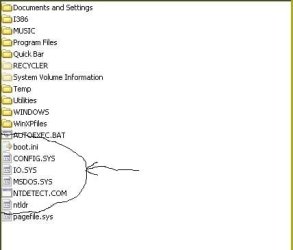
The next step as you will also see in the guide pointed to earlier is simply copying the XP boot files as shown in the attached image being the boot.ini file mentioned before and a few others being indicated in the screen below. NTLDR in lower case is required as well as the NTDETECT.COM, IO.SYS, MSDOS.SYS files while the CONFIG.SYS is simply mixed in there and won't do anything.

Once those are copied over you will need to download and install the latest 2.0.2 version of EasyBCD available free at Download EasyBCD 2.0.2 - NeoSmart Technologies

Before you can add the new entry for XP however you first have to uncheck the "read only" box in the properties screen for the boot.ini file in order to be able to edit the copy you then have on the 7 drive. A fast edit when opened by a double click bringing up the NotePad window will allow you make a simple change to the "rddisk(0)partition 1" to "rdisk(1)partition 1) since XP is now on the second not first hard drive.

Once that change is seen to simply drop down the File menu and save as "all files" not txt for the NotePad default in order to see the change overwrite the copy of the file now present on the 7 drive. You don't want it saved in text file format but still see the .ini extension at the end.

The EasyBCD options are easy to follow as for adding the new entry in for XP. First however a quick trip into the 7 Disk Management to see what the drive letter is and even change it to another is seen to since that will be the drive letter selected when going to add the new boot entry into the 7 BCD store(boot loader info).

The things to remember of course if you are able to see a working install of XP going you first shutdown to replug the 7 back in and check to see which drive is set as default in the bios. If you install XP without unplugging the 7 drive 7 won't boot later since the XP installer would have replaced the 7 mbr entries requiring you boot up with the 7 dvd and use the startup repair or command prompt option to enter the "Fixmbr" and "Fixboot" commands until seeing the "boot sector successfully written" confirmation.

The unplug first step will see the XP drive made bootable while leaving the 7 drive plugged through all this would see the XP boot files placed on the 7 drive only plus the need for repairing the 7 boot problem you would see. The guide however is what to refer to there if you have any problems since that covers each step except for isolation of the 7 drive when XP is being installed.

 

Attachments

  • XP Boot Files.jpg
    XP Boot Files.jpg
    35.2 KB · Views: 2

My Computers

System One System Two

  • Computer type
    PC/Desktop
    Computer Manufacturer/Model Number
    Custom builds = 2
    OS
    W7 Ultimate x64/W10 Pro x64/W11 Pro Triple Boot - Main PC W7 Remote PC Micro ATX W7 Pro x64/W11 Pro
    CPU
    AMD Phenom II X4 975 Deneb 3.6ghz - 965 2nd remote pc
    Motherboard
    Gigabyte GA-790XTA-UD4-Gigabyte GA-880GM-D2H remote pc
    Memory
    Kingston Hyper X DDR3 1600 1.5v 16gb - Hyper X Fury 8gb 2nd
    Graphics Card(s)
    MSI HD Radeon 5750 1gb - MSI HD Radeon 6450 on mini tower
    Sound Card
    Creative Labs X-Fi Xtreme Audio P - Realtek onooard 2nd case
    Monitor(s) Displays
    ASUS VW199T-P 19" HP 2082a Main-HP 2082a 20" remote pc
    Screen Resolution
    Asus 1440x900 - HP 1600x900
    Hard Drives
    WD Black 1TB HD per OS W7, W10, and pending W11 presently on 500gb OS Drive - Pending Triple 1TB HDs for Spanned Storage/backup volume
    Single 2TB external USB enclosure, single 1TB System 7 Host/Boot drive, Pending 8TB external HD for system image b
    PSU
    Corsair 750TX - primary / Corsair CX600 - second
    Case
    Antec 900-2 - SSD compatible / NZXT Vulcan mini tower
    Cooling
    Zalman CNPS9900A
    Keyboard
    AZIO L70 Backlit Letters Gaming - ONN Cordless/USB
    Mouse
    MSI DS200 Programmable, Logitech Cordless
    Internet Speed
    30mbps upgrade - primary hard wired - mini tower usb WiFi
    Antivirus
    GFI VIPRE Internet Security 2014 on W7 2016 beta on W10,
    Browser
    Cyberfox, WaterFox 64bit FF variants, FireFox x64, Pale Moon
    Other Info
    Accomdata fan cooled usb 2.0 PIDE/Sata II, III external enclosure.
    Sambient usb/eSata PATA/Sata II, III external enclosure.
  • Computer type
    PC/Desktop
    System Manufacturer/Model Number
    CUSTOM ASSEMBLY
    OS
    W7 Pro x64/W11 Pro
    CPU
    AMD Deneb 3.6ghz - 965
    Motherboard
    Gigabyte GA-880GM-D2H remote pc
    Memory
    Kingston Hyper X Fury 8gb
    Graphics Card(s)
    MSI HD Radeon 6450 DVI Output
    Sound Card
    Realtek onooard Creative or Other separate PENDING
    Monitor(s) Displays
    VIZIO 32" LCD TV Separate LCD Pending
    Screen Resolution
    1600x1080
    Hard Drives
    WD 500GB OS Host/Boot WD Green 1TB Storage/Backup
    PSU
    Corsair 600W - THERMALTAKE 600W spare case
    Case
    NZXT Vulcan mini tower
    Cooling
    Twin 120mm Top Fans - 240mm Side Cover
    Keyboard
    ONN Cordless/USB Logitech Cordless
    Mouse
    ONN USB/Cordless - Logitech Cordless
    Internet Speed
    DSL 5G
    Browser
    MS Edge, FireFox, WaterFox x64, FireFox Nightly
    Other Info
    OS Testing-Remote Access to Main TeamViewer
Ok, I will start the process and install XP (the computer gods willing!:D).
Then I will reconnect the 7 drive and try to follow your instructions to get those files in there. I suppose I can always disconnect the XP drive again if for some reason it doesn't boot to the 7 drive. Wish me luck!
 

My Computer

Computer Manufacturer/Model Number
HP p6347c
OS
W7
CPU
AMD Athlon(tm) II X4 630 Processor
Motherboard
AMD RS780/RS880
Memory
8 GB
Graphics Card(s)
ATI Radeon HD 4200
Sound Card
Realtek High Definition Audio
Monitor(s) Displays
HP w2338h (HP w2338h Wide LCD Monitor)
Hard Drives
WDC WD6400AAKS-65A7B SCSI Disk Device
Well once XP is on hopefully as you were having problems with the installation part you wouldn't want to replug and then unplug the 7 drive once XP is running but set the 7 drive to be the default host/boot drive once again in order to be able to add the XP entry in. That has to be the default drive in order to work.

That's a quick browse in the bios setup there where once you find the "hard drive" item and highlight it you simply hit the enter button to bring up the list of drives screen. The plus and minus keys over on the NumPad are used to move a particular drive to the top of the list setting that as the default. From there you simply exist the bios with the save option.

For now take your time and go over each step as well as the guide. Method Two is what you want to read carefully. http://www.sevenforums.com/tutorials/8057-dual-boot-installation-windows-7-xp.html
 

My Computers

System One System Two

  • Computer type
    PC/Desktop
    Computer Manufacturer/Model Number
    Custom builds = 2
    OS
    W7 Ultimate x64/W10 Pro x64/W11 Pro Triple Boot - Main PC W7 Remote PC Micro ATX W7 Pro x64/W11 Pro
    CPU
    AMD Phenom II X4 975 Deneb 3.6ghz - 965 2nd remote pc
    Motherboard
    Gigabyte GA-790XTA-UD4-Gigabyte GA-880GM-D2H remote pc
    Memory
    Kingston Hyper X DDR3 1600 1.5v 16gb - Hyper X Fury 8gb 2nd
    Graphics Card(s)
    MSI HD Radeon 5750 1gb - MSI HD Radeon 6450 on mini tower
    Sound Card
    Creative Labs X-Fi Xtreme Audio P - Realtek onooard 2nd case
    Monitor(s) Displays
    ASUS VW199T-P 19" HP 2082a Main-HP 2082a 20" remote pc
    Screen Resolution
    Asus 1440x900 - HP 1600x900
    Hard Drives
    WD Black 1TB HD per OS W7, W10, and pending W11 presently on 500gb OS Drive - Pending Triple 1TB HDs for Spanned Storage/backup volume
    Single 2TB external USB enclosure, single 1TB System 7 Host/Boot drive, Pending 8TB external HD for system image b
    PSU
    Corsair 750TX - primary / Corsair CX600 - second
    Case
    Antec 900-2 - SSD compatible / NZXT Vulcan mini tower
    Cooling
    Zalman CNPS9900A
    Keyboard
    AZIO L70 Backlit Letters Gaming - ONN Cordless/USB
    Mouse
    MSI DS200 Programmable, Logitech Cordless
    Internet Speed
    30mbps upgrade - primary hard wired - mini tower usb WiFi
    Antivirus
    GFI VIPRE Internet Security 2014 on W7 2016 beta on W10,
    Browser
    Cyberfox, WaterFox 64bit FF variants, FireFox x64, Pale Moon
    Other Info
    Accomdata fan cooled usb 2.0 PIDE/Sata II, III external enclosure.
    Sambient usb/eSata PATA/Sata II, III external enclosure.
  • Computer type
    PC/Desktop
    System Manufacturer/Model Number
    CUSTOM ASSEMBLY
    OS
    W7 Pro x64/W11 Pro
    CPU
    AMD Deneb 3.6ghz - 965
    Motherboard
    Gigabyte GA-880GM-D2H remote pc
    Memory
    Kingston Hyper X Fury 8gb
    Graphics Card(s)
    MSI HD Radeon 6450 DVI Output
    Sound Card
    Realtek onooard Creative or Other separate PENDING
    Monitor(s) Displays
    VIZIO 32" LCD TV Separate LCD Pending
    Screen Resolution
    1600x1080
    Hard Drives
    WD 500GB OS Host/Boot WD Green 1TB Storage/Backup
    PSU
    Corsair 600W - THERMALTAKE 600W spare case
    Case
    NZXT Vulcan mini tower
    Cooling
    Twin 120mm Top Fans - 240mm Side Cover
    Keyboard
    ONN Cordless/USB Logitech Cordless
    Mouse
    ONN USB/Cordless - Logitech Cordless
    Internet Speed
    DSL 5G
    Browser
    MS Edge, FireFox, WaterFox x64, FireFox Nightly
    Other Info
    OS Testing-Remote Access to Main TeamViewer
I unplugged the data connector of the 7 drive, and rebooted with the XP CD in the CD drive.
Sorry to tell you this, but the result is still the same error msg on blue screen. :cry:
I tried 3 different XP installation CDs to eliminate the possibility of a bad CD. They all went through the file loading process, but when they got to the "Starting Windows" point the same error screen came up and I had to cut the power to shut down.
To get access to this forum I connected the 7 drive again.
What now?
 

My Computer

Computer Manufacturer/Model Number
HP p6347c
OS
W7
CPU
AMD Athlon(tm) II X4 630 Processor
Motherboard
AMD RS780/RS880
Memory
8 GB
Graphics Card(s)
ATI Radeon HD 4200
Sound Card
Realtek High Definition Audio
Monitor(s) Displays
HP w2338h (HP w2338h Wide LCD Monitor)
Hard Drives
WDC WD6400AAKS-65A7B SCSI Disk Device
Now with each disk did you see all setup files copied over and then the automatic restart? Remember you left the optical set as the first in the boot order rather then calling up the boot device menu for a one time session while leaving the hard drive set as first and default.

I'm trying to rule various possible causes for why you continue to see the same problem. As you have noted before you tried other disks ruling out the XP cd as one item.

Apparently one thing is off since the new drive is known to be good while the optical drive also appears to be copying all the setup files over without problem as well. Since the XP installer on each clearly has the drive present you are not in need of a driver disk for sata controllers apparently.Other then the optical drive being a little flaky and missing a file or two "something" not found yet seems to be preventing a working XP install there.

If you system came with the 6gb of memory as listed in the specifications a bad dimm would be a cause for the blue screens during each attempt. The last thought would be removing all but one dimm for a last attempt as well as running memtest on each dimm by itself to be able to rule any bad ram out entirely.

If you ran memtest as advised earlier in the thread but not long enough to repeat the series of stress you may not have run it long enough to reveal any faults. This would be one item to followup on just in case you need to replace one or two of them.

In the event the memory is found defect free your options for XP left would be the XP Mode run on the VM Lite Workstation or a custom install of XP on VHD running VIrtual Box and dedicating the new drive for storage and backup purposes. I did that here as well while trying out the XP Mode on the VM ware and on VBox there as well as other OSs and never ran into any installation problem except for 3.1, 95, 98SE made it once!

It used to be the chipsets not allowing XP's installer to see sata drives where a fluppy had to have sata controller drivers that would be a stumbling block for the most part. Apparently something new is preventing a normal install if nothing else is found bad or not set correctly.
 

My Computers

System One System Two

  • Computer type
    PC/Desktop
    Computer Manufacturer/Model Number
    Custom builds = 2
    OS
    W7 Ultimate x64/W10 Pro x64/W11 Pro Triple Boot - Main PC W7 Remote PC Micro ATX W7 Pro x64/W11 Pro
    CPU
    AMD Phenom II X4 975 Deneb 3.6ghz - 965 2nd remote pc
    Motherboard
    Gigabyte GA-790XTA-UD4-Gigabyte GA-880GM-D2H remote pc
    Memory
    Kingston Hyper X DDR3 1600 1.5v 16gb - Hyper X Fury 8gb 2nd
    Graphics Card(s)
    MSI HD Radeon 5750 1gb - MSI HD Radeon 6450 on mini tower
    Sound Card
    Creative Labs X-Fi Xtreme Audio P - Realtek onooard 2nd case
    Monitor(s) Displays
    ASUS VW199T-P 19" HP 2082a Main-HP 2082a 20" remote pc
    Screen Resolution
    Asus 1440x900 - HP 1600x900
    Hard Drives
    WD Black 1TB HD per OS W7, W10, and pending W11 presently on 500gb OS Drive - Pending Triple 1TB HDs for Spanned Storage/backup volume
    Single 2TB external USB enclosure, single 1TB System 7 Host/Boot drive, Pending 8TB external HD for system image b
    PSU
    Corsair 750TX - primary / Corsair CX600 - second
    Case
    Antec 900-2 - SSD compatible / NZXT Vulcan mini tower
    Cooling
    Zalman CNPS9900A
    Keyboard
    AZIO L70 Backlit Letters Gaming - ONN Cordless/USB
    Mouse
    MSI DS200 Programmable, Logitech Cordless
    Internet Speed
    30mbps upgrade - primary hard wired - mini tower usb WiFi
    Antivirus
    GFI VIPRE Internet Security 2014 on W7 2016 beta on W10,
    Browser
    Cyberfox, WaterFox 64bit FF variants, FireFox x64, Pale Moon
    Other Info
    Accomdata fan cooled usb 2.0 PIDE/Sata II, III external enclosure.
    Sambient usb/eSata PATA/Sata II, III external enclosure.
  • Computer type
    PC/Desktop
    System Manufacturer/Model Number
    CUSTOM ASSEMBLY
    OS
    W7 Pro x64/W11 Pro
    CPU
    AMD Deneb 3.6ghz - 965
    Motherboard
    Gigabyte GA-880GM-D2H remote pc
    Memory
    Kingston Hyper X Fury 8gb
    Graphics Card(s)
    MSI HD Radeon 6450 DVI Output
    Sound Card
    Realtek onooard Creative or Other separate PENDING
    Monitor(s) Displays
    VIZIO 32" LCD TV Separate LCD Pending
    Screen Resolution
    1600x1080
    Hard Drives
    WD 500GB OS Host/Boot WD Green 1TB Storage/Backup
    PSU
    Corsair 600W - THERMALTAKE 600W spare case
    Case
    NZXT Vulcan mini tower
    Cooling
    Twin 120mm Top Fans - 240mm Side Cover
    Keyboard
    ONN Cordless/USB Logitech Cordless
    Mouse
    ONN USB/Cordless - Logitech Cordless
    Internet Speed
    DSL 5G
    Browser
    MS Edge, FireFox, WaterFox x64, FireFox Nightly
    Other Info
    OS Testing-Remote Access to Main TeamViewer
Now with each disk did you see all setup files copied over and then the automatic restart? Remember you left the optical set as the first in the boot order rather then calling up the boot device menu for a one time session while leaving the hard drive set as first and default.
Yes, I watched all the setup files being loaded. I don't know whether it is the automatic restart when it says "starting windows". I also don't know whether the boot order is actually changed, because I always have to "hit any key" to go to the CD first. Maybe that is what you mean by the one time session?
If you system came with the 6gb of memory as listed in the specifications a bad dimm would be a cause for the blue screens during each attempt. The last thought would be removing all but one dimm for a last attempt as well as running memtest on each dimm by itself to be able to rule any bad ram out entirely.
I have added an extra dimm when I got the machine, for 8GB of RAM, but past mem tests have never shown a problem with them. I have not removed any when I ran the mem tests - is that really necessary?
If you ran memtest as advised earlier in the thread but not long enough to repeat the series of stress you may not have run it long enough to reveal any faults. This would be one item to followup on just in case you need to replace one or two of them.
Maybe you are talking about a different type of mem test than what I did?
Mine was part of the HP proprietory support application health check that came installed on the PC.
Should I do it differently, and how?
In the event the memory is found defect free your options for XP left would be the XP Mode run on the VM Lite Workstation or a custom install of XP on VHD running VIrtual Box and dedicating the new drive for storage and backup purposes.
But running it for storage and backup only would defeat the whole purpose of the new drive. I bought it specifically for running XP (have an old game I play with a club, which won't work on W7) This is our forum: The Battle Group
It used to be the chipsets not allowing XP's installer to see sata drives where a fluppy had to have sata controller drivers that would be a stumbling block for the most part. Apparently something new is preventing a normal install if nothing else is found bad or not set correctly.
Could it be the chip sets here too?
 

My Computer

Computer Manufacturer/Model Number
HP p6347c
OS
W7
CPU
AMD Athlon(tm) II X4 630 Processor
Motherboard
AMD RS780/RS880
Memory
8 GB
Graphics Card(s)
ATI Radeon HD 4200
Sound Card
Realtek High Definition Audio
Monitor(s) Displays
HP w2338h (HP w2338h Wide LCD Monitor)
Hard Drives
WDC WD6400AAKS-65A7B SCSI Disk Device
As for memtest that's a free Linux memory tester now seen as an option in the 7 startup options! It's easy to start up there or download a live cd image. But it sounds like you have that ruled out as far as defects while the overall hardware configuration could be another possible block for XP.

The XP Mode wouldn't do for running old games while many old pc games are fairing quite well on the 64bit 7 here! Have you tried installing it on 7 using the compatibility mode? Are you running the 32bit or 64bit 7 there?

Surprisingly one older XP game that would not go on Vista under any circumstance was suddenly found to install on the 32bit 7 RC last year without issue while looking over what would go on 7. Unfortunately I still have to find the sleeve with the game's product key to try it out again on the 64bit retail.
 

My Computers

System One System Two

  • Computer type
    PC/Desktop
    Computer Manufacturer/Model Number
    Custom builds = 2
    OS
    W7 Ultimate x64/W10 Pro x64/W11 Pro Triple Boot - Main PC W7 Remote PC Micro ATX W7 Pro x64/W11 Pro
    CPU
    AMD Phenom II X4 975 Deneb 3.6ghz - 965 2nd remote pc
    Motherboard
    Gigabyte GA-790XTA-UD4-Gigabyte GA-880GM-D2H remote pc
    Memory
    Kingston Hyper X DDR3 1600 1.5v 16gb - Hyper X Fury 8gb 2nd
    Graphics Card(s)
    MSI HD Radeon 5750 1gb - MSI HD Radeon 6450 on mini tower
    Sound Card
    Creative Labs X-Fi Xtreme Audio P - Realtek onooard 2nd case
    Monitor(s) Displays
    ASUS VW199T-P 19" HP 2082a Main-HP 2082a 20" remote pc
    Screen Resolution
    Asus 1440x900 - HP 1600x900
    Hard Drives
    WD Black 1TB HD per OS W7, W10, and pending W11 presently on 500gb OS Drive - Pending Triple 1TB HDs for Spanned Storage/backup volume
    Single 2TB external USB enclosure, single 1TB System 7 Host/Boot drive, Pending 8TB external HD for system image b
    PSU
    Corsair 750TX - primary / Corsair CX600 - second
    Case
    Antec 900-2 - SSD compatible / NZXT Vulcan mini tower
    Cooling
    Zalman CNPS9900A
    Keyboard
    AZIO L70 Backlit Letters Gaming - ONN Cordless/USB
    Mouse
    MSI DS200 Programmable, Logitech Cordless
    Internet Speed
    30mbps upgrade - primary hard wired - mini tower usb WiFi
    Antivirus
    GFI VIPRE Internet Security 2014 on W7 2016 beta on W10,
    Browser
    Cyberfox, WaterFox 64bit FF variants, FireFox x64, Pale Moon
    Other Info
    Accomdata fan cooled usb 2.0 PIDE/Sata II, III external enclosure.
    Sambient usb/eSata PATA/Sata II, III external enclosure.
  • Computer type
    PC/Desktop
    System Manufacturer/Model Number
    CUSTOM ASSEMBLY
    OS
    W7 Pro x64/W11 Pro
    CPU
    AMD Deneb 3.6ghz - 965
    Motherboard
    Gigabyte GA-880GM-D2H remote pc
    Memory
    Kingston Hyper X Fury 8gb
    Graphics Card(s)
    MSI HD Radeon 6450 DVI Output
    Sound Card
    Realtek onooard Creative or Other separate PENDING
    Monitor(s) Displays
    VIZIO 32" LCD TV Separate LCD Pending
    Screen Resolution
    1600x1080
    Hard Drives
    WD 500GB OS Host/Boot WD Green 1TB Storage/Backup
    PSU
    Corsair 600W - THERMALTAKE 600W spare case
    Case
    NZXT Vulcan mini tower
    Cooling
    Twin 120mm Top Fans - 240mm Side Cover
    Keyboard
    ONN Cordless/USB Logitech Cordless
    Mouse
    ONN USB/Cordless - Logitech Cordless
    Internet Speed
    DSL 5G
    Browser
    MS Edge, FireFox, WaterFox x64, FireFox Nightly
    Other Info
    OS Testing-Remote Access to Main TeamViewer
As for memtest that's a free Linux memory tester now seen as an option in the 7 startup options! It's easy to start up there or download a live cd image. But it sounds like you have that ruled out as far as defects while the overall hardware configuration could be another possible block for XP.

The XP Mode wouldn't do for running old games while many old pc games are fairing quite well on the 64bit 7 here! Have you tried installing it on 7 using the compatibility mode? Are you running the 32bit or 64bit 7 there?
I am running 64bit W7. How do you use compatibility mode?
However, that still leaves the mystery unsolved of having a new WD 500GB SATA drive installed properly, and not accepting an OS!
 

My Computer

Computer Manufacturer/Model Number
HP p6347c
OS
W7
CPU
AMD Athlon(tm) II X4 630 Processor
Motherboard
AMD RS780/RS880
Memory
8 GB
Graphics Card(s)
ATI Radeon HD 4200
Sound Card
Realtek High Definition Audio
Monitor(s) Displays
HP w2338h (HP w2338h Wide LCD Monitor)
Hard Drives
WDC WD6400AAKS-65A7B SCSI Disk Device
I readily agree on the "Unsolved Mystery" part having WD 500gb models on the last build and multi as well as dual booted XP along with Vista and the 7 betas and RCs!

This one is a kind of stumper since the only last item in the chain would be a flaky optical drive that works part of the time while booted in Windows but fails to copy fully the setup files or even boot live from disk.

On the last build here one drive was replaced when suddenly hearing grinding sounds. You would have to shutdown completely and power up again in order to boot from any disk with the old drive there.

The new HD on the other hand seems to be ok without any bad sectors found as far as you know. Files copied and pasted manually went right on for you ruling that out.

As for the 64bit 7 and seeing an immediate compatibility issue the only that may work would be to right click on the setup or installer.exe file when browsing to the game's disk in an explorer. On the properties screen you will find the compatibility tab there and set it to XP with SP2 as well as check off the run as admin box. If the game installs but won't run you then go into the main folder and do the same for the game's main executable there too.

In some cases simply choosing the "troubleshoot compatibility" item in the right click menu will troubleshoot installation problems while others require the 32bit not 64bit 7 where you would be stuck. The Metal of Honor: Allied Assault title was one found to go on the 32bit 7 but not on Vista with any option. That was one written for XP only not older versions like 98 or 2000.

For games 9x-XP compatible on the other hand they go right onto the 64bit 7 with ease and seem to run just as they did on the previous versions being more let's say "cross version compatible" and see excellent 32bit emulation. Funny how all that goes!

As for the optical drive trying a different data cable or even swapping that out for another would see if XP suddenly went on without any fuss. Even brand new drives can be a problem at times where that appears to be the last link in the chain as to why XP is not seeing a full working install.

If you had a different version you could test the drive itself keeping the 7 drive out of the loop by trying a temp install of Vista or 7 if you had another OS disk available for a fast look. If that also saw problems then you would know it wasn't limited to XP alone.

That would be another "food for thought" idea to run past you. With 3 separate XP disks however I would still tend to lean at the optical drive as far as a possible hardware concern however.
 

My Computers

System One System Two

  • Computer type
    PC/Desktop
    Computer Manufacturer/Model Number
    Custom builds = 2
    OS
    W7 Ultimate x64/W10 Pro x64/W11 Pro Triple Boot - Main PC W7 Remote PC Micro ATX W7 Pro x64/W11 Pro
    CPU
    AMD Phenom II X4 975 Deneb 3.6ghz - 965 2nd remote pc
    Motherboard
    Gigabyte GA-790XTA-UD4-Gigabyte GA-880GM-D2H remote pc
    Memory
    Kingston Hyper X DDR3 1600 1.5v 16gb - Hyper X Fury 8gb 2nd
    Graphics Card(s)
    MSI HD Radeon 5750 1gb - MSI HD Radeon 6450 on mini tower
    Sound Card
    Creative Labs X-Fi Xtreme Audio P - Realtek onooard 2nd case
    Monitor(s) Displays
    ASUS VW199T-P 19" HP 2082a Main-HP 2082a 20" remote pc
    Screen Resolution
    Asus 1440x900 - HP 1600x900
    Hard Drives
    WD Black 1TB HD per OS W7, W10, and pending W11 presently on 500gb OS Drive - Pending Triple 1TB HDs for Spanned Storage/backup volume
    Single 2TB external USB enclosure, single 1TB System 7 Host/Boot drive, Pending 8TB external HD for system image b
    PSU
    Corsair 750TX - primary / Corsair CX600 - second
    Case
    Antec 900-2 - SSD compatible / NZXT Vulcan mini tower
    Cooling
    Zalman CNPS9900A
    Keyboard
    AZIO L70 Backlit Letters Gaming - ONN Cordless/USB
    Mouse
    MSI DS200 Programmable, Logitech Cordless
    Internet Speed
    30mbps upgrade - primary hard wired - mini tower usb WiFi
    Antivirus
    GFI VIPRE Internet Security 2014 on W7 2016 beta on W10,
    Browser
    Cyberfox, WaterFox 64bit FF variants, FireFox x64, Pale Moon
    Other Info
    Accomdata fan cooled usb 2.0 PIDE/Sata II, III external enclosure.
    Sambient usb/eSata PATA/Sata II, III external enclosure.
  • Computer type
    PC/Desktop
    System Manufacturer/Model Number
    CUSTOM ASSEMBLY
    OS
    W7 Pro x64/W11 Pro
    CPU
    AMD Deneb 3.6ghz - 965
    Motherboard
    Gigabyte GA-880GM-D2H remote pc
    Memory
    Kingston Hyper X Fury 8gb
    Graphics Card(s)
    MSI HD Radeon 6450 DVI Output
    Sound Card
    Realtek onooard Creative or Other separate PENDING
    Monitor(s) Displays
    VIZIO 32" LCD TV Separate LCD Pending
    Screen Resolution
    1600x1080
    Hard Drives
    WD 500GB OS Host/Boot WD Green 1TB Storage/Backup
    PSU
    Corsair 600W - THERMALTAKE 600W spare case
    Case
    NZXT Vulcan mini tower
    Cooling
    Twin 120mm Top Fans - 240mm Side Cover
    Keyboard
    ONN Cordless/USB Logitech Cordless
    Mouse
    ONN USB/Cordless - Logitech Cordless
    Internet Speed
    DSL 5G
    Browser
    MS Edge, FireFox, WaterFox x64, FireFox Nightly
    Other Info
    OS Testing-Remote Access to Main TeamViewer
If you had a different version you could test the drive itself keeping the 7 drive out of the loop by trying a temp install of Vista or 7 if you had another OS disk available for a fast look. If that also saw problems then you would know it wasn't limited to XP alone.

That would be another "food for thought" idea to run past you. With 3 separate XP disks however I would still tend to lean at the optical drive as far as a possible hardware concern however.
I have been thinking about that too. Will try to install one of the old Vista or W7 CDs.
 

My Computer

Computer Manufacturer/Model Number
HP p6347c
OS
W7
CPU
AMD Athlon(tm) II X4 630 Processor
Motherboard
AMD RS780/RS880
Memory
8 GB
Graphics Card(s)
ATI Radeon HD 4200
Sound Card
Realtek High Definition Audio
Monitor(s) Displays
HP w2338h (HP w2338h Wide LCD Monitor)
Hard Drives
WDC WD6400AAKS-65A7B SCSI Disk Device
Can you believe:
I am working in W7 Ultimate on my new second drive. I had an old CD and it installed fine. Not at first, but after I figured out to hit F10 and get into the BIOS, where I changed the boot priority to the HD group. Then it installed without a hitch. All I need to know now is how to get it to work in XP mode!
 

My Computer

Computer Manufacturer/Model Number
HP p6347c
OS
W7
CPU
AMD Athlon(tm) II X4 630 Processor
Motherboard
AMD RS780/RS880
Memory
8 GB
Graphics Card(s)
ATI Radeon HD 4200
Sound Card
Realtek High Definition Audio
Monitor(s) Displays
HP w2338h (HP w2338h Wide LCD Monitor)
Hard Drives
WDC WD6400AAKS-65A7B SCSI Disk Device
As far as BattleGroup you likely won't get anywhere trying to install the game on the XP Mode since that is limited to a form of virtual video memory without direct access to the video card itself as well as not seeing any Direct X or OpenGL support. The XP Mode was developed mainly for businesses to be able to upgrade to 7 from XP but still run many of their present desktop softwares.

The one item I didn't get to on the last post would seem to suggest the need for a sata controller driver disk in order to get XP to install instead. The install success seeing 7 go on the new drive now shows how Vista and 7 have generic controller drivers to work with while the older version sadly lacked those considering when XP was first seen.

This also rules out the optical drive however since 7 went right on. That brings us to the end of the chain now that the last link is found good. The old version simply needs some help being installed!

You may have to contact the HP support to ask why XP won't install on that particular model as a second OS when you have a second drive added in for just that since everything else has been ruled out so far.
 

My Computers

System One System Two

  • Computer type
    PC/Desktop
    Computer Manufacturer/Model Number
    Custom builds = 2
    OS
    W7 Ultimate x64/W10 Pro x64/W11 Pro Triple Boot - Main PC W7 Remote PC Micro ATX W7 Pro x64/W11 Pro
    CPU
    AMD Phenom II X4 975 Deneb 3.6ghz - 965 2nd remote pc
    Motherboard
    Gigabyte GA-790XTA-UD4-Gigabyte GA-880GM-D2H remote pc
    Memory
    Kingston Hyper X DDR3 1600 1.5v 16gb - Hyper X Fury 8gb 2nd
    Graphics Card(s)
    MSI HD Radeon 5750 1gb - MSI HD Radeon 6450 on mini tower
    Sound Card
    Creative Labs X-Fi Xtreme Audio P - Realtek onooard 2nd case
    Monitor(s) Displays
    ASUS VW199T-P 19" HP 2082a Main-HP 2082a 20" remote pc
    Screen Resolution
    Asus 1440x900 - HP 1600x900
    Hard Drives
    WD Black 1TB HD per OS W7, W10, and pending W11 presently on 500gb OS Drive - Pending Triple 1TB HDs for Spanned Storage/backup volume
    Single 2TB external USB enclosure, single 1TB System 7 Host/Boot drive, Pending 8TB external HD for system image b
    PSU
    Corsair 750TX - primary / Corsair CX600 - second
    Case
    Antec 900-2 - SSD compatible / NZXT Vulcan mini tower
    Cooling
    Zalman CNPS9900A
    Keyboard
    AZIO L70 Backlit Letters Gaming - ONN Cordless/USB
    Mouse
    MSI DS200 Programmable, Logitech Cordless
    Internet Speed
    30mbps upgrade - primary hard wired - mini tower usb WiFi
    Antivirus
    GFI VIPRE Internet Security 2014 on W7 2016 beta on W10,
    Browser
    Cyberfox, WaterFox 64bit FF variants, FireFox x64, Pale Moon
    Other Info
    Accomdata fan cooled usb 2.0 PIDE/Sata II, III external enclosure.
    Sambient usb/eSata PATA/Sata II, III external enclosure.
  • Computer type
    PC/Desktop
    System Manufacturer/Model Number
    CUSTOM ASSEMBLY
    OS
    W7 Pro x64/W11 Pro
    CPU
    AMD Deneb 3.6ghz - 965
    Motherboard
    Gigabyte GA-880GM-D2H remote pc
    Memory
    Kingston Hyper X Fury 8gb
    Graphics Card(s)
    MSI HD Radeon 6450 DVI Output
    Sound Card
    Realtek onooard Creative or Other separate PENDING
    Monitor(s) Displays
    VIZIO 32" LCD TV Separate LCD Pending
    Screen Resolution
    1600x1080
    Hard Drives
    WD 500GB OS Host/Boot WD Green 1TB Storage/Backup
    PSU
    Corsair 600W - THERMALTAKE 600W spare case
    Case
    NZXT Vulcan mini tower
    Cooling
    Twin 120mm Top Fans - 240mm Side Cover
    Keyboard
    ONN Cordless/USB Logitech Cordless
    Mouse
    ONN USB/Cordless - Logitech Cordless
    Internet Speed
    DSL 5G
    Browser
    MS Edge, FireFox, WaterFox x64, FireFox Nightly
    Other Info
    OS Testing-Remote Access to Main TeamViewer
As far as BattleGroup you likely won't get anywhere trying to install the game on the XP Mode since that is limited to a form of virtual video memory without direct access to the video card itself as well as not seeing any Direct X or OpenGL support. The XP Mode was developed mainly for businesses to be able to upgrade to 7 from XP but still run many of their present desktop softwares.

The one item I didn't get to on the last post would seem to suggest the need for a sata controller driver disk in order to get XP to install instead. The install success seeing 7 go on the new drive now shows how Vista and 7 have generic controller drivers to work with while the older version sadly lacked those considering when XP was first seen.
That is a suspicion I had, because on bootup there is always a text asking whether I want to install some driver.
This also rules out the optical drive however since 7 went right on. That brings us to the end of the chain now that the last link is found good. The old version simply needs some help being installed!.
How can we give it that help?.
You may have to contact the HP support to ask why XP won't install on that particular model as a second OS when you have a second drive added in for just that since everything else has been ruled out so far.
Trouble is that HP support won't help with anything but the original configuration the machine came with.
 

My Computer

Computer Manufacturer/Model Number
HP p6347c
OS
W7
CPU
AMD Athlon(tm) II X4 630 Processor
Motherboard
AMD RS780/RS880
Memory
8 GB
Graphics Card(s)
ATI Radeon HD 4200
Sound Card
Realtek High Definition Audio
Monitor(s) Displays
HP w2338h (HP w2338h Wide LCD Monitor)
Hard Drives
WDC WD6400AAKS-65A7B SCSI Disk Device
I just ran a quick install attempt to see that text when I load the old XP CD. It says "press F6 if you need to install a third party RAID or SCSI driver". That is probably what is missing? Where do we get that from?
 

My Computer

Computer Manufacturer/Model Number
HP p6347c
OS
W7
CPU
AMD Athlon(tm) II X4 630 Processor
Motherboard
AMD RS780/RS880
Memory
8 GB
Graphics Card(s)
ATI Radeon HD 4200
Sound Card
Realtek High Definition Audio
Monitor(s) Displays
HP w2338h (HP w2338h Wide LCD Monitor)
Hard Drives
WDC WD6400AAKS-65A7B SCSI Disk Device
Something maybe as simple as the need for sata drivers is preventling XP but not 7 from going on. I know the 64bit Vista was the one that saw problems originally when having more then 2-3gb of memory installed where you would simply install only 2gb until the previous version was running.

The XP installer may be where the problem is actually stemming from however. Besides the HP support site lacking anything in their FAQs section as usual about custom install of any OS, HP Pavilion p6300 Desktop PC series*-* Windows XP - HP Business Support Center

we back track in one search when looking up this particular model series to discover something found about another which could be the source of the problem. How-to Install Windows Xp on HP Pavilion dv6236EA

According to that disabling the Native ide mode for sata drives allowed XP to install while previous attempts failed while the mode was enabled. I know Gigabyte boards see this setting in the bios while Asus boards don't. The Foxconn board in yours however may also see this option usually in the "Integrated Peripherals"or "Onboard" sections depending on the bios used.

Again we just missed each other! For all drver updates including a set for creating a driver disk of some type(floppy, cd) you need to go to the HP support site itself. Unfortunately you may still need to contact HP to see if they have XP drivers for that model to start with since the search comes up with Vista and 7 only at present! :(

You can see that bad news for the too new of model as I suspected by clicking on the "Software & Driver Downloads" link on the page for this model. http://h10025.www1.hp.com/ewfrf/wc/product?product=4120616&lc=en&dlc=en&cc=us&lang=en

Apparently your only place now for XP support if found would be at Foxconn and to find out if they list that particular model board or use the System Info for Windows tool, http://www.gtopala.com/ to see just model board that is.
 
Last edited:

My Computers

System One System Two

  • Computer type
    PC/Desktop
    Computer Manufacturer/Model Number
    Custom builds = 2
    OS
    W7 Ultimate x64/W10 Pro x64/W11 Pro Triple Boot - Main PC W7 Remote PC Micro ATX W7 Pro x64/W11 Pro
    CPU
    AMD Phenom II X4 975 Deneb 3.6ghz - 965 2nd remote pc
    Motherboard
    Gigabyte GA-790XTA-UD4-Gigabyte GA-880GM-D2H remote pc
    Memory
    Kingston Hyper X DDR3 1600 1.5v 16gb - Hyper X Fury 8gb 2nd
    Graphics Card(s)
    MSI HD Radeon 5750 1gb - MSI HD Radeon 6450 on mini tower
    Sound Card
    Creative Labs X-Fi Xtreme Audio P - Realtek onooard 2nd case
    Monitor(s) Displays
    ASUS VW199T-P 19" HP 2082a Main-HP 2082a 20" remote pc
    Screen Resolution
    Asus 1440x900 - HP 1600x900
    Hard Drives
    WD Black 1TB HD per OS W7, W10, and pending W11 presently on 500gb OS Drive - Pending Triple 1TB HDs for Spanned Storage/backup volume
    Single 2TB external USB enclosure, single 1TB System 7 Host/Boot drive, Pending 8TB external HD for system image b
    PSU
    Corsair 750TX - primary / Corsair CX600 - second
    Case
    Antec 900-2 - SSD compatible / NZXT Vulcan mini tower
    Cooling
    Zalman CNPS9900A
    Keyboard
    AZIO L70 Backlit Letters Gaming - ONN Cordless/USB
    Mouse
    MSI DS200 Programmable, Logitech Cordless
    Internet Speed
    30mbps upgrade - primary hard wired - mini tower usb WiFi
    Antivirus
    GFI VIPRE Internet Security 2014 on W7 2016 beta on W10,
    Browser
    Cyberfox, WaterFox 64bit FF variants, FireFox x64, Pale Moon
    Other Info
    Accomdata fan cooled usb 2.0 PIDE/Sata II, III external enclosure.
    Sambient usb/eSata PATA/Sata II, III external enclosure.
  • Computer type
    PC/Desktop
    System Manufacturer/Model Number
    CUSTOM ASSEMBLY
    OS
    W7 Pro x64/W11 Pro
    CPU
    AMD Deneb 3.6ghz - 965
    Motherboard
    Gigabyte GA-880GM-D2H remote pc
    Memory
    Kingston Hyper X Fury 8gb
    Graphics Card(s)
    MSI HD Radeon 6450 DVI Output
    Sound Card
    Realtek onooard Creative or Other separate PENDING
    Monitor(s) Displays
    VIZIO 32" LCD TV Separate LCD Pending
    Screen Resolution
    1600x1080
    Hard Drives
    WD 500GB OS Host/Boot WD Green 1TB Storage/Backup
    PSU
    Corsair 600W - THERMALTAKE 600W spare case
    Case
    NZXT Vulcan mini tower
    Cooling
    Twin 120mm Top Fans - 240mm Side Cover
    Keyboard
    ONN Cordless/USB Logitech Cordless
    Mouse
    ONN USB/Cordless - Logitech Cordless
    Internet Speed
    DSL 5G
    Browser
    MS Edge, FireFox, WaterFox x64, FireFox Nightly
    Other Info
    OS Testing-Remote Access to Main TeamViewer
Back
Top