Alternative to Game Explorer

DevourDarkness

New member
Member
Local time
1:57 AM
Messages
58
Hi, are there any other programs that are like game explorer and the steam game library? Curious...
 

My Computer

Computer Manufacturer/Model Number
My Own
OS
Windows 7 Ultimate 64-Bit
CPU
AMD Phenom II X4 955 BE OC to 3.62Ghz
Motherboard
Gigabyte MA770T-UD3
Memory
G-Skill NT 4GB
Graphics Card(s)
Sapphire Radeon HD 4670
Monitor(s) Displays
Dell 20' and some 16' inch Generic
Screen Resolution
1680x1050
Hard Drives
250GB ?
500GB Western Digital
PSU
Seasonic M12 II Bronze 520W
Case
NZXT Guardian 921
Cooling
Xigmatek S1283 Red Scorpion
Keyboard
Dell
Mouse
Dell
Internet Speed
6000Mbps
Hi DevourDarkness,

I have searched for alternatives in Google and I found this tool named Game Explorer Manager.

About GEM

The Games Explorer Manager (GEM) is a nice little tool that allows the user to edit the Games Explorer and add their own games or programs (that are already installed) even though Windows Vista didn't already detect them and put it in the list. This is if a user has a game that is so old, not well known that Vista doesn't add it to the games list automatically, or that the developers of the game didn't set up the installer to register with the Vista Games Explorer then this would be a great alternative for someone looking for a quick an easy fix that is simple.

Game Explorer Manager (GEM) by Extensible Software

Best regards,
frzwin7
 

My Computer

Computer type
PC/Desktop
Computer Manufacturer/Model Number
Custom Built
OS
Windows 7 Ultimate x64
CPU
Intel(R) Core(TM) 2 Quad Q8200 @ 2.33 GHz
Motherboard
Asus P5KPL-AM SE Motherboard
Memory
2x2GB Kingston DDR2
Graphics Card(s)
1GB AMD Radeon HD 5450
Sound Card
VIA Technologies High Definition Audio Device
Monitor(s) Displays
Samsung SyncMaster 733NW
Screen Resolution
1440x900
Hard Drives
SEAGATE 320GB Barracuda® 7200.12, SATA 3 Gb/s, 7200 RPM, 16MB cache x 2
Case
Custom Casing
Cooling
Ice cubes from the freezer ;)
Keyboard
Generic Plug & Play Keyboard
Mouse
Optical Mouse
Internet Speed
Very slow
That is just editing the Games Explorer, I mean a whole new alternative browser
 

My Computer

Computer Manufacturer/Model Number
My Own
OS
Windows 7 Ultimate 64-Bit
CPU
AMD Phenom II X4 955 BE OC to 3.62Ghz
Motherboard
Gigabyte MA770T-UD3
Memory
G-Skill NT 4GB
Graphics Card(s)
Sapphire Radeon HD 4670
Monitor(s) Displays
Dell 20' and some 16' inch Generic
Screen Resolution
1680x1050
Hard Drives
250GB ?
500GB Western Digital
PSU
Seasonic M12 II Bronze 520W
Case
NZXT Guardian 921
Cooling
Xigmatek S1283 Red Scorpion
Keyboard
Dell
Mouse
Dell
Internet Speed
6000Mbps
That is just editing the Games Explorer, I mean a whole new alternative browser

There is no other alternative. But you can make your own customized/personalized Games Explorer. Use RocketDock or ObjectDock for a Mac OS-like feel. Just drag the game shortcuts to the dock, and change the default icons with the DVD Plastic Case Icons. After which, customize the dock's skin.

Best regards,
frzwin7
 
Last edited:

My Computer

Computer type
PC/Desktop
Computer Manufacturer/Model Number
Custom Built
OS
Windows 7 Ultimate x64
CPU
Intel(R) Core(TM) 2 Quad Q8200 @ 2.33 GHz
Motherboard
Asus P5KPL-AM SE Motherboard
Memory
2x2GB Kingston DDR2
Graphics Card(s)
1GB AMD Radeon HD 5450
Sound Card
VIA Technologies High Definition Audio Device
Monitor(s) Displays
Samsung SyncMaster 733NW
Screen Resolution
1440x900
Hard Drives
SEAGATE 320GB Barracuda® 7200.12, SATA 3 Gb/s, 7200 RPM, 16MB cache x 2
Case
Custom Casing
Cooling
Ice cubes from the freezer ;)
Keyboard
Generic Plug & Play Keyboard
Mouse
Optical Mouse
Internet Speed
Very slow
So when I change the icons, they don't actually have to be the normal square aspect ratio?
 

My Computer

Computer Manufacturer/Model Number
My Own
OS
Windows 7 Ultimate 64-Bit
CPU
AMD Phenom II X4 955 BE OC to 3.62Ghz
Motherboard
Gigabyte MA770T-UD3
Memory
G-Skill NT 4GB
Graphics Card(s)
Sapphire Radeon HD 4670
Monitor(s) Displays
Dell 20' and some 16' inch Generic
Screen Resolution
1680x1050
Hard Drives
250GB ?
500GB Western Digital
PSU
Seasonic M12 II Bronze 520W
Case
NZXT Guardian 921
Cooling
Xigmatek S1283 Red Scorpion
Keyboard
Dell
Mouse
Dell
Internet Speed
6000Mbps
So when I change the icons, they don't actually have to be the normal square aspect ratio?

Oh sorry. :shock: The icons are for RocketDock/ObjectDock only. Icons are in PNG not ICO. :)
 

My Computer

Computer type
PC/Desktop
Computer Manufacturer/Model Number
Custom Built
OS
Windows 7 Ultimate x64
CPU
Intel(R) Core(TM) 2 Quad Q8200 @ 2.33 GHz
Motherboard
Asus P5KPL-AM SE Motherboard
Memory
2x2GB Kingston DDR2
Graphics Card(s)
1GB AMD Radeon HD 5450
Sound Card
VIA Technologies High Definition Audio Device
Monitor(s) Displays
Samsung SyncMaster 733NW
Screen Resolution
1440x900
Hard Drives
SEAGATE 320GB Barracuda® 7200.12, SATA 3 Gb/s, 7200 RPM, 16MB cache x 2
Case
Custom Casing
Cooling
Ice cubes from the freezer ;)
Keyboard
Generic Plug & Play Keyboard
Mouse
Optical Mouse
Internet Speed
Very slow
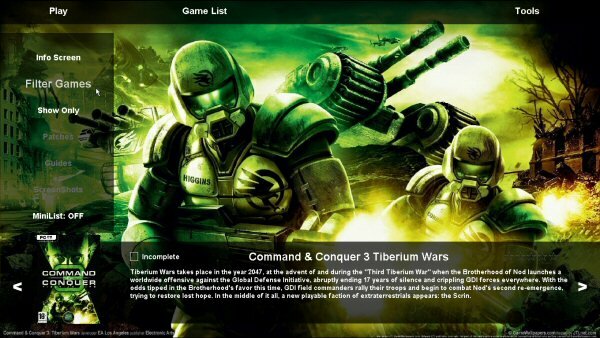
Ive programmed an alternative if anyones interested.

Download/Website
http://PhotonGameManager.com

Features

  • Downloads FanArt?, BoxArt?, Screenshoots and Game Info and showcases the data in the user interface
  • Showcases games in InfoView? or CoverView?
  • Run Games from the interface
  • Download and Install of official Game Patches
  • AutoMount? Image Files when you run games (Requires DAEMON Tools or Alcohol 120% to be installed)
  • View Game Info such as release date or publisher
  • Filter Games by keyword/s you type
  • Sort Games by categories such as Release date or publisher
Preview
image1yws.jpg
 
Last edited:

My Computer

OS
Windows 7 Pro x64
Just a heads up the new version of GameManager is out (V3) and its vastly improved over V2, infact its so much better it makes V2 look like a pile of crap :)

Features
-Downloads fan, front box, back box and banner art, screenshoots and Game Info and showcases the data in the user interface
-Showcases games in InfoView, CoverFlow or BannerFlow
-Run games from the interface
-Take screenshots in games and view them from the interface
-Download and install official game patches
-AutoMount image files when you run games, unmount them when done(Requires DAEMON Tools or Alcohol 120% to be installed)
-Run post-game and pre-game batch files
-View game Info such as release date, publisher or genre
-Quickly find your games by filtering by keyword/s you type
-Organise Games by categories such as release date, publisher or platform
-Show only games from a certain platform
-Launch straight from the interface into games of many consoles (requires use of emulators/roms*)

GameManager6.jpg
 

My Computer

OS
Windows 7 Pro x64
Back
Top