Font Removal?

TopHatProfessor

New member
Local time
11:11 AM
Messages
19
Hello I'm new to this site, so I'm sorry if I'm posting in the wrong section...

I was recently visiting a Russian/Cyrillic or something of that sort version of Wikipedia. It downloaded a font called KurKlim and it made the website's characters/words look choppy. Before, they were smoother but now they look very squarish. Well now that I don't need that font, I tried deleting it. I went to the Font folder through Control Panel. I searched, but strangely it wasn't there. I looked through my computer for it but it didn't find it. So I went to MS Office Word 2010 and it was an accesible font. I could type in it... And in the Character Map and Private Character editor I could view/edit(?) it. Is there some other place besides the Font folder that these 3 programs could access the font without it being in the Font folder? Any help is appreciated.

Extra Question:
http://cu.wikipedia.org/wiki/
Which language is this website in, and which font (if you can see it) is being used? KurKlim changed this website's font.
(I know this may be very off topic, but I am curious of which font is used.)
 

My Computer

OS
Windows 7
According to the 'About this section' of the link you provided, that website is the Old Church Slavonic-language section of Wikipedia. It suggests downloading the DejaVu unicode fonts which are available here. To test this, I downloaded & installed the DejaVu fonts and restarted my browser. It doesn't look quite right, but anyway here is the result:
s6hvnn.png


As for your font issue, it sounds like KurKlim is hidden based on your system's language settings. This page on the Microsoft Answers site might help. Good luck.
 

My Computer

OS
home: Windows 7 x64 • work: OS X 10.12
CPU
home: 3.0 GHz x4 • work: 2 GHz x2
Memory
home: 8 GB • work: 16 GB
Thank you for your help, but I'm still not sure what you mean with the language setting...
When you say KurKlim hidden by my computer's language setting, what do you mean exactly by that?
Because whenever I use MS Office Word, it shows up as TT or TrueType. All the others are O's. Does this have anything to do with it?
(And I apologize for not responding sooner, I was away.)
 

My Computer

OS
Windows 7
Please, somebody help?

Try downloading that font again and watch to see where the font is being saved.
Don't download it again just see where your computer is saving it.
Then you can go there and delete it. IMO
 

My Computer

Computer Manufacturer/Model Number
HP M9077c
OS
Windows 7 Home Premium 64bit
CPU
Intel(R)Core(TM)2 quad [email protected] 2.39GHz
Motherboard
ASUSeK
Memory
6GB DDR2 6400
Graphics Card(s)
GeForce 8500/512MB
Sound Card
Realtek High Def Audio
Monitor(s) Displays
HP w2408 LCD 24" widescreen
Screen Resolution
1920x1200
Cooling
6 pack of Bud
Keyboard
MS wireless Inteli
Mouse
MS wireless Inteli
Please, somebody help?

Try downloading that font again and watch to see where the font is being saved.
Don't download it again just see where your computer is saving it.
Then you can go there and delete it. IMO

Thanks! But sadly when I went over there, the KurKlim font couldn't be found (Just my luck >.<) is there anyway else I could download this font? Or remove the font in general? I was thinking of doing a system restore but that would take me back FAR. D:
 

My Computer

OS
Windows 7

My Computer

Computer Manufacturer/Model Number
HP M9077c
OS
Windows 7 Home Premium 64bit
CPU
Intel(R)Core(TM)2 quad [email protected] 2.39GHz
Motherboard
ASUSeK
Memory
6GB DDR2 6400
Graphics Card(s)
GeForce 8500/512MB
Sound Card
Realtek High Def Audio
Monitor(s) Displays
HP w2408 LCD 24" widescreen
Screen Resolution
1920x1200
Cooling
6 pack of Bud
Keyboard
MS wireless Inteli
Mouse
MS wireless Inteli
Here's another place
dafont.com

Upper right search type in KurKim
 

My Computer

Computer Manufacturer/Model Number
HP M9077c
OS
Windows 7 Home Premium 64bit
CPU
Intel(R)Core(TM)2 quad [email protected] 2.39GHz
Motherboard
ASUSeK
Memory
6GB DDR2 6400
Graphics Card(s)
GeForce 8500/512MB
Sound Card
Realtek High Def Audio
Monitor(s) Displays
HP w2408 LCD 24" widescreen
Screen Resolution
1920x1200
Cooling
6 pack of Bud
Keyboard
MS wireless Inteli
Mouse
MS wireless Inteli
Tried that ;/ failed to show up! I'm thinking this KurKlim font is very... Strange D:
 

My Computer

OS
Windows 7

My Computer

Computer Manufacturer/Model Number
HP M9077c
OS
Windows 7 Home Premium 64bit
CPU
Intel(R)Core(TM)2 quad [email protected] 2.39GHz
Motherboard
ASUSeK
Memory
6GB DDR2 6400
Graphics Card(s)
GeForce 8500/512MB
Sound Card
Realtek High Def Audio
Monitor(s) Displays
HP w2408 LCD 24" widescreen
Screen Resolution
1920x1200
Cooling
6 pack of Bud
Keyboard
MS wireless Inteli
Mouse
MS wireless Inteli
Whoa I haven't been here in a while. So sorry to keep you all hanging. Finally, I found KurKlim! OK I just installed it, but all it says is "KurKlim is an already installed font. Would you like to replace it?" or something like that. I clicked yes, but when I went to the font folder it's no longer there. Where do I go to find the location of this cursed font???
 

My Computer

OS
Windows 7
Whoa I haven't been here in a while. So sorry to keep you all hanging. Finally, I found KurKlim! OK I just installed it, but all it says is "KurKlim is an already installed font. Would you like to replace it?" or something like that. I clicked yes, but when I went to the font folder it's no longer there. Where do I go to find the location of this cursed font???


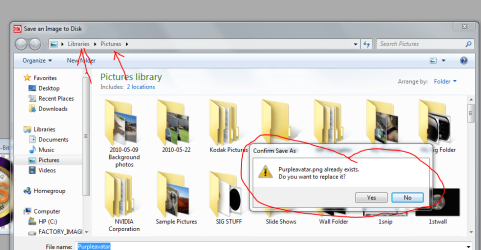
When it asks would you like to replace it.................look above to see where it was originally stored.
Capture saved.PNG

Here is an example:
I made an avatar and saved it then went back to avatar and tried to save it again but it told me that it is already saved. See the arrows!
 

My Computer

Computer Manufacturer/Model Number
HP M9077c
OS
Windows 7 Home Premium 64bit
CPU
Intel(R)Core(TM)2 quad [email protected] 2.39GHz
Motherboard
ASUSeK
Memory
6GB DDR2 6400
Graphics Card(s)
GeForce 8500/512MB
Sound Card
Realtek High Def Audio
Monitor(s) Displays
HP w2408 LCD 24" widescreen
Screen Resolution
1920x1200
Cooling
6 pack of Bud
Keyboard
MS wireless Inteli
Mouse
MS wireless Inteli
Thanks for the great explanation of that! :D I appreciated it... But how I installed it in the first place was I saved it to the Desktop and opened it and just clicked Install. So this time, I clicked 'Saved' (when I downloaded it) and on the drop down list for file type I clicked all file types, saved it to the Fonts folder, and went through this process of replacing. I went to the font folder, but its still not there! >.<
 

My Computer

OS
Windows 7
Back
Top