Outlook 2010 Sent Mails Disappear From Sent Folder

You might need to set up the information for the incoming and outgoing mail server manually.

POP3 SMTP Mail News Servers for AT&T Internet Service Provider
AT&T Worldnet incoming mail server: postoffice.worldnet.att.net
AT&T Worldnet outgoing mail server: mailhost.worldnet.att.net
 

My Computer My Computer

At a glance

Windows 7 Professional SP1 64-bitIntel Core i5-2450M @2.5 GHz6 GB DDR3 1333MHzIntel HD 3000
Computer type
Laptop
Computer Manufacturer/Model Number
Toshiba P775-S7100
OS
Windows 7 Professional SP1 64-bit
CPU
Intel Core i5-2450M @2.5 GHz
Memory
6 GB DDR3 1333MHz
Graphics Card(s)
Intel HD 3000
Monitor(s) Displays
Built-in 17.3" LED; 22" Insignia NS-L22Q-10A
Screen Resolution
1600x900; 1360x768
Hard Drives
750 GB Hitachi
1TB Seagate FreeAgent External
Internet Speed
Verizon DSL Speed(Down/Up): 3360 Kbps / 800 Kbps
Antivirus
MSE and MBAM Pro
Browser
IE10
I now see that you asked about a different set of question. I am running a combination environment between POP3, IMAP and Exchange. I have multiple accounts. All accounts use the AT&T transport to send e-mail. I am running over a cable modem. Long story. I have found no correlation between any messages. However, I believe most of them are when I am dialog with someone. I know there is a new setting regarding looking at messages of a conversation, but I am not really sure how that would be involved because I don't believe I am using that view. I have no filters being used. I do have some rules, but none of them are in play in this situation.

I tried to run without conversation type enabled. Same difference. I removed all rules. Same issue. I also created a new profile with a new pst account, nada. I also noticed that if I add a folder to favorites bar and close rapidly and re open, the same thing happens, new shortcut was there just before I closed and gone when re opened. If I wait a while before closing OE 2010 and do other activities, then shut it and re open, sent mail shows and new shortcuts also. It seems to be a time delay thing or something like that.

So go figure. :shock:
 

My Computer My Computer

At a glance

Windows 7 x64 Ultimate SP1I5 875K UnlockedKingston HyperX Genesis DDR3-1600MHz 9-9-9-27...EVGA GeForce GTX 570 HD 732 MHz GPU 1280 MB, ...
Computer Manufacturer/Model Number
Asus
OS
Windows 7 x64 Ultimate SP1
CPU
I5 875K Unlocked
Motherboard
P7P55D-E-PRO
Memory
Kingston HyperX Genesis DDR3-1600MHz 9-9-9-27 @ 1.65V XMP
Graphics Card(s)
EVGA GeForce GTX 570 HD 732 MHz GPU 1280 MB, 152 GB Mem
Sound Card
Onboard Via 1828S
Monitor(s) Displays
Samsung T240 HD
Screen Resolution
Dual 1920X1200 1027X768
Hard Drives
OCZ Vertex II Extended Sandforce SSD 60 Gig 2X WD Black Caviar 1 terabyte 6GBS Transer Sata 3 Marvell Chip
PSU
Corsair Gold fully Modular 80 Plus 850
Case
Coolermaster Half X Full Tower
Cooling
Noctua NH-U12P
Keyboard
MS
Mouse
MS
Internet Speed
Fast enough
Other Info
My fridge has a water tap
I decided to test the time delay theory just now. I sent an email the same way I had been before, but before checking to make sure it sent, I closed Outlook immediately. When I reopened it, the email did not appear at first, but it did appear after having it open for a few minutes. I also noticed, and this might just because I'm using a hotmail account with it, that it takes longer than WLM to actually send or recieve mail. Especially receiving. I've read a lot of complaints about Outlook 2010, so it might just be buggy.
 

My Computer My Computer

At a glance

Windows 7 Professional SP1 64-bitIntel Core i5-2450M @2.5 GHz6 GB DDR3 1333MHzIntel HD 3000
Computer type
Laptop
Computer Manufacturer/Model Number
Toshiba P775-S7100
OS
Windows 7 Professional SP1 64-bit
CPU
Intel Core i5-2450M @2.5 GHz
Memory
6 GB DDR3 1333MHz
Graphics Card(s)
Intel HD 3000
Monitor(s) Displays
Built-in 17.3" LED; 22" Insignia NS-L22Q-10A
Screen Resolution
1600x900; 1360x768
Hard Drives
750 GB Hitachi
1TB Seagate FreeAgent External
Internet Speed
Verizon DSL Speed(Down/Up): 3360 Kbps / 800 Kbps
Antivirus
MSE and MBAM Pro
Browser
IE10
I decided to test the time delay theory just now. I sent an email the same way I had been before, but before checking to make sure it sent, I closed Outlook immediately. When I reopened it, the email did not appear at first, but it did appear after having it open for a few minutes. I also noticed, and this might just because I'm using a hotmail account with it, that it takes longer than WLM to actually send or recieve mail. Especially receiving. I've read a lot of complaints about Outlook 2010, so it might just be buggy.

There you go.

Except, I don't have a hotmail account tied to mine. Try it with any account you send to. At first, some Emails will record immediately but then, the same recipient won't record if you send a second mail. I tried this between users that have the isp as I do and others. Same issue.

That's why I'm in contact with the Outlook team to see if we can find a resolution.

Another thing that I noticed that works like crap is the out of office assistant. Been crap since 2007 version. 2003 was way simpler.

:(
 

My Computer My Computer

At a glance

Windows 7 x64 Ultimate SP1I5 875K UnlockedKingston HyperX Genesis DDR3-1600MHz 9-9-9-27...EVGA GeForce GTX 570 HD 732 MHz GPU 1280 MB, ...
Computer Manufacturer/Model Number
Asus
OS
Windows 7 x64 Ultimate SP1
CPU
I5 875K Unlocked
Motherboard
P7P55D-E-PRO
Memory
Kingston HyperX Genesis DDR3-1600MHz 9-9-9-27 @ 1.65V XMP
Graphics Card(s)
EVGA GeForce GTX 570 HD 732 MHz GPU 1280 MB, 152 GB Mem
Sound Card
Onboard Via 1828S
Monitor(s) Displays
Samsung T240 HD
Screen Resolution
Dual 1920X1200 1027X768
Hard Drives
OCZ Vertex II Extended Sandforce SSD 60 Gig 2X WD Black Caviar 1 terabyte 6GBS Transer Sata 3 Marvell Chip
PSU
Corsair Gold fully Modular 80 Plus 850
Case
Coolermaster Half X Full Tower
Cooling
Noctua NH-U12P
Keyboard
MS
Mouse
MS
Internet Speed
Fast enough
Other Info
My fridge has a water tap
I am wondering if anyone has investigated if this has anything to do with Outlook 2010 and an antivirus program. I am using Norton 360 and that is something else that scans mail. Is it possible that it is getting involved and it has something to do with the combination of Outlook 2010 and an antivirus software? Just a thought. Personally, I am not having any trouble sending e-mail. As far as I can tell, everything is being delivered, it just seems to be disappearing from my sent box.
 

My Computer My Computer

At a glance

Windows 7 x64 UltimateQuad Core Q6600 @ 2.4Ghz4 GbATI Radeon HD 2400 Pro
Computer Manufacturer/Model Number
Dell Optiplex 755
OS
Windows 7 x64 Ultimate
CPU
Quad Core Q6600 @ 2.4Ghz
Memory
4 Gb
Graphics Card(s)
ATI Radeon HD 2400 Pro
Sound Card
Sound Blaster X-Fi Xtreme
Monitor(s) Displays
Twin Dell 2408WFP Digital (24")
Screen Resolution
1920 x1200 on both monitors
Hard Drives
WDC WD800ADFS-75SLR2 ATA
Hitachi HDP725025GLA380 ATA
WD My Book 1111 USB backup drive
Keyboard
Microsoft Wireless Laser 7000
Mouse
Microsoft Wireless Laser 7000
Internet Speed
30Mb down x 2Mb Up
I am wondering if anyone has investigated if this has anything to do with Outlook 2010 and an antivirus program. I am using Norton 360 and that is something else that scans mail. Is it possible that it is getting involved and it has something to do with the combination of Outlook 2010 and an antivirus software? Just a thought. Personally, I am not having any trouble sending e-mail. As far as I can tell, everything is being delivered, it just seems to be disappearing from my sent box.


I didn't mention that Email was not sent. Just that some Emails won't show up in sent folder if you close Outlook immediately when mail is sent. I tried shutting mail scan and anti virus. Same issue. That thought had occurred to me.
 

My Computer My Computer

At a glance

Windows 7 x64 Ultimate SP1I5 875K UnlockedKingston HyperX Genesis DDR3-1600MHz 9-9-9-27...EVGA GeForce GTX 570 HD 732 MHz GPU 1280 MB, ...
Computer Manufacturer/Model Number
Asus
OS
Windows 7 x64 Ultimate SP1
CPU
I5 875K Unlocked
Motherboard
P7P55D-E-PRO
Memory
Kingston HyperX Genesis DDR3-1600MHz 9-9-9-27 @ 1.65V XMP
Graphics Card(s)
EVGA GeForce GTX 570 HD 732 MHz GPU 1280 MB, 152 GB Mem
Sound Card
Onboard Via 1828S
Monitor(s) Displays
Samsung T240 HD
Screen Resolution
Dual 1920X1200 1027X768
Hard Drives
OCZ Vertex II Extended Sandforce SSD 60 Gig 2X WD Black Caviar 1 terabyte 6GBS Transer Sata 3 Marvell Chip
PSU
Corsair Gold fully Modular 80 Plus 850
Case
Coolermaster Half X Full Tower
Cooling
Noctua NH-U12P
Keyboard
MS
Mouse
MS
Internet Speed
Fast enough
Other Info
My fridge has a water tap
I did not mean to imply that you said it was not being sent. I was really trying to respond to the the suggestion that I might need to change my SMTP servers if I am using AT&T. I have been using that AT&T/Yahoo servers for quite some time without incident. These are the ones for the DSL service and region where I am. I know to all of you that I am a rookie/junior member, but I have a lot of experience and I am willing to help figure this out. I also know I can still learn from you as well.
 

My Computer My Computer

At a glance

Windows 7 x64 UltimateQuad Core Q6600 @ 2.4Ghz4 GbATI Radeon HD 2400 Pro
Computer Manufacturer/Model Number
Dell Optiplex 755
OS
Windows 7 x64 Ultimate
CPU
Quad Core Q6600 @ 2.4Ghz
Memory
4 Gb
Graphics Card(s)
ATI Radeon HD 2400 Pro
Sound Card
Sound Blaster X-Fi Xtreme
Monitor(s) Displays
Twin Dell 2408WFP Digital (24")
Screen Resolution
1920 x1200 on both monitors
Hard Drives
WDC WD800ADFS-75SLR2 ATA
Hitachi HDP725025GLA380 ATA
WD My Book 1111 USB backup drive
Keyboard
Microsoft Wireless Laser 7000
Mouse
Microsoft Wireless Laser 7000
Internet Speed
30Mb down x 2Mb Up
I'll give you a plug cas7517,

If you don't want someone to confuse a reply (especially when it doesn't involve the above post that you want to reply to), quote the post that you want to reply to.

This avoids misunderstandings.

BTW, I never doubted your knowledge, We never have enough of that, especially when an O/S can perform millions of tasks.

If I knew the answer, I wouldn't have posted here.

So, your help is as valuable as any user on this forum regardless the number of posts that he or she has contributed. ;)
 

My Computer My Computer

At a glance

Windows 7 x64 Ultimate SP1I5 875K UnlockedKingston HyperX Genesis DDR3-1600MHz 9-9-9-27...EVGA GeForce GTX 570 HD 732 MHz GPU 1280 MB, ...
Computer Manufacturer/Model Number
Asus
OS
Windows 7 x64 Ultimate SP1
CPU
I5 875K Unlocked
Motherboard
P7P55D-E-PRO
Memory
Kingston HyperX Genesis DDR3-1600MHz 9-9-9-27 @ 1.65V XMP
Graphics Card(s)
EVGA GeForce GTX 570 HD 732 MHz GPU 1280 MB, 152 GB Mem
Sound Card
Onboard Via 1828S
Monitor(s) Displays
Samsung T240 HD
Screen Resolution
Dual 1920X1200 1027X768
Hard Drives
OCZ Vertex II Extended Sandforce SSD 60 Gig 2X WD Black Caviar 1 terabyte 6GBS Transer Sata 3 Marvell Chip
PSU
Corsair Gold fully Modular 80 Plus 850
Case
Coolermaster Half X Full Tower
Cooling
Noctua NH-U12P
Keyboard
MS
Mouse
MS
Internet Speed
Fast enough
Other Info
My fridge has a water tap
Understood. Thanks.
 

My Computer My Computer

At a glance

Windows 7 x64 UltimateQuad Core Q6600 @ 2.4Ghz4 GbATI Radeon HD 2400 Pro
Computer Manufacturer/Model Number
Dell Optiplex 755
OS
Windows 7 x64 Ultimate
CPU
Quad Core Q6600 @ 2.4Ghz
Memory
4 Gb
Graphics Card(s)
ATI Radeon HD 2400 Pro
Sound Card
Sound Blaster X-Fi Xtreme
Monitor(s) Displays
Twin Dell 2408WFP Digital (24")
Screen Resolution
1920 x1200 on both monitors
Hard Drives
WDC WD800ADFS-75SLR2 ATA
Hitachi HDP725025GLA380 ATA
WD My Book 1111 USB backup drive
Keyboard
Microsoft Wireless Laser 7000
Mouse
Microsoft Wireless Laser 7000
Internet Speed
30Mb down x 2Mb Up
OK folks. After receiving some great help from my friends on the Outlook team, here is the cause of the problem.

PGP software. I have been using PGP for years and would have never suspected that it would not get along with Outlook. Someone from the Outlook team did some research and found a nice thread that actually mentioned that version 10 of PGP was not compatible with Outlook 2010.

Man I felt like a fool.

You can use PGP disk encryption without issues but messaging is a no go (well more like crippled but partly working). If you don't want issues with your Outlook, turn off PGP services from systray. After, disable from start menu. You will loose some functionality but not the disk encryption, except disk won't unmount with time delay. You must unmount yourself or it will do so on shutdown or reboot.

Threads mentioned that there might be a fix from PGP with version 10.1 soon to be released.

So there it is folks, another one bites the dust!!!

Thanks again to the Outlook team at MS.

TOP NOTCH GUYS!!!!
:cool:
 
Last edited:

My Computer My Computer

At a glance

Windows 7 x64 Ultimate SP1I5 875K UnlockedKingston HyperX Genesis DDR3-1600MHz 9-9-9-27...EVGA GeForce GTX 570 HD 732 MHz GPU 1280 MB, ...
Computer Manufacturer/Model Number
Asus
OS
Windows 7 x64 Ultimate SP1
CPU
I5 875K Unlocked
Motherboard
P7P55D-E-PRO
Memory
Kingston HyperX Genesis DDR3-1600MHz 9-9-9-27 @ 1.65V XMP
Graphics Card(s)
EVGA GeForce GTX 570 HD 732 MHz GPU 1280 MB, 152 GB Mem
Sound Card
Onboard Via 1828S
Monitor(s) Displays
Samsung T240 HD
Screen Resolution
Dual 1920X1200 1027X768
Hard Drives
OCZ Vertex II Extended Sandforce SSD 60 Gig 2X WD Black Caviar 1 terabyte 6GBS Transer Sata 3 Marvell Chip
PSU
Corsair Gold fully Modular 80 Plus 850
Case
Coolermaster Half X Full Tower
Cooling
Noctua NH-U12P
Keyboard
MS
Mouse
MS
Internet Speed
Fast enough
Other Info
My fridge has a water tap
OK folks. After receiving some great help from my friends on the Outlook team, here is the cause of the problem.

PGP software. I have been using PGP for years and would have never suspected that it would not get along with Outlook. Someone from the Outlook team did some research and found a nice thread that actually mentioned that version 10 of PGP was not compatible with Outlook 2010.

Man I felt like a fool.

You can use PGP disk encryption without issues but messaging is a no go (well more like crippled but partly working). If you don't want issues with your Outlook, turn off PGP services from systray. After, disable from start menu. You will loose some functionality but not the disk encryption, except disk won't unmount with time delay. You must unmount yourself or it will do so on shutdown or reboot.

Threads mentioned that there might be a fix from PGP with version 10.1 soon to be released.

So there it is folks, another one bites the dust!!!

Thanks again to the Outlook team at MS.

TOP NOTCH GUYS!!!!
:cool:

Very glad to hear your problem has been resolved! I would've never suspected that another piece of software would be causing that problem.
 

My Computer My Computer

At a glance

Windows 7 Home Premium x64Intel Core i7-2600 @3.40GHz8.00GB DDR3NVIDIA GeForce GTX 555 w/1.0GB RAM
Computer Manufacturer/Model Number
Alienware X51
OS
Windows 7 Home Premium x64
CPU
Intel Core i7-2600 @3.40GHz
Memory
8.00GB DDR3
Graphics Card(s)
NVIDIA GeForce GTX 555 w/1.0GB RAM
Monitor(s) Displays
BenQ XL2420TX
Screen Resolution
1920x1080@120Hz
Hard Drives
1TB
PSU
330-watt
Keyboard
Logitech Wireless Illuminated Keyboard K800
Mouse
Razer Orochi
Internet Speed
Campus Internet
No PGP

I am having the same email disappearing issue with Outlook 2010. I do not have any PGP software installed. Any thoughts?
 

My Computer My Computer

At a glance

Windows 7 Ultimate 64bit
OS
Windows 7 Ultimate 64bit
Outlook 2010: Not saving sent emails

No emails saving in my sent folder.
I am having the same problem with my sent mail. I have there different mail accounts set up on my Outlook - 3 gmail accounts. I am running Windows 7 64bit. I am running Norton(free trial). No PGP software...
Internet connection - DSL
Please advise, thanks!
 

My Computer My Computer

At a glance

Windows 7 Ultimate x64
OS
Windows 7 Ultimate x64
my 2cents and LOTS of frustration with outlook 2010, just installed on a brand new laptop (office 2010)

windows 7, 64 bit
no anti virus installed at all
no pgp
i have 16 email accounts configured using POP only

i have 9 computers and i am very familiar with outlook 2003 ... i'm a newbie to office 2010


here is a LIST of the bugs found .. (please feel free to take a shot at fixes for any of them)


1. when i open a new email, the 'default from email' is WRONG... and i cannot get it to accept the correct default 'from'...

i even tried deleting the correct default... and adding it again, that did not help


2. same as the folks above, but mine is WEIRDER...

'some' of my send emails correctly land in the SENT FOLDER... some do not

i played around with using different emails as my 'FROM' to see if that makes a difference

it does ...

but i can't figure out WHY!

when using my own dedicated server business email... as the 'FROM' ... those emails are never sent to the SENT folder... but they are always RECEIVED by Outlook 2003 on my other computers (i have 3 computers that are 'on' at the same time as i conduct this troubleshooting/ diagnostics


3. this is the WORST bug...

(and i know all about the ADVANCED SETTINGS to keep the email 'on' the server --- i tried that and it does not help)

i cannot RECEIVE certain emails into outlook 2010 ... while those same emails are 100% received on my outlook 2003 computers!

=========================

i've spent hours reading posts.... and nothing has helped solve any of these bugs

i have to solve them or i have to THROW OUT office 2010 and use 2003 (boo hoo)

please help solve any of these if you can
 

Attachments

  • outlook 20110.jpg
    outlook 20110.jpg
    75.7 KB · Views: 97
Last edited by a moderator:

My Computer My Computer

At a glance

windows 7 64 biti78 gigs?
Computer Manufacturer/Model Number
hp laptop dv8t
OS
windows 7 64 bit
CPU
i7
Motherboard
?
Memory
8 gigs
Graphics Card(s)
?
Sound Card
?
Monitor(s) Displays
18.3 1920 x
Hard Drives
1 terrabyte
SOLUTION!
SOLUTION!
SOLUTION!

it only took me '5' hours and whichever microsoft tech/s concocted this latest version of outlook 2010 .... (with regarding to "sending and receiving emails") .... should be...

SHOT!

it really took a group of sadistic microsoft minds to code outlook this way... but i have found...
the SOLUTION to the send/receive problem nagging all of us...

i have 16 different POP accounts configured (not a large amount when you run several different websites as an ADMIN)....

in outlook 2003 ... there is only '1' pst file ... and all email is directed to that

but in outlook 2010 ... the evil minds at microsoft decided that each account should have its own pst file...

well... ok... that wouldn't seem to be bad, would it?

but...

the problem is that, somehow (and i'm really not a tech/geek in this matter) ...
email being sent/received by outlook 2010 can only display in '1' ... repeat ... '1'
of those pst files

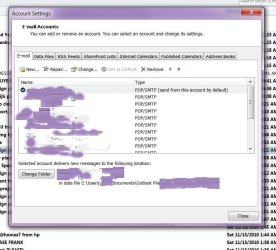
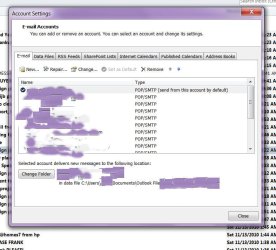
so i have attached a screenshot ...

and it really only takes a few seconds to solve this problem (after it took me 5 hours of online GOOGLING/ and a gillion trial/errors of FRUSSSSSSSSSSSSSSSSSSTRATION!!!)

so with outlook 2010 open on your screen....

1. click the FILE link at the very top left

2. when the next page loads, click on ACCOUNT SETTINGS

3. a sub-window opens beneath that... then click on

ADD AND REMOVE ACCOUNTS


4. you will see displayed the attachment i uploaded

the new window that just opened has multiple tabs across
the top, starting with EMAIL ... DATA FILES... etc.


5. beneath that you will see your list of email accounts

6. now here's the very simple solution and all your SENT emails
will display in your SENT folder... and all of your RECEIVED emails
(if you are using POP like me, i don't know anything about IMAP) ....
will be displayed in your INBOX


7. click on your email account ... notice at the bottom of the screen
microsoft has an option that reads: CHANGE FOLDER

your email can only be received into and sent into '1' pst and that
will be the DEFAULT email account you configured for your outlook

so.... single click to select your email account....

then click on CHANGE FOLDER....

then you will see a NEW window pop up that says at the very top:

NEW EMAIL DELIVERY LOCATION ...

there you will see ALL of your email accounts...

double click on your DEFAULT email account...

it will expand and beneath that will be displayed:

INBOX

---------------------

now make sure you click on INBOX to select it and
the 'OK' button that was grayed out will now be functional

just click 'OK' ... and you are done!

all of your email sent from this account will display
in the SENT folder

all of your email sent 'to' this account will display
in your INBOX

YAYYYYYYYYYYYYYYYYYYYYYYYY!!

--------------------------------

you must do this with EACH email account
 

Attachments

  • outlook 20110.jpg
    outlook 20110.jpg
    75.7 KB · Views: 291
Last edited by a moderator:

My Computer My Computer

At a glance

windows 7 64 biti78 gigs?
Computer Manufacturer/Model Number
hp laptop dv8t
OS
windows 7 64 bit
CPU
i7
Motherboard
?
Memory
8 gigs
Graphics Card(s)
?
Sound Card
?
Monitor(s) Displays
18.3 1920 x
Hard Drives
1 terrabyte

My Computer My Computer

At a glance

Windows 8 Pro w/MC 32-bitIntel Atom 1.86 GHz2 GBIntel GMA 500
Computer type
PC/Desktop
Computer Manufacturer/Model Number
OQO 2+
OS
Windows 8 Pro w/MC 32-bit
CPU
Intel Atom 1.86 GHz
Motherboard
OQO 2+
Memory
2 GB
Graphics Card(s)
Intel GMA 500
Sound Card
IDT
Monitor(s) Displays
LCD
Screen Resolution
800 x 480 (portable) 1280 x 1024 (docked)
Hard Drives
64 GB SSD
PSU
9 Ah Battery (portable) or OQO Brick (docked)
Case
Shirt Pocket Sized
Cooling
Tiny Fan
Keyboard
Slide out (portable) DiNovo Edge (docked)
Mouse
Eraser head (portable) Logitech Bluetooth (docked)
Internet Speed
WWAN or 802.11G (portable) T1 (docked)
Browser
IE 10
Other Info
DVD-RW OQO Docking Station
You aren't using any third party software with Outlook?

Did you try to run in safe mode?
 

My Computer My Computer

At a glance

Windows 7 x64 Ultimate SP1I5 875K UnlockedKingston HyperX Genesis DDR3-1600MHz 9-9-9-27...EVGA GeForce GTX 570 HD 732 MHz GPU 1280 MB, ...
Computer Manufacturer/Model Number
Asus
OS
Windows 7 x64 Ultimate SP1
CPU
I5 875K Unlocked
Motherboard
P7P55D-E-PRO
Memory
Kingston HyperX Genesis DDR3-1600MHz 9-9-9-27 @ 1.65V XMP
Graphics Card(s)
EVGA GeForce GTX 570 HD 732 MHz GPU 1280 MB, 152 GB Mem
Sound Card
Onboard Via 1828S
Monitor(s) Displays
Samsung T240 HD
Screen Resolution
Dual 1920X1200 1027X768
Hard Drives
OCZ Vertex II Extended Sandforce SSD 60 Gig 2X WD Black Caviar 1 terabyte 6GBS Transer Sata 3 Marvell Chip
PSU
Corsair Gold fully Modular 80 Plus 850
Case
Coolermaster Half X Full Tower
Cooling
Noctua NH-U12P
Keyboard
MS
Mouse
MS
Internet Speed
Fast enough
Other Info
My fridge has a water tap
Possible Solution

Hi,

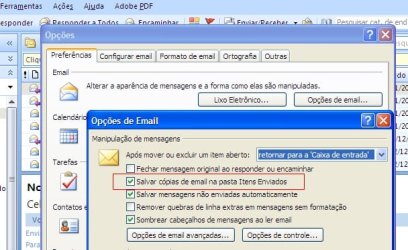
I had the same problem, that occurred when I lost my email rules. The solution was to activate the option "Save copies from sent email in sent folder" (something like that, my Outlook is in portuguese), under the Email Options.

See the screen attached.

Cadu
 

Attachments

  • Clipboard02.jpg
    Clipboard02.jpg
    49.2 KB · Views: 456

My Computer My Computer

At a glance

XP
OS
XP
Back
Top