New external HDD won't show in "Computer'

roving

New member
Member
VIP
Local time
5:18 AM
Messages
98
Today I received a new Transcend 500 gig portable HDD. When plugged in Win quickly recognizes it and shows that it is ready. I cannot get it to appear in "Computer" and it can't be found with my file manager on my Win Home Prem x86 HP desktop. It does appear as a "StoreJet Transcend USB device" in Devices and Printers which shows it as working properly. I checked Device Manager and found no conflicts in USB ports. It appears under Disk Drives in Device Manager. I then plugged it into my Win 7 Home Prem 64 HP laptop and it instantly was recognized and shows up in both Computer and Devices and Printers and is accessible. Any suggestions how I might get it to appear and be recognized in Computer so that I can access and use it? (It has been tried in 4 different USB ports to no avail. Each of those work OK with other devices)
 

My Computer My Computer

Computer type
PC/Desktop
Computer Manufacturer/Model Number
HP d4996t
OS
Windows 8 Pro
CPU
Intel Core 2 quad Q6600 2.4Ghz
Motherboard
Asustek
Memory
4 Ghz
Graphics Card(s)
Nvidia GeForce 8400GS
Sound Card
Soundblaster X-Fi Extreme Audio
Monitor(s) Displays
Hyundai 22" widescreen
Hard Drives
400 GB 279 G free
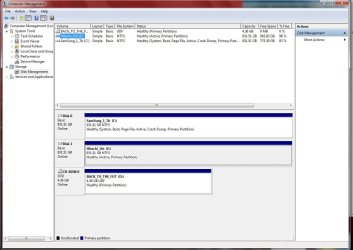
Does it show up in Disk Management :

Start :ar: Computer Management :ar: Disk Management ??
 

Attachments

  • Disk_mgmt_Aug_2010.JPG
    Disk_mgmt_Aug_2010.JPG
    110.6 KB · Views: 131

My Computer My Computer

Computer type
PC/Desktop
Computer Manufacturer/Model Number
Built them myself, Science Experiments !
OS
Win7 Enterprise, Win7 x86 (Ult 7600), Win7 x64 Ult 7600, TechNet RTM on AMD x64 (2.8Ghz)
CPU
AMD fx8350 4ghz, AMD-32 2400mhz, AMD-64 3200mhz, AMDx64 2.8G
Motherboard
SIS 755, ECS-K8M890M-M (Ult 7600), GigaByte & others
Memory
2gb, 4gb on the Ult 7600, 4gb on Technet RTM, 32gb on FX8350
Graphics Card(s)
Draw my own Graphics, several nVidia cards
Sound Card
on motherboard
Monitor(s) Displays
19" flat scr, 28" I-Inc widescr,22" Emprex Widescr, 23" Acer
Screen Resolution
1280 x 1024, 1440 x 900, 1920 x 1080
Hard Drives
6 pata Ide HD's & 2 Sata HD's
added 80gb external on Ult 7600 computer,
numerous extra 1tb, 2TB, 3Tb SATA HD's
A collection of ext HD Docks w/ HDs
PSU
430w, 550w, 600w, 700, 800, etc
Case
All Generic Full Towers
Cooling
Open Air & a few fans, some w/ colored LEDs
Keyboard
Compaq & Dell recycled from GoodWill
Mouse
Made in China Optical Wired Mouse
Internet Speed
Fast Cable InterNet
Antivirus
AVG Free on 24 different Desktops, NO Problems!
Browser
IE 8 is preferred, but use FireFox sometimes
Other Info
Linksys Routers, switches, & Hubs
Too Many USB Flash Drives to count, Biggest is 64GB !
Eight computers in my home network.
Sixteen computers at my business network.
Linked via TeamViewer !
Lots of old used spare computer parts everywhere!
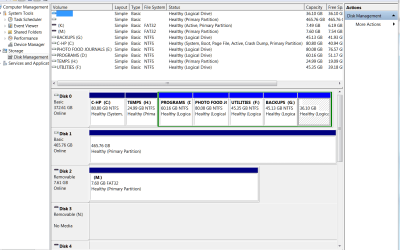
Not as Transcend Store Jet. Here is a screenshot of it. I suspect that Disk 1 could be it as the size is about right. I have 6 'resident' partitions as shown. Disk 1 is not one of them, of course.

And while I have your expertise handy, the external is formatted as FAT 32. Should I reformat it to NTSF?

Thanks for your interest and inpuit.
 

Attachments

  • screen shot Comp Mgmt.PNG
    screen shot Comp Mgmt.PNG
    35 KB · Views: 136

My Computer My Computer

Computer type
PC/Desktop
Computer Manufacturer/Model Number
HP d4996t
OS
Windows 8 Pro
CPU
Intel Core 2 quad Q6600 2.4Ghz
Motherboard
Asustek
Memory
4 Ghz
Graphics Card(s)
Nvidia GeForce 8400GS
Sound Card
Soundblaster X-Fi Extreme Audio
Monitor(s) Displays
Hyundai 22" widescreen
Hard Drives
400 GB 279 G free
Can you right click on the 465.76gb section & explore it ? Did you place anything on it when you had it connected to the other computer ?
 

My Computer My Computer

Computer type
PC/Desktop
Computer Manufacturer/Model Number
Built them myself, Science Experiments !
OS
Win7 Enterprise, Win7 x86 (Ult 7600), Win7 x64 Ult 7600, TechNet RTM on AMD x64 (2.8Ghz)
CPU
AMD fx8350 4ghz, AMD-32 2400mhz, AMD-64 3200mhz, AMDx64 2.8G
Motherboard
SIS 755, ECS-K8M890M-M (Ult 7600), GigaByte & others
Memory
2gb, 4gb on the Ult 7600, 4gb on Technet RTM, 32gb on FX8350
Graphics Card(s)
Draw my own Graphics, several nVidia cards
Sound Card
on motherboard
Monitor(s) Displays
19" flat scr, 28" I-Inc widescr,22" Emprex Widescr, 23" Acer
Screen Resolution
1280 x 1024, 1440 x 900, 1920 x 1080
Hard Drives
6 pata Ide HD's & 2 Sata HD's
added 80gb external on Ult 7600 computer,
numerous extra 1tb, 2TB, 3Tb SATA HD's
A collection of ext HD Docks w/ HDs
PSU
430w, 550w, 600w, 700, 800, etc
Case
All Generic Full Towers
Cooling
Open Air & a few fans, some w/ colored LEDs
Keyboard
Compaq & Dell recycled from GoodWill
Mouse
Made in China Optical Wired Mouse
Internet Speed
Fast Cable InterNet
Antivirus
AVG Free on 24 different Desktops, NO Problems!
Browser
IE 8 is preferred, but use FireFox sometimes
Other Info
Linksys Routers, switches, & Hubs
Too Many USB Flash Drives to count, Biggest is 64GB !
Eight computers in my home network.
Sixteen computers at my business network.
Linked via TeamViewer !
Lots of old used spare computer parts everywhere!
Not as Transcend Store Jet. Here is a screenshot of it. I suspect that Disk 1 could be it as the size is about right. I have 6 'resident' partitions as shown. Disk 1 is not one of them, of course.

And while I have your expertise handy, the external is formatted as FAT 32. Should I reformat it to NTSF?

Thanks for your interest and inpuit.

How about if you give it a drive letter,

http://www.sevenforums.com/tutorials/82994-drive-letter-add-change-remove-windows-7-a.html
 

My Computer My Computer

Computer type
PC/Desktop
Computer Manufacturer/Model Number
Self Built
OS
Win 10 Pro x64
CPU
Intel I5-2500K @3.3GHz
Motherboard
Asrock P67 Extreme4
Memory
16GB G.Skill Ripjaws X (4x4GB)
Graphics Card(s)
EVGA GeForce 750 Ti SC 2GB
Sound Card
ASUS Xonar DG 5.1 Channels 24-bit 96KHz PCI Interface Sound
Monitor(s) Displays
auria eq2367
Screen Resolution
1920 x 1080
Hard Drives
250GB Samsung 850 EVO SSD
1TB WD Blue
1TB Hitachi
PSU
SeaSonic X 650W 80 Plus Gold
Case
Corsair Obsidian 750D
Cooling
Corsair H60, Three 140mm case fans
Keyboard
Logitech Wireless Keyboard K520
Mouse
Logitech Wireless Mouse M310
Internet Speed
Wave Broadband ~ 100 dn 5 up
Antivirus
Windows Defender, Malwarebytes Premium
Browser
Edge, IE11, Chrome
Other Info
Laptop specs: HP g7-1365dx /
CPU: AMD A6-3420M APU with Radeon(tm) HD Graphics /
RAM: Crucial 8Gb (2x4Gb) /
SSD: Crucial M4-CT128M4SSD2 ATA Device/ FW 000F /
GFX: AMD Radeon HD 6520G /
OS: Windows 10 Pro x64
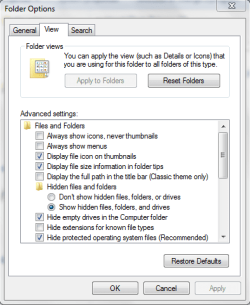
there is an option to hide empty drives, maybe you have that selected?
 

Attachments

  • Capture.PNG
    Capture.PNG
    15.1 KB · Views: 34

My Computer My Computer

Computer Manufacturer/Model Number
HP dv6519tx
OS
Windows 7 Ultimate x64
CPU
1.80 GHz Intel Core 2 Duo processor T7100
Memory
3 gig ddr2
Graphics Card(s)
NVIDIA GeForce 8400M GS
Sound Card
Realtek High Definition Audio
Monitor(s) Displays
15.4” WXGA High Definition BrightView Widescreen
Screen Resolution
1280 x 800
Hard Drives
Hitachi 320 GB (5400 rpm)
PSU
90 W AC Power Adapter
Cooling
Kitchen plate under the lappy
Keyboard
101 key compatible
Mouse
Touch Pad with On/Off button and dedicated vertical Scroll
Internet Speed
Three Wireless internet prepaid using E160G USB dongle
Not as Transcend Store Jet. Here is a screenshot of it. I suspect that Disk 1 could be it as the size is about right. I have 6 'resident' partitions as shown. Disk 1 is not one of them, of course.

And while I have your expertise handy, the external is formatted as FAT 32. Should I reformat it to NTSF?

Thanks for your interest and inpuit.

How about if you give it a drive letter,

http://www.sevenforums.com/tutorials/82994-drive-letter-add-change-remove-windows-7-a.html

I agree with derekimo try to give it a drive letter, if the drive is empty you could format it to NTFS, I think it will receive a drive letter automatically then.

MK2
 

My Computer My Computer

OS
7
Thanks to all that helped!! The problem was resolved and the solution was to change and assign a Drive letter to it. It was done by right clicking the name, Disk 1, and then it automatically assigned a Drive letter to it. All OK after that. Tracking it via Computer Management/Disk Management got me to the place to make the change.
 

My Computer My Computer

Computer type
PC/Desktop
Computer Manufacturer/Model Number
HP d4996t
OS
Windows 8 Pro
CPU
Intel Core 2 quad Q6600 2.4Ghz
Motherboard
Asustek
Memory
4 Ghz
Graphics Card(s)
Nvidia GeForce 8400GS
Sound Card
Soundblaster X-Fi Extreme Audio
Monitor(s) Displays
Hyundai 22" widescreen
Hard Drives
400 GB 279 G free
Thanks to all that helped!! The problem was resolved and the solution was to change and assign a Drive letter to it. It was done by right clicking the name, Disk 1, and then it automatically assigned a Drive letter to it. All OK after that. Tracking it via Computer Management/Disk Management got me to the place to make the change.

Thanks for posting back with your solution, glad we could help.
 

My Computer My Computer

Computer type
PC/Desktop
Computer Manufacturer/Model Number
Self Built
OS
Win 10 Pro x64
CPU
Intel I5-2500K @3.3GHz
Motherboard
Asrock P67 Extreme4
Memory
16GB G.Skill Ripjaws X (4x4GB)
Graphics Card(s)
EVGA GeForce 750 Ti SC 2GB
Sound Card
ASUS Xonar DG 5.1 Channels 24-bit 96KHz PCI Interface Sound
Monitor(s) Displays
auria eq2367
Screen Resolution
1920 x 1080
Hard Drives
250GB Samsung 850 EVO SSD
1TB WD Blue
1TB Hitachi
PSU
SeaSonic X 650W 80 Plus Gold
Case
Corsair Obsidian 750D
Cooling
Corsair H60, Three 140mm case fans
Keyboard
Logitech Wireless Keyboard K520
Mouse
Logitech Wireless Mouse M310
Internet Speed
Wave Broadband ~ 100 dn 5 up
Antivirus
Windows Defender, Malwarebytes Premium
Browser
Edge, IE11, Chrome
Other Info
Laptop specs: HP g7-1365dx /
CPU: AMD A6-3420M APU with Radeon(tm) HD Graphics /
RAM: Crucial 8Gb (2x4Gb) /
SSD: Crucial M4-CT128M4SSD2 ATA Device/ FW 000F /
GFX: AMD Radeon HD 6520G /
OS: Windows 10 Pro x64
Thanks to all that helped!! The problem was resolved and the solution was to change and assign a Drive letter to it. It was done by right clicking the name, Disk 1, and then it automatically assigned a Drive letter to it. All OK after that. Tracking it via Computer Management/Disk Management got me to the place to make the change.

Good work. Another successful solution :D
 

My Computer My Computer

Computer type
PC/Desktop
Computer Manufacturer/Model Number
Built them myself, Science Experiments !
OS
Win7 Enterprise, Win7 x86 (Ult 7600), Win7 x64 Ult 7600, TechNet RTM on AMD x64 (2.8Ghz)
CPU
AMD fx8350 4ghz, AMD-32 2400mhz, AMD-64 3200mhz, AMDx64 2.8G
Motherboard
SIS 755, ECS-K8M890M-M (Ult 7600), GigaByte & others
Memory
2gb, 4gb on the Ult 7600, 4gb on Technet RTM, 32gb on FX8350
Graphics Card(s)
Draw my own Graphics, several nVidia cards
Sound Card
on motherboard
Monitor(s) Displays
19" flat scr, 28" I-Inc widescr,22" Emprex Widescr, 23" Acer
Screen Resolution
1280 x 1024, 1440 x 900, 1920 x 1080
Hard Drives
6 pata Ide HD's & 2 Sata HD's
added 80gb external on Ult 7600 computer,
numerous extra 1tb, 2TB, 3Tb SATA HD's
A collection of ext HD Docks w/ HDs
PSU
430w, 550w, 600w, 700, 800, etc
Case
All Generic Full Towers
Cooling
Open Air & a few fans, some w/ colored LEDs
Keyboard
Compaq & Dell recycled from GoodWill
Mouse
Made in China Optical Wired Mouse
Internet Speed
Fast Cable InterNet
Antivirus
AVG Free on 24 different Desktops, NO Problems!
Browser
IE 8 is preferred, but use FireFox sometimes
Other Info
Linksys Routers, switches, & Hubs
Too Many USB Flash Drives to count, Biggest is 64GB !
Eight computers in my home network.
Sixteen computers at my business network.
Linked via TeamViewer !
Lots of old used spare computer parts everywhere!
Back
Top