Solved Bluetooth Headset Won't Show in Playback. EVER.

KLR71

New member
Local time
7:10 PM
Messages
8
I've tried about every solution imaginable to this, found in tons of threads. I have HP Bluetooth Module in Device Manager, and my headset shows up as a Bluetooth Peripheral Device there too. I have two Bluetooth instances in the taskbar, I have all the settings on for recognizing BT devices and my headset is in Devices and Printers. The other BT thing in the taskbar is "Bluetooth on MYPC" and only has two rightclick options, "Start the Bluetooth Device" and "Bluetooth Device Not Found." If you try to start BT this way it just whines about "Bluetooth Device not found." Even though it shows up in Device Manager. Yes, I've tried it with the headset on, in pairing mode too. At one point I even had an entry for the HP Bluetooth Module in Devices and Printers.

None of this has made a jot of difference - I've never seen the headset in the Playback Devices, not once. Do you only get that when you spend over $100 or something? This is really irritating. This is an HP HPE h8-1220 desktop with a clean install of Win 7 x64 Home Premium, with every update installed. I've used a couple of driver scanners to improve things - no change. Went to HP's website and installed all kinds of junk - no change. Installed a copy of Bluesoleil, whatever that is - installing that wouldn't let me see the Devices and Printers page any more, so a bit of a change. It also added its own useless icon to the taskbar.

So, unless something posts something really AHA! here in the next day I think I'm just going to return these pieces of crap to Fry's and exchange them for something tried and true, i.e., radio or infrared. Oh, it's a Vivitar headset - I bought something slightly more expensive before, Iliveelectronics or something like that. That didn't help either. I can provide screenshots if that helps. Cripes what an annoying technology.
 

My Computer My Computer

At a glance

Windows 7
OS
Windows 7
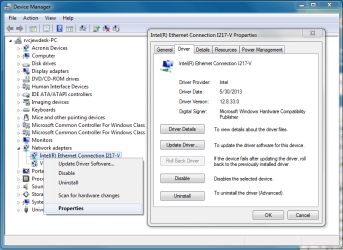
Hi, what model of vivitar headset is it exactly, and i would uninstall all bluesoil since i'm sure it will only cause you problems. Can you post of the driver it currently trying to use for you like how my shot is below?
 

Attachments

  • nic.png
    nic.png
    37.3 KB · Views: 3

My Computer My Computer

At a glance

10 Pro x64Ryzen 9 3900X64GB(4x16GB) DDR4EVGA 1080ti FTW3
Computer type
PC/Desktop
Computer Manufacturer/Model Number
Custom
OS
10 Pro x64
CPU
Ryzen 9 3900X
Motherboard
Asrock x370 Tachi
Memory
64GB(4x16GB) DDR4
Graphics Card(s)
EVGA 1080ti FTW3
Sound Card
ASUS Xonar Essence STX (V4 Bursons), ODAC rev B, NFB-11, O2
Monitor(s) Displays
3xASUS PB278Q/R, Optoma HD142X
Screen Resolution
3x1440p, 1080p
Hard Drives
512GB 850 EVO(OS, Programs)
4TB (Movies)
3TB (Downloads)
3TB (Programs)
1TB HDD (Games)
2x6TB R1 (videos)
PSU
AX760
Case
Fractal Define R5
Cooling
NH-D15S
Keyboard
Massdrop Ctrl with Box Navy's
Mouse
G903, Alioth XXL Mat
Internet Speed
280/40
Antivirus
MBAM, ESET
Browser
Canary 64 Bit
Other Info
I also own a Thinkpad P50 Xeon 4K, X220T, X1C5
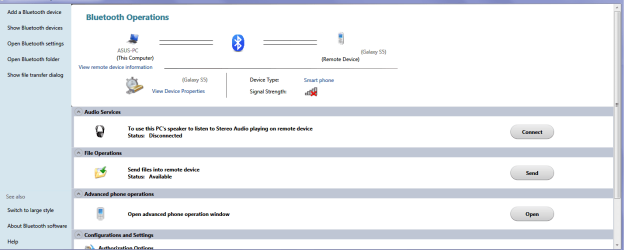
Ok KLR as rvc says mate that software is probably crap. What I did with my Blu tooth stuff is to go to Devices and Printers and see what is being detected there.

Once you can see the device you need to pair it with the machine. It is a real pain but once done is really quite good not having to have USB dongles hanging out of the machine for the mouse etc (I have a Blu tooth mouse now) and even your phone if it does Blu tooth.

In the pic you can see what a left click comes up with the device once connected. Remember too that Blu tooth devices need to be quite close to the machine to work well at all.
 

Attachments

  • BLU 1.PNG
    BLU 1.PNG
    23.9 KB · Views: 9

My Computer My Computer

At a glance

Desk1 7 Home Prem / Desk2 10 Pro / Main lap A...Desk1 i5 3750K / Laptop i7 GTX 860M / Desk2 i...Desk1 8GB (1866) / Desk2 16GB (1333) / Laptop...Desk 1& 2NVidia GTX 650 & Laptops on board Intel
Computer type
PC/Desktop
Computer Manufacturer/Model Number
Own build (new) Desk1 / Asus ROG Win 7 / Desk2 1st build
OS
Desk1 7 Home Prem / Desk2 10 Pro / Main lap Asus ROG 10 Pro 2 laptop Toshiba 7 Pro Asus P2520 7 & 10
CPU
Desk1 i5 3750K / Laptop i7 GTX 860M / Desk2 i5 2500
Motherboard
Desk1 Asus P877-V / Desk2 Gigabyte H67 UD3H / Laptop ?
Memory
Desk1 8GB (1866) / Desk2 16GB (1333) / Laptop 8Gb DDR3
Graphics Card(s)
Desk 1& 2NVidia GTX 650 & Laptops on board Intel
Sound Card
Desk 1 & 2 -XONAR DG Realtek High Def audio Laptop
Monitor(s) Displays
Desk 1 Benq HD 2450 / Desk2 Philips 24" / Laptop 17.5"
Screen Resolution
1920x1080 D1 & D2 & Laptop 1
Hard Drives
Desk1 Samsung 120GB 830 SSD
Asus ROG 256GB 850 Pro SSD
Desk2 Samsung 840 256 SSD
Toshiba 120GB EVO
PSU
Desk 1 Corsair HX 1050/ Laptop ? / Desk 2 Corsair HX 650
Case
Desk 1 Cooler HAF XM ? Toshiba laptop / Desk2 Coolermaster
Cooling
Fans on all Desk1 -2 Desk2 - all Coolermasters 5 Laptop ?
Keyboard
Desk 1 MS Sidewinder X6 Desk 2 MS Sidewinder X 4
Mouse
Desk 1&2 - Gigabyte MS 900 gamer - laptop - Logitec wireless
Internet Speed
ADSL2+
Other Info
One other Desktop (tester) and spare Toshba laptop both with SSD's
Running Kaspersky 2016 ISS on all machines config'd identically
Logitec audio stereo systems on each machine (x3)
Canon MG5250MFC
Router/modem TP-Link running WPA2SK
Hey, thanks for the replies. The Vivitar is a V12609-ESP. That Speccy is a neat bit of software. I can see how you fellows would find it useful. Here's my system profile:Here's my profile.

ICIT2LOL - I've never seen a menu like you picture at Devices and Printers, I only get the options for Add Device or Printer. Maybe my Win7 isn't fancy enough.

I tried another driver pack today, no change. Is there a 2nd party Bluetooth management program out there? Other than Bluesoleil. I could never get any of its buttons to work either, btw. It really seems like something is jammed on this machine. Maybe a USB conflict? When I first fired it up a couple of weeks ago I kept getting black screen of death problems - eventually I figured out that having an external hard drive plugged in was causing them. Strangely enough my previous computer had the same problem, only blue screens instead of black; in the end I figured out I had to have my Logitech mouse dongle plugged into one specific USB port, and the external drive into another. I mean to start up a thread here just documenting all the BSOD causes, as this one I've never seen mentioned elsewhere. And later on I'll try some of those solutions on my new machine too, to see if helps the Bluetooth to work.
 

My Computer My Computer

At a glance

Windows 7
OS
Windows 7
OK, I notice when I attempt to uncheck "Turn adapter off" in Bluetooth Settings it refuses to stay unchecked; when I open the dialog again it's once again checked. How does that work?

Tried the solution of setting the BT services from Local System to Local Service, as explained in this post. Didn't help, nor did setting the BT services to Automatic (Delayed Start), which someone else suggested as a cure. Today I'm just going to give up and go over to Fry's and buy a couple of USB BT dongles - they're only $10, after all.

Oh, and I'm using wireless keyboard and mouse; tried unplugging the keyboard dongle but the BT adapter still refuses to turn on.
 

My Computer My Computer

At a glance

Windows 7
OS
Windows 7
Kevin after looking at your speccy your computer is an HP computer then correct, What model is it specifically (would be written where ever your service tag is printed)? It Looks like your bluetooth adapter does not have drivers cept basic windows ones, if your device is not pairing this is most likely the issue. Your bluetooth turning back on may also be due to it being controlled globally by a hp hotkey service vs windows so it will always revert back.

If the dongle from Frys works might want to just stick with it though since it is probably better with drivers anyways.
 

My Computer My Computer

At a glance

10 Pro x64Ryzen 9 3900X64GB(4x16GB) DDR4EVGA 1080ti FTW3
Computer type
PC/Desktop
Computer Manufacturer/Model Number
Custom
OS
10 Pro x64
CPU
Ryzen 9 3900X
Motherboard
Asrock x370 Tachi
Memory
64GB(4x16GB) DDR4
Graphics Card(s)
EVGA 1080ti FTW3
Sound Card
ASUS Xonar Essence STX (V4 Bursons), ODAC rev B, NFB-11, O2
Monitor(s) Displays
3xASUS PB278Q/R, Optoma HD142X
Screen Resolution
3x1440p, 1080p
Hard Drives
512GB 850 EVO(OS, Programs)
4TB (Movies)
3TB (Downloads)
3TB (Programs)
1TB HDD (Games)
2x6TB R1 (videos)
PSU
AX760
Case
Fractal Define R5
Cooling
NH-D15S
Keyboard
Massdrop Ctrl with Box Navy's
Mouse
G903, Alioth XXL Mat
Internet Speed
280/40
Antivirus
MBAM, ESET
Browser
Canary 64 Bit
Other Info
I also own a Thinkpad P50 Xeon 4K, X220T, X1C5
The Cirago dongle from Fry's works great so never mind. I did a fresh install of Win7 after buying this desktop and didn't get any of the HP disks so it shouldn't have anything proprietary from them, maybe that would have helped, but I downloaded about 10 different BT or wireless program suites from them and it never helped. I sure learned a lot about what might make BT work on Windows machines...thanks again for all the assistance.
 

My Computer My Computer

At a glance

Windows 7
OS
Windows 7
Glad you got a solution that worked for you.
 

My Computer My Computer

At a glance

10 Pro x64Ryzen 9 3900X64GB(4x16GB) DDR4EVGA 1080ti FTW3
Computer type
PC/Desktop
Computer Manufacturer/Model Number
Custom
OS
10 Pro x64
CPU
Ryzen 9 3900X
Motherboard
Asrock x370 Tachi
Memory
64GB(4x16GB) DDR4
Graphics Card(s)
EVGA 1080ti FTW3
Sound Card
ASUS Xonar Essence STX (V4 Bursons), ODAC rev B, NFB-11, O2
Monitor(s) Displays
3xASUS PB278Q/R, Optoma HD142X
Screen Resolution
3x1440p, 1080p
Hard Drives
512GB 850 EVO(OS, Programs)
4TB (Movies)
3TB (Downloads)
3TB (Programs)
1TB HDD (Games)
2x6TB R1 (videos)
PSU
AX760
Case
Fractal Define R5
Cooling
NH-D15S
Keyboard
Massdrop Ctrl with Box Navy's
Mouse
G903, Alioth XXL Mat
Internet Speed
280/40
Antivirus
MBAM, ESET
Browser
Canary 64 Bit
Other Info
I also own a Thinkpad P50 Xeon 4K, X220T, X1C5
Yep glad it got sorted networking stuff can be rather convoluted at the best of times. I am on my 8 laptop right now so cannot tell you how I got to the screen you could not find might post that later.

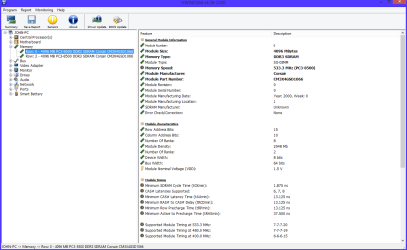
In the meantime if you want REALLY detailed info on your computer use this http://www.hwinfo.com/download.php pick the right bit version and just close the right hand panel and in the left hand panel click on the small + in boxes to open out the components and in the right hand panel you will see in depth details of them see pic - it is my RAM opened out - very good when trying to match that and other stuff.


Another little tutorial you might like to speed things up a bit is this
http://www.sevenforums.com/tutorials/11728-optimize-windows-7-a.html

Have fun:)
 

Attachments

  • HW INFO RAM.PNG
    HW INFO RAM.PNG
    35.2 KB · Views: 7

My Computer My Computer

At a glance

Desk1 7 Home Prem / Desk2 10 Pro / Main lap A...Desk1 i5 3750K / Laptop i7 GTX 860M / Desk2 i...Desk1 8GB (1866) / Desk2 16GB (1333) / Laptop...Desk 1& 2NVidia GTX 650 & Laptops on board Intel
Computer type
PC/Desktop
Computer Manufacturer/Model Number
Own build (new) Desk1 / Asus ROG Win 7 / Desk2 1st build
OS
Desk1 7 Home Prem / Desk2 10 Pro / Main lap Asus ROG 10 Pro 2 laptop Toshiba 7 Pro Asus P2520 7 & 10
CPU
Desk1 i5 3750K / Laptop i7 GTX 860M / Desk2 i5 2500
Motherboard
Desk1 Asus P877-V / Desk2 Gigabyte H67 UD3H / Laptop ?
Memory
Desk1 8GB (1866) / Desk2 16GB (1333) / Laptop 8Gb DDR3
Graphics Card(s)
Desk 1& 2NVidia GTX 650 & Laptops on board Intel
Sound Card
Desk 1 & 2 -XONAR DG Realtek High Def audio Laptop
Monitor(s) Displays
Desk 1 Benq HD 2450 / Desk2 Philips 24" / Laptop 17.5"
Screen Resolution
1920x1080 D1 & D2 & Laptop 1
Hard Drives
Desk1 Samsung 120GB 830 SSD
Asus ROG 256GB 850 Pro SSD
Desk2 Samsung 840 256 SSD
Toshiba 120GB EVO
PSU
Desk 1 Corsair HX 1050/ Laptop ? / Desk 2 Corsair HX 650
Case
Desk 1 Cooler HAF XM ? Toshiba laptop / Desk2 Coolermaster
Cooling
Fans on all Desk1 -2 Desk2 - all Coolermasters 5 Laptop ?
Keyboard
Desk 1 MS Sidewinder X6 Desk 2 MS Sidewinder X 4
Mouse
Desk 1&2 - Gigabyte MS 900 gamer - laptop - Logitec wireless
Internet Speed
ADSL2+
Other Info
One other Desktop (tester) and spare Toshba laptop both with SSD's
Running Kaspersky 2016 ISS on all machines config'd identically
Logitec audio stereo systems on each machine (x3)
Canon MG5250MFC
Router/modem TP-Link running WPA2SK
Thank you

I had similar trouble connecting bluetooth headset to my pc to use as an audio device.
I am using a bluetooth dongle CSR v4.0. When I plugged in this dongle windows seemed to find drivers for it and install the device. The headset even showed up when I went to add new device in devices and printers but it would not show up as an audio device. After a little google searching I found a driver software package specific to my CSR dongle. Installed the software and now everything works perfectly. audio device controls on the pc, headphone out, microphone, it all works. Hope this helps someone ;)
 

My Computer My Computer

At a glance

Windows 7 professional x64i72600k8gb ddr3GTX750
Computer type
PC/Desktop
Computer Manufacturer/Model Number
Custom build
OS
Windows 7 professional x64
CPU
i72600k
Motherboard
Asus
Memory
8gb ddr3
Graphics Card(s)
GTX750
Hard Drives
500gb samsung ssd
Antivirus
avg
Browser
firefox
Back
Top