
Built-in Administrator Account - Enable or Disable

How to Enable or Disable the Built-in Elevated Administrator Account in Windows 7

   Information
This tutorial will show you how to enable or disable the built-in elevated Administrator account in Windows 7.

You must be logged in as an administrator to be able to do the options in this tutorial.

   Note
Standard user (Users) - The standard account is an unelevated restricted users account. It can help protect your computer by preventing users from making changes that affect everyone who uses the computer, such as deleting files that are required for the computer to work. It is recommend to create a standard account for each user instead of an administrator account for the user. When you are logged on to Windows with a standard account, you can do almost anything that you can do with an administrator account, but if a standard user wanted to do something that requires elevated rights that affects other users of the computer, such as installing software or changing security settings, Windows will give the standard user a UAC prompt to enter the password of an administrator account for approval and confirmation before allowing the action.

administrator user - Is an unelevated administrator account that is created by default during the installation of Windows 7, or is already setup or you on a OEM (ex: Dell) computer. An administrator account has complete access to the computer, and can make any desired changes. To help make the computer more secure, this administrator account type will be prompted by UAC by default to give confirmation before allowed to make any changes that require elevated administrator rights. Such as those that affect the system, other users, or when running anything elevated (Run as Administrator) since running elevated will allow it to have access to the entire computer.

Built-in "Administrator" - Is the hidden elevated administrator account that has full unrestricted access rights and permission on the computer. By default, this elevated "Administrator" account is not prompted by UAC by default to provide confirmation before allowed to make any changes that require elevated administrator permissions since it is an elevated account.

   Warning
If you enable the built-in Administrator account, then it is recommended to create a password for better security.

For additional security purposes, it is also not recommended to leave the built-in Administrator account always enabled, or to use it for everyday purposes.


:note: For the updated Windows 10 tutorial, please see here: Administrator account - Enable or Disable in Windows 10 - Windows 10 User Accounts Tutorials


OPTION ONE

Enable built-in Administrator in Local Users and Groups


NOTE: This option will only be available in the Windows 7 Professional, Ultimate, and Enterprise editions.
1. Open the Local Users and Groups manager.

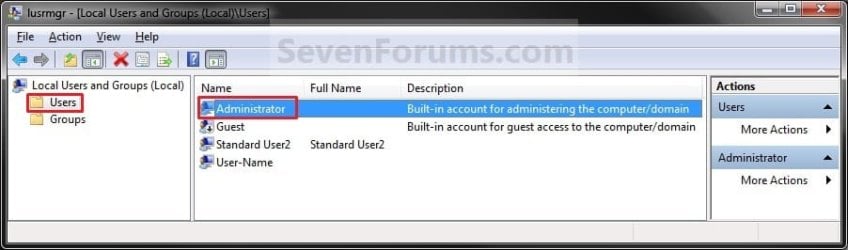
2. In the left pane, click on the Users folder. (See screenshot below step 3)

3. In the middle pane, right click on Administrator and click on Properties. (See screenshot below)
Local_Users_and_Group.jpg
4. To Enable the Built-in Elevated Administrator Account
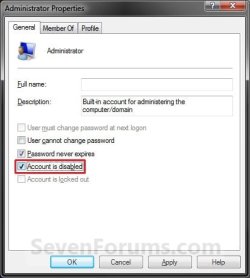
A) Uncheck the Account is disabled box. (See screenshot below step 6)

B) Go to step 6.
5. To Disable the Built-in Elevated Administrator Account
NOTE: This is the default setting.
A) Check the Account is disabled box. (See screenshot below step 6)
6. Click on OK. (See screenshot below)
Properties.jpg
7. Close the Local Users and Groups window. (See screenshot below step 3)

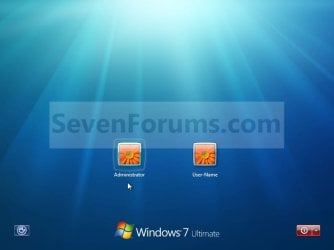
8. Log off, and you will now see the built-in Administrator account log on icon added (enabled) or removed (disabled) from the log on screen. (See screeenshot below)
NOTE: Click on the Administrator icon to log on to the built-in Administrator account.
Log-on.jpg


OPTION TWO

Enable built-in Administrator in an Elevated Command Prompt


NOTE: This option can be used in all editions of Windows 7. If your Windows 7 uses another language than English, then you may need to translate the word administrator part of the commands below to your language to use instead.
1. Open an elevated command prompt, and do step 2, 3, or 4 below for what you want to do.

2. To Enable the Hidden Built-in Elevated Administrator Account
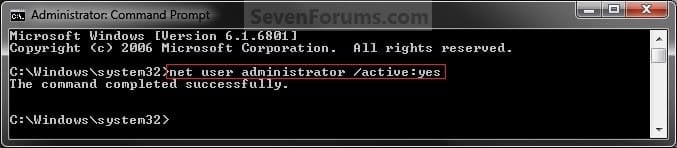
A) In the elevated command prompt, copy and paste the command below and press Enter, and go to step 5 below. (See screenshot below)
NOTE: If you had previously renamed the built-in "Administrator" account's name, then you will need to substitute administrator in the command below with the new name instead.
net user administrator /active:yes
Command_Enable.jpg
3. To Enable the Hidden Built-in Elevated Administrator Account with Password
A) In the elevated command prompt, copy and paste the command below and press Enter, and go to step 5 below. (See screenshot below)
NOTE: If you had previously renamed the built-in "Administrator" account's name, then you will need to substitute administrator in the command below with the new name instead.
net user administrator password /active:yes

   Note
Substitute password in the command above with the password you want to use to log on to the built-in Administrator account.


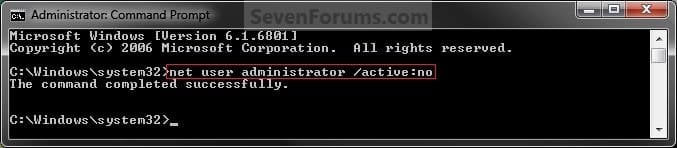
4. To Disable the Hidden Built-in Elevated Administrator Account
NOTE: This is the default setting.
A) In the elevated command prompt, copy and paste the command below and press Enter, and go to step 5 below. (See screenshot below)
NOTE: If you had previously renamed the built-in "Administrator" account's name, then you will need to substitute administrator in the command below with the new name instead.
net user administrator /active:no
Command_Disable.jpg
5. Close the elevated command prompt.

6. Log off, and you will now see the built-in Administrator account log on icon added (enabled) or removed (disabled) from the log on screen. (See screeenshot below)
NOTE: Click on the Administrator icon to log on to the built-in Administrator account.
Log-on.jpg


OPTION THREE

Enable built-in Administrator in Local Security Policy


NOTE: This option will only be available in the Windows 7 Professional, Ultimate, and Enterprise editions.
1. Open the Local Security Policy editor.

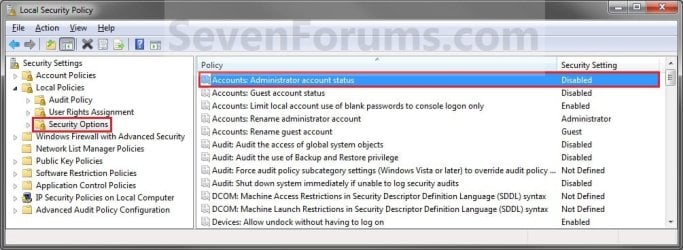
2. In the left pane, expand Local Policies, and click on Security Options. (See screenshot below)
Secpol-1.jpg
3. In the right pane, right click on Accounts: Administrator account status and click on Properties. (See screenshot above)

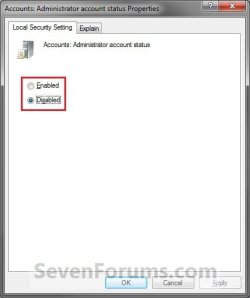
4. To Enable the Hidden Built-in Elevated Administrator Account
A) Select (dot) Enabled. (See screenshot below step 6)

B) Go to step 6.
5. To Disable the Hidden Built-in Elevated Administrator Account
NOTE: This is the default setting.
A) Select (dot) Disabled. (See screenshot below step 6)
6. Click on OK. (See screenshot below)
Secpol-2.jpg
7. Close the Local Security Policy window. (See screenshot below step 2)

8. Log off, and you will now see the built-in Administrator account log on icon added (enabled) or removed (disabled) from the log on screen. (See screeenshot below)
NOTE: Click on the Administrator icon to log on to the built-in Administrator account.
Log-on.jpg


OPTION FOUR

Enable built-in Administrator from System Recovery (WinRE) at Boot


1. For how, see: How to Enable the Built-in Administrator Account from WinRE
That's it,
Shawn


Last edited:
Lio,

You can't delete the built-in Administrator account. Instead you can only disable it as in the tutorial while logged in another administrator account (ex: LioSeven).
 

My Computer My Computer

At a glance

64-bit Windows 11 Pro for WorkstationsIntel i7-8700K OC'd to 5 GHz64 GB (4x16GB) G.SKILL TridentZ RGB DDR4 3600...ASUS ROG-STRIX-GTX1080TI-O11G-GAMING
Computer type
PC/Desktop
Computer Manufacturer/Model Number
Self built custom
OS
64-bit Windows 11 Pro for Workstations
CPU
Intel i7-8700K OC'd to 5 GHz
Motherboard
ASUS ROG Maximus XI Formula Z390
Memory
64 GB (4x16GB) G.SKILL TridentZ RGB DDR4 3600 MHz
Graphics Card(s)
ASUS ROG-STRIX-GTX1080TI-O11G-GAMING
Sound Card
Integrated
Monitor(s) Displays
2 x Samsung Odyssey G7 27"
Screen Resolution
2560x1440
Hard Drives
1TB Samsung 990 PRO M.2,
4TB Samsung 990 PRO PRO M.2,
TerraMaster F8 SSD Plus NAS
PSU
Seasonic Prime Titanium 850W
Case
Thermaltake Core P3
Cooling
Corsair Hydro H115i
Keyboard
Logitech wireless K800
Mouse
Logitech MX Master 4
Internet Speed
2 Gb/s Download and 100 Mb/s Upload
Antivirus
Malwarebyte Anti-Malware Premium
Browser
Google Chrome
Other Info
Logitech Z625 speaker system,
Logitech BRIO 4K Pro webcam,
HP Color LaserJet Pro MFP M477fdn,
APC SMART-UPS RT 1000 XL - SURT1000XLI,
Galaxy S23 Plus phone
Lio,

You can't delete the built-in Administrator account. Instead you can only disable it as in the tutorial while logged in another administrator account (ex: LioSeven).


I've tried it but I don't have any possibility to disable.
:cry:
I also tried to enter in the administrator account (OverLio) but from there I only can delete MY REAL account, LioSeven and same from LioSeven.
It's crazy!! I can delete my account (till 4 hours ago my ONLY account, with all my programs ..... ) but I cannot delete a new account just created.
I'm going to try a restore point but because I've tried to install and uninstall so many time that damned LSS, I can only restore till 3 days ago

and so I cannot solve any problem :(
Thanks and... if you have some good idea :) I'm only waiting for any help
 

My Computer My Computer

At a glance

Vista/SevenConroe E6800Mushkin XP PC2-6400 8GB (4X2GB) DDR2-800 CL4-...2 x ASUS Radeon X1950 Pro
OS
Vista/Seven
CPU
Conroe E6800
Motherboard
ASUS P5W DH Deluxe
Memory
Mushkin XP PC2-6400 8GB (4X2GB) DDR2-800 CL4-3-3-10
Graphics Card(s)
2 x ASUS Radeon X1950 Pro
Monitor(s) Displays
2x Samsung SyncMaster 30" - 1x Samsung SyncMaster 27"
Hard Drives
1x WD Raptor 74GB SATA (for Vista)
2x WD Caviar SE16 500GB SATA2 16MB; 1x WD 1 TB SATA
PSU
OCZ GameXStream 850W
Case
TT Armor LCS Black with an Integrated Water Cooling System
Cooling
Built-in Liquid Cooling System
Keyboard
Logitech
Mouse
Logitech
Internet Speed
10Mbit
Other Info
Camera: Canon 5D - Canon EOS 5D Mark II
Wacom tablet Intuos4 large
Have you logged out of the built-in Administrator account, logged into your LioSeven administrator acccount, then try to disabled the built-in Administrator account using step 2 in OPTION TWO of the tutorial?
 

My Computer My Computer

At a glance

64-bit Windows 11 Pro for WorkstationsIntel i7-8700K OC'd to 5 GHz64 GB (4x16GB) G.SKILL TridentZ RGB DDR4 3600...ASUS ROG-STRIX-GTX1080TI-O11G-GAMING
Computer type
PC/Desktop
Computer Manufacturer/Model Number
Self built custom
OS
64-bit Windows 11 Pro for Workstations
CPU
Intel i7-8700K OC'd to 5 GHz
Motherboard
ASUS ROG Maximus XI Formula Z390
Memory
64 GB (4x16GB) G.SKILL TridentZ RGB DDR4 3600 MHz
Graphics Card(s)
ASUS ROG-STRIX-GTX1080TI-O11G-GAMING
Sound Card
Integrated
Monitor(s) Displays
2 x Samsung Odyssey G7 27"
Screen Resolution
2560x1440
Hard Drives
1TB Samsung 990 PRO M.2,
4TB Samsung 990 PRO PRO M.2,
TerraMaster F8 SSD Plus NAS
PSU
Seasonic Prime Titanium 850W
Case
Thermaltake Core P3
Cooling
Corsair Hydro H115i
Keyboard
Logitech wireless K800
Mouse
Logitech MX Master 4
Internet Speed
2 Gb/s Download and 100 Mb/s Upload
Antivirus
Malwarebyte Anti-Malware Premium
Browser
Google Chrome
Other Info
Logitech Z625 speaker system,
Logitech BRIO 4K Pro webcam,
HP Color LaserJet Pro MFP M477fdn,
APC SMART-UPS RT 1000 XL - SURT1000XLI,
Galaxy S23 Plus phone
And no luck in the restore too :(
I already have the 2 account and this error too:

03-09-201019-12-03.jpg


It seems really every steps I do, I run in another problem
:sick::sick:
 

My Computer My Computer

At a glance

Vista/SevenConroe E6800Mushkin XP PC2-6400 8GB (4X2GB) DDR2-800 CL4-...2 x ASUS Radeon X1950 Pro
OS
Vista/Seven
CPU
Conroe E6800
Motherboard
ASUS P5W DH Deluxe
Memory
Mushkin XP PC2-6400 8GB (4X2GB) DDR2-800 CL4-3-3-10
Graphics Card(s)
2 x ASUS Radeon X1950 Pro
Monitor(s) Displays
2x Samsung SyncMaster 30" - 1x Samsung SyncMaster 27"
Hard Drives
1x WD Raptor 74GB SATA (for Vista)
2x WD Caviar SE16 500GB SATA2 16MB; 1x WD 1 TB SATA
PSU
OCZ GameXStream 850W
Case
TT Armor LCS Black with an Integrated Water Cooling System
Cooling
Built-in Liquid Cooling System
Keyboard
Logitech
Mouse
Logitech
Internet Speed
10Mbit
Other Info
Camera: Canon 5D - Canon EOS 5D Mark II
Wacom tablet Intuos4 large
Have you logged out of the built-in Administrator account, logged into your LioSeven administrator acccount, then try to disabled the built-in Administrator account using step 2 in OPTION TWO of the tutorial?

I'm logged in my usual account LioSeven where I'm administrator and I have this reply if I use Command Prompt

Microsoft Windows [Version 6.1.7600]
Copyright (c) 2009 Microsoft Corporation. All rights reserved.

C:\Users\LioSeven>net user administrator /active:yes
System error 5 has occurred.

Access is denied.


C:\Users\LioSeven>
So, ANOTHER ERROR :cry:


OPS I see only now that I was not In the elevated Command Prompt, I try again
 

My Computer My Computer

At a glance

Vista/SevenConroe E6800Mushkin XP PC2-6400 8GB (4X2GB) DDR2-800 CL4-...2 x ASUS Radeon X1950 Pro
OS
Vista/Seven
CPU
Conroe E6800
Motherboard
ASUS P5W DH Deluxe
Memory
Mushkin XP PC2-6400 8GB (4X2GB) DDR2-800 CL4-3-3-10
Graphics Card(s)
2 x ASUS Radeon X1950 Pro
Monitor(s) Displays
2x Samsung SyncMaster 30" - 1x Samsung SyncMaster 27"
Hard Drives
1x WD Raptor 74GB SATA (for Vista)
2x WD Caviar SE16 500GB SATA2 16MB; 1x WD 1 TB SATA
PSU
OCZ GameXStream 850W
Case
TT Armor LCS Black with an Integrated Water Cooling System
Cooling
Built-in Liquid Cooling System
Keyboard
Logitech
Mouse
Logitech
Internet Speed
10Mbit
Other Info
Camera: Canon 5D - Canon EOS 5D Mark II
Wacom tablet Intuos4 large
Did you type the command in a elevated (right click "Run as administrator") command prompt?
 

My Computer My Computer

At a glance

64-bit Windows 11 Pro for WorkstationsIntel i7-8700K OC'd to 5 GHz64 GB (4x16GB) G.SKILL TridentZ RGB DDR4 3600...ASUS ROG-STRIX-GTX1080TI-O11G-GAMING
Computer type
PC/Desktop
Computer Manufacturer/Model Number
Self built custom
OS
64-bit Windows 11 Pro for Workstations
CPU
Intel i7-8700K OC'd to 5 GHz
Motherboard
ASUS ROG Maximus XI Formula Z390
Memory
64 GB (4x16GB) G.SKILL TridentZ RGB DDR4 3600 MHz
Graphics Card(s)
ASUS ROG-STRIX-GTX1080TI-O11G-GAMING
Sound Card
Integrated
Monitor(s) Displays
2 x Samsung Odyssey G7 27"
Screen Resolution
2560x1440
Hard Drives
1TB Samsung 990 PRO M.2,
4TB Samsung 990 PRO PRO M.2,
TerraMaster F8 SSD Plus NAS
PSU
Seasonic Prime Titanium 850W
Case
Thermaltake Core P3
Cooling
Corsair Hydro H115i
Keyboard
Logitech wireless K800
Mouse
Logitech MX Master 4
Internet Speed
2 Gb/s Download and 100 Mb/s Upload
Antivirus
Malwarebyte Anti-Malware Premium
Browser
Google Chrome
Other Info
Logitech Z625 speaker system,
Logitech BRIO 4K Pro webcam,
HP Color LaserJet Pro MFP M477fdn,
APC SMART-UPS RT 1000 XL - SURT1000XLI,
Galaxy S23 Plus phone
I just correct my previous post when I've seen that I was not in Elevated Command Prompt.

And PLEASE, don't tell me to reinstall all.
I'm now finishing to install my new system with all the program and till I have the problem with Lightscribe, all works like a charm and I was going to make the image of all the perfect installation to have my backup copy.
It's only for this reason I don't have the backup: I need to have all setting up, with my Photoshop, all the plugins, all the link and so on.........

I try with the elevated prompt
 

My Computer My Computer

At a glance

Vista/SevenConroe E6800Mushkin XP PC2-6400 8GB (4X2GB) DDR2-800 CL4-...2 x ASUS Radeon X1950 Pro
OS
Vista/Seven
CPU
Conroe E6800
Motherboard
ASUS P5W DH Deluxe
Memory
Mushkin XP PC2-6400 8GB (4X2GB) DDR2-800 CL4-3-3-10
Graphics Card(s)
2 x ASUS Radeon X1950 Pro
Monitor(s) Displays
2x Samsung SyncMaster 30" - 1x Samsung SyncMaster 27"
Hard Drives
1x WD Raptor 74GB SATA (for Vista)
2x WD Caviar SE16 500GB SATA2 16MB; 1x WD 1 TB SATA
PSU
OCZ GameXStream 850W
Case
TT Armor LCS Black with an Integrated Water Cooling System
Cooling
Built-in Liquid Cooling System
Keyboard
Logitech
Mouse
Logitech
Internet Speed
10Mbit
Other Info
Camera: Canon 5D - Canon EOS 5D Mark II
Wacom tablet Intuos4 large
Now I've disabled (I hope and I'll see when I login next time).
But even I've solved this problem, I have the first problem: I cannot install the Lightscribe drive
But for now, THANKSSSSSSSSSSSSS
 

My Computer My Computer

At a glance

Vista/SevenConroe E6800Mushkin XP PC2-6400 8GB (4X2GB) DDR2-800 CL4-...2 x ASUS Radeon X1950 Pro
OS
Vista/Seven
CPU
Conroe E6800
Motherboard
ASUS P5W DH Deluxe
Memory
Mushkin XP PC2-6400 8GB (4X2GB) DDR2-800 CL4-3-3-10
Graphics Card(s)
2 x ASUS Radeon X1950 Pro
Monitor(s) Displays
2x Samsung SyncMaster 30" - 1x Samsung SyncMaster 27"
Hard Drives
1x WD Raptor 74GB SATA (for Vista)
2x WD Caviar SE16 500GB SATA2 16MB; 1x WD 1 TB SATA
PSU
OCZ GameXStream 850W
Case
TT Armor LCS Black with an Integrated Water Cooling System
Cooling
Built-in Liquid Cooling System
Keyboard
Logitech
Mouse
Logitech
Internet Speed
10Mbit
Other Info
Camera: Canon 5D - Canon EOS 5D Mark II
Wacom tablet Intuos4 large
You're most welcome Lio. I hope you will be able to get the Lightscribe drive issue sorted soon as well.
 

My Computer My Computer

At a glance

64-bit Windows 11 Pro for WorkstationsIntel i7-8700K OC'd to 5 GHz64 GB (4x16GB) G.SKILL TridentZ RGB DDR4 3600...ASUS ROG-STRIX-GTX1080TI-O11G-GAMING
Computer type
PC/Desktop
Computer Manufacturer/Model Number
Self built custom
OS
64-bit Windows 11 Pro for Workstations
CPU
Intel i7-8700K OC'd to 5 GHz
Motherboard
ASUS ROG Maximus XI Formula Z390
Memory
64 GB (4x16GB) G.SKILL TridentZ RGB DDR4 3600 MHz
Graphics Card(s)
ASUS ROG-STRIX-GTX1080TI-O11G-GAMING
Sound Card
Integrated
Monitor(s) Displays
2 x Samsung Odyssey G7 27"
Screen Resolution
2560x1440
Hard Drives
1TB Samsung 990 PRO M.2,
4TB Samsung 990 PRO PRO M.2,
TerraMaster F8 SSD Plus NAS
PSU
Seasonic Prime Titanium 850W
Case
Thermaltake Core P3
Cooling
Corsair Hydro H115i
Keyboard
Logitech wireless K800
Mouse
Logitech MX Master 4
Internet Speed
2 Gb/s Download and 100 Mb/s Upload
Antivirus
Malwarebyte Anti-Malware Premium
Browser
Google Chrome
Other Info
Logitech Z625 speaker system,
Logitech BRIO 4K Pro webcam,
HP Color LaserJet Pro MFP M477fdn,
APC SMART-UPS RT 1000 XL - SURT1000XLI,
Galaxy S23 Plus phone
Hello,
I've followed the steps in OPTION TWO of this tutorial, since my OS is Windows 7 Home Basic.
1) Opened an elevated command prompt, as described in the indicated topic;
2) When I typed the command net user administrator /active:yes , the system returned the message:

The user name could not be found

For more help, type NET HELPMSG 2221.


So, after a lot of searching, I've discovered that the problem was that my system language is Brazilian Portuguese (I'm Brazilian, by the way). So, changing the command line to net user administrador /active:yes it worked as well as it should. Note that the word "administrator" was placed by "administrador", its translating in Portuguese. I think that it could help for the ones with systems in other languages too.

Best Regards,

negrometal
 

My Computer My Computer

At a glance

Windows 7 Home Basic 64-bitIntel® Core™2 Duo E75004GBIntel GMA 3100
Computer Manufacturer/Model Number
HP Pavilion Slimline s5520br PC
OS
Windows 7 Home Basic 64-bit
CPU
Intel® Core™2 Duo E7500
Memory
4GB
Graphics Card(s)
Intel GMA 3100
Hello,
I've followed the steps in OPTION TWO of this tutorial, since my OS is Windows 7 Home Basic.
1) Opened an elevated command prompt, as described in the indicated topic;
2) When I typed the command net user administrator /active:yes , the system returned the message:

The user name could not be found

For more help, type NET HELPMSG 2221.

So, after a lot of searching, I've discovered that the problem was that my system language is Brazilian Portuguese (I'm Brazilian, by the way). So, changing the command line to net user administrador /active:yes it worked as well as it should. Note that the word "administrator" was placed by "administrador", its translating in Portuguese. I think that it could help for the ones with systems in other languages too.

Best Regards,

negrometal

Hello Negrometal, and welcome to Seven Forums.

Thank you. I have added a note for this in OPTION TWO so that it will be able to help others. :)
 
Last edited:

My Computer My Computer

At a glance

64-bit Windows 11 Pro for WorkstationsIntel i7-8700K OC'd to 5 GHz64 GB (4x16GB) G.SKILL TridentZ RGB DDR4 3600...ASUS ROG-STRIX-GTX1080TI-O11G-GAMING
Computer type
PC/Desktop
Computer Manufacturer/Model Number
Self built custom
OS
64-bit Windows 11 Pro for Workstations
CPU
Intel i7-8700K OC'd to 5 GHz
Motherboard
ASUS ROG Maximus XI Formula Z390
Memory
64 GB (4x16GB) G.SKILL TridentZ RGB DDR4 3600 MHz
Graphics Card(s)
ASUS ROG-STRIX-GTX1080TI-O11G-GAMING
Sound Card
Integrated
Monitor(s) Displays
2 x Samsung Odyssey G7 27"
Screen Resolution
2560x1440
Hard Drives
1TB Samsung 990 PRO M.2,
4TB Samsung 990 PRO PRO M.2,
TerraMaster F8 SSD Plus NAS
PSU
Seasonic Prime Titanium 850W
Case
Thermaltake Core P3
Cooling
Corsair Hydro H115i
Keyboard
Logitech wireless K800
Mouse
Logitech MX Master 4
Internet Speed
2 Gb/s Download and 100 Mb/s Upload
Antivirus
Malwarebyte Anti-Malware Premium
Browser
Google Chrome
Other Info
Logitech Z625 speaker system,
Logitech BRIO 4K Pro webcam,
HP Color LaserJet Pro MFP M477fdn,
APC SMART-UPS RT 1000 XL - SURT1000XLI,
Galaxy S23 Plus phone
You're welcome, Brink. This topic is really helpful for the users.
Thank you.
 

My Computer My Computer

At a glance

Windows 7 Home Basic 64-bitIntel® Core™2 Duo E75004GBIntel GMA 3100
Computer Manufacturer/Model Number
HP Pavilion Slimline s5520br PC
OS
Windows 7 Home Basic 64-bit
CPU
Intel® Core™2 Duo E7500
Memory
4GB
Graphics Card(s)
Intel GMA 3100
Hello,
This thread is very interesting as usual on this forum.
As we are talking about full rights Administrator Account ,I will have a question,I wanted to discuss for long time already !
Let say,I am the one and only user on my machines (my wife is afraid even touching the mouse )
Why will I hesitate to be always logged as "Big chief "
Of course, I already know your answers
But could you give me good arguments for or against
I mean good arguments,not for exemple: virus infections...or it is not recommended etc...
I want to be able to decide the worth of it based on pro and cons conclusions

"Don't let me be misunderstood..." you know or remenmber this song :D :D :D

Ps: Forgive me for eventual English mistakes, I'm trying my best
 

My Computer My Computer

At a glance

Windows 7 Ultimate x64I7 930OCZ 3x2 12800 memory setgigabyte GTX 460 OC 1Go
Computer Manufacturer/Model Number
Home made Pc
OS
Windows 7 Ultimate x64
CPU
I7 930
Motherboard
Gigabyte Ga-X58A-UD3R
Memory
OCZ 3x2 12800 memory set
Graphics Card(s)
gigabyte GTX 460 OC 1Go
Sound Card
on Board
Monitor(s) Displays
Ilyama 24' 1920x1080
Hard Drives
OCZ Vertex 2 60 G0
2x Samsung F3 1To
PSU
Cooler Master Silent Pro Gold 600 W
Case
Cooler Master 692 II Advanced
Cooling
Noctua NH-D14
Hello Pepito,

The best argument I can think of for against this is that not only do you have full access to everything on the computer while logged on to the built-in Administrator account, but so does everything that is running. Including malware.

Normally when logged into a normal administrator account, you would have UAC as a last line of defense to ask you to give permission when anything tries to run as administrator (elevated) before letting it do so. You do not have this while logged on to the built-in Administrator account.

Hope this helps,
Shawn
 
Last edited:

My Computer My Computer

At a glance

64-bit Windows 11 Pro for WorkstationsIntel i7-8700K OC'd to 5 GHz64 GB (4x16GB) G.SKILL TridentZ RGB DDR4 3600...ASUS ROG-STRIX-GTX1080TI-O11G-GAMING
Computer type
PC/Desktop
Computer Manufacturer/Model Number
Self built custom
OS
64-bit Windows 11 Pro for Workstations
CPU
Intel i7-8700K OC'd to 5 GHz
Motherboard
ASUS ROG Maximus XI Formula Z390
Memory
64 GB (4x16GB) G.SKILL TridentZ RGB DDR4 3600 MHz
Graphics Card(s)
ASUS ROG-STRIX-GTX1080TI-O11G-GAMING
Sound Card
Integrated
Monitor(s) Displays
2 x Samsung Odyssey G7 27"
Screen Resolution
2560x1440
Hard Drives
1TB Samsung 990 PRO M.2,
4TB Samsung 990 PRO PRO M.2,
TerraMaster F8 SSD Plus NAS
PSU
Seasonic Prime Titanium 850W
Case
Thermaltake Core P3
Cooling
Corsair Hydro H115i
Keyboard
Logitech wireless K800
Mouse
Logitech MX Master 4
Internet Speed
2 Gb/s Download and 100 Mb/s Upload
Antivirus
Malwarebyte Anti-Malware Premium
Browser
Google Chrome
Other Info
Logitech Z625 speaker system,
Logitech BRIO 4K Pro webcam,
HP Color LaserJet Pro MFP M477fdn,
APC SMART-UPS RT 1000 XL - SURT1000XLI,
Galaxy S23 Plus phone
Hello Brink,
this is a very reasonnable answer , but not enough convicing
as you surely aware of, a good active resident guard from a good firewall, deeply configurate
will offer equal or even best protection than the UAC settings
I prefere and easily accept the frequently and annoying prompts from my firewall resident guard,then I'll do from the UAC one's
In my opinion,there is no possible comparison in terms of efficency between this two solutions
by the way,my UAC is disabeled and all my bets on Comodo firewall ;)

Hope to have other constructive opinions too
thank you
 

My Computer My Computer

At a glance

Windows 7 Ultimate x64I7 930OCZ 3x2 12800 memory setgigabyte GTX 460 OC 1Go
Computer Manufacturer/Model Number
Home made Pc
OS
Windows 7 Ultimate x64
CPU
I7 930
Motherboard
Gigabyte Ga-X58A-UD3R
Memory
OCZ 3x2 12800 memory set
Graphics Card(s)
gigabyte GTX 460 OC 1Go
Sound Card
on Board
Monitor(s) Displays
Ilyama 24' 1920x1080
Hard Drives
OCZ Vertex 2 60 G0
2x Samsung F3 1To
PSU
Cooler Master Silent Pro Gold 600 W
Case
Cooler Master 692 II Advanced
Cooling
Noctua NH-D14
Pepito,

Not using the built-in Administrator account unless really needed is just another layer of built-in security and protection. That's all. If you use common sense along with other security measures to fill all aspects of this loss of protection, then that will help to minimize the risk.

It's really just up to you and what your needs are. If you are ok with losing that layer of protection for being able to always have full control, then that is your prerogative since it's your system. However, if you do not need to have full control of everything all of the time, then why put your system at additional risk for no reason. To each their own though. :)
 

My Computer My Computer

At a glance

64-bit Windows 11 Pro for WorkstationsIntel i7-8700K OC'd to 5 GHz64 GB (4x16GB) G.SKILL TridentZ RGB DDR4 3600...ASUS ROG-STRIX-GTX1080TI-O11G-GAMING
Computer type
PC/Desktop
Computer Manufacturer/Model Number
Self built custom
OS
64-bit Windows 11 Pro for Workstations
CPU
Intel i7-8700K OC'd to 5 GHz
Motherboard
ASUS ROG Maximus XI Formula Z390
Memory
64 GB (4x16GB) G.SKILL TridentZ RGB DDR4 3600 MHz
Graphics Card(s)
ASUS ROG-STRIX-GTX1080TI-O11G-GAMING
Sound Card
Integrated
Monitor(s) Displays
2 x Samsung Odyssey G7 27"
Screen Resolution
2560x1440
Hard Drives
1TB Samsung 990 PRO M.2,
4TB Samsung 990 PRO PRO M.2,
TerraMaster F8 SSD Plus NAS
PSU
Seasonic Prime Titanium 850W
Case
Thermaltake Core P3
Cooling
Corsair Hydro H115i
Keyboard
Logitech wireless K800
Mouse
Logitech MX Master 4
Internet Speed
2 Gb/s Download and 100 Mb/s Upload
Antivirus
Malwarebyte Anti-Malware Premium
Browser
Google Chrome
Other Info
Logitech Z625 speaker system,
Logitech BRIO 4K Pro webcam,
HP Color LaserJet Pro MFP M477fdn,
APC SMART-UPS RT 1000 XL - SURT1000XLI,
Galaxy S23 Plus phone
Hello,
you are absolutely right !
Anyway,I don't use this account permanently
I just wanted to have other opinions on this subject,as I am very new to Seven,only 2 weeks
thank you for your explanations
 

My Computer My Computer

At a glance

Windows 7 Ultimate x64I7 930OCZ 3x2 12800 memory setgigabyte GTX 460 OC 1Go
Computer Manufacturer/Model Number
Home made Pc
OS
Windows 7 Ultimate x64
CPU
I7 930
Motherboard
Gigabyte Ga-X58A-UD3R
Memory
OCZ 3x2 12800 memory set
Graphics Card(s)
gigabyte GTX 460 OC 1Go
Sound Card
on Board
Monitor(s) Displays
Ilyama 24' 1920x1080
Hard Drives
OCZ Vertex 2 60 G0
2x Samsung F3 1To
PSU
Cooler Master Silent Pro Gold 600 W
Case
Cooler Master 692 II Advanced
Cooling
Noctua NH-D14
You're most welcome Pepito. Anytime. :)
 

My Computer My Computer

At a glance

64-bit Windows 11 Pro for WorkstationsIntel i7-8700K OC'd to 5 GHz64 GB (4x16GB) G.SKILL TridentZ RGB DDR4 3600...ASUS ROG-STRIX-GTX1080TI-O11G-GAMING
Computer type
PC/Desktop
Computer Manufacturer/Model Number
Self built custom
OS
64-bit Windows 11 Pro for Workstations
CPU
Intel i7-8700K OC'd to 5 GHz
Motherboard
ASUS ROG Maximus XI Formula Z390
Memory
64 GB (4x16GB) G.SKILL TridentZ RGB DDR4 3600 MHz
Graphics Card(s)
ASUS ROG-STRIX-GTX1080TI-O11G-GAMING
Sound Card
Integrated
Monitor(s) Displays
2 x Samsung Odyssey G7 27"
Screen Resolution
2560x1440
Hard Drives
1TB Samsung 990 PRO M.2,
4TB Samsung 990 PRO PRO M.2,
TerraMaster F8 SSD Plus NAS
PSU
Seasonic Prime Titanium 850W
Case
Thermaltake Core P3
Cooling
Corsair Hydro H115i
Keyboard
Logitech wireless K800
Mouse
Logitech MX Master 4
Internet Speed
2 Gb/s Download and 100 Mb/s Upload
Antivirus
Malwarebyte Anti-Malware Premium
Browser
Google Chrome
Other Info
Logitech Z625 speaker system,
Logitech BRIO 4K Pro webcam,
HP Color LaserJet Pro MFP M477fdn,
APC SMART-UPS RT 1000 XL - SURT1000XLI,
Galaxy S23 Plus phone
win 7 home pemium 64 bit error 5

I tried to enable the Administrator account and get "system error 5 has occurred" followed by "access denied".

I'm on a new laptop. First time with Windows 7. Would like my user account to not be the administration account just on general principles. But tried to create an administrator account and was told it already exists, yet it doesn't show up. this shouldn't be this difficult. Either its there, or its not there, and I should be able to control it. Don't know what the average person does.
 

My Computer My Computer

At a glance

win 7 home premium 64biti34G
Computer Manufacturer/Model Number
Toshiba Portega R705
OS
win 7 home premium 64bit
CPU
i3
Memory
4G
The Administrator account does already exist, as the computer stated. I recommend using option 2 of this tutorial, as I find it to be the easiest one. Remember that it must be an elevated command prompt. To make it an elevated command prompt, right click command prompt in the start menu and select "Run as Administrator". This gives you control through command prompt that you would otherwise only have when logged into the Admin account. If you need clarification on any instructions, let me know and I will try my best to explain more thoroughly what to do. Please let us know the outcome of you next attempt to activate the admin account.
 

My Computer My Computer

At a glance

Windows 7 Professional SP1 64-bitIntel Core i5-2450M @2.5 GHz6 GB DDR3 1333MHzIntel HD 3000
Computer type
Laptop
Computer Manufacturer/Model Number
Toshiba P775-S7100
OS
Windows 7 Professional SP1 64-bit
CPU
Intel Core i5-2450M @2.5 GHz
Memory
6 GB DDR3 1333MHz
Graphics Card(s)
Intel HD 3000
Monitor(s) Displays
Built-in 17.3" LED; 22" Insignia NS-L22Q-10A
Screen Resolution
1600x900; 1360x768
Hard Drives
750 GB Hitachi
1TB Seagate FreeAgent External
Internet Speed
Verizon DSL Speed(Down/Up): 3360 Kbps / 800 Kbps
Antivirus
MSE and MBAM Pro
Browser
IE10
Back
Top