Music file tags can't be edited

kuy

New member
Local time
5:39 AM
Messages
15
Hi guys,

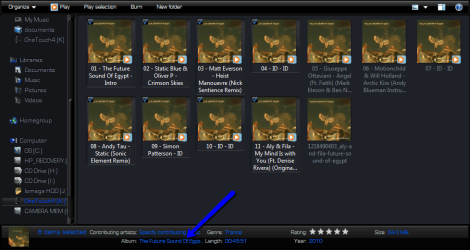
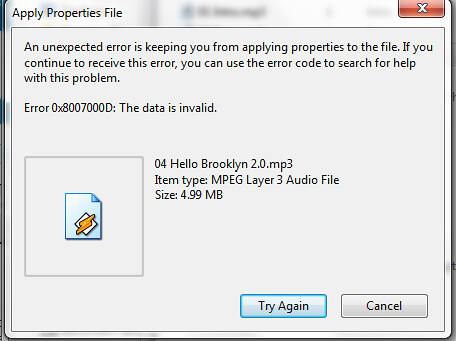
On some (not all) of my music files, I cannot edit the details/tags/metadata (call it what you will). If I right-click the file, go to Properties then the Details tab, I cannot click in the fields to edit them. If I use the details panel at the bottom of the folder, or try to edit the metadata in Winamp, I get the following error:
4967216701_46e66e2fbd.jpg


Any ideas what's wrong, or how to edit the details of these files?

Thanks!
Kuy
 

My Computer My Computer

At a glance

Windows 7 Home Premium 64bit
OS
Windows 7 Home Premium 64bit
Hi guys,

On some (not all) of my music files, I cannot edit the details/tags/metadata (call it what you will). If I right-click the file, go to Properties then the Details tab, I cannot click in the fields to edit them. If I use the details panel at the bottom of the folder, or try to edit the metadata in Winamp, I get the following error:

4967216701_46e66e2fbd.jpg


Any ideas what's wrong, or how to edit the details of these files?

Thanks!
Kuy

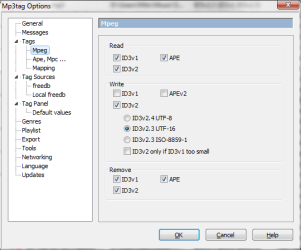
Get MP3tag (freeware) Mp3tag - Download. Configure tag settings thusly:

Untitled.png

Perform a full backup of your music. You won't need it if you do this right but...

Highlight problematic files (or all files as this will cleanup and reduce tag garbage). Click the red X in the toolbar (remove tags). This will remove all tags from the selected files. Click the Undo button next to it. This will write clean tags in only a single consistent format to your files.
 

My Computer My Computer

At a glance

El Capitan / Windows 10i7-4980HQ16GBIris 5200
Computer type
Laptop
Computer Manufacturer/Model Number
Apple
OS
El Capitan / Windows 10
CPU
i7-4980HQ
Memory
16GB
Graphics Card(s)
Iris 5200
Thanks for the help, but I've already tried that, and it doesn't fix the problem. The troublesome files have ID3v2.3 tags, if that helps. They are also missing entries in the mp3Tag columns headed Codec, Bitrate, Frequency and VBR, and their Length is 00.00. However, they play fine! (I'm using Winamp v5.571 to play music files, if that matters)
 

My Computer My Computer

At a glance

Windows 7 Home Premium 64bit
OS
Windows 7 Home Premium 64bit
Thanks for the help, but I've already tried that, and it doesn't fix the problem. The troublesome files have ID3v2.3 tags, if that helps. They are also missing entries in the mp3Tag columns headed Codec, Bitrate, Frequency and VBR, and their Length is 00.00. However, they play fine! (I'm using Winamp v5.571 to play music files, if that matters)

How many files are there? If you post them somewhere I will fix them. None of those tags are required but if they are there and suffering from Mojibake due to character encoding issues they will stop some programs dead. That's why REMOVING the tags and enforcing UTF-16 encoding when they are rewritten helps. If that doesn't fly then clear the those tags using MP3tag.
 

My Computer My Computer

At a glance

El Capitan / Windows 10i7-4980HQ16GBIris 5200
Computer type
Laptop
Computer Manufacturer/Model Number
Apple
OS
El Capitan / Windows 10
CPU
i7-4980HQ
Memory
16GB
Graphics Card(s)
Iris 5200
How many files are there? If you post them somewhere I will fix them. None of those tags are required but if they are there and suffering from Mojibake due to character encoding issues they will stop some programs dead. That's why REMOVING the tags and enforcing UTF-16 encoding when they are rewritten helps. If that doesn't fly then clear the those tags using MP3tag.

Thanks a lot for the offer, but there are quite a lot of files! I've tried everything I can think of with mp3tag - changing the tags to v2.3, removing the tags and hand-editing, trying different encodings, etc - as well as a few other solutions that people on this and other forums have suggested, and nothing's changed the error/problems I'm encountering. I think I'll just give up and re-rip the albums!

Thanks for the help.
 

My Computer My Computer

At a glance

Windows 7 Home Premium 64bit
OS
Windows 7 Home Premium 64bit
kuy have you re edited them from the root folder
 

My Computer My Computer

At a glance

Microsoft Windows 7 Home Premium 64-bit 7600IIx4 amd athelon 635 processor2x2gbati radeon HD 5450
Computer Manufacturer/Model Number
Hewlett packard/p6512uk
OS
Microsoft Windows 7 Home Premium 64-bit 7600
CPU
IIx4 amd athelon 635 processor
Motherboard
FOXCONN 2AA9
Memory
2x2gb
Graphics Card(s)
ati radeon HD 5450
Sound Card
(1) Realtek High Definition Audio (2) AMD High Definition
Monitor(s) Displays
samsung lcd tv 32"
Screen Resolution
1360x 768
Hard Drives
(1) WDC WD10 01FAES-60Z2A0 SATA Disk Device (2) Maxtor OneTouch USB Device (3) ST310003 33AS USB Device (4) WD My Book 1111 USB Device
PSU
?
Cooling
air!
Keyboard
wireless hp
Mouse
wireless Hp,optical
Internet Speed
1.10mb/s
Antivirus
MSE
Browser
Firefox
kuy have you re edited them from the root folder

Showing my inexperience here, but what exactly do you mean? Do you mean adding the entire root directory to mp3tag rather than a specific subfolder? Or do you mean just trying to edit the troublesome files using Windows Explorer's details bar? or something else?
 
Last edited:

My Computer My Computer

At a glance

Windows 7 Home Premium 64bit
OS
Windows 7 Home Premium 64bit
no, go to the folder with your music open an album highlight 15 tracks at a time and re-name the album and other details
 

Attachments

  • 2010-09-07_2010.png
    2010-09-07_2010.png
    48.4 KB · Views: 40

My Computer My Computer

At a glance

Microsoft Windows 7 Home Premium 64-bit 7600IIx4 amd athelon 635 processor2x2gbati radeon HD 5450
Computer Manufacturer/Model Number
Hewlett packard/p6512uk
OS
Microsoft Windows 7 Home Premium 64-bit 7600
CPU
IIx4 amd athelon 635 processor
Motherboard
FOXCONN 2AA9
Memory
2x2gb
Graphics Card(s)
ati radeon HD 5450
Sound Card
(1) Realtek High Definition Audio (2) AMD High Definition
Monitor(s) Displays
samsung lcd tv 32"
Screen Resolution
1360x 768
Hard Drives
(1) WDC WD10 01FAES-60Z2A0 SATA Disk Device (2) Maxtor OneTouch USB Device (3) ST310003 33AS USB Device (4) WD My Book 1111 USB Device
PSU
?
Cooling
air!
Keyboard
wireless hp
Mouse
wireless Hp,optical
Internet Speed
1.10mb/s
Antivirus
MSE
Browser
Firefox
Ah right, yeah I tried that and the error stated above appeared on the problem files (with the addition of a 'Skip' option). It does change the non-problem files, though. Thanks for the help anyway
 

My Computer My Computer

At a glance

Windows 7 Home Premium 64bit
OS
Windows 7 Home Premium 64bit
ah you mentioned explorers detail bar , so i guess you tried that then.
 

My Computer My Computer

At a glance

Microsoft Windows 7 Home Premium 64-bit 7600IIx4 amd athelon 635 processor2x2gbati radeon HD 5450
Computer Manufacturer/Model Number
Hewlett packard/p6512uk
OS
Microsoft Windows 7 Home Premium 64-bit 7600
CPU
IIx4 amd athelon 635 processor
Motherboard
FOXCONN 2AA9
Memory
2x2gb
Graphics Card(s)
ati radeon HD 5450
Sound Card
(1) Realtek High Definition Audio (2) AMD High Definition
Monitor(s) Displays
samsung lcd tv 32"
Screen Resolution
1360x 768
Hard Drives
(1) WDC WD10 01FAES-60Z2A0 SATA Disk Device (2) Maxtor OneTouch USB Device (3) ST310003 33AS USB Device (4) WD My Book 1111 USB Device
PSU
?
Cooling
air!
Keyboard
wireless hp
Mouse
wireless Hp,optical
Internet Speed
1.10mb/s
Antivirus
MSE
Browser
Firefox
How many files are there? If you post them somewhere I will fix them. None of those tags are required but if they are there and suffering from Mojibake due to character encoding issues they will stop some programs dead. That's why REMOVING the tags and enforcing UTF-16 encoding when they are rewritten helps. If that doesn't fly then clear the those tags using MP3tag.

Thanks a lot for the offer, but there are quite a lot of files! I've tried everything I can think of with mp3tag - changing the tags to v2.3, removing the tags and hand-editing, trying different encodings, etc - as well as a few other solutions that people on this and other forums have suggested, and nothing's changed the error/problems I'm encountering. I think I'll just give up and re-rip the albums!

Thanks for the help.

Zip up a particularly good example and attach it or upload it to http://drop.io/wl5o9ln with password "kuy" and I'll fix it and tell you how to fix the others.
 

My Computer My Computer

At a glance

El Capitan / Windows 10i7-4980HQ16GBIris 5200
Computer type
Laptop
Computer Manufacturer/Model Number
Apple
OS
El Capitan / Windows 10
CPU
i7-4980HQ
Memory
16GB
Graphics Card(s)
Iris 5200
Zip up a particularly good example and attach it or upload it to http://drop.io/wl5o9ln with password "kuy" and I'll fix it and tell you how to fix the others.

Thanks a lot, that sounds great. I've uploaded two files (named 04 Hello Brooklyn 2.0.mp3 and 12 Success.mp3) to that website.
 

My Computer My Computer

At a glance

Windows 7 Home Premium 64bit
OS
Windows 7 Home Premium 64bit

Attachments

  • tagging.png
    tagging.png
    77.1 KB · Views: 11

My Computer My Computer

At a glance

Linux CENTOS 7 / various Windows OS'es and se...Intel i7 Intel i58GB, 16GBOn Motherboard
Computer type
PC/Desktop
Computer Manufacturer/Model Number
Custom built, several laptops HP/ASUS
OS
Linux CENTOS 7 / various Windows OS'es and servers
CPU
Intel i7 Intel i5
Memory
8GB, 16GB
Graphics Card(s)
On Motherboard
Sound Card
Realtek HD audio
Monitor(s) Displays
Apple Cinema display, Samsung LCD
Screen Resolution
1920 X 1080
Hard Drives
4 X 1TB SATA
Mouse
Toshiba wireless laser
Internet Speed
> 20MB up
Are these mp3s file that you "created" under a different user account from a previous install of windows?

They may be write locked to your current account because by permission they still belong to that other account. You can "Take Ownership" of them (Search this forum for those words) to get full edit permissions for them. This can be done on whole folders at once.

Before just blindly taking ownership though, right click one of the files then click Properties then Security, then click your user acount name and see if "Full Control" is checked (As well as Modify/Write). If not then you need to take ownership of the files.
 

My Computer My Computer

At a glance

Windows 7 x64 Ultimatei7 96012 Gig Corsair DominatorNvidia 480
Computer Manufacturer/Model Number
Scratch built
OS
Windows 7 x64 Ultimate
CPU
i7 960
Motherboard
Asus P6X58D
Memory
12 Gig Corsair Dominator
Graphics Card(s)
Nvidia 480
Sound Card
Maudio Delta 44 + breakout box
Monitor(s) Displays
Dell UltraSharp U2410 24in and Samsung 21 dual monitors
Screen Resolution
1920x1200 and 1280x1024
Hard Drives
Primary: Intel X-25M G2 160G SSD
Secondary: Segate baracuda 1.0 TB
HDs in AHCI mode.
PSU
Corasair TX850
Case
Cooler Master HAF
Cooling
Corsair H50
Keyboard
Logitech G15 + N52 game pad
Mouse
Logitech MX518
Internet Speed
15kbs down 4.5kbps up
Other Info
WEI 7.6
CPU & RAM 7.6
Graphics 7.9
Hard disk 7.7
Are these mp3s file that you "created" under a different user account from a previous install of windows?

They may be write locked to your current account because by permission they still belong to that other account. You can "Take Ownership" of them (Search this forum for those words) to get full edit permissions for them. This can be done on whole folders at once.

Before just blindly taking ownership though, right click one of the files then click Properties then Security, then click your user acount name and see if "Full Control" is checked (As well as Modify/Write). If not then you need to take ownership of the files.

Cheers, but Full Control is checked, as is everything else.
 

My Computer My Computer

At a glance

Windows 7 Home Premium 64bit
OS
Windows 7 Home Premium 64bit
Zip up a particularly good example and attach it or upload it to http://drop.io/wl5o9ln with password "kuy" and I'll fix it and tell you how to fix the others.

Thanks a lot, that sounds great. I've uploaded two files (named 04 Hello Brooklyn 2.0.mp3 and 12 Success.mp3) to that website.

You are not crazy. Something is seriously amiss with these two files. Sorry, I don't usually give up but...
 

My Computer My Computer

At a glance

El Capitan / Windows 10i7-4980HQ16GBIris 5200
Computer type
Laptop
Computer Manufacturer/Model Number
Apple
OS
El Capitan / Windows 10
CPU
i7-4980HQ
Memory
16GB
Graphics Card(s)
Iris 5200
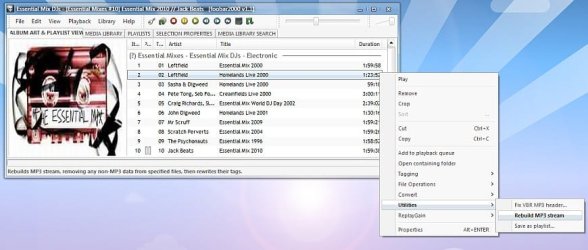
Foobar2000 can rebuild a .mp3 stream, try it might just work ;)

foobar2000
 

Attachments

  • Clipboard02.jpg
    Clipboard02.jpg
    44.5 KB · Views: 15
  • Clipboard03.jpg
    Clipboard03.jpg
    50.6 KB · Views: 13

My Computer My Computer

At a glance

Windows 7 Home Premium (64 bit)Intel I5 2500K 3.3Ghz Stock8Gig Kingston DDRIII HyperX Blue 1333 MhzAMD Sapphire 7870 2GB
Computer type
PC/Desktop
Computer Manufacturer/Model Number
Self Built
OS
Windows 7 Home Premium (64 bit)
CPU
Intel I5 2500K 3.3Ghz Stock
Motherboard
Asus P8H 61-M LE USB 3
Memory
8Gig Kingston DDRIII HyperX Blue 1333 Mhz
Graphics Card(s)
AMD Sapphire 7870 2GB
Sound Card
Creative Fatality Pro
Monitor(s) Displays
27" BENQ LED
Screen Resolution
1920X1080
Hard Drives
1 x OCZ Agility 3 120GB SSD
1 x Seagate 250GB
1 x Western Digital 1000GB
1 x HP 500GB
PSU
700W Coolermaster Stealth Pro etc
Case
Coolermaster Scout
Cooling
Some fans
Keyboard
Some Logitech type.
Mouse
Logitech MX518
Internet Speed
Wireless 8mb
Other Info
Canon Scanner
Epson Printer
Nikon DSLR 3000
Wacom Tablet
The troublesome files have ID3v2.3 tags, if that helps. They are also missing entries in the mp3Tag columns headed Codec, Bitrate, Frequency and VBR, and their Length is 00.00. However, they play fine! (I'm using Winamp v5.571 to play music files, if that matters)

This is usually the result of improper ripping settings and bad ripping software, and although they may play fine in your media player of choice, the files are indeed corrupted, so be sure to try out hybridfan's tip above. If not, I suggest you simply re-rip the stuff. For MP3 you can use Winamp if you bought the Pro version, but there are always open source alternatives such as Exact Audio Copy.
 

My Computer My Computer

At a glance

Windows 7 Home Premium x64Intel Core i5 2500K8GB DDR3nVidia GeForce GTX650 Ti BOOST
Computer type
Laptop
Computer Manufacturer/Model Number
Custom
OS
Windows 7 Home Premium x64
CPU
Intel Core i5 2500K
Motherboard
MSI MS-7750
Memory
8GB DDR3
Graphics Card(s)
nVidia GeForce GTX650 Ti BOOST
Sound Card
Realtek
Monitor(s) Displays
21' Philips
Screen Resolution
Full HD
Hard Drives
1TB
PSU
500W
Thanks all, in the end I decided that I'll just re-rip the files and take more care in future! Thanks for all the help
 

My Computer My Computer

At a glance

Windows 7 Home Premium 64bit
OS
Windows 7 Home Premium 64bit
Back
Top